
GoEnhance AI Review: Features, Pricing, Use Cases & Alternatives
Discover what GoEnhance AI offers in this detailed GoEnhance AI review, including features, pricing, use cases, pros and cons, and a comparison with Vmake Labs for creators.

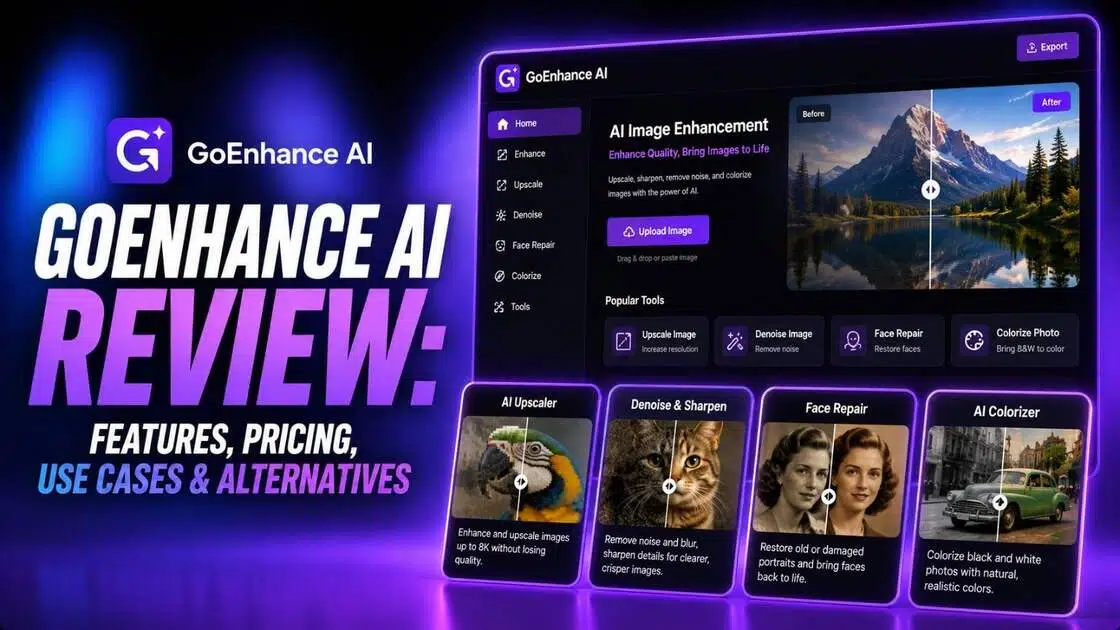
AI video generators now support different workflows, from creating clips from text to transforming existing footage. GoEnhance AI combines text-to-video, image-to-video, and video-to-video tools with creative effects and animation features. In this GoEnhance AI review, we examine its key features, pricing structure, use cases, advantages, limitations, and an alternative worth considering for AI video creation.
What is GoEnhance AI?
GoEnhance AI is an AI-powered video creation platform that supports text, image, and video-based workflows.
Users can generate videos from prompts, animate still images, or transform existing footage through video-to-video tools. Its platform also includes options such as video-to-animation, AI avatars, lip-syncing, character animation, and creative video effects.
GoEnhance AI uses multiple AI models and provides different generation workflows depending on the type of content being created. The platform offers a free tier with tokens, while paid subscriptions provide additional tokens, faster generation, more concurrent jobs, and access to premium features.
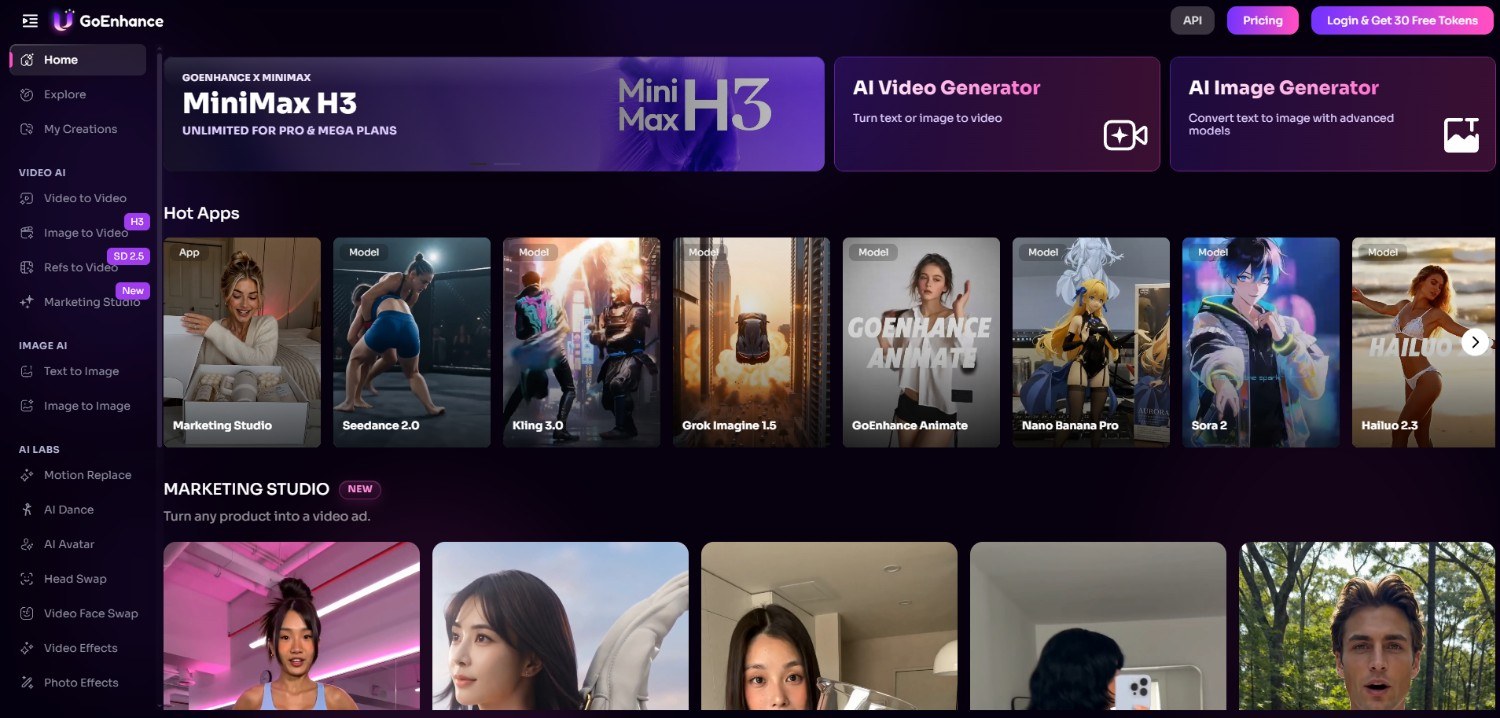
GoEnhance AI features worth trying
-
Video-to-video generation: GoEnhance AI can transform existing footage into different visual styles. Its video-to-video workflow supports creative transformations, including animation, restyling, and other effects while using the original video as source material.
-
Text-to-video and image-to-video generation: The platform lets users create videos from written prompts or animate static images. These workflows can turn ideas, photographs, and artwork into short AI-generated clips without requiring traditional video production.
-
AI animation and character tools: GoEnhance AI includes tools for character animation, AI avatars, face swapping, and lip-syncing. These options provide additional ways to animate people, characters, or existing footage for creative video projects.
-
AI video enhancement and creative effects: GoEnhance AI combines video generation with creative effects, including anime-style transformations and other visual treatments. Users can experiment with different styles to adapt existing footage for social and creative content.
How to use GoEnhance AI in 3 easy steps?
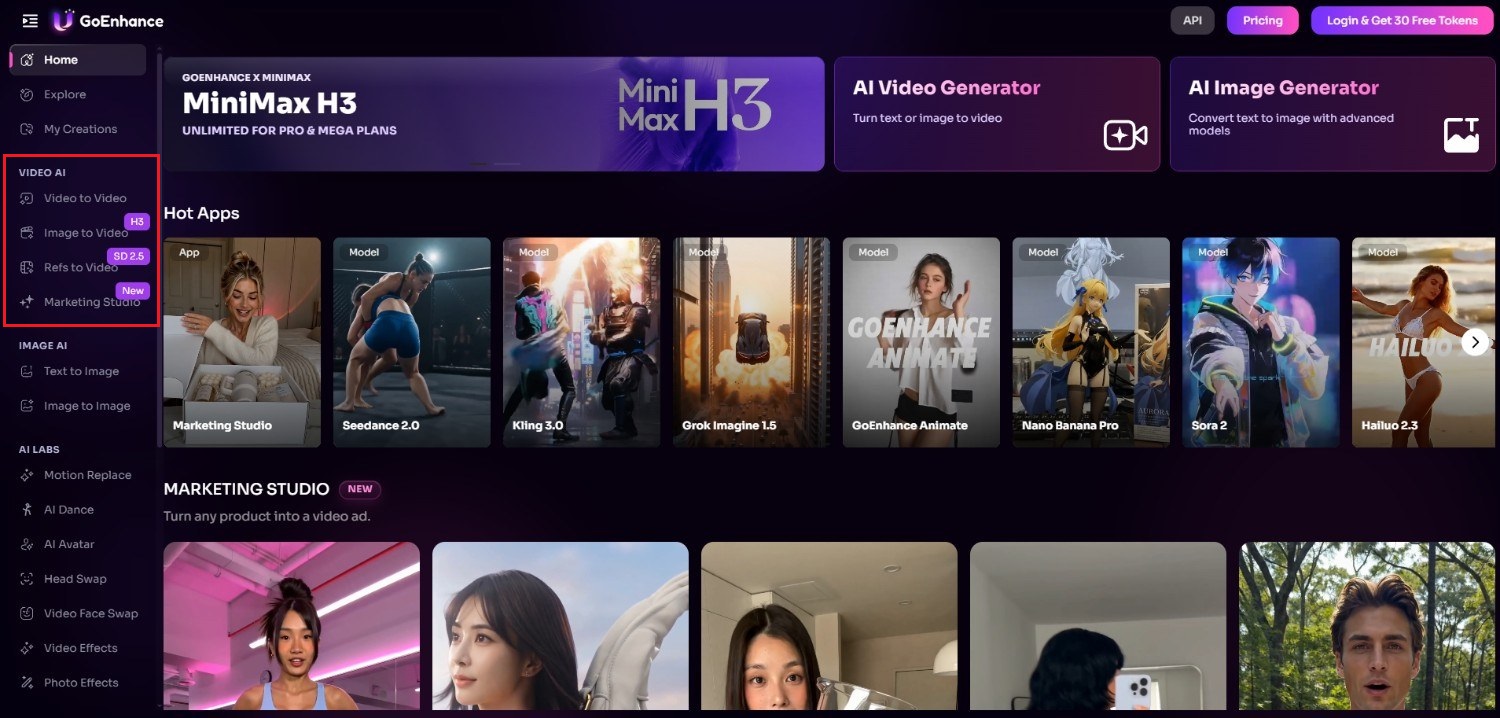
Step 1: Access Goenhance AI official website
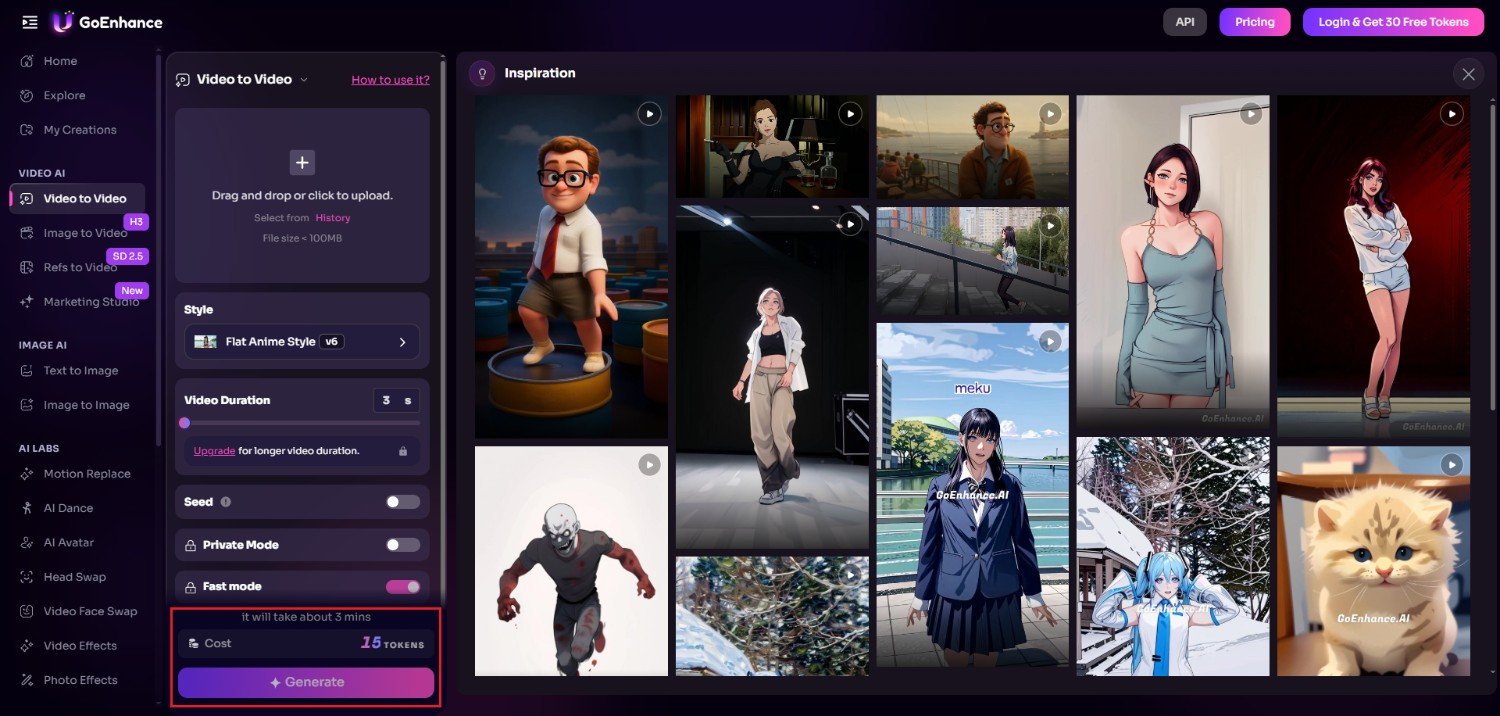
Start off by first accessing the official website of Goenhance AI. Once you do that, be sure to sign-in to your existing account, or create a new account to get 30 free tokens for image/video generation needs. After that, browse through the available tools on the left-hand panel and select the one that fits your needs the most. We selected the "Video to Video" generation tool.
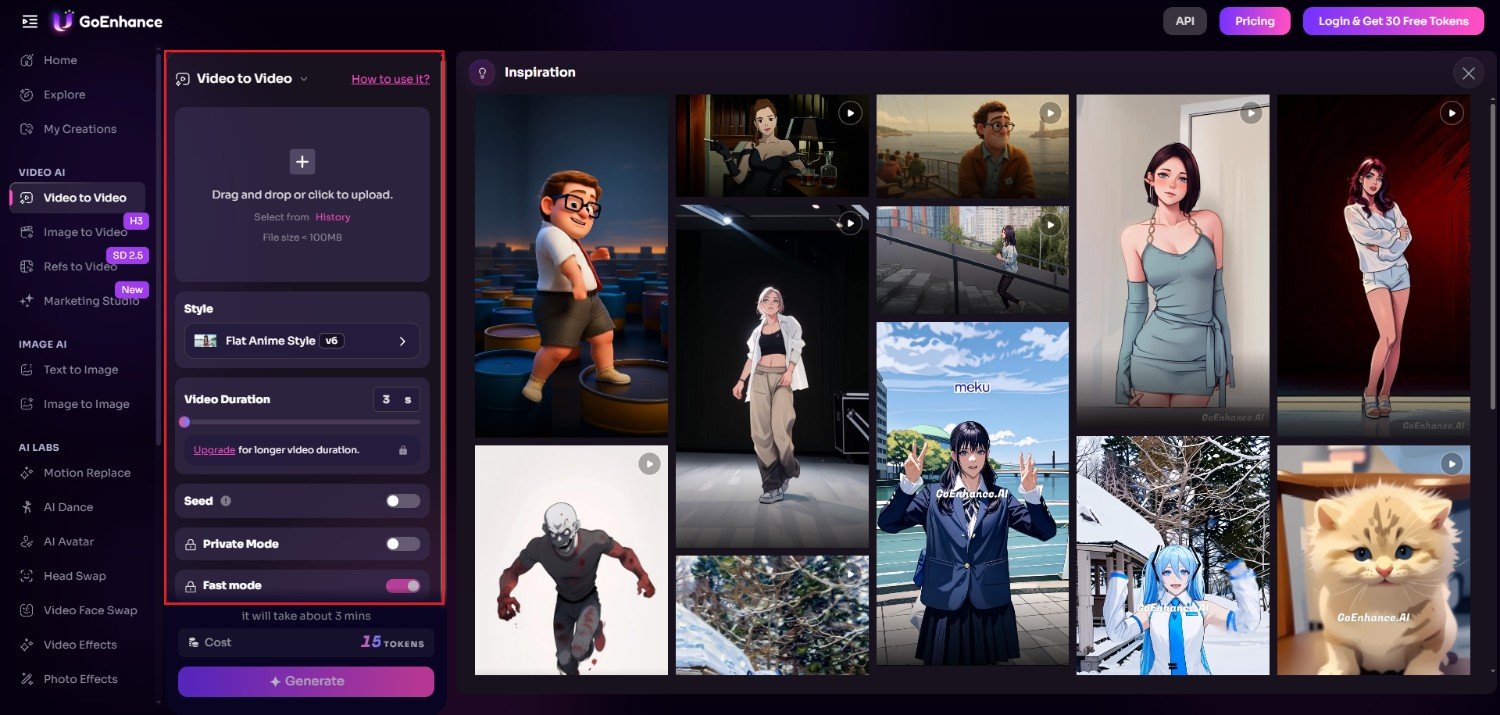
Step 2: Provide details for your project
Since we selected the video to video generation process, the primary step involves uploading the video that you want to change the style of, choosing the specific style you want from the given options, and then selecting the video duration. Additionally, select the toggles for "Private Mode" and "Fast Mode".
Step 3: Generate and export
After selecting your necessary options, click on the "Generate" option. Goenhance AI will start creating your video and once that is completed, the same will be shown on your screen, ready to be downloaded for sharing.
Our text examples:
Video to video
Image to video
GoEnhance AI pricing and plans
GoEnhance AI offers a free tier with tokens that can be used across its features. Paid subscriptions provide larger token allowances, faster generation, more concurrent jobs, and premium features.
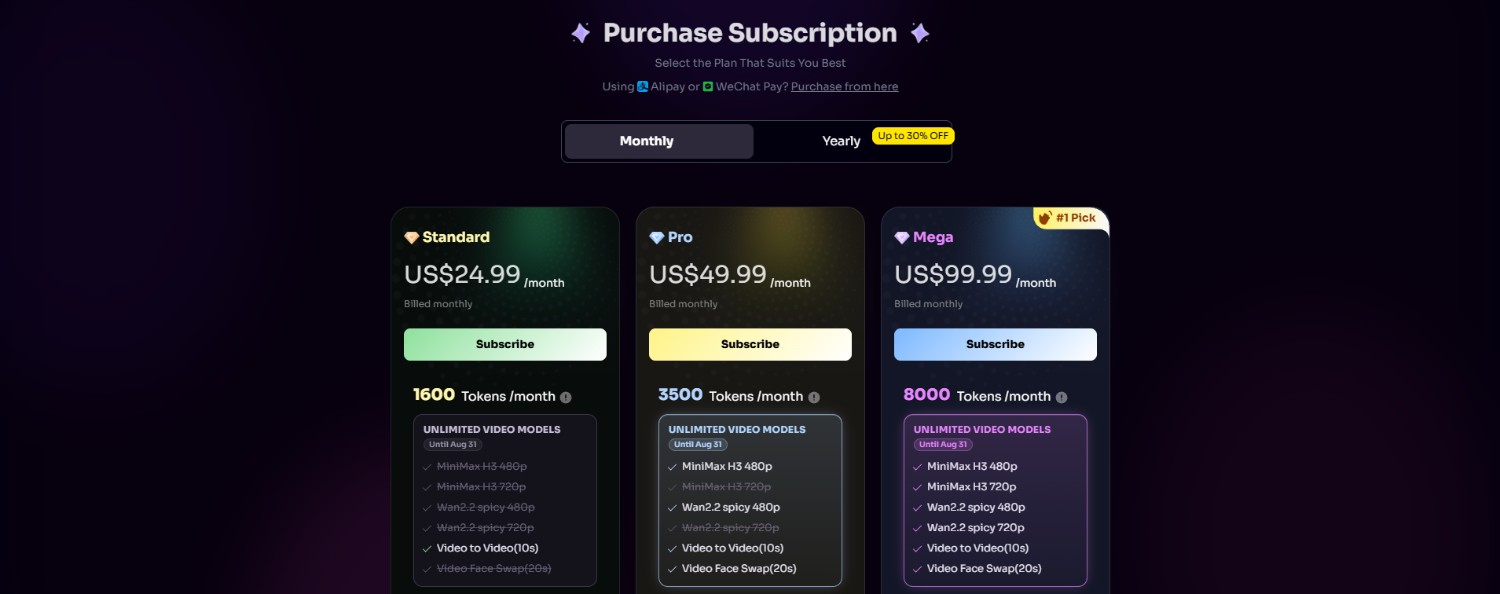
Standard, Pro, and Mega subscribers can also access Relax Mode on supported features, while commercial use is restricted to those paid tiers. The platform states that subscriptions are managed through its billing portal.
|
Tier |
Price |
Key Benefits |
|---|---|---|
|
Standard |
$24.99/month |
More tokens, faster generation, concurrent jobs, premium features, Relax Mode on supported tools |
|
Pro |
$49.99/month |
Higher allowances and paid-plan benefits, including Relax Mode on supported tools |
|
Mega |
$99.99/month |
Highest-level allowance and paid-plan benefits, including Relax Mode on supported tools |
*Commercial use is permitted for Standard, Pro, and Mega subscribers; Free and Basic users are limited to personal use.
GoEnhance AI review: top pros and cons
GoEnhance AI brings several generation and transformation tools into one platform, although its token system and paid access requirements are worth considering before choosing a plan.
Strengths |
Weaknesses |
|---|---|
|
Wide range of AI video creation tools GoEnhance AI combines text-to-video, image-to-video, video-to-video, animation, lip-sync, face swap, and other video tools in one platform. Multiple input and generation methods Users can begin with text prompts, images, or existing videos, giving them flexibility when choosing how to approach different video projects. Beginner-friendly workflow The platform uses a relatively straightforward upload-or-prompt workflow, followed by style selection, customization, generation, previewing, and downloading. Free tier for testing features GoEnhance AI provides a free tier with limited tokens, allowing users to explore its available tools before deciding whether a paid subscription is necessary. |
Token-based usage can become limiting for frequent creation Fast Mode consumes tokens, so users creating videos frequently may need to monitor their balance or consider a higher subscription tier. Some advanced video workflows may require paid access Commercial usage is limited to paid plans, while some benefits such as Relax Mode are reserved for Standard, Pro, and Mega subscribers. |
Vmake Labs AI video generator: a GoEnhance AI alternative
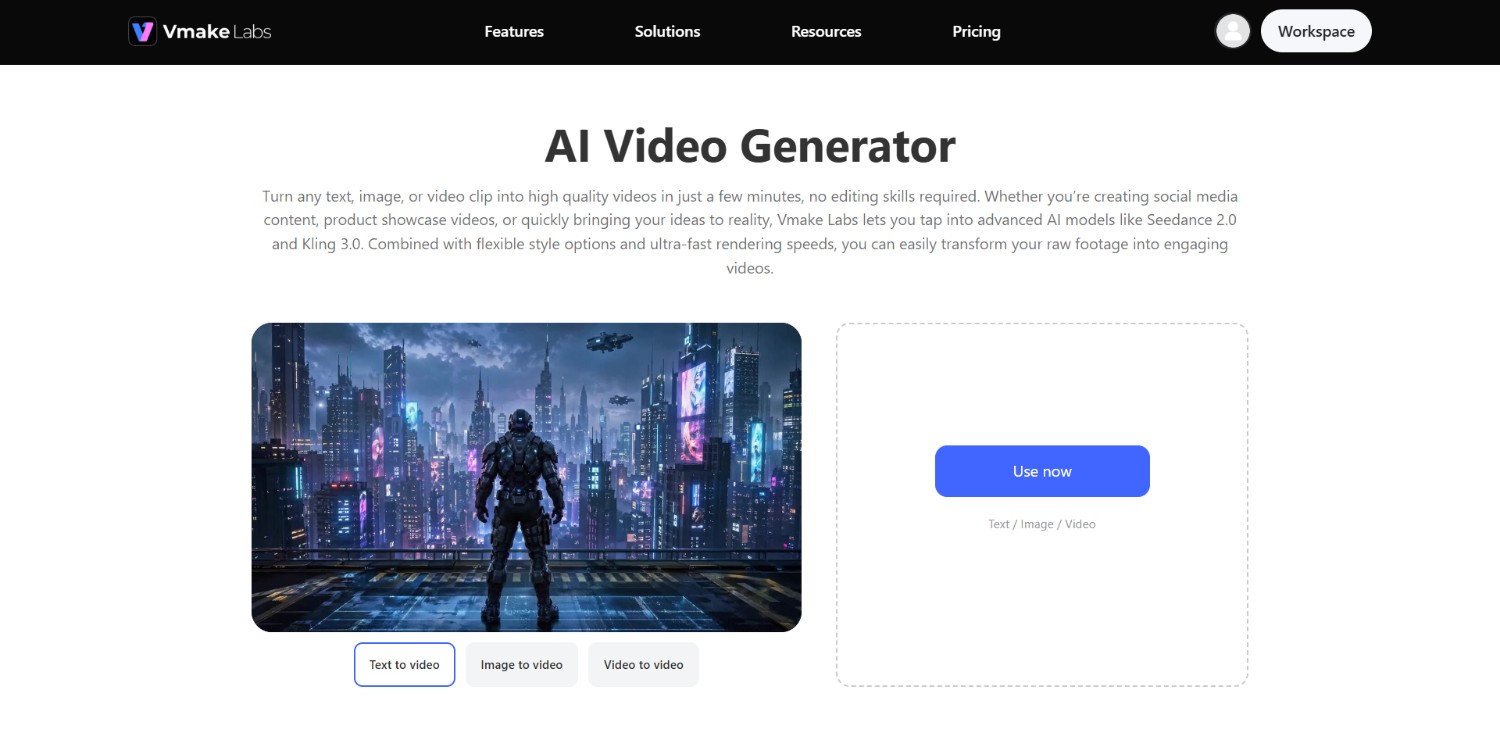
If GoEnhance AI's token-based workflow or paid-access requirements do not fit your video creation needs, Vmake Labs offers another approach to AI video generation. Vmake Labs AI video generator supports Text-to-Video, Image-to-Video, and Video-to-Video workflows from a single interface.
You can enter a prompt, upload an image or video, choose an available model, adjust relevant settings, and generate a clip. The workflow also includes preview and download steps, making it suitable for creators, marketers, and businesses looking to work with different types of source material.
Vmake Labs AI video generator features
-
Multi-model AI video generation: Vmake Labs brings multiple AI video models into one workspace, including Seedance 2.0, Kling 3.0, Google Veo 3.1, Sora 2, Vidu Q2, and Wan 2.2. Users can switch models based on their project requirements.
-
Text-to-video, image-to-video, and video-to-video: Vmake Labs supports multiple generation methods, including text-to-video, image-to-video, multi-image references, start/end frame controls, and video-to-video. This gives users several ways to begin or transform a video project.
-
Multiple visual styles and generation controls: Users can choose from different visual styles and adjust settings such as video duration and aspect ratio. The available options make it possible to adapt generated clips for different creative formats and publishing requirements.
-
High-resolution output and duration control: Vmake Labs supports video output of up to 4K resolution and lets users set durations between 2 and 15 seconds. These controls provide flexibility when creating short clips for different content formats.
How to use Vmake Labs AI video generator?
Step 1: Access Vmake Labs "AI video generator" tool
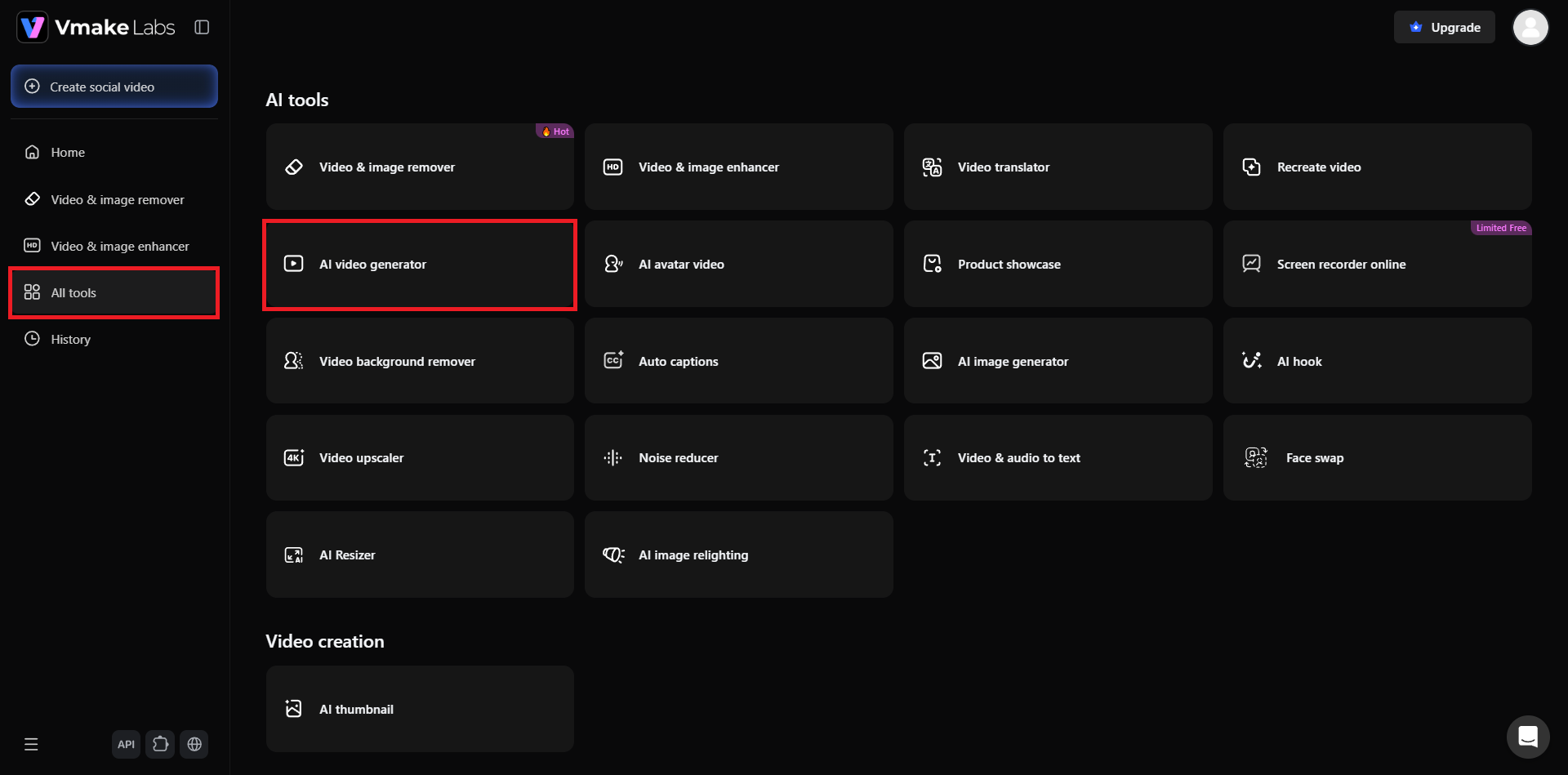
Begin the process by first accessing the official website of Vmake Labs. Once you do that, you need to either sign-in to an existing account, or proceed to sign-up for a new account. After logging in, you need to access the "All tools" option from the left-hand panel, and then select the "AI video generator" option.
Step 2: Choose your AI model and provide prompt
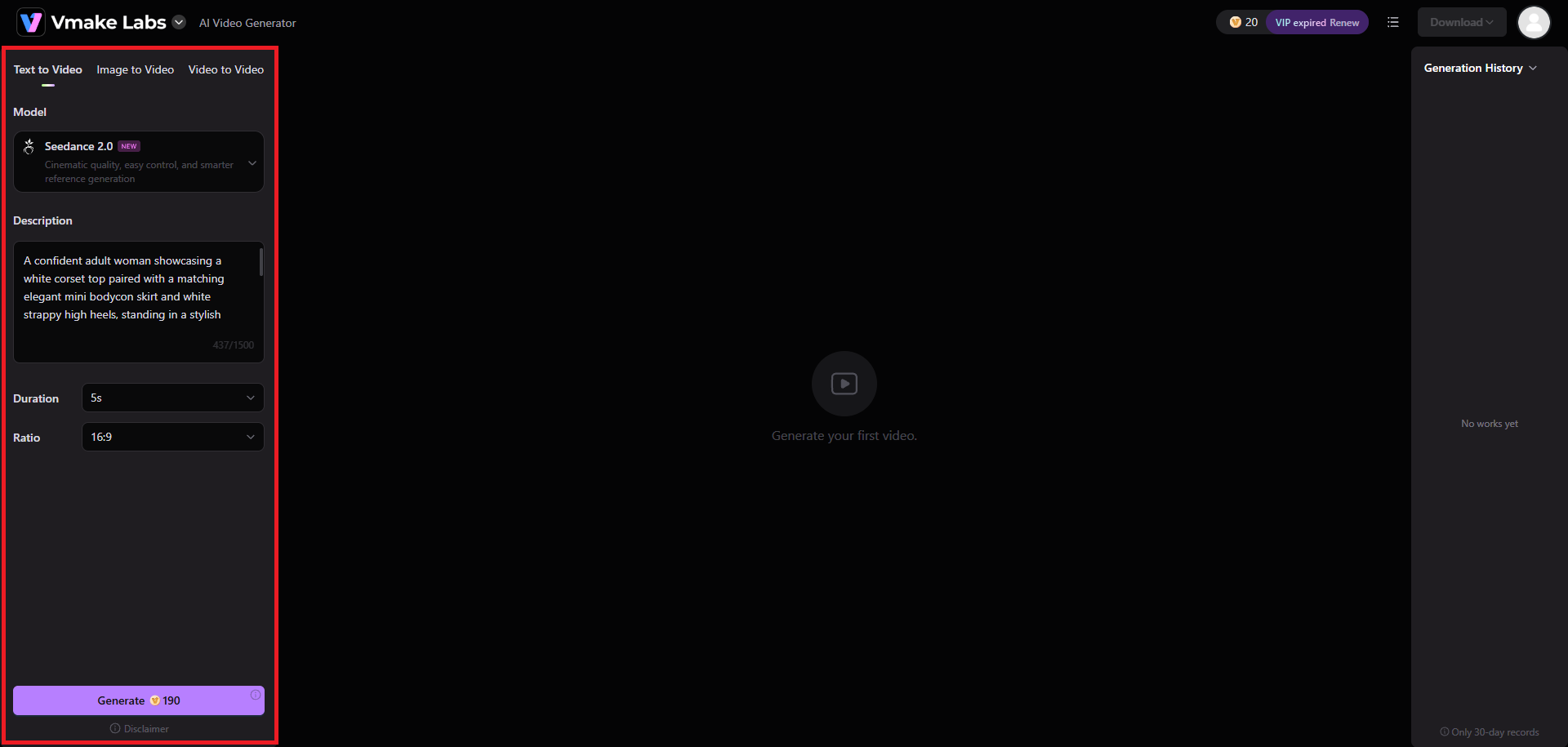
A new web page will open where you need to first select the process for your video generation: whether you want text to video, image to video, or video to video. Then, you need to choose the video generation model that suits your preferences (we selected Seedance 2.0).
After that, you need to write a detailed prompt regarding the type of video you want to create. Once done, select the video duration, aspect ratio, and click on "Generate".
Step 3: Export your AI-generated video
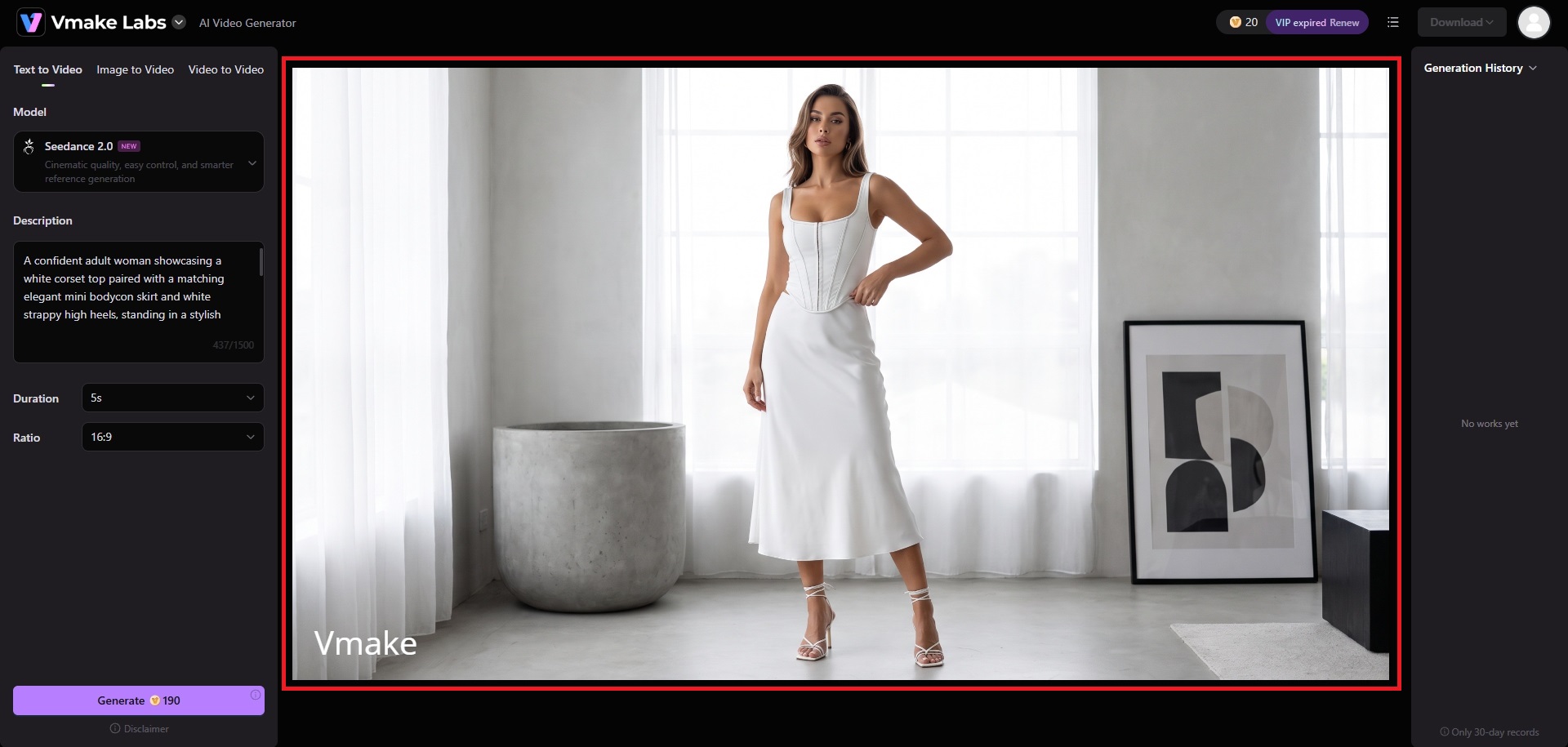
Vmake Labs will start generating your video and once that is completed, the same will be showcased on your screen. You can then decide to download the video for your sharing needs.
Vmake Labs vs Goenhance AI: which is the better choice?
The better option depends on your preferred workflow, available tools, and how you plan to create videos. Both platforms support multiple AI video workflows, but their toolsets and generation approaches differ.
Who should use GoEnhance AI?
-
Creators exploring animation: GoEnhance AI is suitable for users interested in anime, cartoon, character, and other stylized video transformations.
-
Users working with existing footage: Its video-to-video tools can be useful when you want to transform or restyle an existing clip.
-
Creators wanting additional character tools: AI avatars, lip-syncing, character animation, and related features provide options beyond basic video generation.
Who should use Vmake Labs AI video generator?
-
Users wanting multiple AI models: Vmake Labs combines several AI video models within one workspace, allowing users to switch between models for different projects.
-
Creators working across different input types: Text-to-video, image-to-video, and video-to-video workflows allow users to start from prompts, images, or existing footage.
-
Users who want adjustable output settings: Vmake Labs provides controls for video duration, aspect ratio, model selection, and other generation preferences.
|
Feature |
GoEnhance AI |
Vmake Labs |
|---|---|---|
|
Text-to-video |
Yes |
Yes |
|
Image-to-video |
Yes |
Yes |
|
Video-to-video |
Yes |
Yes |
|
AI animation tools |
Yes |
Available through generation workflows |
|
Multiple AI models |
Yes |
Yes |
|
Visual style options |
Yes |
Yes |
|
Duration controls |
Available |
Yes |
|
4K output |
Available on supported tools |
Yes |
|
Start/end frame workflows |
Available on supported tools |
Yes |
|
Free option |
Yes |
Yes |
Overall, GoEnhance AI may be a better fit for creators focused on animation and video transformation, while Vmake Labs may suit users who want multiple AI models and several video-generation workflows within one workspace.
Tips and tricks for using GoEnhance AI
A few practical adjustments can make the GoEnhance AI workflow easier to manage. Consider these tips when experimenting with different generation modes, styles, and token usage.
-
Choose the right input for each video tool
Start with the input that best matches your goal. Use text when creating a concept from scratch, images when animating artwork, and existing footage when you want to experiment with video-to-video transformations.
-
Write specific prompts for more controlled generations
Describe the subject, action, environment, camera movement, lighting, and visual style when writing prompts. More specific instructions can give the AI clearer information about the video you want to create.
-
Experiment with styles and settings
Try different visual styles and generation settings instead of relying on one configuration. Small changes to the style, prompt, or input can help you explore different creative directions before settling on an approach.
-
Use free tokens strategically before upgrading
Use the free allocation to test the workflows you are most interested in before purchasing a subscription. This can help you understand token consumption and determine whether a paid plan fits your usage.
Conclusion
In our GoEnhance AI review, we can conclude that it is a versatile platform for creators who want to experiment with AI-powered video generation, animation, and video transformation. Its support for text, image, and video inputs provides flexibility, while features such as video-to-animation, character animation, and creative effects broaden its potential use cases. However, token-based Fast Mode usage and commercial-use restrictions on lower plans may be considerations for some users.
For users who prioritize access to multiple AI video models and text-to-video, image-to-video, and video-to-video workflows in one interface, Vmake Labs is another option to consider.
FAQs
-
Is GoEnhance AI free to use?
Yes. GoEnhance AI offers a free tier with tokens that users can spend across its available features. Paid plans provide additional tokens, faster generation, concurrent jobs, and premium features.
-
Is GoEnhance AI good for beginners?
GoEnhance AI is designed for creators with different experience levels and provides accessible workflows for generating and transforming videos. It also supports both PC and mobile access.
-
Can GoEnhance AI create videos from text and images?
Yes. GoEnhance AI supports both text-to-video and image-to-video generation, allowing users to create videos from written descriptions or animate existing images. It also supports video-to-video workflows.
-
Does GoEnhance AI support commercial use?
Commercial use is permitted for Standard, Pro, and Mega subscribers. Free users and Basic subscribers are limited to personal use, according to GoEnhance AI's current FAQ.
-
Is Vmake Labs a good alternative to GoEnhance AI?
Vmake Labs can be an alternative for users seeking multiple AI video models and several generation methods. It supports text-to-video, image-to-video, multi-image references, and video-to-video workflows.

You May Be Interested
Artistly AI Review 2026: Is It Worth Trying for Creators?
DeeVid AI Review 2026: Features, Pricing & Top Alternative
Doodle AI Review 2026: Features, Pricing and Alternatives
Getimg AI Review 2026: Is It the Best AI Image Generator?

Supawork AI Review: Watermark Remover Tested (2026)

Nero AI Review 2026 Explained: Is the Tool Worth Using?

Pixar AI Review: What It Is & How to Create Pixar-Style Art

Vivideo AI Review 2026: Features, Pricing and Alternatives
