
X-Design Watermark Remover Review (2026): Features & Pricing
 Vmake Labs TeamJanuary 5, 2026
In today’s content-driven world, clean, professional visuals are essential. Whether you’re a content creator, marketer, student, or small business owner, watermarks on images and videos can ruin the visual appeal of your work. Luckily, several AI tools are available to solve this problem.
Among them, X-Design Watermark Remover is a prominent platform that promises fast, intelligent watermark removal. Instead of manual editing or complex software, users can now remove unwanted logos, text, or overlays in just a few clicks, leaving no trace. What sets it apart is its balance of simplicity and accuracy. But can it really satisfy your needs?
In this guide, you will learn everything about the X-Design Watermark Remover, including its features, how it works in real scenarios, where it struggles, how it compares to top competitors, and whether it’s worth your time and money. Let’s dig into their details!
 What is X-Design Watermark Remover and What Does It Offer?
X-Design Watermark Remover is an AI-powered online tool that helps erase watermarks and logos from both images and videos in seconds. It is part of a broader platform that offers a range of AI editing and enhancement tools, such as retouching and background removal.
It uses machine learning to analyze surrounding pixels and fills in the removed background with a similar texture. Suitable for users of any skill level, it ensures fast, fully automatic processing.
You don’t need professional editing experience to achieve high-quality results. Everything runs through a clean interface, making it suitable for quick edits as well as larger creative projects.
Additional Features:
- AI Photo Editor: With this all-in-one AI photo editor, you can resize, retouch, enhance quality, and swap/delete/generate backgrounds.
- Enhancement Solution: It is capable of sharpening video details, colors, or clarity, and fixing blurriness in images and videos.
- Background Remover: You can effortlessly remove or replace video or image backgrounds, ideal for e-commerce, social media, and marketing.
- Image Extender: It helps you expand the image background, adjust the aspect ratio, and resize your original image to restore missing edges with content-aware precision.
- Color Changer: You can replace the color of your image elements, such as the fashion items, or colorize any part to boost productivity.
- Upscaling Tools: It can increase your image quality to 4K resolution by automatically detecting content type and selecting the best enhancement settings, such as removing noise.
- Video Generator: You can convert text prompts or images to stunning cinematic video clips. It also lets you adjust the scene or add text before exporting.
- E-Commerce Solution: It streamlines the creative workflow by generating and refining product visuals.
- AI Design Agent: You can create logos, posters, flyers, and other branding materials, including food photography and mockups.
Core Capabilities of X-Design Watermark Remover
X-Design Watermark Remover is a versatile web and mobile application that can clean up both images and videos. I have tested it on different watermarked samples to evaluate its performance. So, here are the insights:
X-Design AI Watermark Remover
Images are the primary focus of X-Design, as per my hands-on experience. X-Design AI Watermark Remover can detect and remove text, watermarks, trademarks, unwanted people, and even stamps in seconds. It offers both manual and automatic processing, so you can either select the brush to erase the watermark or go for one-click processing.
Its inpainting technology intelligently reconstructs the background, making the final image look natural. You can also upload a batch of photos to process multiple files at once. It also preserves image quality and detail while removing watermarks, delivering professional results.
X-Design Video Watermark Remover
X-Design Video Watermark Remover is an incredible feature that can instantly erase watermarks and logos from your video clips. It can process MP4, M4V, and MOV file formats. Its advanced algorithms analyze each frame to detect and remove distracting marks, delivering the best quality output.
You can also remove watermarks from up to 3 videos at once, and each gets its own processing card. It handles watermark removal entirely on its own. You can even preview the watermark-free output or download the first 5 seconds for free.
Getting Started with X-Design Watermark Remover
The intuitive interface of X-Design Watermark Remover makes it easy to use. To help you, here are tutorials on removing watermarks from images and videos:
Guide 1. How to Remove Watermarks from Images
Step 1. Import Image
Open the X-Design AI Watermark Remover in the browser and click “Upload Image” or “Batch upload” to import the watermarked photo.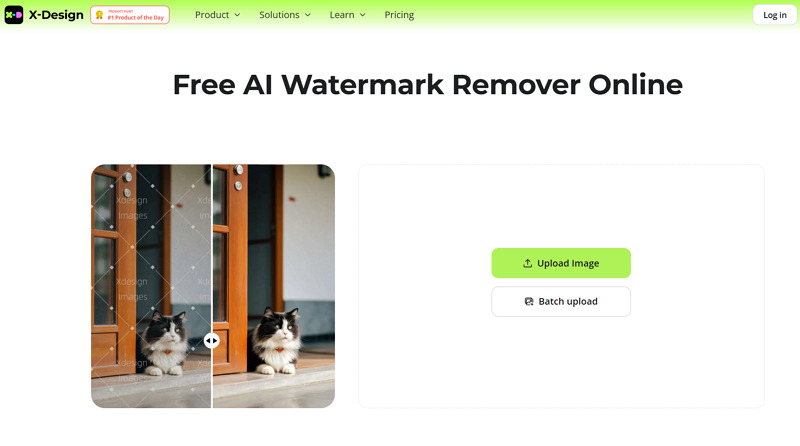
Step 2. Choose Removal Mode
Now you can enable text, watermarks, unwanted people, eyeglasses, or glare. Otherwise, select the brush, box, or circle tool to paint the watermark.
Step 3. Compare and Download
Lastly, press the “Compare” button to preview the results. Then, hit “Download,” select the output format, and tap “Download” again. That’s all!
Guide 2. Steps to Use X-Design Video Watermark Remover
Step 1. Upload Video
First of all, access the X-Design Video Watermark Remover and click “Upload Video” to import the watermark video file.
Step 2. Select the Removal Mode
Next, you can choose the watermark removal mode, i.e., “Smart Remove,” “Remove Watermark,” or “Remove Subtitle.”
Step 3. Download the Output
Finally, press the “Remove” button and let AI complete the processing. Once removed, hit “Download 5s Preview” or “Download Full Video.” All done!
Pricing Review of X-Design Watermark Remover
X-Design Watermark Remover is subscription-based, but it works on a credit system. To help you understand it, here is the pricing table to consider:
| Plan | Price | What’s included |
| Free | $0 | 20 credits daily Limited background or object removal Up to 20 image edits |
| Pro | ||
| Monthly | $9.99 | 200 credits per month Unlimited background or object removal Up to 300 image edits Unlimited use with Nano Banana Pro |
| Yearly | $49.99 | |
| Lifetime | $6.99 | 20 credits |
| $12.99 | 50 credits | |
| $19.99 | 100 credits | |
| $49.99 | 300 credits | |
| $69.99 | 500 credits | |
| $89.99 | 1000 credits | |
| $149.99 | 2000 credits | |
| Enterprise | Let’s Talk! | AI Background Remover Other AI tools |
X-Design Watermark Remover vs. The Competitors
X-Design Watermark Remover is a powerful tool, but it’s not the only one on the market. To provide a complete picture, let’s compare it with other popular alternatives, including Vmake, HitPaw, and 123APPS:
| Tool | Compatibility | Batch Support | Speed | Output Quality | Key Feature |
| X-Design Watermark Remover | Web, Mobile (Android & iOS) | Yes (Images) | Fast | Medium | Support video and image watermark removal, but it’s suitable for enhancing & editing |
| Vmake Video Watermark Remover | Web, Mobile (Android & iOS) | Yes | Fast | High | Detect and remove video watermarks with a click, but it’s best for removing dynamic watermarks |
| HitPaw Watermark Remover | Web, Desktop (Win & Mac) | Yes (Images) | Normal | High | Capable of removing image & video watermarks, but the advanced features are only for desktop users |
| 123APPS Watermark Remover | Web | No | Normal | Medium | Support video watermark removal, but it only works well for static watermarks |
Benefits & Drawbacks of X-Design Watermark Remover
Along with the benefits, X-Design Watermark Remover has some limitations, just like other similar tools. Here are a few pros and cons:
Benefits:
- User-friendly interface
- Cross-platform support with no sign-up
- AI tools for images & videos
- Versatile editing functionalities
- Allow multiple watermark selections
- Flexible, non-expiring credits system
- Support batch watermark removal
- Both web and mobile apps are available
Drawbacks:
- Limited free version
- Lack of advanced customization options
- Some features require a learning curve
- May struggle with dynamic watermarks
Real User Reviews
Now, let’s review some user feedback to have an idea about their hands-on experience. Let’s consider a few:
Trustpilot: 3.8 (39 reviews)
- I use it to remove watermarks from videos, and it’s doing well. Everything looks good for me. – Lana Hogan
- I am a paid subscriber who uses it to remove text from video. They have a decent limit of 30 videos per day, even on their basic plan. Although it sometimes fails to remove background watermarks, especially when they are slanted, it’s still amazing and totally budget-friendly. – Harsh Sethia
FAQs about X-Design Watermark Remover
1. Is X-Design Watermark Remover safe?
Yes, X-Design Watermark Remover is generally safe to use. However, you should be cautious or avoid uploading highly sensitive and confidential media files.
2. Does it offer a money-back guarantee?
Of course. It offers a 7-day money-back guarantee. Whether you’ve purchased a Pro plan or credits and not used them within 7 days, you are eligible for a refund.
3. Can I use it for commercial projects?
Absolutely, but only if you own the watermarked image and video or have the necessary permission. Removing watermarks from copyrighted content is unethical, illegal, and a significant risk that violates creators’ rights.
Final Verdict: Is X-Design Watermark Remover Worth Using in 2026?
The above extensive testing proves that X-Design Watermark Remover is a competent yet convenient media cleanup tool for online and mobile users. In addition, it is also suitable for editing and enhancing videos and images. Its simple interface, AI processing, and batch support make it excellent for everyone.
However, if you have to remove complex and dynamic video watermarks to achieve high-quality output, Vmake Video Watermark Remover is the ultimate solution. Let’s give it a try today!

You May Be Interested

Seedance 2.0: What's New & How to Use It

123APPS Watermark Remover Review (2026): Pros, Cons, and Pricing

5 Best Valentine's Day Video Ideas for eCommerce in 2026

How to Create a YouTube Thumbnail? Create YouTube Thumbnails Using AI
