
Fotor Video Enhancer: Visual Enhancement in the Age of AI
Explore Fotor Video Enhancer with this review guide, covering its features, pros & cons, pricing, user ratings, and alternatives to decide if it’s worth using!

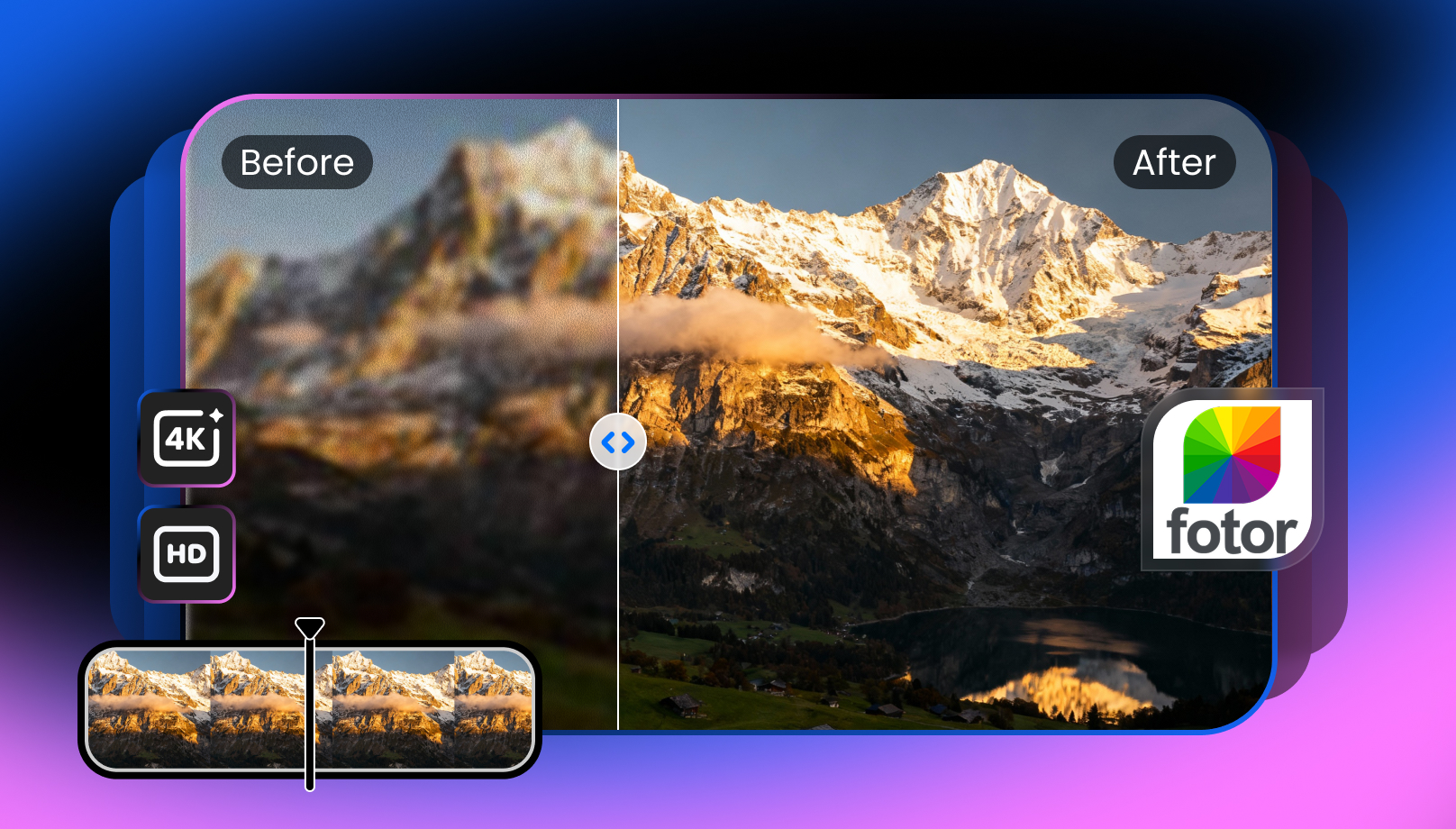
Have you ever recorded a video that appears blurry or pixelated? Low video quality can ruin the viewing experience, but you’re not alone. Various AI-based video enhancement tools are available, like Fotor Video Enhancer.
This online tool claims to enhance videos by removing grain, balancing sharpness, and improving resolution. What makes it popular is its reputation for breathing new life into blurry and unstable videos. But does it really deliver HD or 4K clarity?
Here is a detailed review of Fotor Video Enhancer. You’ll explore its features, free and paid versions, performance, steps to enhance videos, and other popular alternatives.
Understanding Fotor Video Enhancer: A Beginner’s Guide
Fotor Video Enhancer is capable of instantly improving video quality and resolution without requiring manual editing skills. It is part of Fotor, a versatile online platform best known for photo editing and design.
However, you can also use its wide range of AI tools, including background and watermark removers, an image sharpener or colorizer, and built-in templates, to enhance your videos. It is suitable for beginners and small businesses due to its balance of simplicity and features.
Additional Features:
Photo Editor: It offers a variety of innovative tools to edit your images. Whether you need to enhance, unblur, upscale, or retouch skin in one click, it can handle all these tasks. You can also add text or elements to images and apply effects or beauty filters.
AI Remover: This feature helps remove, change, and blur the background. You can also erase a watermark, cut out or blur an image, extract a signature, and more.
AI Filter: It can transform your images into paintings, cartoons, sketches, anime, Ghibli art, and caricatures. You can even change the style if needed.
AI Replacer: This incredible tool helps you swap faces, heads, gender, hairstyles, clothes, and more in an image.
AI Generator: It can generate an image, characters, avatars, tattoos, babies, portraits, headshots, or a LinkedIn photo. You can also create videos such as intros, outros, kissing, hugging, dancing, fighting, TikTok clips, and more.
Built-in Templates: You can access a variety of marketing and social media templates to create posters, flyers, logos, YouTube covers, thumbnails, Instagram stories, posts, resumes, etc.
Cross-Platform Support: Fotor Photo Editor is available not only online but also on Windows, Mac, iOS, and Android.
Key Functionalities of Fotor Video Enhancer
Fotor Video Enhancer is an AI-driven online tool that helps you create clear, smooth, and high-quality videos. It uses artificial intelligence to recognize and enhance various aspects of your video automatically. It is capable of reducing noise, unblurring videos, increasing video clarity, enhancing facial details, and boosting the brightness, contrast, and saturation levels, all in a single click.
With support for MP4, MOV, and WEBM formats, it even lets you upscale videos to HD or 4K resolution. With its focus on simplicity and automation, it claims to be ideal for casual users, content creators, professionals, and businesses.
How to Use Fotor Video Enhancer
Thanks to its AI processing, it’s easy to improve video or image quality. Here is a step-by-step guide on how to use Fotor Video Enhancer online to process videos:
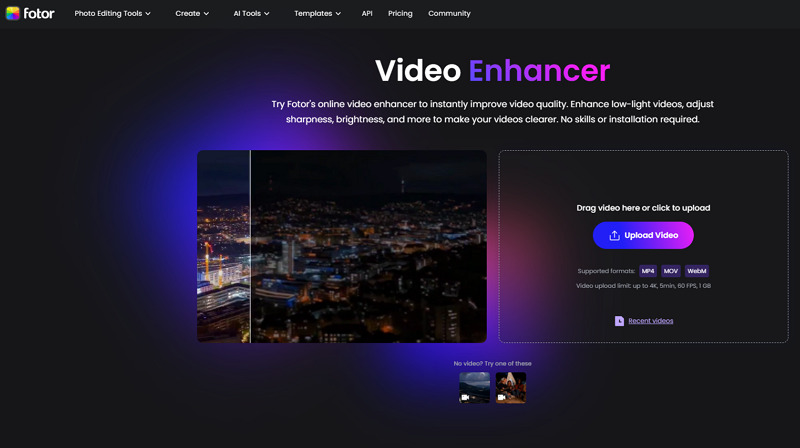
Step 1. Upload Video
First of all, visit the official Fotor Video Enhancer page and click “Upload Video” to browse and import the required video file.
Step 2. Enhance or Upscale
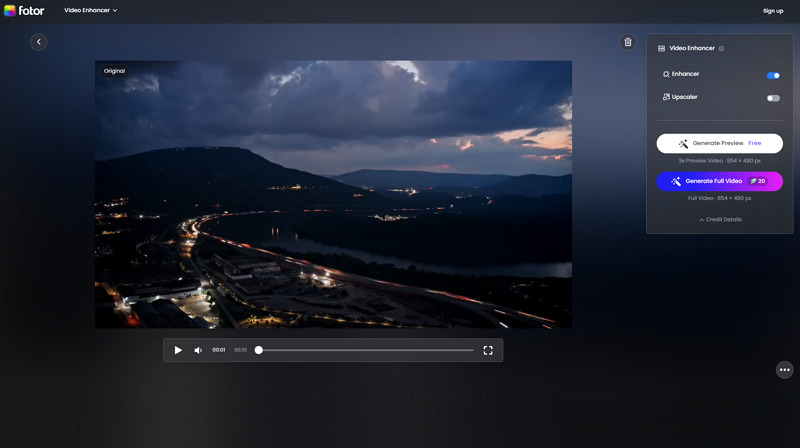
Now, you can enable the “Enhancer” or “Upscaler” switch or both at a time. Then, press “Generate Preview” or “Generate Full Video.”
Step 3. Download Output
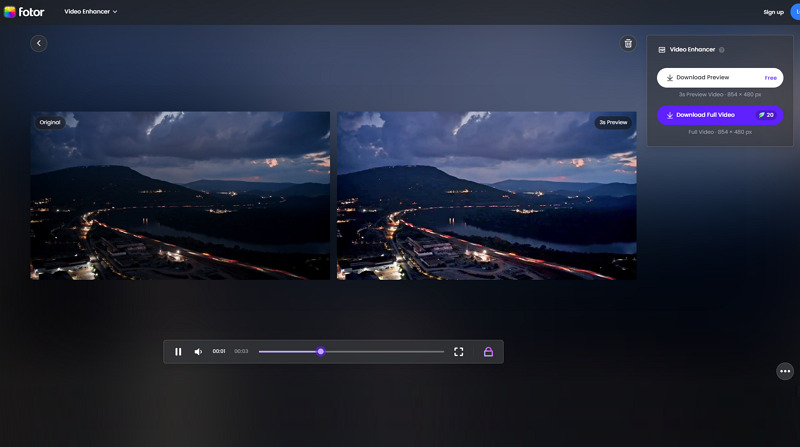
Lastly, let AI complete the processing. Once done, preview the output and if it’s fine, hit “Download Preview” or “Download Full Video.” That’s all!
Fotor Video Enhancer: Pricing Review
Although Fotor Video Enhancer offers a free version, it’s only a watermarked preview that requires signing up. However, it supports both subscription and credit-based packages. So, let’s look at the pricing table below to understand it better:
Plan | Pricing | What’s included |
Fotor Basic | $0 | Basic photo editing Limited credits for generative AI (including image/video generation, video enhancer, eraser, bg remove) Download with watermark 512MB cloud storage |
Fotor Pro (Monthly) | $8.99 | Everything in Fotor Basic, plus: Advanced editing & AI tools 100 credits/month for generative AI (video enhancer) No watermark 2GB of cloud storage Ads-free |
| Yearly | $3.33 | |
Fotor Pro+ (Monthly) | $19.99 | Everything in Fotor Pro, plus: AI batch editing 300 credits/month for generative AI (video enhancer) No watermark 100GB of cloud storage Ads-free |
| Yearly | $7.49 | |
Credits Plans | ||
One-time Payment | $11.99 $19.99 $39.99 $59.99 $79.99 | 100 credits 200 500 1000 2000 |
Subscription Plan (Monthly) | $9.99 $19.99 $35.99 $59.99 $139.99 $269.99 | 200 credits 500 1000 2000 5000 10000 Unused credits will roll over as long as you’re subscribed, up to 5 months of accumulation |
Yearly | $69.99 $143.99 $259.99 $459.99 $1099.99 $1999.99 | 200 credits/month x 12 500 1000 2000 5000 10000 Unused credits will roll over as long as you’re subscribed, up to 5 months of accumulation |
Fotor Video Enhancer vs. The Competitors
To evaluate the real-world performance of Fotor Video Enhancer, you need to compare it with top alternatives across key aspects. Here is a comparison table, including Fotor, Vmake, Picwand, and Airbrush:
Tool | Platform | Supported Formats | Custom Options | Output Quality | Ideal for |
Fotor Video Enhancer | Web | MP4, MOV, WEBM | No | Average | Quick and automatic adjustment of a simple video. But focused on photo editing & enhancement |
Web, Mobile (Android & iOS) | MP4, MOV, M4V, 3GP, and AVI | Yes | Best | Professional video-specific enhancement and 4K+ upscaling with support for restoring AI-generated videos | |
Picwand Video Enhancer | Web, Desktop (Win & Mac) | MP4, MOV, M4V, 3GP, and more | Yes | Best | High-quality video enhancer with support for up to 4K & 8K upscaling |
Airbrush Video Enhancer | Web | MP4, M4V, and MOV | No | Good | Ideal for quick and automated video enhancement and upscaling to 4K |
Pros & Cons of Fotor Video Enhancer
For a comprehensive review, it is crucial to consider both the benefits and drawbacks of Fotor Video Enhancer. Here are some of its pros and cons:
Pros:
Simple interface, suitable for beginners
No software installation is required
AI-powered enhancement with quick previews
Offer various photo and video editing features
Cons:
AI enhancement lacks fine details
Support only three video formats
Allow only a 3-second preview for free
HD video downloads require a subscription
Lack of manual adjustments and creative control
User Feedback & Ratings
Now, let’s have a look at the real user feedback from some platforms:
Trustpilot: 4/5 (1462 reviews)
Just subscribed to Pro+ only to find out that each video costs 20 credits, and PRO+ with 30 credits? I guess they figured out a way to charge me twice - monthly for the sub and every single time I want to generate a video. Take my advice, people- plenty of apps give you thousands of credits WITH your monthly sub. And it’s either the same or better quality. FYI- 200 credits for $20? Ridiculous. - Joseph Ocasio
Capterra: 4.6/5 (1087 reviews)
I mostly use Fotor for quick touch-ups or simple visuals for internal materials. It’s the kind of tool that comes in handy when I don’t feel like opening heavier software like Photoshop. - Sarah F.
Frequently Asked Questions of Fotor Video Enhancer
1. Is Fotor Video Enhancer safe to use?
Yes, Fotor Video Enhancer is generally safe to use as the uploaded files are deleted from the servers after processing. But since it’s cloud-based, always practice caution when uploading sensitive or confidential videos.
2. Can I use it for commercial projects?
Yes, you can. However, the free plan is for personal use only. You need Pro or Pro+ for commercial projects. However, you should have ownership or editing rights to the video to avoid copyright issues.
3. Can I use Fotor Video Enhancer without signing up?
Yes, you can use it without signing up to enhance videos just once. Later, you have to sign up and purchase a subscription and credits.
Final Verdict: Is Fotor Video Enhancer Worth It?
Based on extensive research and testing, Fotor Video Enhancer can only be a convenient tool for quick, simple improvements. However, its upscaling feature delivers blurry output with missing details when upscaling low-quality videos to 4K resolution. However, if you are looking for professional-grade 2K, 4K, and 4K+ enhancement with a user-friendly interface and batch processing, Vmake Video Enhancer is the right solution. Try it today and enjoy quick video-specific restoration!

You May Be Interested

Seedance 2.0: What's New & How to Use It

123APPS Watermark Remover Review (2026): Pros, Cons, and Pricing

5 Best Valentine's Day Video Ideas for eCommerce in 2026

How to Create a YouTube Thumbnail? Create YouTube Thumbnails Using AI
