
Domo AI Review 2026: I Tested Its AI Video Tools, Anime, and Pricing
Transform videos into anime and stylized art with Domo AI. Need multi-model AI engines and advanced prompt control for high-quality social content? Discover why Vmake Labs is a top alternative.

Searching for a reliable Domo AI review to evaluate its 2026 performance? Creators frequently utilize this platform to turn static images and video clips into stylized visual content. Practical testing remains necessary to properly evaluate output consistency, operational controls, and overall value.
Domo AI: What is it and what does it do?
This platform operates as a dedicated visual generation and stylization ecosystem designed for modern workflows. The toolset primarily targets digital artists, short-form content creators, and animators seeking unique aesthetics rather than standard photography.
What is Domo AI?
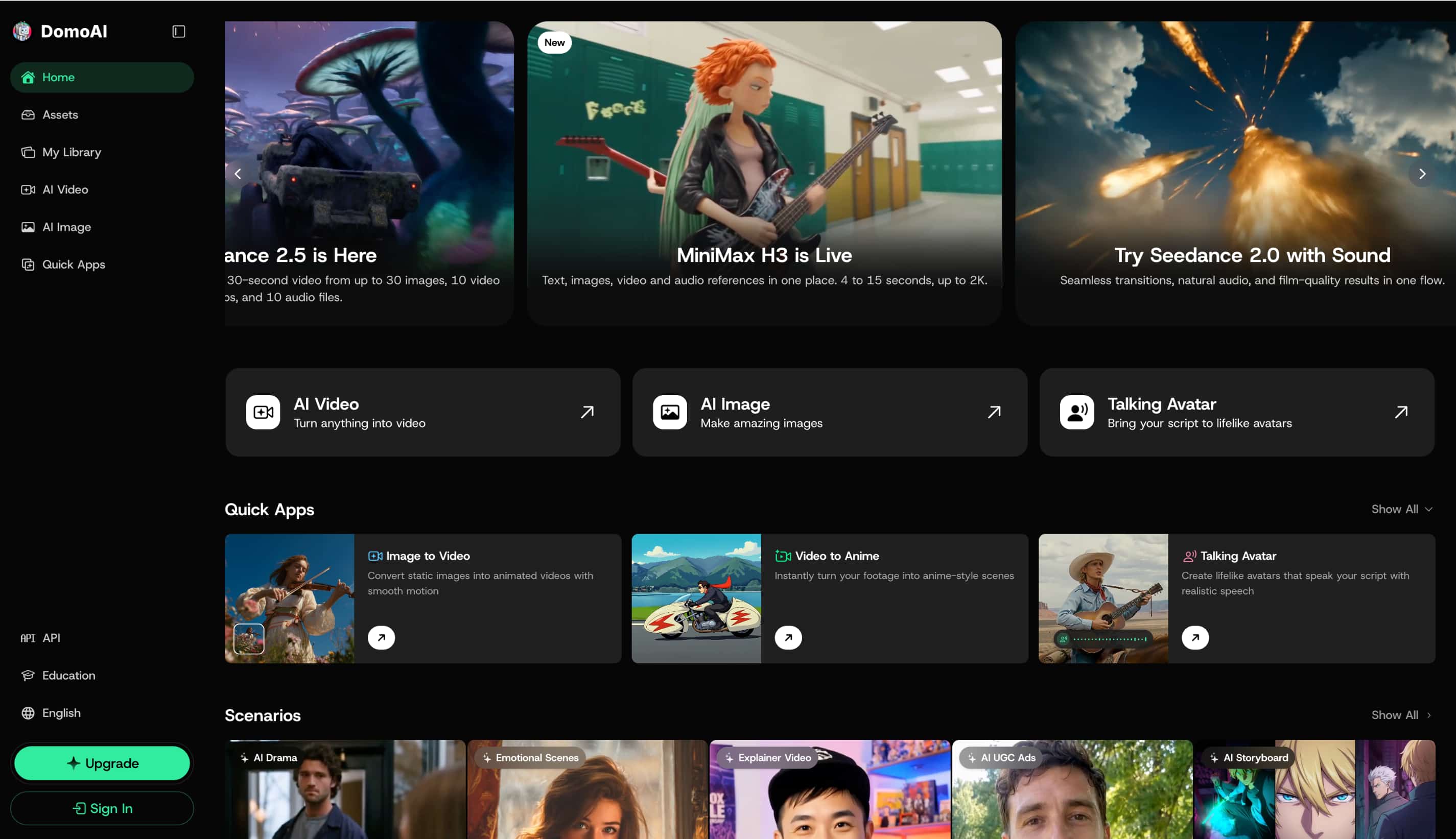
Operating as an advanced, AI-powered visual generation and stylization platform, Domo AI transforms standard media into distinct artistic creations. Instead of traditional editing, its robust tools apply intricate stylistic filters to dynamic footage. The architecture caters primarily to digital illustrators, animation enthusiasts, and short-form video creators seeking distinctive aesthetic overlays.
What can Domo AI generate?
The following matrix breaks down the primary generation capabilities available within the workspace, comparing functions against optimal use cases.
|
Capability |
What Domo AI Does |
Best Suited For |
|---|---|---|
|
Image to Video |
Animates still photos and illustrations |
Social content & motion art |
|
Video to Video |
Restyles existing video clips |
Stylized visual transformations |
|
Text to Video |
Generates video clips from text prompts |
Rapid concept exploration |
|
Video to Anime |
Converts live footage into anime aesthetics |
Animation-style creators |
|
AI Image Generation |
Renders static images from text prompts |
Visual asset generation |
Understanding these distinct functions helps streamline the creative process when building an overarching digital media strategy.
Domo AI Video features tested: Image to Video, Anime, and more
Evaluating the core tools requires rendering various file types to assess overall reliability and output fidelity. Each function behaves differently depending on the complexity of the uploaded media.
Domo AI Image to Video
The Domo AI image to video workflow involves uploading a static asset and defining the motion parameters. Motion fluidity and camera trajectory remain generally consistent, keeping the main subject anchored effectively. Edge cases occasionally occur where background elements warp or distort unexpectedly during high-intensity virtual camera pans.
Domo AI Video to Anime
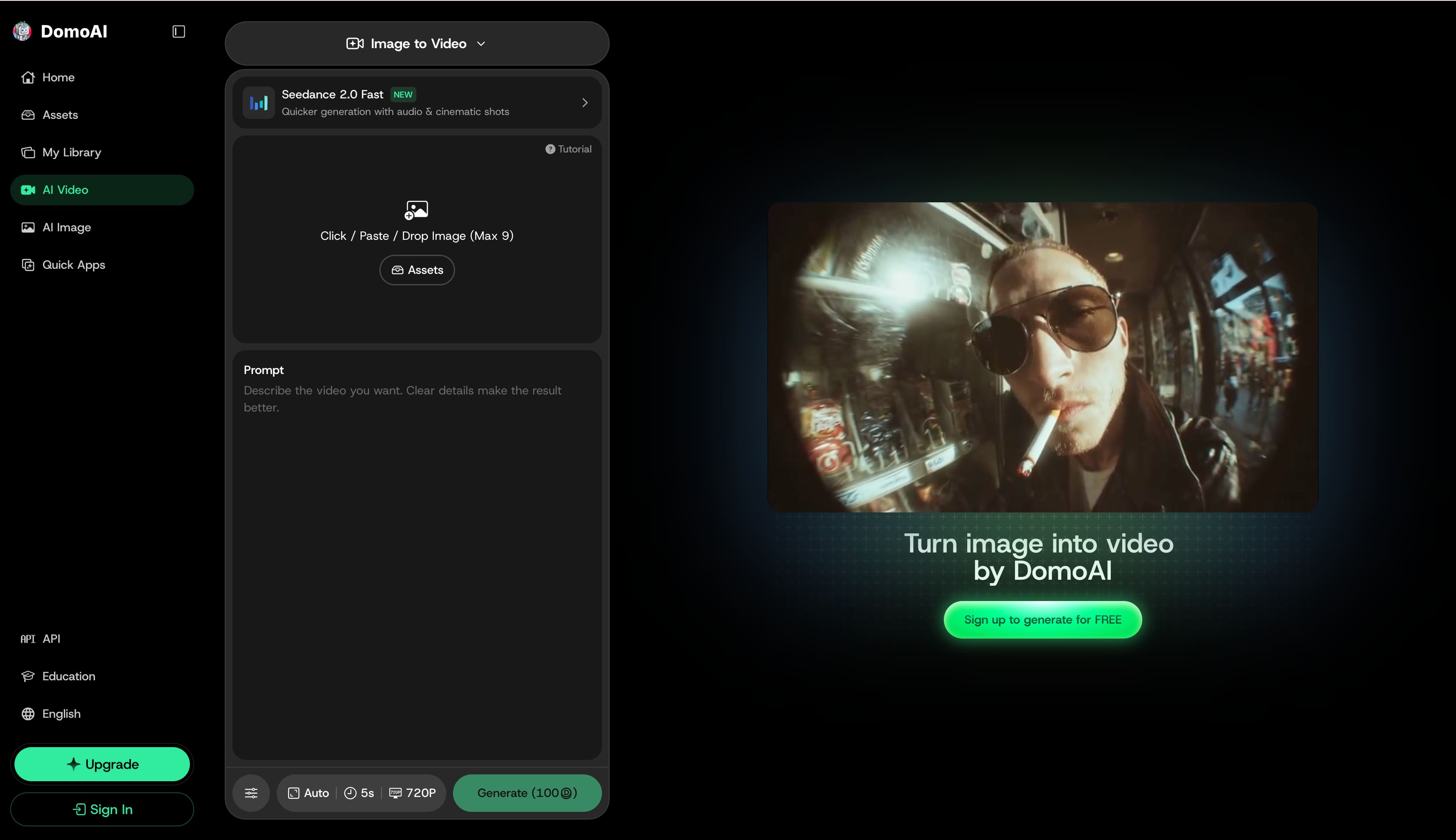
Executing a Domo AI video to anime transformation starts by uploading raw footage and selecting one of the available anime presets. Character fidelity and facial stability maintain a strong resemblance to the source material during slow movements. However, rapid movement or complex lighting shifts often cause noticeable visual artifacting across the frame.
Domo AI Text to Video
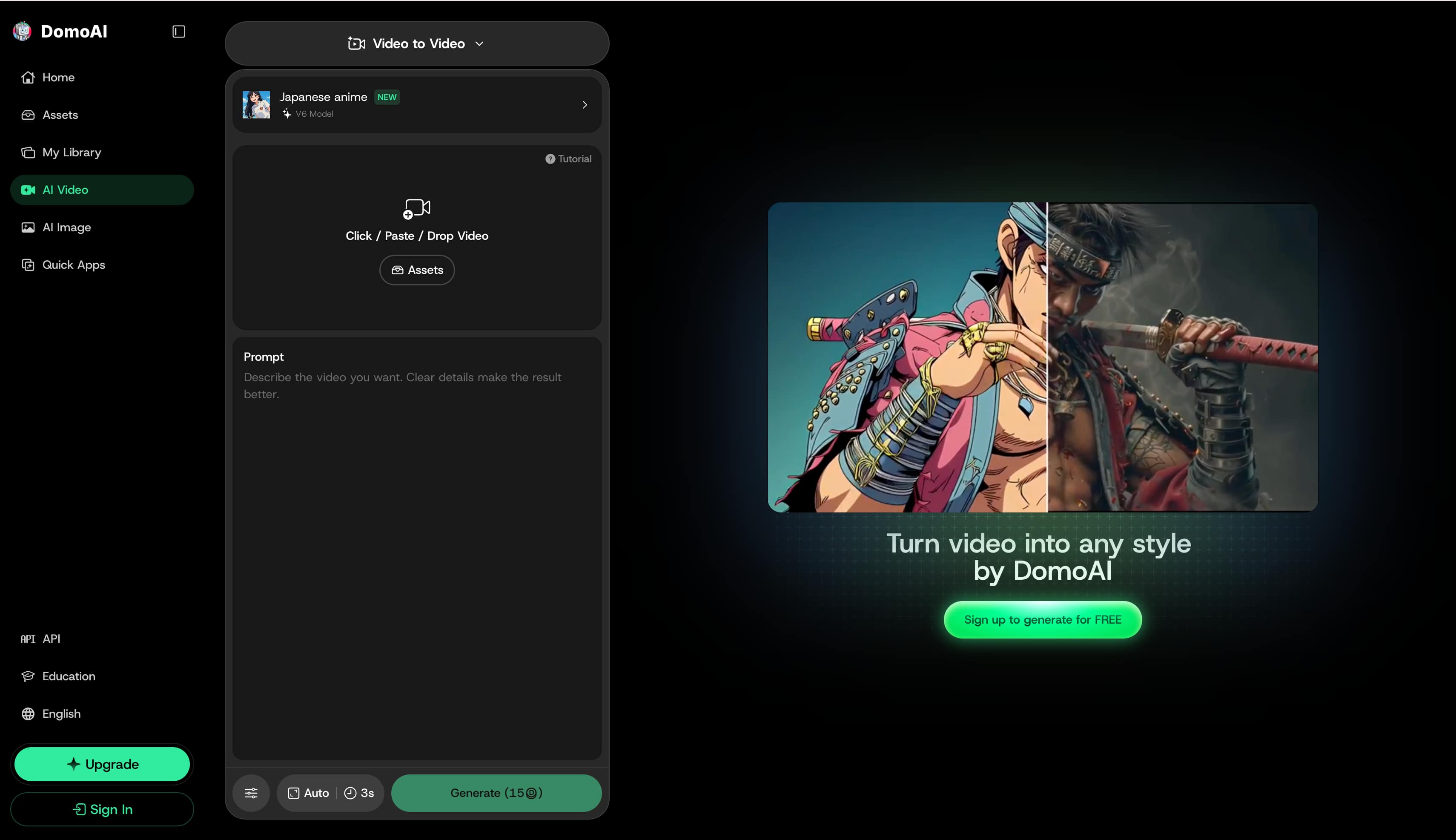
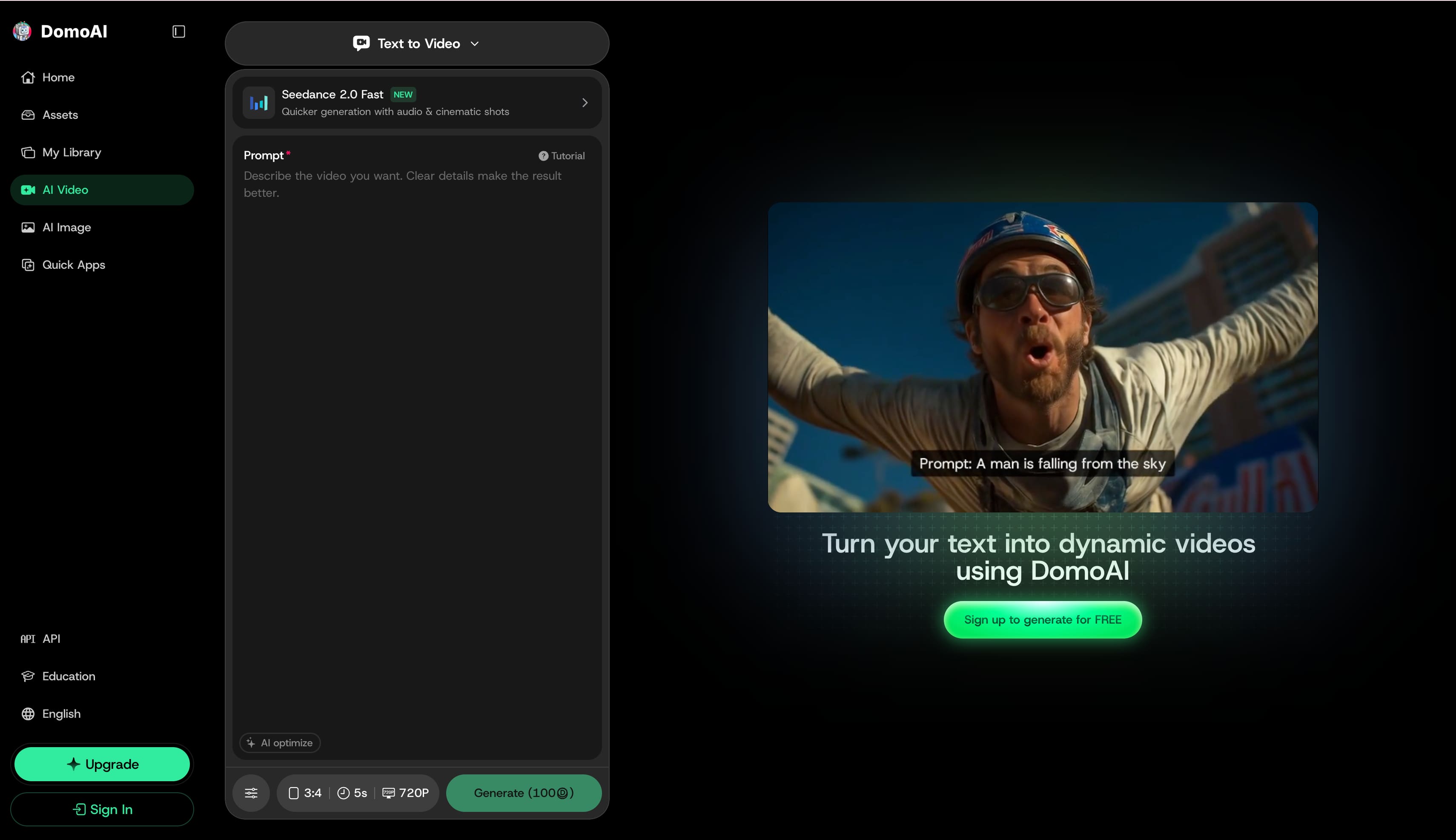
Testing the text to video pathway reveals a streamlined interface designed for transforming written descriptions into dynamic visual sequences. Selecting this mode grants access to specific rendering engines, such as Seedance 2.0 Fast, which processes cinematic shots alongside embedded audio. The workspace includes an AI optimization toggle for prompt refinement, plus granular output controls to quickly adjust aspect ratios, define clip duration, and render at 720P resolution for digital distribution.
Other Domo AI Creative Tools
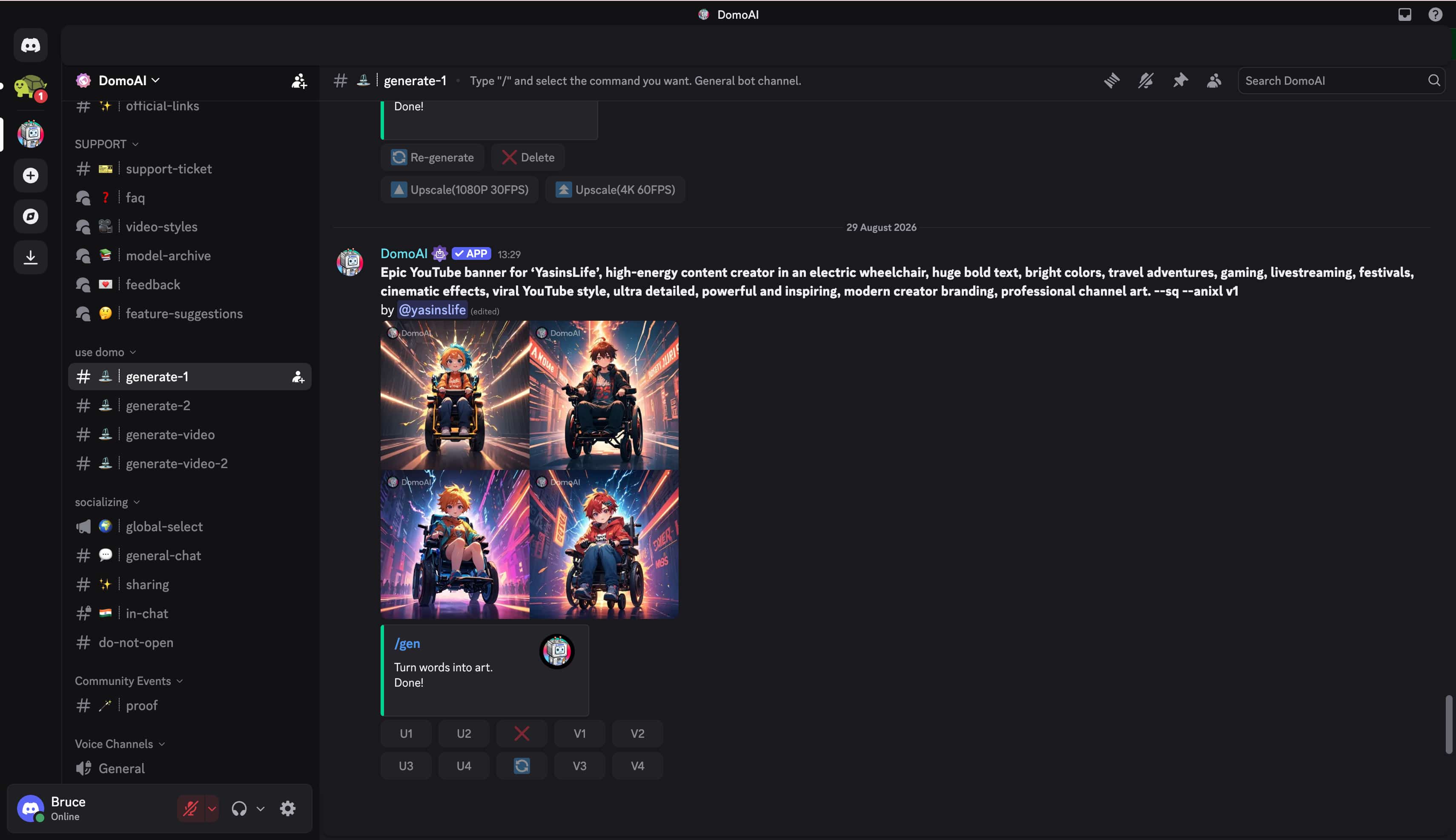
Secondary stylization models provide alternative aesthetics beyond standard animation presets, complete with dedicated character consistency tools. Operating through a Discord server provides quick access, while the web app offers a cleaner, traditional interface.
How to use Domo AI to create an AI video
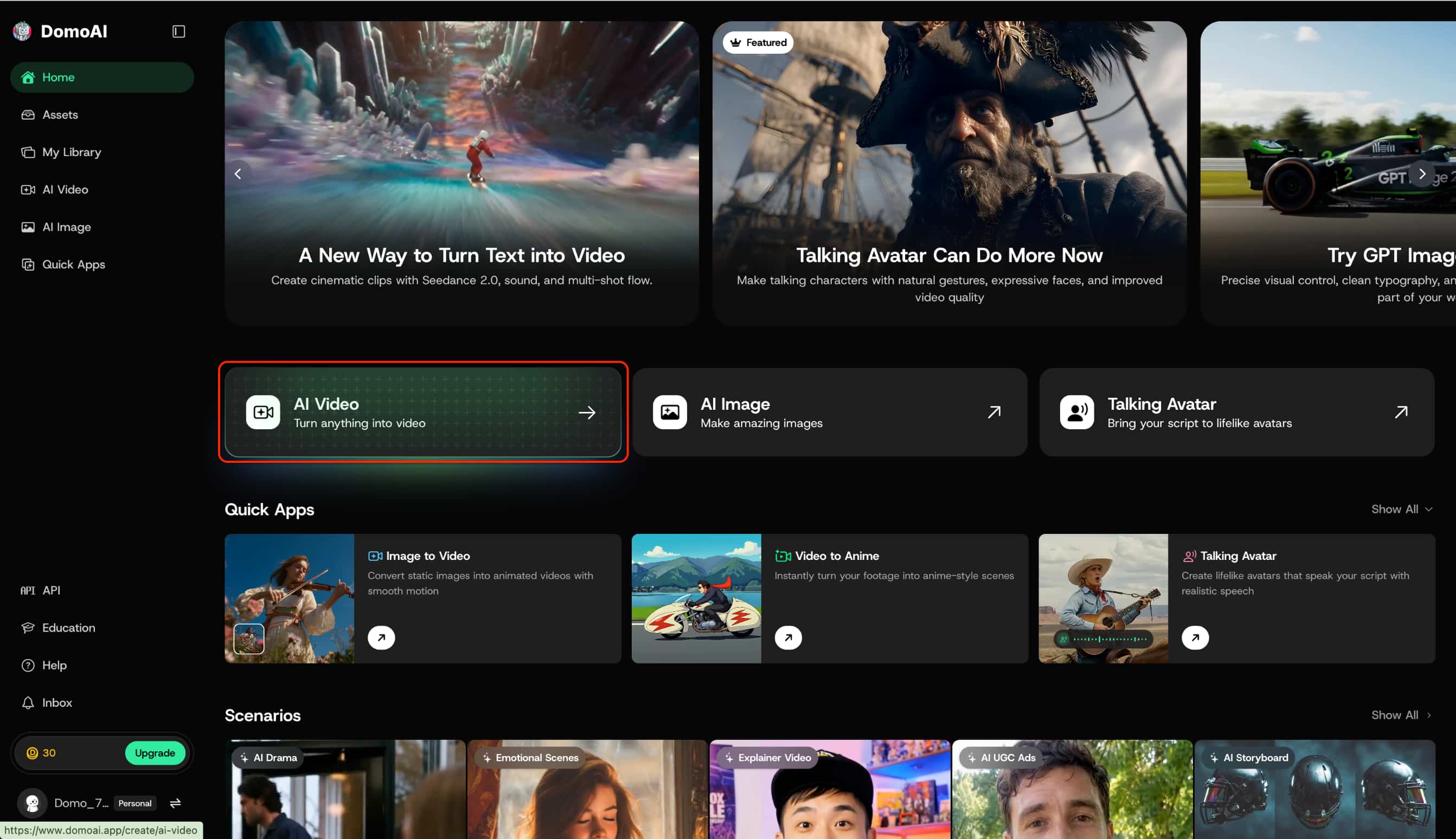
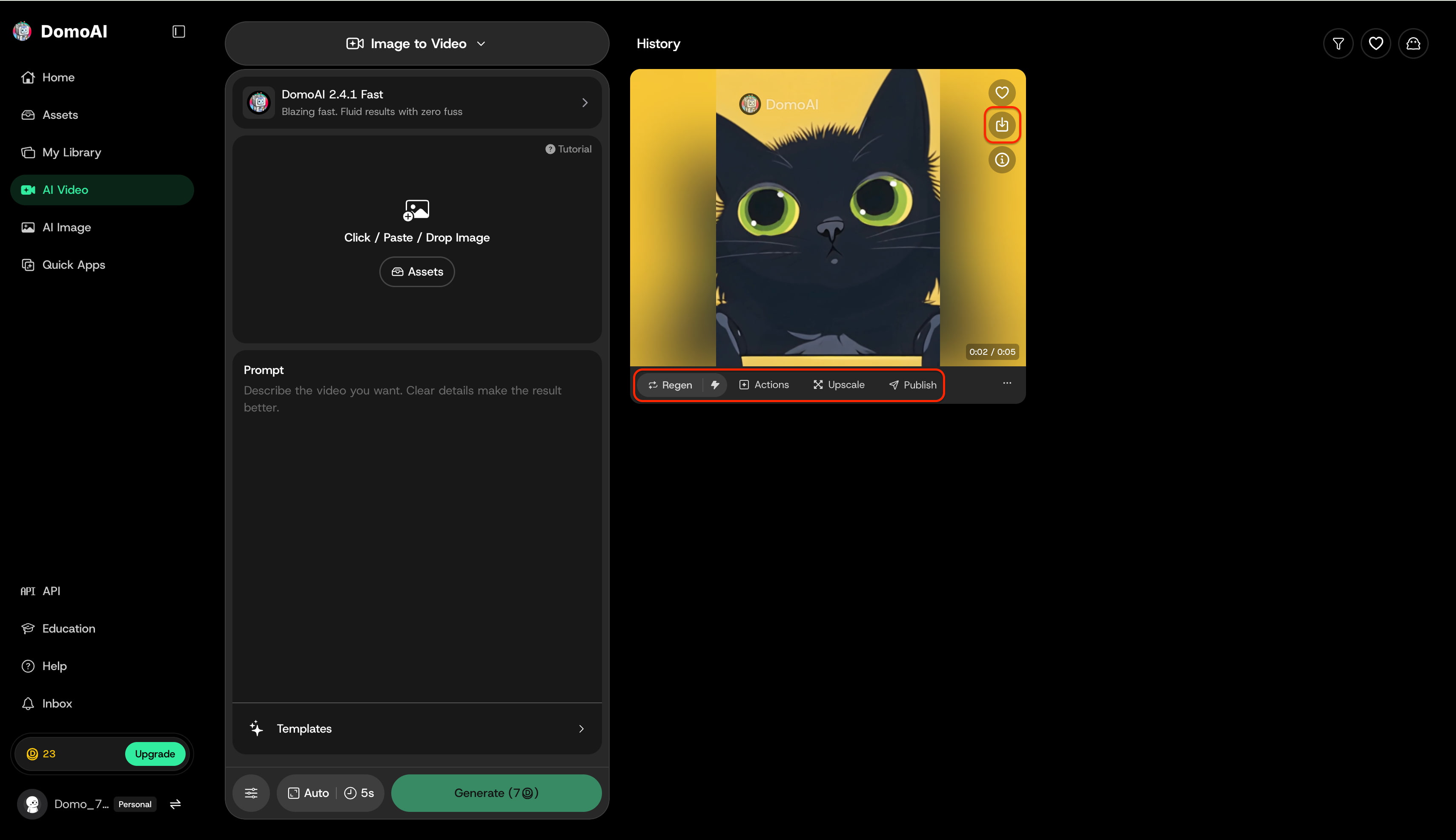
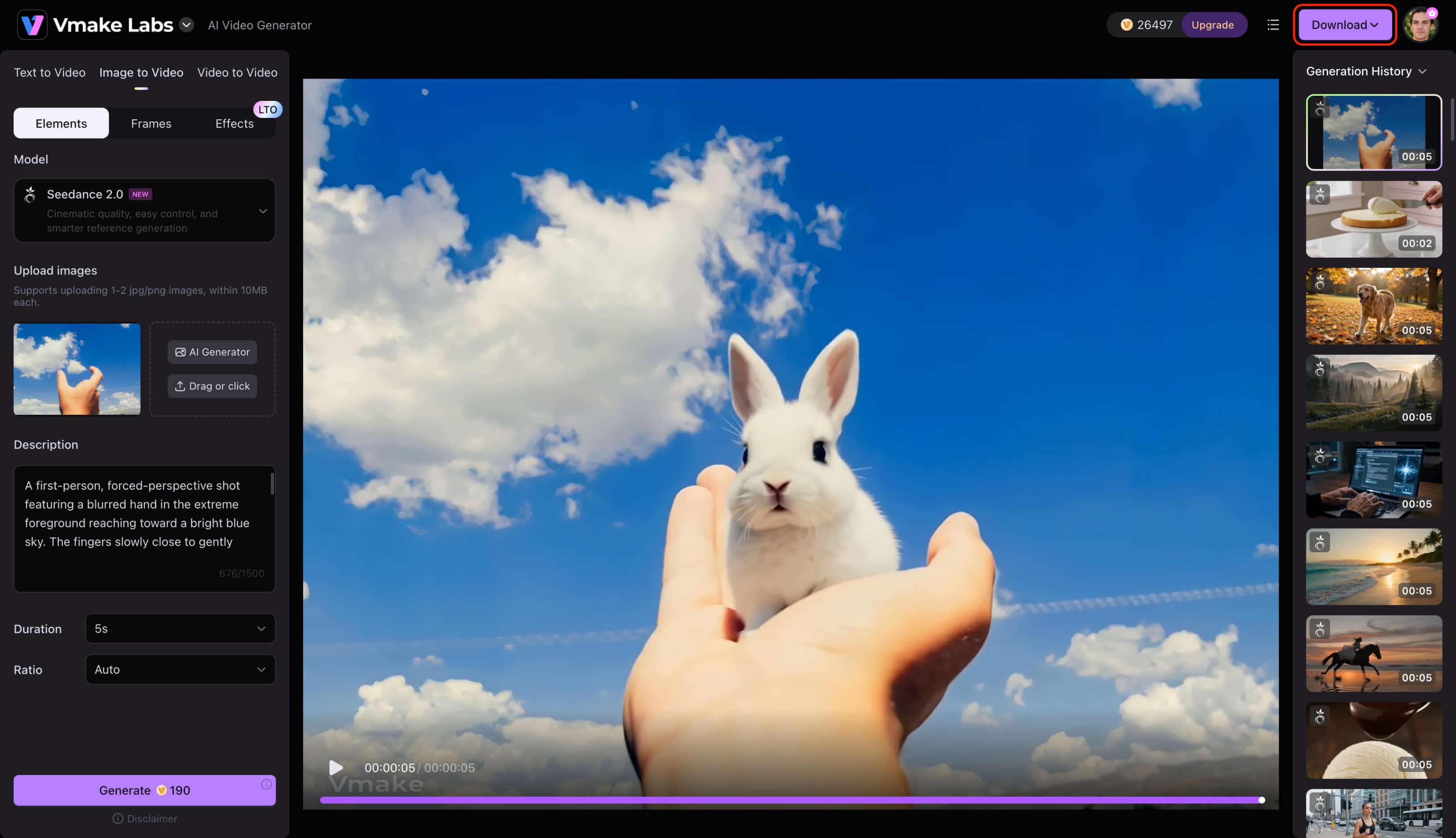
Step 1: Access the tool and select a generation method
Log into the platform dashboard and click the AI Video card to launch the main studio workspace. Alternatively, select a dedicated preset under the Quick Apps menu to start a specific workflow immediately.
Step 2: Upload your media, select models, and configure prompt settings
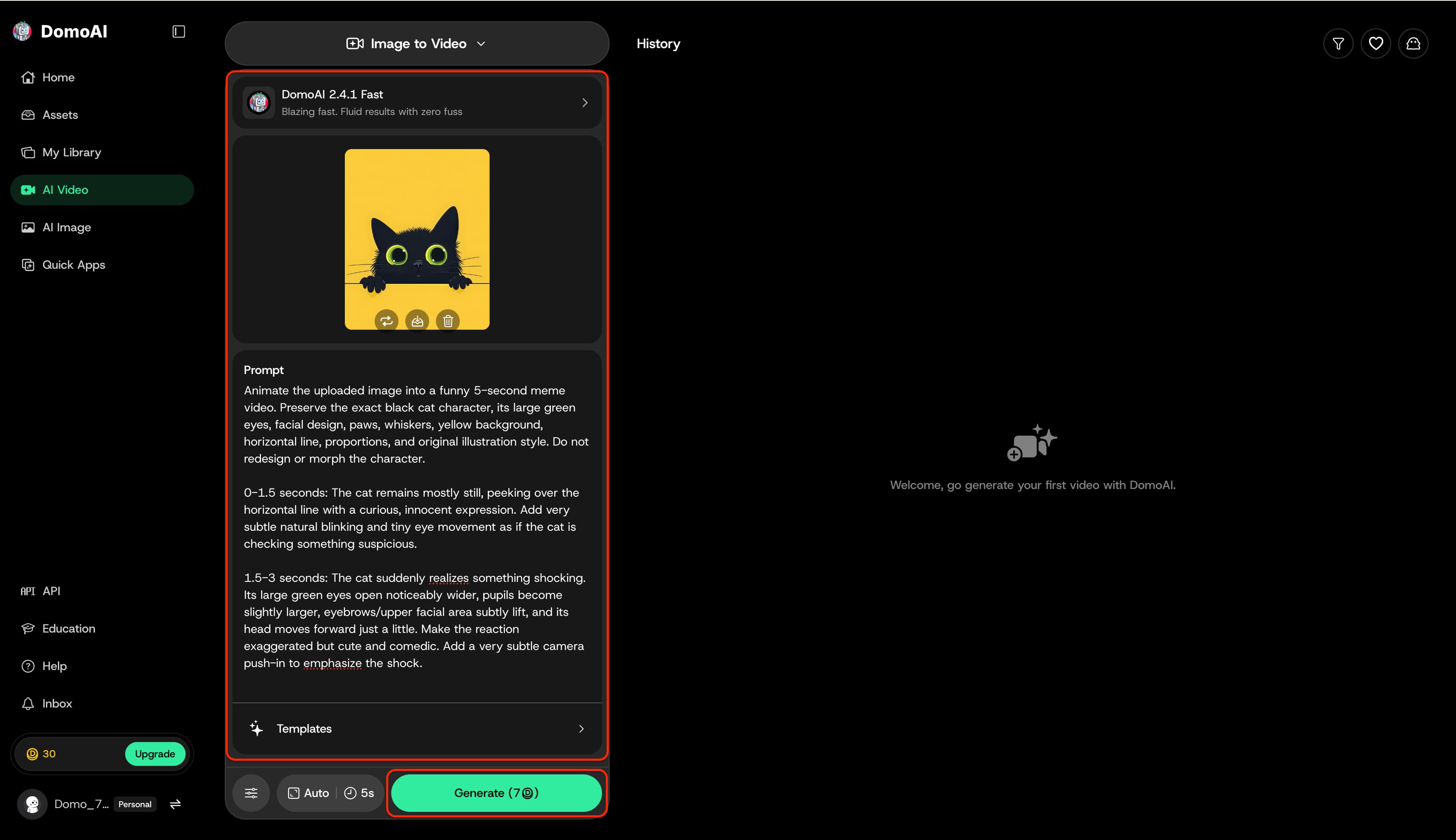
Open the top generation mode dropdown, such as Image to Video or Text to Video to pick a functional approach, then use the menu directly below it to assign a rendering engine like Seedance 2.0 Fast or DomoAI 2.4.1 Fast. Afterward, upload a source graphic, enter a descriptive prompt, and configure the bottom-bar parameters before initiating the render.
Step 3: Generate, preview, and export the finalized video
Click the Generate button to begin processing and monitor the real-time progress percentages. Once rendering finishes, review the results in the history viewer and click the Download icon to save the high-resolution file. Quick tools for upscaling or regenerating the clip also remain accessible on the bottom toolbar for immediate revisions.
Input image:

Resultant video:
Domo AI review: What worked and what could improve
A comprehensive evaluation highlights several structural advantages alongside a few technical bottlenecks. Identifying these factors clarifies the platform's practical viability for daily workflows.
What I liked about Domo AI
-
Distinctive anime and illustrative transformation presets stand out immediately.
-
Beginners experience a remarkably low learning curve.
-
Short clips benefit from highly efficient processing turnaround times.
What could Domo AI improve?
-
High-motion scenes occasionally exhibit temporal flickering and facial morphing.
-
Granular timeline controls and camera adjustments feel highly restricted.
-
Consumption of processing allocations on failed or imperfect generations slows down iteration.
Domo AI user feedback & community sentiment

-
Creative and Editing Capabilities
-
One-Click Animation: The Reddit community highly values the video-to-anime feature for its smooth motion handling and vibrant color output.
-
Automated Editing: The platform excels at pacing slice-of-life videos. User Bulky-Departure6533 notes it automatically syncs emotional beats and transitions, eliminating the need for complex manual editing or strict scripts.
-
Organic Motion Tracking: The character-to-video tool is praised across forums for accurately mimicking human movement from reference footage, supported by a strong integration of multiple generation models.
-
Usability and Output Limitations
-
Avatar Animations: While voice cloning is functional, generated talking avatars occasionally suffer from rapid blinking and exaggerated head movements.
-
Prompt Accuracy: Basic text prompts can hallucinate unrequested elements. Angus Nguyen reported random additions to generations, though Justin Cazaly noted that specific reference features consistently follow user instructions well.
-
Free-Tier Unreliability: The free-generation mode frustrates some creators. Otega Okoligwe abandoned their subscription, stating the mode ignores prompts and outputs completely random generations.
-
Pricing, Billing, and Support
-
Credit Drain: A major pain point is the strict content filter. J.A. Koning reported that the system deducts paid credits even when generations are rejected for false-positive violations.
-
International Checkout: Global billing processes have caused trust issues. CU customer experienced instant charges without clear currency conversions or final confirmation screens.
-
Inconsistent Support: Customer service experiences are polarized. GROOVE MAKER reported unprofessional handling of refund requests and confusing usage logs before management intervention.
Domo AI: Pros and cons
Balancing the advantages against the limitations provides a clearer picture of overall utility. This comparison highlights where the engine thrives and where it struggles.
|
Pros |
Cons |
|---|---|
|
Broad selection of anime & artistic styles |
Output consistency requires multiple rerolls |
|
Fast processing for short-form clips |
Granular camera and timeline control is limited |
|
Accessible web and community interfaces |
Credit-based systems can be costly for heavy usage |
|
Strong community for prompt sharing |
Occasional temporal flickering in high-action scenes |
Evaluating these factors ensures realistic expectations before integrating the toolset into an established production pipeline.
Is Domo AI free, and how much does it cost?
Financial structures dictate scalability for ongoing projects. Analyzing the pricing tiers clarifies long-term sustainability for independent developers and larger studios.
Does Domo AI have a free plan?
According to the official plans and pricing documentation, Domo AI does not offer a permanent, recurring free plan; instead, it provides new users with a one-time Free Trial.
-
Starter Credits: The Free Trial comes with 15 initial credits.
-
Access: This trial allows you to access and test Domo AI's generation tools and interface without needing to purchase a paid subscription.
-
Limitations: Because it is a one-time allowance, the 15 credits do not renew, meaning the trial is meant for validating the workflow rather than supporting ongoing weekly video production.
-
When to Upgrade: You will need to upgrade to a paid tier when you run out of your initial credits, or when you need to bypass free-tier limitations such as watermarks, duration caps, or slow queue times.
What do Domo AI paid plans include?
The available subscription packages scale based on processing volume and speed requirements.
|
Plan Tier |
Monthly Price |
Monthly Credits |
Key Features |
Best For |
|---|---|---|---|---|
|
Basic |
$9.99 / mo |
500 (~100 videos) |
|
Beginners & light testing |
|
Standard |
$27.99 / mo |
1,500 (~300 videos) |
|
Regular content creators |
|
Pro |
$69.99 / mo |
4,000 (~800 videos) |
|
Power users & active editors |
|
Team |
$142 / seat / mo |
24,000 (3-seat base) |
|
Agencies & production teams |
Selecting the correct tier prevents workflow disruptions during high-output rendering phases.
Is Domo AI worth paying for?
The final cost-to-value verdict based on volume, niche (anime/art vs. realism), and budget leans toward positive for specific users. For those prioritizing anime styles, the investment proves worthwhile, whereas users seeking photorealism might prefer alternative platforms.
While stylized animation offers unique creative avenues, many modern digital campaigns demand photorealistic fidelity and versatile rendering tools. Transitioning to a comprehensive platform like Vmake Labs, equipped with diverse multi-model engines, provides the necessary flexibility and control for professional growth.
Domo AI alternative: Is Vmake Labs a better fit?
Exploring alternative solutions reveals platforms tailored specifically for high-definition realism and digital scaling. Evaluating a Domo AI alternative helps pinpoint the ideal software for specific marketing demands.
When Vmake Labs makes more sense
Vmake Labs is an ultimate AI social video studio that helps small businesses generate, enhance, and optimize videos to capture attention, build brands, and drive sales. This video generator provides an expansive ecosystem designed specifically for social media dominance. By integrating industry-leading models, the platform streamlines the entire production pipeline. Marketers and independent developers can rapidly prototype, refine, and deploy high-converting visual assets without requiring extensive technical expertise.
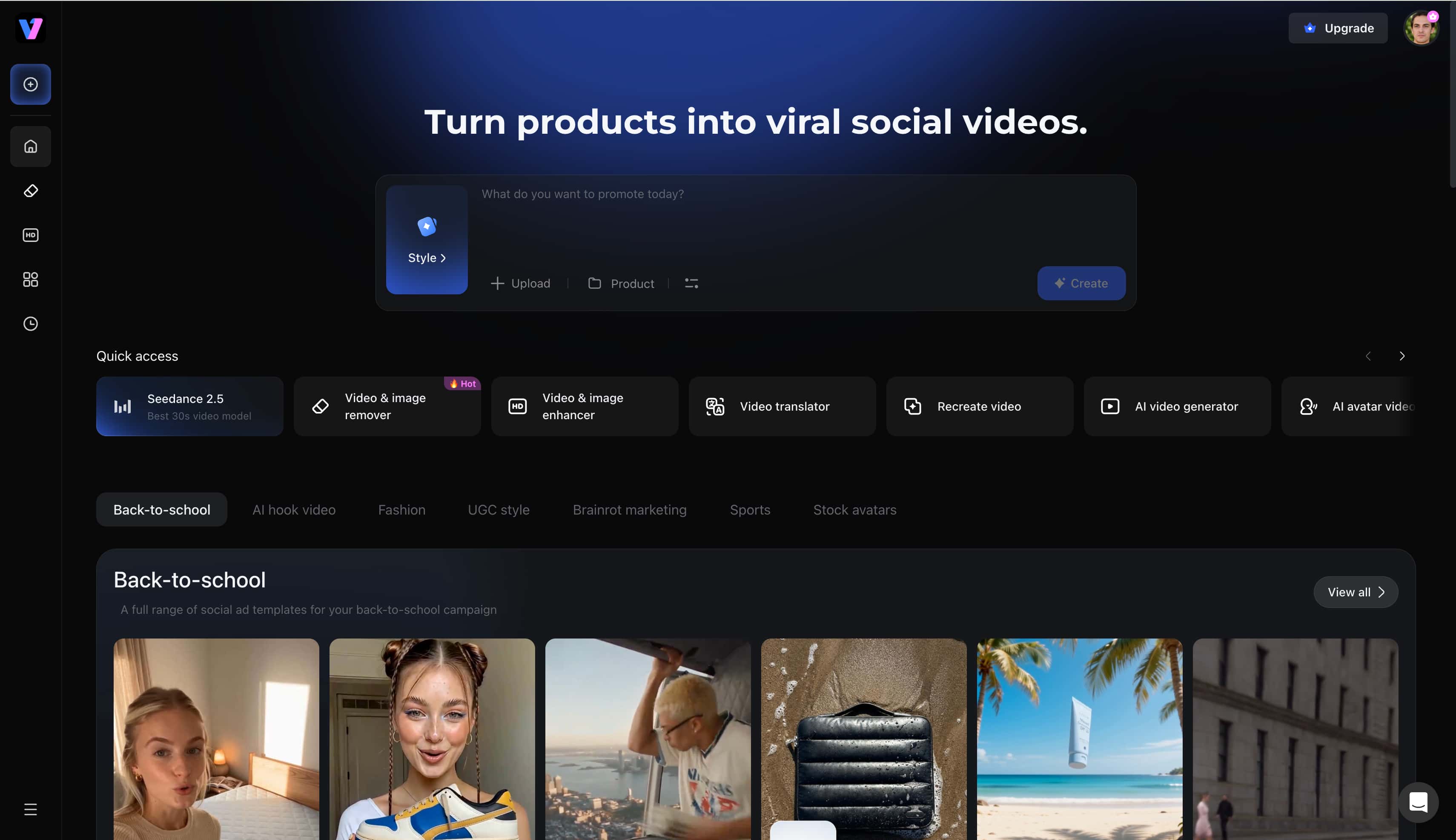
Key Features
-
Multi-Model Engine: The platform unifies premier video architectures, including Kling, Hailuo, Sora, Wan, and Seedance 2.0, into a single creation suite. Creators can effortlessly switch between these specialized generative engines to achieve the exact visual fidelity required for any project.
-
Image-to-Video Transformation: Transforming static assets into dynamic sequences requires precision and stability. The image to video generator ensures consistent subject anchoring while introducing fluid motion. This maintains high fidelity across every rendered frame without unwanted morphing.
-
First and Last Frame Precision: This capability allows precise control over starting and ending visual states for perfect looping mechanics. Editors utilize this HD video converter environment to maintain consistent quality across high-resolution social exports.
-
Product Video Templates: Automated frameworks allow rapid assembly of e-commerce advertisements. The integrated video enhancer automatically upscales footage to ensure maximum clarity on social feeds. These templates eliminate the guesswork from structuring high-converting promotional content.
Domo AI vs. Vmake Labs feature comparison
A direct feature comparison clarifies the distinct operational advantages of each platform.
|
Feature and Factor |
Domo AI |
Vmake Labs |
|---|---|---|
|
Primary Strength |
Anime and stylized video transformation |
High-res and social-ready AI video production |
|
Image to Video |
Supported (Stylized and artistic) |
Supported (Photorealistic and high-fidelity) |
|
Video to Video |
Supported (Style transfer) |
Supported (Enhancement and modification) |
|
Multiple AI Models |
Not available (Single proprietary pipeline) |
Supported (Kling, Hailuo, Veo, Sora, Wan, and others) |
|
First and Last Frame Control |
Not available |
Supported |
|
E-Commerce Video Tools |
Limited |
Supported (Model swapping, product video generation) |
|
Best Suited For |
Anime creators and digital artists |
Marketers, brands, and social media managers |
This side-by-side breakdown highlights the shift from purely artistic stylization toward comprehensive digital utility.
How to generate a video with Vmake Labs
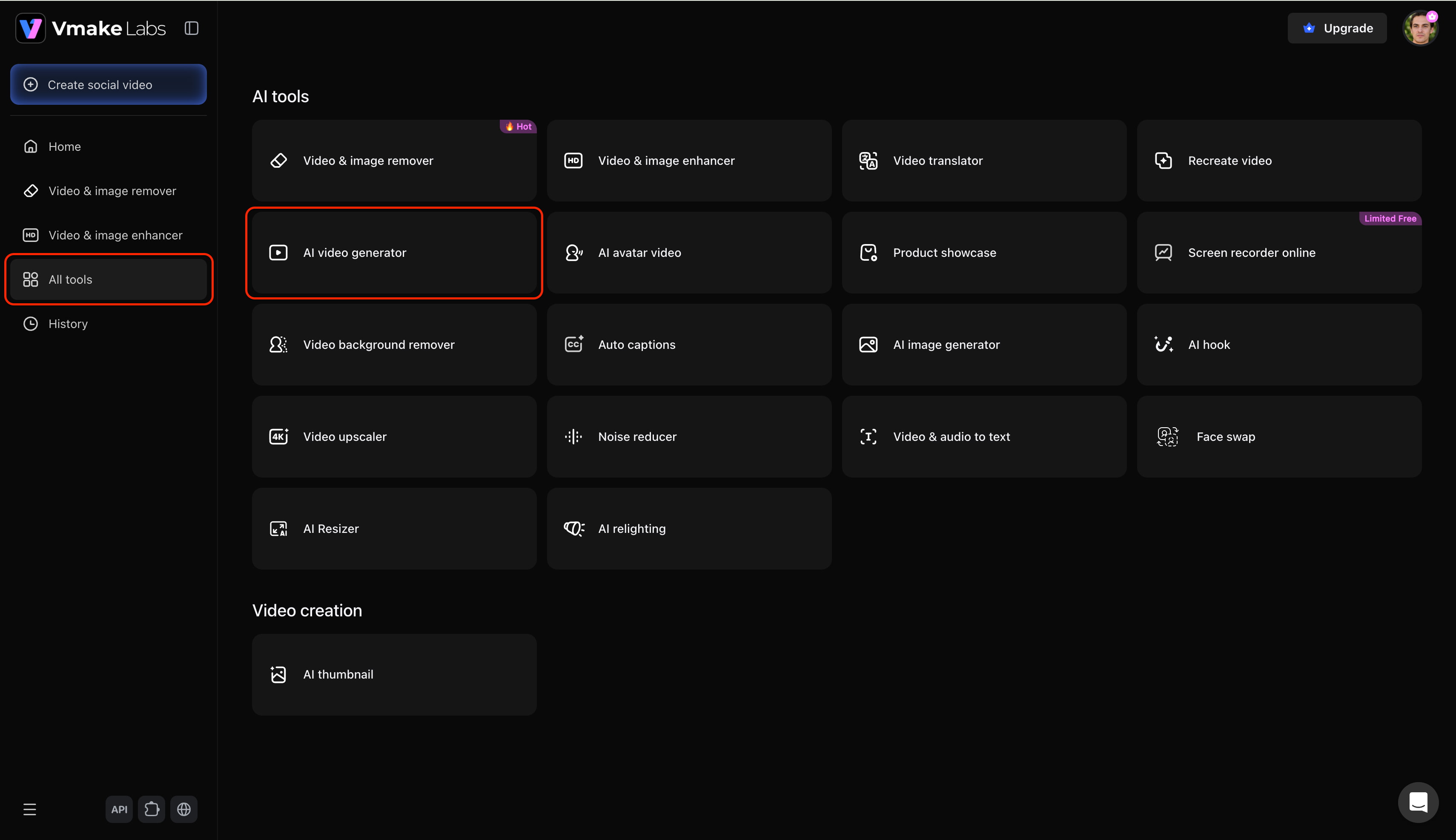
Step 1: Access the AI video generator feature
Start by logging into the Vmake account and navigating to the main dashboard. Next, open the "All tools" menu and select the "AI video generator" option to launch the creative workspace.
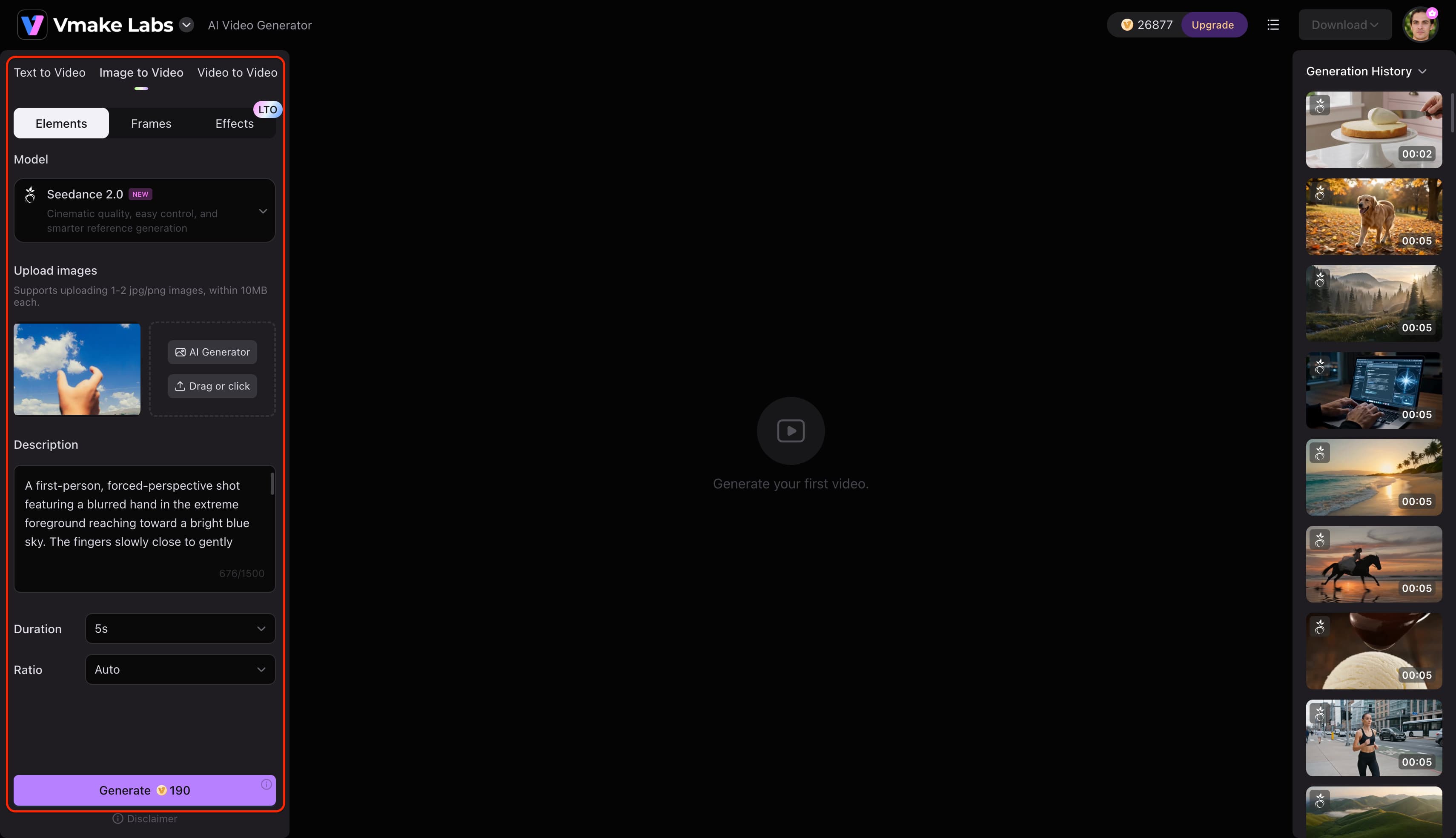
Step 2: Input the video creation details
A new interface will open to accept specific production parameters. The platform supports text-to-video, image-to-video, and video-to-video pathways. Simply choose a preferred AI model (such as Seedance, Veo, or Kling), provide a detailed prompt or reference asset, set the desired duration and aspect ratio, and then click on "Generate".
Step 3: Export the AI-generated video
The engine will process the request and display the finalized footage directly on the screen upon completion. Review the visual fidelity, then click on the "Download" option to export the high-resolution file for immediate sharing or professional publishing.
Conclusion
In summary, this platform delivers distinct advantages for digital artists prioritizing artistic stylization and rapid animation transformations. However, the restrictive token allocation and lack of granular timeline controls present tangible bottlenecks for high-volume workflows. For independent marketers or social media managers requiring photorealistic fidelity, flexible rendering engines, and extensive social templates, exploring robust alternative solutions ultimately ensures superior production scalability and visual consistency throughout 2026.
FAQ
What is Domo AI used for?
The application excels at stylizing existing videos and generating robust anime transformations from standard footage. Additionally, it effectively animates static artwork to create engaging Domo AI video sequences for digital distribution.
Is Domo AI free to use?
New users receive a limited trial allowance to test the generation tools without immediate payment. Sustained daily usage requires purchasing a subscription to bypass restrictions and access premium rendering speeds.
How well does Domo AI handle video-to-anime conversion?
Character fidelity and general motion tracking remain quite stable during slow or moderate movements. Visual artifacts occasionally emerge when the engine processes rapid action or complex, overlapping background elements.
Can Domo AI videos be used for commercial projects?
Licensing permissions vary significantly depending on whether the output originates from a free trial or a paid tier. Paid subscribers generally retain broader rights, though checking the latest terms of service remains essential.
Does Domo AI require Discord, or is there a web interface?
The platform originally relied heavily on a Discord bot workflow for processing prompt generation requests. A dedicated web browser interface now exists, offering a cleaner workspace for those who prefer traditional software navigation.
What is the best Domo AI alternative for e-commerce and social ads?
Vmake Labs operates as a highly capable shoppable video generator engineered to maximize versatile digital production. The inclusion of multi-model support ensures marketing teams can produce diverse, high-definition promotional materials efficiently.

You May Be Interested

Z Image AI Review 2026: Features, Performance, Pros and Cons
Yodayo AI Review 2026: Features, Pricing, and Alternatives
X-Design Watermark Remover Review (2026): Features & Pricing
Vidu AI Review: Is This AI Video Generator Worth in 2026?
Vadoo AI Review 2026: Features, Pricing and Alternatives
VEED Review: Does the Watermark Remover Work? (2026)

Vivideo AI Review 2026: Features, Pricing and Alternatives
Unlucid AI Review: Is this AI platform worth it in 2026?
