
Digen AI Review: Is It Worth Using in 2026?
See what our Digen AI review found about video generation, image-to-video quality, watermark removal, pricing, user feedback, and how it compares with Vmake Labs AI Video Generator as an alternative.

Digen AI brings together AI video creation, image-to-video generation, and tools such as watermark removal in one platform. But features alone do not tell the full story. In this Digen AI review, we look at its video results, ease of use, pricing, free access, and user feedback to see where it fits in 2026.
What can you do with Digen AI?
Digen AI brings several AI-powered creation and editing tools into one platform, with a focus on generating and modifying visual content. It is particularly relevant for users who want to create videos from prompts or images, while also having access to tools such as watermark removal and other image-processing features.
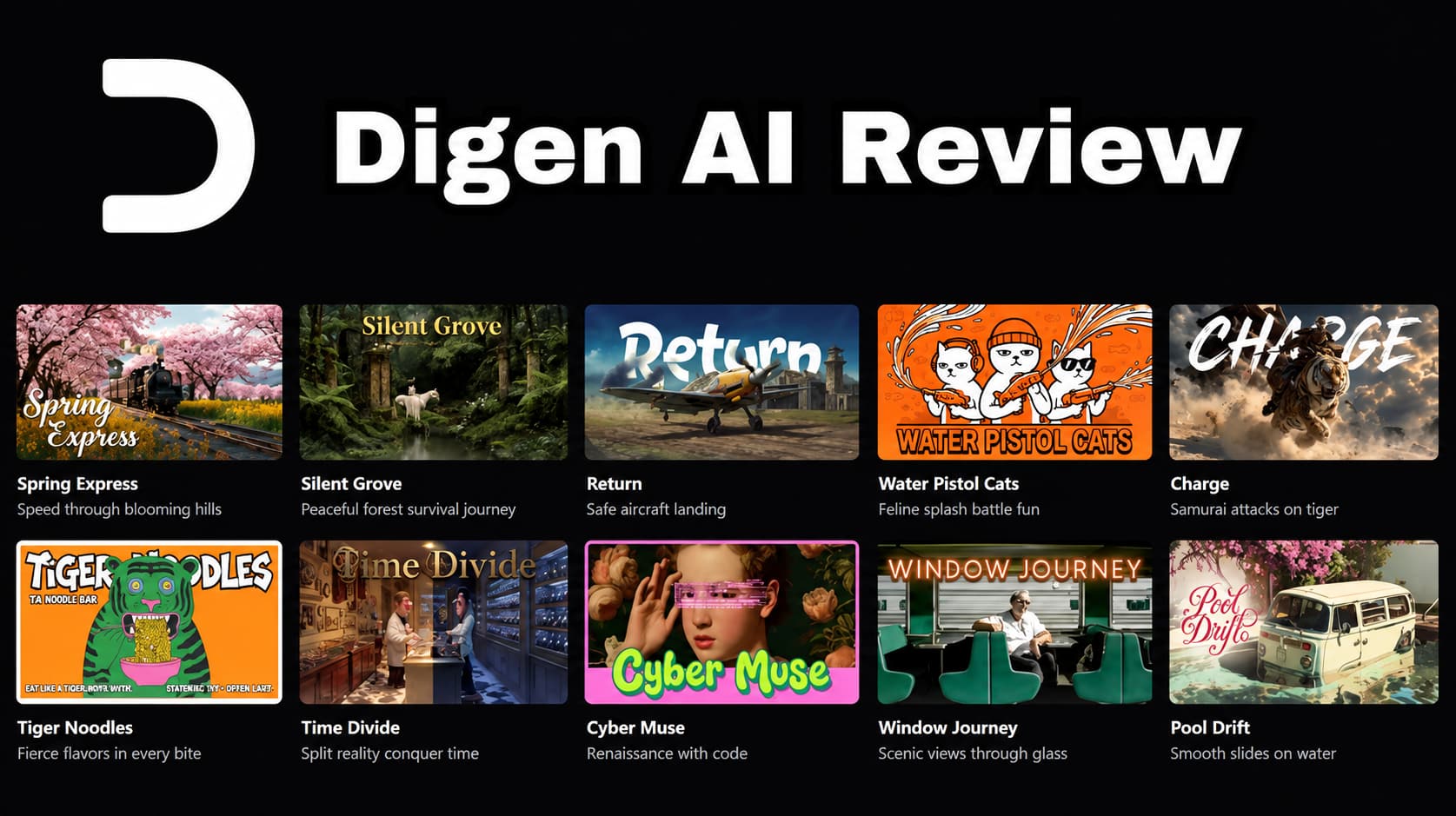
Digen AI at a glance
Digen AI is designed for creators and other users who want to generate short-form visual content without relying entirely on traditional editing workflows. Its main use cases include AI video creation, image-to-video generation, and visual editing. Users can start with a creative input, choose the relevant workflow, generate or edit the result, and refine it before exporting.
Digen AI features worth knowing
-
AI video generation: Create short video clips from creative inputs without building every scene manually from scratch. The available generation options make Digen AI useful for social content, creative experiments, and other short-form projects.
-
Image-to-video: Turn a still image into a moving clip while keeping the original visual as the starting point. This can be useful for animating photos, artwork, product visuals, or other static assets.
-
Watermark removal: Digen AI includes a tool for removing watermarks from supported images or videos. The quality of the result can vary depending on the watermark's position, size, and the surrounding visual content.
-
Image and video editing: Beyond generation, Digen AI provides editing or enhancement capabilities that can help users refine existing visual assets instead of generating everything from scratch.
-
Free access: Digen AI offers a free way to access its tools, although free usage comes with limitations. Users who need more generations or fewer restrictions may need to consider its paid options.
Putting Digen AI to the test
Rather than judging Digen AI only by its feature list, we focused on how it performs when creating and editing visual content. The testing looked at the main workflows a typical user would try, including video generation, image-to-video, and watermark removal, with attention to output quality, consistency, and how much refinement was needed.
How to make a video with Digen AI
Step 1: Choose a creation workflow Select the video-generation option that best matches your project. Choose a text-based workflow if you are starting with an idea, or an image-based option if you already have a visual reference.

Step 2: Add your prompt or image Enter a clear description of the scene or upload your reference image. Add any available settings that can help shape the result before starting the generation.
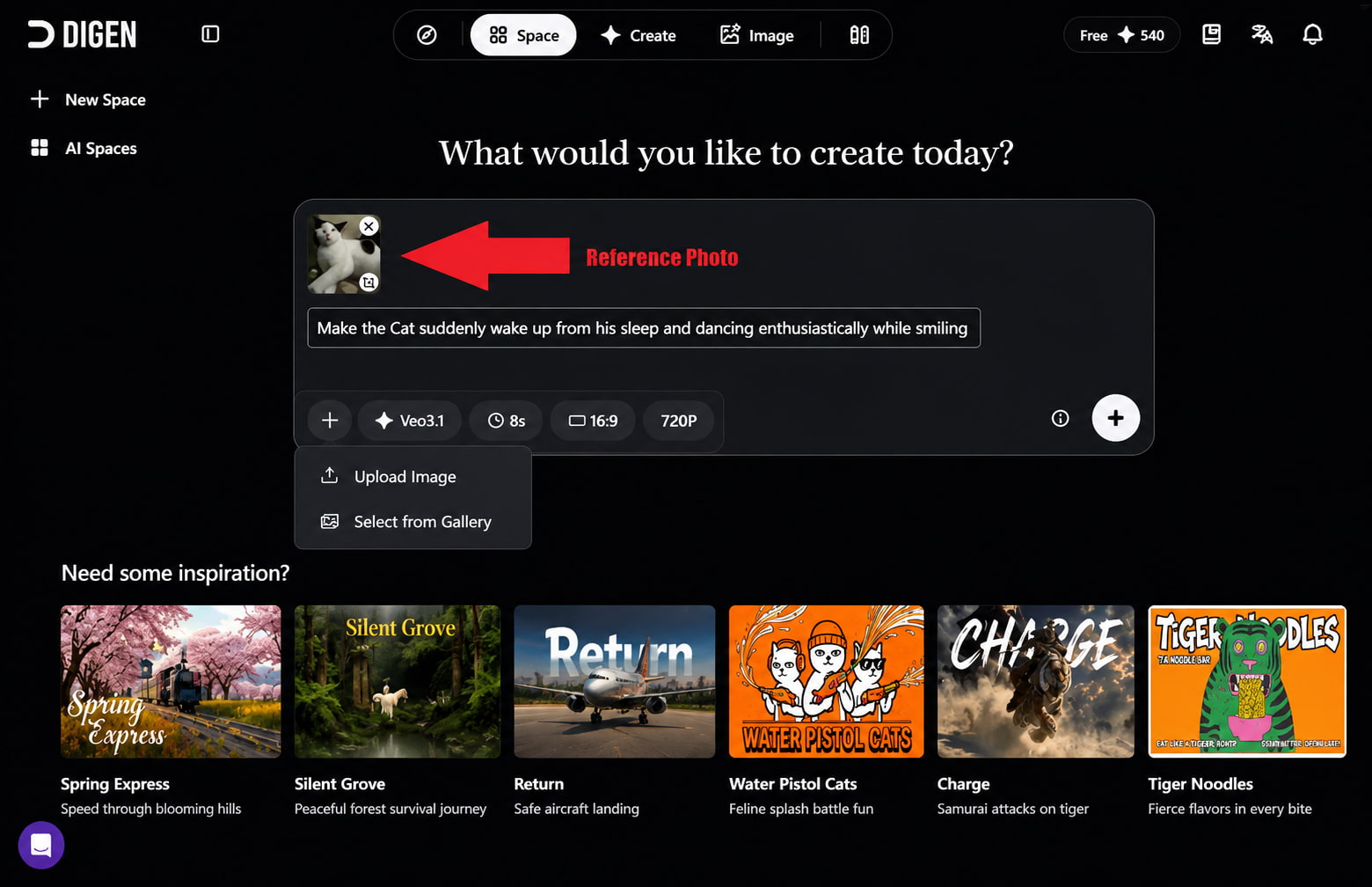
Step 3: Generate and refine the result Generate the video and review the output for motion, subject consistency, and overall quality. If the result misses the prompt or needs cleaner movement, adjust your input and regenerate it.
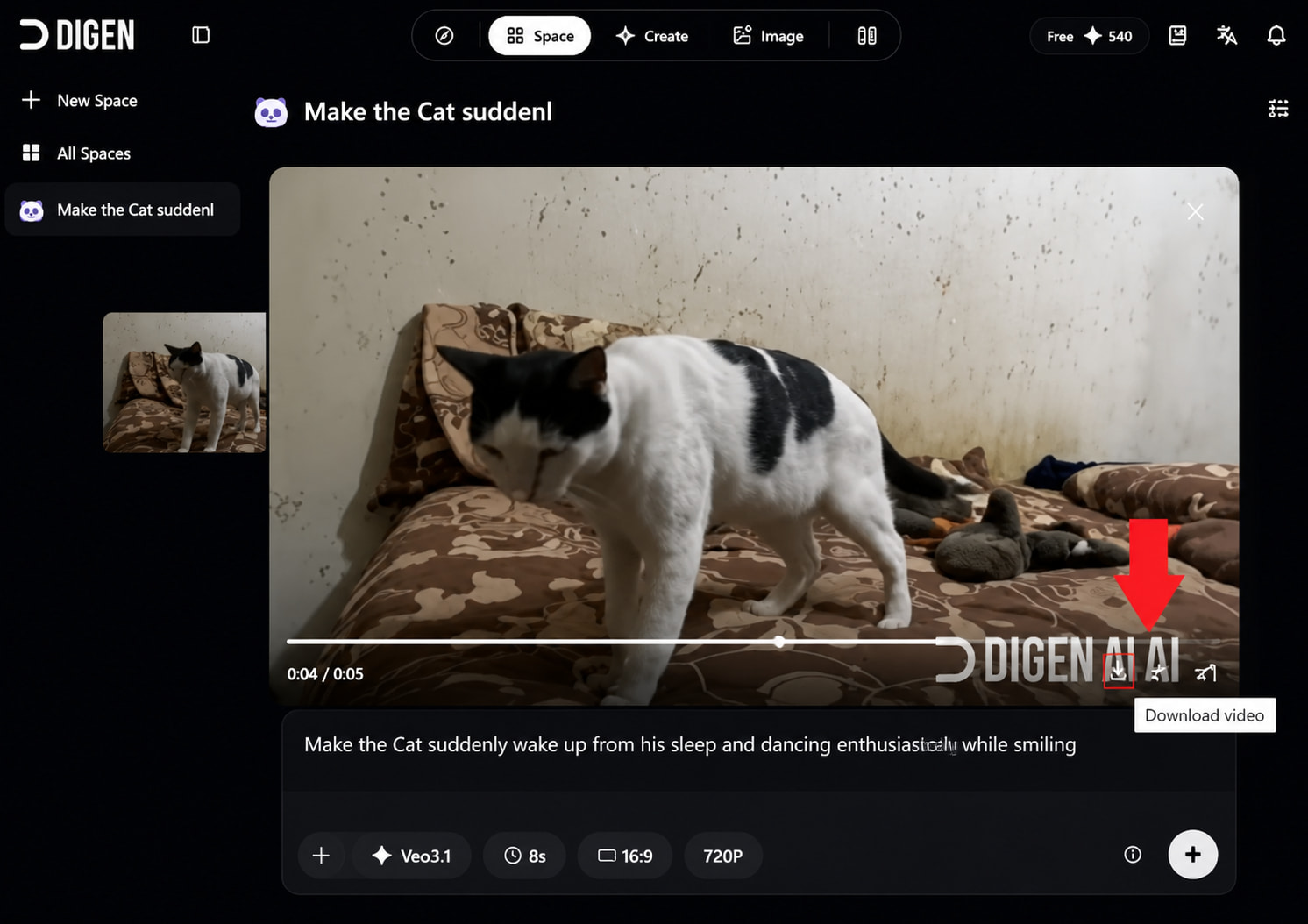
Our Digen AI testing process
We tested Digen AI across the main workflows covered in this review rather than relying only on its feature list. The tests included image-to-video, AI video generation, creative/social content, and watermark removal. We looked at how closely the output followed the input, how natural the motion appeared, whether subjects stayed consistent, and how often a result needed to be regenerated.
|
Test scenario |
What we evaluated |
|---|---|
|
Image-to-video |
Motion, subject preservation, prompt adherence |
|
AI video generation |
Scene quality, prompt accuracy, consistency |
|
Creative/social video |
Composition, movement, visual appeal |
|
Watermark removal |
Removal quality, artifacts, output quality |
Video quality and generation results
Digen AI delivers usable results for short-form video, with the best outputs coming from clear prompts and well-defined reference images. Its image-to-video workflow can add natural-looking movement to static visuals, while more detailed scenes may need additional generations to get the desired result. Overall, the main strengths are straightforward generation and useful image-to-video results, while inconsistent motion, subject changes, and occasional visual artifacts can affect weaker outputs, making a quick review and regeneration worthwhile before using the final clip.
Is Digen AI easy to use?
Digen AI is relatively straightforward to navigate, especially for users who are already familiar with AI content-generation tools. The basic workflow involves choosing a creation option, adding a prompt or visual input, adjusting the available settings, and generating the result. Uploading an image is also simple, while the main learning curve comes from understanding which inputs and settings produce more consistent results. The generation and download process is easy to follow, although users may need to regenerate a clip when the first output does not match their expectations.
What Digen AI does well
Digen AI works well when you want to move from a simple idea or static image to a short video without a complicated workflow. Its image-to-video feature is useful for adding motion to existing visuals, while the range of creative tools gives users more ways to work with their content. The platform is also fairly easy to navigate, so most users can get from input to generated result without much setup.
Where Digen AI falls short
Digen AI’s main weaknesses are less about getting started and more about consistency. Some generations may miss parts of the prompt, produce uneven movement, or introduce small visual artifacts, particularly when the scene is more detailed. Image-to-video results can also vary between attempts, so users may need several generations before getting a clip they are happy with. These extra attempts can matter for users working with limited free credits or a fixed generation budget.
Digen AI pricing, free access, and user feedback
Is Digen AI free?
Digen AI offers limited free access, while paid plans start at $4.99 per month and provide substantially higher Meme and Pro Meme allowances, more queues, and greater video-generation capacity. The available pricing information does not clearly confirm separate free-tier watermark or download restrictions, so these should not be stated as fixed limitations.
Digen AI pricing
Digen AI currently offers three main subscription tiers, with higher plans providing more monthly Meme and Pro Meme credits, larger video-generation allowances, and higher queue limits. The plans shown during our review were:
|
Plan |
Monthly price |
Meme / mo |
Pro Meme / mo |
Video allowance* |
|---|---|---|---|---|
|
Ultra |
$4.99 |
6,000 |
2,200 |
Up to 300 videos |
|
Ultra Pro |
$9.99 |
15,000 |
5,600 |
Up to 750 videos |
|
Ultra Max |
$19.99 |
36,000 |
13,000 |
Up to 1,800 videos |
Digen AI pros and cons
|
Pros |
Cons |
|---|---|
|
Supports several AI video-generation workflows, including image-to-video. |
Generation quality and consistency can vary between results. |
|
Offers access to a wide range of video models and creative tools. |
Higher usage can make the paid plans more relevant for frequent creators. |
|
Multiple subscription tiers give users different levels of generation capacity. |
Some outputs may need regeneration to reach the desired result. |
What are users saying about Digen AI?
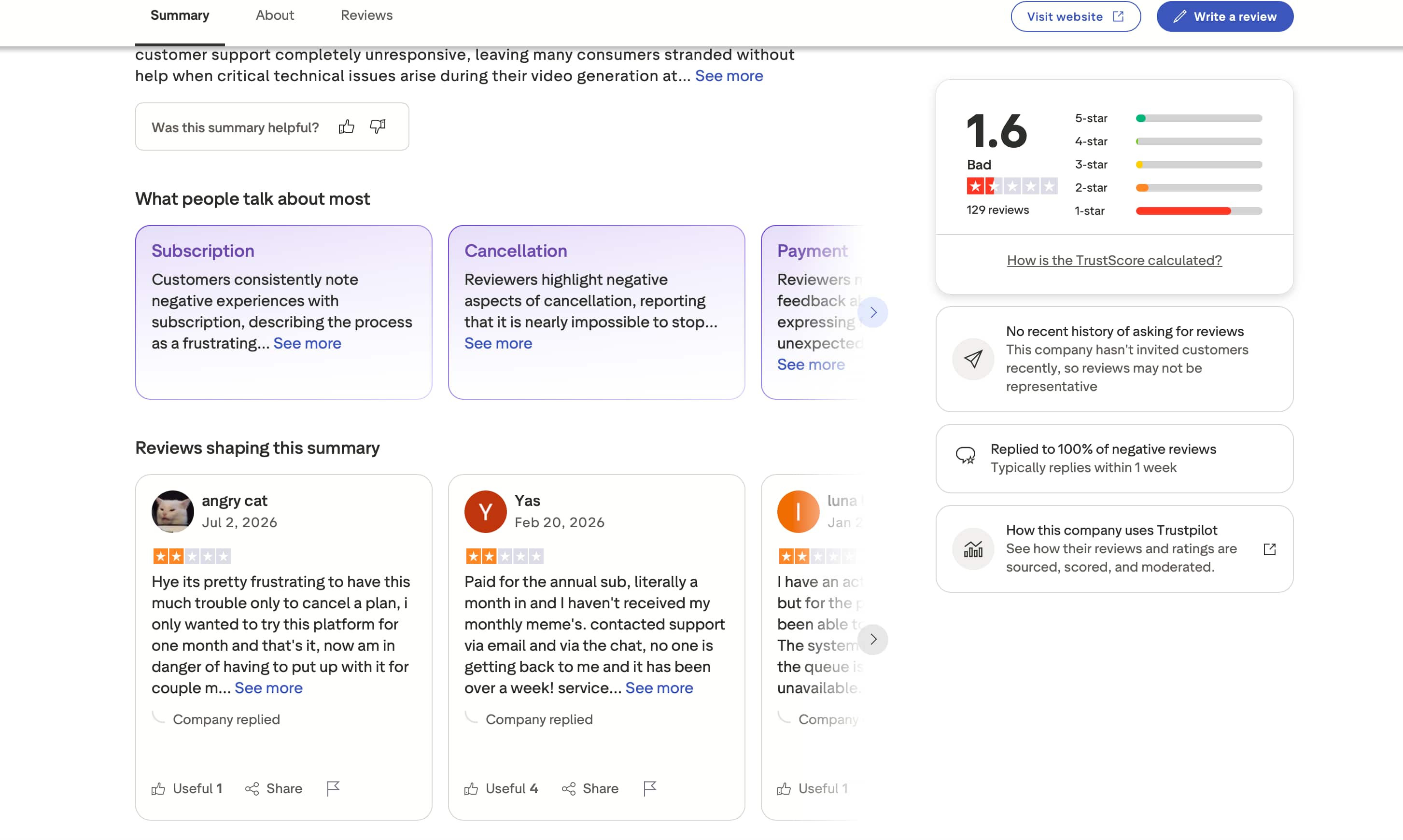
Trustpilot: Digen AI has a 1.6/5 rating from 129 reviews on Trustpilot. The most discussed issues are subscriptions, cancellation, payments, and customer support. Several reviewers describe difficulty cancelling their plans or getting help with account and payment-related problems.
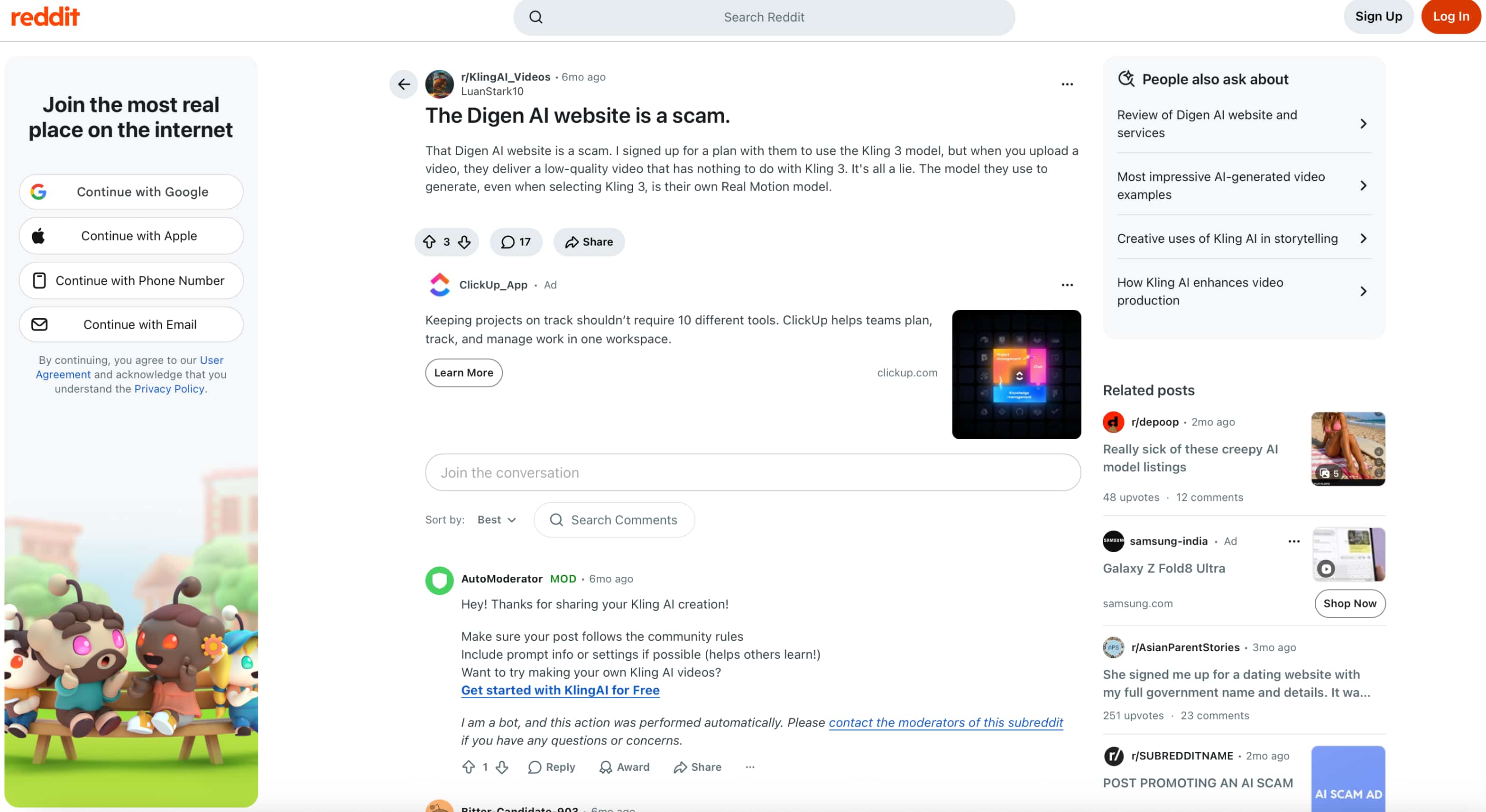
Reddit: On Reddit, one user posted about subscribing to Digen AI expecting access to Kling 3 but receiving low-quality results instead. The user also claimed that the platform appeared to generate videos with its own Real Motion model rather than the selected Kling model. The post, titled “The Digen AI website is a scam,” had 3 upvotes and 17 comments when the screenshot was captured.
Our take on Digen AI
Digen AI offers a broad set of video-generation tools and several model options, making it useful for creators who want to experiment with different video styles and workflows. In our testing, the results were usable for creative and social content, although consistency and output quality could vary between generations. Pricing also deserves a closer look, especially for users who expect frequent generations. Combined with the mixed feedback around subscriptions and customer support, Digen AI is worth testing before committing to a longer paid plan. If your priorities extend beyond Digen AI’s specific tools, it’s worth looking at an alternative with more ways to start and build a video.
Vmake Labs AI Video Generator as an alternative
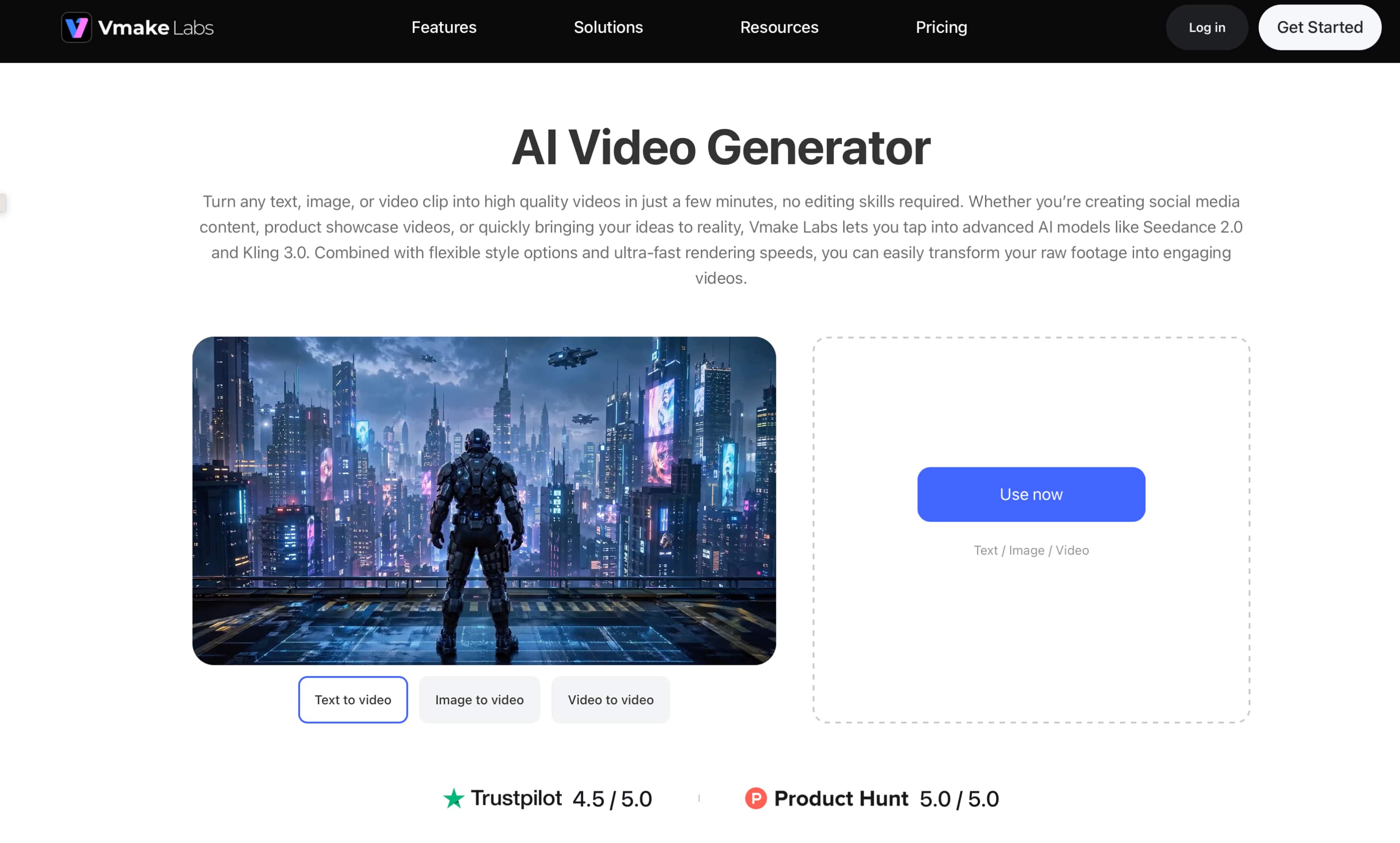
If Digen AI’s workflow feels limiting, Vmake Labs AI Video Generator offers more flexibility in how a video project starts. Creators can work from a text prompt, reference image, or existing video, then choose from multiple AI video models to generate short clips. For ecommerce projects, Vmake Labs also offers a dedicated product video workflow.
How to create videos with Vmake Labs
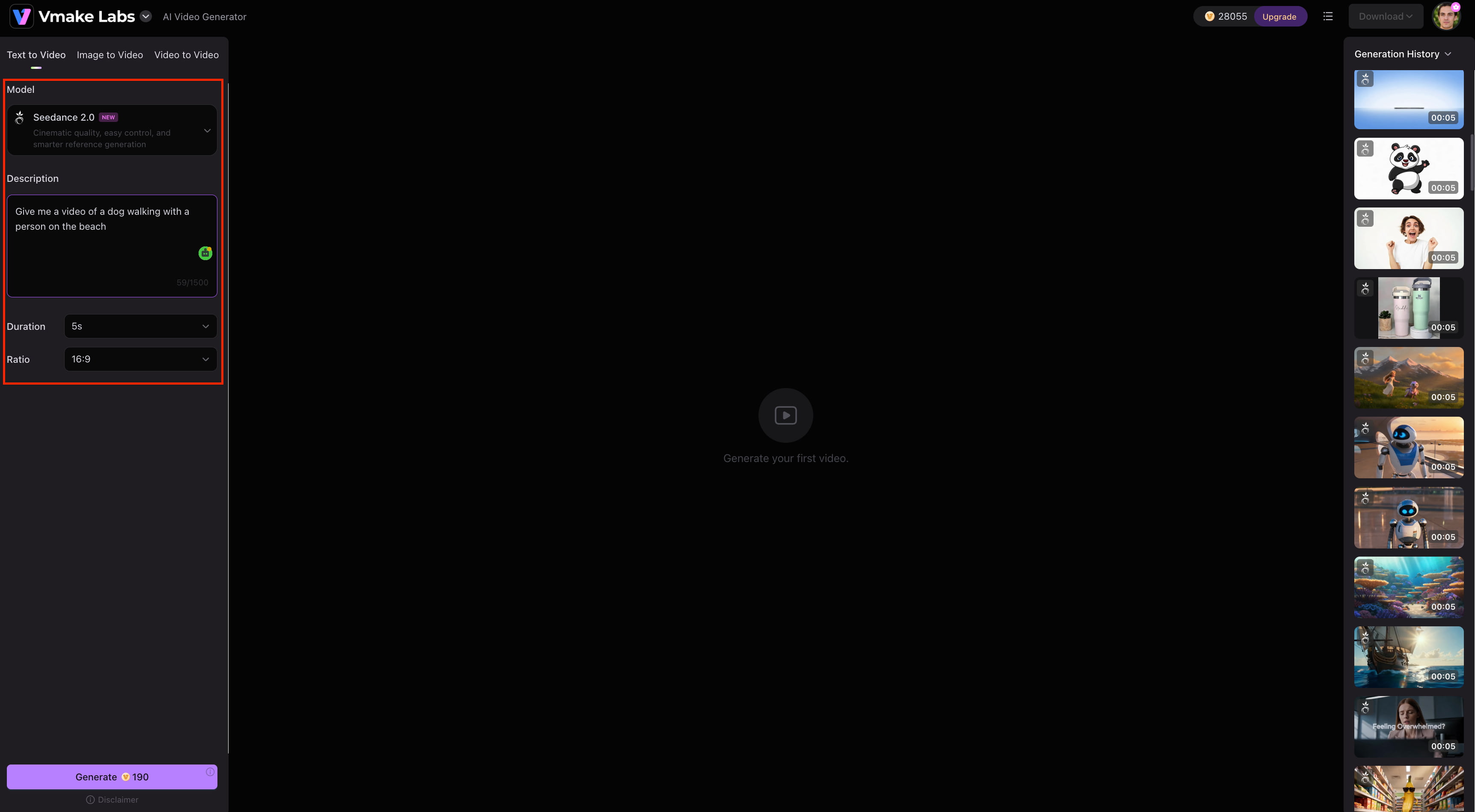
Step 1: Choose a video generation method Open the Vmake Labs AI Video Generator and choose Text to Video, Image to Video, or Video to Video based on your starting asset.
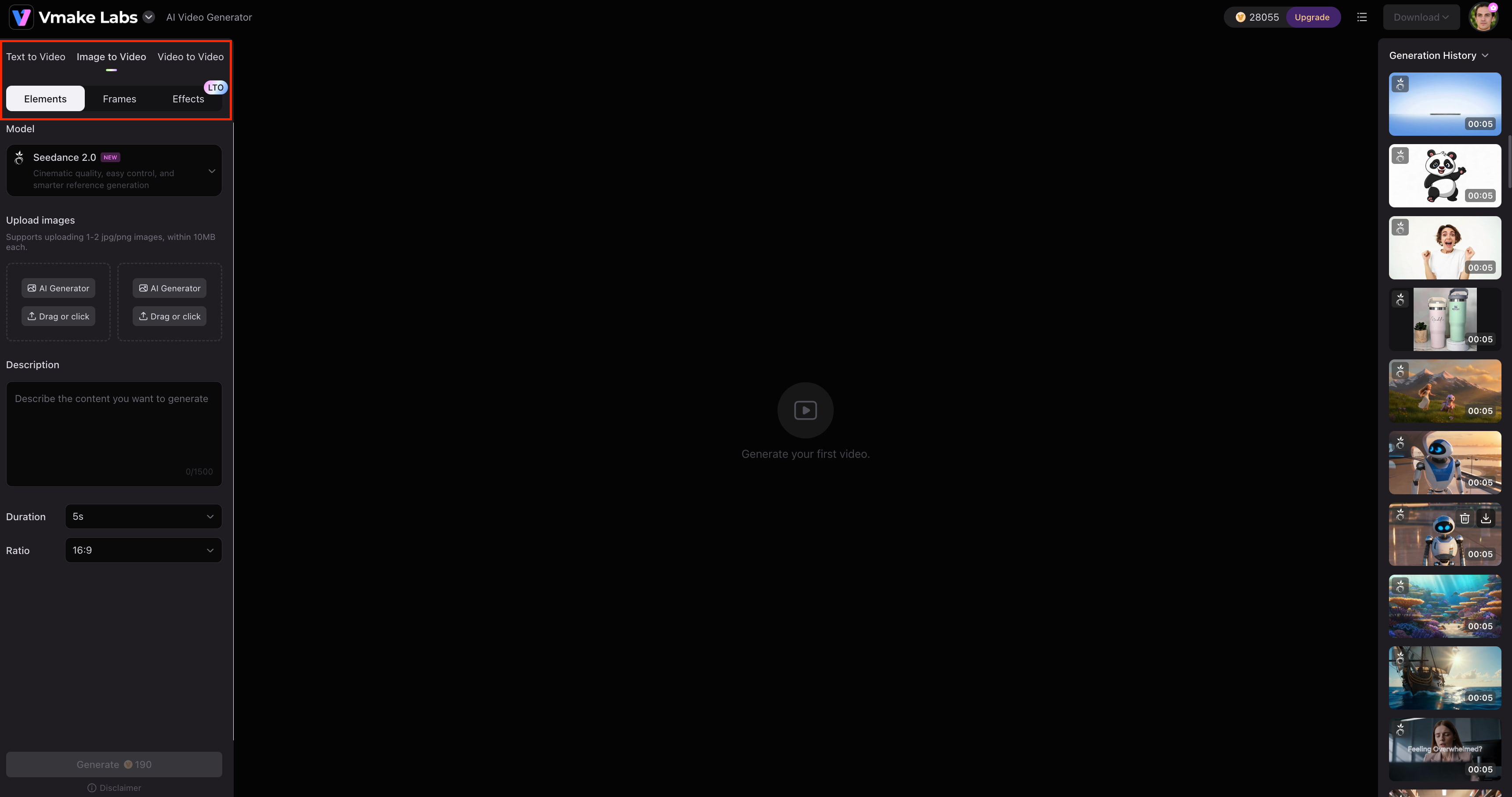
Step 2: Add your input and choose a model Enter your prompt or upload an image or video, then select an available AI video model and adjust the relevant settings.
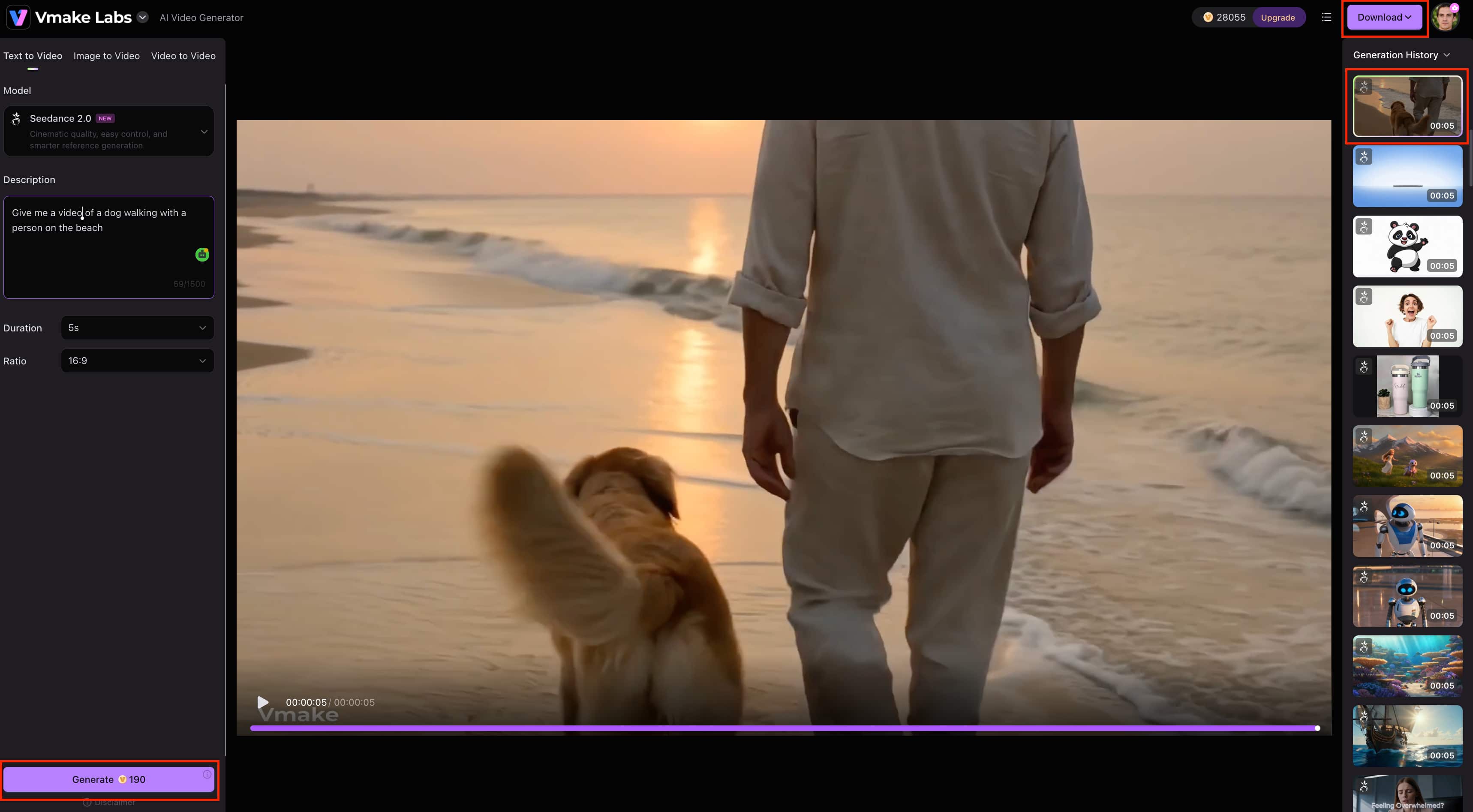
Step 3: Generate, review, and download Generate the video and review the result. If needed, make changes and generate another version. Download the final clip when it is ready.
Why consider Vmake Labs as a Digen AI alternative?
-
Multiple AI video models: Choose from supported models to compare different video-generation results.
-
Text to Video: Create short videos from written prompts without needing a reference asset.
-
Image to Video: Turn still images into short animated clips, which is useful for existing product or creative visuals.
-
Video to Video: Use existing footage as the starting point for a new video variation.
-
Flexible workflows: Switch between text, image, and video inputs based on the project and available assets.
Digen AI vs Vmake Labs: Which video generator is better?
Digen AI and Vmake Labs take different approaches to video creation. Digen AI is suited to users who want its specific generation and image-to-video workflow, while Vmake Labs offers more starting options and multiple AI video models for different content needs.
|
Category |
Digen AI |
Vmake Labs AI Video Generator |
|---|---|---|
|
Best for |
AI video creation and creative content |
Marketing, ecommerce, social, and creative video |
|
Video generation |
AI video generation |
Text to Video, Image to Video, and Video to Video |
|
Image to Video |
Supported |
Supported |
|
Watermark removal |
Available |
Not a core video-generation feature |
|
AI models |
Digen AI's available generation options |
Multiple AI video models |
|
Starting inputs |
Text and images |
Text, images, and existing videos |
|
Generation workflows |
Digen AI video-generation workflow |
Text to Video, Image to Video, Video to Video, Frames, and Effects |
|
Best suited to |
Users looking for Digen AI's video-creation workflow |
Creators, marketers, ecommerce teams, and businesses |
Which one should you choose?
Digen AI may be a better fit if you want its specific video-generation workflow, need image-to-video capabilities, or find its watermark-removal tool useful. It can also make sense if its free access and pricing structure fit the amount of video content you plan to create.
Vmake Labs may be a better fit if you want multiple AI video models and more flexibility in how you start a project. Its Text to Video, Image to Video, and Video to Video workflows make it suitable for creators, marketers, ecommerce teams, and businesses working with different types of content.
Final verdict on Digen AI
Digen AI is a capable option for creators who want AI video generation, image-to-video tools, and a straightforward creative workflow. Our testing found usable results, although output consistency and occasional artifacts mean some clips may need regeneration. Its free access is useful for trying the platform, while paid plans offer more generation capacity. However, mixed user feedback around subscriptions and support is worth considering before committing. For users who want multiple AI video models and flexible Text to Video, Image to Video, and Video to Video workflows, Vmake Labs is a strong alternative.
FAQs
-
What is Digen AI?
Digen AI is an AI content-generation platform with tools for creating videos, including image-to-video generation and other creative workflows. It is aimed at users who want to create short-form visual content without building videos entirely from scratch.
-
Is Digen AI free?
Digen AI offers limited free access, while its paid plans start at $4.99 per month and provide higher Meme and Pro Meme allowances and greater generation capacity. The available pricing information does not clearly confirm separate free-tier watermark or download restrictions.
-
Is Digen AI a video generator?
Yes, Digen AI can generate videos from creative inputs and supports image-to-video workflows. If you want more ways to start a video project, Vmake Labs also supports Text to Video, Image to Video, and Video to Video workflows.
-
Can Digen AI turn images into videos?
Yes, Digen AI supports image-to-video generation, allowing users to use a still image as the starting point for an animated clip. Vmake Labs offers a similar Image-to-Video workflow, along with Text-to-Video and Video-to-Video for projects that start with other types of assets.
-
Can Digen AI remove watermarks?
Yes, watermark removal is one of the capabilities covered in this review. If watermark removal is a key requirement, Digen AI may be worth considering, while Vmake Labs focuses more on AI video generation through multiple models and input workflows.
-
Is Digen AI safe and legitimate?
Digen AI is an operating AI content platform, but user feedback includes concerns about subscriptions, payments, cancellations, and customer support. It is worth testing before committing to a longer plan, especially if you are considering paid use.

You May Be Interested
Artistly AI Review 2026: Is It Worth Trying for Creators?
DeeVid AI Review 2026: Features, Pricing & Top Alternative
Doodle AI Review 2026: Features, Pricing and Alternatives
Getimg AI Review 2026: Is It the Best AI Image Generator?

Supawork AI Review: Watermark Remover Tested (2026)

Nero AI Review 2026 Explained: Is the Tool Worth Using?

Pixar AI Review: What It Is & How to Create Pixar-Style Art

Vivideo AI Review 2026: Features, Pricing and Alternatives
