
Honest Dzine AI Review: Is It Worth Using in 2026?
Looking for a complete Dzine AI review? Explore its image generation, editing, video tools, pricing, free credits, Ghibli-style images, and a powerful alternative.

Dzine AI has grown from a niche design tool into one of the most talked-about all-in-one image and video platforms of 2026. This Dzine AI review breaks down its features, hands-on image quality, pricing, real user feedback, and a genuine alternative worth comparing before you subscribe.
What is Dzine AI
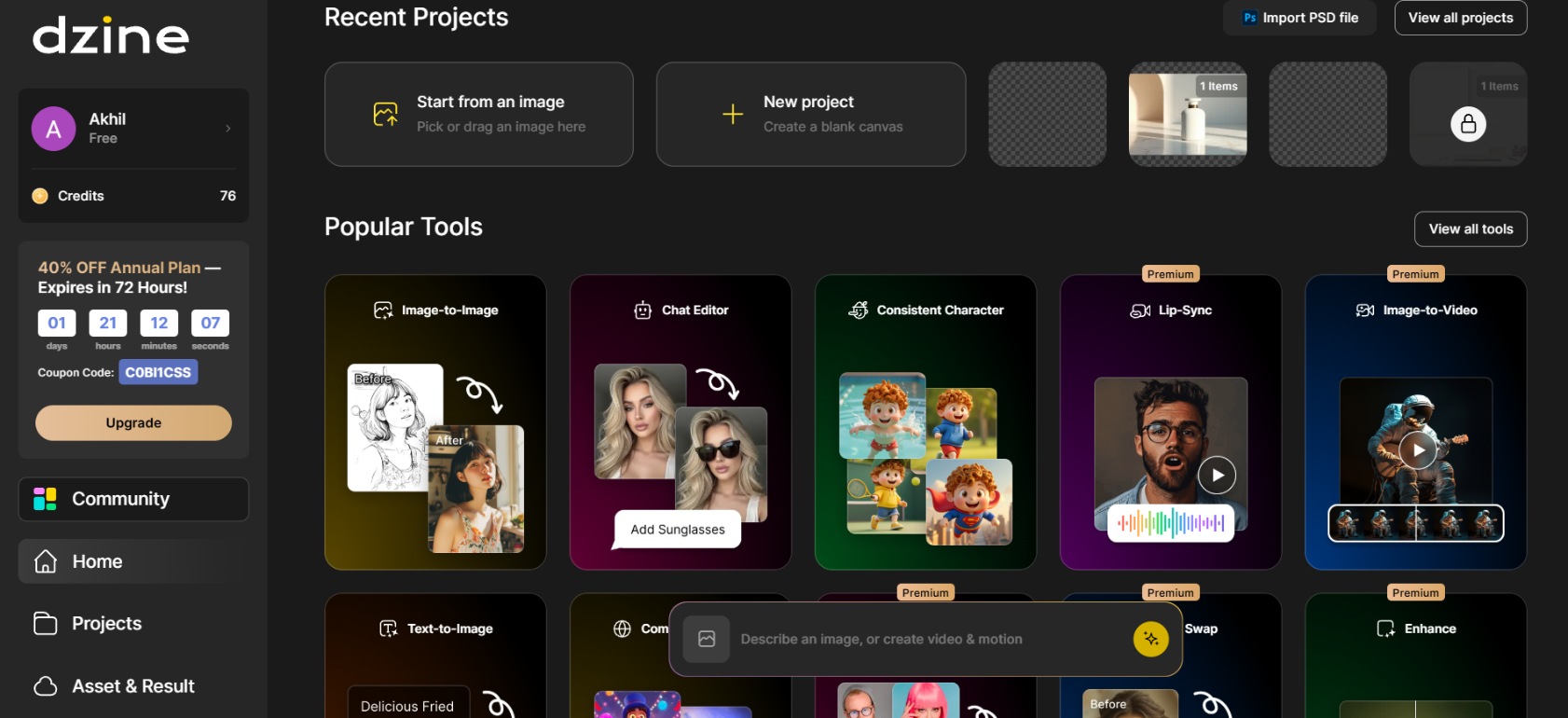
Dzine AI (formerly Stylar AI) is a browser-based all-in-one AI image and design studio that combines text-to-image, image-to-image, advanced editing, consistent character tools, and AI video generation (including lip-sync and talking avatars) inside a single canvas workspace. It markets itself as "the most controllable AI image & design tool," giving users layer-based control, multi-model access, generative fill, object insertion/removal, and style transfer rather than pure prompt-to-output generation.
It targets designers, marketers, content creators, and small businesses who want generation plus post-generation refinement without switching between separate apps for images and short clips.
Key features of Dzine AI
-
Multi-model AI image generation
Dzine gives you access to several third-party and proprietary models from one dashboard, including Nano Banana Pro, Flux, Google Imagen, Seedream, and Z-image. Generate with different engines and compare results without separate subscriptions.
-
AI video generation and transformation
Text-to-video and image-to-video tools run on models like Sora 2, Kling, Hailuo, Wan, and Veo 3.1, turning a still image or prompt into motion. Coverage spans short social clips, product demos, and polished promotional footage.
-
Viral style transfer filters
A dedicated style-changer library restyles an uploaded photo in a few clicks, including Ghibli Studio, Pixar-style, anime, and retro PS2-style filters. Adjustable intensity sliders let you dial each effect up or down.
-
Advanced AI image editing
Beyond generation, Dzine layers in a chat-based editor, local masked editing, generative fill, object removal, background swaps, and an upscaler. Refine specific elements, like a flower, without regenerating or losing the rest of the image.
-
Consistent character and style system
Users can lock a character's face, outfit, or a specific visual style across multiple generations. This matters for anyone building a recurring brand mascot, a multi-panel comic, or a cohesive set of marketing images.
-
Lip-sync and talking avatar tools
Dzine can animate a still image's mouth to match an uploaded audio track, turning a static portrait into a talking avatar. A multiple-person lip-sync mode also supports dialogue-style videos, like explainer content or scripted scenes.
Dzine AI image quality: hands-on test
To evaluate the robustness of Dzine's image quality, we subjected it to three categories of prompts designed to test various skills: photorealism, product rendering, and stylized fantasy environments. Each test evaluates composition, fine detail, realism, character or product consistency and prompt adherence.
Test 1: Photorealistic portrait
Sample prompt:
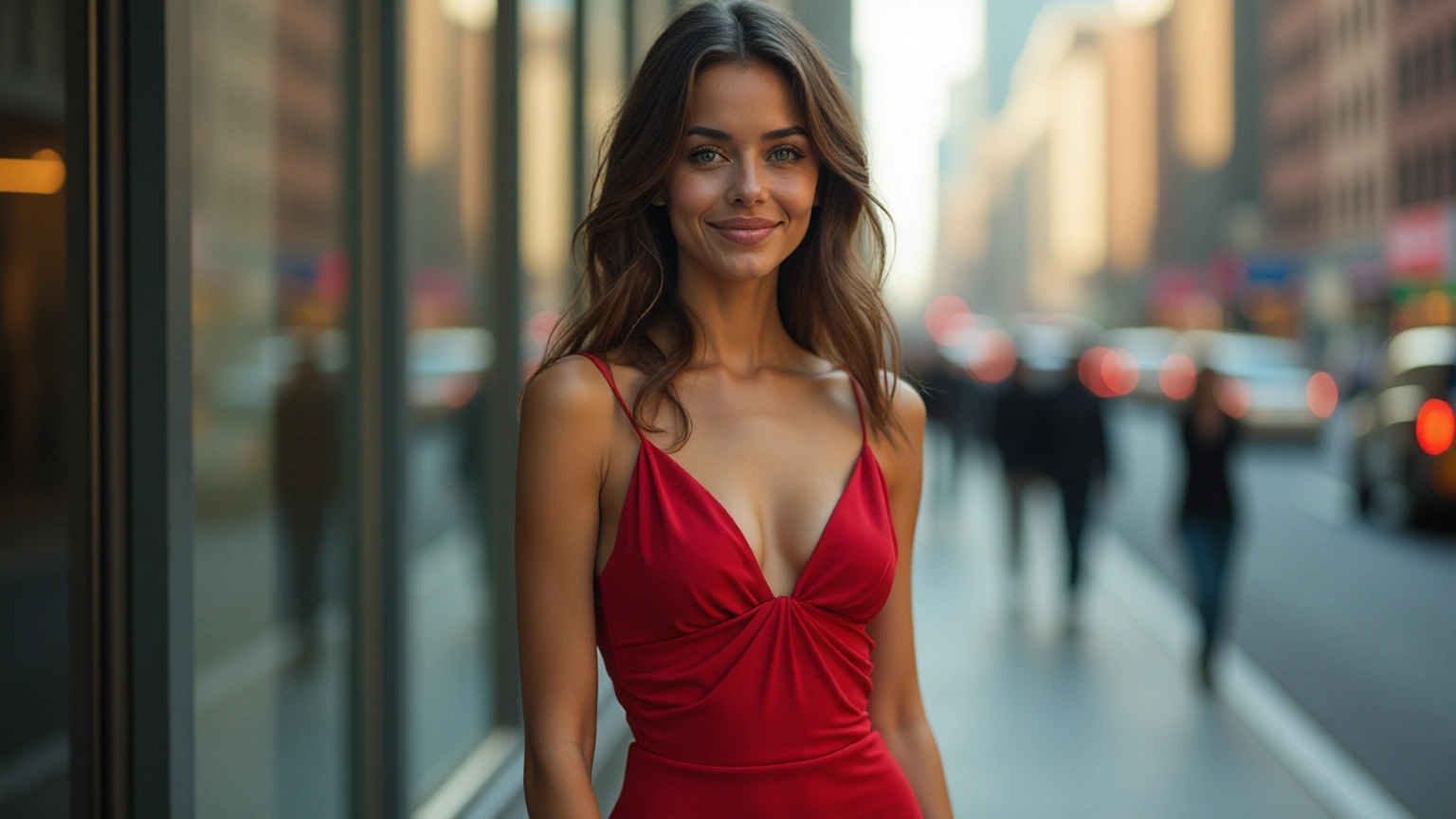
A cinematic portrait of a young woman wearing a red dress, soft natural lighting, realistic skin texture, shallow depth of field, blurred city background.
How it scored:
-
Image realism: Skin texture reads as natural rather than airbrushed, with a soft warm glow consistent with golden-hour light. Hair strands and the silk-like sheen of the dress fabric both hold up well.
-
Prompt accuracy: Every element from the brief is present: red dress, soft natural lighting, and a genuinely blurred city street with bokeh from cars and pedestrians behind her.
-
Fine details: The face and eyes are sharp and well-formed. Hands aren't visible in frame, which sidesteps the area where this kind of generator most often struggles.
-
Lighting and composition: Warm, directional rim light and centered, cinematic framing . This is a genuine strength in output.
-
Consistency between generations: Re-running the same prompt tends to shift pose and expression while keeping the overall mood consistent.
Test 2: Product photography
Sample prompt:
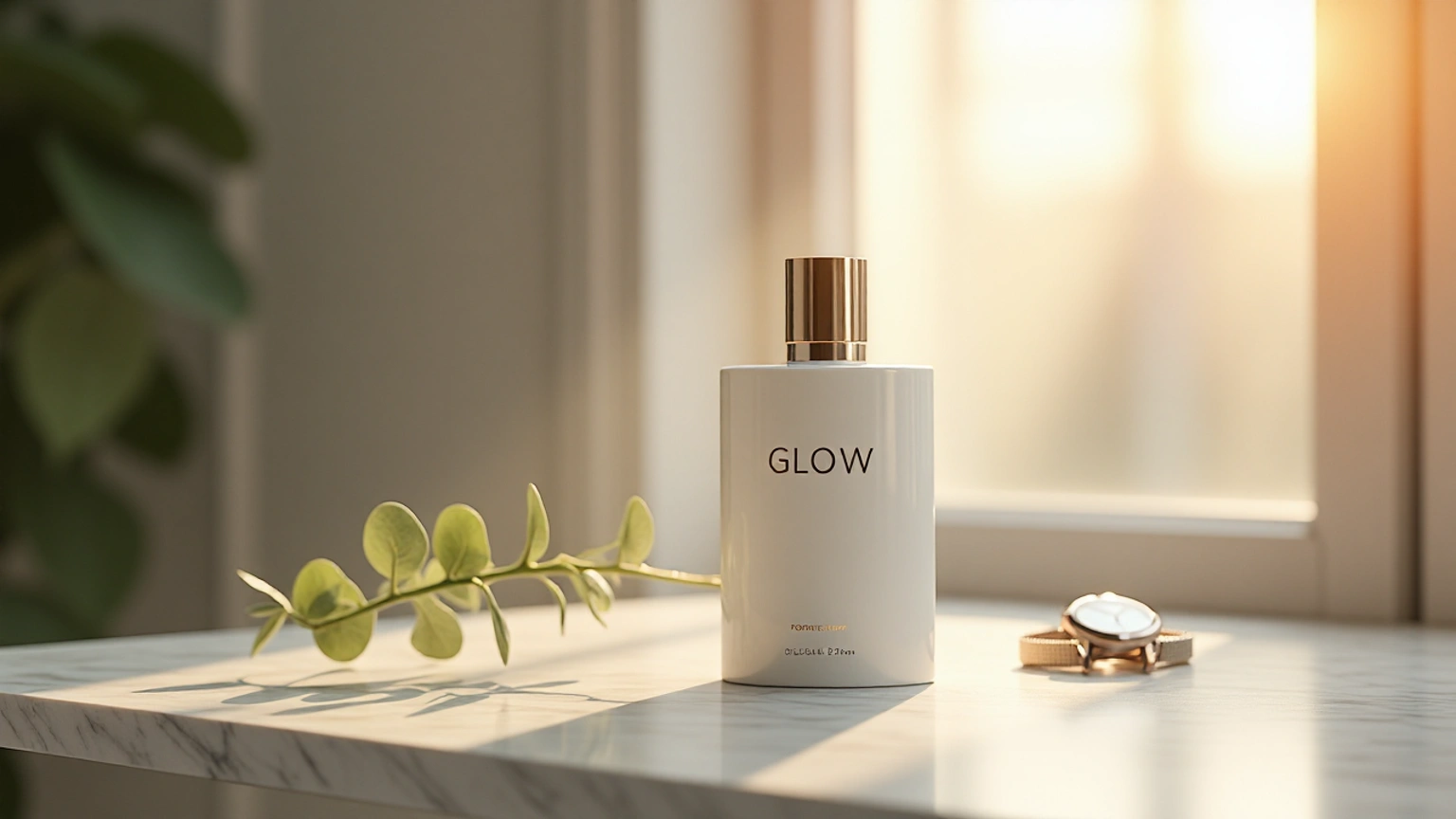
A premium white perfume bottle with the word "GLOW" printed on it in elegant lettering, sitting on a marble table, soft studio lighting, luxury advertising photography, realistic reflections, clean background.
How it scored:
-
Image realism: The marble veining and its soft reflection on the tabletop look convincing, and the bottle's matte-ceramic material reads genuinely different from the metal band around its neck.
-
Prompt accuracy: White bottle, marble surface, soft studio lighting, and a clean background are all present. The result leans more architectural and stylized (an arched wall casting a dramatic shadow) than a plain studio backdrop, which is a tasteful interpretation of "luxury advertising photography" rather than a literal one.
-
Fine details: The gold band, cap, and bottle silhouette are crisp, and the marble veining holds detail up close.
-
Lighting and composition: This is the standout category, the warm-versus-cool light split and the arch's shadow gives it real advertising-campaign polish.
-
Text and object accuracy: The word "GLOW" appears cleanly on the bottle in a simple serif font with no warped letters or uneven spacing. The bottle itself stays a single solid form, with no melting edges, floating parts, or duplicated elements.
-
Consistency between generations: In our product tests, the clean studio look and material quality remained consistent, while small changes in the camera angle and shadow length created subtle variations in the final results.
Test 3: Fantasy scene
Sample prompt:
An ancient castle surrounded by misty mountains, golden sunset, dramatic clouds, cinematic fantasy environment, highly detailed.
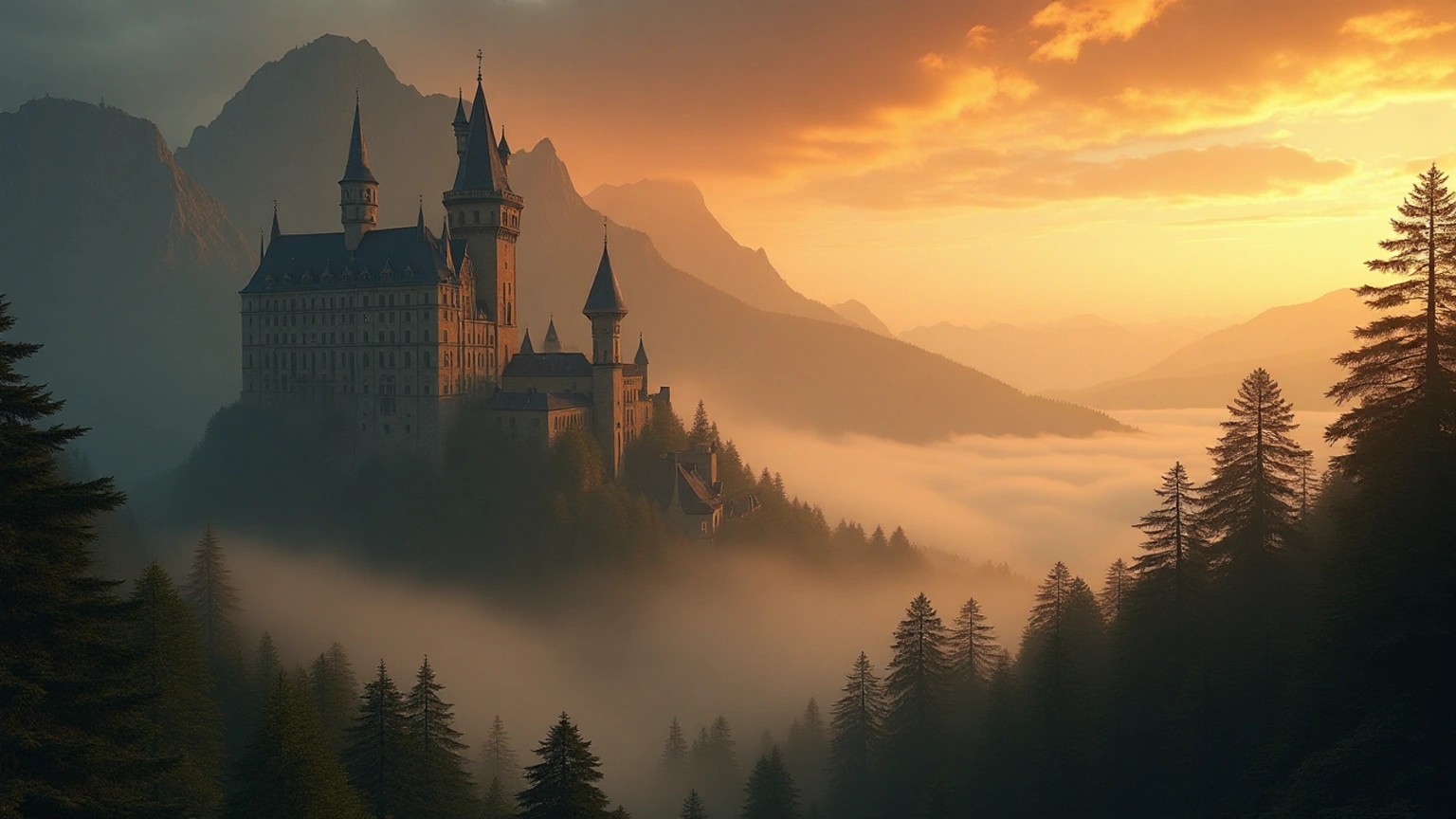
How it scored:
-
Image realism: Convincing atmospheric perspective. The layered mist filling the valley, haze softening the distant peaks, and warm sunset color grading all read as cinematic rather than flat or cartoonish.
-
Prompt accuracy: Every element from the prompt appears, including an ancient turreted castle, misty mountains, a golden sunset, and dramatic orange-lit clouds filling the sky.
-
Fine details: The castle's spires, window rows, and rooflines are rendered with real detail even at this distance, while the pine forest in the foreground retains individual tree shapes rather than collapsing into a texture blob.
-
Lighting and composition: A clear standout. The castle is well placed in the left third, the eye is led into the misty valley on the right, and the golden backlight ties the whole scene together.
-
Consistency between generations: Fantasy landscape prompts usually preserve the atmospheric mood and color temperature while rearranging cloud shapes or tree placement.
Dzine AI pricing & free plan breakdown
Dzine uses a unified credit system that covers both image and video tools. Credits are deducted based on the model and feature used.
Free tier
New users receive 100 credits on signup (valid for 12 months). There is no longer a daily credit refresh. Free generations are limited, appear publicly in the community feed, and typically carry watermarks. Commercial use is not included. The free tier is useful for testing basic generation and editing but is not practical for regular or client work.
Paid subscription plans
|
Plan |
Beginner |
Creator |
Master |
Master Pro |
|---|---|---|---|---|
|
Monthly Price |
$8.99 |
$24.99 |
$59.99 |
$149.99 |
|
Credits / Month |
1,000 |
6,000 |
9,000 + Unlimited images* |
30,000 + Unlimited images* |
|
Key Features |
Private generation, commercial use, basic video tools |
Credit rollover (up to 3 months), multi-character lip-sync, higher video capacity |
Unlimited image generations under fair-use policy, expanded video, higher upscales |
Highest credit volume, maximum storage and concurrency, full model access |
|
Storage |
1 GB |
10 GB |
100 GB |
200 GB |
|
Private Characters |
Not available |
10 |
60 |
120 |
|
Concurrent Jobs |
8 |
8 |
15 |
18 |
*Unlimited image generations on Master and Master Pro are subject to Dzine’s fair-use policy.
Annual billing offers up to 22% off. Credit rollover (up to 3 months) is available on Creator and higher plans. Top-up credits can be purchased on Creator plans and above.
For casual users who just want to try Ghibli-style filters or a handful of generations, the free plan is enough to get a feel for the interface. For anyone doing regular commercial work, the Beginner or Creator plan is the realistic starting point once you factor in the free tier's watermark and public-generation limits.
Dzine AI review: strengths and limitations
After testing Dzine AI across image generation, editing, and short video workflows, a clear picture of its real strengths and practical limits emerged. Here’s what stood out.
Pros |
Cons |
|---|---|
|
|
Real-user reviews and feedback
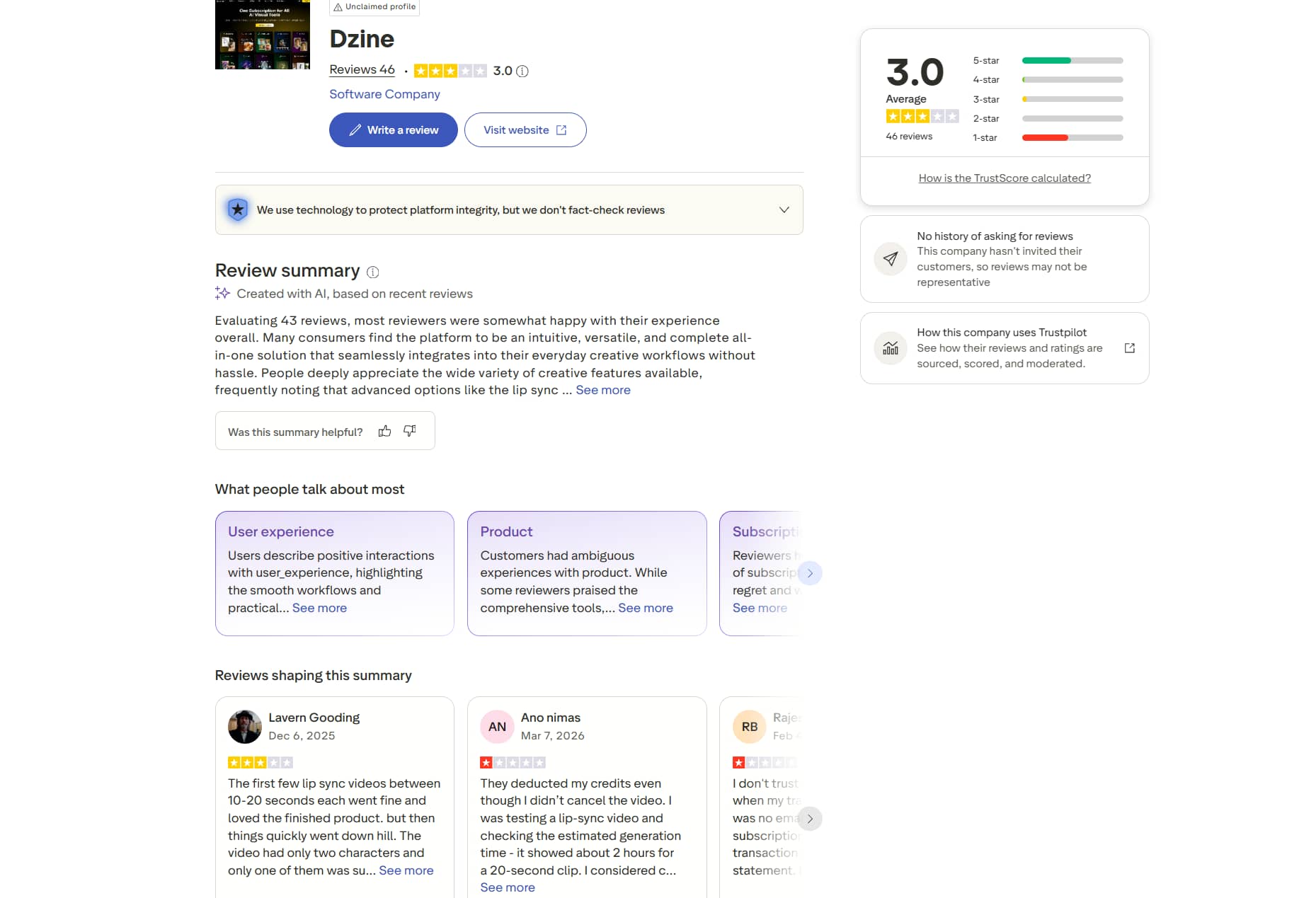
Trustpilot
Trustpilot feedback is mixed. Users like all-in-one tools, image quality, and lip-sync features. Others report unexpected charges, credit deductions, slower speeds after heavy use, uneven results, and poor customer support.
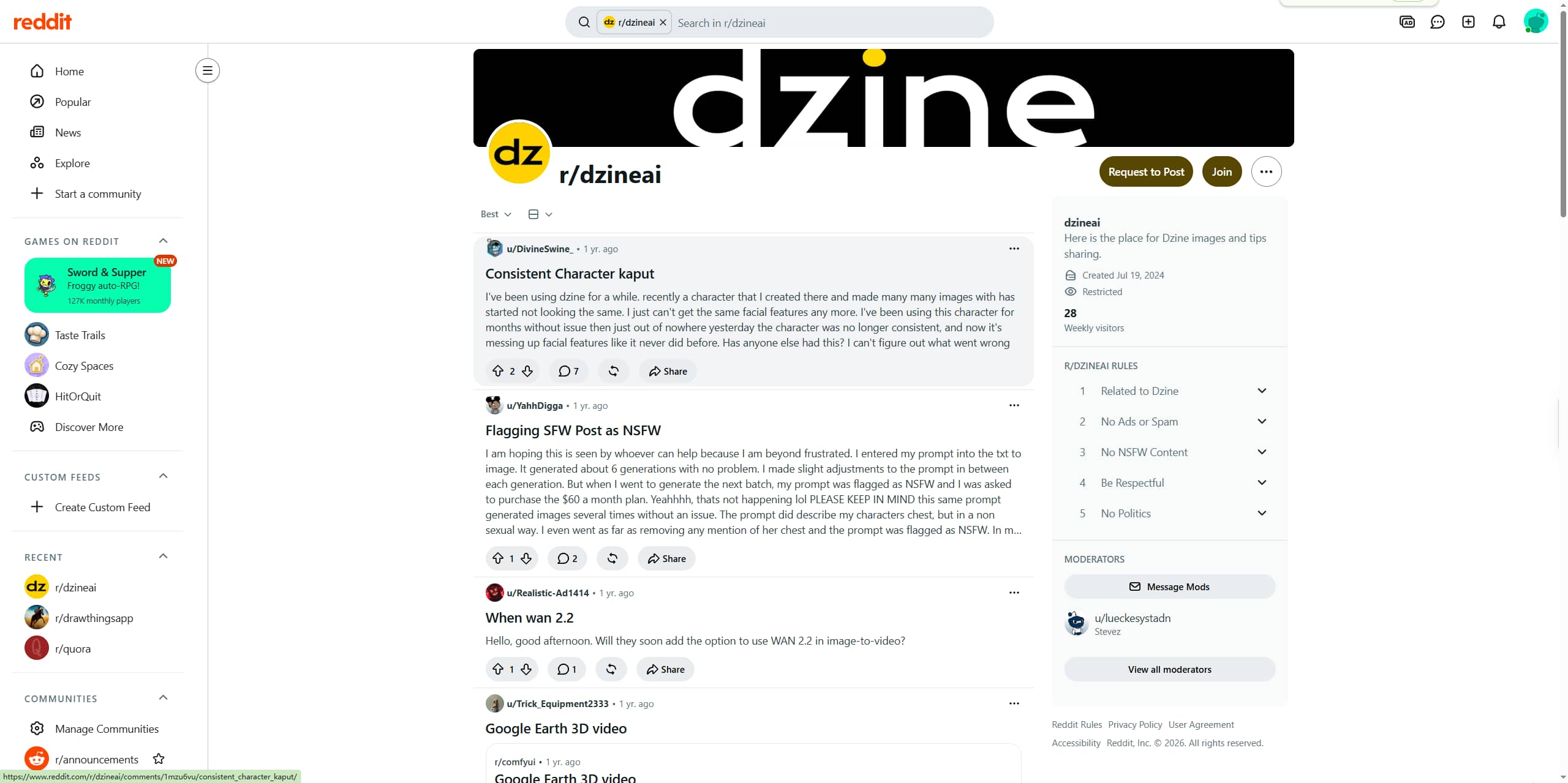
Reddit feedback on r/dzineai is limited and mixed. Some users like Dzine for AI influencer and consistent character work. Others report broken character consistency after months of use, sudden NSFW flagging that blocks prompts, and friction with image enhancement or upscaling workflows.
Our verdict
Dzine AI earns its reputation as a capable all-in-one platform. The multi-model access, editing depth, and style transfer library (especially the Ghibli filter) are genuinely useful, and pricing starts low enough for small businesses and solo creators to justify trying it. The trade-offs are real, though: output consistency between generations is uneven, the credit system takes time to learn, and the strict billing policy means you should read the fine print before subscribing.
If your priority is variety, trying multiple image and video models under one roof without stitching together five tools, Dzine is a reasonable pick. If you want a faster, more focused image generation workflow without the learning curve or credit-system guesswork, it's worth putting Dzine side by side with a more streamlined alternative.
The top alternative: Vmake Labs
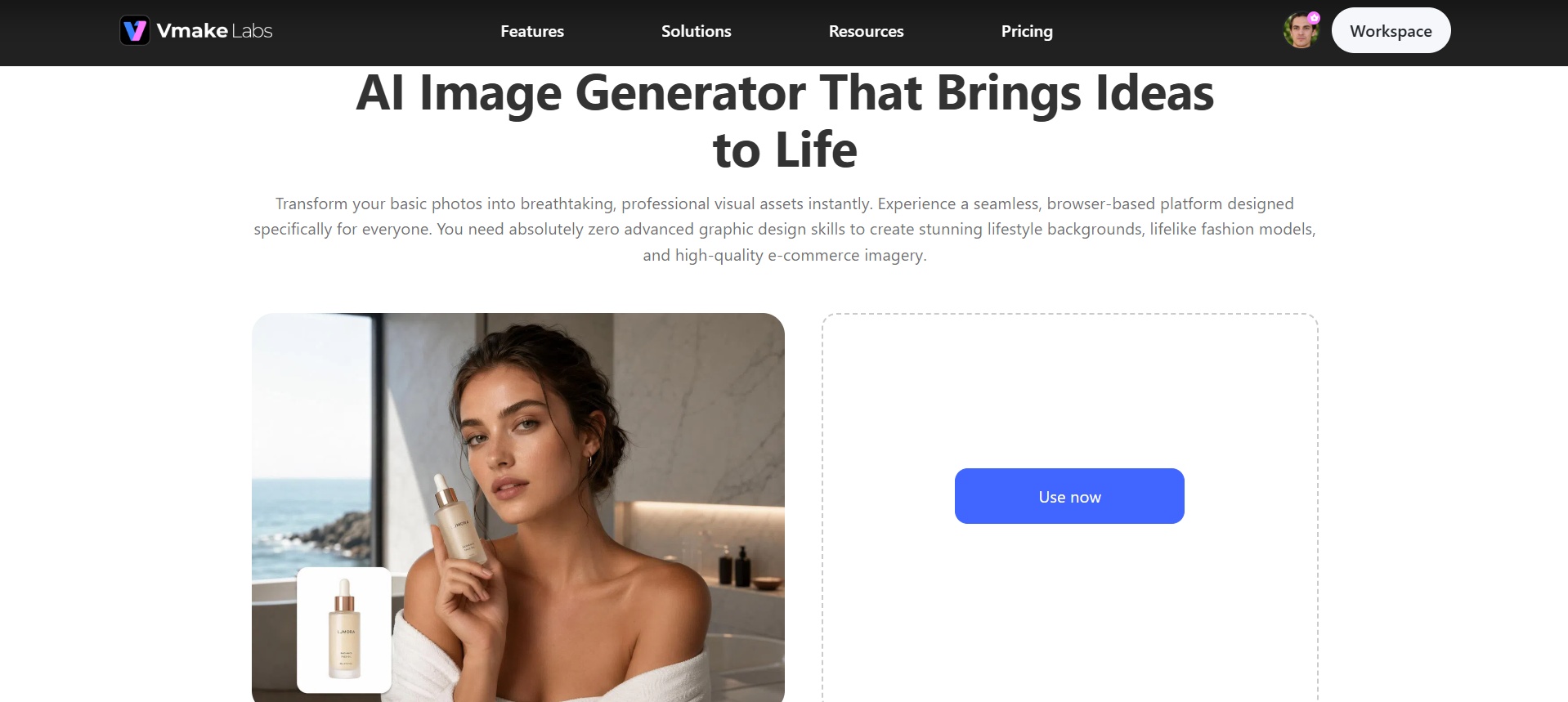
Vmake Labs is an AI social video studio that includes a dedicated AI image generator, built for creators and marketers who want fast, high-quality image output. It supports text-to-image, image-to-image, multiple models such as Seedream, GPT Image and Nano Banana Pro, reference images, and flexible aspect ratios. The focus is on fast, practical visuals for marketing, product shots, and social media rather than complex design workflows.
Key features of Vmake Labs
-
Text-to-image generator
You type what you want in plain language and the tool generates a finished picture from the prompt. It creates product shots, lifestyle scenes and marketing visuals without design skills or complex settings.
-
Image-to-image transformation
Upload an existing photo or sketch and apply new styles, lighting, or compositions. The generator maintains the core subject, but generates fresh variations that can be useful for A/B testing or refreshing older assets.
-
Multiple AI models
Choose from several current models including Seedream, GPT Image, and Nano Banana series. Switching models lets you match the output style and quality level to the specific creative or commercial need.
-
Reference image support
Add one or more reference photos to guide composition, character appearance, or product details. This improves consistency and reduces the number of regenerations needed to reach a usable result.
-
Aspect ratio control
Choose the exact frame size before generation, such as square, vertical, landscape or custom ratios. This makes the output ready to be used on some platforms like YouTube thumbnails, TikTok, Instagram or Product Listings.
Steps to generate images using Vmake Labs
Follow these simple steps to generate images with Vmake Labs effortlessly.
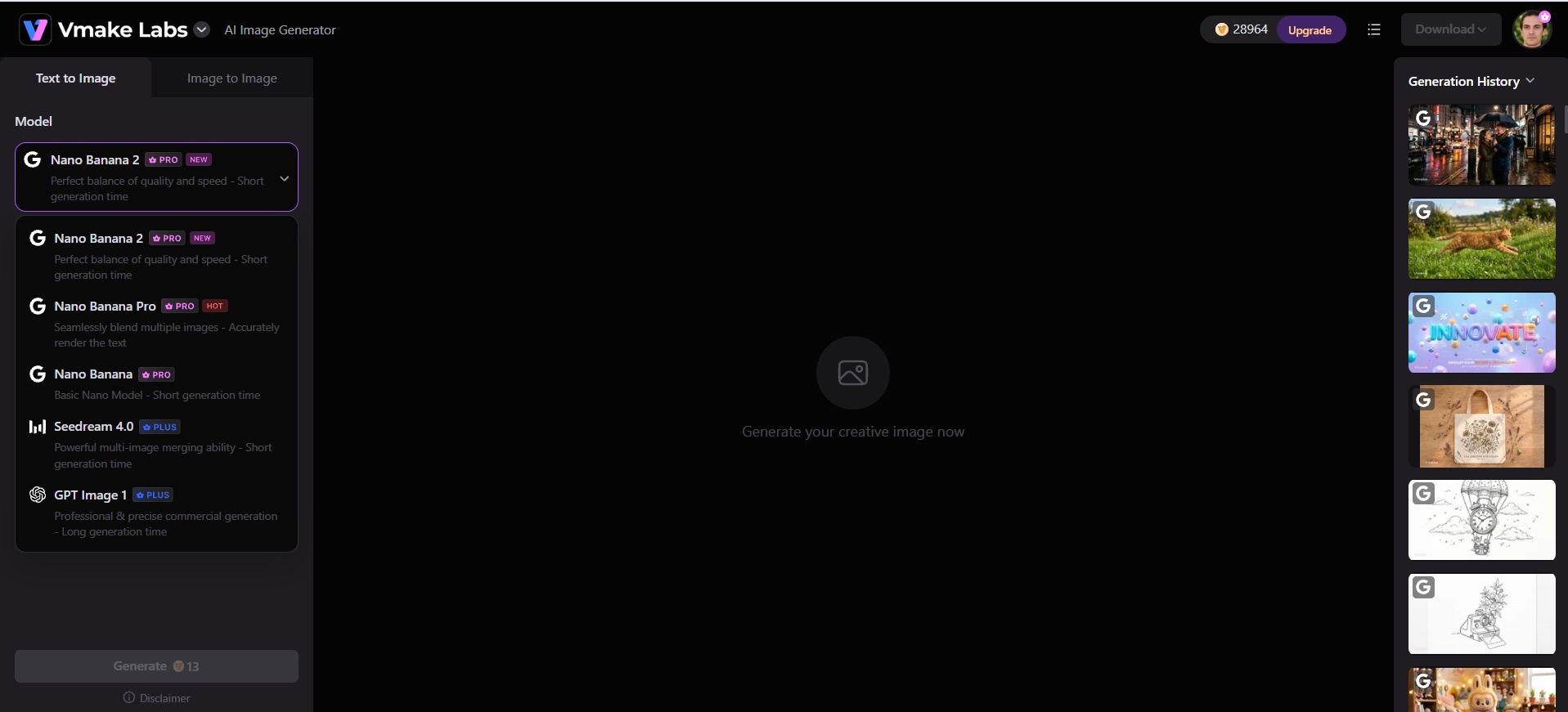
Step 1: Choose AI model
Open the AI image generator in Vmake Labs workspace and select your preferred model (e.g., Seedream, GPT Image, or Nano Banana variants).
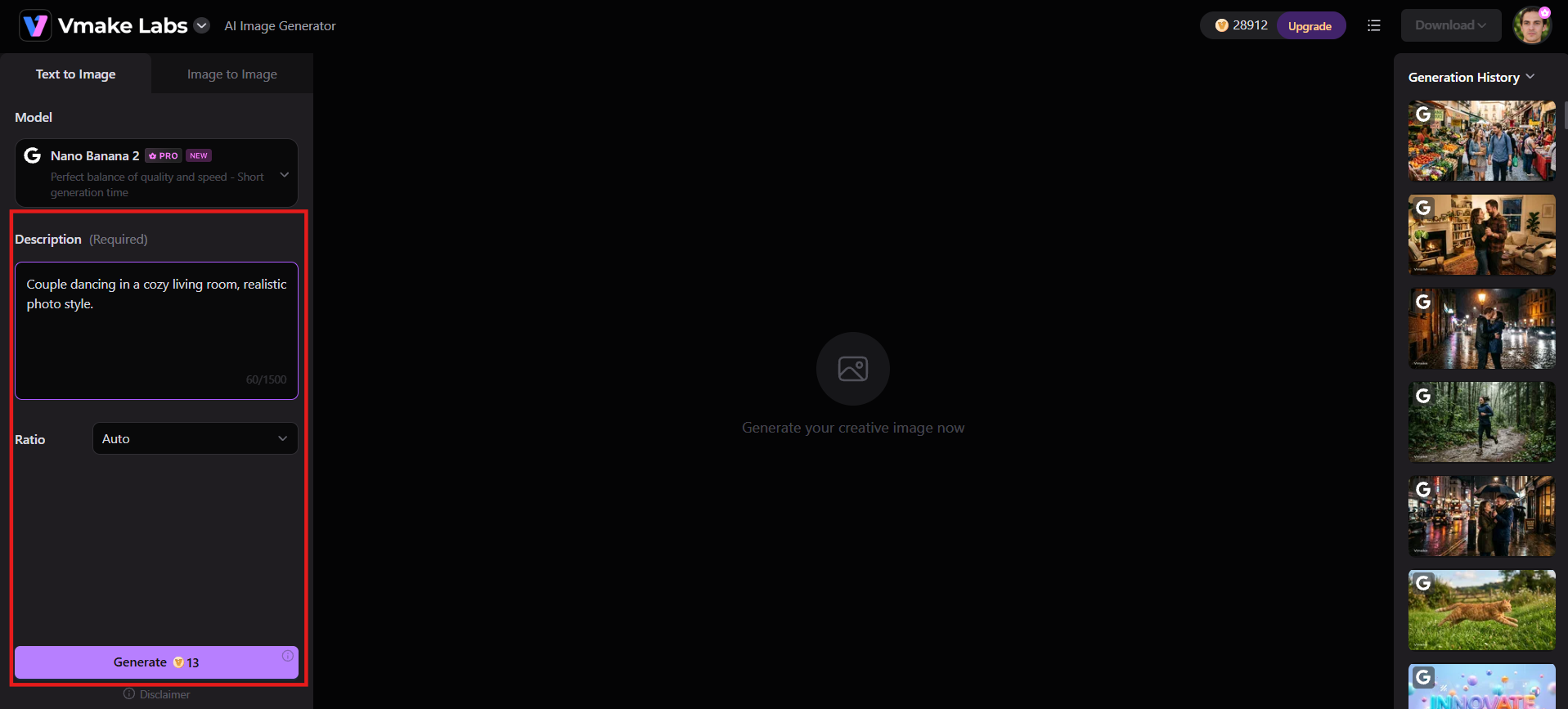
Step 2: Enter prompt or upload reference
Enter a clear, detailed prompt describing the image. Add a reference photo if you want stronger guidance, then choose the aspect ratio that fits your platform or use case.
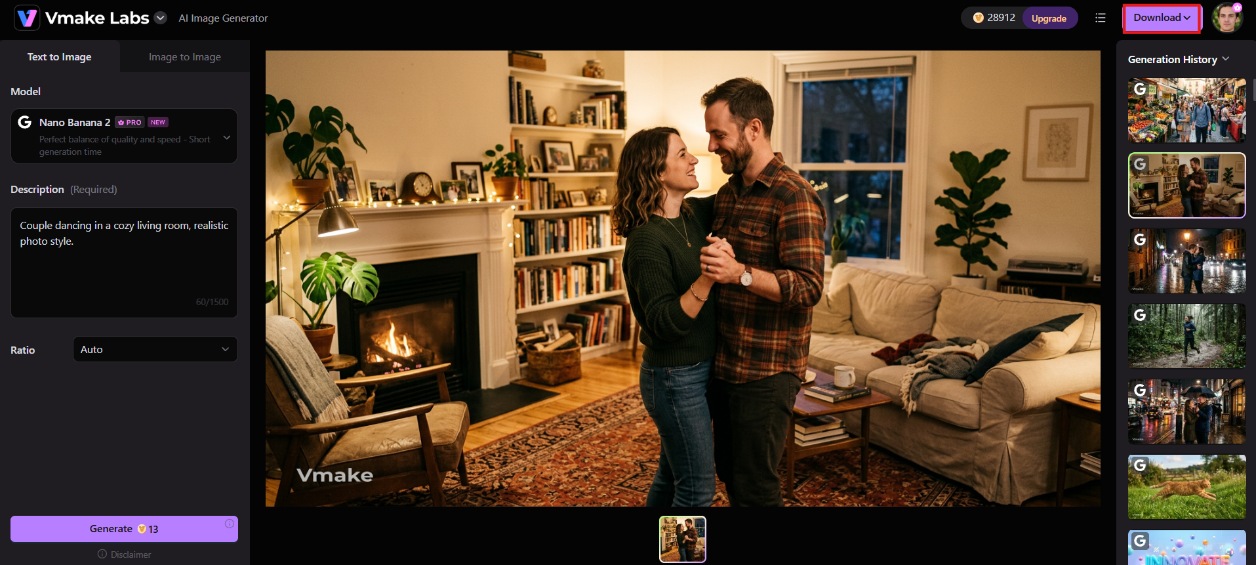
Step 3: Generate and download
Click Generate and wait for the result. Once the image appears, download it or run additional variations and refinements before moving it into other Vmake Labs tools.
Dzine AI vs. Vmake Labs: which is better?
|
Category |
Dzine AI |
Vmake Labs |
|---|---|---|
|
Core Focus |
Controllable all-in-one image + video design |
Social & product video + image generation |
|
Image Generation |
Excellent (broader multi-model + deep control) |
Strong (multiple models: Seedream, GPT Image, Nano Banana series) |
|
Video Generation |
Strong (lip-sync, multi-character, versatile) |
Excellent (product-to-viral, modern top models) |
|
Editing Control |
Outstanding (layer-based canvas) |
Moderate (cleanup & enhancement focused) |
|
Social / UGC Videos |
Capable |
Highly optimized |
|
Enhancement Tools |
Good |
Excellent (upscaling, watermark removal, De-AI) |
|
Consistent Characters |
Strong dedicated system |
Limited |
|
Ease for Social Content |
Moderate |
Faster & more template-driven |
Choose Dzine AI if:
-
You want access to many different AI models and filters (including niche style transfers like Ghibli) in one place.
-
You need deep, layer-based image editing alongside generation.
-
You're comfortable with a learning curve in exchange for maximum tool variety.
Choose Vmake Labs if:
-
You want a faster, simpler path from prompt to finished image or video.
-
You're producing content for social media and want image generation and video tools that work together natively.
-
You want multiple AI image models in one workspace
-
You want platform-ready visuals without a steep learning curve.
Conclusion
Dzine AI is a capable, wide-ranging platform, and testing it turned up real strengths in its model variety, editing depth, and style transfer tools, with the Ghibli filter especially standing out. The trade-offs are a real learning curve, uneven output consistency, and a credit and billing system that takes some getting used to. For creators who want that breadth, Dzine is worth trying through its free plan. For those who'd rather skip the learning curve and get to a finished image faster, Vmake Labs is worth a look. Try it free and compare the results yourself.
FAQs
Is Dzine AI free to use?
Yes. Dzine offers a free plan with a batch of starter credits and access to its core generation and editing tools. Free-tier images are watermarked and generated publicly, meaning they may appear in Dzine's community feed.
Can Dzine create videos as well as static images?
Yes. Dzine includes text-to-video and image-to-video tools, along with lip-sync features for animating a still image to match audio. Video generation is available starting on the Creator plan.
Can I use Dzine AI for commercial purposes?
Paid Dzine plans, from Beginner up through Master Pro, include commercial usage rights for generated content. The free plan's public-generation setup makes it less suited to client or brand work.
How does the Dzine AI Ghibli filter work?
You upload a photo, select the Ghibli Studio filter from Dzine's style transfer library, and the tool restyles the image with a hand-painted, animated look. You can adjust intensity and try a few variations before downloading a result.
What is the best alternative to Dzine AI?
Vmake Labs is a strong alternative for anyone who wants a faster, more focused AI image and video generation workflow without a large, credit-metered tool catalog to learn first.

You May Be Interested

Z Image AI Review 2026: Features, Performance, Pros and Cons
Yodayo AI Review 2026: Features, Pricing, and Alternatives
X-Design Watermark Remover Review (2026): Features & Pricing
Vidu AI Review: Is This AI Video Generator Worth in 2026?
Vadoo AI Review 2026: Features, Pricing and Alternatives
VEED Review: Does the Watermark Remover Work? (2026)

Vivideo AI Review 2026: Features, Pricing and Alternatives
Unlucid AI Review: Is this AI platform worth it in 2026?
