NoteGPT AI Image Generator: Features, Pros & Cons, and Alternatives
Explore our complete guide on the NoteGPT AI Image Generator. Learn how to generate free AI images, best prompt practices, and key alternative tools, such as Vmake Labs work.

Creating images with AI has become easier than ever, and NoteGPT AI Image Generator is one of the latest tools offering text-to-image creation alongside its broader AI productivity platform. This review explores its features, pricing, strengths, limitations, and user feedback. It also compares NoteGPT with Vmake Labs, helping you determine which platform better suits your creative, marketing, or commercial image generation needs.
What is NoteGPT AI image generator?
NoteGPT AI Image Generator is an AI-powered image creation tool integrated into the broader NoteGPT productivity ecosystem.
While NoteGPT is widely recognized for AI note-taking, summarization, document analysis, and learning assistance, it also includes image generation capabilities powered by multiple third-party AI models. Users can generate artwork, illustrations, marketing visuals, social media graphics, concept designs, and creative images using text prompts without requiring graphic design experience.
The platform emphasizes accessibility by combining various AI utilities within a single workspace, making it convenient for users who want image generation alongside writing, research, presentations, and other AI-assisted productivity tasks.
Key features of NoteGPT AI image generator
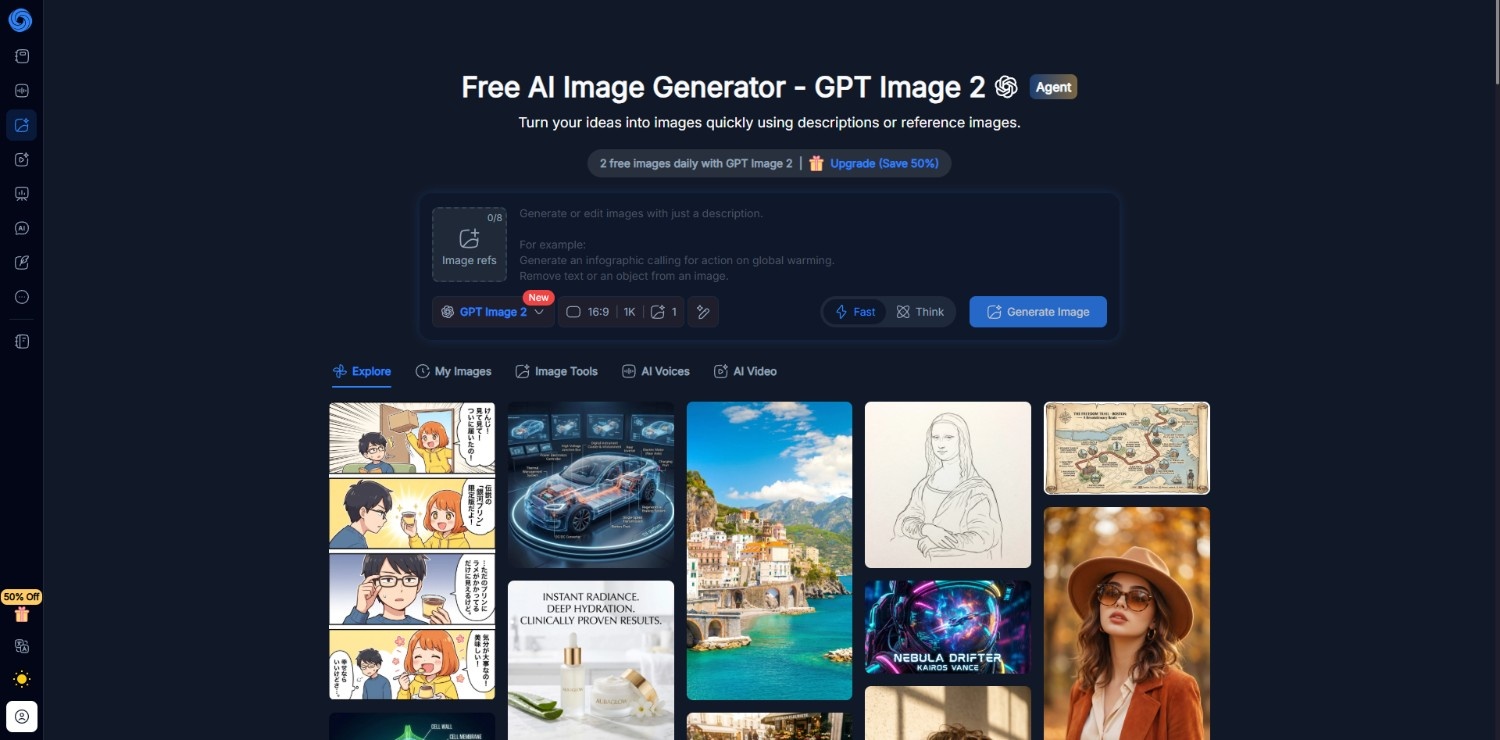
AI image generator by NoteGPT combines AI image creation with its broader productivity platform. Its image generator focuses on flexibility, multiple AI models, and accessible workflows for casual creators, students, marketers, and professionals.
-
Multiple AI image generation models
Rather than relying on a single model, NoteGPT lets users switch between multiple AI image generation engines, making it easier to experiment with different artistic styles, rendering quality, image realism, and creative outputs.
-
Text to image generation
Users can describe an idea using natural language prompts, and the AI generates original images within seconds. This workflow supports illustrations, concept art, posters, marketing visuals, social media graphics, and creative projects.
-
Image-to-image transformation
Existing images can be used as creative references to produce new visual variations while preserving composition or overall style. This helps refine concepts instead of generating completely new images every time.
-
Built-in creative workspace
Since image generation is integrated into NoteGPT's wider AI platform, users can combine generated visuals with AI writing, summarization, presentations, document analysis, and study tools without switching between multiple applications.
How to use NoteGPT AI image generator?
Step 1: Access NoteGPT AI image generator
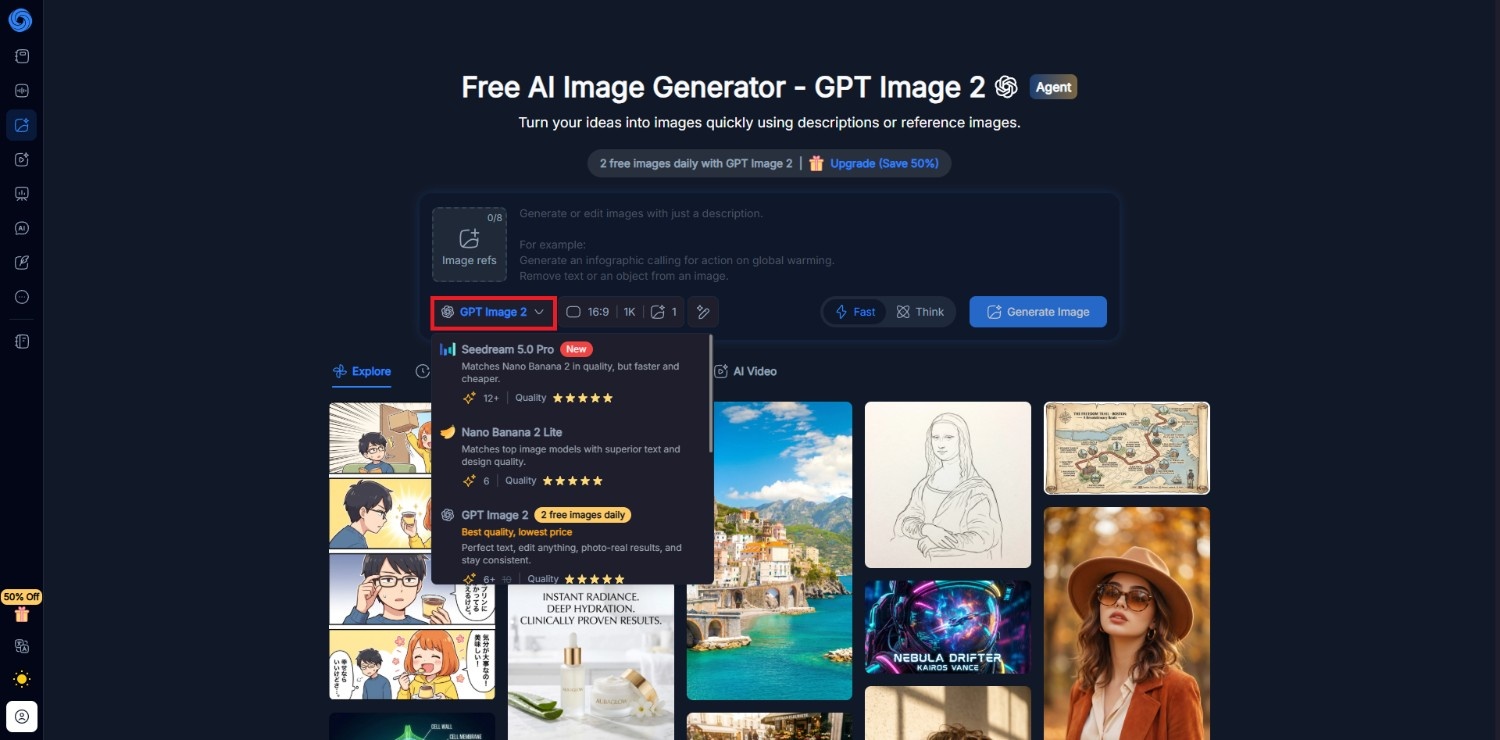
Start off by first accessing the official website of NoteGPT AI image generator. Once you access it, you need to first select the AI image generation model that you want to use. Keep in mind that NoteGPT allows free usage for up to two generations, without signing up. For instance, we chose "GPT Image 2".
Step 2: Input your detailed prompt for image generation
In the next step, you need to provide a detailed prompt regarding the type of image you want to generate. Once done, select the desired aspect ratio and resolution. Additionally, choose the number of images you want to create. Once done, hit "Generate Image".
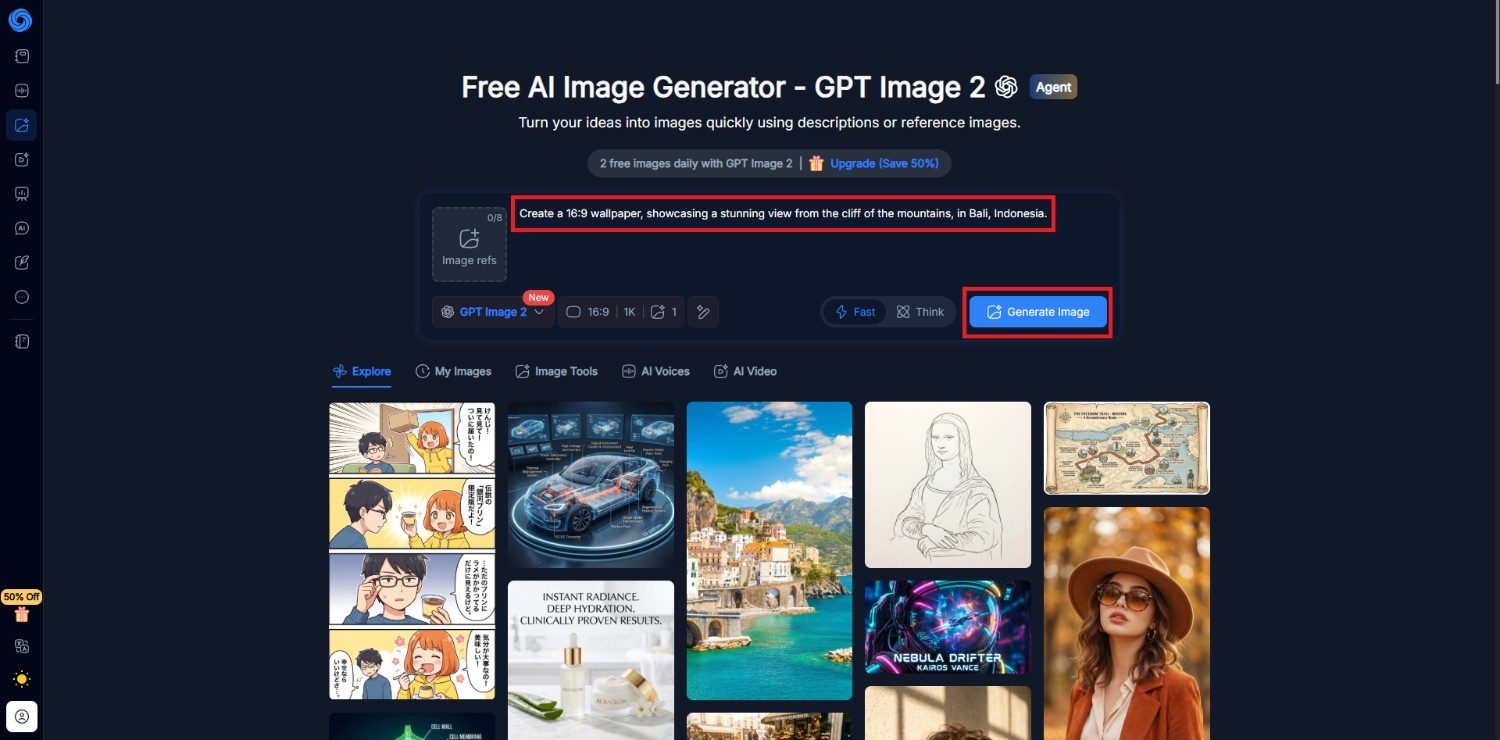
Step 3: Download your AI-generated image
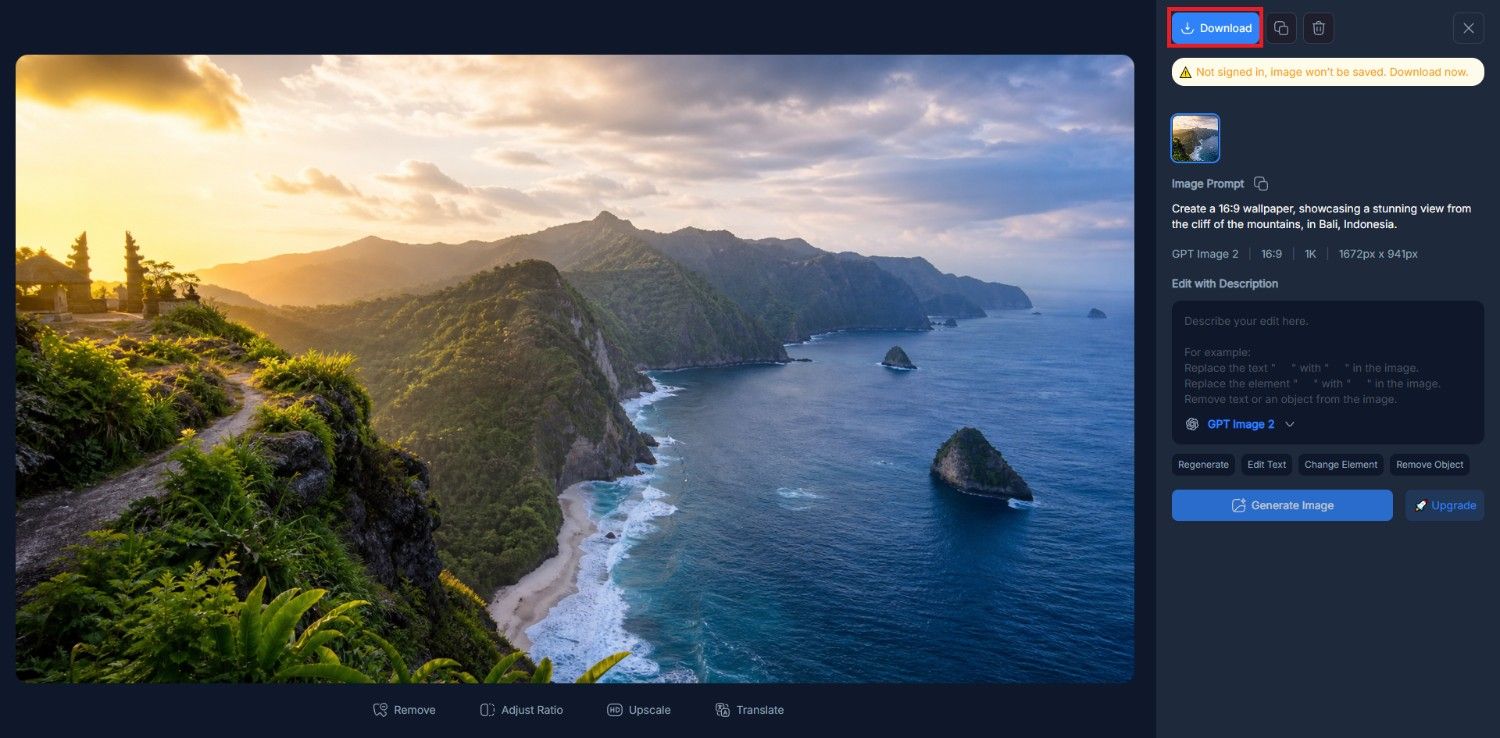
NoteGPT will start generating your image and once that is completed, you will be able to view the same on your canvas. After that, you only need to click on the "Download" option and you will be good to go.
NoteGPT AI image generator: pros and cons
Like most AI image generators, NoteGPT balances convenience with a credit-based workflow. It performs well for general creative tasks but has a few limitations that users should consider before subscribing.
Pros |
Cons |
|---|---|
|
Multiple AI models available Access to multiple image generation models gives users greater creative flexibility, allowing them to compare outputs and choose styles that best fit different projects. Integrated AI productivity platform Image generation sits alongside AI writing, summarization, presentations, and document analysis, reducing the need to switch between multiple AI applications during workflows. Simple learning curve The interface is beginner-friendly, making it easy for first-time users to create images through text prompts without prior experience in graphic design. Commercial use on paid plans Paid subscriptions include commercial usage rights for supported AI-generated content, making the platform suitable for business presentations, marketing materials, and client projects. |
Credit consumption varies by model Premium image models consume different numbers of credits, making it difficult for users to estimate how many images they can realistically generate each month. Limited advanced image editing tools Compared with dedicated AI image editors, NoteGPT offers fewer editing features, making complex modifications or detailed post-processing less convenient. |
What are users saying on G2 and Trustpilot?
User feedback presents two noticeably different perspectives. G2 reviews are largely from productivity users who value NoteGPT's summarization capabilities, while Trustpilot contains more criticism around pricing transparency and credit usage.
On G2
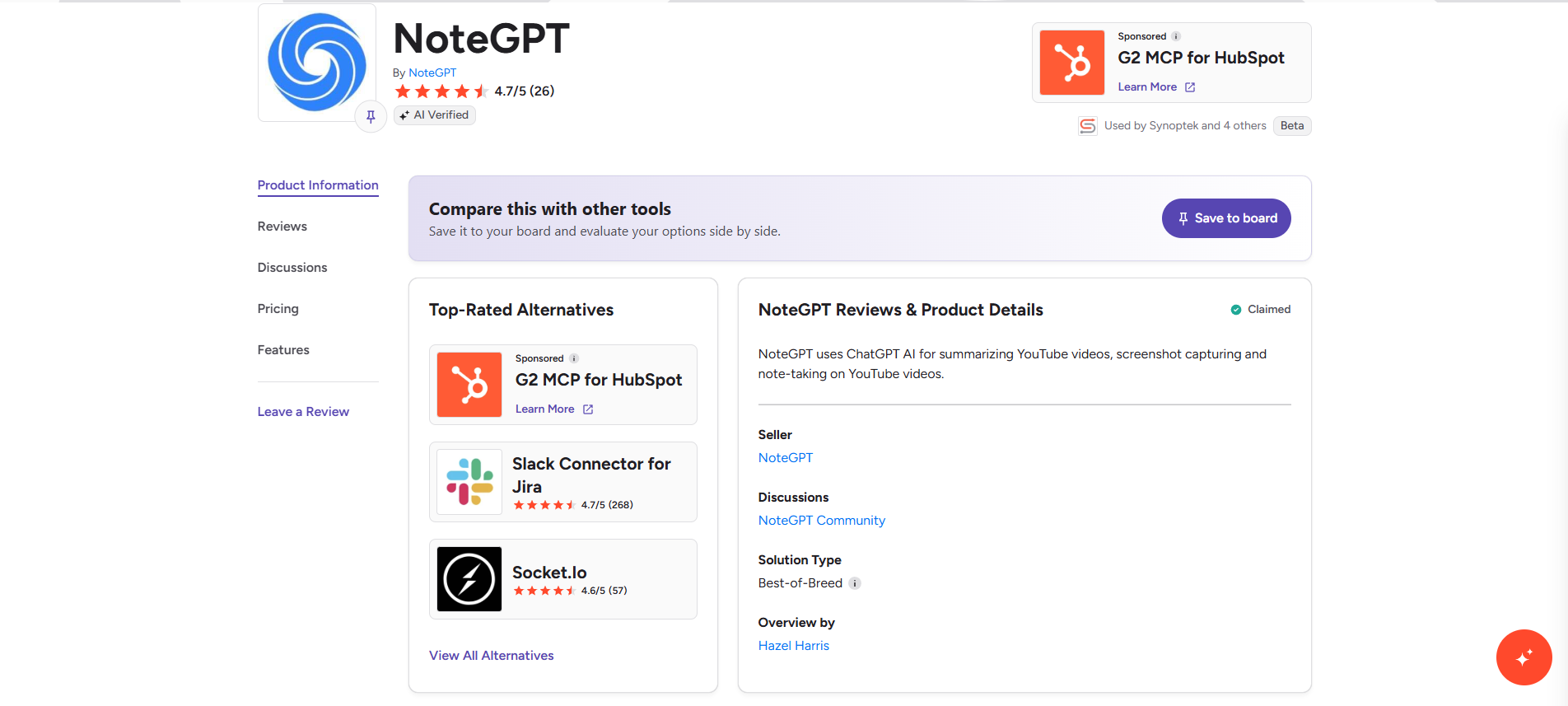
NoteGPT maintains a strong rating on G2, where reviewers frequently praise its accurate summaries, browser extension, productivity workflow, and time-saving capabilities. Most reviews focus on research and note-taking rather than AI image generation, with occasional requests for better mobile usability.
On Trustpilot
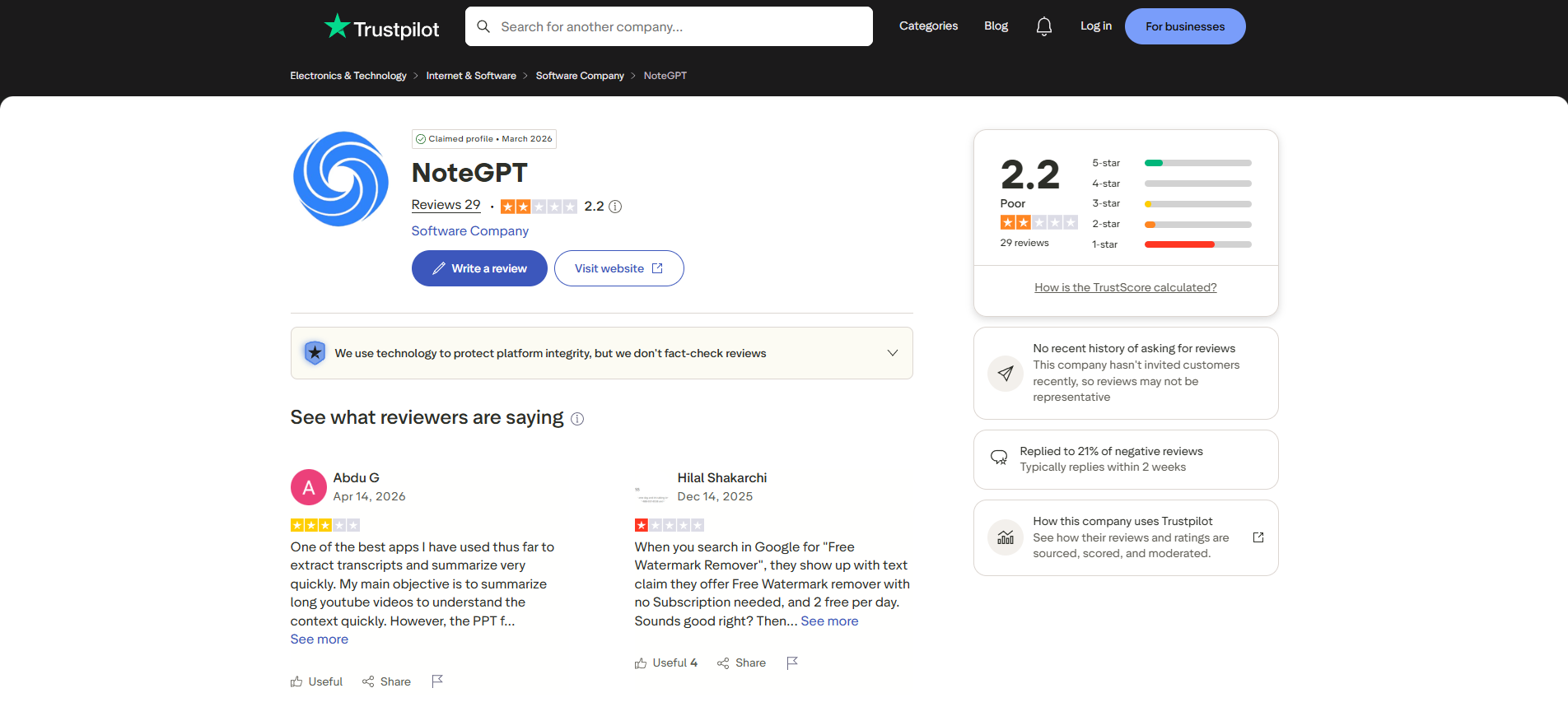
Trustpilot feedback is considerably more critical. Recurring complaints mention confusing free-plan messaging, premium credit consumption, unexpected upgrade prompts, and limitations when using advanced AI image models. The company has publicly responded to many reviews explaining its quota-based credit system.
Overall conclusion
The broader NoteGPT platform receives strong professional feedback for AI productivity features, but users considering its AI image generator should review the credit system carefully, as pricing clarity and premium credit consumption are recurring concerns on Trustpilot.
NoteGPT image generator pricing plans
NoteGPT uses a quota-based pricing system where AI image generation consumes Premium Credits instead of offering unlimited generations.
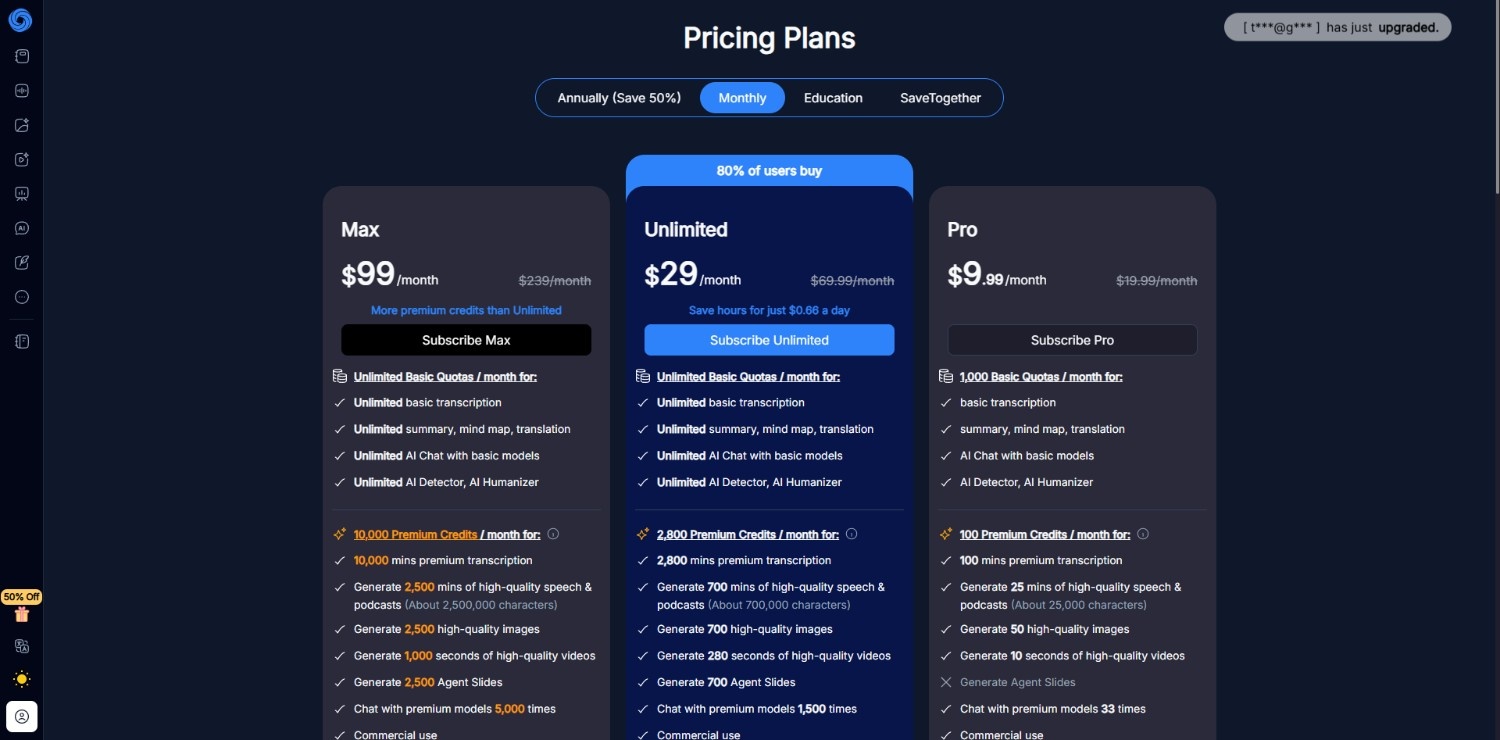
Higher-tier plans provide substantially more image generation and commercial usage, but the varying credit cost across different AI models makes estimating monthly usage less straightforward. Users should review the credit policy before subscribing.
|
Plan |
Monthly Price* |
AI Image Generation |
|---|---|---|
|
Free |
$0 |
15 monthly quotas shared across features |
|
Pro |
$9.99/month |
Up to 50 high-quality images/month (100 Premium Credits) |
|
Unlimited |
$29/month |
Up to 700 high-quality images/month (2,800 Premium Credits) |
|
Max |
$99/month |
Up to 2,500 high-quality images/month (10,000 Premium Credits) |
*Monthly billing shown. Annual billing offers discounted effective monthly pricing. Premium AI models may consume credits at different rates.
Discover Vmake Labs: an alternative AI image generator
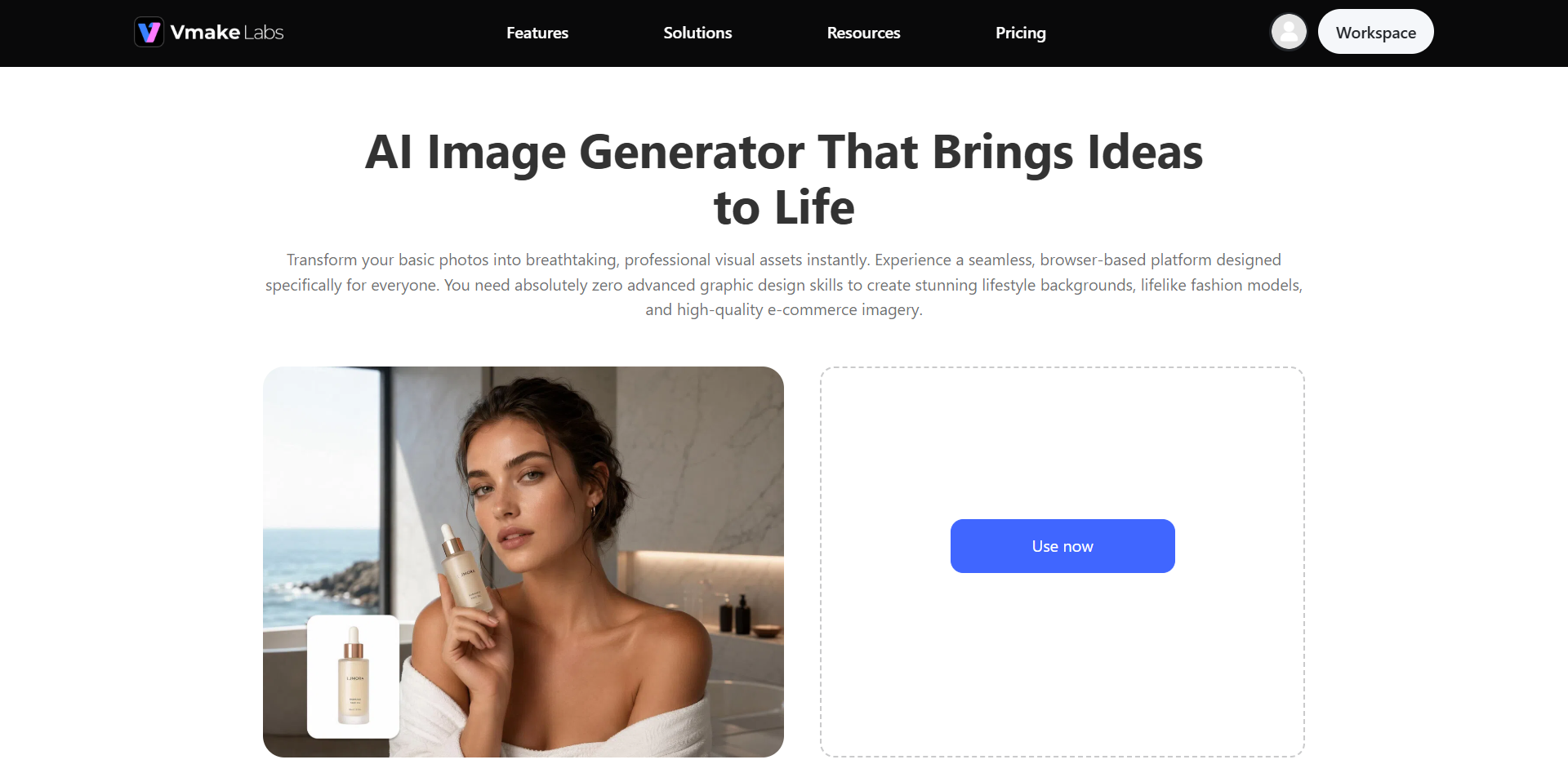
While NoteGPT integrates AI image generation into a productivity platform, Vmake Labs focuses on visual content creation for individuals, creators, marketers, and e-commerce businesses.
Beyond generating images from text prompts, it offers AI-powered tools for product photography, fashion model creation, image enhancement, and background generation within a single workspace. Users can also access multiple AI generation models to match different creative styles and project requirements.
For those seeking a dedicated platform centered on producing and refining commercial-quality visuals rather than general productivity, Vmake Labs provides a broader range of image creation and enhancement capabilities.
Features of Vmake Labs AI image generator tool
-
Supports text-to-image & image-to-image: Generate original visuals from descriptive text prompts or transform existing images into new artistic variations. Both workflows support rapid concept development, creative exploration, and customized visual content for multiple industries.
-
Supports multiple AI image generation models: Choose from several AI image generation models optimized for different visual styles, including realistic photography, illustrations, digital artwork, product imagery, and creative designs, giving users greater flexibility for diverse projects.
-
AI product photography & background generator: Generate clean product photos with AI-created backgrounds, studio scenes, and lifestyle environments. This simplifies creating marketplace listings, advertisements, promotional banners, and social media product campaigns.
-
Smart image quality enhancer & upscaler: Improve image sharpness, resolution, and overall clarity with AI-powered enhancement tools that upscale low-resolution visuals while preserving important details for printing, marketing materials, or digital publishing.
How to use Vmake Labs AI image generator in 3 easy steps?
Step 1: Access Vmake Labs "AI image generator" tool
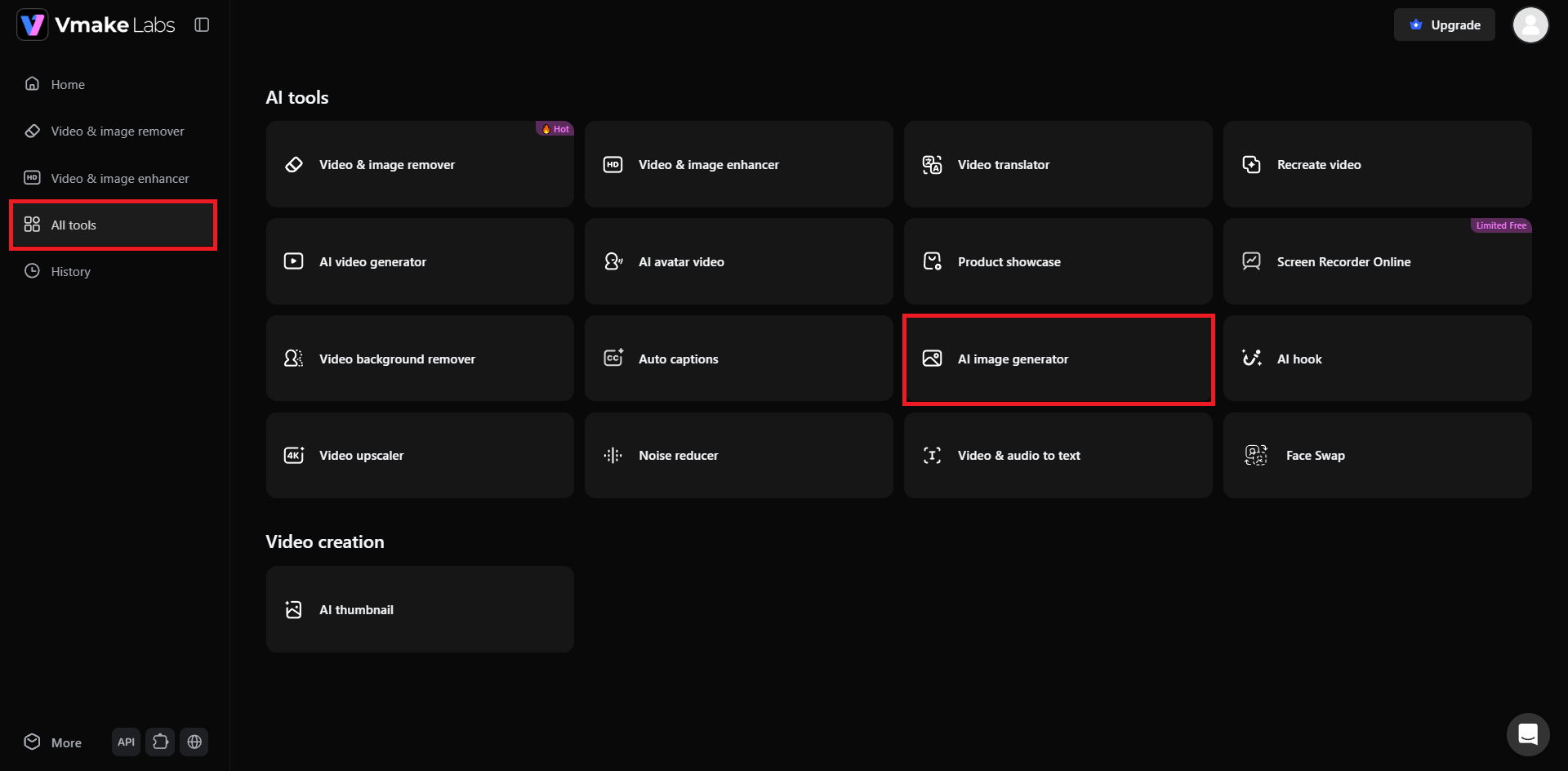
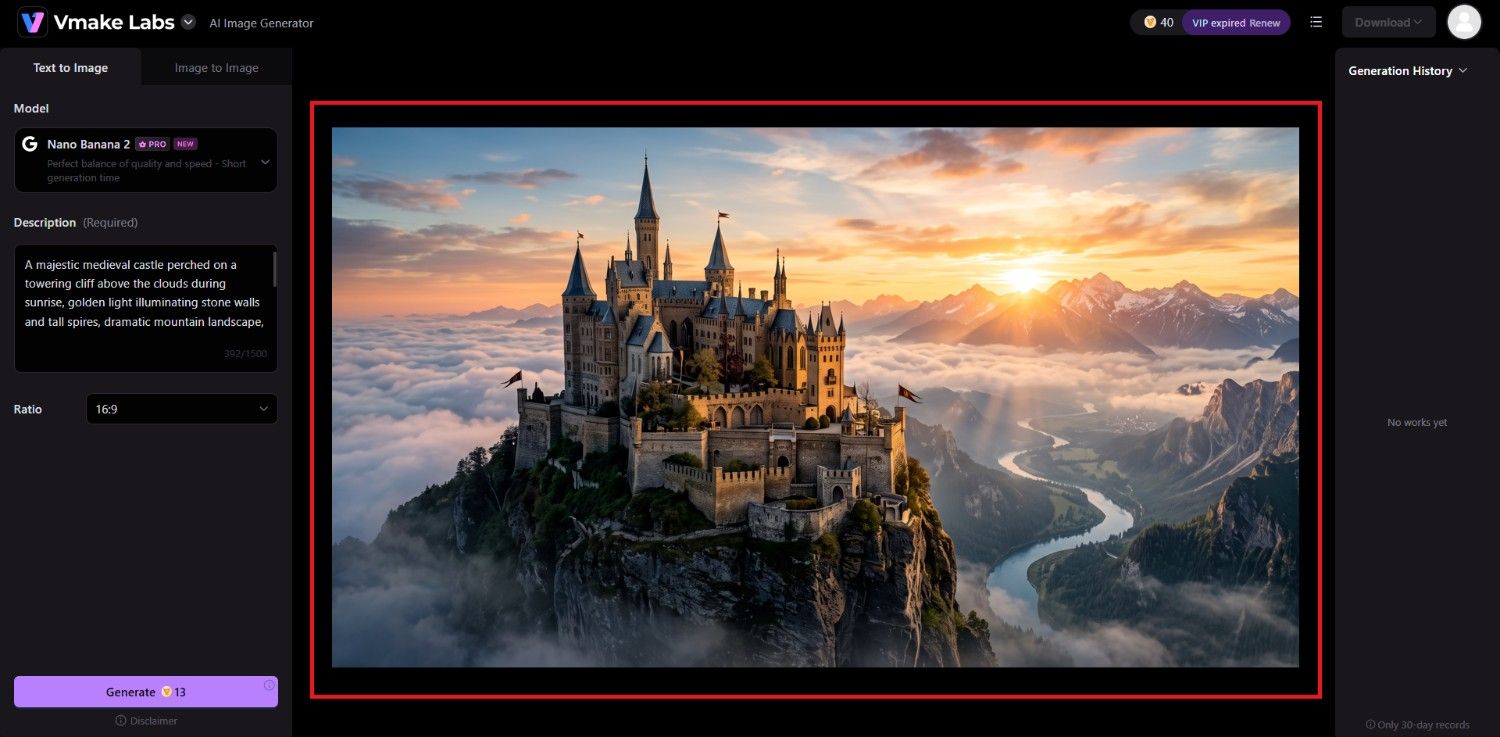
Begin your journey by first accessing the Vmake Labs official website and then logging into your account. After successfully signing in, you need to access the "All tools" option from the dashboard's left-hand panel. From the "All tools" option, pick the "AI image generator" tool.
Step 2: Provide your detailed prompt
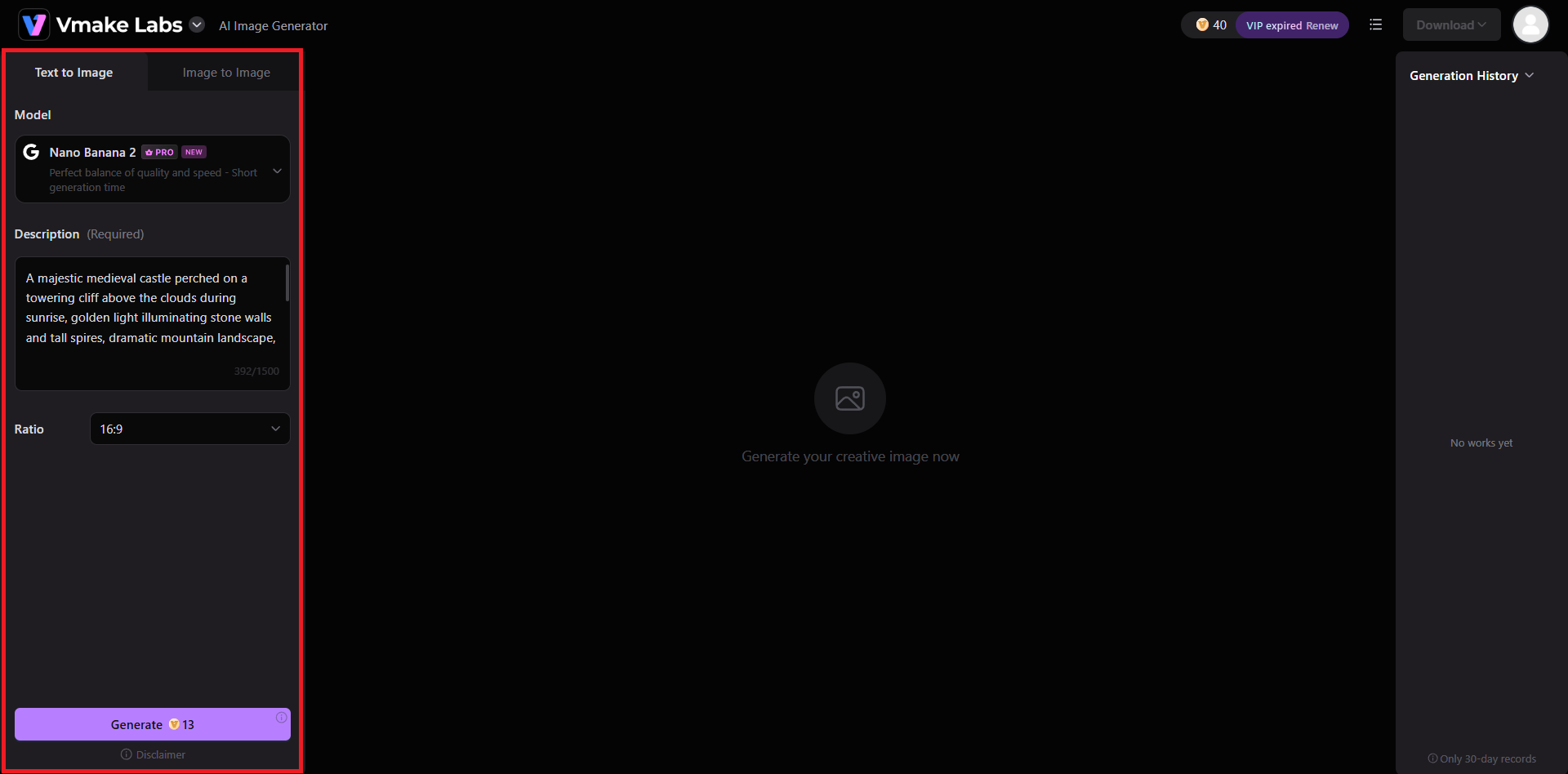
In the next step, you need to choose between "Text to Image" generation or "Image to Image" generation. After selecting your desired generation process, choose your AI image generation model, like we have chosen "Nano Banana 2". After that, provide your detailed prompt and select the aspect ratio for the resulting image. Once done, hit "Generate".
Step 3: Download your generated image
Vmake Labs will start generating your image and once that is successfully completed, the same will be shown on your canvas. After that, you can proceed to download it for sharing on social media platforms.
Vmake Labs vs NoteGPT for AI image generation
Although both platforms support AI image generation, they target different audiences. NoteGPT emphasizes productivity alongside image creation, whereas Vmake Labs focuses on comprehensive visual content production and enhancement.
|
Feature |
Vmake Labs |
NoteGPT |
|---|---|---|
|
Primary focus |
AI image creation and visual editing |
AI productivity with integrated image generation |
|
Text-to-image |
Yes |
Yes |
|
Image-to-image |
Yes |
Yes |
|
Multiple AI image models |
Yes |
Yes |
|
AI fashion model generation |
Yes |
No |
|
AI product photography |
Yes |
No |
|
AI background generation |
Yes |
Limited |
|
Image enhancement & upscaling |
Built-in AI tools |
Limited |
|
Productivity tools |
Limited |
Extensive AI workspace |
|
Best suited for |
Creators, marketers, e-commerce businesses |
Students, researchers, professionals, general users |
Where/When to use Vmake Labs:
Choose Vmake Labs when producing marketing creatives, product images, fashion photography, branded visuals, or enhanced commercial content. Its specialized image generation and editing tools support end-to-end visual production workflows.
Where/When to use NoteGPT:
Choose NoteGPT when AI image generation complements your research, note-taking, writing, presentations, or learning tasks. It works best for users seeking multiple AI productivity tools within a single platform.
Best practices to follow when using NoteGPT AI image generator
Better prompts and thoughtful refinement often produce more consistent AI-generated images. These practices can help you maximize image quality while making efficient use of your available credits.
-
Craft detailed and specific prompts
Include the subject, composition, lighting, color palette, camera angle, artistic style, and background details. Specific prompts reduce ambiguity and help the AI generate visuals that better match your expectations.
-
Select the right AI model and visual style
Different AI models excel at different tasks. Choose realistic models for product images, artistic models for illustrations, and experiment with styles to identify the best fit for your project.
-
Leverage image-to-image generation
Upload an existing image as a reference when refining concepts or maintaining consistent compositions. This approach often produces more predictable results than repeatedly generating completely new images from scratch.
-
Refine and polish outputs for professional use
Review generated images carefully and make necessary adjustments before publishing. Minor edits, upscaling, background refinement, or color corrections can improve overall quality for marketing or commercial applications.
Conclusion
NoteGPT AI Image Generator extends the platform beyond productivity by offering accessible AI-powered image creation through multiple generation models. It is a practical option for users who want image generation alongside writing, research, and presentation tools without relying on separate applications.
However, its credit-based pricing and relatively limited image editing capabilities may not suit creators producing visual content regularly. For users requiring dedicated image generation, AI-powered enhancement, product photography, fashion model creation, and commercial visual workflows, Vmake Labs provides a more specialized environment designed specifically for creating and refining professional-quality images.
Frequently Asked Questions (FAQs)
-
Is NoteGPT AI Image Generator free to use?
Yes. NoteGPT offers a free plan with limited monthly quotas. Advanced AI image generation models and higher usage limits require a paid subscription with Premium Credits allocated according to the selected plan.
-
What AI models does NoteGPT AI Image Generator rely on?
NoteGPT supports multiple third-party AI image generation models rather than a single proprietary model. Available options may change over time as the platform adds or updates supported AI technologies.
-
Can NoteGPT AI Image Generator create readable text inside images?
It can generate images containing text, but accuracy varies depending on the selected AI model and prompt. For logos, posters, or graphics requiring precise typography, manual editing is often recommended.
-
Do I need to create an account to use NoteGPT AI Image Generator?
Yes. Users must sign in to access NoteGPT's AI tools, including image generation. Creating an account also enables quota tracking, credit management, and access to saved projects across devices.
-
How does Vmake Labs differ from NoteGPT AI Image Generator?
Vmake Labs focuses primarily on AI-powered visual creation, offering dedicated tools for product photography, fashion models, background generation, and image enhancement, while NoteGPT integrates image generation within a broader AI productivity platform.

You May Be Interested
7 Best Free AI Image Generators 2026 Alternatives to Grok Imagine
Artguru Image Upscaler Review: Features & Best Alternative
Grok Image Generator Review: Is It Worth Using in 2026?
Best AI Image Generator: 10 Top Picks for 2026 Review