What is 8k Resolution: A Complete Guide to The Next-Gen Visual Era
 Ken DawsonMay 31, 2026
Technically speaking, 8K resolution introduces a massive 33-million-pixel grid. But, what is the 8k resolution, and how does it impact the world? This guide explores how 8K is transforming industries, breaking down the required hardware, and detailing the benefits. Let's demystify what 8K resolution actually means for you.
What is 8k resolution in pixels?
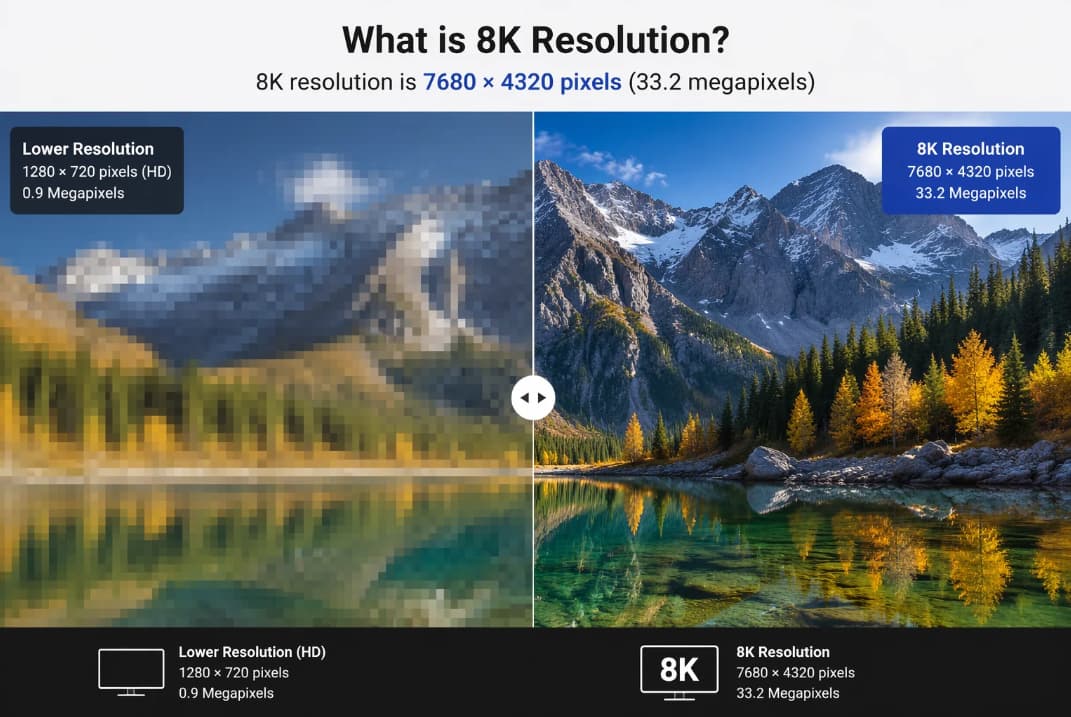
The 8K standard is defined by a huge grid of 7680×4320 pixels. This horizontal and vertical count makes for a canvas physically larger and considerably more intricate than anything seen before. This grid packs in total approx. 33.2 million pixels to the screen.
With such tremendous pixel density, you can't discern individual dots with the naked eye, even while standing near to a big panel. This results in an almost seamless visual experience. It's less like gazing at a digital screen and more like seeing through a wonderfully clean glass window.
The key advantages of 8k technology
-
Extraordinary pixel density: With 8K there are more than 33 million pixels on screen, which gives an exceptionally smooth image, like looking through a real window. You won't see individual pixels, just crystal-clear detail.
-
Superior large-screen performance: 8K really shines on 75-inch TVs and up, as lower resolutions can start to seem blurry or stretched. It makes everything crisp and clear, and makes watching on a bigger screen a far more immersive experience.
-
Creative flexibility for editors: The increased resolution offers video editors and content developers more options. They can clip, zoom, or reframe film without loss of quality, while still producing gorgeous 4K recordings.
-
Enhanced depth perception: The extra detail gives photographs a more natural and dimensional look. Scenes look more real & have greater depth, like 3D but without special glasses.
-
Future-ready viewing: In 2026 and beyond, 8K will be the future of streaming services, cameras, and gaming consoles. Investing in 8K now puts you ahead of the curve. It's future-proof technology that will future-proof your setup for years to come.
Video editing and content creation in 8k
-
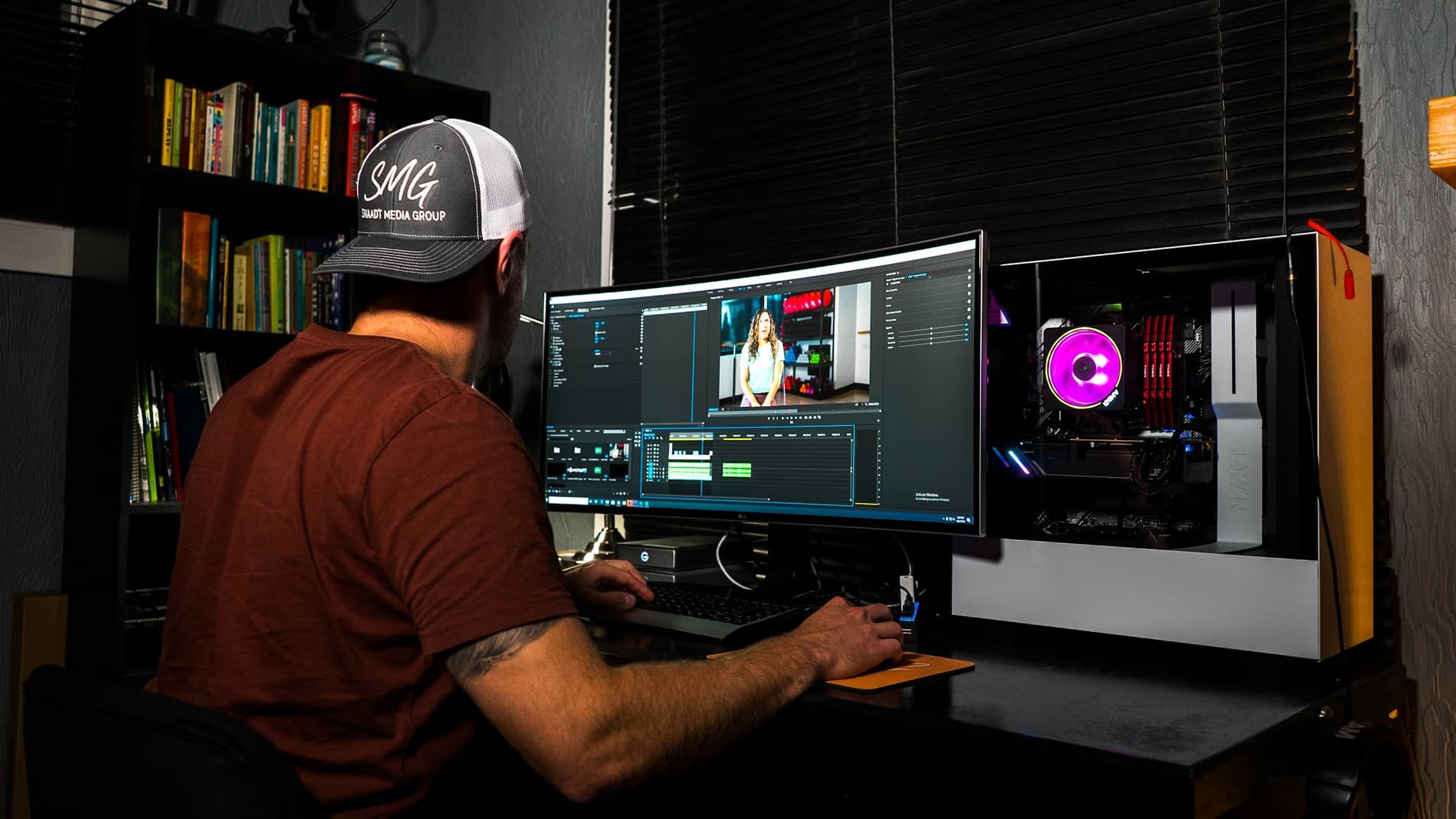
Cropping flexibility: 8K footage gives editors a wealth of detail to play with. You can zoom into a scene, crop areas of the frame, or capture close-ups without the final movie appearing out of focus. The resulting movie still looks amazingly sharp in 4K, even after significant cropping.
-
Frame stabilization: The higher resolution provides a huge pixel "buffer" for digital stabilization technologies. You can stabilize shaky footage and crop out the edges without losing the quality of the finished film.
-
Enhanced color grading: Many 8K videos are created with HDR support, capturing more detail in both bright and dark areas. This means greater control over color enhancement for designers, better color quality, smoother lighting transitions, and a more cinematic final appearance.
Technical limitations and infrastructure challenges
-
Massive bandwidth demands: Watching real 8K videos online requires an extremely fast and stable internet connection. Most consumers require Internet speeds in the 50-100 Mbps range for smooth streaming. Without an appropriate speed, videos can lag, delay, or unexpectedly degrade in quality.
-
High storage requirements: 8K video files are huge and will eat up storage space in no time. A few minutes of raw footage can take up a few gigabytes. So, artists often resort to big SSDs, external drives, and backup storage solutions.
-
Limited native content: At this point, there is still very little native 8K material. Most films, television series, and web videos are still made at 4K or lower resolutions. Quality can be improved by AI upscaling, albeit it still can't quite match footage originally recorded in 8K.
-
Hardware upgrade costs: Most of the time, playing 8K content requires robust, expensive gear. Many users need better graphics cards, faster CPUs, more RAM, and HDMI 2.1 support. For casual users and small creators, upgrading to an 8K-ready configuration can be pricey.
-
Diminishing returns on small screens: The difference between 4K and 8K is less noticeable on smaller TVs and screens. Most people will only appreciate the 8K detail on larger TVs when viewed from close range. The improvement for normal viewing setups could seem slight.
-
Demanding render times: When working at this size, you will need a high-end workstation with ample RAM and a multi-core processor. Working with 33 million pixels every frame adds considerable time to rendering and exporting projects.
Pro tip: Optimize your visuals with VMake AI 4k+ enhancement
8K is the big visual trend for 2026, although true native 8K might still be expensive and demanding on tech. Hence, Vmake's AI 4K+ enhancement tool is a clever compromise. Using this tool makes movies look crisper and more detailed, providing a polished image that feels at home on modern, high-resolution monitors.
Vmake is a sophisticated video enhancer that uses cutting-edge AI and deep learning to improve poor-quality video in a few clicks. It can also eliminate digital noise, enhance textures, and retrieve lost information without making recordings appear too artificial. The AI 4K+ upgrade also cleans up compressed or fuzzy clips, making them look more professional. You may even preview the enhanced outcomes before exporting them. Vmake offers a fast, practical option for designers who want 8K-style visuals without expensive equipment.
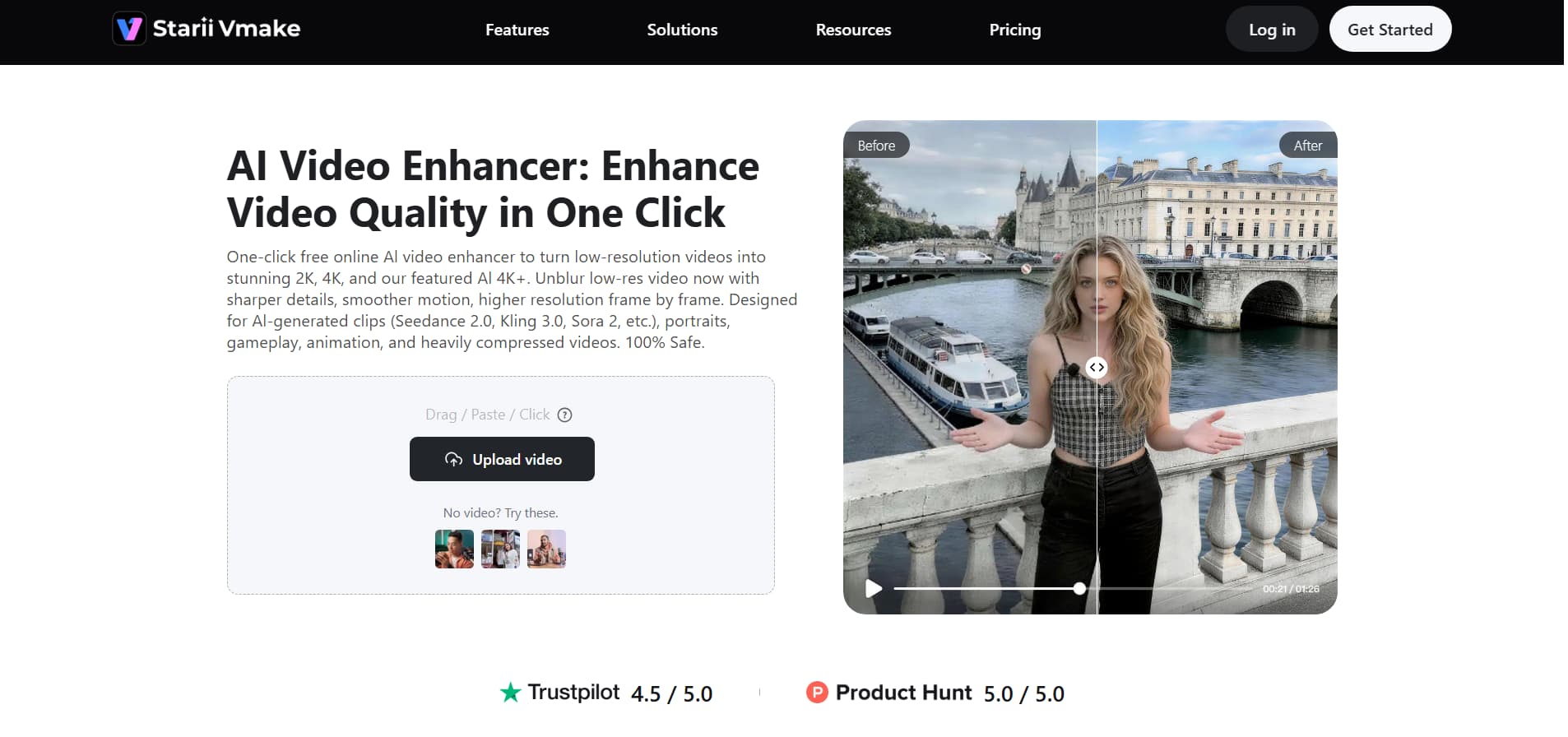
Enhance the video quality of the video using Vmake today.
Step-by-step guide to enhance video with Vmake
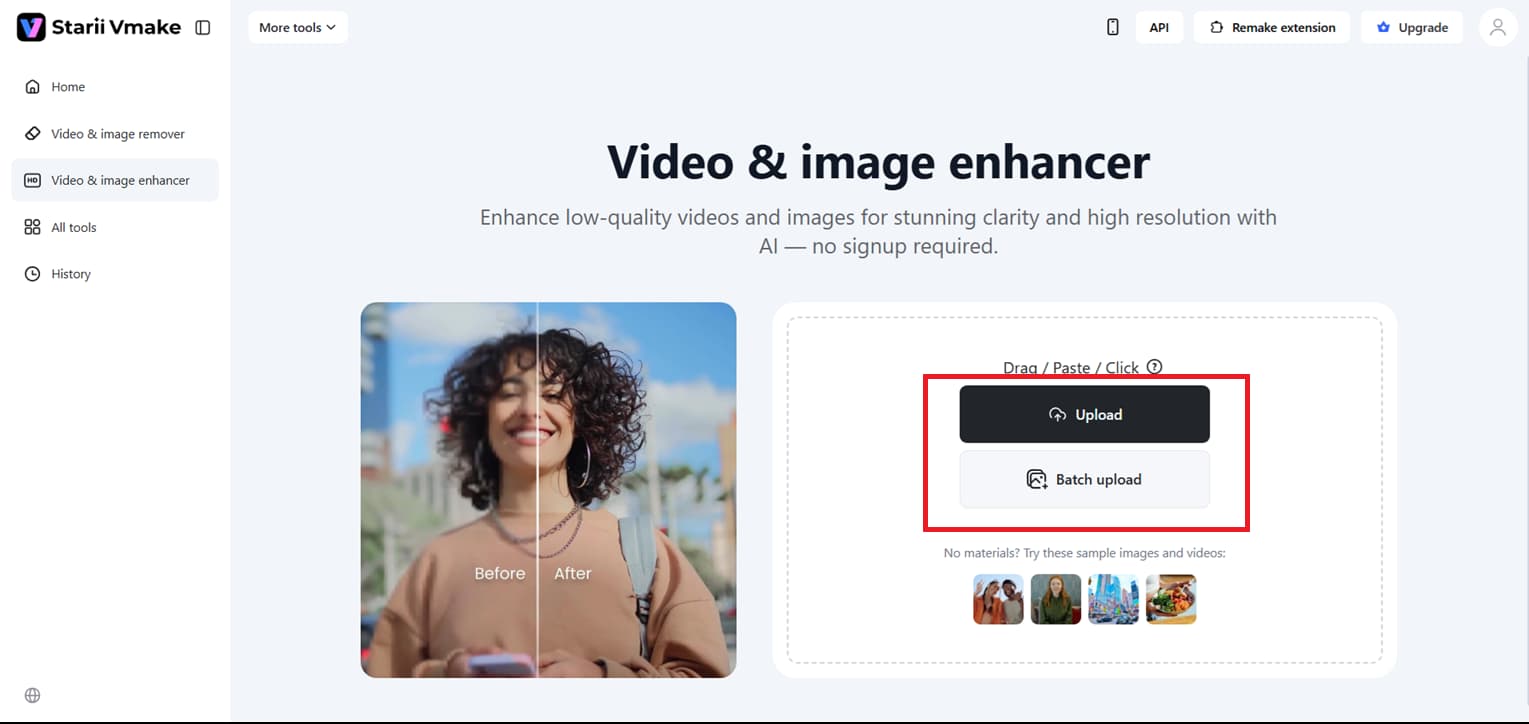
Step 1: Upload your media assets
Simply drag or paste your video into the Vmake UI or select it from your local folders. This platform also supports bulk uploads, enabling analysis of multiple clips simultaneously. The system supports all main formats, so you can jump directly into the enhancement process, without the hassle of conversion, whether your footage is in MP4, MOV, AVI, or 3GP.
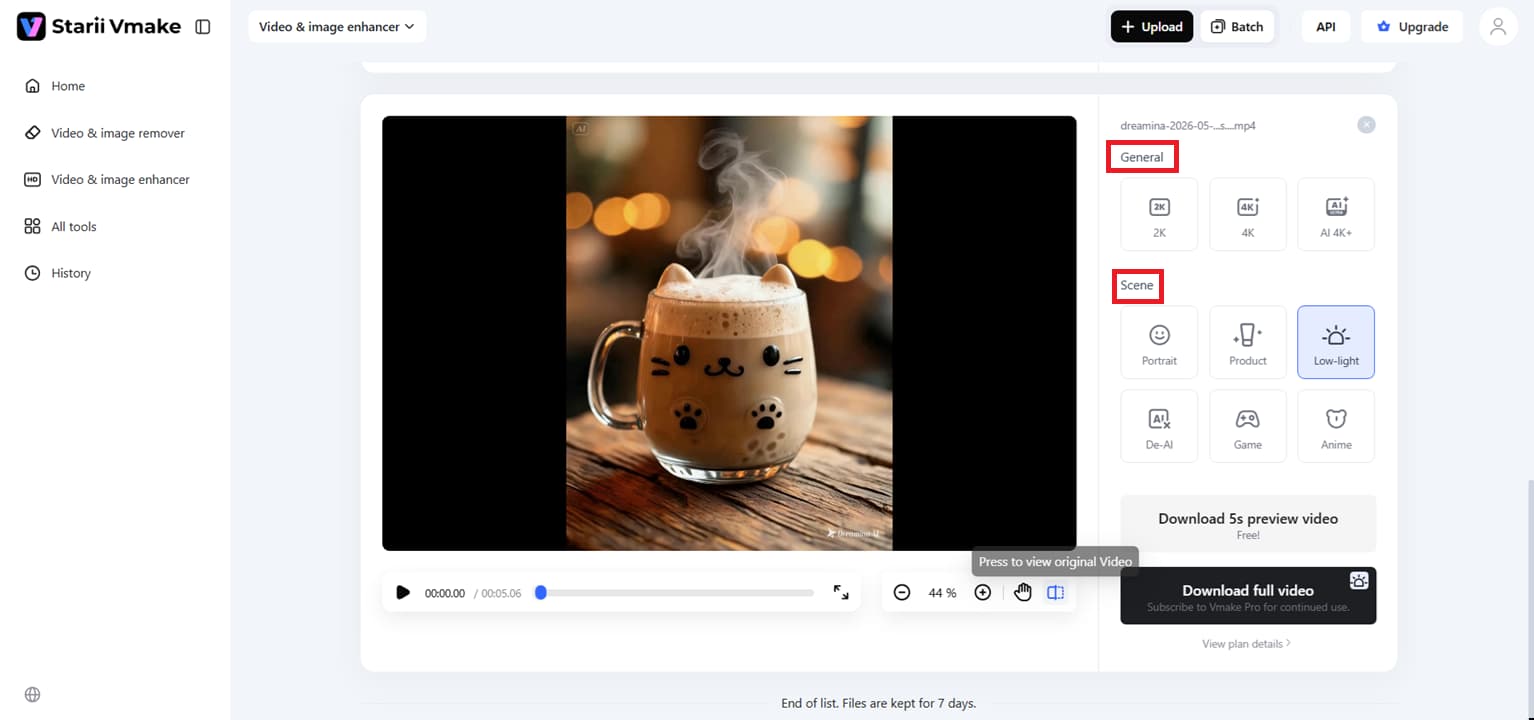
Step 2: Select your intelligent enhancement model
The AI analyses the frames to find the best way to restore your file once it has been uploaded. You can upgrade to 2K, 4K, or even the sophisticated AI 4K+ level. You can select specific optimization modes for Portraits, Gaming, Anime, or Product displays to get a polished result, allowing the AI to focus on the exact textures that matter most to your project.
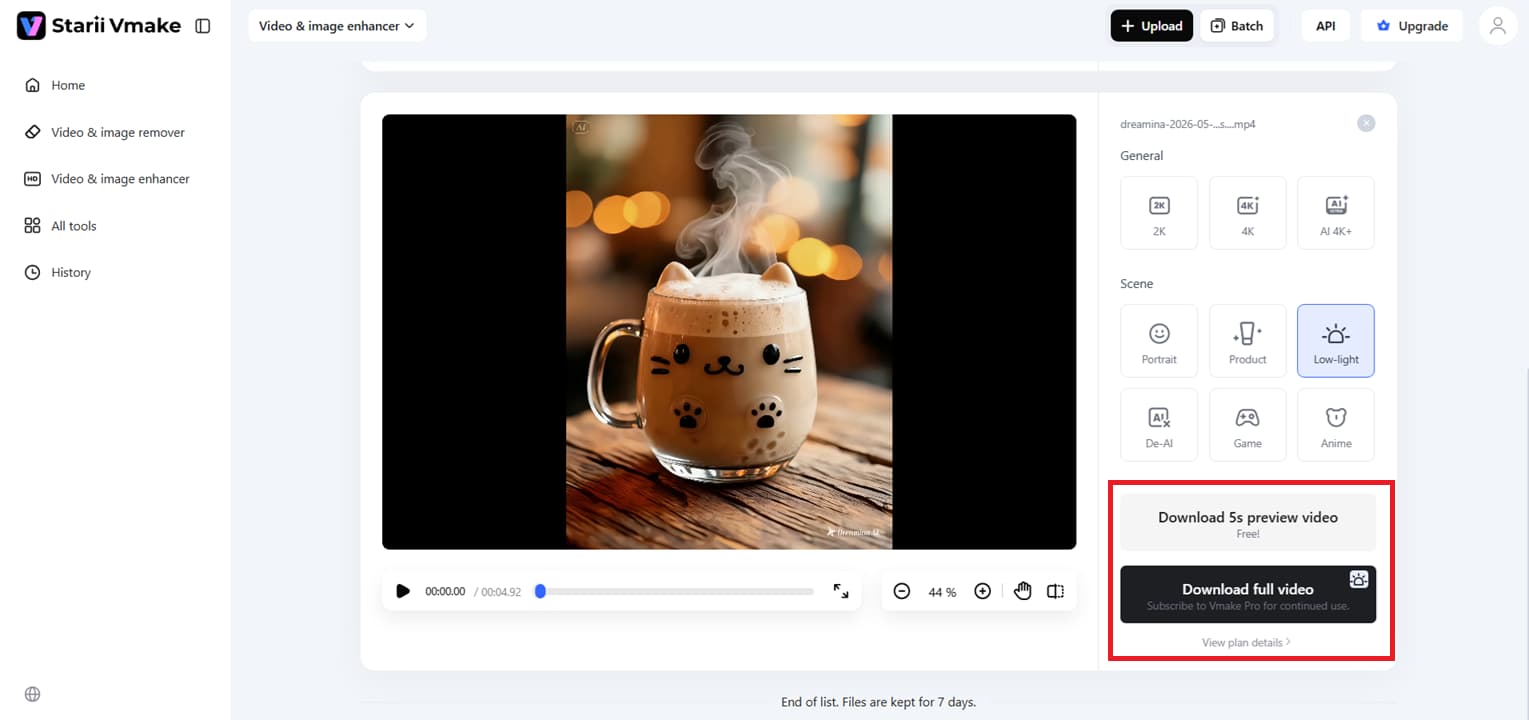
Step 3: Review the transformation and save
Preview the video to check out the clean & bright video with sharp features, and make sure they fit your creative idea. This HD preview lets you see the clarity across the frame. If you are happy, you can either choose to ''Download 5s preview video'' or ''Download the full video''.
Key features of the Vmake AI tool:
-
One-click enhancement: This feature automates the entire process, converting video into HD easily. With just one click, the AI analyses your film and makes the best modifications for professional results, with no technical knowledge required.
-
Visual noise reduction: Vmake senses and reduces digital grain and noise in videos from low-light or high-ISO settings. Giving you much smoother, clearer footage that looks polished even on large high-definition televisions.
-
Face and texture restoration: The tool works on human features and delicate details to restore lost clarity. It enhances facial expressions and restores the natural texture of skin, hair, and clothing, so everyone in your film seems alive.
-
Cross-device accessibility: Vmake is a web application, thus it's built to be flexible. Make your films better anytime, anywhere, whether you're working from a PC in the office or on a mobile device on the move.
-
De-AI mode: A new setting to make AI-generated entertainment feel more real. It fixes over-smoothing, repeating textures, and lighting imbalances to make synthetic movies look natural and blend seamlessly with real-world footage.
Practical use cases and applications of 8k resolution
-
Medical and surgical precision: For sensitive operations, surgeons use 8K displays. The ultra-clear display allows them to see the small neurons, tissues, and blood arteries in greater detail. This helps to enhance accuracy and prevent mistakes during surgery.
-
Advanced digital signage: 8K screens are large enough for use in airports, malls, and luxury stores. The images are still sharp even when viewed up close. This means that commercials and promotional material are more realistic and eye-catching.
-
Professional cinematography: Filmmakers shoot in 8K to capture the finest detail. Also, it helps them to future-proof their projects. When upsampled to 4K, the footage looks cleaner and clearer.
-
Security and surveillance: 8K security cameras can record large areas with fine detail. Security teams may zoom in on footage to pick out faces, license plates, or distant things without the image getting hazy.
-
Scientific visualization: Scientists and space agencies use 8K monitors to study complex data and simulations. At high resolution, people detect fine patterns and characteristics they can't see on lower-resolution screens.
Conclusion
8K isn't just a vague idea anymore by the time we get farther into 2026. It's thrilling for experts and ordinary producers alike because of its extraordinary detail, realism, and editing freedom. But we still have some fairly serious difficulties, such as huge storage requirements and pricey equipment. That's why AI solutions like Vmake AI are more helpful for high-quality HD visual experiences.
It seems that high-quality images are the way forward for content creation if you are looking to relive old memories, add some spice to your social media clips, or enhance AI-created stuff. Want to see the change yourself? Enhance your movies to HD quality with just a few clicks using the Vmake AI video enhancement tool.
FAQ's
What resolution is 8k compared to 4k?
Technically, 8K offers four times the pixel density of 4K, totaling a whopping 33 million pixels for unmatched depth. It's the leap from high definition to life-like reality, a canvas so thick that pixels melt into invisibility. You don't need the latest filming gear to create HD-level videos with Vmake AI, as its clever enhancements can easily enhance the resolution to AI 4K+ and bridge that resolution gap.
Can the human eye actually see the difference in 8k?
The human eye perceives 8K as increased "texture" and "presence," making the image look three-dimensional rather than flat. The added data results in a cleaner, more immersive experience, even when viewed up close, though it is most noticeable on large displays. This is where Vmake AI 4K+ enhancement comes in; it sharpens tiny details and textures, so your content looks natively crisp to the naked eye.
Do you need special cables to watch 8k content?
Yes, you do. You'll need an HDMI 2.1 connection to support the high data transfer rates of 8K video without lag or loss of quality. Regular cables just don't have the bandwidth to transfer that much content from your player to your screen. Vmake AI, however, helps you overcome these technological challenges by optimizing your video files for AI 4K+ compression while maintaining professional, high-resolution quality.
Is 8k content currently available for streaming?
Native 8K streaming is still in its early days, with YouTube leading the way and other platforms trying to keep up. Native 8K files are heavy; hence, most creators compensate for the lack of available content with high-end upscaling. Make AI put this professional competence at your fingertips, turning your existing library into 8K-ready masterpieces suited for the next generation of streaming.
What are the main storage and hardware challenges when handling 8K video?
Raw 8K files are data suckers; they take up a lot of hard disk space and a lot of internet bandwidth to post or distribute. The enormous processing demands of these huge files can sometimes cause them to stop, lag, or drop frames on conventional machines when processed locally. Vmake AI entirely eliminates these hardware limitations by shifting the heavy rendering workload to the cloud, so you can optimize videos to 4K or AI 4K+ directly from your browser.
Why should filmmakers shoot in 8K if most people only watch in 4K or 1080p?
Filming in 8K means content is future-proof, and editors have the flexibility to crop, zoom, or stabilize shots without losing visual quality. Shooting in 4K gives you a far crisper, richer finished 4K movie than downsampling an 8K file does. Want that ultra-clean, high-end appearance but don't want to break the bank on cinema gear? Use Vmake AI, an online tool to intelligently enhance the clarity of your normal video to 4K or AI 4K+, using a single click.

You May Be Interested
How to Convert 480p Video to 1080p (Best Upscaling Methods)
[Updated!] How to Upscale Anime Video to 4K Online
How to Upscale Videos: Guide to Higher Resolution and Sharper Details
What is 480p Resolution and How to Enhance 480p Quality
1080p vs 1440p: Which Resolution Is Better for You?
1080p vs 4K: Pros, Cons, and Which One to Choose