
123APPS Watermark Remover: The Power of AI in Visual Restoration
Read our 2026 123APPS Watermark Remover review. We test its AI video tools, pricing, and performance vs Vmake. See if it's the right choice for your video editing.


Whether you’re making a presentation, an online course, or a social media video, reusing older footage is common. But what if the video clip has a watermark or logo that ruins a polished piece of content? So, it becomes a challenge to remove watermarks cleanly without damaging the background.
Thankfully, modern AI tools can solve this problem, and 123APPS Watermark Remover is a prominent example. It promises fast and easy watermark removal without requiring professional video editing skills. What makes it popular is its comprehensive editing features for audio, video, and PDF files.
This article provides everything you need to know about 123APPS Watermark Remover, based on my personal testing. You will learn about what 123APPS offers, its actual performance, what it does best, where it falls short, and whether it is the right choice for your needs in 2026.

What is 123APPS, and What Does It Bring to the Table?
123APPS is a professional online platform that offers a watermark remover to help you erase watermarks and logos from videos with a few clicks. In addition, it presents a broad set of AI tools for editing, enhancing, and converting video, audio, and documents. With a beginner-friendly interface, it is ideal for casual users who frequently work with video content. You can also enjoy efficient results without a learning curve.
Additional Features:
- Video/Audio Editor: This lets you trim, merge, crop, rotate, stabilize, and equalize media files. You can also add audio, images, or text to a video, join audio clips, adjust volume, use green screen, sync audio with the video, and more.
- Video/Voice Recorder: It helps you capture the screen, video, or audio directly from your device. You can also download or edit them quickly after recording.
- Text to Speech: This enables you to type any text and choose a language, voice, pitch, and speed to convert it into natural-sounding speech. You can also preview it before using.
- PDF Editor/Converter: It works wonders for splitting, merging, compressing, unlocking, protecting, rotating, or adding page numbers. You can also convert to or from PDF with ease.
- File Converter: With an extensive format support, you can convert any image, audio, video, document, font, ebook, or other file to the preferred format.
123APPS Watermark Remover: Key Features & Hands-On Experience
123APPS Watermark Remover is a versatile tool, but it can only remove watermarks from videos. I have tested it on some watermarked footage to evaluate its capabilities. So, here are its features in my experience:
123APPS Video Watermark Remover
123APPS Video Watermark Remover helps you remove or blur static watermarks, logos, images, dates, or anything else that seems unnecessary. It supports a range of video codecs so that you can import videos in MP4, MOV, AVI, WMV, and more, up to 500 MB each, for free. It offers quick, one-click watermark removal.
The process is completely automatic, and you can preview the clear video and download it in seconds. You can even export unwatermarked videos in the desired format, up to 4K resolution. It is ideal for cleaning short videos, such as TikTok clips and personal footage.
Getting Started with 123APPS Video Watermark Remover
Thanks to its simple interface, you can effortlessly remove the watermarks from videos. But to guide you, here is a complete tutorial on how to use 123APPS Video Watermark Remover:
Step 1. Access Watermark Remover
The first step is to open the 123APPS website and click “Remove Logo from Video” under the “Video Tools.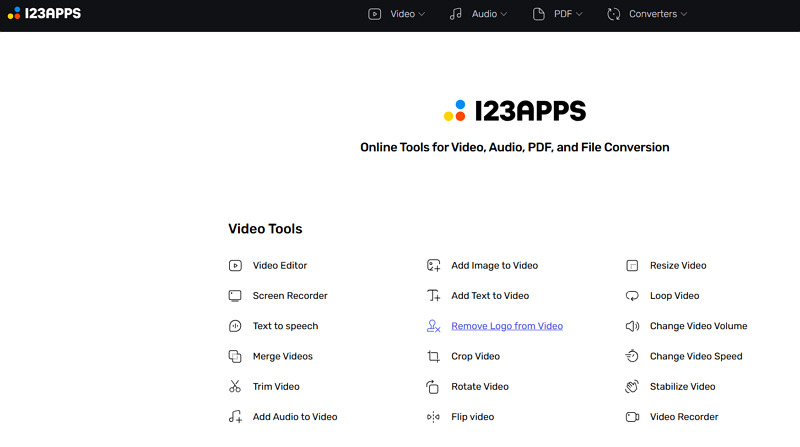
Step 2. Import the Video
Now, press the “Choose File” tab to import the watermarked video. Otherwise, you can drag and drop it to proceed.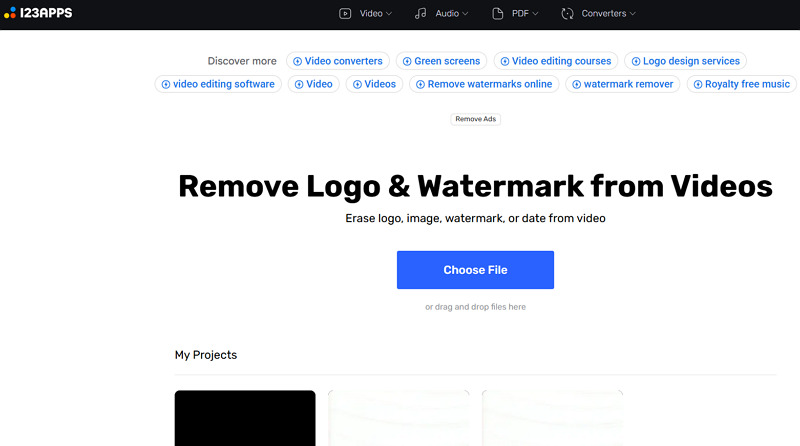
Step 3. Remove the Watermark
Next, play the video until the watermark appears. Drag the box over the watermark, then tap “Apply” to make it disappear automatically.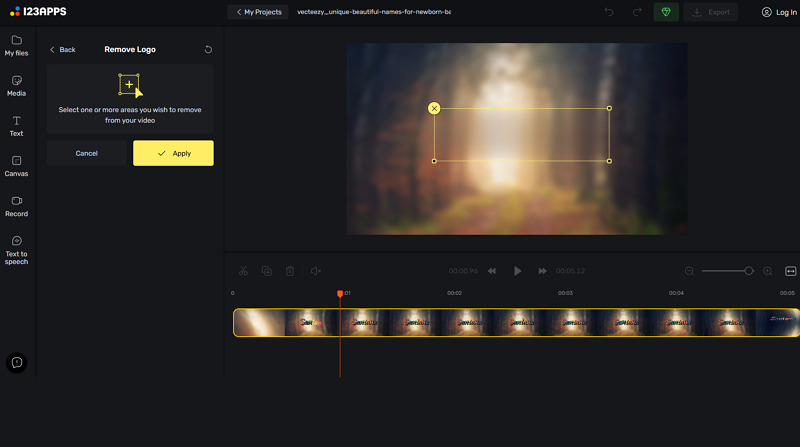
Step 4. Export the Output
Lastly, you can preview and edit if needed. Then, press “Export” and the settings icon. Choose the format, frame rate, compression, and quality. Then, hit “Export” again.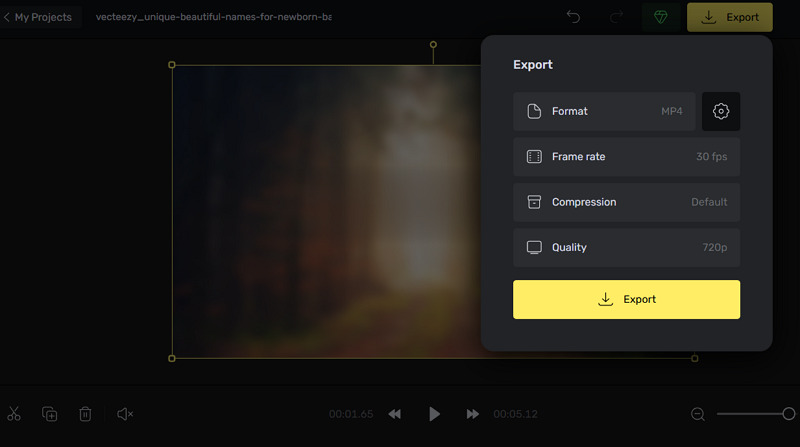
Pricing Plans of 123APPS Watermark Remover
123APPS uses a subscription model, offering both free and premium plans for different user needs. Let’s look at the table below to understand the pricing structure better; we have only included video tools:
| Plan | Subscription | What’s included |
| Free | $0 | 51 tools 5 files per day processing 500 MB file size Fast speed Ads |
| Premium (Monthly) | $6.90 per month | 51 tools Unlimited files processing 4 GB file size Faster speed Ads-free |
| Premium (Yearly) | $5.33 per month |
123APPS Watermark Remover vs. Popular Alternatives
When evaluating the performance of 123APPS Watermark Remover, it is essential to compare it with its competitors on the market. Below is a comparison table of 123APPS with some of its alternatives:
| Tool | Platform | Batch Support | Output Quality | Ideal Use |
| 123APPS Watermark Remover | Web | No | Medium | Remove watermarks from videos only, but only works for simple and static marks |
| Vmake Video Watermark Remover | Web, Mobile (Android & iOS) | Yes | High | One-click watermark detection and removal. Truly excels at eliminating dynamic watermarks |
| Fotor Watermark Remover | Web, Desktop (Win & Mac), Mobile (Android & iOS) | Yes (Images) | Medium | Capable of erasing image & video watermarks, but suitable for light text or logo removal |
| HitPaw Watermark Remover | Web, Desktop (Win & Mac) | Yes (Images) | High | Supports removing both image & video watermarks, but is specialized for images |
Benefits & Drawbacks of 123APPS Watermark Remover
Although this watermark remover is comprehensive, it is not perfect, just like other online tools. Let’s consider its benefits and drawbacks:
Benefits:
- No download or installation
- Easy to use and navigate
- Support multiple video formats
- Remove logos with two clicks
- Export in HD, 2K, and 4K resolution
- Various editing & conversion tools
Drawbacks:
- Limited free version and file size
- Leave the watermark traces
- Unable to remove dynamic watermarks
- Lack of a batch processing feature
- No desktop software or mobile app
- Customer support is also not great
Real User Reviews
No doubt, it is essential to consider the other users’ feedback to learn about its performance. Here are some reviews from Trustpilot and Capterra:
Trustpilot: 1.7/5 (37 reviews)
I bought the premium plan to remove the file size and time limits, but it was a waste of money. Most of the time, when saving your edits, an encoding error message appears, and the work fails. The screen recording function is a dummy. It works for very short recordings, but the limit is 1 hour and 30 minutes. The watermark removal feature is very limited, and it’s more of a blur than a removal. The result is a blurry spot in the place of the watermark. The contact option is a fiction; they never respond to sent messages or bug reports – never. – Sebastian Gajda
Capterra: 4/5 (2 reviews)
123apps is a convenient and useful suite of tools for occasional file editing and conversion. While it may not have all the functionality of more advanced software, it’s free and easy to use, making it a great option for those looking for a quick, simple solution. However, users should keep in mind its limitations regarding file size, control, and privacy. – Priyanshu J.
FAQs about 123APPS Watermark Remover
1. Is 123APPS Watermark Remover safe to use?
According to 123APPS, its services follow the US and EU data protection standards. Plus, you should be aware of potential privacy risks while uploading your personal or confidential videos.
2. Does it remove watermarks from Images?
No, 123APPS Watermark Remover only works for videos. It does not support removing logos or watermarks from images, PDFs, or AI content.
3. Can I use it for commercial projects?
Of course. You can remove watermarks for commercial use. Yet, you must have the ownership rights to the original content and follow the copyright laws and privacy policy.
Final Verdict: Is 123APPS Watermark Remover Worth It?
No doubt, 123APPS Watermark Remover is a simple, fast, and affordable way to eliminate watermarks from videos. Its range of editing and conversion features makes it suitable for everyday projects in 2026. However, it cannot eliminate complex, dynamic watermarks from videos. In this regard, Vmake Video Watermark Remover is the best solution for its AI performance, batch support, and high-quality output.

You May Be Interested

Seedance 2.0: What's New & How to Use It

123APPS Watermark Remover Review (2026): Pros, Cons, and Pricing

5 Best Valentine's Day Video Ideas for eCommerce in 2026

How to Create a YouTube Thumbnail? Create YouTube Thumbnails Using AI
