
Airbrush Video Enhancer: Making Your Footage Look Better
 Ken DawsonJanuary 28, 2026
In the ever-evolving realm of video enhancement, AI-powered tools have become real game changers. From content creators and influencers to casual users enhancing personal clips, everyone wants clear, sharp, and professional-looking videos without using complex software.
Among various options, Airbrush Video Enhancer stands out for upscaling low-resolution footage, restoring details, and refining visuals with cutting-edge technology. But does it truly deliver high-quality results? Is it worth your money?
In this article, you will learn about Airbrush Video Enhancer, its features, free and paid versions, how to use it, and how it performs when compared with its alternatives.
Overview of Airbrush Video Enhancer
Airbrush Video Enhancer is an AI-powered solution that automatically fixes various aspects to improve video clarity. It’s a part of the broader Airbrush suite, best known for enhancing, editing, and retouching photos and portraits. Its intuitive interface, quick & automated processing, unique effects, and a range of AI tools, such as a watermark and background remover, make it ideal for beginners and small businesses.
Additional Features:
Photo Retouch: It helps you revamp portraits by beautifying faces, adjusting colors, and removing blemishes with AI-powered tools for flawless results.
Image Enhance & Restore: You can effortlessly enhance, restore, and upscale images with a single click. It also helps unblur, unpixelate, and sharpen multiple photos in a batch.
AI Filters: It offers various filters, including an anime generator, a photo-to-cartoon or sketch converter, an action figure generator, and other creative filters that turn photos into eye-catching visuals.
Face/Body Editor: What’s more is the face & body editor with which you can smooth skin, enhance facial features, slim waist, and adjust curves, to deliver stunning photos on the go.
Background Editor: Whether you need to remove, change, or blur the background, extend the image, erase logos, or make PNGs, this tool can help you complete all these tasks.
AI Replace: You can replace objects, swap faces, change clothes, and swap multiple faces with a single click.
Magic Remover: It facilitates erasing people, objects, watermarks, wrinkles, and more, delivering a clean, professional look.
Performance Review of Airbrush Video Enhancer
Airbrush Video Enhancer is a comprehensive platform available on the web and mobile devices. Let’s explore the features of each version to understand their performance:
Airbrush Video Enhancer (Web)
Airbrush Video Enhancer is a fantastic web-based tool that uses machine learning to analyze each frame automatically. Later, it applies enhancements such as upscaling, denoising, and color correction. While supporting various video formats, it can effortlessly convert low-quality footage to 4K at 30 FPS and beyond.
It is suitable for reviving family memories, enhancing your YouTube content, and upgrading your short marketing videos with minimal effort. However, the web’s limitations and restrictive settings make it difficult to handle more complex projects.
Airbrush: Face & Photo Editor (Mobile)
Airbrush helps mobile users improve their video quality by enhancing clarity, adjusting light, boosting colors, interpolating, repairing, and stabilizing, making every moment crisp and clear. Besides, it applies face retouching to your videos and removes objects or other distractions to clean up your scenes, giving videos a professional look.
You can also apply makeup, smooth skin, whiten teeth, contour, brighten, and remove dark circles. It is suitable for enhancing short-form videos and selfie videos on the go.
How to Use Airbrush Video Enhancer: A Beginner’s Guide
Since Airbrush Video Enhancer works differently on the web and mobile, following the right steps is important. Here are the tutorials to enhance videos, depending on the platform you’re using:
Guide 1. Steps to Enhance Videos Online
Step 1. Access AI Video Enhancer
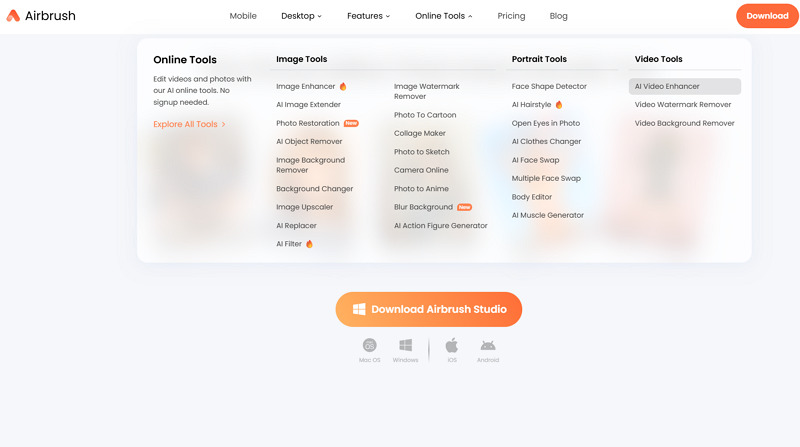
First of all, open the Airbrush official website and open the “Online Tools” drop-down menu. Now, click the “AI Video Enhancer” under the “Video Tools.”
Step 2. Upload Video
Next, tap “Upload Video” to browse and import the video. You can also upload from your mobile by scanning.

Step 3. Download the Output
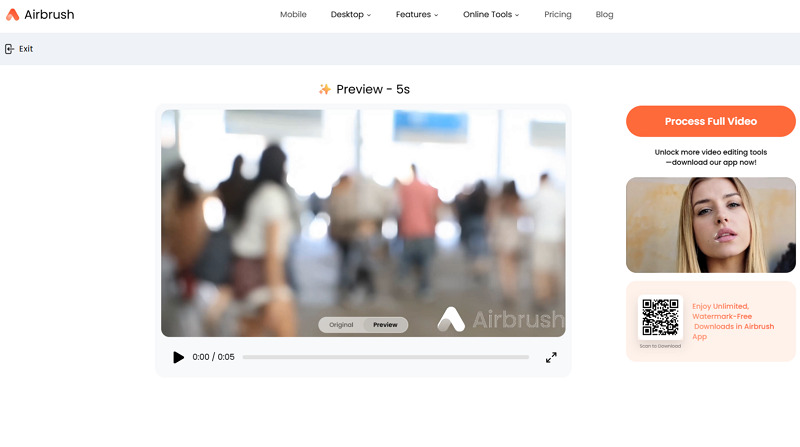
Lastly, you can preview and compare the results. Then, hit “Process Full Video” and download it once it’s done. That’s all!
Guide 2. How to Enhance Videos on Mobile
Step 1. Open AI Repair
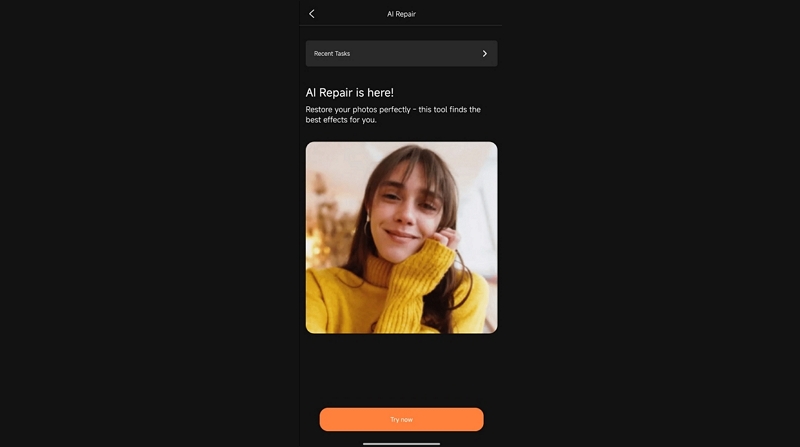
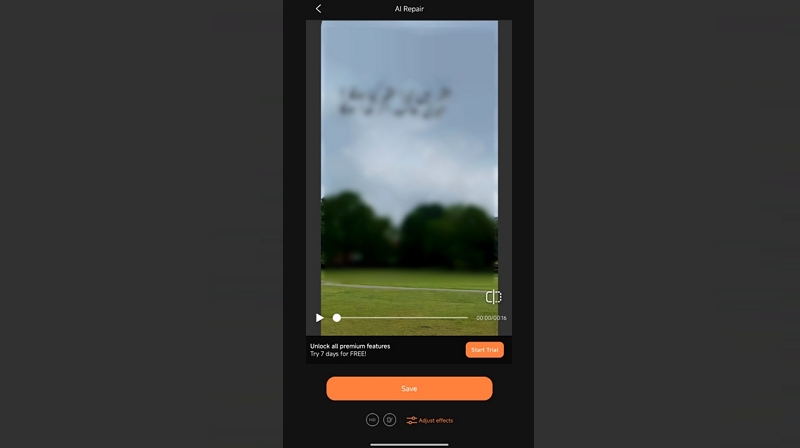
After installing and launching the mobile application, select the “AI Repair” tool, then click “Try Now” to proceed.
Step 2. Import Video
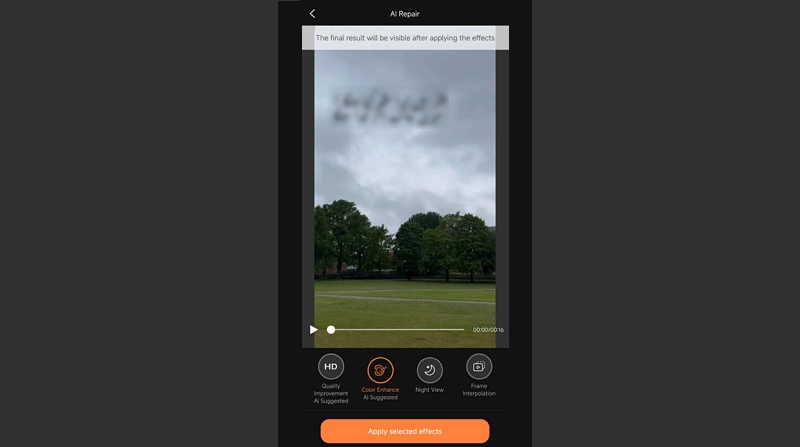
Now, open the “Video” section and pick a video you want to enhance. Then, choose one or multiple effects like “Quality Improvement,” “Color Enhancement,” and more.
Step 3. Preview and Save
Finally, press “Apply selected effects.” Wait a while, then preview and hit “Save” to download the results to your phone.
Pricing & Plans: Airbrush Video Enhancer
Airbrush Video Enhancer offers various subscription plans, but they differ for both web tools and mobile. Let’s look at the table below for better understanding:
Plan | Pricing | What’s included |
Web Tools | ||
Starter | $3 (3 credits) | Credits are valid for one year Work for both photos and videos Unlock premium features and styles |
| Basic | $9 (10) | |
| Value | $49 (75) | |
| Creator | $99 (200) | |
Mobile | ||
Free | $0 | Free access to core editing tools Basic filters and materials |
Annual | $54.99 | Full access to advanced retouching & AI-powered tools Exclusive effects and creative upgrades Export in stunning 4K Ad-free experience |
| Monthly | $12.99 | |
Airbrush Video Enhancer vs The Competitors
To learn more about the performance of Airbrush Video Enhancer, it’s important to compare it with other alternatives on the market. Below is a comparison table of Airbrush with Vmake, Fotor, Canva, and Unblur Image:
Tool | Platform | Batch Support | Custom Options | Key Feature |
Airbrush Video Enhancer | Web, Mobile (Android & iOS) | No | No | Fast and fully automated enhancement, suitable for short and portrait videos |
Web, Mobile (Android & iOS) | Yes | Yes | Professional-grade scenario-specific video enhancement with support for 4K+ upscaling | |
Fotor Video Enhancer | Web | No | Yes | Quick and automatic enhancement and upscaling; mainly focused on photo editing & enhancement |
Canva Video Enhancer | Web, Mobile (Android & iOS), Desktop (Win & Mac) | No | Yes | Basic video adjustment tools and AI upscaling for short clips, but mainly for creative designing |
Unblur Image Video Enhancer | Web | No | No | Simple video enhancer with support for upscaling to 2K resolution; ideal for very low-quality videos |
Advantages & Disadvantages of Airbrush Video Enhancer
Although Airbrush Video Enhancer offers many benefits, it also has some limitations that must not be overlooked before deciding to go with it. Here are my insights:
Pros:
Easy to use with no installation
AI-driven resolution enhancement
Suitable for beginners and quick edits
Automatic adjustment of video parameters
Watermark removal to refine the output
Offer a preview function for comparison
Fast processing for simple and short clips
Cons:
No free plan available for web users
No batch support to enhance multiple videos
Lack of advanced controls for professionals
Output may be textured and lack realism
No desktop option limits use in secure environments
Leave a watermark in the free version
Only a five-second preview is available for free
Airbrush Video Enhancer: Frequently Asked Questions
1. Is Airbrush Video Enhancer a safe app?
Yes, Airbrush Video Enhancer is safe. However, it collects user data, like names and email addresses, which may be shared with third parties. Before downloading the app, ensure you check its privacy policy.
2. Can it remove severe compression artifacts?
Airbrush Video Enhancer can remove a little noise to improve video clips. But for severely degraded footage, go for alternatives that deliver higher-quality output.
3. Is Airbrush Video Enhancer free to use?
Yes, Airbrush Video Enhancer offers a free tier for very short clips. However, you will need a paid subscription for full access and longer processing.
Conclusion: Is Airbrush Video Enhancer Worth Using in 2026?
Airbrush Video Enhancer is a remarkable solution for enhancing short videos and social media content at a fast speed. It excels at improving facial appearance, offering one-click enhancements, quick denoising, and simple upscaling without complex editing.
However, if you need a bit of manual control, batch support, 4K upscaling, or cinematic-grade restoration, Vmake Video Enhancer is a powerful alternative. Try it today for one-click facial enhancements and detailed processing of gaming visuals.

You May Be Interested

Seedance 2.0: What's New & How to Use It

123APPS Watermark Remover Review (2026): Pros, Cons, and Pricing

5 Best Valentine's Day Video Ideas for eCommerce in 2026

How to Create a YouTube Thumbnail? Create YouTube Thumbnails Using AI
