
Airbrush Watermark Remover Review (2026): Features and Pricing
 Ken DawsonDecember 25, 2025
Watermarks are one of those small things that can cause immense frustration. They’re easy to overlook until the moment you actually need to reuse an image or video. And then suddenly, that logo or text becomes impossible to ignore. Removing it usually means using complex editing software and spending hours fixing things manually, or tools that leave blurry patches.
However, Airbrush Watermark Remover takes a different approach. It uses advanced AI to clean watermarks from images and videos without any editing skills. As AI watermark removers continue to grow, Airbrush stands out with its background remover and visual enhancer, helping users get clean visuals with minimal effort.
But whether it processes quickly and reliably enough for everyone? In this detailed post, you will explore everything about the Airbrush watermark remover, including its features, benefits, real-life uses, and a comparison with other popular platforms.
 What is Airbrush and What Does It Offer?
Airbrush is an AI-driven image and video editor that can detect and remove watermarks, logos, objects, and backgrounds from your visuals. It also offers various AI tools to help enhance sharpness, add definition, and restore missing details in your images and videos.
You can even extend your visuals without losing quality and upscale them to 4K resolution. It is ideal for casual users, creators, social media managers, and small businesses who need quick, one-click tools to achieve high-quality results.
Additional Features:
- Photo Retouch: It can automatically beautify faces, smooth skin, adjust colors, and remove blemishes with a single click.
- Photo Eraser: You can remove objects and people from your images in seconds for a clean, professional look.
- AI Face Editor: It’s an aan all-in-one solution for retouching portraits, brightening the complexion, refining features, and removing imperfections.
- Photo Restoration: It helps restore old photos by enhancing faded colors, removing blur, and reviving lost details, resulting in vibrant images.
- Background Remover: You can remove or replace backgrounds in images and videos with a few clicks.
- Color Changer & Filters: It can accurately revamp your photos by adjusting saturation, brightness, and vibrance, or by applying stunning filters and effects.
- Creative Options: You can convert your images into cartoons, sketches, and anime, or make collages as desired.
- Portrait Tools: It offers a variety of tools, including face swap, clothes changer, body editor, face shape detector, hairstyle/clothes changer, and more.
Airbrush Watermark Remover: Key Features & Hands-On Experience
Airbrush Watermark Remover is a powerful solution that can clean up both images and videos. To assess its performance on both file types, I tested it on various watermarked samples. Here are the insights:
Airbrush Image Watermark Remover
Images are the primary focus of Airbrush, as per my testing. Airbrush Image Watermark Remover automatically detects and instantly removes timestamps, logos, and text watermarks from uploaded images. It lets you import photos in JPG, JPEG, and PNG formats. It ensures fast and free watermark removal while preserving clarity and original details.
In addition, you can manually select the watermark; however, you need to use the desktop or mobile app. It is suitable for streamlining social media content, cleaning product visuals, enhancing ad campaigns, and rebranding your previous designs.
Airbrush Video Watermark Remover
This incredible feature from Airbrush assists you in eliminating transparent or semi-transparent watermarks and logos. Its advanced algorithms analyze each frame to detect and erase distracting elements, delivering the highest-quality output.
You can upload videos in the browser or from your mobile device, in standard formats such as MP4, MOV, and M4V. However, the maximum file size is 200 MB, and the file should be less than 10 minutes long.
The processing is completely automatic; however, you can preview the results before downloading. It is ideal for enhancing video content for social media and rebranding for eCommerce shops.
How to Use Airbrush Watermark Remover?
With an intuitive interface, using Airbrush Watermark Remover is not difficult. To help you get started, below are tutorials on removing watermarks from images and videos:
Guide 1. Steps to Remove Watermarks from Images
Step 1. Import Image
First of all, open the Airbrush Image Watermark Remover. Now, click “Upload Image” or “Upload from Mobile” to import the photo.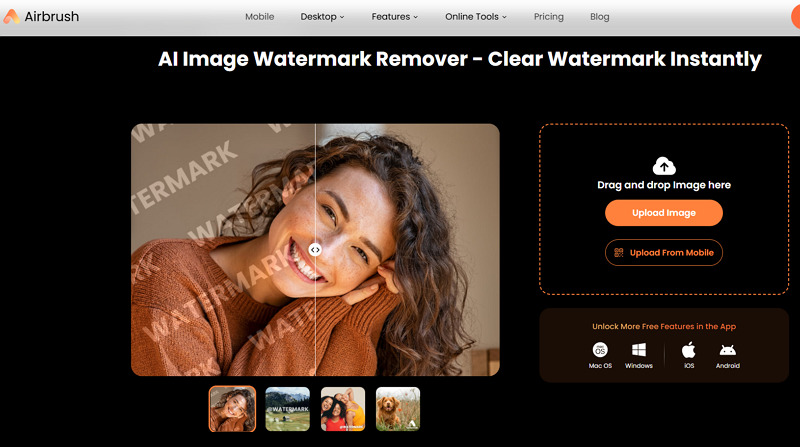
Step 2. Download the Output
Once the image is processed, you can press the “Download” button to save the output.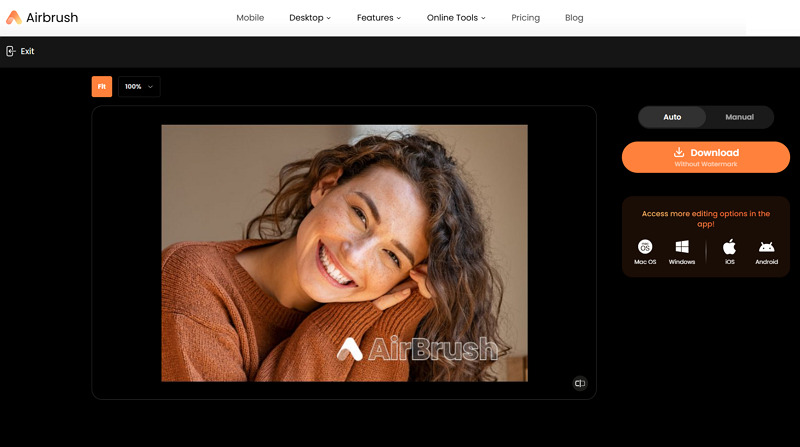
Step 3. Try Manual Controls
Lastly, you can download the offline app for the specific device and use manual controls to refine the output. That’s all!
Guide 2. How to Clean Watermarked Videos
Step 1. Upload Video
The first step is to access the Airbrush Video Watermark Remover. Now, tap the “Upload Video” or “Upload from Mobile” tab to proceed.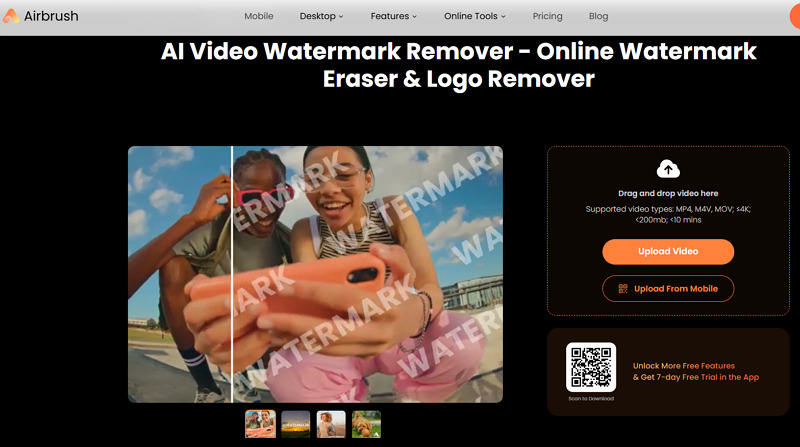
Step 2. Preview the Output
With the automatic processing, you can have a 5-second preview of your video by clicking the play icon. Then, press “Preview” or “Original” to compare the results.
Step 3. Process Full Video
Lastly, tap the “Process Full Video” button and choose “Process Full HD Video” or “Download Free Video” to export the results. All done!
Airbrush Watermark Remover: Pricing and Plans
Airbrush uses a subscription-based model, catering to online, desktop, and mobile users. Let’s look at the pricing table to understand each plan better:
| Device | Plan | Pricing | What’s included |
| Desktop | Free | $0 |
|
| Studio Pro – Monthly | $9.95 |
|
|
| Studio Pro – Annual | $99.95 | ||
| Mobile | Free | $0 |
|
| Premium – Monthly | $12.99 |
|
|
| Premium – Annual | $54.99 |
Top Alternatives to Airbrush Watermark Remover: How It Stacks Up
As a lot of AI watermark removers are available in the market, here is a comparison table of Airbrush Watermark Remover and its competitors, including Vmake, Magic Eraser, and HitPaw:
| Tool | Compatibility | Batch Support | Speed | Ideal For |
| Airbrush Watermark Remover | Web, Mobile (Android & iOS), Desktop (Win & Mac) | No | Medium | Support removing watermarks for images & videos, but mainly focused on image watermark removal |
| Vmake Video Watermark Remover | Web, Mobile (Android & iOS) | Yes | Fast | Detect and remove watermarks in a single click. Specialized in handling dynamic watermarks |
| Magic Eraser Watermark Remover | Web, Mobile (Android & iPhone) | No | Medium | Offer video & image watermark removal with better performance on removing image watermarks |
| HitPaw Watermark Remover | Web, Desktop (Win & Mac) | Yes (Images) | Fast | Capable of erasing both image & video watermarks, but truly excels at images |
Airbrush Watermark Remover: Pros & Cons
Although Airbrush Watermark Remover offers several benefits, it also has some drawbacks. Let’s consider its pros and cons:
Pros:
- Simple user interface
- Work well on both video and images
- All-in-one editing solution with no sign-up
- Maintain original resolution and quality
- Support batch processing
- Desktop and mobile apps availability
Cons:
- Several limitations in the free plan
- Full video processing is not for free
- Online watermark remover doesn’t work
- Struggle with complex watermarks
- Leave its own watermark on images/videos
Real User Feedback
To learn more about the performance of Airbrush, let’s review some user feedback from sites like Trustpilot and Capterra:
Trustpilot: 1.8/5 (39 reviews)
Scam, it claims it’s free when it’s not. Plus, not only it didn’t remove the watermark from my video, but it also added its own on top of it, so now the video has two watermarks. – Jonathan Terry
Capterra: 4.2/5 (12 reviews)
A clean, sleek alternative to the other players in this field, and it’s cheap in price and has everything you need on board. Many features and good manuals to go straight away, and the results are perfect. – Mb M.
Frequently Asked Questions of Airbrush Watermark Remover
1. Is Airbrush Watermark Remover safe to use?
Yes, Airbrush Watermark Remover processes uploaded files securely and deletes them shortly after processing. However, go for its desktop and mobile versions, which are more safe than its online tool.
2. Does Airbrush Watermark Remover work on mobile devices?
Of course. Since Airbrush Watermark Remover is browser-based, it can work across devices. However, it is recommended to use its desktop and mobile applications.
3. Does it remove watermarks from YouTube or TikTok?
Yes, it can detect and remove watermarks from YouTube or TikTok videos, but only if they have already been downloaded. However, you should always respect copyright and platform policies.
Conclusion: Is Airbrush Watermark Remover Really Worth Using?
Airbrush Watermark Remover is a powerful desktop and mobile app for anyone who needs to clean images or videos without complex editing tools. However, it is more popular as an image-editing suite in 2026, delivering natural results for everyday use. However, it does not work for dynamic full-screen video watermarks. For that purpose, Vmake Video Watermark Remover is the best choice for its ease of use, AI performance, and high-quality output.

You May Be Interested

Seedance 2.0: What's New & How to Use It

123APPS Watermark Remover Review (2026): Pros, Cons, and Pricing

5 Best Valentine's Day Video Ideas for eCommerce in 2026

How to Create a YouTube Thumbnail? Create YouTube Thumbnails Using AI
