
2026 DeWatermark Watermark Remover Review: Pros, Cons, Pricing
 Ken DawsonDecember 23, 2025
No doubt, watermarks are important for protecting digital content, but they are a hurdle for those who need to reuse it for any project. Whether you’re working on social media design, marketing videos, or personal documents, these logos, text overlays, and other marks can disrupt your workflow. In this scenario, DeWatermark Watermark Remover is a valuable solution.
This AI tool can clean up photos and videos without manual editing, providing a smooth experience. But how does DeWatermark stand out in the market in 2026? Its cutting-edge technology and an intuitive interface make it accessible even for users with no technical knowledge.
In this post, you will look at what DeWatermark Watermark Remover offers, its pros and cons, pricing module, and how it compares with its alternatives to determine whether it can meet your needs.
 What is DeWatermark.AI: A Beginner’s Guide
DeWatermark is a versatile AI-driven online platform that can remove watermarks, logos, text, stamps, and other visual markings from images, videos, and PDFs. It uses advanced technology to analyze the pixels surrounding the watermark and intelligently reconstruct the area, ensuring smooth, natural-looking results with no loss of quality.
This tool is helpful for content creators, digital marketers, and even developers who frequently work with stock images, videos, or other content that has been watermarked but needs to be used without distractions.
Additional Features:
- Background Removal: It lets you remove an image’s background and customize it in seconds.
- Emoji & Text Remover: You can eliminate emojis and text from photos with smart AI detection and manual touchups.
- Image Enhancement: To achieve sharp, smooth, and natural details, it supports upscaling photo resolution.
- Batch Processing: You can remove marks from multiple images or enhance them at once, saving time and boosting productivity.
- Cross-Platform: Since it’s browser-based, you can use it on all platforms. Additionally, it offers an offline Windows and macOS app.
- API Support: With DeWatermark, businesses and developers can integrate this tool into their apps or websites to automate watermark removal at scale.
Key Features & Hands-On Experience of DeWatermark Watermark Remover
DeWatermark Watermark Remover is an advanced browser-based tool that supports various file types. I have tested it on different watermarked samples, and the results highlighted its unique strengths. Below is a detailed look at its top features and performance based on my hands-on experience:
DeWatermark Image Watermark Remover
DeWatermark AI Image watermark remover is capable of removing the hardest, complicated watermarks for free in three ways. You can use the old model, the newest, or the powerful one to analyze the image and remove stamps, logos, text, signatures, objects, or emojis, while preserving the original quality.
Its powerful recognition technology can detect and separate watermark layers with ease. It also offers a manual brush tool to erase the last traces of watermark to achieve HD results.
You can drag & drop photos into the interface for quick processing. It lets you upload an image in PNG, JPG, WebP, and AVIF formats. You can even remove watermarks of up to 50 images at once with the batch function.
DeWatermark Video Watermark Remover
DeWatermark Video Watermark Remover is another incredible feature that supports various popular formats, i.e., MP4, MOV, etc. So, you can efficiently remove both moving and static watermarks, whether it’s a text, image, or logo.
It uses super-advanced AI models to recognize watermarks and replace the watermarked areas, delivering precise, realistic results. However, the process is fully automatic with no customization options.
DeWatermark PDF Watermark Remover
DeWatermark also offers a solution for PDFs, which is often a complex format for watermark removal. It uses AI models to detect and separate watermark layers from the PDF while keeping its layout.
You can erase both text and image watermarks, including faint and semi-transparent overlays. The processing only takes a few seconds and requires no technical skills. It even supports watermark removal on numerous PDF files in a batch.
How to Use DeWatermark Watermark Remover
Although the process is simple, learning the right way to use DeWatermark is necessary. Here are the tutorials to remove watermarks from images, videos, and PDFs:
Guide 1. Steps to Batch Remove Image Watermarks
Step 1. Choose Watermark Removal Mode
First of all, open the DeWatermark Watermark Remover tool and select “Auto Remove 2.0,” “Auto Remove 3.0,” or “PRO Remove.”
Step 2. Upload Image
Now click “Upload Image” to import the photo, and let AI remove the watermark. You can turn on the “Enable text remover” switch. Then, tap “Download” or “Manual Edit.”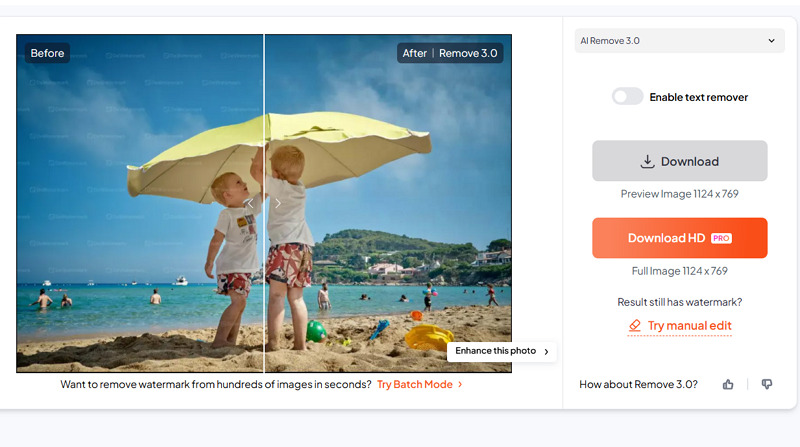
Step 3. Try Manual Editing
Next, use the brush size to paint the smudges, then press “Remove.” Lastly, hit “Download,” and choose the desired option to save the output. All done!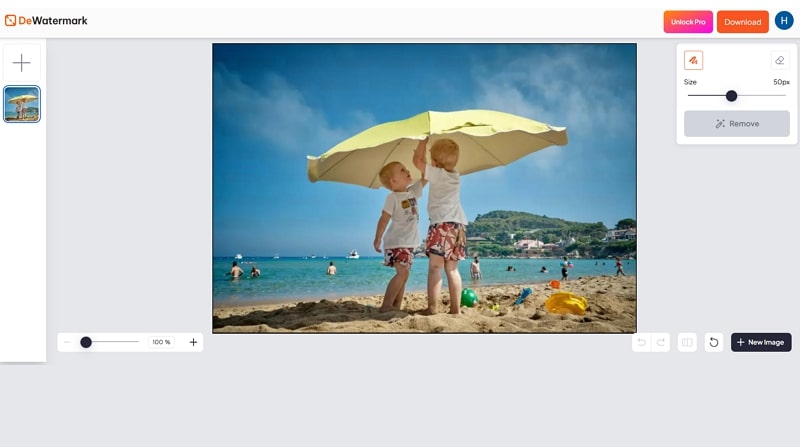
Guide 2. How to Remove Watermarks from a Video
Step 1. Import a Video
The first step is to access the DeWatermark Video Watermark Remover and click “Upload Video” or use the sample video to proceed.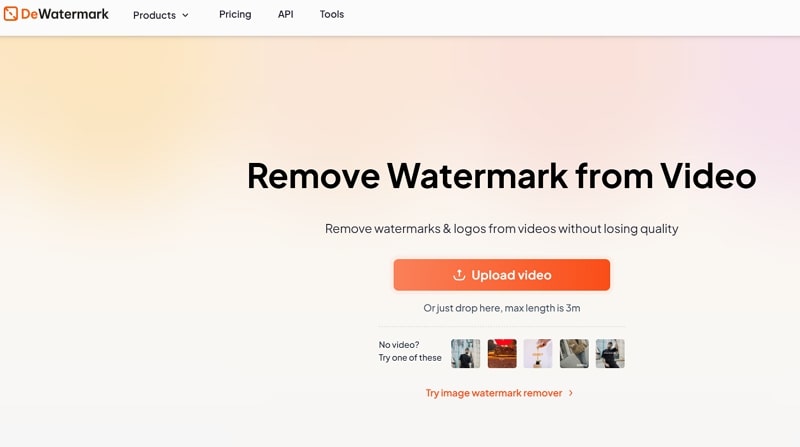
Step 2. Select Preview or Full Video
It’s time to choose between the “Get 5s Preview” and “Get Full HD Video” based on your pricing plan and let AI finish the processing.
Step 3. Download the Output
Once you see the watermark-removed video, hit the “Download 5s Preview” tab to export it to your device. That’s all!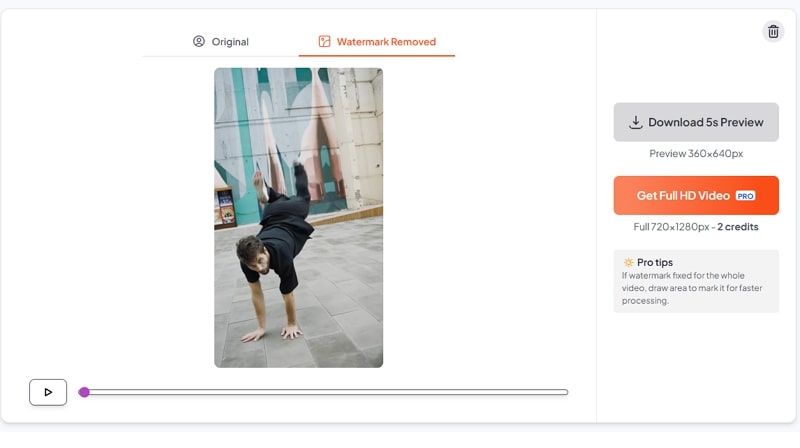
Guide 3. How to Use PDF Watermark Remover
Step 1. Upload PDF
Firstly, visit the DeWatermark PDF Watermark Remover and tap the “Upload PDF File” tab to import your document.
Step 2. Choose the Desired Mode
Now, you have to select between the “Get 1st page” or “Get full” options to start the automatic watermark removal.
Step 3. Save the Output
Once the watermark is removed, press the “Download 1st Page” button to save the output. You’re all done!
DeWatermark Pricing Plans
DeWatermark uses a credit-based system where one credit can process one image and 5 seconds of video. It offers several plans to accommodate different user needs. Below is a pricing table for a better understanding:
|
Plan |
Credits/Price | What’s included |
|
Free |
3 per day/$0 |
AI Image/Video Watermark Remover AI Text Remover Manual Editor |
|
Pro |
||
| Monthly | 100/$6
200/$10 500/$16 1000/$20 |
All the benefits of the free plan Best output quality (up to 24mpx) 4X image upscale Batch processing Full video processing No ads |
|
Yearly |
1200/$3 per month
2400/$5 per month 6000/$8 per month 12000/$10 per month |
|
|
Enterprise |
Let’s talk |
|
Top Alternatives of DeWatermark Watermark Remover
While DeWatermark is a powerful tool, considering its alternatives is also necessary to make a better decision. Let’s look at the comparison table below, which includes DeWatermark Watermark Remover and its competitors, i.e., Vmake, EzRemove, and Fotor:
|
Tool |
Platform | Pricing Model | Batch Support | Key Feature |
| DeWatermark Watermark Remover | Web, Desktop (Windows & Mac) | Free with credits | Yes (Images) | Capable of removing video, image, and PDF watermarks, but focused only on image cleanup |
| Vmake Video Watermark Remover | Web, Mobile (Android & iOS) | Free, Subscription | Yes | One-click watermark detection and removal. Specialized in handling dynamic video watermarks |
| EzRemove AI Watermark Remover | Web | Free with credits | No | Supports removing watermarks from images and videos, but truly excels at handling image watermarks |
| Fotor Watermark Remover | Web, Mobile (Android & iOS) | Free, Subscription | Yes (Images) |
Image watermark removal, but it can erase video watermarks occasionally |
Pros & Cons of DeWatermark Watermark Remover
Along with the benefits of this watermark remover, there are also drawbacks. Let’s explore both of them:
Pros:
- User-friendly with fast processing speed
- Support photo, video, and PDF files
- Offer three image watermark removal modes
- Manual brush for fine-tuning processed images
- Remove watermarks and enhance photos in a batch
- Ideal for eliminating text-based watermarks
- Keep the original picture quality after watermark removal
- Delete files after processing to maintain privacy
Cons:
- Limited free plan
- Not suitable for removing dynamic watermarks
- Struggle with complex watermarks
- PDF and full video processing require credits
- No manual mode for deleting video watermarks
- Lack of batch processing for videos
Frequently Asked Questions of DeWatermark Watermark Remover
1. Is DeWatermark Watermark Remover safe to use?
Yes. DeWatermark focuses on user privacy, so it deletes uploaded files after 24 hours. But if you have to download the desktop software, always visit the official website.
2. Does it remove watermarks from TikTok/YouTube?
Yes. DeWatermark can remove watermarks from TikTok, YouTube, CapCut, and other platforms’ videos. However, the videos should be downloaded to your device with a visible watermark so AI can detect them.
3. Can I use DeWatermark Watermark Remover for commercial projects?
Yes, you can. But you need to review DeWatermark’s terms of service for compliance with your specific use case. Plus, make sure to have the rights or permissions to repurpose the content.
Conclusion: Is DeWatermark Watermark Remover the Right Tool for You?
DeWatermark Watermark Remover is a powerful tool to remove light or minor marks from images, videos, and PDFs. With AI processing, ease of use, and high-quality results, it is an excellent solution for those who only need to remove image watermarks.
However, if you need a reliable and efficient solution to erase moving watermarks from a single or a bulk of videos, Vmake Video Watermark Remover is the top choice. Try it now and enjoy professional output quality.

You May Be Interested

Seedance 2.0: What's New & How to Use It

123APPS Watermark Remover Review (2026): Pros, Cons, and Pricing

5 Best Valentine's Day Video Ideas for eCommerce in 2026

How to Create a YouTube Thumbnail? Create YouTube Thumbnails Using AI
