
HeyGen vs Revid AI: Finding the Perfect AI Video Tool
Revid AI vs. HeyGen: which is right for you? Compare their features, pricing, and video quality to make an informed choice today. Plus, explore Vmake as a powerful alternative for seamless creation.

Revid AI and HeyGen are completely revolutionizing content creation, but they cater to entirely different beasts. Are you craving lightning-fast viral videos or hyper-realistic studio avatars? In this comprehensive guide, we will be taking a deeper look at each platform, as well as exploring an ideal alternative that can replace either one, without any issues. Let's dive in.
Introducing Revid AI vs HeyGen
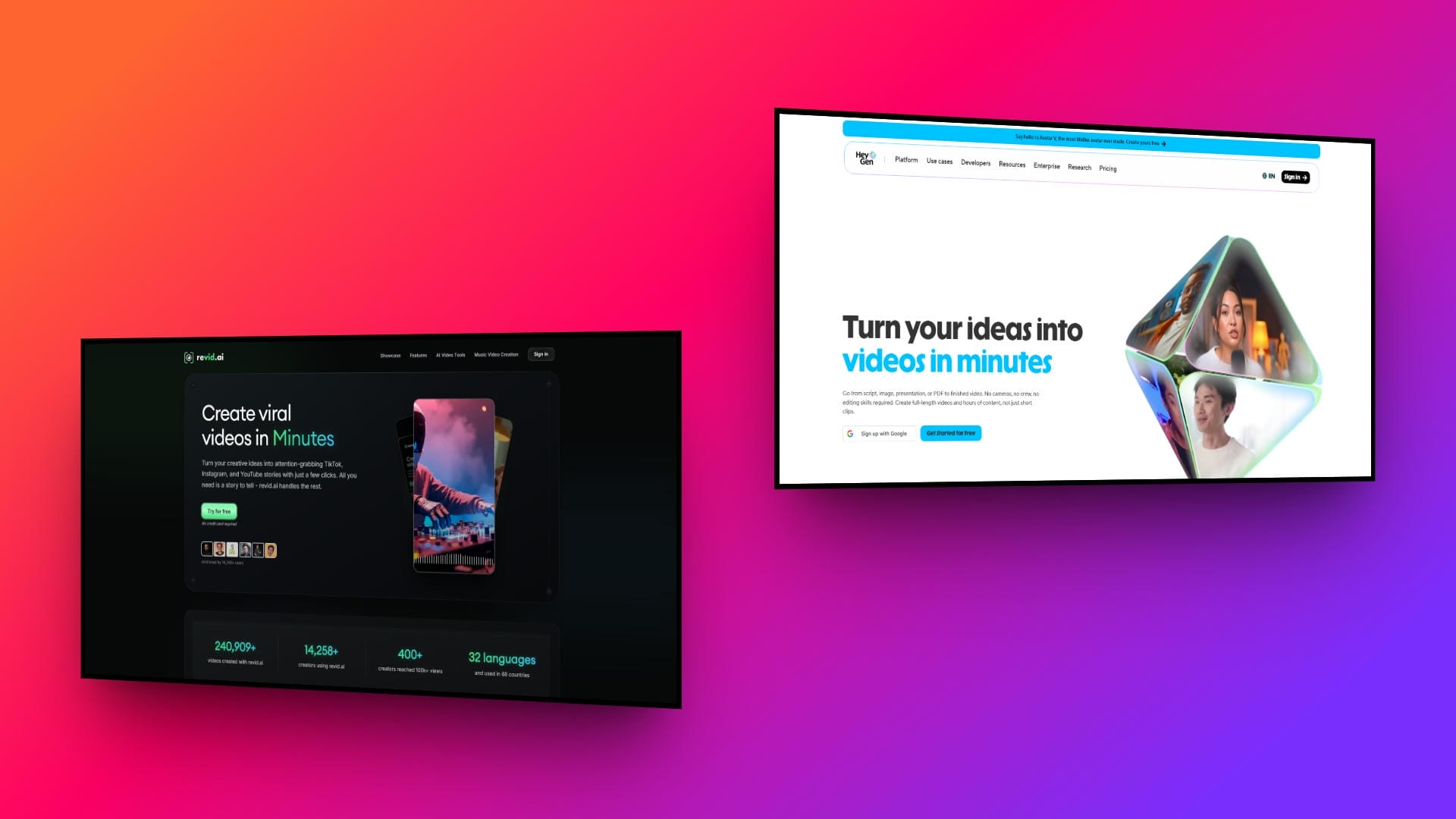
Revid AI and HeyGen represent two incredibly distinct philosophies within the rapidly expanding AI video generation market. Revid AI is expertly built for speed, scale, and volume. It primarily targets content creators, social media marketers, and digital agencies who need to produce highly engaging, short-form content rapidly. It effortlessly transforms simple text prompts or e-commerce URLs into ready-to-post videos.
Conversely, HeyGen firmly focuses on premium, broadcast-level visual quality. It specializes in hyper-realistic AI avatars and seamless voice cloning, uniquely designed for professional corporate presentations, sophisticated training materials, and multi-regional global marketing campaigns.
Revid AI music video generator key features:
-
Automated UGC creation: Revid AI automatically crafts highly engaging, fast-paced user-generated content videos specifically tailored to dominate TikTok and Instagram Reels algorithms.
-
Instant URL-to-video: Instantly transform any basic e-commerce product link into a dynamic, ready-to-post video advertisement to rapidly scale your marketing campaigns.
-
Built-in viral hooks: Access a massive library of proven viral hooks combined with trendy, fast-paced editing styles designed to capture immediate audience attention.
HeyGen AI video key features:
-
Hyper-realistic avatars: Generate incredibly lifelike, studio-quality custom AI avatars that feature subtle, natural facial micro-expressions to establish genuine trust and professional authority.
-
Flawless multilingual lip-syncing: Seamlessly translate your video scripts while maintaining flawless, frame-perfect lip-syncing across dozens of different languages for truly global marketing reach.
-
Advanced voice cloning: Utilize sophisticated voice cloning capabilities featuring highly nuanced emotional tone control to deliver authentic, professional-sounding voiceovers that match your brand.
Deep dive: comparing Revid AI vs HeyGen AI avatar generator
We will be comparing both tools across a number of different factors, that will help you make the perfect final decision.
Input differences
How you start your video creation journey varies drastically between these platforms. Let us explore the fundamental differences in how you input your base content.
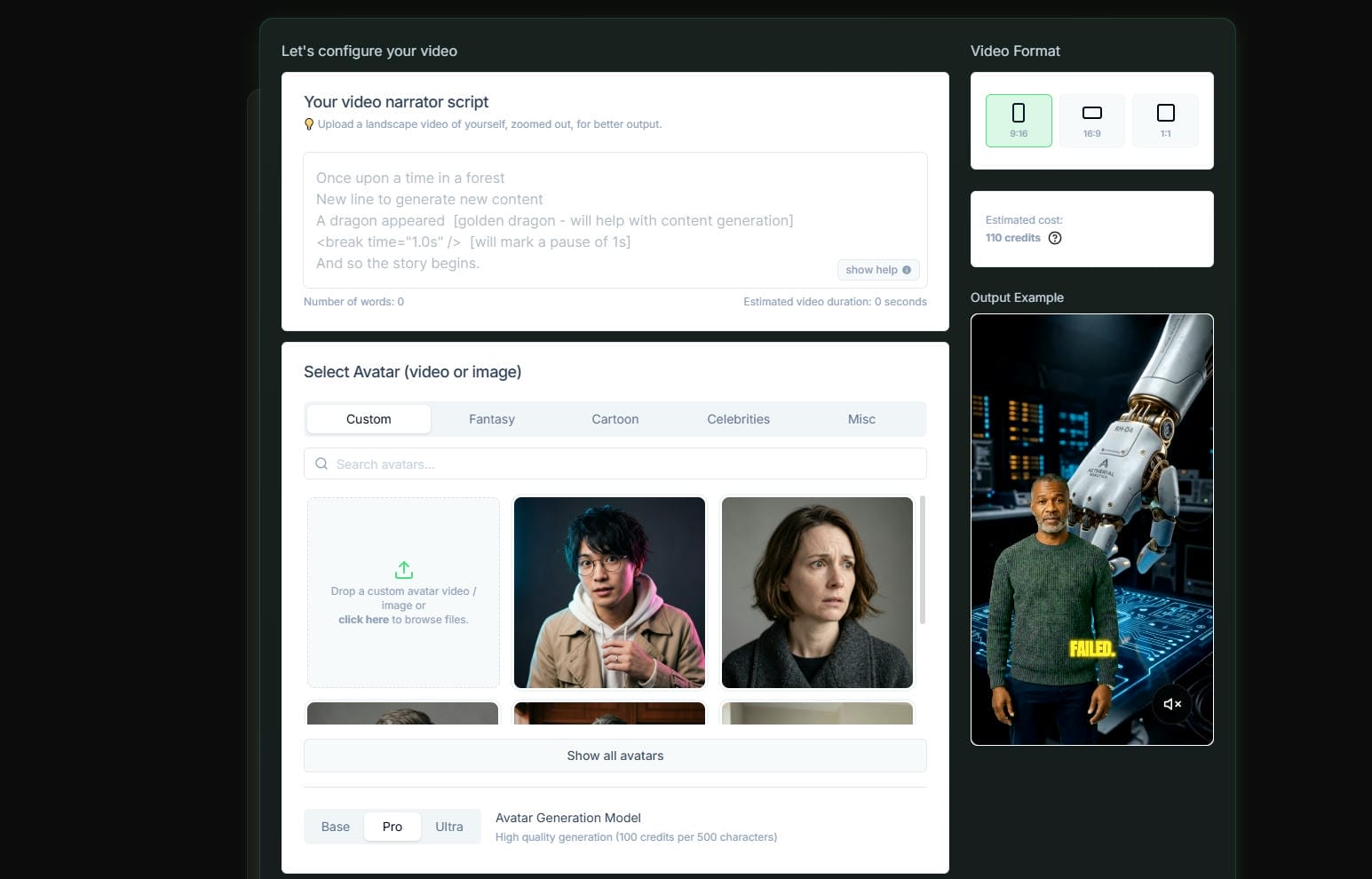
Revid AI prioritizes absolute simplicity in its input process. Users can simply drop a product URL, paste a brief text idea, or upload a single image, and the AI takes over, automatically generating the script, fetching assets, and compiling the scenes. It requires zero technical prompting.
HeyGen, conversely, requires more deliberate and structured inputs. You must provide a specific script, select an exact avatar from their library, choose a specific background, and configure the voice settings manually. While this demands more upfront effort, it allows for granular control over the final output.
Best For Fast Social Media Content: Revid AI
Revid AI wins this category for sheer ease of use and speed, making it the perfect choice for users who want a hands-off, automated creation process.
Output quality differences
The final visual result is where these two tools truly diverge. Understanding their output quality is crucial for aligning the software with your brand identity.
Revid generates fast-paced, highly dynamic videos optimized specifically for mobile viewing. The output aesthetic closely mimics authentic User-Generated Content (UGC), featuring quick cuts, trendy automated captions, and vibrant visual hooks. However, avatar realism is somewhat basic.
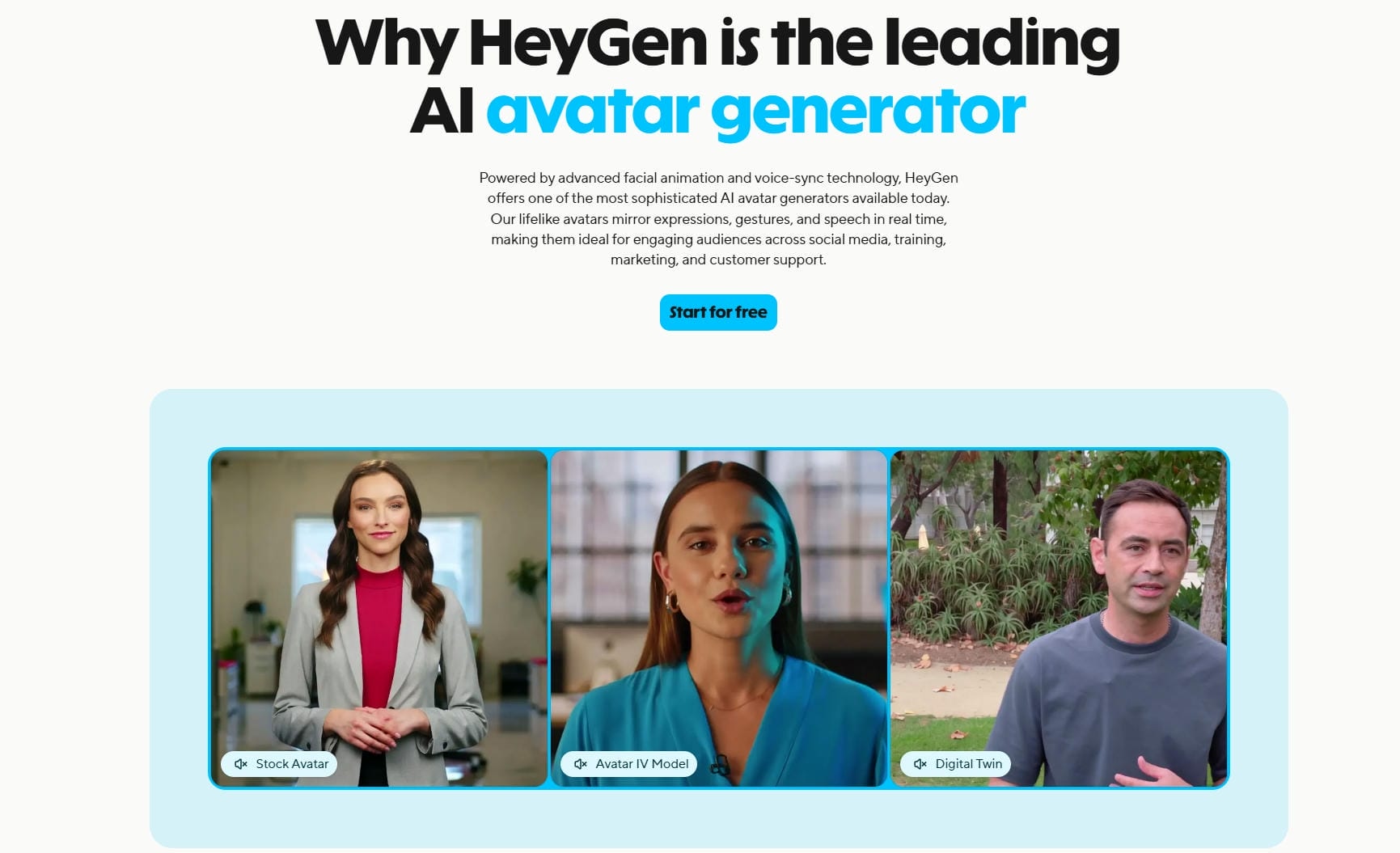
HeyGen delivers unparalleled, cinematic high-resolution video outputs. Their digital avatars are incredibly lifelike, featuring natural blinking, subtle facial micro-expressions, and flawless lip-syncing that perfectly matches the generated voiceover. The final product looks as though it was professionally filmed in a high-end production studio with real human actors.
Best For Realistic AI Avatars: HeyGen
HeyGen is the undisputed winner in output quality. If your brand requires premium, professional realism and broadcast-ready avatar videos, HeyGen vastly outperforms the competition.
Pricing differences
Budgeting for AI tools can be tricky. Let us break down the pricing structures of both platforms to see which offers the best overall value.
|
Aspect |
Revid AI |
HeyGen |
|---|---|---|
|
Starting Price |
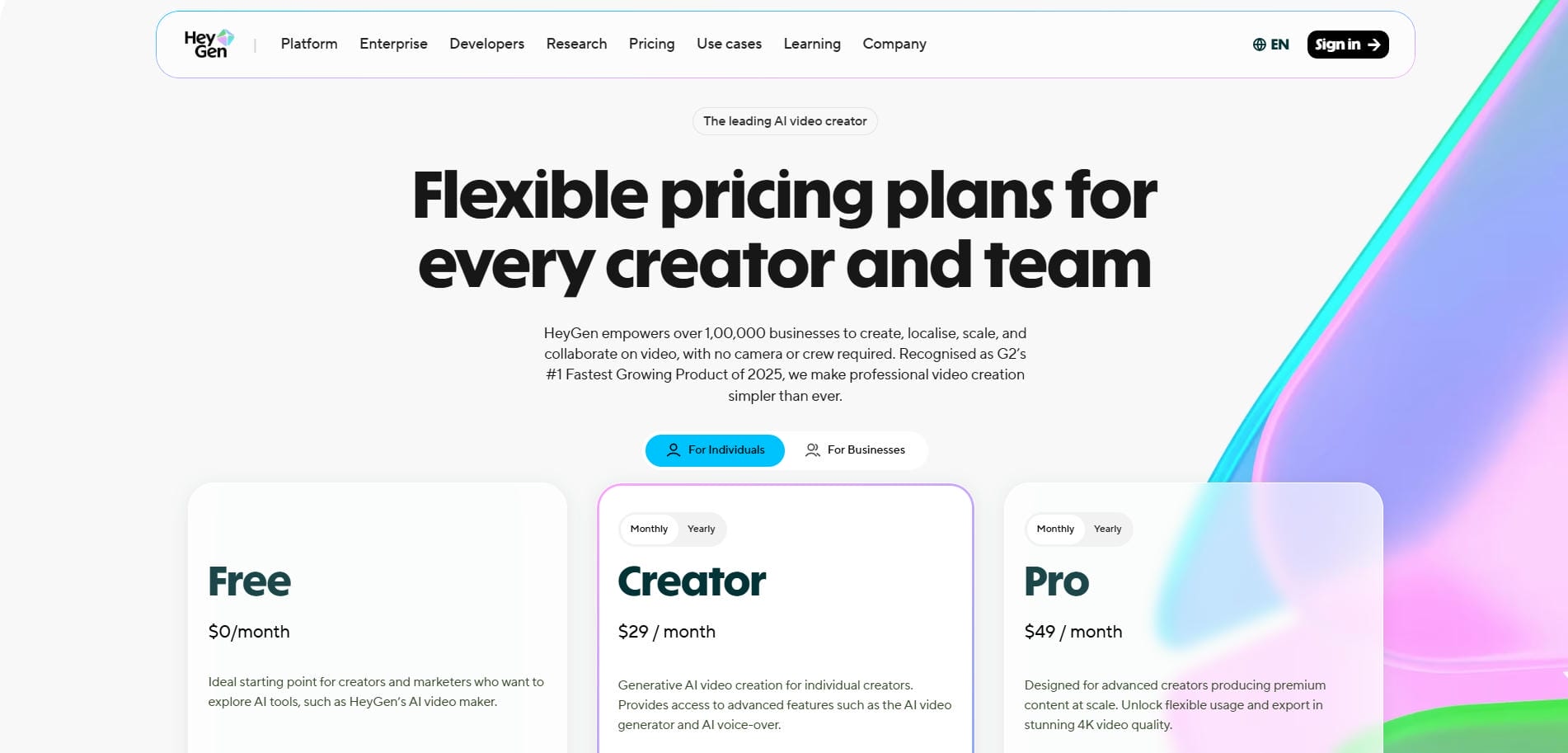
Starts at $39/month |
Starts at $29/month (Free tier available) |
|
Key Paid Plans |
Hobby ($39), Growth ($99), Ultra ($199) |
Creator ($29), Pro ($49), Business ($149+) |
|
Pricing Model |
Flat-rate / Per-video |
Credit-based (per minute) |
|
Cost Level |
Budget-friendly & cost-effective |
Premium & more expensive |
|
Production Volume |
Ideal for mass/daily production |
Limited by monthly credit balance |
|
Best Suited For |
High-volume creators & marketers |
Enterprise & professional users |
Revid: Revid AI utilizes a highly cost-effective, per-video or flat-rate pricing model. This structure is incredibly advantageous for high-volume creators who need to generate dozens of TikToks, Reels, or Shorts daily without constantly watching their credit balance dwindle. It encourages mass production.

HeyGen: HeyGen operates on a premium, credit-based system where costs are calculated per minute of generated video. Because rendering high-fidelity avatars requires immense computational power, HeyGen’s subscription tiers are noticeably more expensive. Running out of credits mid-month can become a costly hurdle for frequent users.
Best Value for Money: Revid AI
Revid AI wins the pricing category. Its straightforward and affordable structure provides vastly superior value for daily creators compared to HeyGen’s restrictive, minute-based credit system.
Where Revid AI video generator excels and where HeyGen excels
Every tool has its specific strengths. Here is a precise breakdown of the specific use cases where Revid AI and HeyGen truly dominate the market.
Revid AI excels at: |
HeyGen excels at: |
|---|---|
|
|
Final verdict
When choosing between these two powerhouse platforms, your decision boils down to your core strategic objective:
-
Choose Revid AI if your primary goal is velocity, volume, and virality. It is the ultimate engine for high-frequency, short-form, and faceless social media content where rapid production and aggressive daily posting schedules are key to outsmarting the algorithm.
-
Choose HeyGen if your primary goal is realism, authority, and enterprise polish It is the industry standard for high-fidelity, talking-head virtual human avatars, complex global localization, and premium corporate messaging that requires a flawless, trustworthy presentation
Introducing Vmake AI video generator as an all-in-one alternative
While Revid AI handles the rapid creation of trend-focused content and HeyGen masterfully scales high-end corporate virtual spokespersons, Vmake enters the chat as a distinct, specialized powerhouse that bridges the gap between raw e-commerce utility and advanced AI post-production
By combining intuitive, user-friendly interfaces with advanced generative AI technology, Vmake AI eliminates the steep learning curves and prohibitive costs associated with traditional video production. It is the ultimate tool for those seeking both professional aesthetics and rapid, scalable content creation in one unified platform.
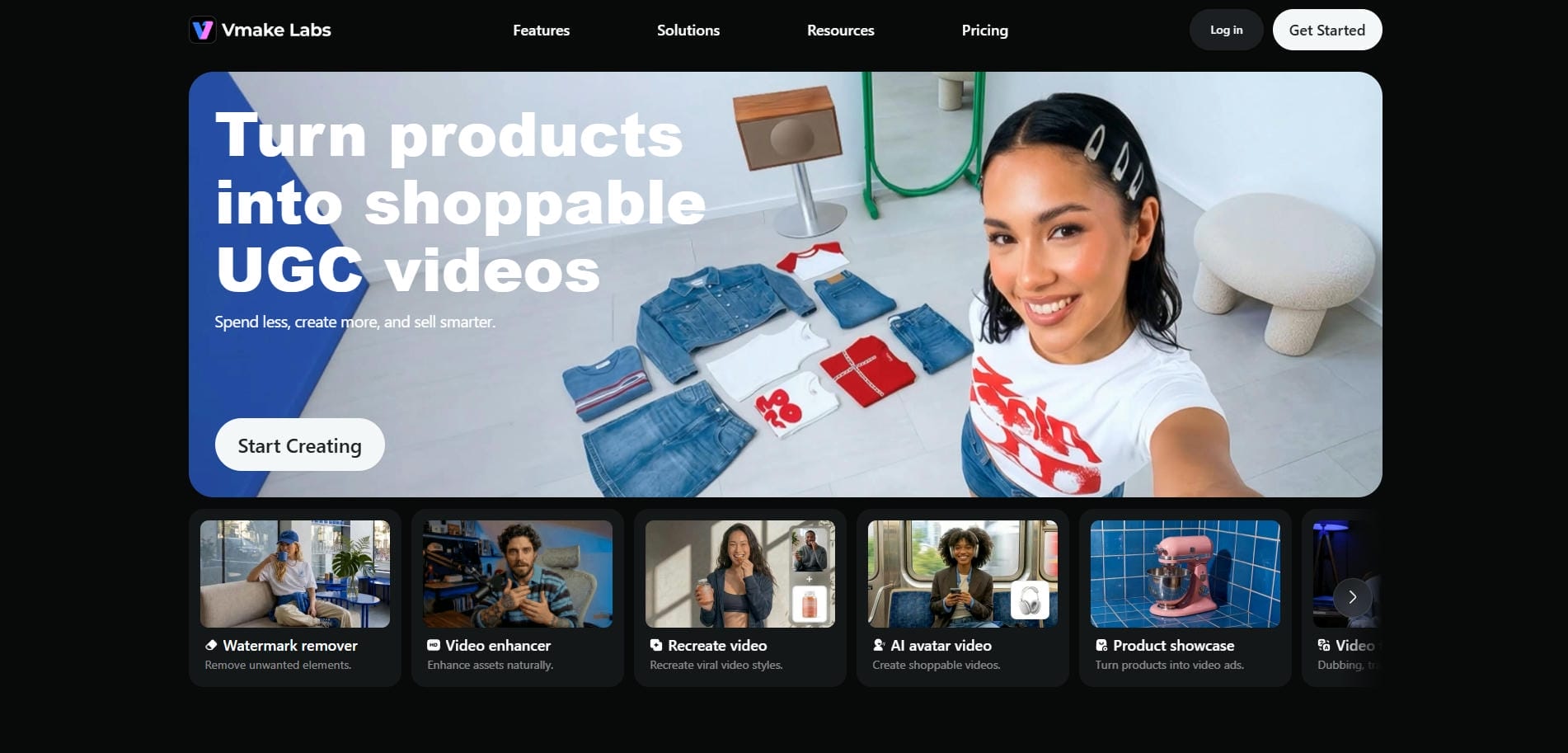
Significant features of Vmake AI video generator:
Vmake AI stands out by offering a robust suite of creative tools. Let us explore the five core features that make its video generation truly exceptional.
-
AI avatar generation: Vmake AI creates incredibly realistic, human-like avatar videos, entirely removing the need for physical cameras, studio lighting, or hiring professional on-screen human actors, ultimately empowering creators.
-
AI video generation with multi-models: This powerful feature instantly converts a single static product photo, a video, or a simple text idea into a fully generated, ready-to-publish UGC video optimized for engagement. The system used a plethora of AI video models, such as Seedance 2.0, Veo 3.1, Kling 3.0, etc.
-
AI hook generation: Vmake AI automatically conceptualizes and generates highly compelling verbal scripts and dynamic visual hooks specifically designed to capture immediate audience attention and dramatically boost retention rates across social media algorithms.
-
Versatile input & export options: Vmake AI allows three input modes: text-to-video, image-to-video, and video-to-video input options for creators. Additionally, when exporting your AI-generated videos, Vmake allows up to 4K resolution exports, so that you can maintain your content crispness.
How to use Vmake AI video generator in 3 easy steps?
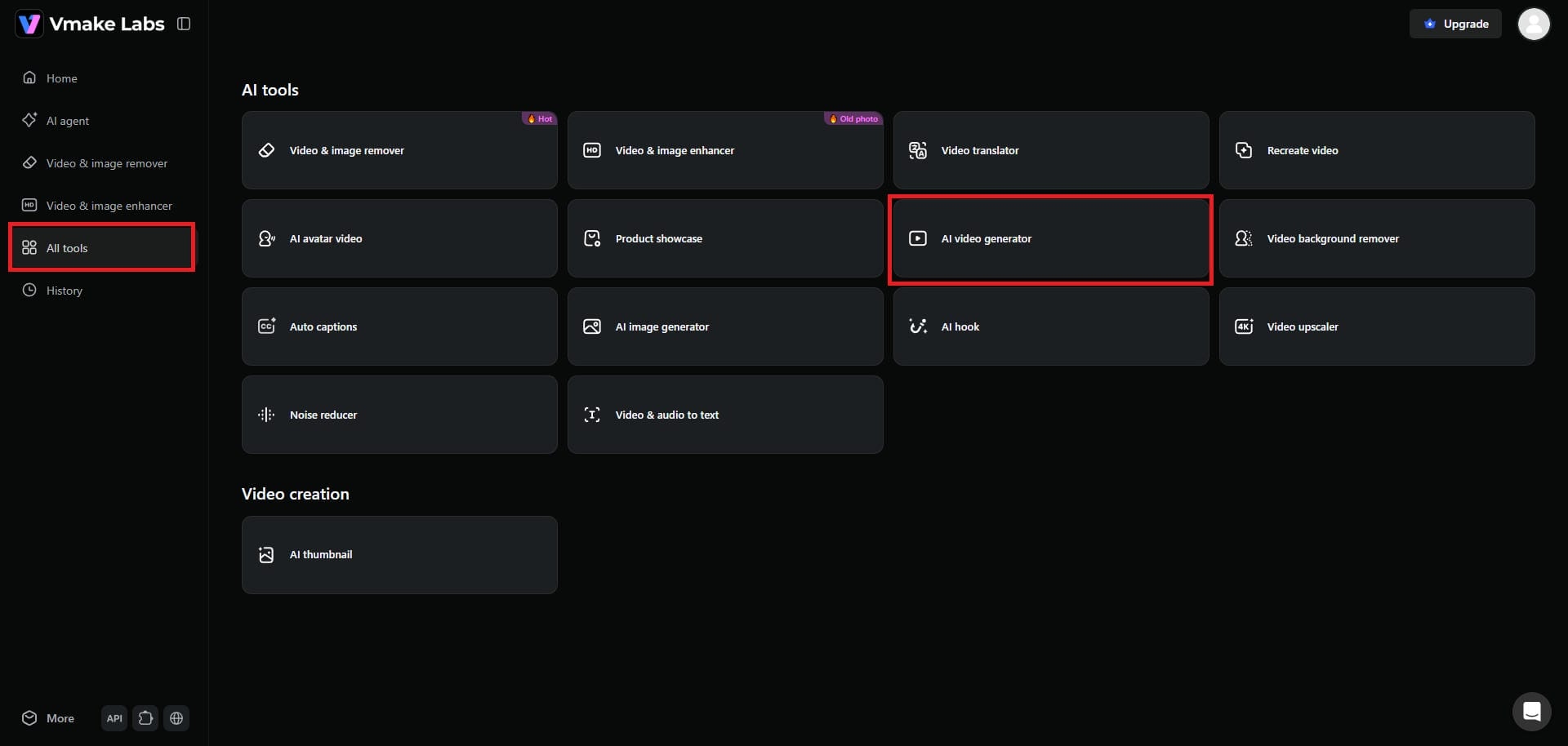
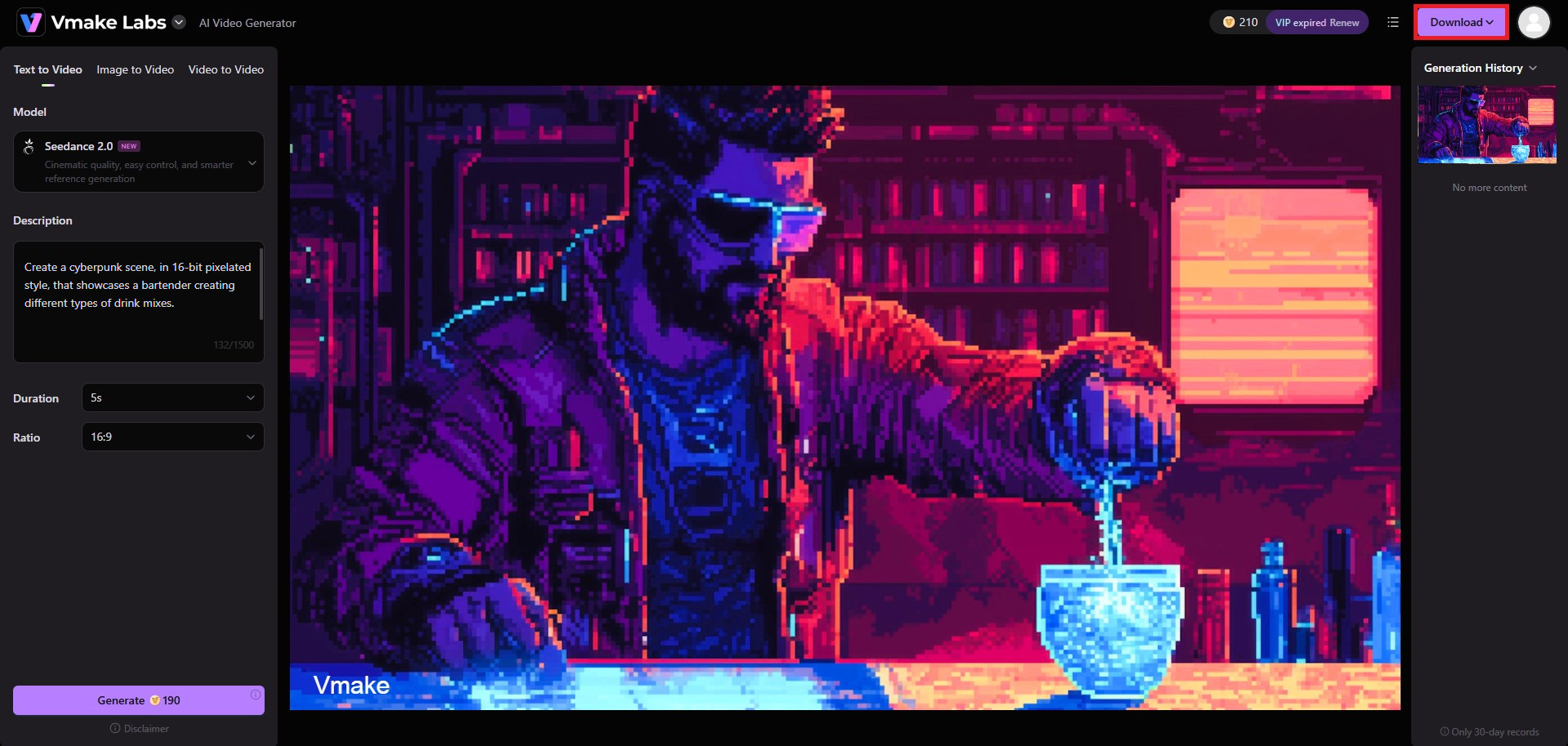
Step 1: Select the "AI video generator" tool
First, you need to access your Vmake account. Once you log-in to your Vmake account, from the left-hand side, select the "All tools" option. Here, you will be able to access the "AI video generator" feature.
Step 2: Provide your detailed video creation prompt
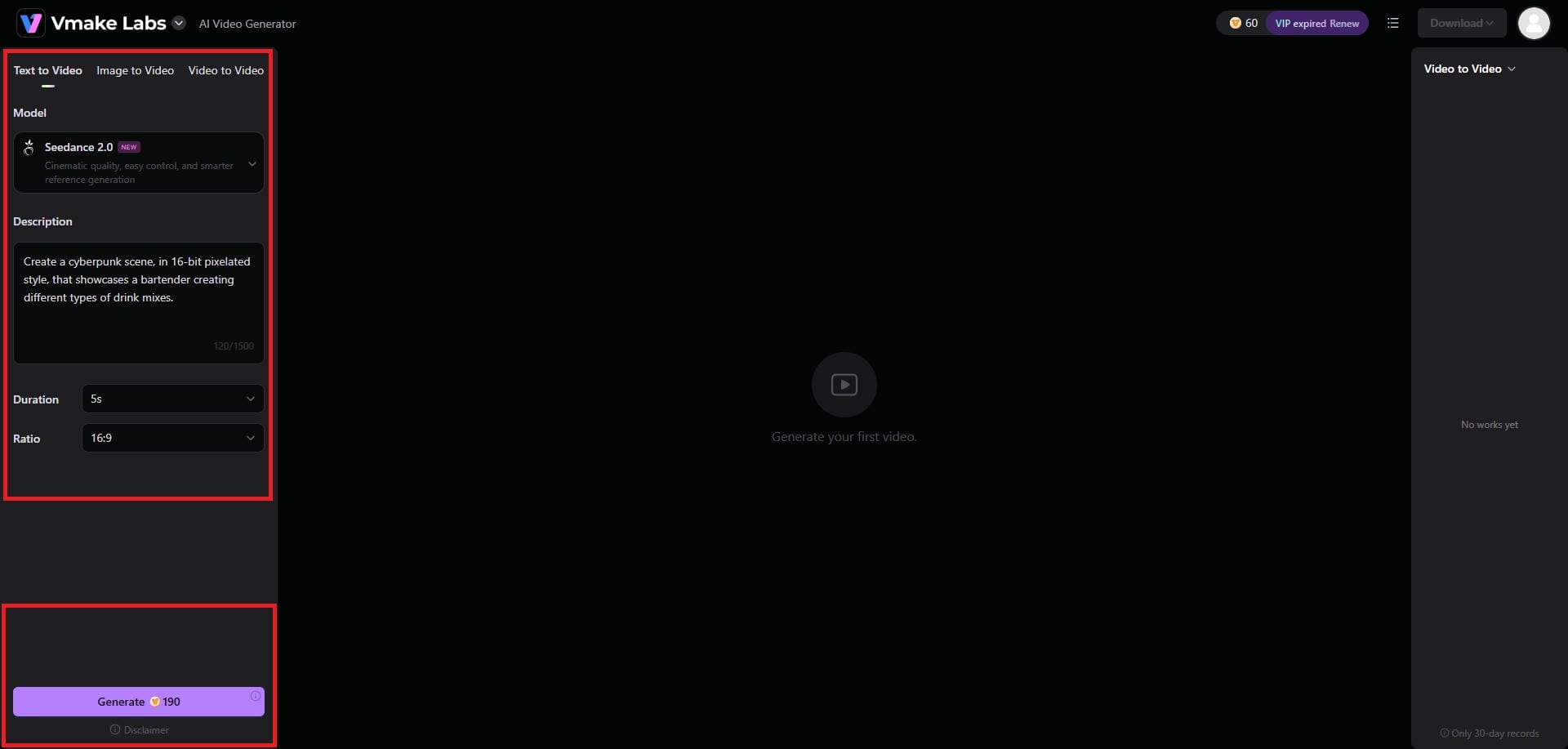
A new web page will open, where you will be required to enter your video creation prompt. You can either choose the text-to-video option, image-to-video option, or video-to-video option, based on your requirements. After that, you need to choose your video model (Seedance, Veo, Kling, or any other), the video duration, and its aspect ratio. Finally, click on "Generate".
Step 3: Export your AI-generated video
Vmake AI will start generating your video, and once that is completed, you will be allowed to play and export your video. To export your video, click on the "Download" option, and you will be good to go.
Revid AI vs HeyGen video generator vs Vmake AI: critical differences that count
HeyGen undeniably leads the market in premium avatar realism and voice cloning, making it ideal for enterprise budgets. On the other hand, Revid AI completely dominates high-speed social media automation, perfectly catering to marketers needing massive volumes of rapid, fast-paced UGC content.
However, Vmake AI strategically balances the best of both worlds. It delivers highly realistic avatars alongside incredibly fast, automated video generation tools, all within a highly accessible, budget-friendly platform available on both mobile and web.
|
Feature |
Revid AI |
HeyGen |
Vmake AI |
|---|---|---|---|
|
Primary Focus |
Speed & UGC Automation |
Premium Realism & Enterprise |
Balanced & All-in-One Tools |
|
Avatar Quality |
Basic / Functional |
Hyper-Realistic / Cinematic |
Highly Realistic / Professional |
|
Production Speed |
Very Fast |
Moderate |
Fast |
|
Pricing Model |
Cost-Effective / Flat-Rate |
Premium / Minute-Based Credits |
Accessible / Budget-Friendly |
|
Best For |
Social Media Marketers |
Corporate Teams & Trainers |
Daily Creators & E-commerce |
If you require professional-grade visual quality without sacrificing production speed or blowing your marketing budget, Vmake AI presents the most versatile and balanced solution.
Wrapping up
Selecting the perfect AI video tool requires evaluating your production volume, budget, and desired aesthetic.
If your absolute priority is generating high-volume, trendy social media clips at a low cost, Revid AI is a fantastic choice. Conversely, if you possess an enterprise budget and require flawlessly realistic digital twins for professional corporate communications, HeyGen remains unmatched.
However, for the vast majority of content creators, small businesses, and e-commerce brands seeking an optimal blend of highly realistic avatars, automated UGC generation, and intuitive affordability, Vmake AI stands out as the ultimate, all-in-one comprehensive solution for dominating the modern digital landscape.
FAQs
Which AI tool is best for creating viral TikTok and Reels content?
Revid AI anime video generator is excellent for rapid social media clips, but Vmake AI is often the superior choice because it combines automated UGC features with highly realistic avatars to make your viral TikToks look much more professional.
Can I clone my own voice and face using these video platforms?
Yes, HeyGen AI video specializes in creating incredibly precise digital twins for enterprise users. The platform offers fantastic, accessible custom avatar and lip-sync technology, allowing everyday creators to easily clone their likeness for daily content.
Which video generator is the most affordable for high-volume daily output?
Revid AI offers great volume pricing, but Vmake AI provides an incredibly competitive, accessible pricing structure that perfectly balances cost with high-quality avatar generation, making it the smartest financial choice for daily, high-volume video producers.
Do these platforms support multiple languages and automatic translation?
HeyGen image-to-video generator is renowned for its flawless multi-language lip-syncing capabilities. Vmake AI also strongly supports diverse global audiences by offering a vast library of natural-sounding AI voices across multiple languages, ensuring your videos seamlessly cross international borders.
Which tool requires the least amount of video editing experience to use?
Both Revid AI and Vmake require zero prior editing skills. Vmake AI's intuitive AI video agent takes a simple photo or link and completely automates the entire generation process, making professional creation effortless for absolute beginners.

You May Be Interested

AI TikTok Video Generator | Create High-Quality AI Videos

Best AI Video Generator: Top Tools Tested (2026)
HeyGen AI Video Generator: Create AI Videos Effortlessly
