Lumen5 AI vs Vmake AI 2026: The Ultimate Text-to-Video Comparison
 Ken DawsonMay 30, 2026
In this tutorial, we compare Lumen5 AI and Vmake AI to help you choose the best text-to-video online tool. From business storytelling, to blog repurposing to cinematic e-commerce content creation, this comparison breaks down features, workflows, and use cases, so you can pick the tool that best suits your aims.
What is Lumen5 AI: The leader in information-driven content
Lumen5 AI is an online video creation platform that transforms your text into engaging videos in just a few clicks. It's made for companies, marketers, educators, and creators who wish to turn blogs, articles, PDFs, or plain text into visual stories without any video-editing skills. The AI automatically generates a storyboard and selects appropriate graphics, clips, and music to match the message.
Key features of Lumen5 AI video maker
Lumen5 AI offers strong tools that make it easy to turn written content into professional-looking movies. The goal is to automate the entire workflow, from scripting to branding. Some of the core features of Lumen5 are as follows:
-
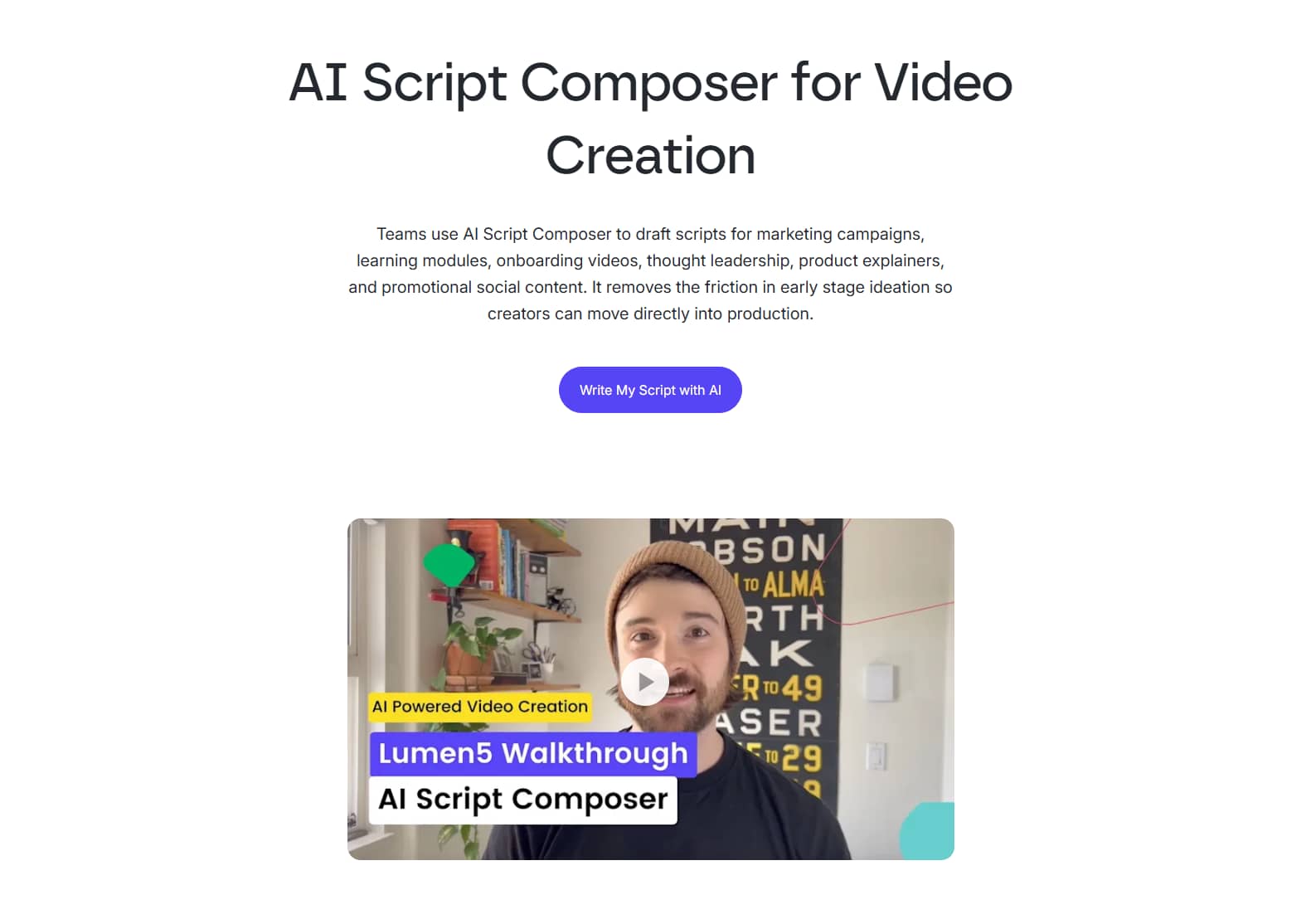
AI script composer: Lumen5 AI examines long-form content, such as blog posts or PDFs, and automatically extracts the most significant ideas. Then it arranges them into a neat, ready-to-use video script that serves as the basis for your film. This allows visitors to swiftly switch from written content to a clear visual storyline.
-
Blog-to-video transformation: Simply enter a URL, and Lumen5 will generate a complete video structure from any webpage or article, in an instant. It splits the text down into scenes, matching each portion with appropriate graphics and media. This makes the content repurposing process swift and very efficient for the marketers and publishers.
-
AI voiceover library: The platform offers a vast library of lifelike, multilingual AI voices that can professionally narrate your movies. No recording equipment is needed; the voice-overs are generated right in the tool. This makes it much easier to create high-quality videos for global audiences.

-
Talking-head videos: Add real presenter-style video clips to your scenes for an extra human, engaging touch with Lumen5. These clips can be used with text overlays and callouts to enhance communication. It is particularly effective for training, education, and business storytelling.
-
Smart branding guardrails: The platform automatically applies your brand's fonts, colors, and logos to every video scene. This ensures everything is consistent and your company identity is reflected in all your content. This is especially beneficial for companies that have large-scale content development.

How to use the Lumen5 AI video generator
Lumen5 makes it fast and easy to create a video. You may go from start to end in only a few minutes:
Step 1: Enter the dashboard and set up your project
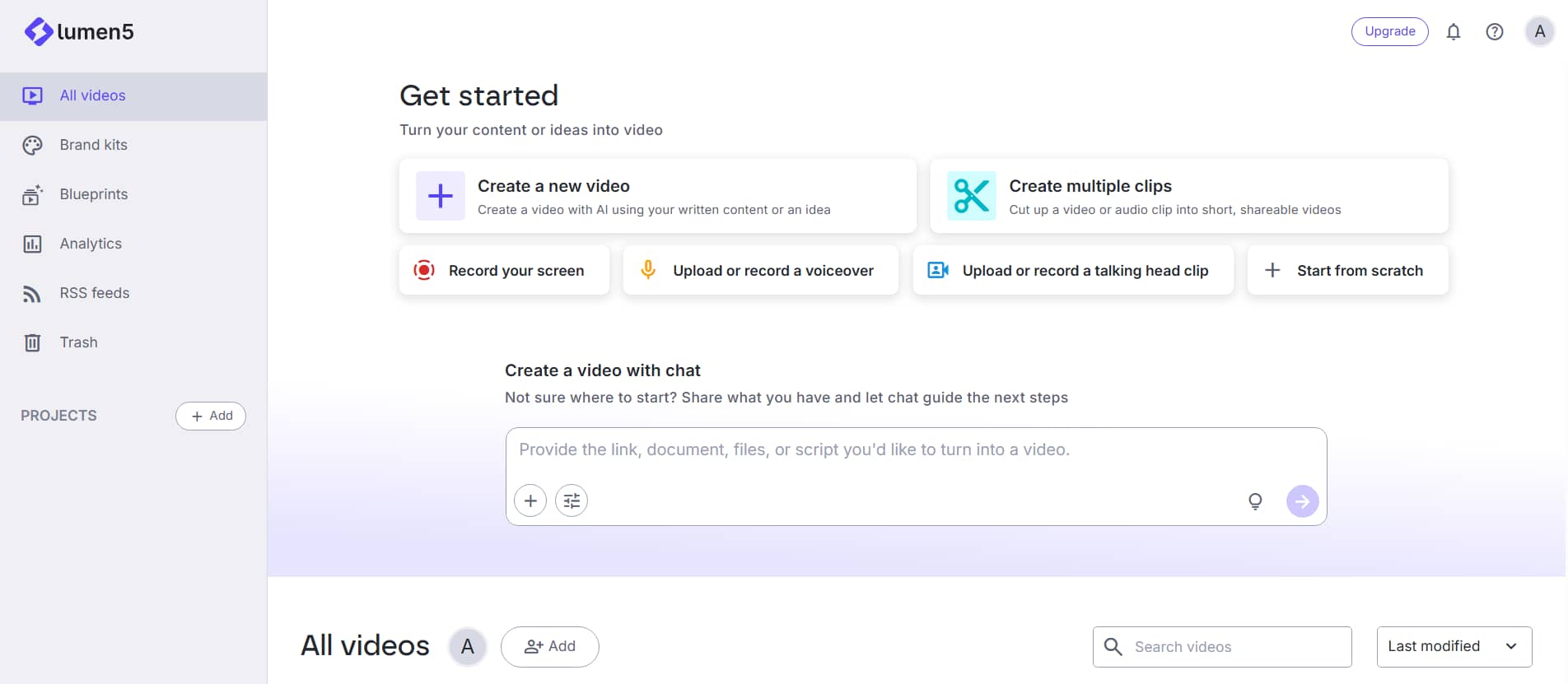
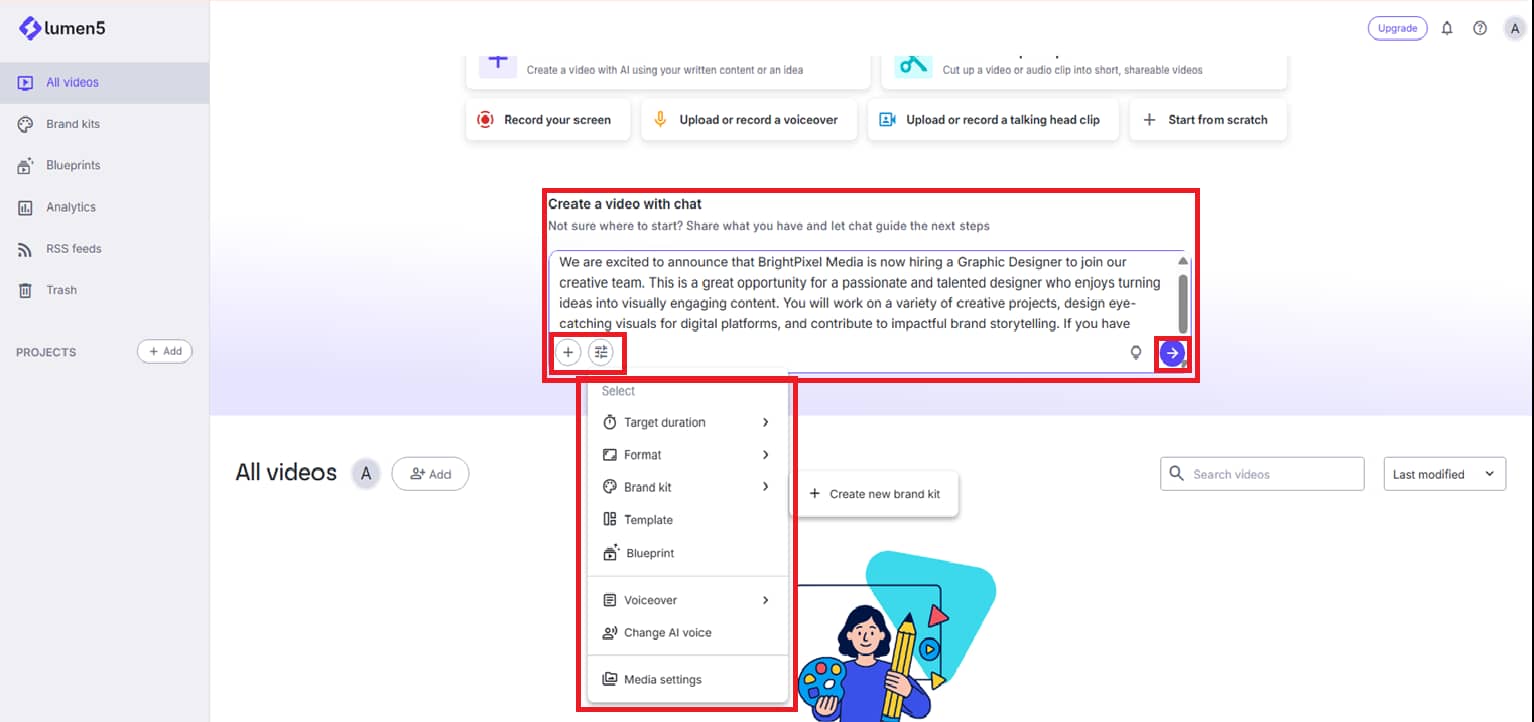
Open the Lumen5 AI video creator dashboard. Here you can type in your concept, paste text, upload a PDF, or add any other source content to begin your film. If you want to add reference photos, click the addition (+) button. Then edit critical settings such as video duration, aspect ratio, brand kit template, AI voice, and other preferences before hitting ''Generate''.
Step 2: AI script generation and video setup
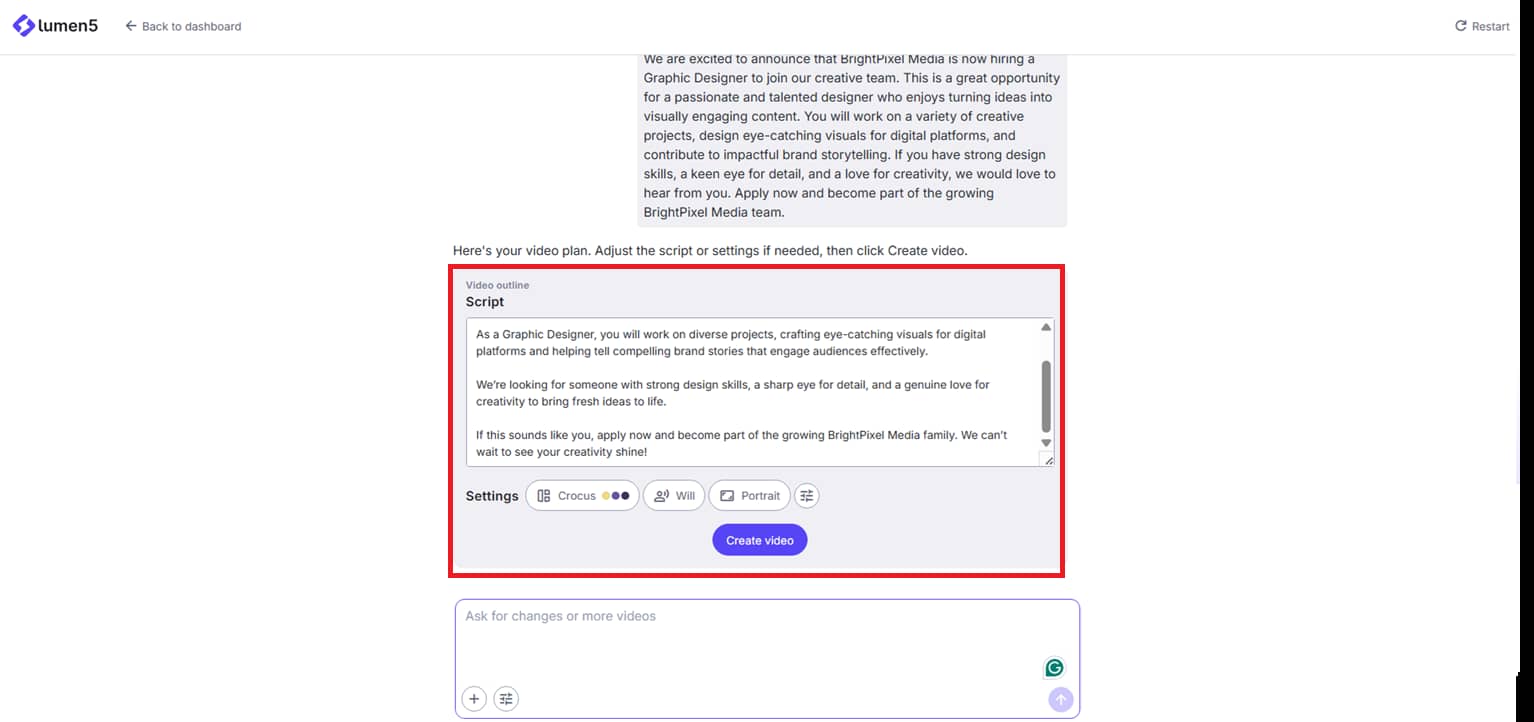
You start moving forward, and the AI analyzes your input and generates the corresponding video script in seconds. If you haven't picked one before, Lumen5 can automatically propose the optimal template and AI voice. Feel free to review and edit those settings as needed. If everything is okay, click on 'Create video' to begin.
Step 3: Preview, edit, and export your video
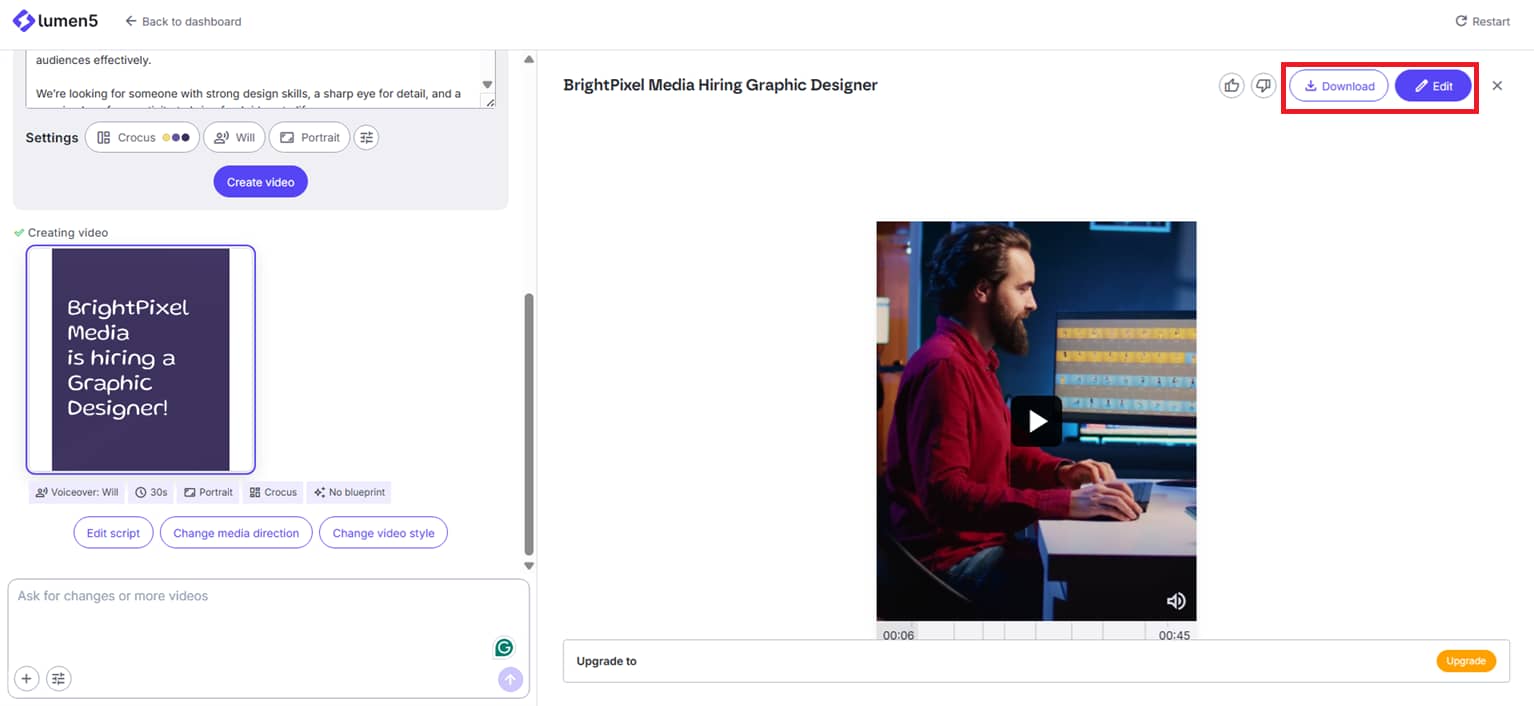
When you click create, you'll be directed to the workspace where your video is made from your screenplay, template, AI voice, and aspect ratio. You get to see the final outcome and make modifications if needed. To edit your video, use the edit option at the top or prompt-based modifications in the left panel. When you're happy, click ''Download'' (in the upper-right corner) to save your completed video.
Real-world application scenarios of the Lumen5 AI video tool
Lumen5 is a popular tool for businesses and creators to turn written content into compelling videos that are easy to distribute across platforms. Its automation and branding characteristics make it especially helpful for professional communication, marketing, and education. Here are some realistic real-world use examples.
-
Content marketing from blogs and articles: Lumen5 is often used to turn blog posts and long-form articles into short & compelling videos. This enables marketers to turn existing material into visuals that attract more eyeballs on social media and websites.
-
Corporate communication and internal training: Businesses use Lumen5 to generate internal training films, onboarding content, and business updates. Technology allows complex information to be compressed into clear visual displays that are easily understood by personnel.
-
Social media marketing campaigns: Brands use Lumen5 to rapidly create branded videos for social media channels such as LinkedIn, Facebook, and Instagram. Templates and automatic formatting help guarantee that videos are optimized for each platform.
-
Educational and explainer content: Teachers and trainers create visual learning tools by turning lessons, notes, and presentations into videos. The combination of pictures, subtitles, and narration helps to enhance understanding and retention.
In a nutshell, Lumen5 AI is designed for organized storytelling and information-forward material, but certain creators and businesses require a more dramatic, visually dynamic approach to their current marketing efforts. That's where Vmake AI shines, particularly for short-form social media videos, e-commerce promotions, and high-impact visual advertising.
New alternative: Try Vmake AI for unlimited content creation
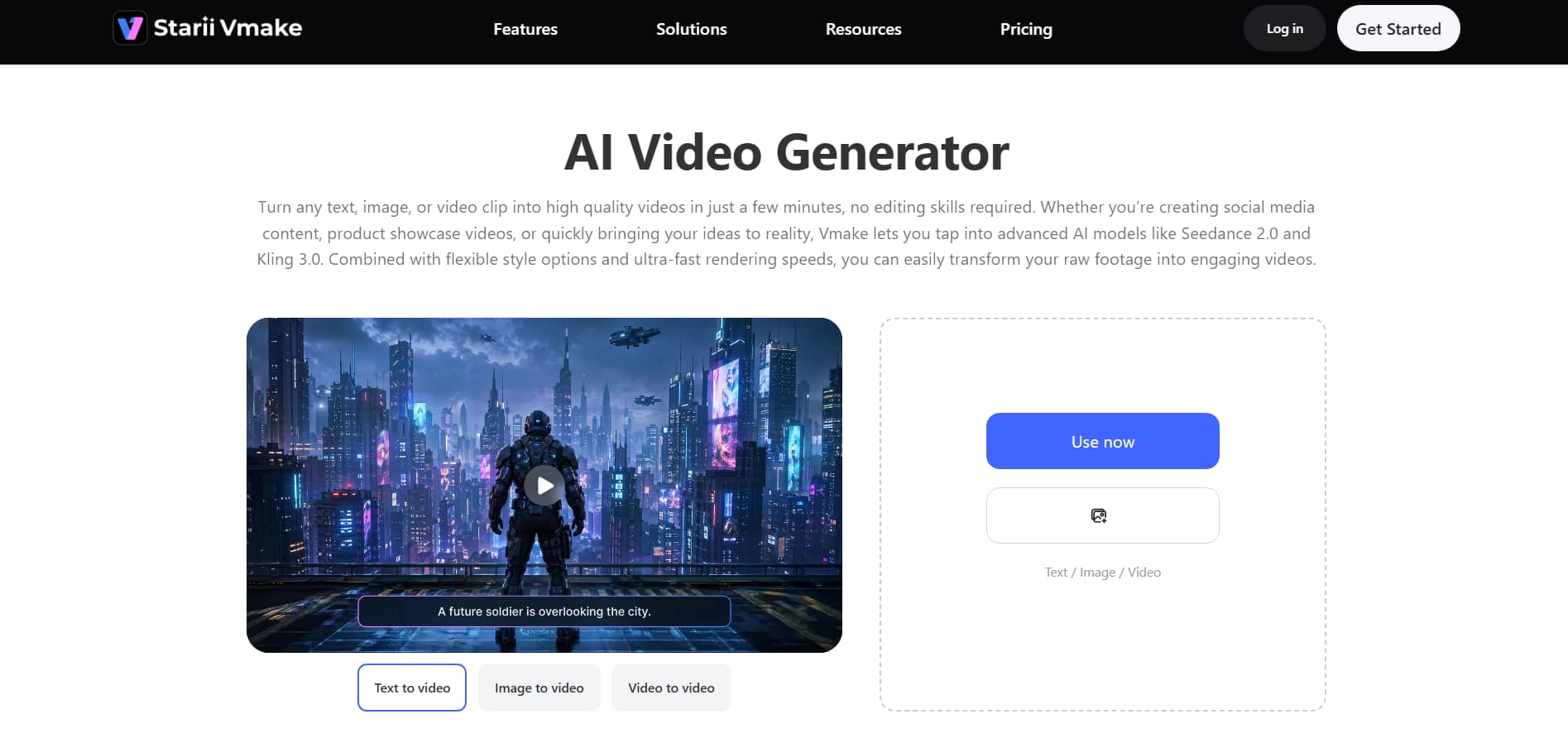
Vmake AI is a robust AI video generation platform designed for rapid, innovative, and attention-grabbing content production. It enables users to convert text, photos, or existing video clips into high-quality short movies in only minutes. This is extremely useful for e-commerce firms, producers, and social media marketers. The platform uses state-of-the-art AI models such as Seedance 2.0 and Kling 3.0, enabling more fluid, realistic video outputs with minimal effort.
Key Features of the Vmake AI Video Generator
Vmake AI provides advanced production tools to easily create high-quality short-form videos for social media and marketing. It integrates several AI models, flexible inputs, and robust editing tools into a single, simplified process. Here are its main aspects outlined in depth.
-
Multi-model creation engine: Vmake AI is powered by the latest AI models, including Seedance 2.0, Kling 3.0, Google Veo 3.1, Sora 2, Vidu Q2, and Wan 2.2, enabling users to generate highly realistic and diverse video content.
-
Flexible creative inputs: It offers text-to-video, image-to-video, and video-to-video generating modes for optimum adaptability. You may get started with a simple prompt, animate still pictures, or restyle existing film with ease.
-
Dynamic motion effects: Vmake offers pre-made cinematic effects that instantly enhance the look of the movie with smooth motion and transitions. 360° product spins, entrance bursts, and natural animation styles help make the material more interesting.
-
Adjustable ratios & pacing: The users can specify aspect ratios such as 9:16 for TikTok or 16:9 for desktop platforms, so that the content fits well on every platform.
-
Unified workflow studio: Vmake AI gives one workspace to create, edit, upscale, and export videos without switching tools. It also offers features such as auto-captioning, object & text removal online tools, and AI video enhancement to improve output quality.
How to create a video using Vmake AI video
Create movies easily and quickly with Vmake AI, even if you're a newbie. Just type in a text prompt and watch your ideas develop into high-quality visual content in minutes. Here's how to create your AI film easily:
Step 1: Open the AI video generator
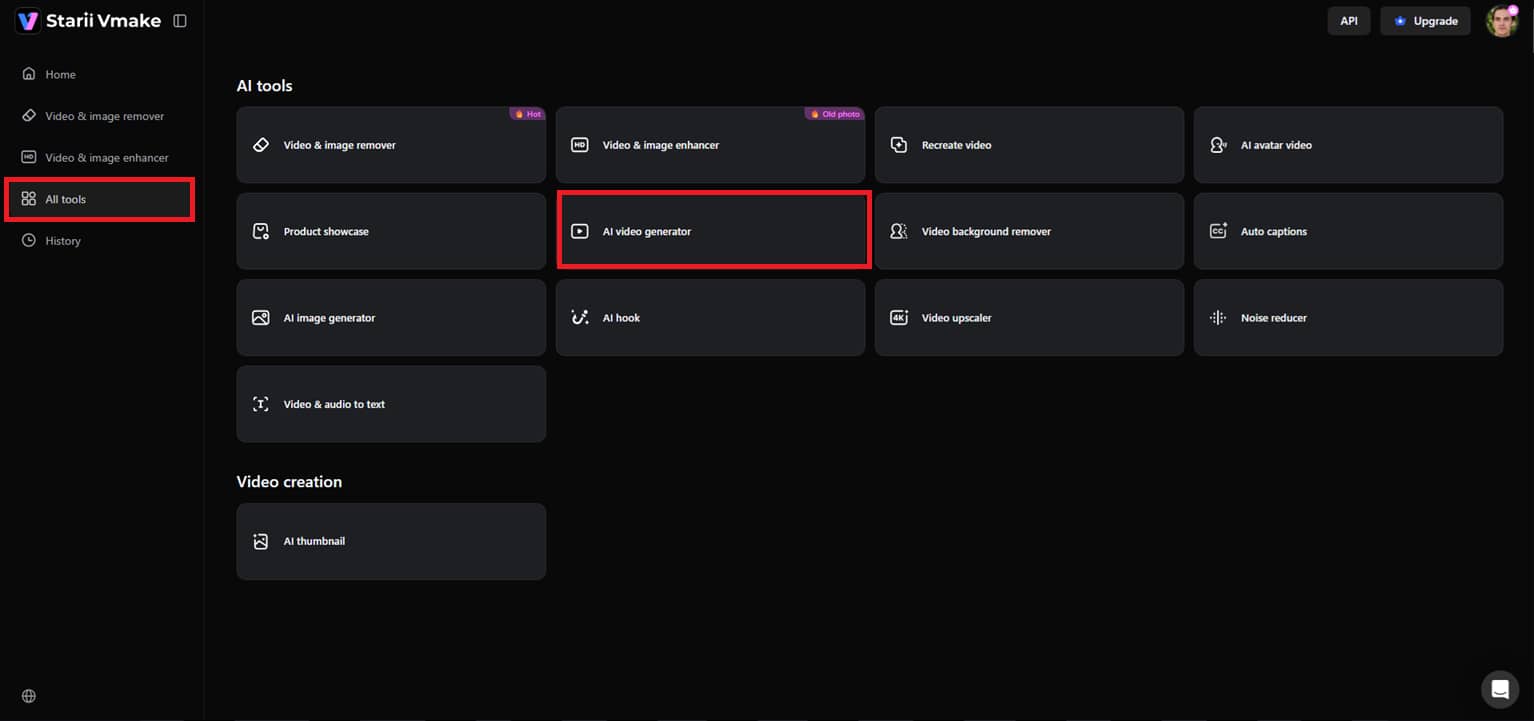
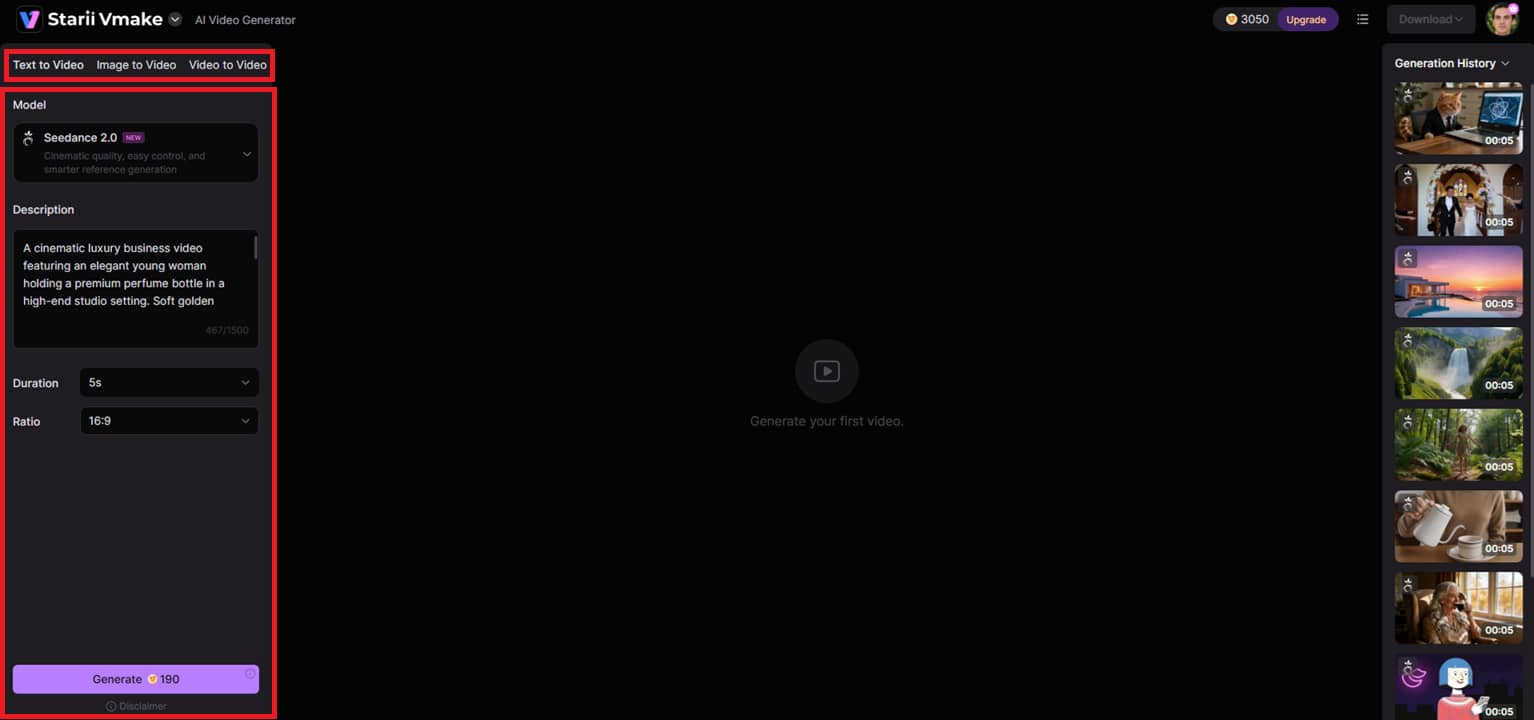
First, go to the left side menu and click on “All Tools.” Next, scroll down and choose “AI video generator.” This will bring you to the main workspace, where you can start making your video from the text.
Step 2: Enter your text prompt and set preferences
Select text-to-video as the generation mode in the editing window. Now, describe your exact prompt for the video you wish to create in full. You can also select your desired AI model, adjust the movie duration, and set the aspect ratio. When you're ready, click ''Generate''.
Step 3: Preview and download your video
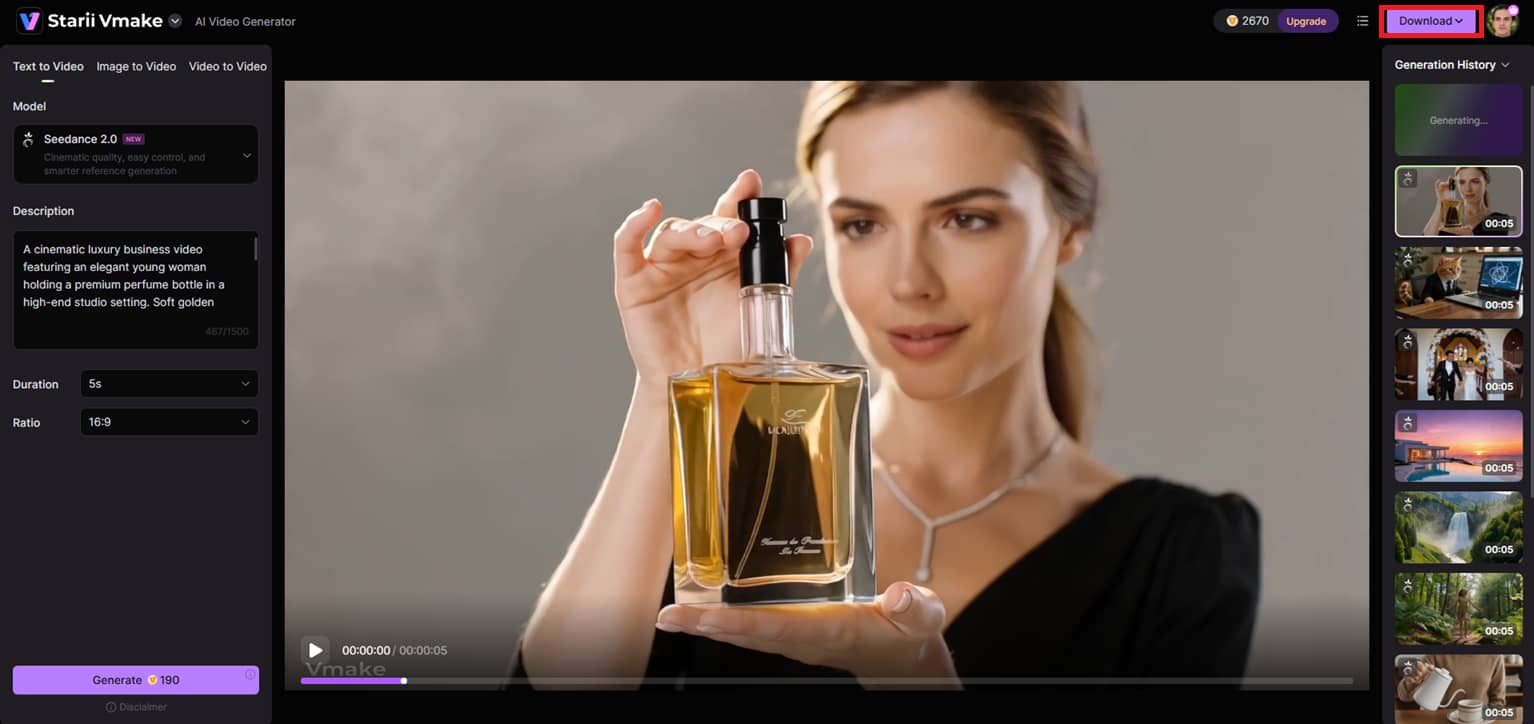
Vmake AI will create your video from your text prompt within seconds. Preview the outcome and evaluate the visuals, motion, and overall quality. If you're satisfied with the result, simply click ''Download'' at the top to save your final movie for social media, commercials, or projects.
Real-world application scenarios of Vmake
Vmake AI is often used by creators, marketers, and internet businesses to produce fast, visually appealing films without complex editing. Here are some of the most practical use cases for Vmake AI.
-
E-Commerce product videos: Online firms use Vmake AI to transform simple product photos into professional, enticing advertising videos. Products seem better on shopping sites and social media with features like cinematic motion effects, seamless transitions, and high-quality rendering.
-
Short-form social media content: Vmake AI helps creators and social media teams make films fast for TikTok, Instagram Reels, and YouTube Shorts. Technology makes it easy to create compelling content regularly without spending hours on manual editing.
-
Marketing and promotional ads: Businesses generate launch videos, promotional advertising, and seasonal campaign content with Vmake AI with simple prompts or existing assets. By turning innovative ideas into polished videos in minutes, the platform speeds up campaign creation.
-
Creative testing and content repurposing: Vmake AI is also useful for testing new creative ideas before jumping into large-scale production. You may create new content formats from existing images and videos for various platforms and campaigns.
Lumen5 vs Vmake AI: In-depth comparison
|
Aspect |
Lumen5 |
Vmake AI |
|---|---|---|
|
Primary focus |
Built for business storytelling, corporate communication, and blog-to-video workflows. |
Ideal for short-form cinematic movies, e-commerce marketing, and social media content. |
|
Content input options |
Blogs, articles, PDFs, URLs, scripts, and text-based content are supported. |
Supports image-to-video, text-to-video, and video-to-video generating workflows. |
|
Video creation style |
It is focused on structured, presentation-style videos with templates and branding tools. |
It's focused on visually engaging videos featuring motion effects and dramatic AI-generated visuals. |
|
Best suited for |
Business, marketing, education, publishing, and internal communication teams. |
Makers, internet vendors, marketing teams, and social media content makers. |
|
AI capabilities |
Uses AI for storyboard creation, visual suggestions, caption syncing, and automated scripting. |
Generates realistic videos using the latest models, such as Seedance 2.0, Kling 3.0, Veo 3, and Sora 2. |
|
Customization & output |
Powerful branding controls, themes, fonts, colors, and layouts to give you a professional look. |
Flexible aspect ratios, graphic styles, motion effects, and high-resolution output up to 4K. |
Final verdict: What to choose between Lumen5 and Vmake?
The best option between Lumen5 AI vs Vmake AI largely relies on the type of material you publish most frequently.
If you want to turn your blogs, articles, documents, or business ideas into clean, professional films, Lumen5 is the superior choice. Its straightforward workflow, branding capabilities, and text-to-video automation will be loved by marketers, educators, and business teams.
For creators and brands seeking visually rich, fast-moving content for social media and e-commerce, Vmake AI is the better choice. Its cinematic AI models, innovative styles, and short-form video capabilities make it perfect for product promotions, advertisements, and attention-grabbing social content.
Conclusion
In this article, you'll read about how Lumen5 AI and Vmake AI take quite distinct approaches to movie-making. We examined Lumen5's capabilities in business storytelling, blog-to-video conversion, branding, and information-based content creation. We also talked about Vmake AI's focus on cinematic visuals, short-form social media videos, e-commerce promos, and AI-enabled creative freedom.
Both platforms offer sophisticated AI video-generation features, but the right one for you depends on your content goals and workflow demands. Lumen5 is a good alternative for creating professional, structured videos from written content. For those seeking visually appealing marketing videos and social media content, Vmake AI is the best option. Try both tools and see which one better fits your creative style, audience, and business goals.
FAQ's
How does Lumen5 AI text-to-video work?
Lumen5 AI turns blogs, articles, PDFs, and scripts into videos by automatically generating scenes, visuals, and storyboard layouts. It is more oriented towards structured storytelling and business-style video creation with templates and branding controls. In contrast, Vmake AI is geared more towards cinematic AI generation, allowing users to create visually dynamic videos using text prompts, photos, or existing clips.
Is the Lumen5 free plan to use?
Yes, Lumen5 offers a free community plan that lets you try AI video-making tools without paying upfront. It is useful for beginners who wish to experiment with blog-to-video workflows and brand content development. Likewise, Vmake AI offers easy-to-use, free AI video creation options and credits for those who wish to rapidly generate short-form social media and promotional videos.
What are the limits of the Lumen5 free plan?
The Lumen5 free plan has some limitations, including 720p exports, 5 videos per month, video watermarks, and limited access to premium templates and sophisticated customization options. This is mostly to test the platform before subscribing to higher-tier plans. Depending on the AI model and generation settings selected on the platform, there may also be export or feature limits in the Vmake AI video generation tool.
What is the best alternative to Lumen5 AI video creator?
Vmake AI is one of the top Lumen5 AI alternatives if you are more into cinematic and social-media-based video making. Lumen5 is more about professional storytelling and repurposing content, while Vmake AI is more about creative visuals, AI-produced motion, and fast-paced marketing content. It depends on what you want more: advertising videos that look nice, or business communication.
What types of videos can you create with Lumen5?
Lumen5 is great for explainer videos, marketing films, LinkedIn content, training materials, and blog-to-video storytelling. Its AI technologies make it easy for businesses and creators to turn text into professional-looking visual material. Vmake AI is better for product showcases, social media advertising, short promotional movies, and visually rich e-commerce videos.
Does Lumen5 provide stock footage and music?
Yes, Lumen5 offers a large library of royalty-free stock footage, images, music, and AI voices that users can use immediately in their movies. The platform's AI also automatically suggests graphics and background voices depending on your script, making the video creation process much faster and easier. Vmake AI, on the other hand, is more focused on developing cinematic visuals with AI and motion-based video creation, based on refrence images and prompts added, rather than on the usual stock-media-driven storytelling workflows.

You May Be Interested
Kling AI vs Runway AI: Claiming Free Credits Effectively
Kling AI vs Runway AI: Essential Q&A for Creators

5 Top Shoppable Video Generators for TikTokers in 2026
Vmake AI Video Generator Now Powered by Google Veo 3.1
OpenClaw 2026: Ultimate Guide to World-Changing Local AI

OpenAI Sora 2 now built into Vmake AI Video Generator