
How to Create Effective In-Stream Ads for Facebook
Unlock new revenue streams with Facebook in-stream ads. Place targeted video ads in long-form content that viewers are already hooked on. Create scroll-stopping videos fast with Vmake Labs and turn watch time into earnings.

Facebook in-stream ads are a proven way for creators to monetize long-form videos by placing targeted ads within compelling content. In this 2026 guide, we cover eligibility, setup, optimisation strategies, and best practices to maximise revenue. Learn how to boost your watch time and revenue using powerful AI tools like Vmake Labs for fast, scroll-stopping content.
What are Facebook in-stream ads?
Facebook in-stream ads are short video advertisements inserted into eligible videos on the platform. Think of them as the commercial breaks of the digital world. They can appear before (pre-roll), during (mid-roll), or after (post-roll) your long-form video content or live streams.

Benefits of Facebook in-stream ads:
-
Generate passive revenue from existing video content.
-
Reach viewers with high watch intent.
-
Improve advertiser engagement compared to traditional feed ads.
-
Support long-form storytelling without sacrificing monetization.
-
Automatically insert ads at suitable moments in eligible videos.
-
Scale earnings as your audience and watch time grow.
How do Facebook in-stream ads work?
Facebook in-stream ads seamlessly integrate into videos, allowing creators to earn from engaged audiences. Understanding their mechanics helps you optimize placements and boost revenue effectively in 2026.
-
Placements & rules
In-stream ads appear on Facebook Watch, the Audience Network partner sites, and during eligible live streams. They are strictly mobile-driven because the majority of video consumption on Facebook happens on smartphones, ensuring higher engagement and better ad performance in a lean-back viewing environment.
-
The 60-second threshold
Ads only trigger after a viewer has watched at least 60 seconds of your long-form video (typically 3+ minutes total). This smart system ensures viewers are already hooked on your content before any commercial break, leading to higher completion rates and more effective monetization.
-
Brand safety controls
Facebook gives creators and advertisers exclusion categories to control what kind of ads show up in their videos. You can opt out of sensitive categories like social issues, alcohol, or mature content, which helps keep your monetized videos advertiser-friendly and protects your brand reputation.
Eligibility requirements for in-stream ads (Creators)
To qualify for in-stream monetization on Facebook, your Page must meet these key thresholds:
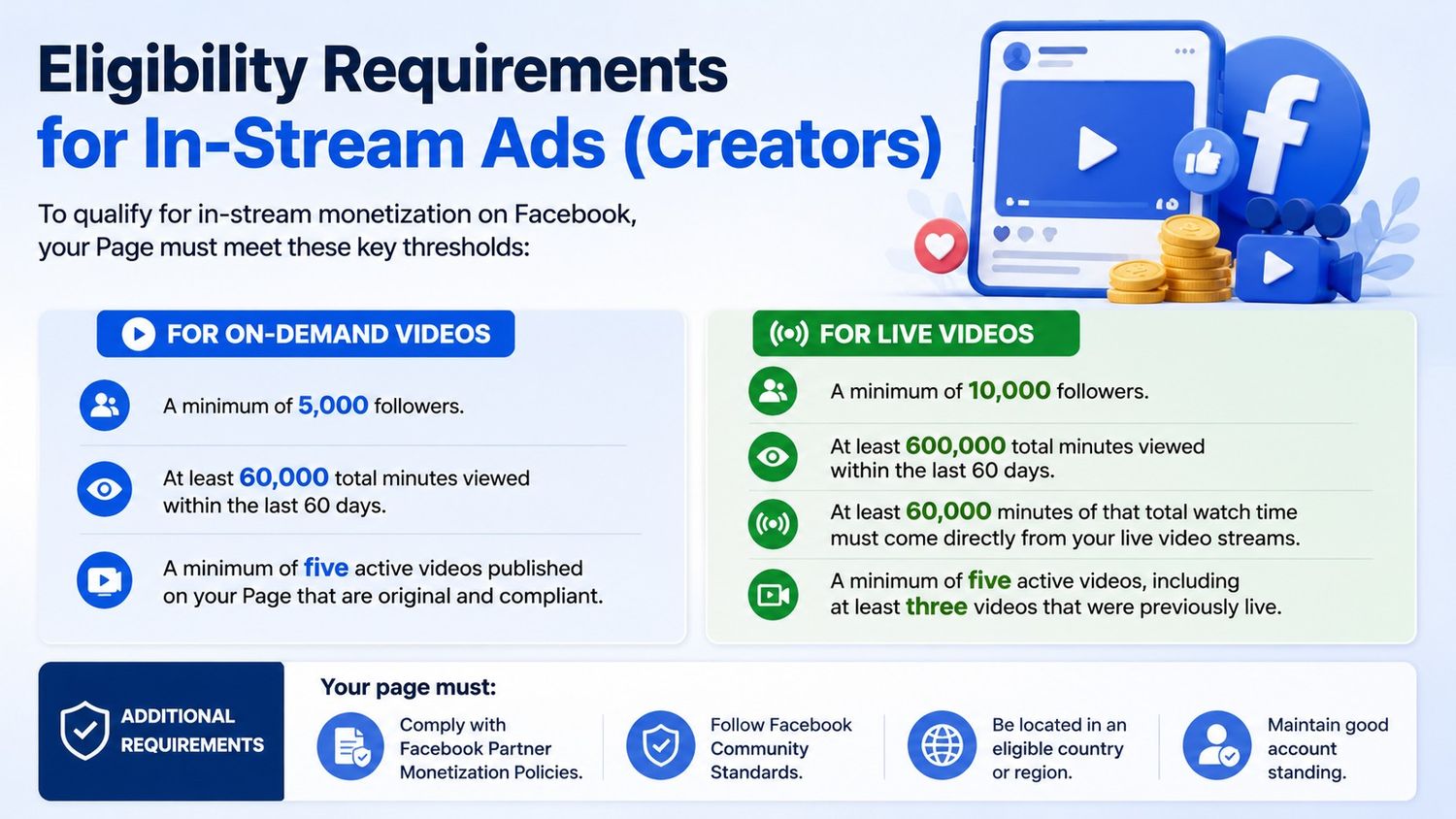
For on-demand videos
-
A minimum of 5,000 followers.
-
At least 60,000 total minutes viewed within the last 60 days.
-
A minimum of five active videos published on your Page that are original and compliant.
For live videos
-
A minimum of 10,000 followers.
-
At least 600,000 total minutes viewed within the last 60 days.
-
At least 60,000 minutes of that total watch time must come directly from your live video streams.
-
A minimum of five active videos, including at least three videos that were previously live.
Additional requirements
Your page must:
-
Comply with Facebook Partner Monetization Policies.
-
Follow Facebook Community Standards.
-
Be located in an eligible country or region.
-
Maintain good account standing.
Meeting these requirements does not automatically guarantee approval, as Facebook reviews monetization eligibility on an ongoing basis.
Tips: How to hit these thresholds faster
-
Post consistently, not just often: A steady upload schedule (aim for at least 2–3 videos a week) keeps your minutes-viewed count climbing and signals reliability to Facebook's review system.
-
Prioritize watch time over view count: Longer, more engaging videos (3+ minutes) generate more minutes viewed per view than short clips, helping you reach the 60,000 or 600,000 minute thresholds faster.
-
Go live regularly: If you're targeting live video monetization, schedule live sessions consistently and promote them in advance to increase live watch time.
-
Audit your content for compliance before applying: Review Facebook's Partner Monetization Policies and Community Standards ahead of time. A single flagged video can stall your account's standing even if you meet the numeric thresholds.
-
Monitor your progress: Use Meta Business Suite or your Page's Professional Dashboard to track follower growth, watch time, and monetization status so you know which milestones you've reached.
Note: Meeting these thresholds puts you in the applicant pool, not the approved list. Facebook reviews accounts on an ongoing basis, so continue meeting the criteria even after applying.
How to set up Facebook in-stream ads
Once you meet Facebook's monetization requirements, setting up in-stream Facebook ads is a straightforward process. Follow these steps to activate monetization and start earning from your videos.
Step 1: Check your monetization eligibility
Go to your Facebook Professional Dashboard or Page settings. Review your follower count, total watch minutes, and active videos against the current requirements.
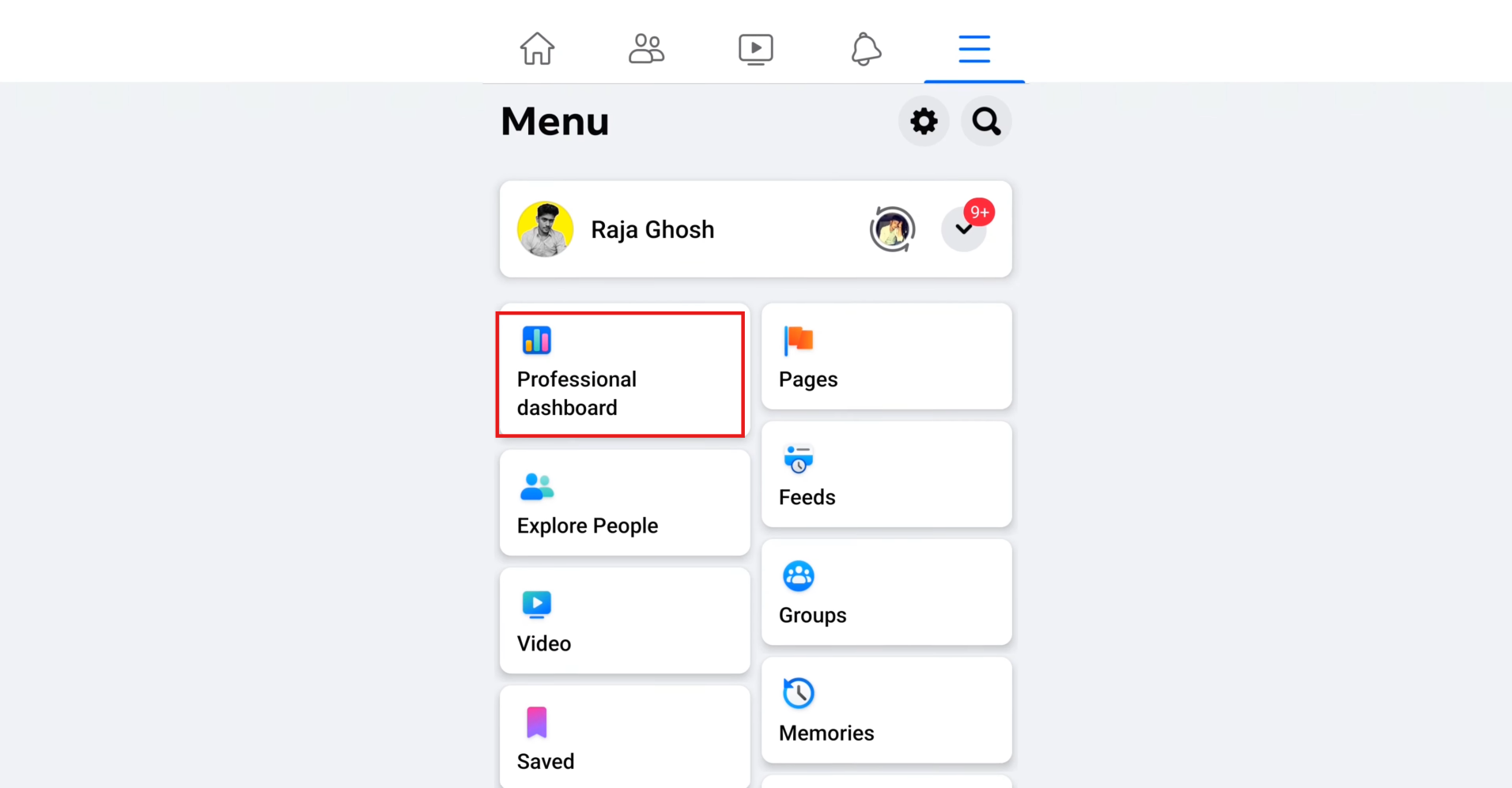
Step 2: Access monetization manager
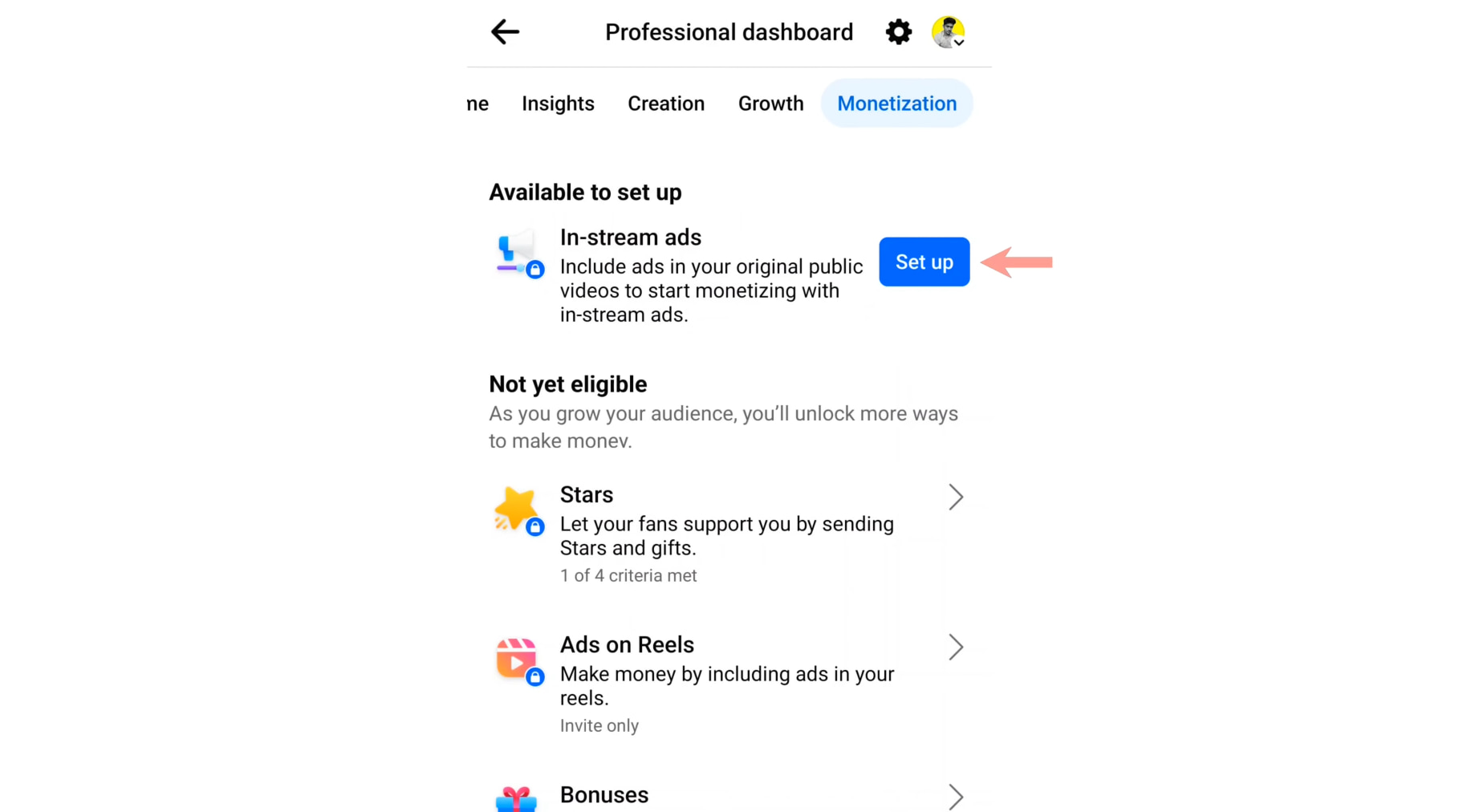
Navigate to your Page, click on Professional Dashboard, and locate the Monetization section. This central hub shows your eligibility status and available tools for in-stream Facebook ads.
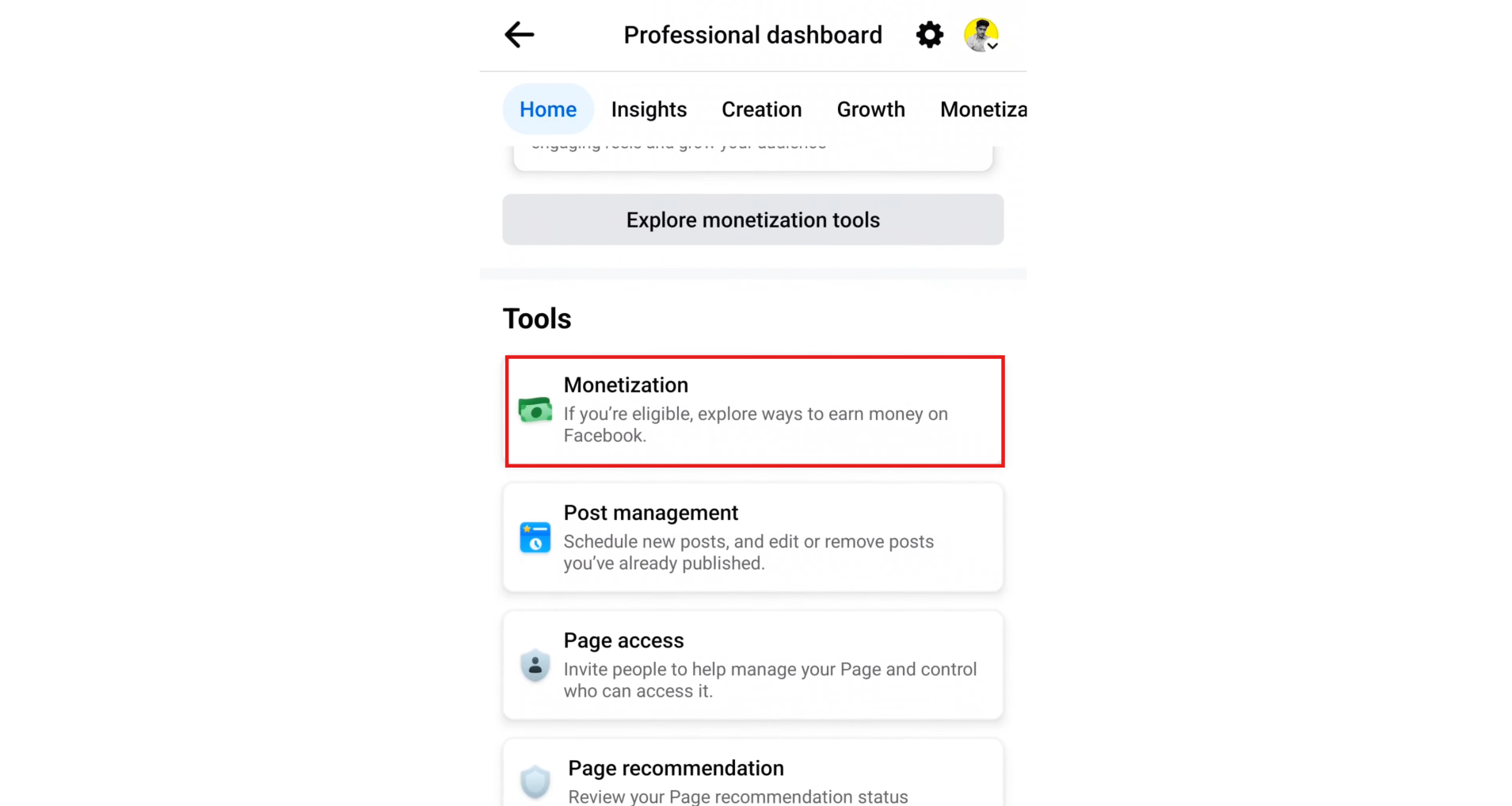
Step 3: Enable in-stream ads
Go to Monetisation manager, and enable the option for in-stream ads. For longer videos, select automatic placement (recommended for best earnings) or manual ad breaks.
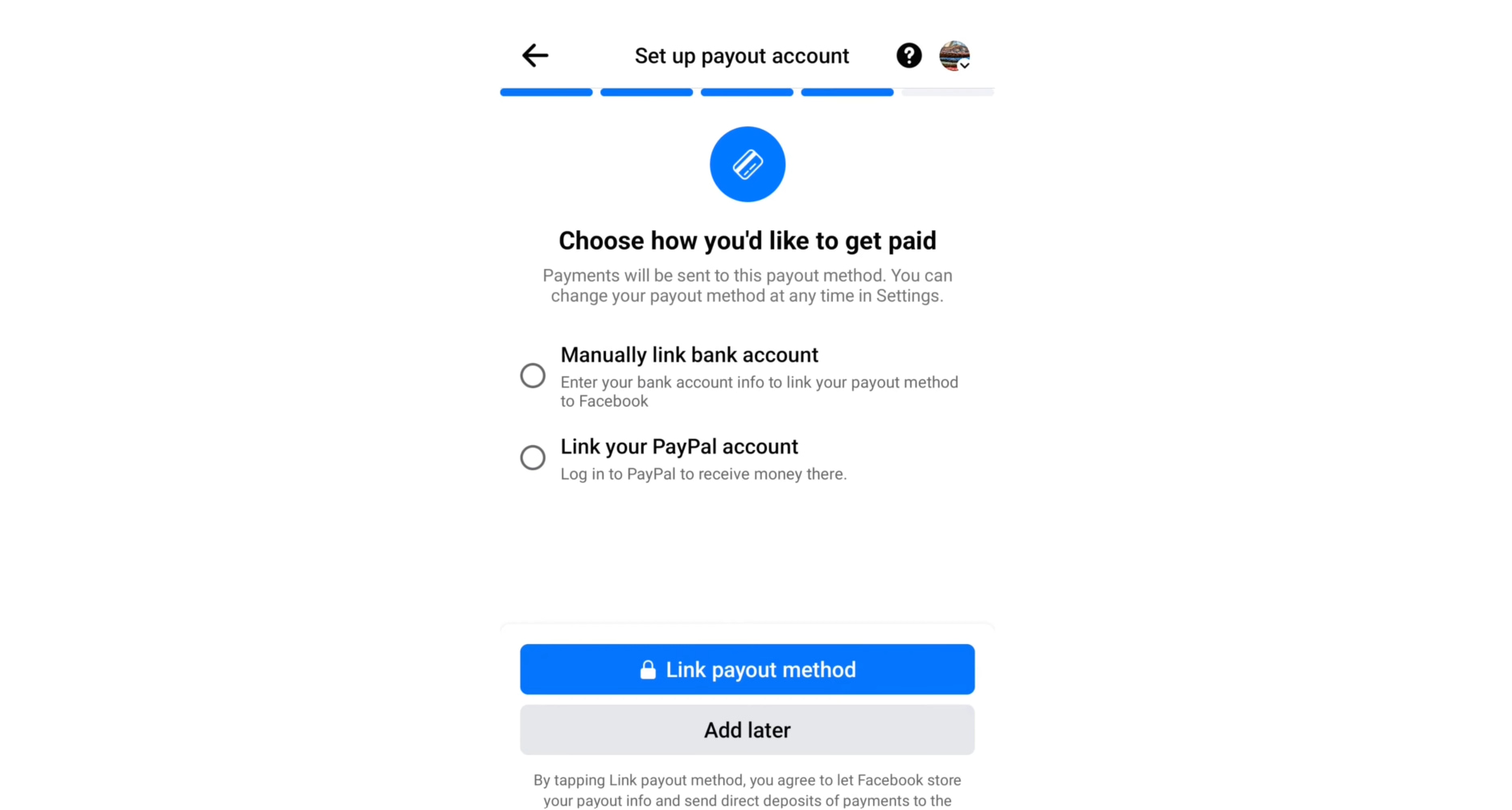
Step 4: Set up payment information
Choose your preferred payout method, including bank details or PayPal, and fill in the tax details. Once your Facebook in-stream ads are making money, you'll get paid seamlessly.
Step 5: Publish and optimize monetizable videos
Once approved, focus on publishing long-form videos that naturally hold attention past the three-minute mark. The more watch time you generate, the more ad placements your content can support.
Once your Facebook monetization is enabled, the secret to growing your revenue is to keep posting engaging videos. Vmake Labs makes it easier to keep up a steady publishing schedule and boost watch time by enabling creators to produce professional videos faster than it takes to film and edit.
How to create engaging videos for Facebook in-stream ads
The Vmake Labs UGC generator is a powerful AI tool designed specifically for creators who want to produce authentic, high-engagement videos optimized for Facebook in-stream ads. Powered by advanced video models like Seedance 2.0, Kling 3.0, and Sora 2, it helps you generate realistic user-generated content style videos quickly, complete with natural voiceovers, expressive avatars, trending hooks, and seamless editing features.
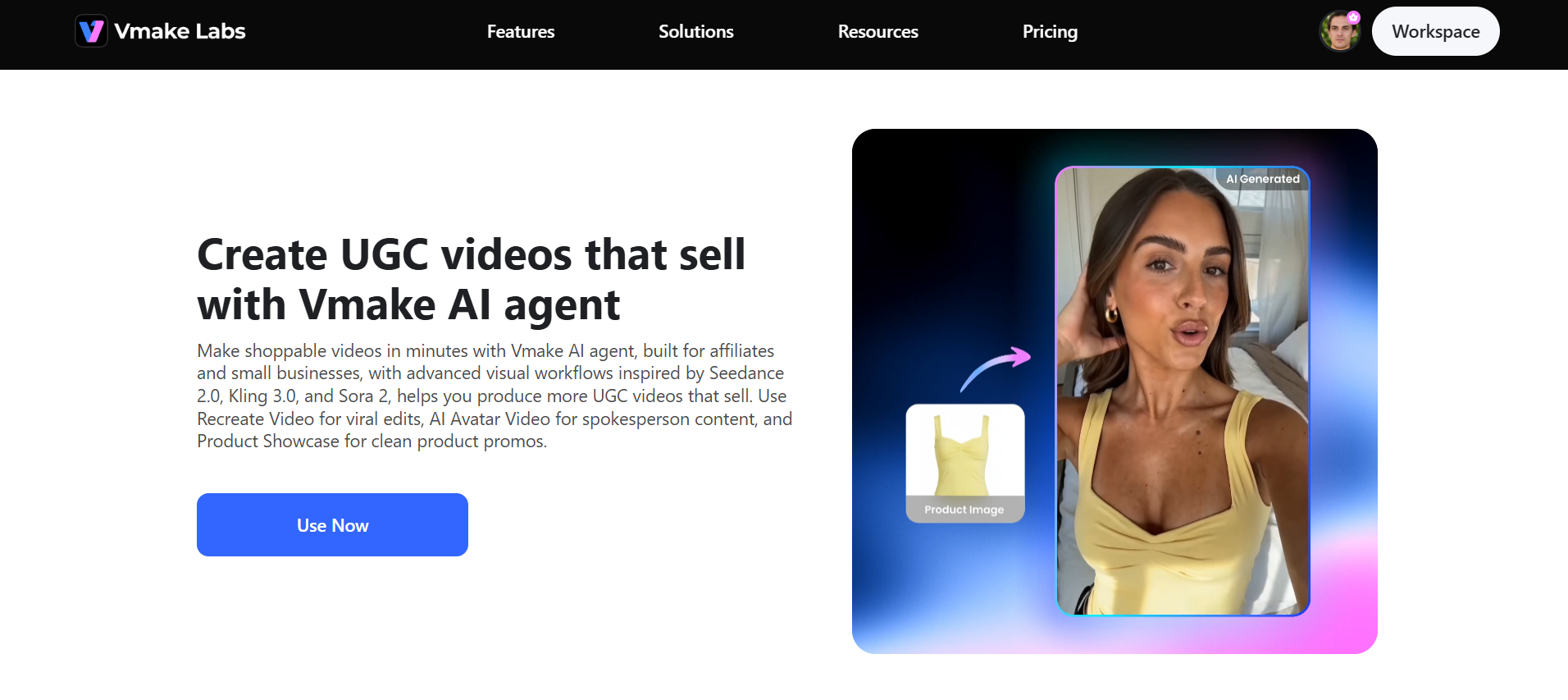
Key features of Vmake Labs
-
Avatar video: Create lifelike talking avatar videos with natural expressions and voiceovers. Ideal for educational content, tutorials, and storytelling that keeps viewers engaged for longer. Longer watch time and higher audience retention can help you meet Facebook's in-stream ad eligibility requirements and maximize ad revenue.
-
Product showcase: Transforms simple photos or links into dynamic, high-converting e-commerce product videos. This makes it easy to publish consistent, professional product content without extensive editing. Regularly uploading original, high-quality videos can help you satisfy Facebook's active video requirements while creating more monetizable content.
-
Restyle video: Transform existing footage into fresh, trending styles instantly. Restyling older videos helps extend the value of your content library. Higher engagement and improved watch time can increase the earning potential of Facebook in-stream ads.
-
Advanced video models: Harness powerful models like Seedance 2.0, Kling 3.0, and Sora 2 to generate high-quality, realistic videos fast. Higher production quality helps content hold attention longer, directly supporting the watch-time numbers Facebook uses to determine in-stream ad eligibility.
Steps to generate videos for in-stream ads
With Vmake Labs, creating high-retention videos optimized for Facebook in-stream ads is fast and simple. Follow these steps to produce content that boosts watch time and revenue.
Step 1: Choose your workflow
Start by picking the workflow that matches what you want to create. Choose from AI Avatar Video, Product Showcase, or Restyle Video depending on your product and content style.
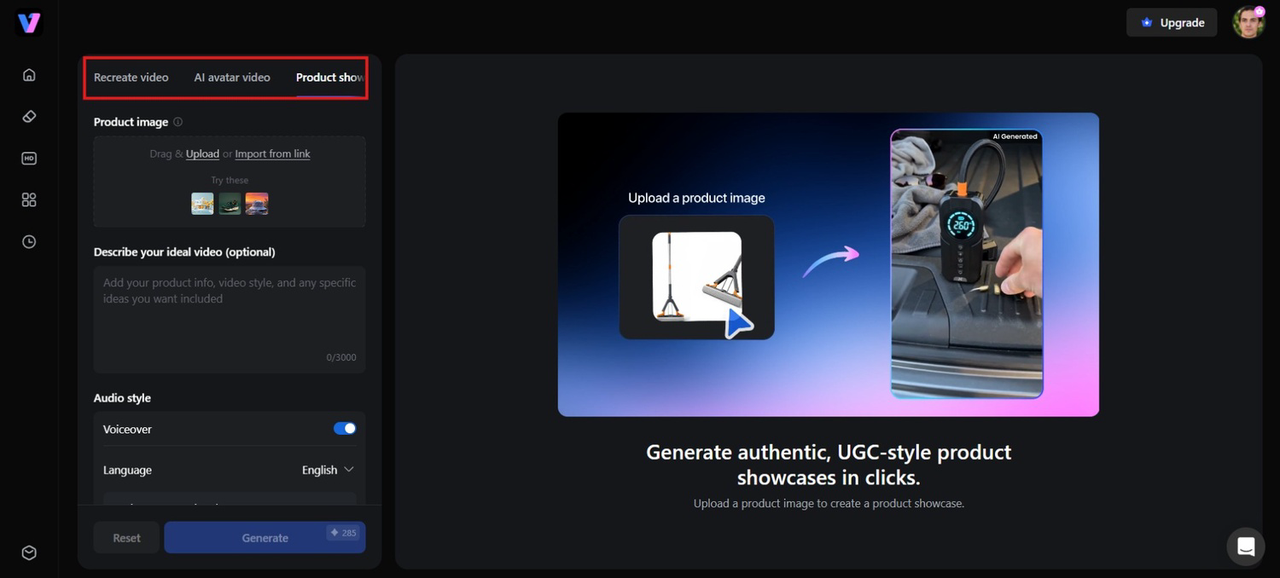
Step 2: Fill in the form
Upload your product image or simply paste your product URL into Vmake AI. There's no need to write complex prompts. Just customize key details such as the AI voiceover, language, background music, and other preferences, and AI handles the setup for you.
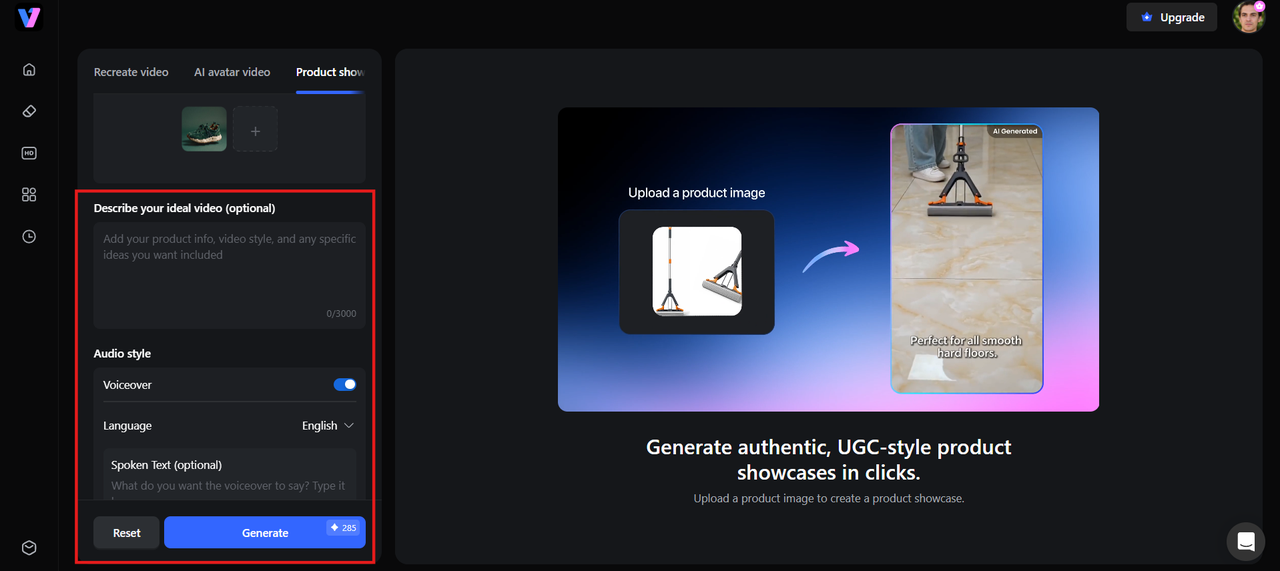
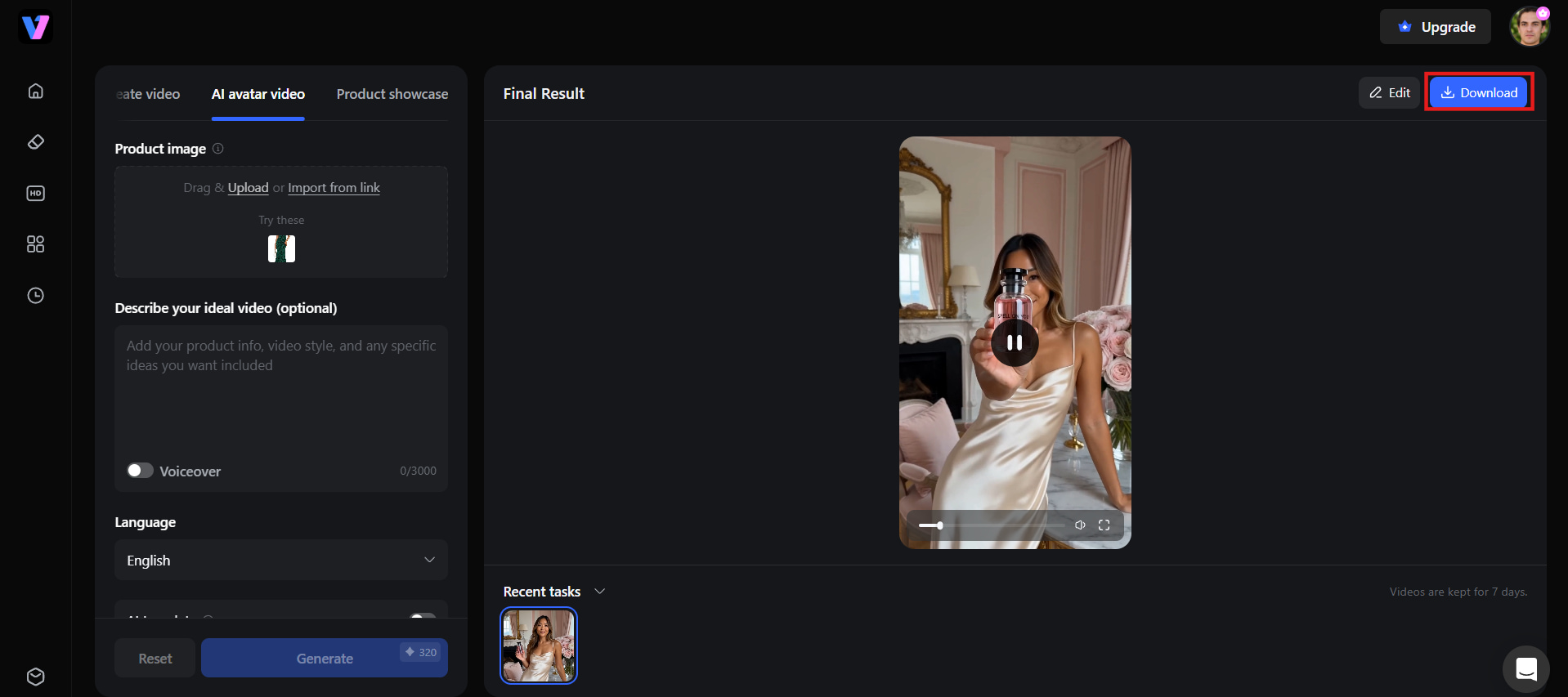
Step 3: Generate and download
Once everything is set, click Generate. Vmake turns your inputs into a complete, ready-to-post video. When it's done, hit Download and publish straight to your page.
Conclusion
In-stream ads for Facebook offer creators an effective way to monetize long-form videos while reaching highly engaged audiences. By meeting eligibility requirements, enabling monetization, and consistently publishing high-quality content, you can increase watch time and maximize your earning potential. With Vmake Labs, creating professional, audience-friendly videos is faster and easier, helping you maintain a consistent publishing schedule. Let's create engaging Facebook videos with Vmake Labs, today and turn every view into a new monetization opportunity.
FAQs
What is the minimum video length for in-stream ads?
For on-demand monetization, Facebook generally requires videos to be at least three minutes long. In-stream ads usually run after viewers have watched around 60 seconds. With Vmake Labs, you can quickly create engaging long-form videos that meet these requirements.
How do I qualify for in-stream ads as a creator?
For on-demand videos, you need 5,000 followers, 60,000 minutes viewed in the last 60 days, and 5 active videos. Live videos require 10,000 followers and 600,000 minutes of watch time, including 60,000+ minutes of live watch time.
Are Facebook in-stream ads skippable?
Some Facebook in-stream ads can be skipped after a few seconds, depending on the ad format and placement, while others are non-skippable. Vmake Labs can help you create engaging videos to keep viewers engaged before and after the ad breaks.
How much do creators earn from Facebook in-stream ads?
There is no fixed payout for Facebook in-stream ads. Earnings depend on factors such as audience location, watch time, engagement, advertiser demand, and CPM rates. Higher-quality, engaging videos often attract more views and increase monetization opportunities.
What video formats are supported for Facebook in-stream ads?
Facebook supports popular formats such as MP4 and MOV for monetizable videos. Uploading high-resolution, properly encoded content delivers a better viewing experience. Vmake Labs, exports high-quality videos suitable for Facebook and other major social platforms.

You May Be Interested
10 Social Media Ads Examples That Drive Engagement & Sales
Real Estate Facebook Ads Guide 2026: Strategies & Examples

Create Ads for TikTok Video With AI: A Complete Beginner's Guide

YouTube Monetization Requirements 2026: Complete Guide
YouTube Thumbnail Size 2026: The New Standard for High-CTR Visuals
