How to Transcribe Video to Text: Free and AI-Based Methods Explained
 Vmake Labs TeamMarch 11, 2026
Transcribing videos to text has become increasingly important for content creators, educators, and businesses. Whether you need to improve accessibility or repurpose content, transcribing video content is beneficial for all types of videos, including YouTube tutorials, TikTok shorts, and Facebook reels. But how to do it? This guide will help you learn how to transcribe video to text, offering practical methods for various video types and platforms.
What Does “Transcribe Video to Text” Mean?
Transcribing video to text is the process of turning spoken words in a video into written text. It’s essential to transcribe video to text to make its content accessible to people who are deaf or hard of hearing, as well as to viewers who prefer reading. In addition, this process makes video content searchable and shareable, improves comprehension, and boosts SEO ranking to reach more people. Transcription involves listening to the video’s audio and typing out the speech manually, or using AI to automate the task.
Common Types of Videos You Can Transcribe
Various types of videos can be transcribed, including YouTube tutorials, social media clips, and more. Thanks to technological advancements, tools like Vmake Video & Audio to Text are making transcription easier.
This fantastic tool uses AI to transcribe video to text free online quickly and efficiently, delivering accurate transcripts. With support for various formats and languages, you can effortlessly generate precise transcripts of your video and audio files in minutes. It also lets you select the transcript language for accessibility purposes. You can even preview the output before exporting.
Main Features:
Easy-to-use interface with no sign-up required
Help convert audio and videos into text or subtitles
Process direct video URLs from various platforms
Quick, consistent transcription without losing fidelity
Support multiple languages and nuanced accents
Allow you to transcribe multiple videos simultaneously
Transcribe YouTube Video to Text
YouTube videos are among the most common forms of online content, and transcribing them can be incredibly useful. With the Vmake Video & Audio to Text tool, it’s straightforward to free transcribe YouTube video to text.
But if you’re still wondering how to transcribe YouTube video to text, no worries. You only have to paste the YouTube video link into the search bar, pick the video and translation language, and the AI will deliver the precise transcript to download.
Transcribe Social Media Videos (TikTok, Facebook)
Social media platforms like TikTok and Facebook host a variety of short-form videos that can benefit from transcription. Whether for accessibility or content optimization, transcribing these videos can help make your content more searchable.
Regarding how to transcribe Facebook video to text, TikTok, or other popular platforms for free, you can copy the link of the video clip and paste it into the Vmake Video & Audio to Text tool. With advanced AI, the transcription will be quickly delivered in the preferred language.
Transcribe Audio Video to Text
When working with multimedia content, you have to transcribe both video and audio, including podcasts, voice recordings, audio/video interviews, webinars, lectures, and more. So, finding an online tool that can convert both file types to text is super handy.
And thankfully, Vmake Video & Audio to Text can facilitate you. Its AI technology can help generate fast, multilingual transcripts in no time. Let’s comply with the given steps to transcribe audio video to text efficiently:
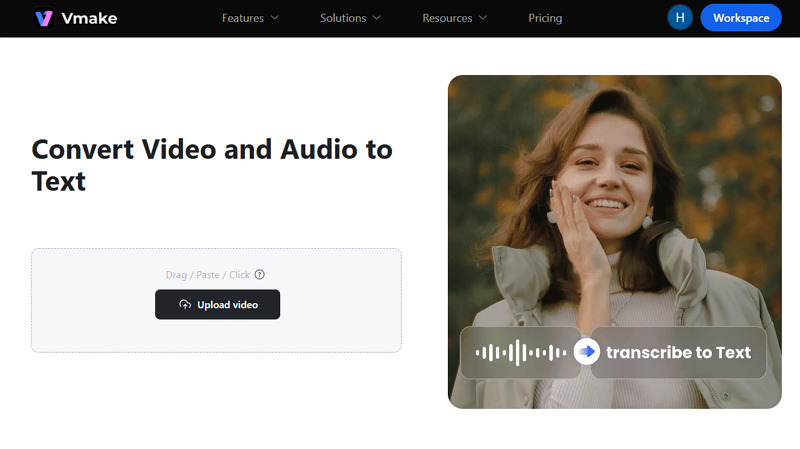
Step 1. Upload the Media File
First of all, open the Vmake Video to Text tool in your browser. Now, upload the media file you want to transcribe to proceed.
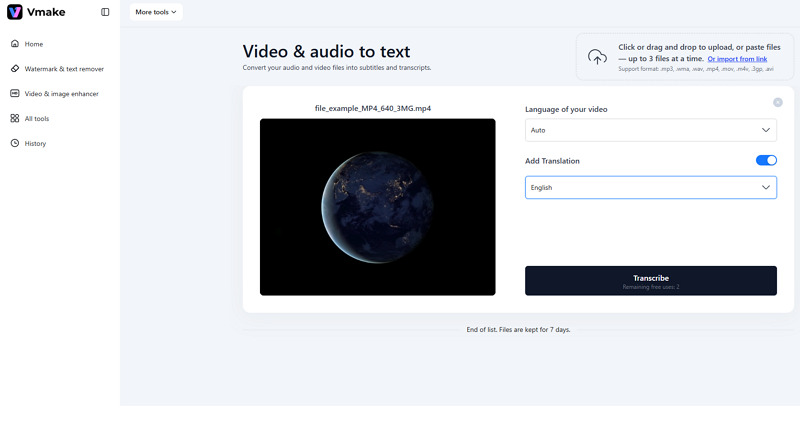
Step 2. Select the Language
Next, select the original video and the translation languages from their drop-down menus. Then, press the “Transcribe” button.
Step 3. Transcribe Video to Text
Once the AI has finished the transcription, you can preview the results. Lastly, hit “Download Transcription (.TXT)” or “Download Subtitle (.SRT).” All done!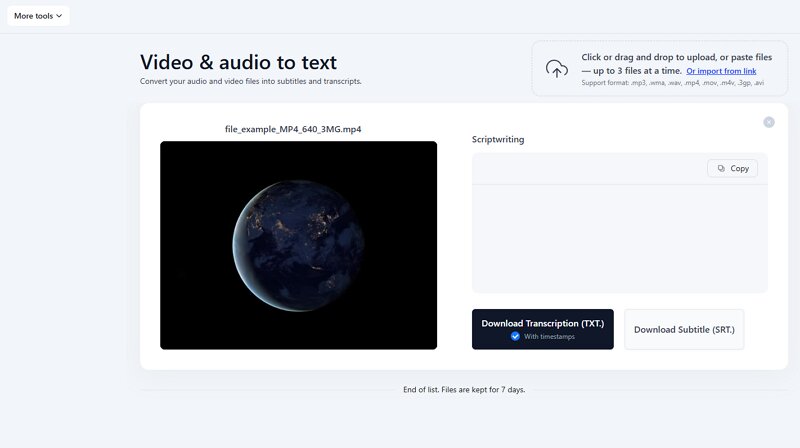
Common Problems When Transcribing Videos
While transcription tools have come a long way, some challenges persist. Let’s consider a few:
Accuracy Issues: Despite AI’s advancements, speech recognition may still struggle with regional dialects, background noise, or multiple speakers. Manual review and editing may be necessary for precision.
Formatting Inconsistency: Automated transcription tools may struggle to maintain consistent formatting, like proper punctuation, paragraph breaks, and speaker labels. This requires manual formatting post-transcription.
Time-Consuming: Although AI speeds up transcription, longer videos still require significant processing time, especially when audio needs cleaning.
Technical Difficulties: Some video formats may not be compatible with transcription tools, leading to transcription errors or failures. So, convert the video to a standard format beforehand.
Misinterpretation of Jargon: When AI transcribe video to text, it may misinterpret slang, names, or highly specialized language, which may require additional editing.
Confidentiality Concerns: When using free online transcription tools, businesses may have concerns about data privacy and the storage of sensitive information. So, go for a secure tool like Vmake that offers high data encryption.
FAQs About Transcribing Video to Text
1. Can I transcribe video to text free?
Yes, several online tools are available that allow you to free transcribe video to text. While you may face limitations in features, they still provide a valuable service for basic transcription needs.
2. Does Restream or Google transcribe video to text?
Yes. With the Restream transcribe video to text service, you can generate transcriptions of live streams. However, Google tools like Google Cloud Speech-to-Text can be used to transcribe audio video to text with precision.
3. Can Microsoft transcribe video to text?
Yes, Microsoft can transcribe videos to text. For this purpose, open Microsoft Word and go to Home > Dictate > Transcribe. Then, upload your video in a standard file format, and it will generate a transcript with timestamps.
4. Is it better to use AI to transcribe video or manually?
AI transcription is faster and more efficient. However, manual transcription is more accurate when dealing with poor audio quality, heavy accents, or specialized terminology. A combination of the two methods can provide the best possible results.
Final Thoughts
In 2026, transcribing video content is more accessible than ever. Whether you’re working with YouTube or need to transcribe TikTok video to text free, AI-based transcription tools make the process easy and efficient.
If you want reliable, fast transcription with a user-friendly experience and multi-language support, Vmake Video and Audio to Text is the top choice. While there may still be minor issues regarding accuracy or compatibility, you can consider using AI-based tools alongside manual review for optimal results.

You May Be Interested

How to Remove Text from a Video: Your Ultimate Guide to Pro Edits
How to Transcribe a Video to Text: Guide to Accurate Transcriptions
The Ultimate Guide to Transcribe YouTube Video to Text [2026]