
How to Convert Image to HD Quality Online in 2026
 Vmake Labs TeamMay 25, 2026
A blurry or low-resolution photo can make even a good design, product, or social media post look unprofessional. But thankfully, AI tools in 2026 make it much easier to convert image to HD quality without advanced editing skills.
This guide explains how HD image conversion works, when to use it, and how to convert to HD 1080p online free with ease.
What Does “Convert Image to HD” Mean?
To convert an image to HD is the process of enhancing a low-resolution, pixelated, or blurry image to a higher, sharper resolution, typically HD. It also increases the clarity and pixel count, improving overall visual quality.
This is done either by stretching a small image or using AI technology. Before trying any method, it’s important to understand the difference between normal resolution, HD, and Full HD.
Standard Resolution vs HD vs Full HD
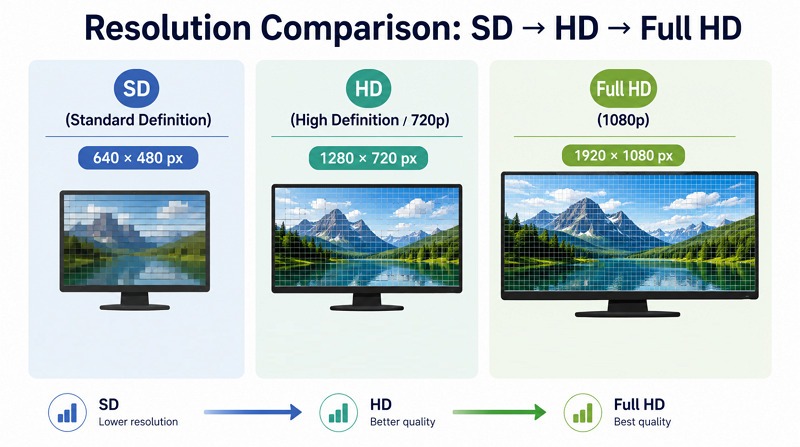
These terms define the number of pixels displayed on the screen; more pixels mean a sharper, more detailed image.
Standard resolution (640 x 180) refers to lower-quality images used on older analog TVs and small smartphone screens.
HD, or High Definition (1280 x 720), gives better clarity than standard resolution and is suitable for many online uses. These may look acceptable on small screens but become blurry when enlarged.
Full HD (1920 x 1080), also called 1080p, offers greater detail and is widely used for televisions, social media streaming, and professional use.
How AI Converts Low-Resolution Images to HD
AI image enhancement works differently from traditional resizing. AI tools use machine learning trained on millions of high-quality images. So, they analyze the image and fill in the missing details, textures, edges, and colors to generate a crisp, high-resolution version. For example, if an old product photo has soft edges, an AI tool can sharpen the outline. If a portrait looks slightly blurry, AI can improve facial details.
When Do You Need to Convert an Image to HD?
Not every image needs HD enhancement; some already look good enough for casual sharing. Here are a few situations when you have to use an image to HD image converter:
Uploading Images to Social Media
Social media platforms often compress uploaded images. If your original picture is already low quality, the final uploaded version may look even worse.
Whether you have to post on Instagram, Facebook, Pinterest, or any other platform, use an AI enhancer to improve brightness, detail, and sharpness. A clean HD image helps your image stand out in crowded feeds.
Printing or Large Display Screens
Images that look fine on a phone may not look good when printed or shown on a large screen. Posters, flyers, banners, business cards, and presentation slides require better resolution.
If the image has low pixel quality, printing will reveal rough edges, blurring, or pixelation. Converting it to HD improves visible detail before printing or displaying on a large screen.
E-commerce Product Images
Online customers cannot touch or test the product; they judge it through pictures. A blurry product image makes the item look cheap, even if it’s good. HD product images help customers see details such as texture, color, packaging, and finish.
Whether you sell on Shopify, Amazon, Etsy, eBay, Daraz, or your own website, you should always use clear product visuals.
Improving Old or Low-Resolution Photos
Old family photos, scanned images, downloaded visuals, and screenshots often have poor resolution. They can be grainy, faded, small, or compressed. AI tools can help improve these images by sharpening details and reducing blur.
This is useful when restoring memories, preparing a photo album, creating a birthday design, making a wedding invitation, or improving an old profile picture.
How to Convert Image to HD Online (Step-by-Step)
The easiest way to convert image to HD image is to use an online AI image enhancement tool. You do not need to download software or manually adjust complicated settings. The process is usually simple, but to help you, below is a practical guide:
Step 1: Use an AI Image Enhancement Tool
First of all, select an efficient tool such as Vmake AI Image Enhancer. It facilitates image enhancement along with upscaling to HD or UHD resolution. You can also enhance multiple images at once to save time and effort. With an ad-free interface, it’s ideal for beginners, content creators, marketing teams, and e-commerce sellers.
Step 2: Upload Your Image
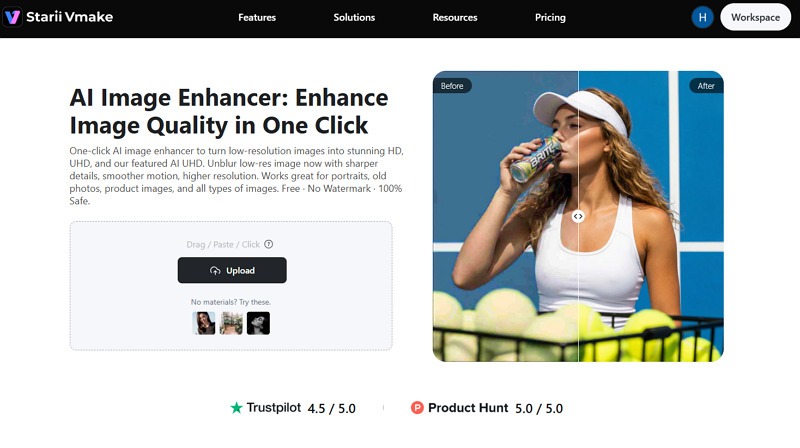
Once you access it in the browser, import the blurry or low-resolution image by clicking “Upload.” You can upscale all types of images, including portraits, products, old photos, and more.
Step 3: Apply HD Enhancement
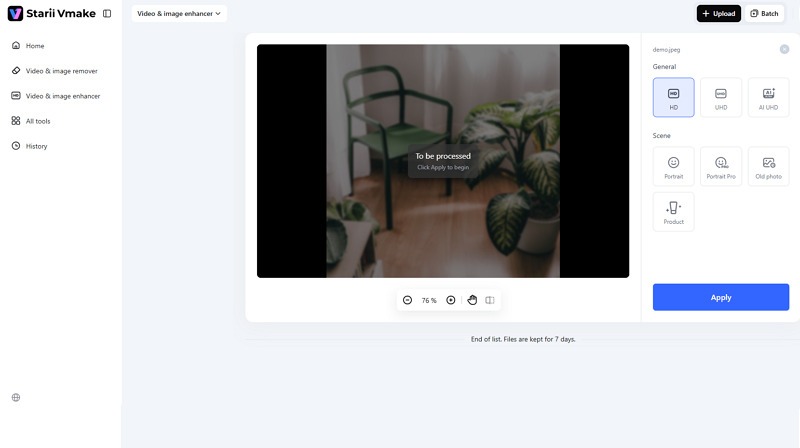
After uploading, AI will automatically detect the type and enhance it using the appropriate model. Then select the output resolution (HD or UHD) and press “Apply.”
Step 4: Download the HD Image
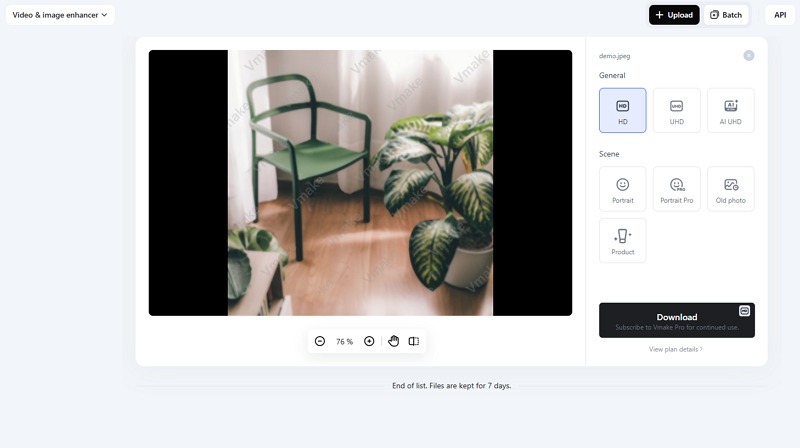
When the processing is complete, preview the output. If it looks fine, hit the “Download” button to save it to your device. That’s all!
Tips to Get the Best HD Results
No doubt, AI enhancements are powerful. However, to achieve the best HD results, you must practice a few things. Let’s explore the tips below:
Start with the Highest Quality Source Image
The better the source image, the better the HD result. AI can sharpen and enhance, but it cannot recover every detail from a very damaged file. Always upload the best version of your image. If you have the original camera photo or a PNG file, use that instead of a compressed or low-quality image.
Avoid Excessive Upscaling
Upscaling means increasing the size of an image. While AI can make upscaling look better, excessive enlargement can introduce unrealistic details, giving an artificial look. For example, converting a very small image directly into a large poster may not produce perfect results.
Choose the Right Output Format
Choosing the right format helps preserve the HD result after enhancement. PNG is best for maximum quality. Pick it for high clarity, transparent backgrounds, graphics, logos, or text-based images. PNG files are usually larger, but keep details cleaner.
Use JPG when you need smaller file sizes for websites, blogs, and social media. However, use WebP for web and digital displays. Choose it if you want a balance between quality, file size, and loading speed.
Use AI Tools Designed for Image Enhancement
Not all AI upscaling tools offer enhancement options. For the best results, use a tool designed to upscale, enhance, sharpen, and restore photos. Vmake AI Image Enhancer is a good option for this purpose because it focuses on improving image clarity, restoring details, and helping you convert image to HD 1080p online free. Developers can also integrate it into their workflows.
Convert Image to HD vs Upscaling: What’s the Difference?
Many people think converting images to HD and upscaling are the same thing, but they are not identical.
Upscaling increases an image’s dimensions and pixel count to make it larger. For example, changing an image from 800 × 600 pixels to 1920 × 1080 pixels is upscaling. However, the result may look blurry or pixelated.
HD conversion is broader. When you convert image to HD, the goal is to increase its size and improve visual quality. This includes sharpening, noise reduction, contrast improvement, detail restoration, and color correction.
In simple words, upscaling changes the size. HD conversion also improves the viewing quality. A good AI HD enhancer does both. It increases image size while enhancing detail, so the output appears naturally sharper.
FAQ
How do I convert an image to HD online?
You can convert an image to HD by using an online tool such as Vmake AI Image Enhancer. Upload your image, apply the HD enhancement, preview the result, and download the improved file.
Can I convert an image to HD for free?
Yes, you can convert image to HD online free using online AI tools like Vmake, which offer free enhancement options. However, some platforms may have limits on file size, daily usage, or watermark removal.
How do I convert an image to 1080p?
To convert an image to 1080p, use an AI enhancer or upscaler that supports Full HD output. Then choose an output size: UHD or 1920 × 1080 pixels.
Will converting an image to HD reduce quality?
If you use a basic resizing tool, quality may decrease because the image is only stretched. However, if you use an AI-powered image enhancer, it will improve clarity, sharpness, and detail as well.
Conclusion
Going through this post, you must have learned why and how to convert image to HD quality in 2026 without complex software. In 2026, AI tools like Vmake AI Image Enhancer can enhance sharpness, restore details, reduce blur, and deliver cleaner results in seconds. Try it today and enjoy simple and fast HD conversion for social media, product listings, presentations, and everyday use.

You May Be Interested

Google Gemini|Copy Paste This Simple Prompts to Create “Hug my younger self ” Photos
1440p vs 1080p: The Ultimate Display Resolution Comparison
1440p vs 4k Comparison: Which Resolution is Better?
720p vs 1080p: Which HD resolution is actually better?
AI Video Enhancement And Upscaling: Pros, Cons, Alternatives, and Future Trends
