Best Time to Post on YouTube: A Complete Posting Guide
Wondering about the best time to post on YouTube? Discover the best posting times for videos and Shorts, audience engagement trends, scheduling tips, and how Vmake AI helps you create content faster.


YouTube release timing lets you get your videos in front of viewers when they're most active. Good timing is always a serious boost for your early engagement, even if great content is your biggest growth engine. It breaks down when to post, short-term timing, and real-life tactics to get the most out of your performance.
Does posting time matter on YouTube?
Many creators are obsessed with edits for days and then just randomly publish. While YouTube doesn't rank videos higher based purely on the clock, uploading when your audience is already scrolling gives your initial engagement a massive boost. Immediate views, likes, and watch hours signal to the algorithm quick performance signals, telling who else might enjoy your content.
That initial momentum is a huge advantage in those critical first few hours. So the importance of timing your release to your audience's daily routine far exceeds any universal schedule; the algorithm will usually test a new upload with a small group before it goes large. Optimization differs from long-form video vs Shorts, but ignoring timing altogether means you are leaving easy traffic on the table early on.
Best time to post on YouTube in 2026
If you look at the data for big studies on social media and platforms, there are some publishing windows that tend to do well. That said, think of these numbers as more of a starting point than a rule book. But your niche, your viewers' location, and your subscribers' actual habits will always move the needle. The smart thing to do is to start with industry benchmarks, then try things out and see what your channel analytics tell you about the real story.
General Best Times to Post on YouTube
A safe bet is published between 2 PM and 6 PM on weekdays. This window gives YouTube a couple of hours to fully process your video files, generate captions, and index your data. By the time the peak evening viewing rush hits after work or school, your video is fully optimized and ready to surface on user feeds.
Best Days of the Week for YouTube Uploads
The best days of the week to upload to YouTube are Thursday, Friday, and Sunday. People love to relax and unwind with video content just before and during the weekend. However, if you're making educational, B2B, or professional tutorials, you might find mid-week mornings are actually more effective, when people are actively looking for solutions.
Best Time to Post YouTube Shorts
Target quick breaks throughout the day, such as lunch hours (12 PM to 3 PM) or right after work and school (6 PM to 9 PM). Because Shorts rely heavily on casual mobile browsing habits, publishing right before these windows ensures your video hits the feed exactly when viewers start scrolling.
Morning vs. Afternoon vs. Evening: When Should You Post?
-
Mornings are perfect for news, productivity, or routine-based content.
-
The afternoons give the platform enough lead time to index your video before prime-time browsing.
-
Evenings drop you straight into the relaxation window when users want entertainment. Give all three slots a try and see what works for you.
Global Audiences vs. Local Audiences
If your channel starts pulling views from multiple countries, a single upload time won't cut it for everyone. Take a close look at your location data inside studio analytics to pinpoint your largest geographic clusters and time your drops to hit their primary active hours.

Why the Best Posting Time Varies by Niche
People act differently depending on what they see. Gamers can be up late and binge-watch videos well past midnight. A business professional is more likely to get a quick clip during a lunch break. Lifestyle, fitness, or tech, your niche decides what your viewers put in their calendars.
How to find the best time to upload to YouTube for your channel
Industry averages are nice to look at, but the real answers live in your own data. YouTube has great built-in reports that eliminate guesswork from scheduling. By monitoring these trends and trying out new slots, you can easily map out a personalized schedule that caters to the needs of your specific audience.
-
Dive into YouTube Analytics audience reports: Make it a habit to regularly check your dashboard so you can spot shifting view patterns early on.
-
Analyze the "When your viewers are on YouTube" report: This heat map is incredibly useful; it tells you exactly what days and hours your specific community is online.
-
Compare performance across different upload times: Compare your past uploads side by side, to see if there are certain publishing windows that lead to cleaner retention, more views. and better watch time.
-
Build a personalized posting schedule: Build a routine based on your own audience data rather than using generic, one-size-fits-all advice.
-
Establish a routine for reviewing timing data: Check your stats at least once a month to catch any seasonal changes or shifts in your viewers' daily habits.
-
Leverage external audience tracking tools: Utilizing dedicated analytics platforms can simplify your workflow and make tracking your peak windows effortless.
Create and publish YouTube content faster with Vmake AI
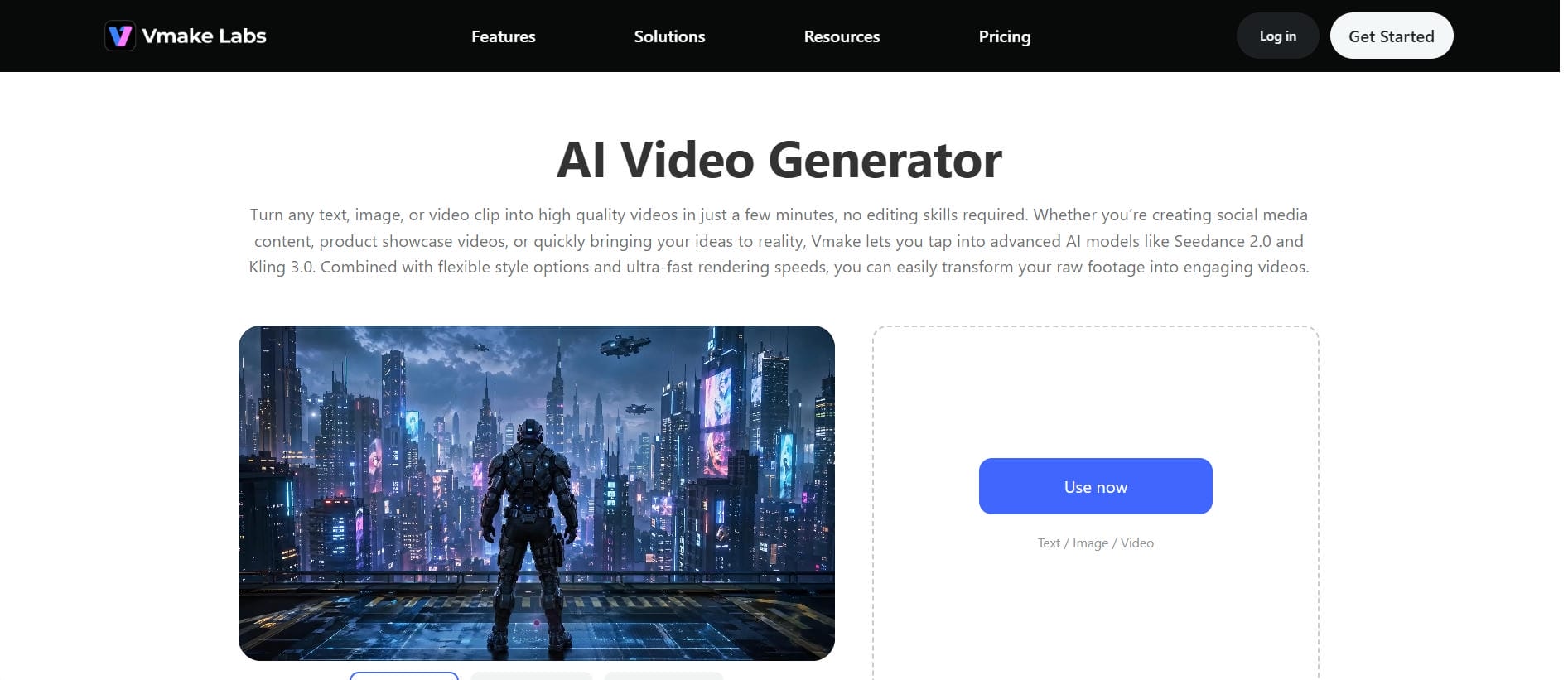
It's hard to be consistent on YouTube when you're doing all the brainstorming, shooting & editing yourself. Vmake AI is designed to bridge that gap. The platform streamlines the production process by turning simple text prompts or static images into high-quality video clips. If you need to create an educational explainer, product demo, or entertaining clip quickly for your channel, these AI tools help speed your workflow so you can stay consistent without burning out.
Key features of Vmake AI
-
Multiple AI Video Models: Choose from advanced AI models like Kling 3.0, Veo 3.1, and Seedance 2.0 to generate videos that match your creative vision.
-
Flexible AI Video Creation Workflows: Create videos from text, images, or existing videos using Text-to-Video, Image-to-Video, and Video-to-Video generation.
-
Diverse Visual Styles for Different Creative Goals: Generate videos in a wide range of styles, from realistic live-action scenes and animations to commercial advertisements and artistic visuals.
-
Flexible Output Settings and Duration Control: Export videos in formats optimized for YouTube, including standard 16:9 videos and 9:16 YouTube Shorts.
-
Creative and Commercial Video Production: Produce talking-head explainers with AI Avatar, generate professional product videos for ecommerce, or create authentic UGC Video for brand collaborations.
Steps to create YouTube videos with Vmake AI
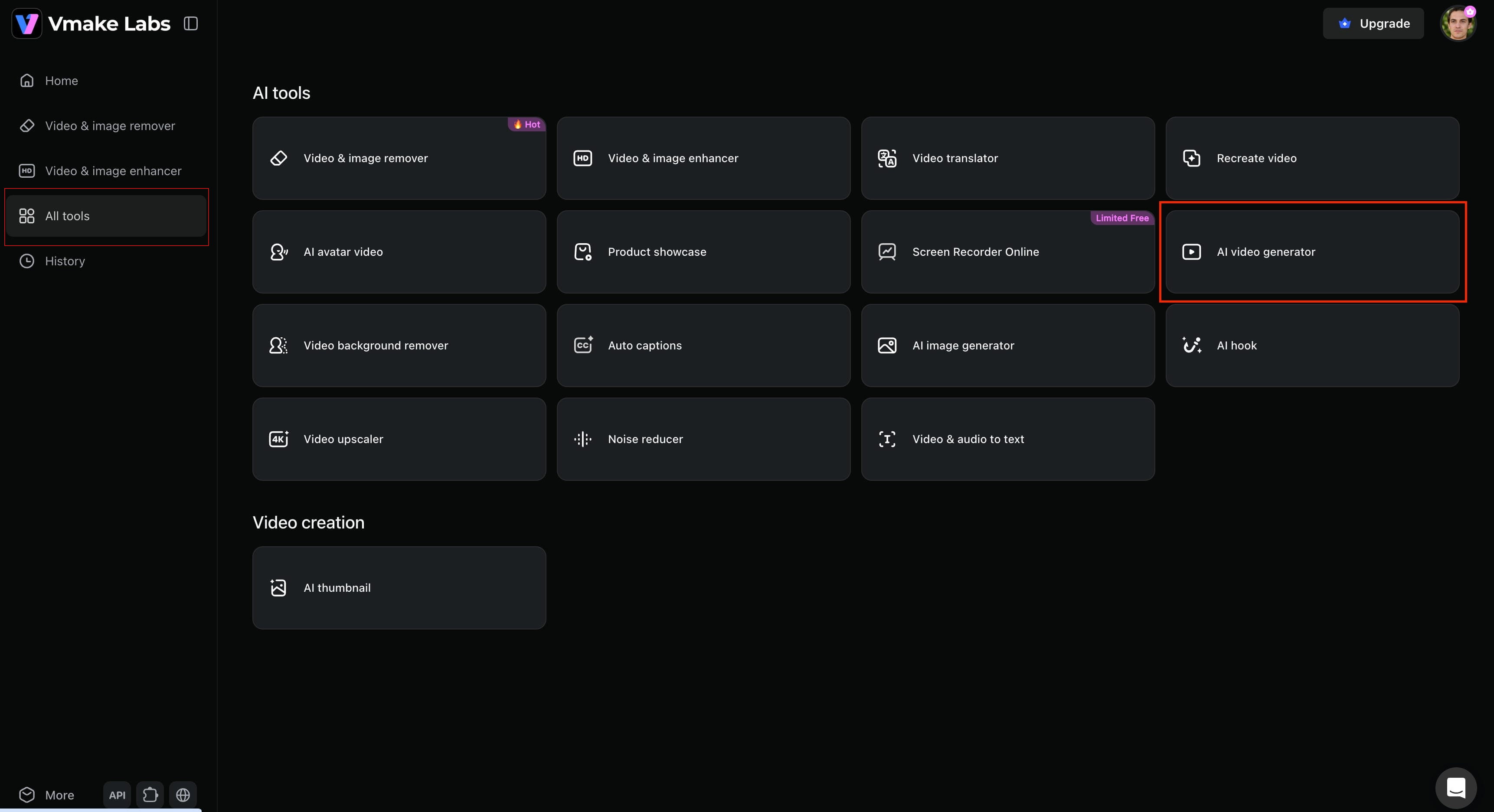
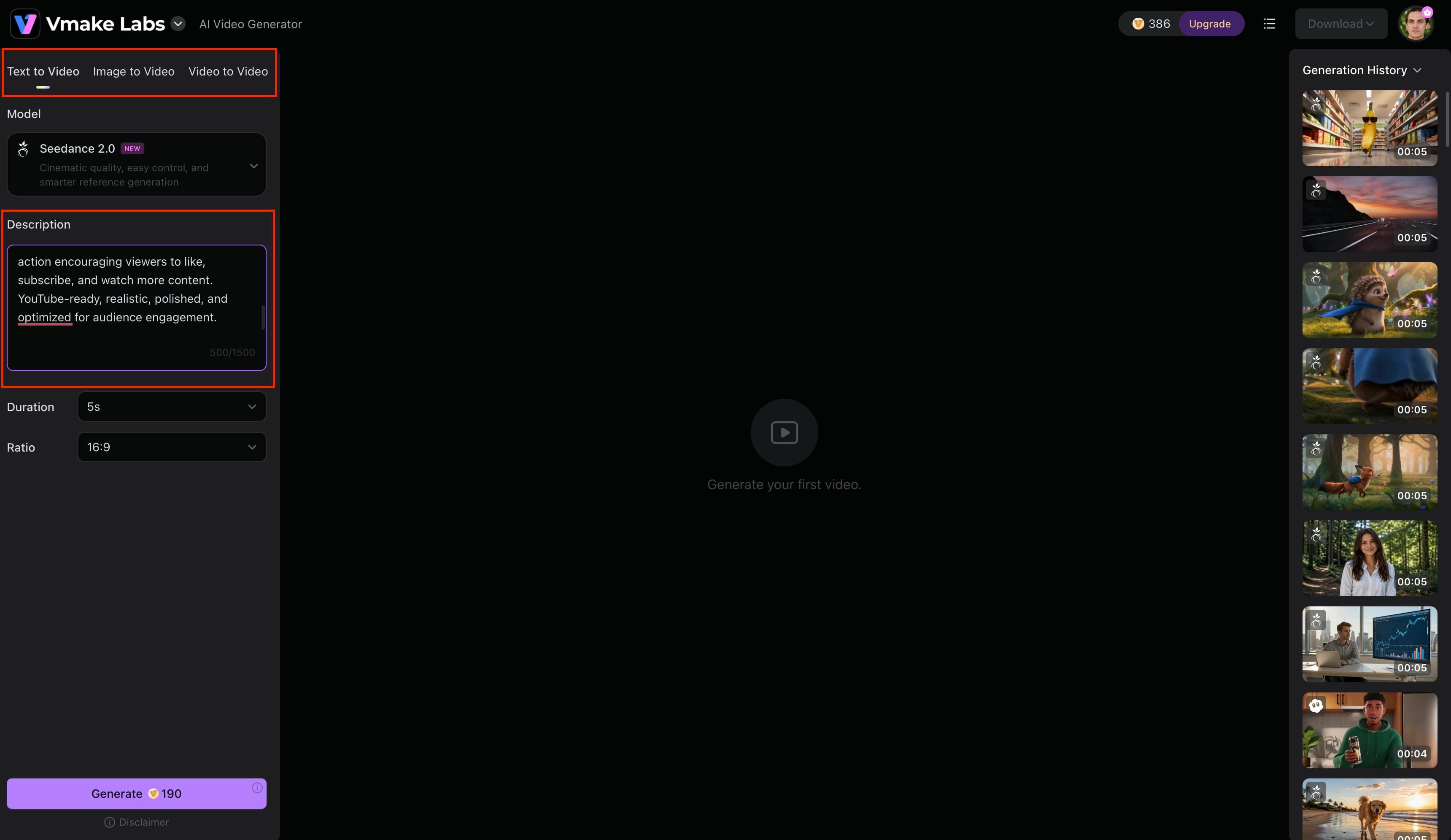
Step 1: Open Vmake AI Video Generator
Open the Vmake AI Video Generator workspace. The design is clean and easy to use for beginners, so that you can start with text prompts, your own images, or a direct idea.
Step 2: Enter a prompt or upload an image
Type out a clear description of what you want to see, or drop in a reference photo. Be specific about visual style, lighting, camera angles, and mood. The more detail you give, the closer the output will be to your vision.
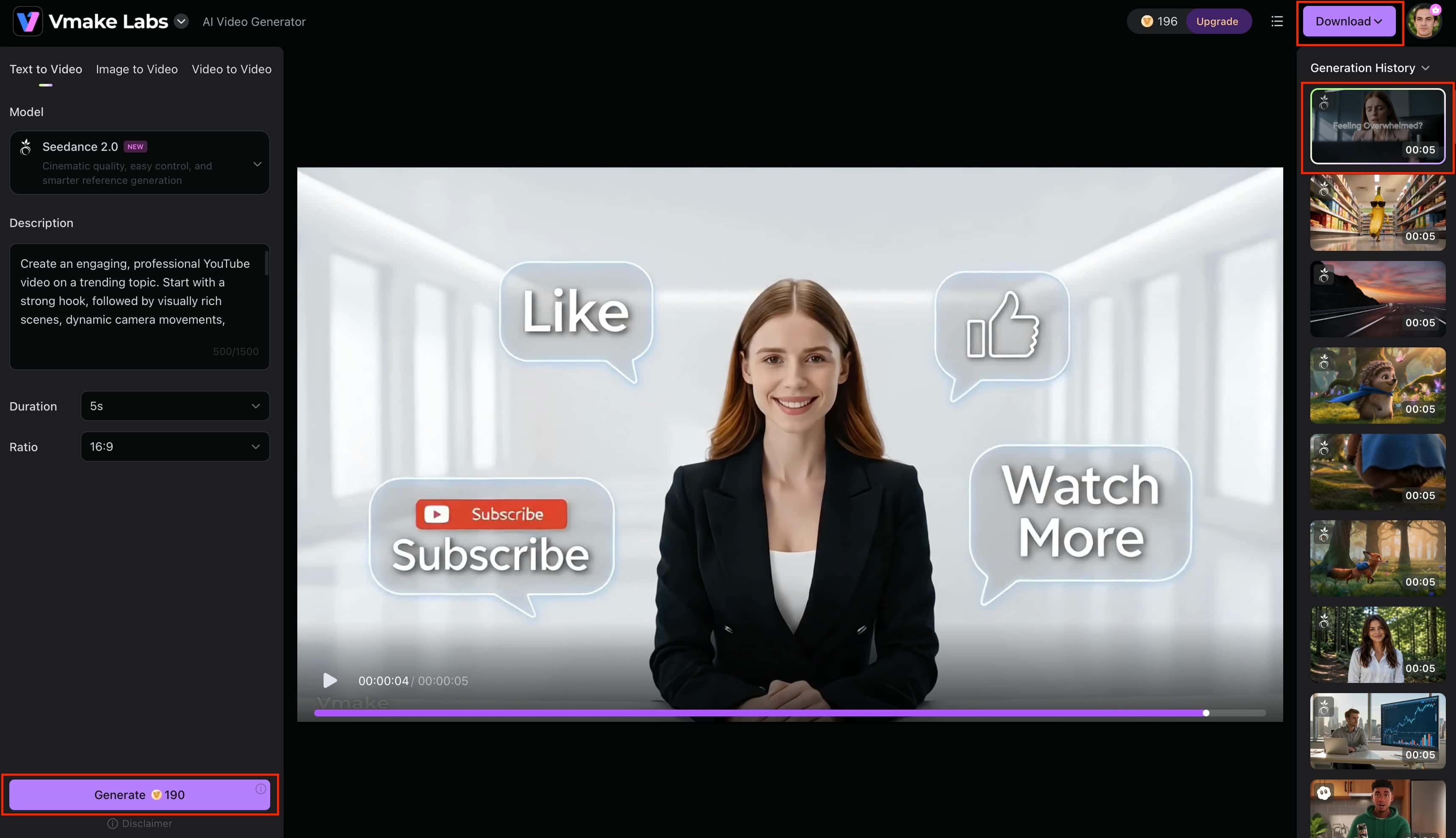
Step 3: Generate, edit, and export your video
Hit generate and watch the clip come together. Then you can tweak the scenes, tighten the pacing, and cut the fat. When it looks good, export the file, and you're ready to go for your channel.
Posting strategies that improve performance beyond timing

Let's be honest, great timing won't make a bad video good. For the algorithm, viewer satisfaction is the number one priority. A good video will find its viewers even if you upload it at midnight, but a rushed one will still fail at peak hours. Real growth comes when you put good scheduling with good creative fundamentals.
-
Prioritize content quality over perfect timing: Exceptional, valuable videos build the kind of loyal audience that drives long-term channel health.
-
Create compelling thumbnails and titles: Your packaging is what wins the initial click, so make it irresistible but honest.
-
Maintain consistency and publishing frequency: Sticking to a reliable upload cadence sets clear expectations for your subscribers.
-
Optimize audience retention and watch time: Keeping eyes on the screen tells YouTube to keep pushing your video to new homepages.
-
Focus on effective posting for long-term growth: Always put the viewer's experience first, from your hook to your call to action.
-
Combine timing data with content strategy: Use data to optimize when you publish, but put your real energy into what you publish.
Conclusion
It is a great way to get more traffic at the beginning of the upload and give your videos a boost. Just remember, data-driven scheduling is meant to aid your creative output, not replace it. In the long run, the winners are the creators who have smart timing, great storytelling, and a predictable upload schedule. Use your analytics heat maps, test different slots and see what works, and if you ever need an extra set of hands to keep up with production demands, tools like Vmake AI can take some of the weight off your shoulders, letting you create great content faster.
FAQs
Does posting at the wrong time hurt YouTube video performance?
Not in the long run, as an engaging video will eventually find its audience. However, a bad release time misses out on initial waves of easy engagement traffic.
Should creators schedule YouTube videos in advance?
Of course, it ensures consistency and goes live during peak hours even while you sleep. Batch-producing content using a fast generation workspace like Vmake AI makes this strategy incredibly easy. It lets you quickly build a deep library of premium content to queue up weeks ahead of schedule.
Is there a different posting schedule for gaming, education, and entertainment channels?
Yes, gaming peaks on weekends and evenings, while educational uploads perform best during standard work or school hours. Since viewers change by niche, tailoring your production is essential. Vmake AI helps you adapt by offering diverse video models to match any specific channel demographic.
How long does it take YouTube to recommend a newly uploaded video?
There is no set timeline; some take hours while others undergo weeks of slow algorithm testing before impressions climb. Since timing is unpredictable, maintaining a high volume of steady uploads gives you the best chance. Using Vmake AI ensures you keep a filled pipeline without burnout.
Can a YouTube video still go viral days or weeks after being published?
Yes, because the algorithm continuously tests older content against fresh audience pools when searching for relevant spikes. Having a deep catalog increases your chances of a sudden viral breakout later on. Tools like Vmake AI make it easy to scale up production and maximize your total content assets.

You May Be Interested

11 Best AI Prompts for Creating Viral Videos on YouTube
YouTube Automation: Guide to Building a Scalable Business
YouTube AI Video Monetization 2025: Rules & Tips

YouTube Monetization Requirements 2026: Complete Guide