

What is Seedance 2.5? The Ultimate Guide to the Next-Gen AI Video Model
 Vmake Labs TeamJune 26, 2026
The world of AI video generation is evolving at a breakneck pace, and keeping up with the latest advancements can often feel overwhelming. If you are a creator, marketer, or filmmaker, you have likely experienced the frustration of dealing with early AI tools—struggling with short clip limits, blurry details, inconsistent subjects, weak prompt following, and outputs that need extra editing before they are ready to publish. Enter Seedance 2.5. This revolutionary model represents a massive leap forward in the generative AI space, signaling a shift toward more controllable and production-ready AI video workflows.
In this ultimate guide, we will take an in-depth dive into what Seedance 2.5 is, explore its groundbreaking features, and show you exactly how how creators can use Seedance 2.0 inside Vmake Labs to create sharper, cleaner, and more publish-ready AI videos before Seedance 2.5 becomes widely available.
What Exactly is Seedance 2.5?
Seedance 2.5 is the latest version of the ByteDance-powered AI video generator in the Seedance model family. It is designed for higher-fidelity, longer-duration video generation, giving creators stronger control over visual quality, video length, reference inputs, scene consistency, and precise video editing.
First unveiled at the 2026 Volcano Engine FORCE Conference, Seedance 2.5 is currently in enterprise beta testing and is expected to officially launch in early July 2026.
Key Features of the Seedance 2.5 for AI Video Generation
What makes this next-gen AI video model so spectacular? Understanding these Seedance 2.5 features reveals exactly why this model is taking the creative industry by storm.
Native 4K Video Output
Seedance 2.5 supports native 4K video output with 10-bit color depth, making it a clear step up from the 1080p ceiling on Seedance 2.0. This means the generated videos can look sharper, richer, and more detailed instead of relying only on upscale sharpening.
Up to 50 Multimodal Reference Inputs
Seedance 2.5 supports up to 50 multimodal reference inputs, including images, audio, and video samples. This is a major upgrade from Seedance 2.0’s limit of 12 references, giving creators more control over the final output. With more references available, users can better maintain consistency across characters, products, locations, props, and visual styles, making the final video more precise, coherent, and production-ready.
30-Second Video Generation
Seedance 2.5 is reported to support up to 30 seconds of video generation in a single output, doubling Seedance 2.0’s 15-second limit. This gives creators more space to build complete scenes, develop smoother motion, and create product demos without stitching multiple clips together.
Local re-draw editing
Seedance 2.5 may allow creators to modify specific parts of a video while keeping the overall scene intact. For example, users may be able to change a product, replace a background, or adjust a subject while keeping the rest of the scene stable. Compared with full-clip regeneration, this makes the editing process more efficient and precise.
Better Prompt Adherence
Seedance 2.5 is reported to improve prompt adherence by around 20% compared with Seedance 2.0. For creators, this means less prompt rewriting, fewer failed generations, and more first-try results that match the intended look and motion.

Seedance 2.5 vs. Previous Generations (The Leap Forward)
To truly appreciate Seedance 2.5, we must compare it structurally to its predecessors in the highly competitive AI video generation landscape.
| Comparison Factor | Seedance 2.0 | Seedance 2.5 |
| Status | Already available through selected platforms / workflows | Previewed / enterprise beta; expected wider launch in early July 2026 |
| Video length | Up to 15 seconds in one generation | Up to 30 seconds in one generation |
| Reference inputs | Up to 12 references: 9 images, 3 videos, 3 audio clips | Up to 50 multimodal references, including images, video, audio, 3D / style references |
| Visual quality | Strong cinematic output; support 480p / 720p / 4K | Native 4K output with 10-bit color depth |
| Editing control | Supports multimodal reference and editing capabilities; good for performance, lighting, camera movement, and motion control | Adds more precise local / regional editing, such as changing a product, subject, or background without regenerating the full clip |
| Prompt adherence | Strong prompt following and complex-scene generation | Reported 20% better prompt adherence than previous versions |
| Best for | Current usable AI video generation, short clips, product drafts, social content | Longer scenes, campaign videos, cinematic demos, product ads, multi-reference brand visuals |
Practical Use Cases for Seedance 2.5
So, how could professionals actually deploy this powerful tool in the real world?
- Short-form Social Videos Seedance 2.5 works well for short-form videos on TikTok, Instagram Reels, and YouTube Shorts. Its 30-second generation length gives creators enough room to build a clear hook, visual action, and ending in one video. This makes it useful for creator-style clips, social ads, product teasers, and viral campaign content that needs to feel complete without stitching several short clips together.
- Film Previsualization and Cinematic Demos With stronger reference control and longer video generation, Seedance 2.5 can help filmmakers and creative teams test camera movement, scene composition, lighting, atmosphere, and character blocking before full production. It is useful for previsualization, storyboard development, cinematic demos, and proof-of-concept videos, allowing teams to turn static briefs into short visual previews.
- AI Ads and Campaign Variations For marketing teams, Seedance 2.5 can help generate different ad concepts and campaign variations more efficiently. Creators can use references such as product photos, brand colors, character sheets, location images, or mood samples to guide the final output. This is especially useful when teams need to test multiple creative directions while keeping the product, brand identity, and visual style consistent.
- Game Cutscene Prototyping and Entertainment Concepts Seedance 2.5 can also support game and entertainment studios in early-stage creative development. Longer video generation and stronger reference control make it useful for concept visualization, cutscene prototyping, character animation tests, and early storyboarding. Instead of waiting for a full production pipeline, teams can quickly turn scripts, character references, or scene ideas into short visual demos to test mood, motion, pacing, and narrative direction.
How Vmake Labs Brings Seedance 2.0 Videos Closer to Seedance 2.5-Style Polish
Although Seedance 2.5 marks a major leap forward in AI video generation, access may not be widely available to every creator yet. The good news is that creators can still start with the Seedance 2.0 model inside Vmake Labs. Since Seedance 2.5 builds on Seedance 2.0 Workflows, Seedance 2.0 remains a practical starting point for generating AI video drafts. Then, creators can use Vmake Labs Video Enhancer to upscale resolution, sharpen details, and improve overall clarity. If the video includes a watermark, Vmake Labs Watermark Remover can help clean up the final output. This workflow helps Seedance 2.0 videos get closer to the sharper, cleaner, and more production-ready look that creators expect from Seedance 2.5.
The workflow is remarkably straightforward:
Step 1: Generate Your Video Draft with Seedance 2.0
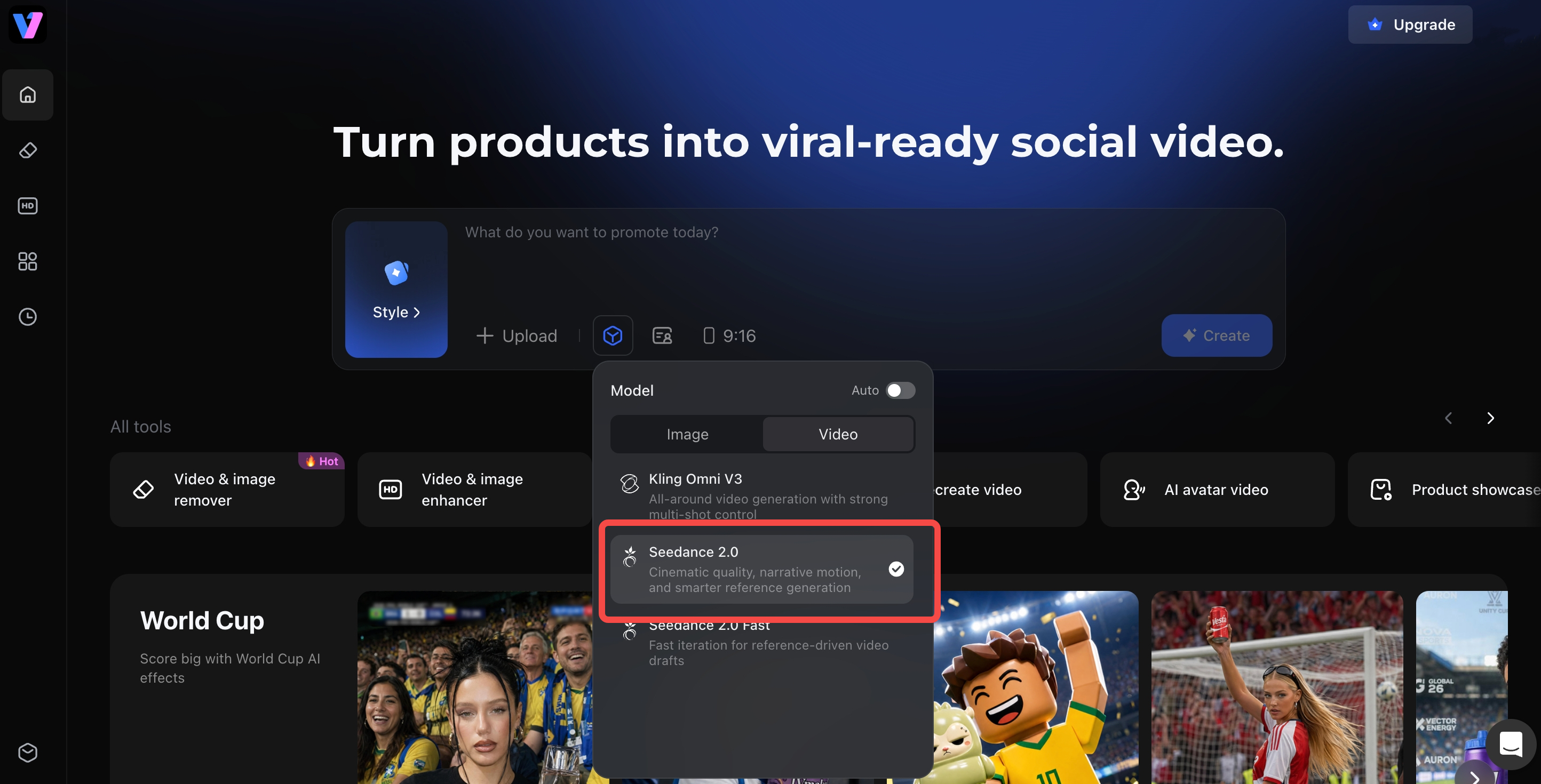
Open the official website and select the Seedance 2.0 model, then upload a product image, enter a product URL, or write a short prompt to describe the video you want to create.
You can also adjust key settings such as speaking language, avatar style, background scene, aspect ratio, and video duration to match different markets or content needs. Once the brief and settings are ready, generate the video, and export the draft.
Step 2: Improve Video Quality with Vmake Labs Video Enhancer
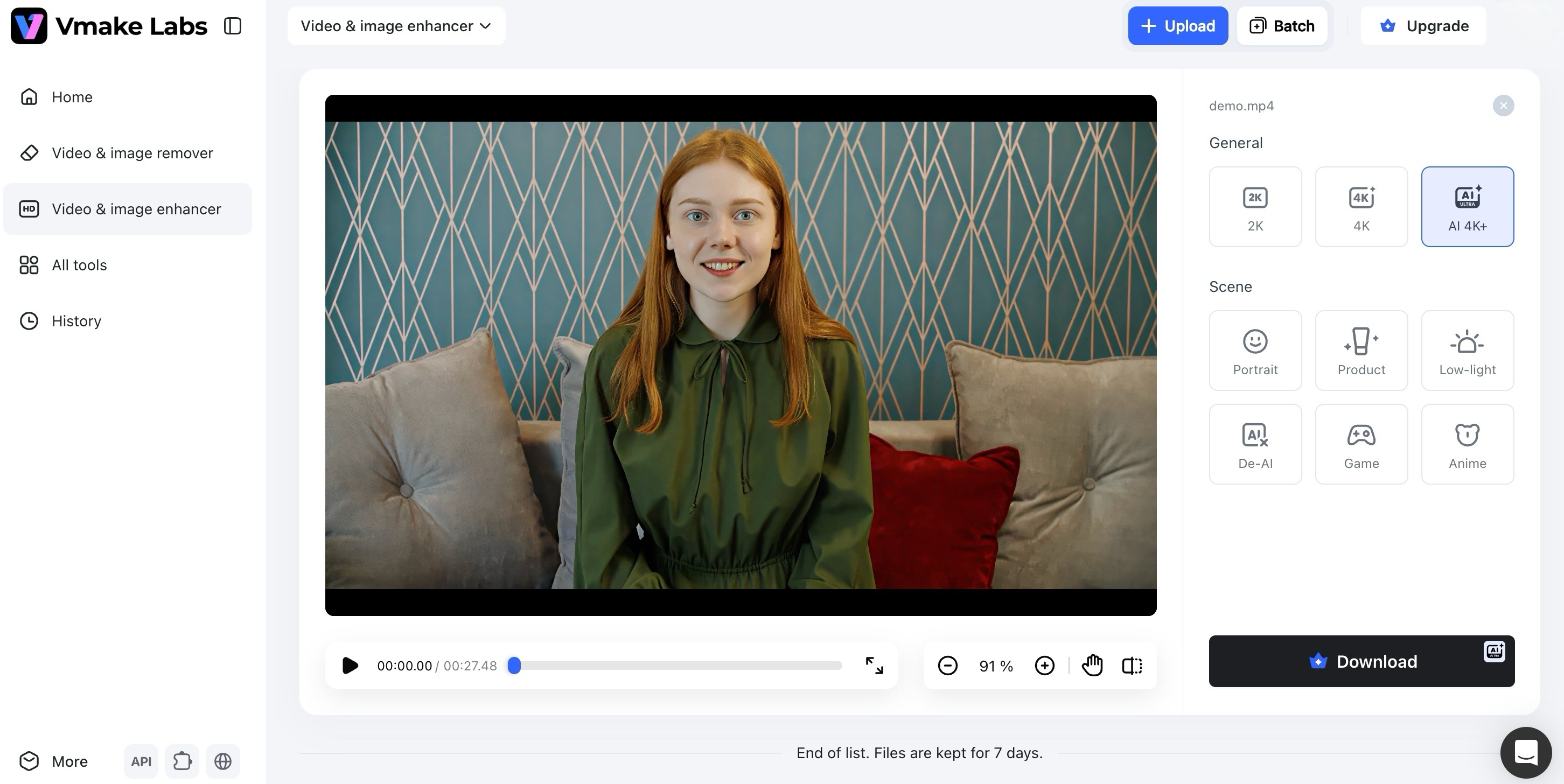
Upload your Seedance 2.0 video to Vmake Labs Video Enhancer, then choose a target resolution such as 2K, 4K, , or AI 4K+. You can also select a scene model, such as Portrait, Product, Low-Light, Gaming, or Anime, to better match your footage. Once the enhancement is complete, preview and export the sharper, cleaner video.
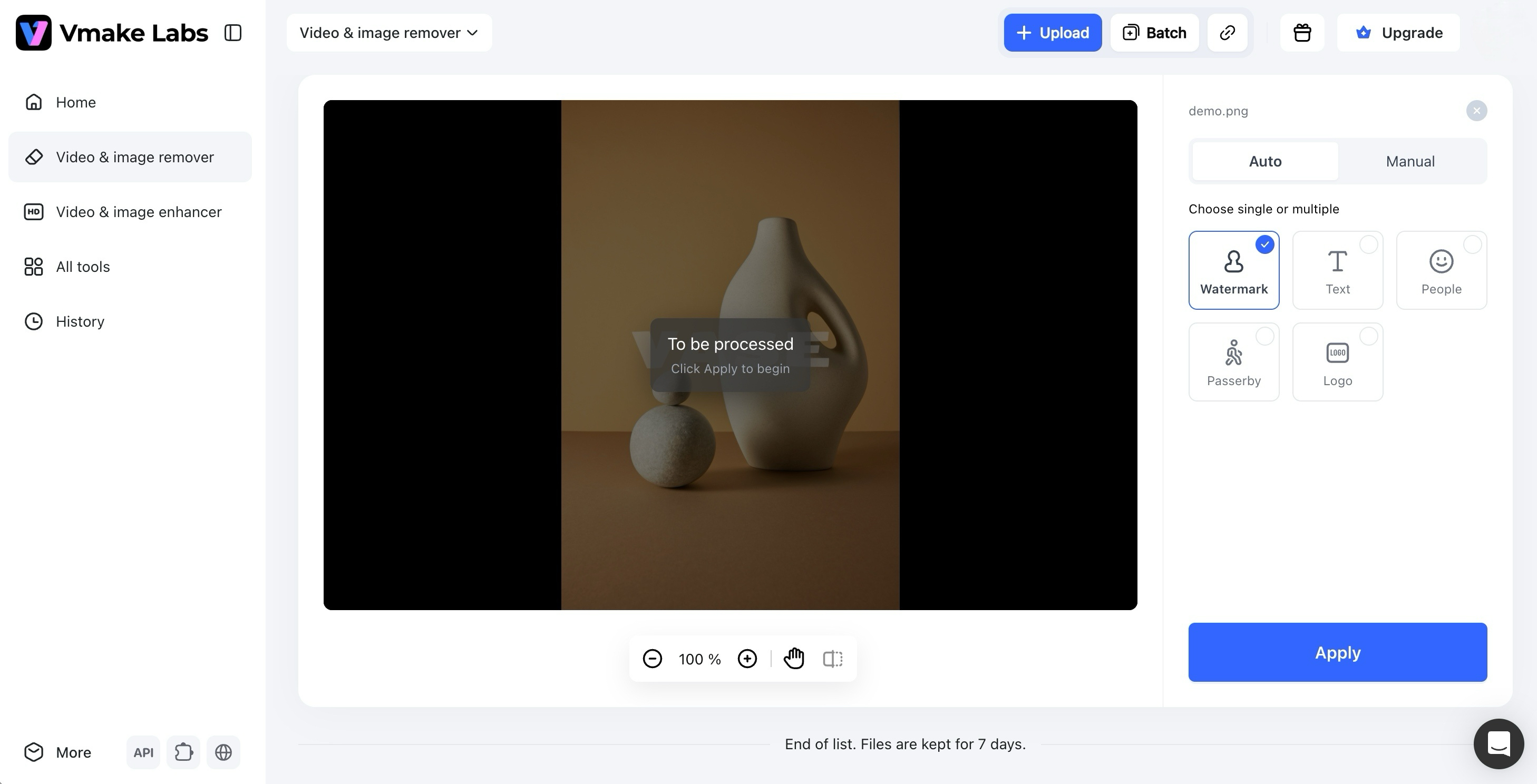
Step 3: Clean Up Watermarks with Vmake Labs Watermark Remover
Some AI-generated videos may include watermarks. Upload your Seedance 2.0 video to Vmake Labs Watermark Remover, then choose Auto mode to let AI detect and remove the watermark automatically.
For more precise control, you can also use Manual mode to mark the watermark area yourself. Once the video looks clean, export the final version.
FAQs
What is Seedance 2.5?
Seedance 2.5 is the latest announced upgrade in ByteDance’s Seedance AI video model family. It is designed for higher-fidelity, longer-duration video generation with stronger control over visual quality, reference inputs, scene consistency, prompt adherence, and local video editing. It is expected to support native 30-second video generation, up to 50 full-modal references, and more controllable, fine-grained video generation and editing.
How is Seedance 2.5 different from Seedance 2.0?
Seedance 2.5 is reported to improve Seedance 2.0 in several key areas. It supports longer 30-second video generation, up to 50 multimodal reference inputs, native 4K output, local re-draw editing, and better prompt adherence. Seedance 2.0 remains useful for current AI video generation, but Seedance 2.5 is positioned as a more production-ready upgrade.
Is Seedance 2.5 available now?
Seedance 2.5 may not be widely available to every creator yet. Since access is still limited during the beta and rollout stage, creators who want to generate AI videos now can use Seedance 2.0 inside Vmake Labs as a practical starting point.
How can I make Seedance 2.0 videos closer to Seedance 2.5-style quality?
Seedance 2.0 cannot fully replace Seedance 2.5’s native upgrades, such as longer generation, more reference inputs, and local re-draw editing. However, creators can use Vmake AI Video Enhancer to upscale resolution, sharpen details, and improve clarity after generating a video with Seedance 2.0. If the video includes a watermark, Vmake Watermark Remover can also help clean up the final output. This makes Seedance 2.0 videos look sharper, cleaner, and closer to Seedance 2.5-style polish.
Final Thoughts
We are standing in the middle of a massive paradigm shift in digital creativity. Seedance 2.5 has undeniably redefined the boundaries of what is possible within AI video generation. With longer native output, richer reference control, sharper visual quality, local re-draw editing, and better prompt adherence, it raises the production ceiling for AI-generated videos. However, since Seedance 2.5 may not be widely available to every creator yet, Seedance 2.0 remains a practical starting point for generating AI video drafts today. Vmake Labs can work alongside Seedance 2.0 to help creators move closer to Seedance 2.5-style polish. By combining Seedance 2.0 generation with Video Enhancer and Watermark Remover, creators can turn early AI video drafts into sharper, cleaner, and more publish-ready content. Seedance 2.5 may define the next level of AI video generation, but Vmake Labs helps creators improve what they can create right now — from first prompt to final publish.

You May Be Interested

123APPS Watermark Remover Review (2026): Pros, Cons, and Pricing

Seedance 2.0 vs Sora 2: Which AI Video Generator Wins in 2026?
Top 20 Captions to Make Your YouTube Shorts Go Viral

Google Gemini|Copy Paste This Simple Prompts to Create “Hug my younger self ” Photos
