What Is Deinterlacing? The Ultimate Video Restoration Manual
 Ken DawsonMay 4, 2026
You hit play on an old family video using your laptop or phone. Instead of a clear picture, you get ugly horizontal lines, weird flickering edges, and a "Comb-like" distortion the second someone moves. If you are sitting there wondering what deinterlace is and why your digitized memories look so broken, you definitely aren't the only one.
Deinterlacing is the process of converting interlaced video—which splits every single frame into alternating lines—into a clean, full-frame progressive format that modern screens can display properly.
Tools like Vmake's AI Video Enhancer can handle this automatically in seconds — but first, let's understand what you're dealing with.
What Is Interlaced Video and Why Does It Look Bad?
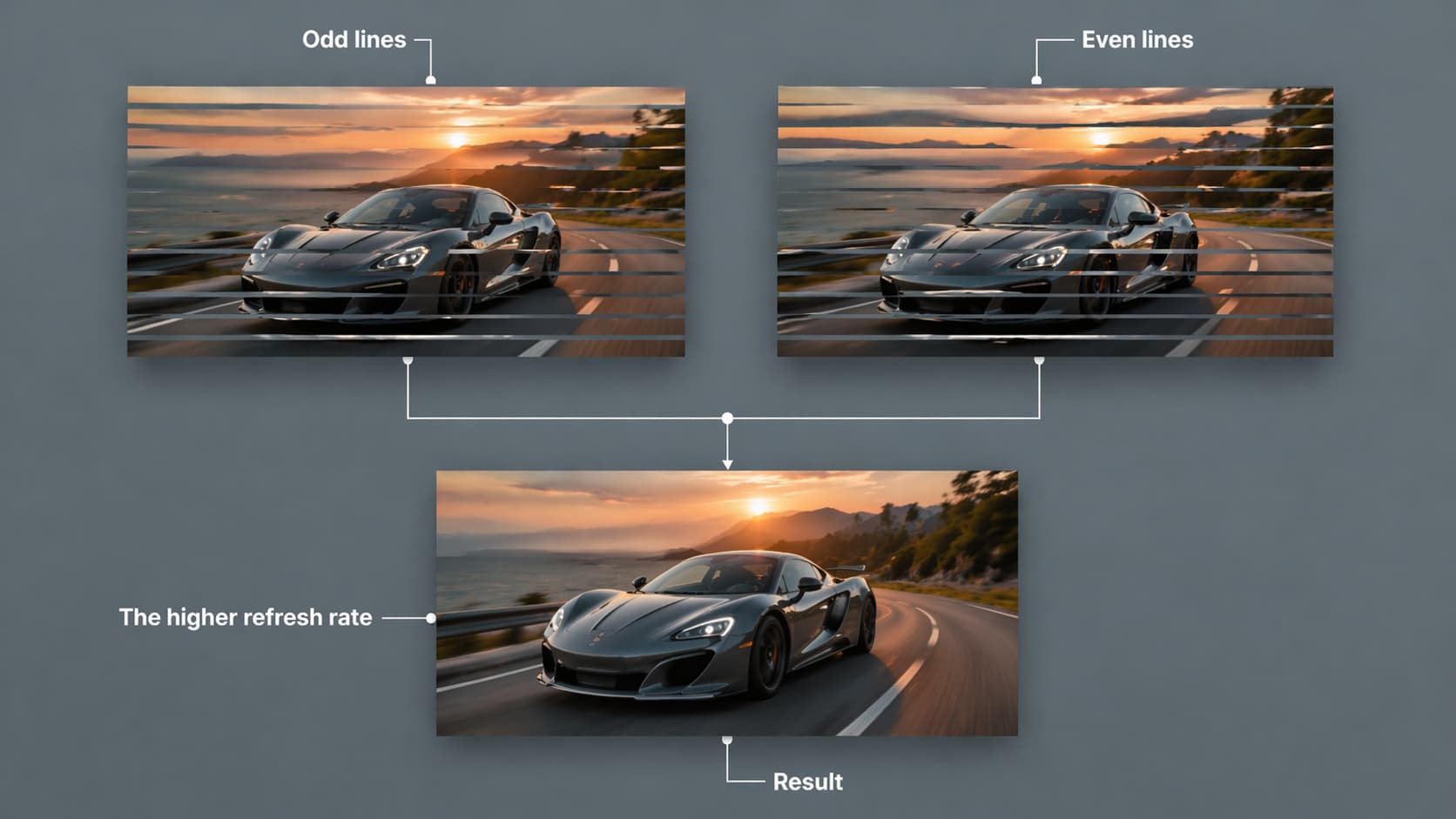
Before you try to fix the footage, it helps to understand how it was recorded in the first place.
I. The Mechanics of Interlaced Video
Older formats didn't display the whole picture at once. Interlaced video is actually built from two separate, sequential fields:
-
Field 1: Contains all the odd lines of the image.
-
Field 2: Contains all the even lines of the image.
II. Origins and Purpose
-
Original Use Case: Broadcasters designed this specifically for analog television and those heavy, traditional CRT screens.
-
Technical Benefits: It gave viewers smooth motion perception while cleverly cutting the required broadcast bandwidth right down the middle.
-
Common Formats: You will spot interlaced video in VHS tapes, early camcorder footage, DVDs, and 480i or 1080i broadcast television (that "i" literally stands for interlaced).
III. The Modern Compatibility Problem
-
Legacy Playback: Early TVs flashed these half-frames incredibly fast—about 1/60th of a second. This tricked our eyes into seeing one fluid image.
-
Modern Playback: Modern 4K digital displays don't work that way. They demand complete, solid frame data to render an image properly.
-
The Gap: Roughly 90% of the screens we use today, from smartphones to smart TVs, simply lack native support for interlaced formats.
IV. Visual Symptoms (The "Bad" Look)
If you force an interlaced video onto a modern progressive screen, you will spot a few annoying symptoms:
-
Combing effect: Jagged, horizontal lines tearing through the edges of moving objects.
-
Flickering: Rapid, alternating shifts in brightness that usually catch your eye in the finer details.
-
Motion blur/ghosting: Fast-moving subjects that look smeared or strangely doubled across the display.
What Is Deinterlacing?
When people jump online to search for the deinterlace meaning, they usually just want a cure for those visual glitches. Deinterlacing is the technical method used to convert that fragmented video into a unified progressive format. It takes footage captured on an older system and transforms it into cleaner, smoother video without the distracting lines.
Think of it like getting a letter where someone only wrote on every other line. Deinterlacing fills in the blank spaces so you can read the entire page at once. People often mix up the terminology, but they mean the exact same thing. "Deinterlace" is the action you take, and "Deinterlacing" is the name of the process itself.
If you need to update an older archive, this is often the mandatory first step. It ensures your frame rates and formats play nicely with today's viewing standards.
How to Deinterlace Video with Vmake (The Easiest Method)
You don't need a video production degree to clean up your footage. Here is how you can process it using Vmake.
-
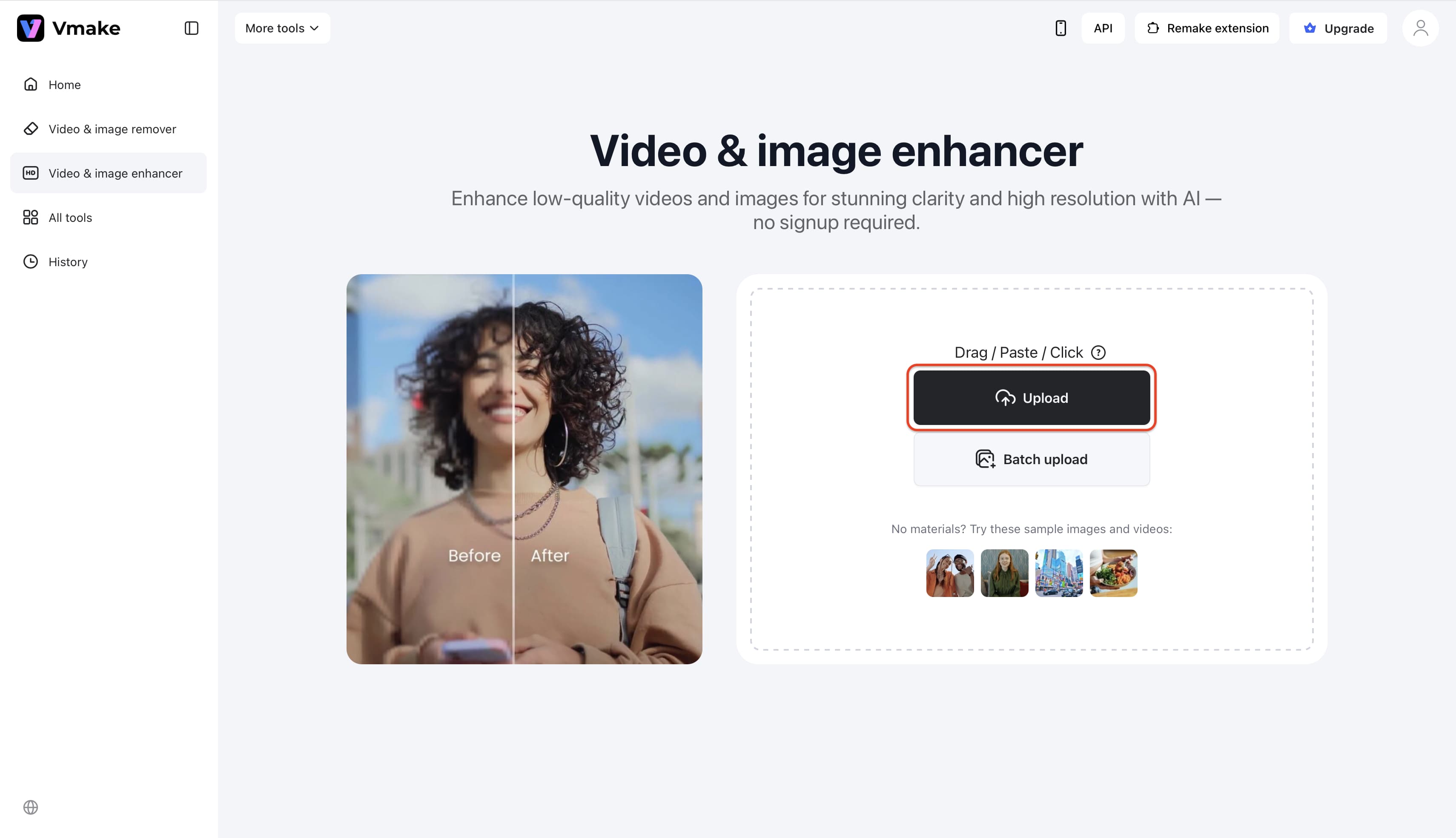
Step 1: Go to the Vmake AI Video Enhancer workspace. Drag and drop your interlaced video file directly into the upload area.
-
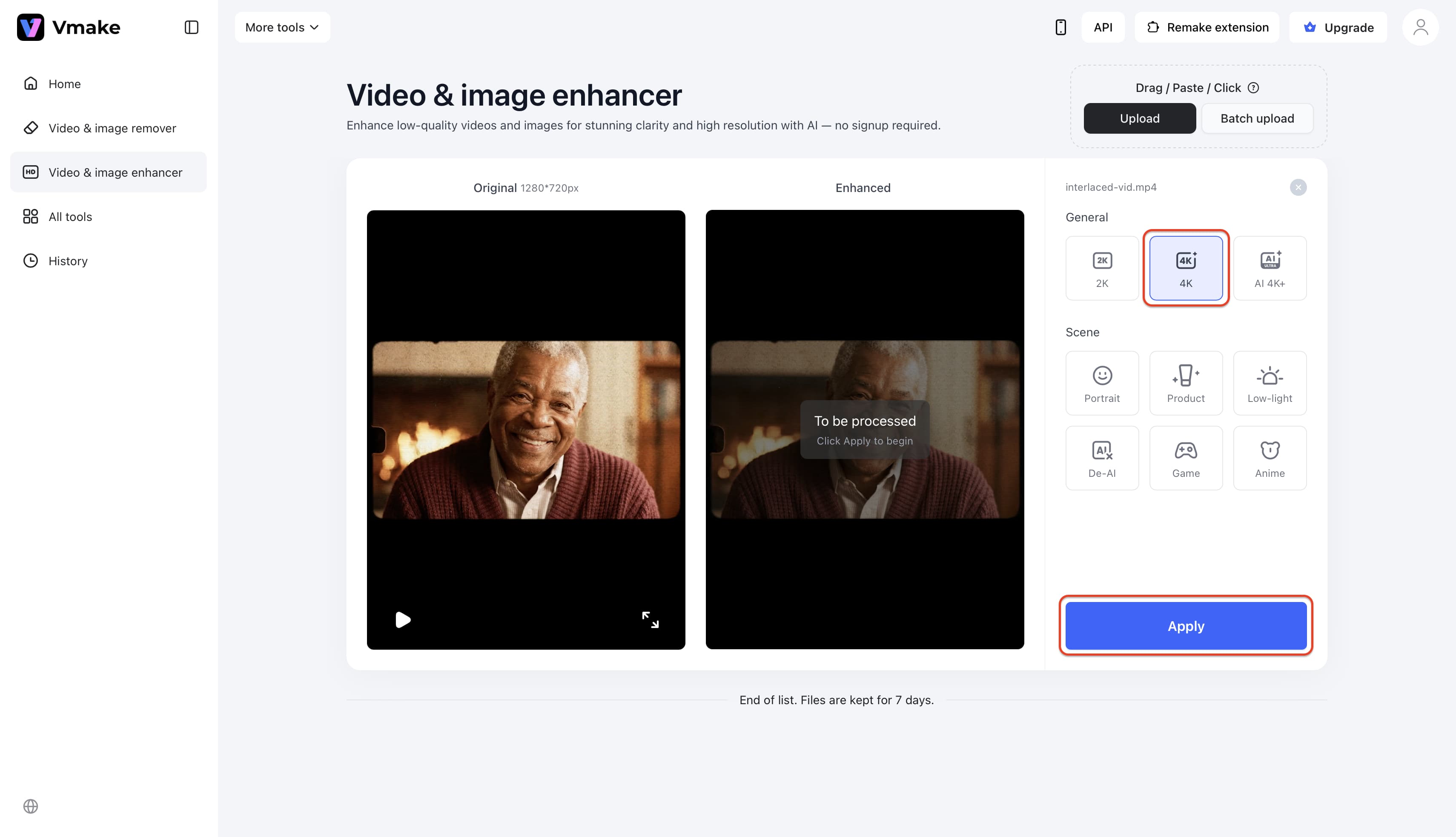
Step 2: Choose your desired output resolution. The tool will automatically analyze the footage frame by frame to detect and process the interlaced fields.
-
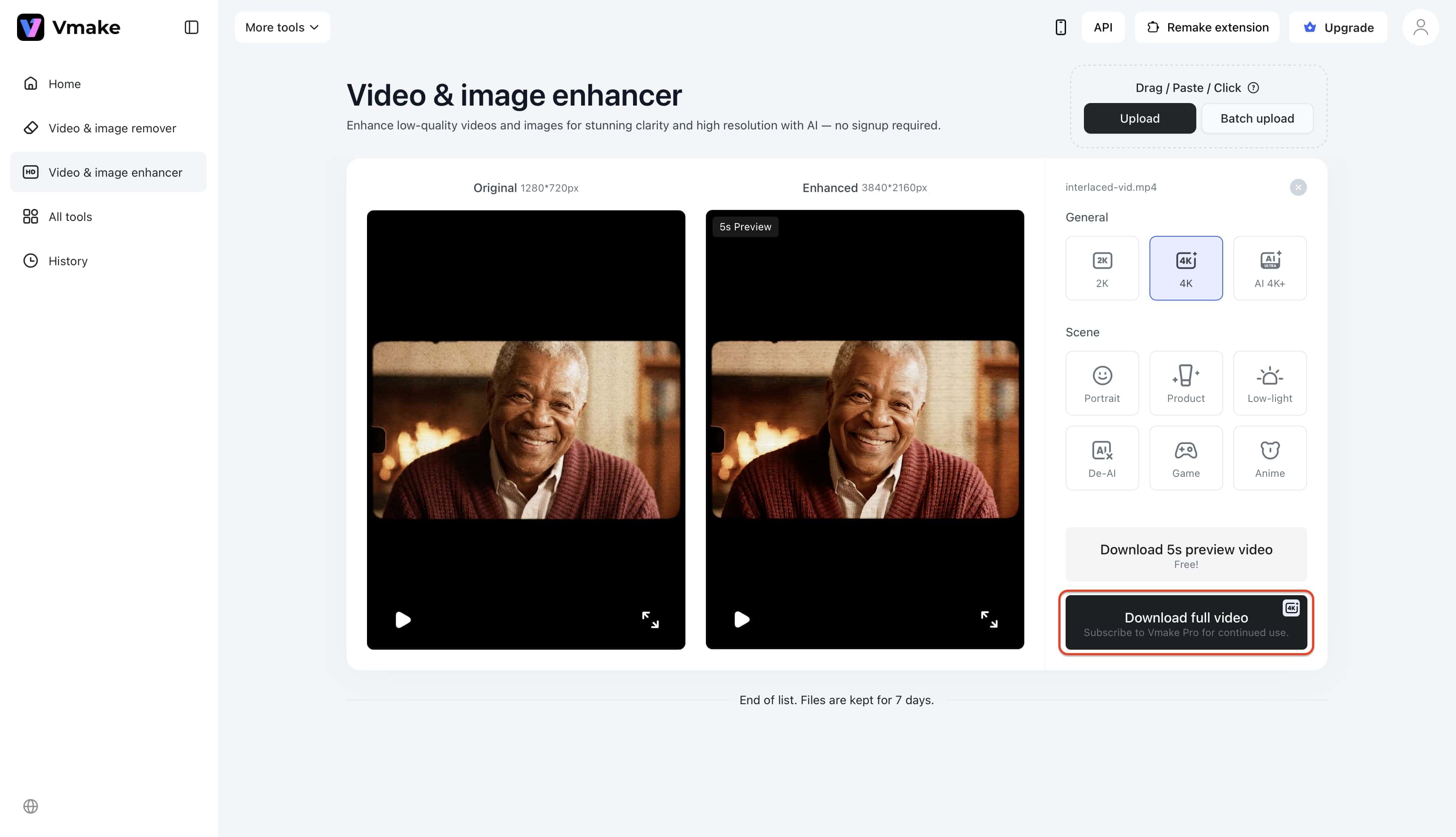
Step 3: Preview your newly smoothed, progressive video frame by frame. Once you are satisfied, download the file to your device.
Key Features That Make Vmake More Than Just a Deinterlacing Tool
-
AI 4K+ Upscaling: Vmake doesn't just fix interlace artifacts. It intelligently adds pixel-level detail to bring footage up to 2K, 4K, or AI 4K+ resolution.
-
Noise & Artifact Removal: Suppresses noise, ringing, dirty edges, fake contours, and mosaic blockiness, which is especially helpful for clips recompressed by social platforms.
-
Low-Light Video Enhancement: Reconstructs shadow details, reduces noise and flicker, and auto-balances brightness and contrast.
-
Portrait Model: Sharper facial features, cleaner hair detail, and more natural skin texture—without harsh over-sharpening.
-
Batch Processing: Upload and enhance multiple videos in a single session. This is ideal for large archival projects or content repurposing at scale.
-
AI-Generated Video Correction: Reduces the over-smoothing and texture repetition common in Sora, Kling, or Seedance outputs.
Deinterlacing Methods — How Does It Actually Work?
For anyone wanting to dig a little deeper into the technology, here is a quick look at the main techniques used to build a progressive frame.
-
Bob/Weave: Combines the odd and even fields into a single frame. It is fast, but it often creates motion ghosting when there is a lot of action on screen.
-
Blending: Averages the adjacent fields together. This cuts down the jagged edges but can leave a slight blur across the video.
-
Interpolation: Estimates the missing pixels based on surrounding visual data. This is a much better option for motion-heavy scenes.
-
AI-Based Deinterlacing: AI analyzes the actual context of the footage and fills in the missing details for a highly polished final product. Used heavily in film restoration where accuracy matters, this is exactly what separates modern tools like Vmake from basic converters.
Who Needs to Deinterlace Video?
If you handle legacy media, video deinterlacing will eventually cross your desk. This process helps out a few distinct groups:
-
Everyday users preserving memories: Anyone converting old family VHS tapes and camcorder footage from the 90s/2000s into digital formats for sharing or archiving.
-
Content creators & editors: Video editors repurposing archival or broadcast footage for YouTube, social media, or documentaries where viewers expect high playback quality.
-
Professionals & archivists: Museums, journalists, and filmmakers working with legacy institutional footage that absolutely must meet modern digital display standards.
Here is how different users are experiencing the transition:
-
"I digitized all my family's 90s camcorder tapes, but they had awful jagged lines on my Mac. Vmake's AI removed them completely. Magic!" – Sarah T.
-
"Finally, a tool where I don't have to fiddle with complex software settings to figure out what is deinterlacing. One click and the video is perfect." – Mark D.
-
"As an archivist, dealing with 1080i broadcast footage is a headache. Vmake handles the deinterlace video process flawlessly while upscaling the resolution." – Elena R.
-
"The batch processing saved my life. I dropped 20 old home videos into the enhancer, and they all came out looking like they were shot yesterday." – Jason L.
-
"I was researching the deinterlace meaning trying to fix a documentary clip. Vmake did it automatically, and the colors look so much better too." – Chloe M.
-
"No learning curve at all. I uploaded my dad's old wedding tape, and the AI recognized the interlacing issues immediately. Highly recommended." – David K.
Final Thoughts
Old video formats shouldn't dictate poor visual quality on modern 4K displays. Deinterlacing acts as the bridge to rescue and modernize valuable archival footage and family memories. Utilizing AI-driven tools like Vmake ensures a smooth, clean, and efficient conversion process for both personal and professional projects.
FAQ
What is deinterlacing in video editing?
In the editing workflow, deinterlacing is the technical process of converting legacy interlaced footage—where alternating lines of an image are captured in separate fields—into a solid, progressive format. This is required because modern timelines and export platforms are designed exclusively for progressive video.
Is there a free AI tool to deinterlace video?
Yes. Platforms like Vmake offer AI Video Enhancers that users can try for free. These tools automatically detect interlacing artifacts and resolve them while enhancing the resolution and color balance of the uploaded file.
What causes the "Combing" effect in videos?
Interlacing causes the combing effect. It happens when two video fields captured at slightly different moments in time are combined into a single frame on a progressive screen. If an object in the video moves, the odd and even lines fail to align perfectly, leaving horizontal, jagged lines along the edges.
What's the difference between interlaced and progressive video?
Interlaced video draws the odd and even lines of a frame alternately, an older method designed to save broadcast bandwidth. Progressive video draws the entire, complete frame all at once, which is the standard requirement for all modern digital screens, smartphones, and web streaming platforms.
Does deinterlacing reduce video quality?
Older deinterlacing methods can sometimes cause a slight loss in overall image sharpness or introduce blur. However, modern AI-powered deinterlacing prevents this by intelligently predicting and reconstructing the missing pixel data, often resulting in a cleaner output than the original footage.

You May Be Interested

5 Tools to Create Eye-Catching Visual Hooks for Short Videos
6 Best Free AI Tools for Video Color Correction in 2025
Airbrush Video Enhancer Review 2026: Features, Pros, and Cons

How AI is Revolutionizing E-Commerce Product Photography and Videos?