Pixbim Review: Watermark Remover AI Honestly Tested
 Ken DawsonMay 2, 2026
Subscription fatigue is rotting the creator economy. You're probably tired of renting every single tool you use. Pixbim bucks this trend by selling straight-up lifetime licenses for forty-nine to seventy-nine bucks a pop, which instantly makes their offline video tools look incredibly tempting against the usual greedy monthly competitors.
But throwing down a lump sum only makes sense if the code isn't garbage.
In this Pixbim review, we're finding out if it actually works. I ran the Pixbim video watermark remover AI through absolute hell. We dumped basic TikTok clips, compressed YouTube rips, and awful vintage family footage into it to see what would break. Frankly, most local software chokes hard on fast-moving background elements. It does a decent job on simple static text, but messy, chaotic backgrounds still trip it up occasionally.
What is Pixbim

At its core, Pixbim is just a cluster of desktop AI tools built for photo and video work. They're clearly chasing the crowd that hates ongoing bills. You don't get a unified dashboard here. Instead, you have to buy specific, standalone programs like Color Surprise AI, Object Remover AI, Video Upscale AI, Video Watermark Remover AI, Voice Clone AI, Lip Sync AI, or Video Colorize AI.
This fractured approach is kind of annoying. Having 10 different icons cluttering your desktop isn't ideal when competitors put everything behind a single clean login screen.
The big hook is that you pay once. Grab the software, and you keep it forever, pulling down lifetime updates as they roll out. People seem to love this setup, pushing the brand to a 4.4 out of 5 on Trustpilot as of early 2026.
-
Windows-first architecture with limited Mac availability: The developers clearly care about PCs first, leaving Apple users scraping the bottom of the barrel for compatible tools.
-
Strictly offline processing for maximum privacy: Everything renders on your own hardware, so your files aren't sitting on some random server farm. You'll definitely feel the pain if your computer's graphics card is a potato, though.
-
Permanent licenses avoiding subscription traps: You swipe your card once. That's it.
-
Universal free trials: Every single app has a seven-day trial period. Don't buy anything until you actually test it on your own rig.
Pixbim Video Watermark Remover AI — hands-on test
We lead this review with the feature users search for most. We put the Pixbim video watermark remover AI through a strict testing process. We wanted to see how the local AI handles different types of logos and text overlays.
Test 1 — Static TikTok watermark
We started with a standard static logo. We loaded an MP4 file into the software. We used the brush tool to paint over the stationary TikTok watermark. We set the processing speed to the default setting for maximum accuracy.

-
Result: Clean removal. The software left no visible artifacts or blur patches. The background rebuilt itself perfectly.
-
Verdict: Works as advertised. The AI inpainting does an excellent job on still graphics.
Test 2 — Moving watermark (animated logo)

Next, we tested a dynamic logo. Moving watermarks are much harder for AI to erase. The software has to track the movement across multiple frames. We painted over the animated corner badge and started the render.
-
Result: Fair. The removal is mostly clean, but we noticed an occasional flicker. The AI struggles slightly when the background behind the moving logo changes colors rapidly.
-
Verdict: Motion tracking works. However, it is less consistent than some dedicated browser rivals.
Test 3 — Semi-transparent watermark
Many creators use faint overlays to protect their content. We tested a video with a large, semi-transparent text watermark across the center. We used a larger brush stroke to cover the wide text area.

-
Result: Strong. The AI easily picks up faint overlays. It rebuilds the colors behind the text without distorting the main subject.
-
Verdict: Best-in-class for this specific case. The local processing engine excels at analyzing transparent pixels.
Test 4 — Processing speed
Local software relies heavily on your computer hardware. We ran the same video on two different Windows machines. One had a dedicated Nvidia graphics card. The other used a basic Intel processor.

-
Result: Highly GPU-dependent. The render finished fast on a decent graphics card. It ran very slowly without one.
-
Verdict: Cloud tools win on laptops with integrated graphics. If your computer lacks power, Pixbim will frustrate you with slow export times.
Pixbim product lineup and pricing
Pixbim sells each tool separately. You can build a custom suite based on your exact needs. Here is a breakdown of the current lineup.

Pixbim Video Watermark Remover AI
This tool removes static and moving watermarks using AI inpainting technology.() You use a manual brush to highlight the logo. The software analyzes the surrounding pixels and fills in the gap. It completely replaces the logo instead of just blurring it. It comes with a lifetime license and is strictly Windows-first
Pixbim Color Surprise AI — $39.99
This photo tool offers one-click colorization of black-and-white photos. You load a vintage image, and the AI applies realistic colors instantly. It also includes a manual color brush. This feature allows you to fine-tune the automated results. If the AI gets a shirt color wrong, you can paint over it with the correct shade.
Pixbim Video Colorize AI — $59.99
This software colorizes full videos. It uses three different AI model versions to achieve the best look. You process the video frame by frame. The AI keeps the colors stable as the scene changes. It is an excellent tool for historical societies or families with old black-and-white home movies.
Pixbim Object Remover AI — $37.99
This photo tool removes objects, watermarks, and text from still images. It acts like a smart eraser. It also features an Auto Fix Scratches tool specifically designed for old photo restoration. You can scan damaged family photos and repair tears automatically.
Pixbim Video Upscale AI — $79
Low-resolution video looks terrible on modern screens. This tool upscales older videos up to 4K resolution. It provides aggressive noise reduction and frame-level enhancement. It sharpens blurry edges and removes digital grain. This is the most expensive tool in the lineup because upscaling demands massive computing power.
Voice Clone AI ($59) and Lip Sync AI ($49)
These are the newest additions to the suite. Voice Clone AI performs audio cloning from short vocal samples. You feed it a voice recording, type a script, and the AI speaks in that exact voice. Lip Sync AI creates auto lip-sync animation. You combine a still portrait with an audio track, and the software makes the face move and talk naturally.
Pixbim watermark remover vs. cloud tools compared
How does desktop software compare to web-based platforms? We built a comparison table to highlight the major differences.
|
Feature |
Pixbim Video Watermark Remover |
Vmake AI |
Media.io |
WatermarkRemover.io |
|---|---|---|---|---|
|
Price |
Lifetime license |
Free tier + credits |
Credit-based |
Free tier + credits |
|
Platform |
Desktop (Windows) |
Browser |
Browser |
Browser |
|
Motion Tracking |
Yes |
Yes |
Yes |
Partial |
|
Batch Processing |
No |
Yes (up to 30) |
Yes |
No |
|
Output Quality |
GPU-dependent |
Cloud processing |
Cloud processing |
Cloud processing |
|
Privacy |
100% offline |
Cloud |
Cloud |
Cloud |
In a nutshell, Pixbim excels in privacy. Your files never leave your hard drive. However, cloud-based tools process files much faster on average machines. They handle the heavy lifting on remote servers.
Pixbim pros
-
One-time purchase: You avoid subscription fatigue entirely. You pay once and own the software forever.
-
100% offline: You get strong privacy. There are no cloud uploads. This is crucial for sensitive corporate videos or private family media.
-
Free trials on every product: The company lets you test the tools for seven days.() You can prove the software works on your specific computer before buying.
-
Responsive customer support: Multiple Trustpilot reviews confirm that the support team replies quickly to technical issues and licensing questions.
-
Lifetime updates included: When the company improves the AI models, you get the upgrade for free.
-
Best-in-class for photo colorization: The Color Surprise AI tool consistently beats expensive competitors in generating realistic historic colors.
Pixbim cons
-
Windows-first: The suite has very limited Mac support. Apple users are largely excluded from the main tools.
-
No mobile or browser version: You cannot edit on your phone. You must be at your desk.
-
Performance tied to your GPU: The software runs slow on older laptops. If you lack an Nvidia card, rendering takes a long time.
-
Per-app pricing adds up: Buying the full suite costs over $300. This is expensive if you need every single tool.
-
Watermark and upscale quality trails browser specialists: Cloud tools update their AI models weekly. Desktop software updates slower. The cloud often produces slightly cleaner motion tracking.
-
Not built for batch-heavy creator workflows: You process files one at a time.() This slows down creators who handle dozens of clips daily.
Who Pixbim is for (and who should skip it)
-
Best for: Pixbim is perfect for hobbyists restoring old photos and videos. It is ideal for privacy-first users who refuse to upload personal files to the web. It works great for one-off project users who hate subscriptions. You will love this software if you run a Windows desktop with a good Nvidia GPU.
-
Skip if: Do not buy this if you are on an Apple Mac or a mobile phone. Skip it if you need aggressive batch processing. If you work on a high-volume creator workflow, processing one video at a time will ruin your schedule.
Pixbim alternative: Try Vmake AI as faster, one-click option
If a video watermark remover is your main use case, browser-based tools are often faster and cheaper per job. You do not need to buy expensive computer hardware to get a clean result.
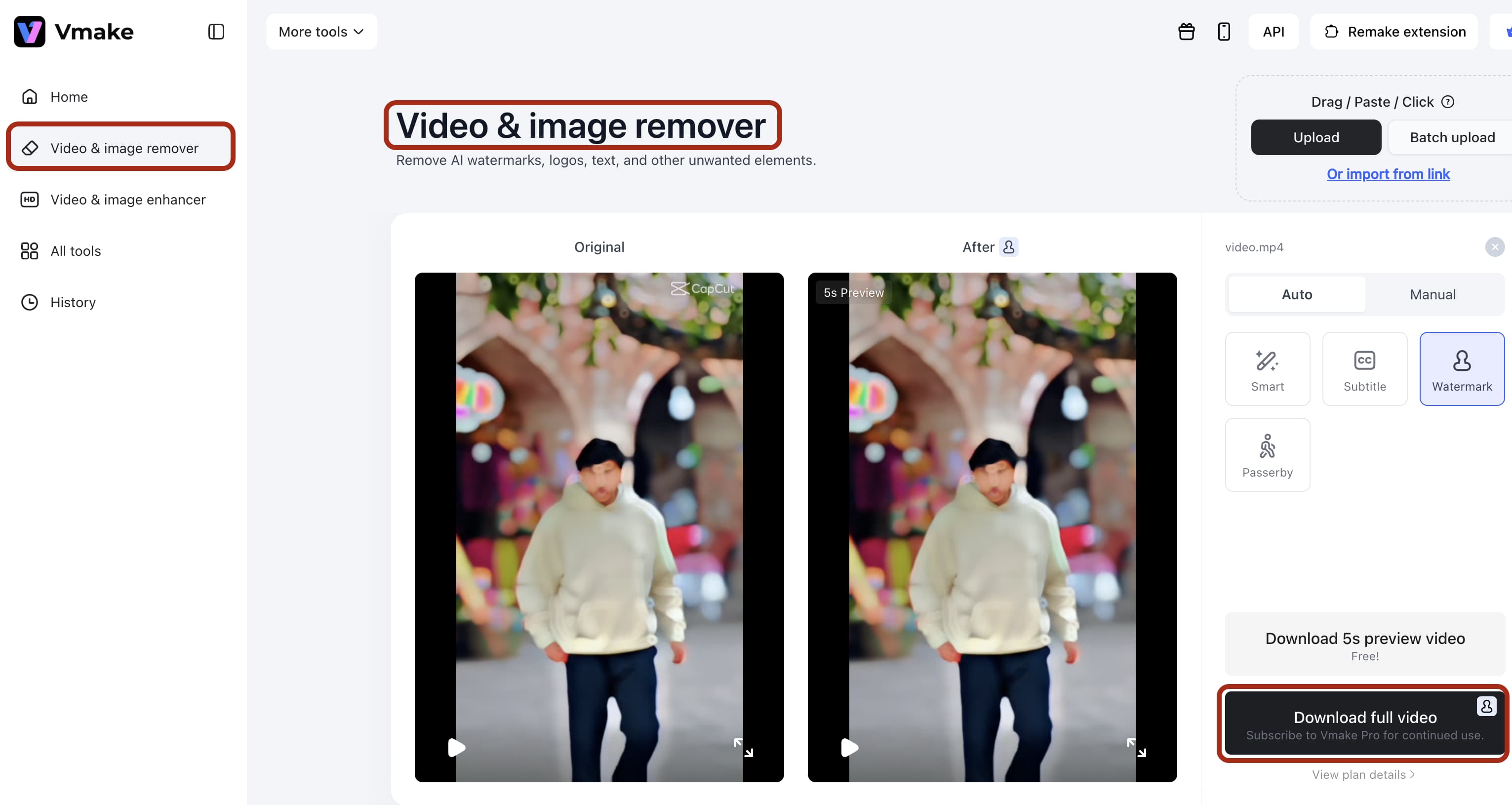
Vmake AI watermark remover offers a strictly superior workflow for modern content creators. It features a generous free tier. There is no software to install. It handles complex motion tracking instantly. Best of all, it supports batch processing for up to 30 videos at once. It runs perfectly on any device, from a cheap Chromebook to an expensive smartphone.

Steps to use the Vmake AI alternative
You don't need a massive technical manual to clean your footage. Just follow these exact steps.
-
Export your raw video
Keep the ugly watermark still visible. Don't try to crop it yourself before uploading. That usually just ruins your framing entirely.

-
Drop your file into the main upload box.
Dumping up to thirty files at once works perfectly if you're drowning in a massive batch.
-
Let the system scan and preview
The AI finds standard logos on its own. You won't even need to touch the manual brush.
-
Preview the clean cut and download.
Watch out for your original file resolution, though. The AI can only rebuild pixels if you've given it enough data to work with initially.
Conclusion
Our Pixbim review shows a clear picture. The software delivers on its core promise. The Pixbim video watermark remover works effectively on static logos and handles basic motion tracking well. The lifetime license model is incredibly fair. The absolute privacy of offline processing is a massive benefit for secure workflows.
However, the reliance on local computer hardware limits its appeal. If you have a slow laptop, the software crawls. For high-volume creators who need speed and batch processing, a cloud platform makes more sense. Desktop software secures your privacy, but browser-based tools secure your time. Choose the tool that best fits your daily editing volume and hardware limits.
FAQ's
Is Pixbim a subscription?
No, every Pixbim product is a one-time purchase with lifetime updates.
Does Pixbim Video Watermark Remover work on Mac?
There is partial Mac support across the Pixbim lineup. You must check each individual product page. The Pixbim watermark remover is primarily built for Windows.
Is Pixbim safe to install?
Yes. Pixbim runs entirely offline with no cloud uploads. Scamadviser gives the official website an average-to-good trust score.
Can Pixbim remove moving watermarks?
Yes. The software features built-in motion tracking. Static watermarks still give the cleanest results, but it handles movement. Fast-motion watermarks occasionally flicker in the final export.
Is Pixbim better than Topaz Labs?
For photo colorization, yes. Pixbim wins easily. For video upscaling, Topaz Video AI is the clear winner, though it comes at a much higher price.
What is the best Pixbim product?
Color Surprise AI is the standout application in the suite. It leads the photo colorization category and sits at a very low price point.

You May Be Interested

123APPS Watermark Remover Review (2026): Pros, Cons, and Pricing

Airbrush Watermark Remover Review (2026): Features and Pricing

How to Add a Watermark to Photos (Easy Guide 2026)

Video Watermark Remover Made Simple with Vmake