
How to Translate YouTube Videos to Any Language (2026 Guide)
Learn how to translate YouTube videos into any language in 2026 — from YouTube’s built-in subtitle settings to AI dubbing tools.

Creating or understanding YouTube content in different languages is no longer a barrier. Whether you’re trying to translate YouTube video, follow a tutorial in Spanish, or aim to expand your reach, you don’t need to rely only on the original language.
But how can I translate a YouTube video? This post offers various methods on how to translate YouTube videos to English or another language, along with tips for better translation results.
Can YouTube Translate Videos Automatically?
Yes, YouTube can automatically translate videos. It offers built-in tools to auto-translate both captions and audio.
How YouTube Auto-Translate Works
YouTube can easily translate closed captions of a video into over 100 languages. You only need to turn on the captions for a video. This is the fastest way to translate a YouTube video to English or other languages without any manual upload.
How to Turn On Auto-Translated Subtitles
Here is how you can make YouTube translate video with ease:
-
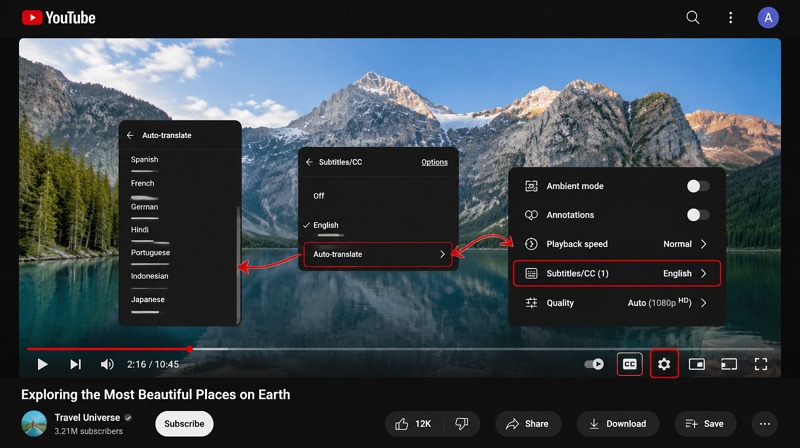
Open the video and click the “Settings” icon
-
Now, select “Subtitles/CC” > “Auto-translate.”
-
Choose your language (e.g., English, Spanish, Hindi)
Limitations of YouTube’s Built-In Translation
While convenient, YouTube’s system has clear drawbacks. Here are a few to consider:
-
Low translation accuracy
-
Poor handling of slang or idioms
-
No formatting control for creators
-
It does not work for videos without captions
-
No support for exporting subtitles for reuse
Because of this, many creators now look for an efficient external video translator for YouTube tools for better results.
4 Ways to Translate a YouTube Video
There are multiple methods on how to translate YouTube video to English, depending on your goals and budget. Let’s explore:
Method 1 — YouTube Auto-Translate
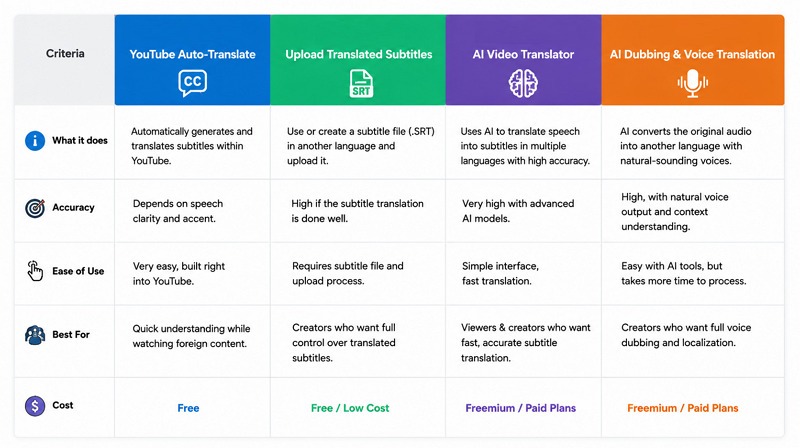
This is the simplest option and works directly inside YouTube. It is best for casual viewers to quickly understand the videos in a language they don’t understand. However, it is not ideal for professional content or brand videos.
Method 2 — Upload Translated Subtitles
This method allows more control over accuracy and presentation. Creators or viewers can manually or automatically translate subtitle files (.SRT) into different languages, then upload and sync them with the video. It is commonly used for educational and professional content where precise wording matters.
Method 3 — AI Video Translator (Recommended)
Modern AI tools have made translation much more efficient and reliable. Platforms like Vmake AI Video Translator automatically convert spoken content into subtitles in multiple languages with high accuracy. This method works best for users who want fast results without manually editing captions.
Method 4 — AI Dubbing and Voice Translation
Instead of only translating text, Vmake AI Video Translator also supports converting the original audio into another language using AI-generated voices. It creates a more natural viewing experience because the translated voice plays directly over the video, making it easier to follow without reading subtitles.
How to Upload Translated Subtitles Back to Your YouTube Video
As a content creator, follow the steps below to upload the translated subtitles of your video to YouTube Studio:
Step 1: Download the .SRT File from Vmake
First of all, translate YouTube subtitles using Vmake AI Video Translator and download the output as an .SRT file.
Step 2: Go to YouTube Studio → Subtitles → Add Language
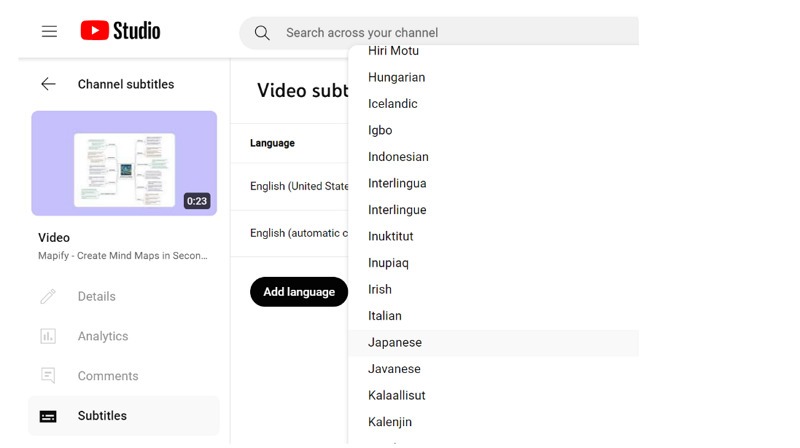
Visit the YouTube Studio to access your channel management dashboard, choose “Subtitle” and click the video you want to translate. Press “Add Language” to add subtitles in the target language.
Step 3: Upload the .SRT File With Timing
It’s time to tap the “Upload file” button to import .SRT file. Then, choose the “With timing” option and hit “Continue.”
Step 4: Translate Your Video Title and Description Too
You can now edit the video title and description in the target language, helping improve the video’s SEO in the specific region.
Best Languages to Translate Your YouTube Videos Into
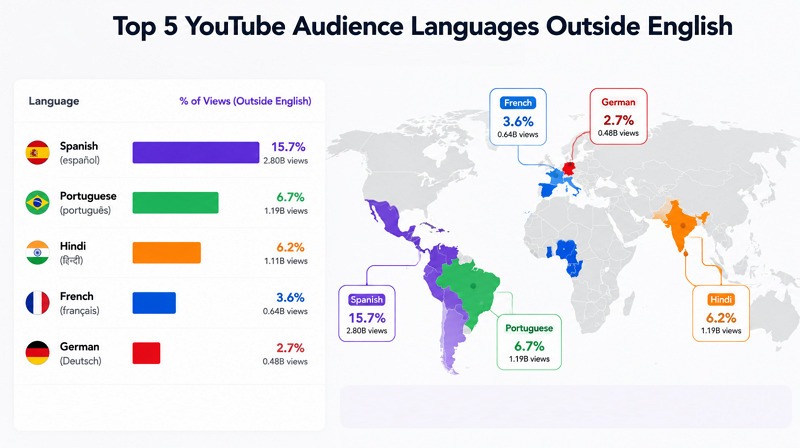
Choosing the right language can increase a video’s reach and engagement. Viewers usually benefit most when content is available in high-engagement languages that match global YouTube audiences. Here are a few:
Spanish — Largest Non-English YouTube Audience
The Spanish language has over 280 million native-speaking users on YouTube, making it the second most popular language on the platform. It opens access to both Europe and Latin America, helping your content spread quickly across diverse audiences.
Portuguese — Fast-Growing Brazil Market
Portuguese represents a highly active video audience, mainly due to Brazil’s fast-growing digital and consumer economy. Translating videos into Portuguese allows access to over 200 million users who regularly consume fintech, healthcare, and ecommerce content on YouTube.
Hindi, French, and German — High-Engagement Markets
Here are the three vital, high-engagement markets for digital expansion, content localization, and audience growth. Hindi gives access to one of the largest internet populations in Asia, while French reaches audiences across Europe and parts of Africa. German audiences are known for strong content retention.
How to Check Where Your Audience Already Comes From
Instead of translating mindlessly, it is more effective to study your YouTube analytics. With YouTube Studio, understand where your current viewers come from. It helps you choose languages that align with real audience demand, ensuring better performance and faster channel growth.
Common Mistakes When Translating YouTube Videos
Let’s look at some mistakes users make while translating YouTube videos that lead to confusion, poor understanding, or a poor viewing experience:
Relying Only on YouTube’s Built-In Auto-Translate
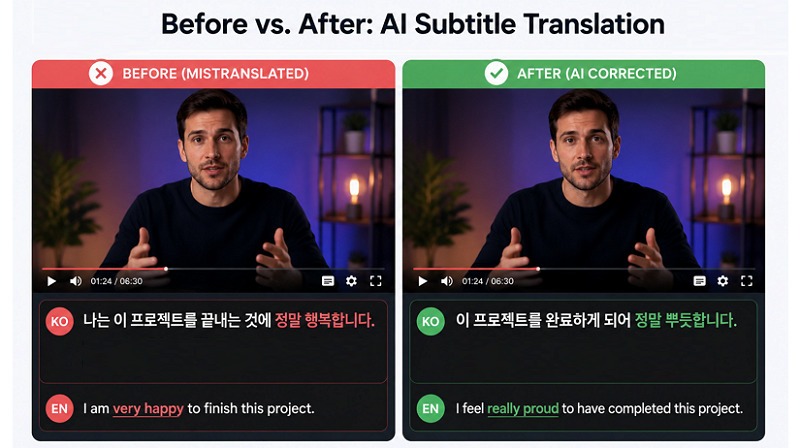
Many people depend completely on YouTube’s automatic translation feature, expecting perfect results. However, it often struggles with accents, fast speech, and informal language, which can reduce accuracy.
Ignoring Subtitle Timing and Reading Speed
Even when translations are correct, poorly synced subtitles can make videos hard to follow. Also, if captions appear too early or too late, they are difficult to read and disrupt the natural viewing experience.
Forgetting to Translate the Title and Description
Those who never explore available settings, such as caption quality, language selection, or manual subtitle options, miss out on better translation outputs. It also reduces the discoverability in the search results.
Using One Translation for All Dialects
A common mistake is treating one language as universal. For example, Spanish in Spain and Spanish in Latin America can differ in vocabulary and tone, which may confuse if not properly localized.
Tips to Get Better YouTube Translation Results
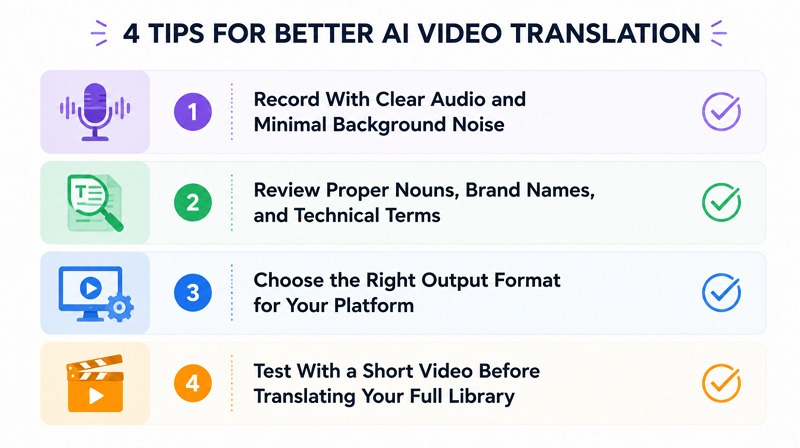
Getting accurate translations is not just about choosing the right YouTube video translator. Below are some other factors that must also be considered:
Record With Clear Audio and Minimal Background Noise
Good translation starts with clear original speech. Videos with minimal background noise, balanced volume, and slow, natural speaking styles produce more accurate captions and translations.
Review Proper Nouns, Brand Names, and Technical Terms
Mistranslation often happens with proper nouns, technical terms, or location-specific words. Checking these terms carefully after translations helps avoid confusion when watching translated content.
Choose the Right Output Format for Your Platform
Different platforms support different subtitle or translation formats. For YouTube, .SRT works best because they preserve timing and is widely compatible with YouTube Studio uploads.
Test With a Short Video Before Translating Your Full Library
Before relying on translation for long or important videos, it is helpful to test a shorter video first. It helps you evaluate the accuracy, timing, and readability of the tool. It not only reduces errors but also refines your workflow before scaling up.
Translate YouTube Videos with Vmake
Vmake provides a simple, AI-powered solution to translate YouTube videos into multiple languages. It is designed for users who want fast, accurate subtitle translation, dubbing, and voice cloning without having to deal with complex editing tools. It makes global content distribution quicker and easier to understand. Here is how to translate a YouTube video to English or other languages:
Key features:
- Flexible Subtitle Controls: The subtitle control gives you flexibility over the output, whether you need a clean frame, multilingual subtitles, or a refreshed version of an older video. You can remove the original subtitles or add new translated subtitles as needed.
- Video Localization in One Place: From language translation to subtitle handling, audio dubbing, and lip-syncing, everything happens within a single workflow. This makes the video translation process more streamlined and easier to manage.
- Enhance Videos Up to 4K: While translating video content, you can improve video clarity. It can upscale low-resolution footage, older videos, and compressed files to 4K resolution, making them clean and more presentable.
Here are the steps to translate videos with Vmake:
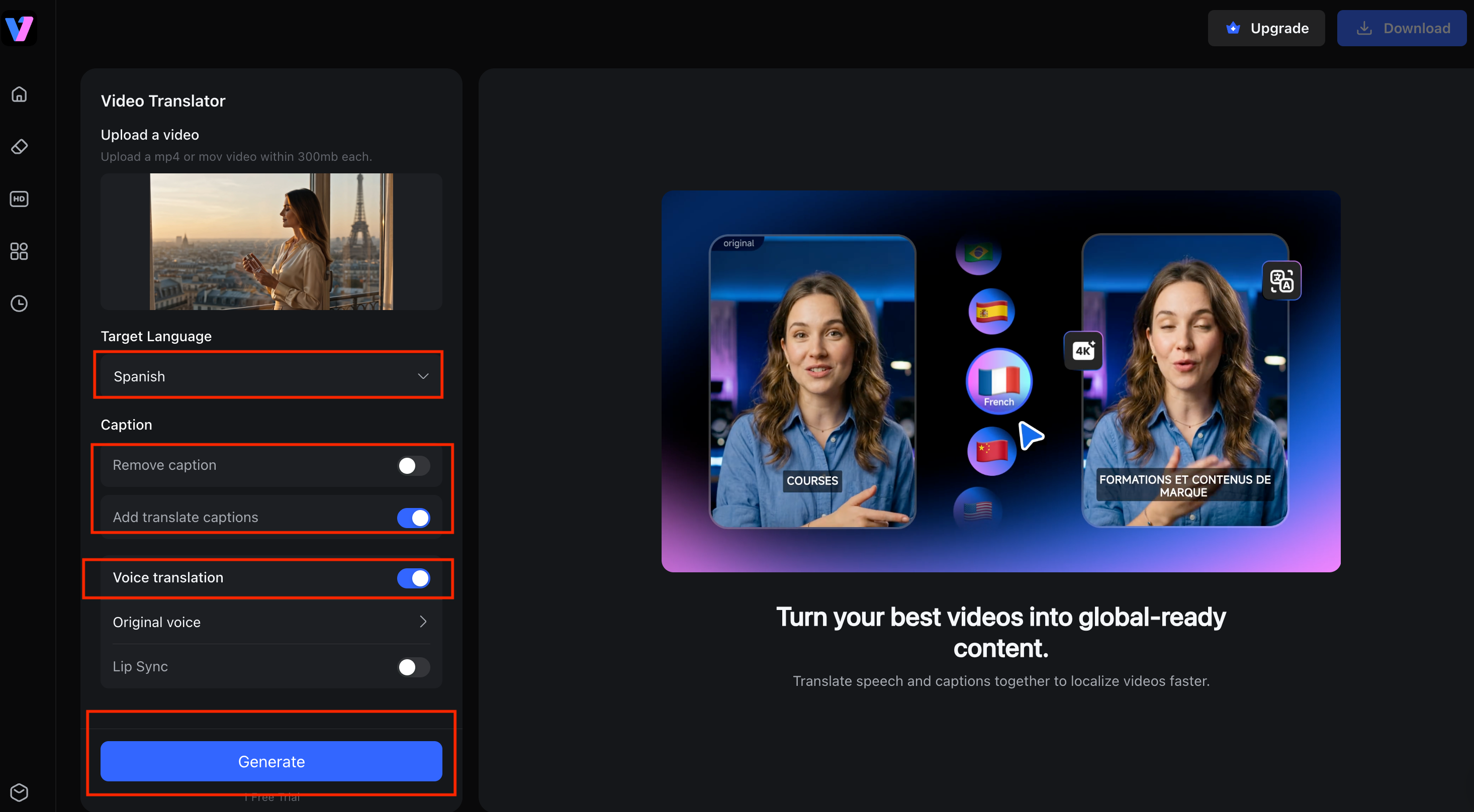
Step 1:Upload a YouTube Video for Translation
The first step is to open the Vmake AI Video Translator tool. Now, click “Use now” to open the main interface. Click or drag the video in the specific section.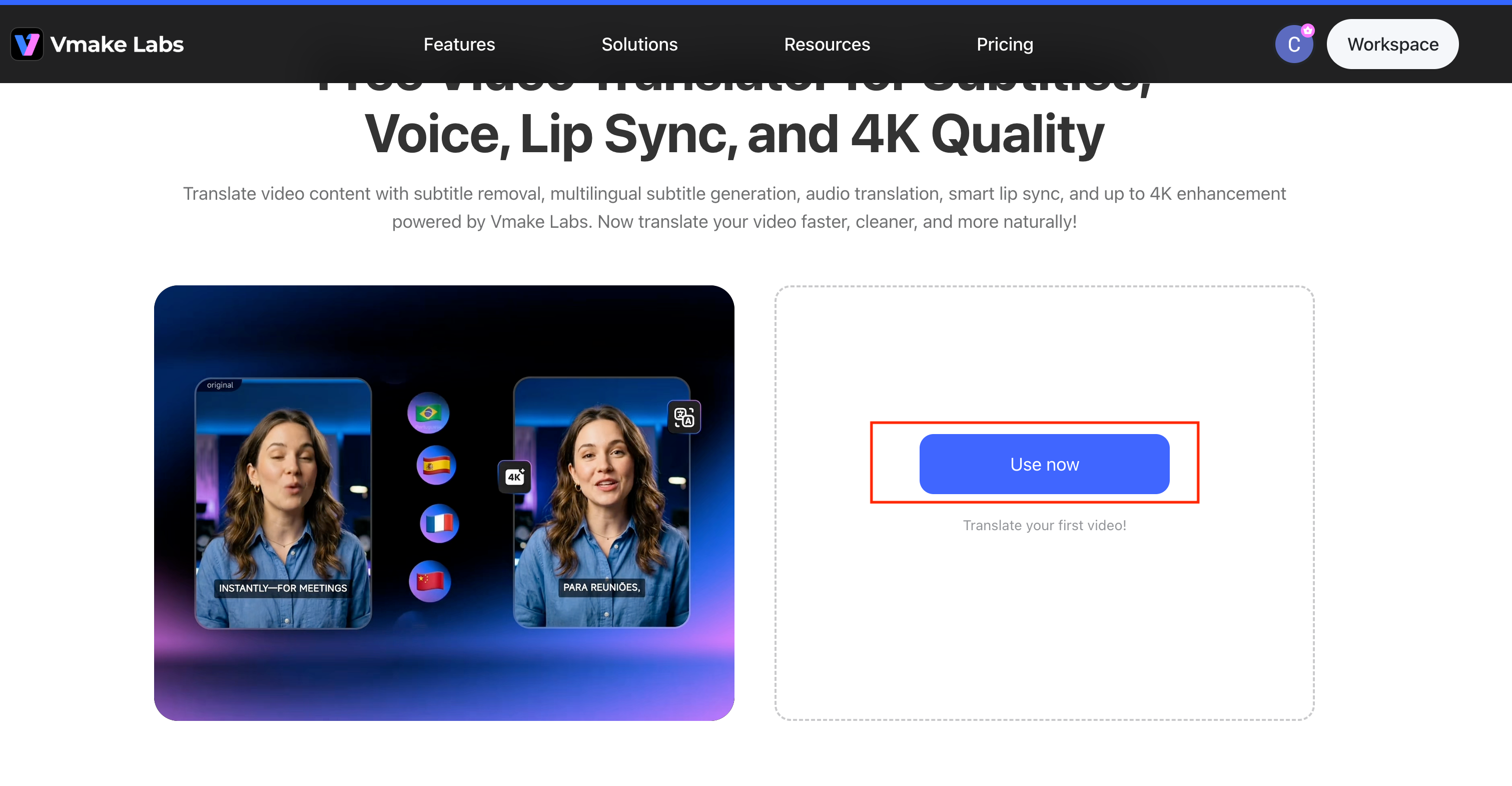
Step 2:Translate Subtitles or Dub Audio in 125+ Languages
Next, Select your target Language from the dropdown menu (e.g., Spanish). Under the Caption section, choose whether to "Remove caption" or "Add translate captions". In the Voice translation section, select either "Original voice" or "Lip Sync" for audio translation.
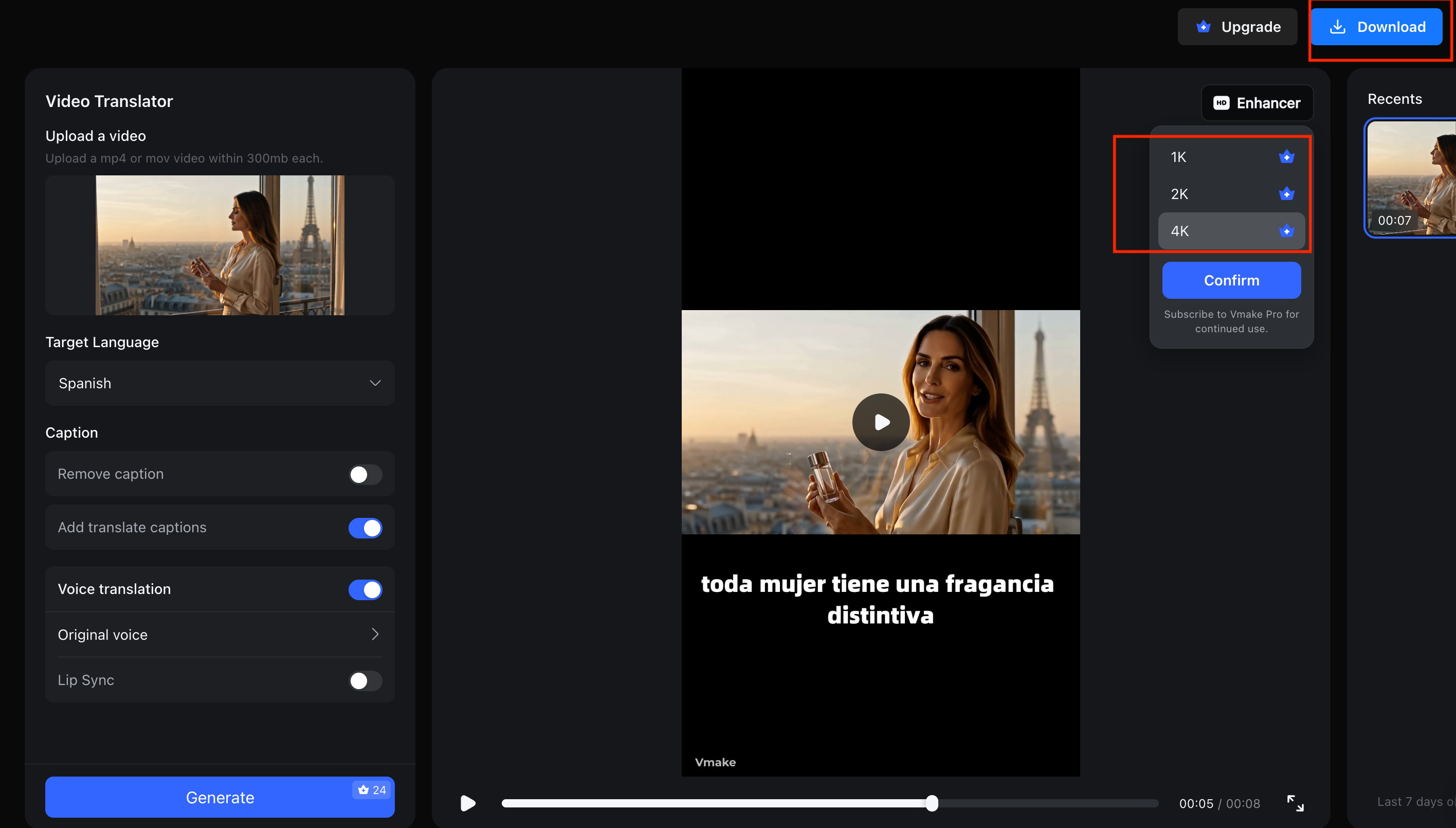
Step 3:Export .SRT for YouTube Studio Upload in One Click
Click the “Generate” button to start processing. You can also choose to enhance the video quality to up to 4K, depending on your needs. Once the video translation is complete, the system will display a preview with the translated subtitles (e.g., "toda mujer tiene una fragancia distintiva"). After confirming the result, click “Download” and select .SRT format for uploading to YouTube Studio.
 FAQ
FAQ
Can I translate a YouTube video for free?
Yes, YouTube offers free auto-translate subtitles for many videos. Also, some AI tools provide limited free plans that help translate videos into multiple languages with basic accuracy.
Does YouTube automatically translate videos?
Yes, YouTube automatically translates videos, titles, descriptions, and captions for viewers into selected languages, making content globally accessible. However, accuracy depends on audio quality, speech clarity, and the availability of captions.
How do I add subtitles in another language to my YouTube video?
To do so, you must first publish subtitles in the video’s original language. Then, you can upload translated .SRT subtitle files in YouTube Studio under the Video subtitles section.
What is the best AI tool to translate YouTube videos?
AI tools like Vmake provide high-quality subtitle translation and dubbing. They offer better accuracy, faster processing, and support for multiple languages compared to basic auto-translate features.
Can I translate a YouTube video to English without subtitles?
Yes, you can generate English translations from audio without subtitles by using AI voice dubbing and lip-syncing tools like Vmake Video Translator.
How long does it take to translate a YouTube video with AI?
It usually takes a few minutes for short videos and longer for extended content. Processing time depends on video length, audio clarity, and the target language.

You May Be Interested

123APPS Watermark Remover Review (2026): Pros, Cons, and Pricing

Seedance 2.0 vs Sora 2: Which AI Video Generator Wins in 2026?
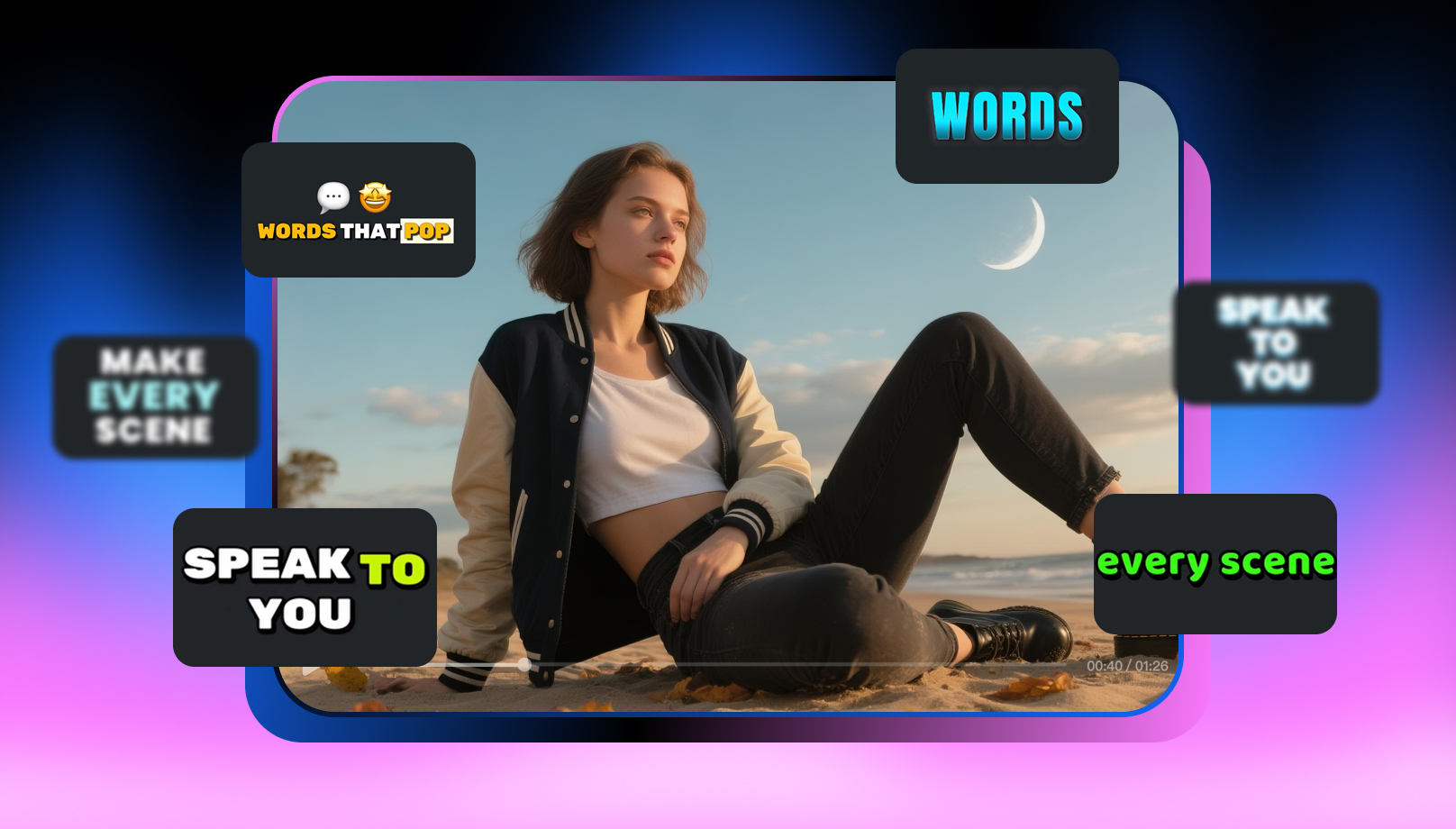
Top 20 Captions to Make Your YouTube Shorts Go Viral

Google Gemini|Copy Paste This Simple Prompts to Create “Hug my younger self ” Photos
