Best AI Content Creation Tools: Top 7 to Streamline Your Workflow
Unlock faster content production with AI content creation tools designed for marketers, agencies, and creators. Use Vmake to generate compelling content and streamline your entire workflow.

Producing great content consistently sounds simple—until you're the one staring at the blank screen. Between endless drafting and strategy shifts, the pressure to scale can completely drain your creativity. That's where AI content creation tools step in. Let's step into the toplist and find the best tool to streamline your content creation!
What are AI-powered content creation tools
When we talk about AI content tools, we basically look at software built on machine learning and natural language processing. Essentially, these platforms are designed to take a lot of heavy lifting off your plate. They can generate text, spin up images, edit audio, and even piece together video assets. You still need a human in the loop, but using them means you can scale up your digital output without burning out.
Quick overview of AI-powered content creation tools
|
Tool |
Best for |
Content type |
Key strength |
|---|---|---|---|
|
Vmake |
AI video creation |
Videos, AI avatars |
High-quality video generation and enhancement |
|
Jasper AI |
Marketing |
Blogs, ads, emails, website copy |
Brand voice consistency and marketing workflows |
|
ChatGPT |
General content creation |
Text, research, ideation, scripts |
Versatile all-in-one AI assistant |
|
Claude |
Long-form writing |
Articles, reports, guides |
Strong context handling and detailed writing |
|
Copy.ai |
Social media and sales copy |
Social posts, ads, emails |
Fast copy generation and automation |
|
GWI Spark |
Audience research |
Consumer insights and content strategy |
Data-driven audience intelligence |
|
Synthesia |
AI avatar videos |
Training modules, standard marketing videos, or corporate explainers |
Professional avatar-based video creation |
The 7 best AI tools for content creation
-
Vmake: Best AI-powered video content creation
Vmake AI video generator seems to be built specifically for creators, marketers, and ecommerce brands who need clean, professional videos but don't have the time to master complex editing software. Instead of forcing you to juggle three different apps, it pulls video generation, enhancement, and AI editing tools together in one spot.
Step-by-step guide
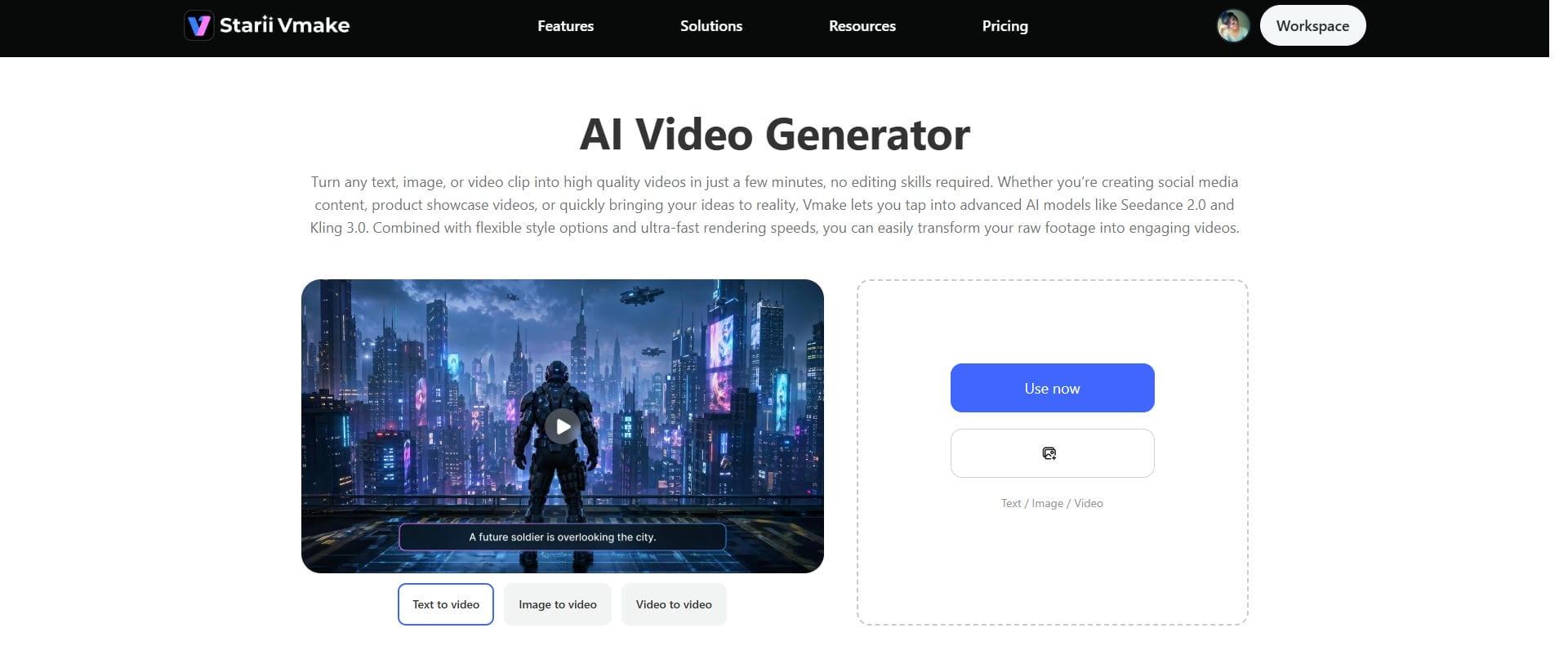
Step 1: Add your content idea
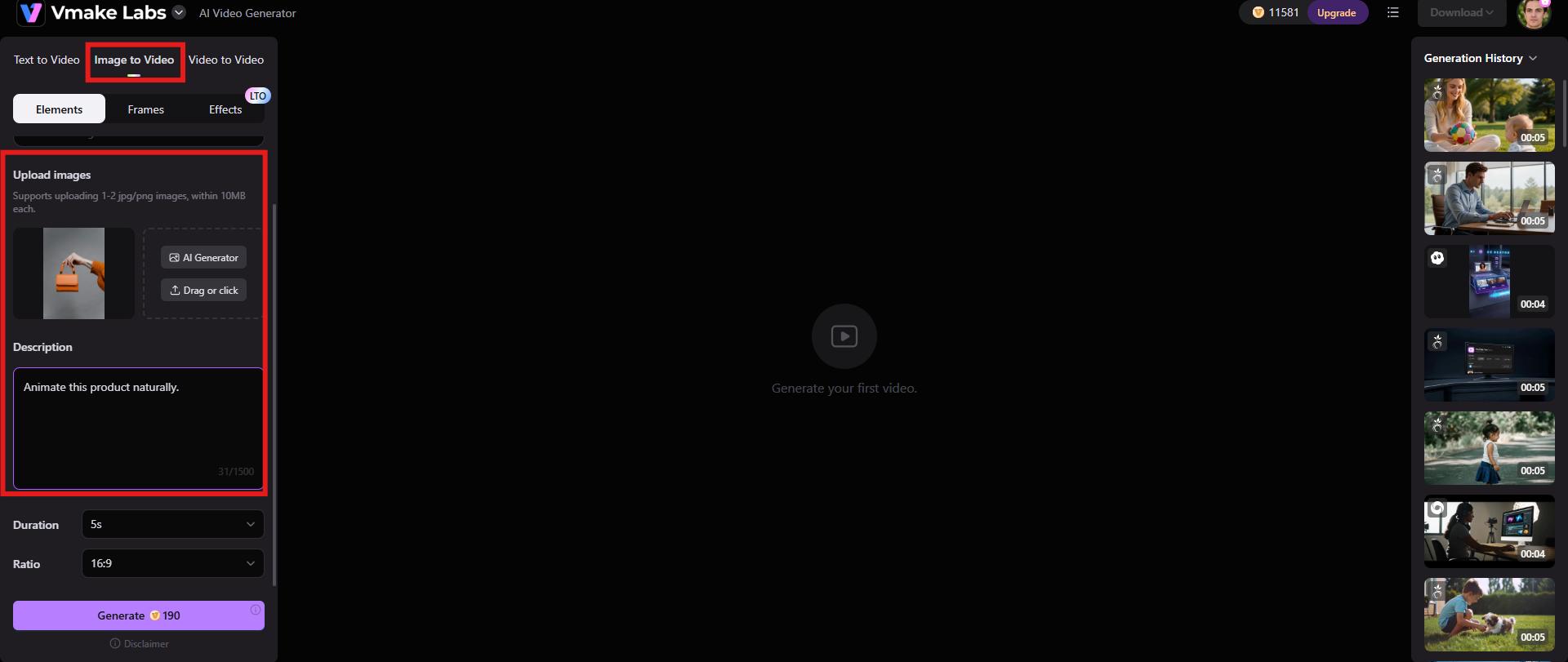
Launch the Vmake video generator and start by choosing among options, like text-to-video, image-to-video, or video-to-video. Upload the reference image and description.
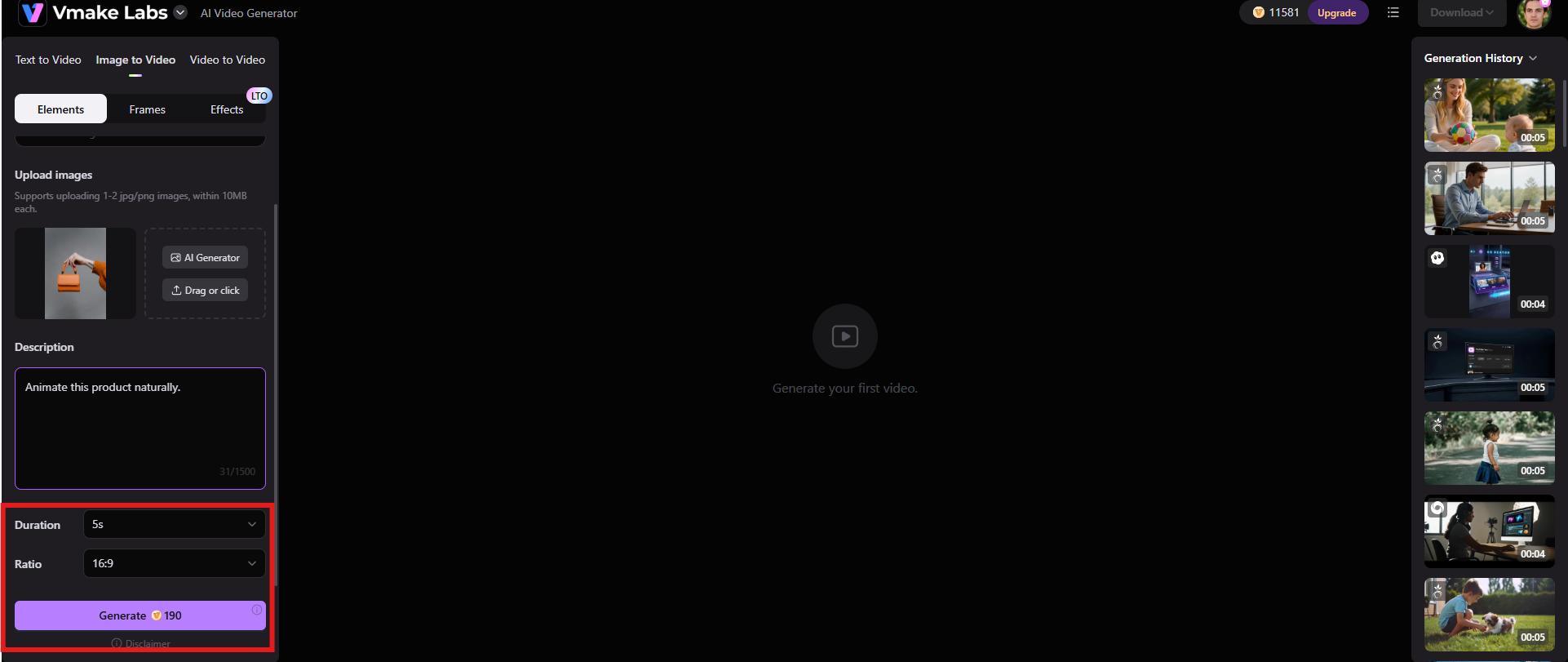
Step 2: Adjust settings and generate
After the upload finishes, you'll need to pick your duration and the right aspect ratio for whatever platform you're targeting; TikTok needs vertical, YouTube needs widescreen, you know the drill. Once you've locked those in, just hit "Generate" to get the wheels turning.
Step 3: Preview and download the video
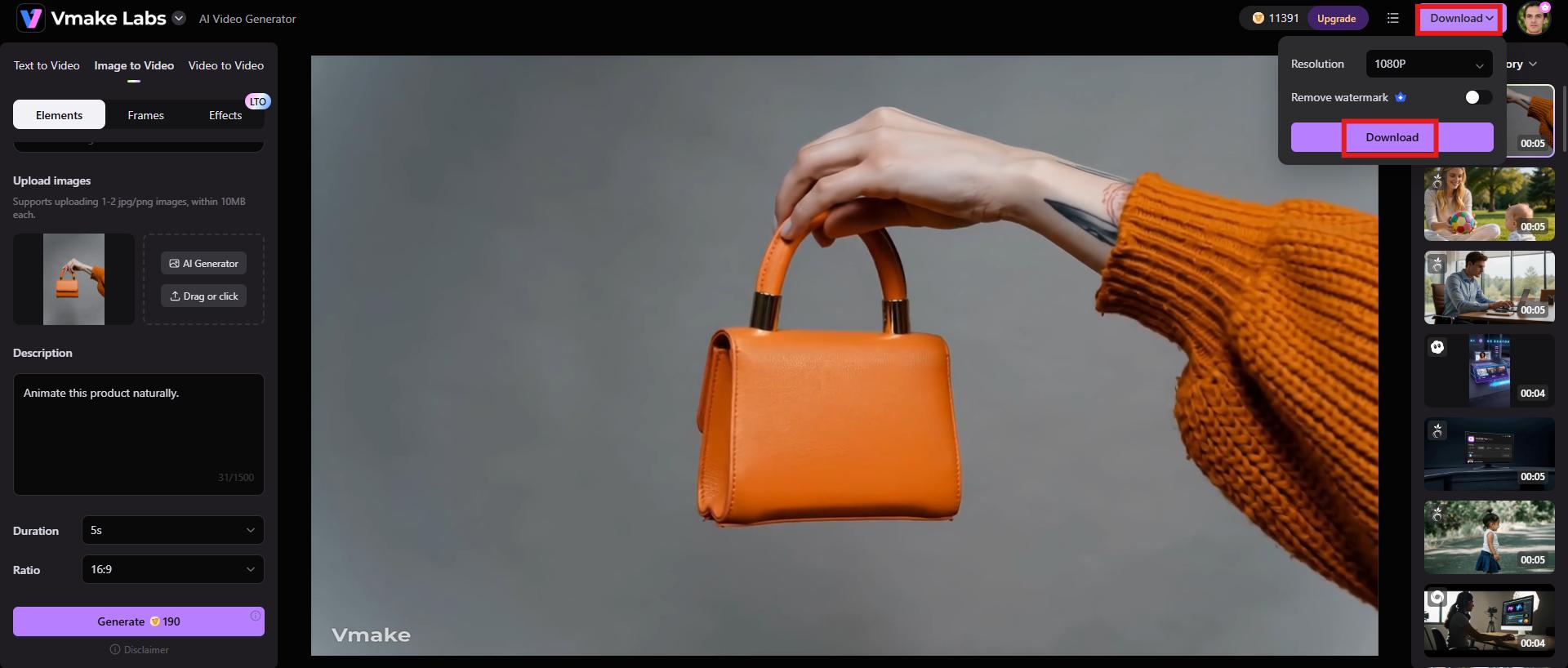
Finally, preview the video generated by Vmake. If everything seems fine, click the "Download" button at the top-right corner and save the video for further use.
Key features
-
AI avatar videos
To be honest, one of the coolest things Vmake does is let you create videos using AI avatars. It completely bypasses the whole ordeal of stepping in front of a camera yourself or dealing with the budget drama of hiring professional presenters.
-
Product showcase
If you're drowning in e-commerce work or trying to scale an ad campaign, Vmake's product showcase feature is worth looking into. It doesn't just slide the photo across the screen; it actually builds a dynamic video with realistic camera pans, subtle visual effects, and backdrop scenes that show off the item from a few different perspectives.
-
High-resolution output
Vmake produces high-resolution videos that look polished across a range of use cases, from social media campaigns and eCommerce product listings to business presentations.
-
Jasper.AI: Best for marketing teams & brand voice
Jasper AI is clearly built with marketing teams in mind. To be honest, most AI writing tools try to do absolutely everything for everyone, which usually makes them mediocre at best. Jasper doesn't do that. It focuses almost entirely on helping businesses pump out marketing content at scale without losing their brand identity in the process.
Key features
-
Emphasizes your actual brand voice
-
It gives you built-in workflows specifically designed for running marketing campaigns.
-
Lean heavily into SEO-focused content generation
-
It includes pretty solid team collaboration capabilities
-
A whole library of templates tailored to different content needs
|
Pros |
Cons |
|---|---|
|
|
-
ChatGPT: Best all-in-one content assistant
The real strength of ChatGPT is that it doesn't just lock you into one specific task. You can use it to bounce ideas around during a messy brainstorming session, outline a rough draft, or quickly summarize a mountain of research that you don't have time to read. It's even pretty solid at basic workflow automation and editing.
Key features
-
Content drafting and editing
-
Research assistance
-
Content repurposing
-
SEO content support
-
Creative writing and brainstorming
|
Pros |
Cons |
|---|---|
|
|
-
Claude: Best for long-form content writing
If you need to write detailed, high-quality long-form content, Claude is usually a go-to. What sets it apart is how incredibly well it maintains context across massive documents. Anyone who has tried to write a long piece with other bots knows the frustration of the AI forgetting what it said three paragraphs ago. Claude doesn't really have that issue. Because it actually remembers the big picture, it's brilliant for building out complex reports, comprehensive guides, or dense whitepapers.
Key features
-
It has a massive context window, which changes how you handle long-form document generation.
-
It also does a great job with dense content summarization.
-
Provides solid, structured writing assistance when you need to map out a complex piece.
-
Deep research and analysis support.
-
It has a coherent writing style.
|
Pros |
Cons |
|---|---|
|
|
-
Copy.ai: Best for social media copywriting
Copy.ai is pretty clearly laser-focused on the shorter side of marketing. If you need to spin up social media content, advertising copy, or quick sales messaging, it's built exactly for that kind of quick-turnaround work. It's essentially designed to churn out short-form marketing materials before you lose your momentum.
Key features
-
It handles social media post generation and ad copy creation incredibly fast
-
You also get decent email marketing support.
-
The tool offers a lot of options for sales content automation.
-
The real win is the workflow automation side of it, connecting those pieces together so you aren't stuck manually copy-pasting everything.
-
Tons of pre-built content templates to get you moving
|
Pros |
Cons |
|---|---|
|
|
-
GWI Spark: Best for audience research & content strategy
GWI Spark is really built for marketers and strategists who need to figure out what their audience actually cares about. It digs into real consumer behavior, personal interests, and broader market trends. That way, you can build a content strategy that's actually based on hard data rather than just guessing what might stick.
Key features
-
It gives you a much clearer picture of the people you're trying to reach.
-
You get real insight into consumer behavior, not just surface-level data points that look impressive in a report.
-
It catches onto trend identification early, allowing you to react before everyone else does.
-
The system delivers real market research insights instead of just giving you raw, unhelpful metrics.
-
It provides actionable strategy recommendations based on what the data is actually telling you.
|
Pros |
Cons |
|---|---|
|
|
-
Synthesia: Best for AI avatar video creation
If you need a professional-looking video but have zero interest in wrangling cameras, lighting, or any of the usual film gear, Synthesia is worth a look. It lets you build the whole thing around realistic AI avatars instead; no studio required. People use it for obvious stuff, like product demos and explainer content. If you need to scale up video production without hiring a full production crew every single time, it handles that specific job really well.
Key features
-
It relies heavily on AI-generated avatars and text-to-video creation, which basically means you can type out a script and get a video back without picking up a camera.
-
The multilingual voice support is surprisingly robust, too.
-
You also get plenty of pre-made video templates to get started quickly.
-
It has built-in decent team collaboration capabilities, so you aren't just working in a silo.
-
It functions quite well as part of a broader suite of corporate training tools.
|
Pros |
Cons |
|---|---|
|
|
Final checklist: Head-to-head comparision
|
Features |
Vmake |
Jasper |
ChatGPT |
Claude |
Copy.ai |
GWK Stark |
Synthesia |
|---|---|---|---|---|---|---|---|
|
Brand voice control |
Basic customization |
Advanced brand voice training |
Prompt-based customization |
Strong contextual adaptation |
Moderate customization |
Not applicable |
Limited |
|
Long-Form Content Quality |
Limited |
Strong |
Strong |
Excellent |
Moderate |
Not designed for content generation |
Not designed for content generation |
|
Social media content |
Video-focussed |
Strong marketing support |
Highly flexible |
Good |
Specialized for social content |
Supports content strategy |
Video-focused |
|
AI Avatar support |
Built-in avatar creation |
Not a core feature |
Not available |
Not available |
Not available |
Not available |
Advanced |
|
Team collaboration |
Available |
Designed for team workflows |
Depends on the workspace plan |
Limited collaboration tools |
Collaboration features available |
Built for teams |
Team-based video workflows |
The benefits of AI tools for content creation

-
Accelerate content production: These tools completely shift the timeline because they handle that brutal initial heavy lifting. It completely changes your momentum.
-
Reduce operational costs: Let's be real: scaling up a human content team or outsourcing to agencies gets incredibly expensive, incredibly fast. By handing the repetitive, formulaic tasks over to software, you drastically lower those operational costs.
-
Improve content consistency: It's surprisingly hard to maintain a consistent brand voice when you're growing, especially when multiple people are writing for different platforms. AI is actually great at this. If you feed it your specific style guidelines, tone preferences, and core messaging frameworks, it stays on script.
-
Scale multi-channel marketing: Modern marketing demands that you be everywhere at once. So, instead of creating everything from scratch for every single platform, you can use these tools to chop up and adapt a single piece of core content.
-
Increase team productivity: When you automate basic research and formatting, your team gets to escape that soul-crushing loop of repetitive work.
Conclusion
AI tools have changed how content gets made. Long-form articles, social posts, audience insights, and AI-generated video; there's something built for almost every format now. ChatGPT and Claude cover the writing side. Jasper AI and Copy.ai lean more toward marketing copy specifically. GWI Spark handles audience insights. Synthesia builds videos using AI avatars instead of cameras. Each tool solves a different problem, not all of them. Worth keeping in mind before you go looking for the one that does everything.
If you make videos or just need them to look like you do, Vmake is worth your attention. It cuts out a lot of busy work.
FAQs
Which AI tool is best for making content?
There is no single "best" AI content tool. It completely depends on what you're trying to make. If you need a hand with drafting text, tools like ChatGPT and Claude are the first names you'll hear. But for actual marketing copy, platforms like Jasper AI and Copy.ai handle campaign workflows a lot better. Honestly, most people don't need the longest feature list anyway. The best tool is just the one that doesn't make you change how you already work.
Can AI content creation tools replace human writers?
Not completely. AI handles boring, repetitive chores like running summaries or spitting out rough first drafts. You get a solid head start. It cuts down your time on the keyboard, which is a massive win when you're staring at a blank page.
Are there free AI content creation tools available?
Yes, quite a few. Free plans always come up with annoying restrictions on usage, lock away the best features, or intentionally throttle your output quality. It's a classic bait-and-switch.
How can AI improve my content workflow?
The biggest advantage is speed. AI can map out your outlines, spit out rough first drafts, or scramble existing content into fresh formats. It brainstorms headlines when you're stuck. You can even use it to crunch long research down to size or give you a hand with basic video production tasks.
What should I look for when choosing an AI content creation tool?
Start with your goals. A blogger doesn't need the same features as a social media manager or a video marketing team. Pay attention to a few practical things: content quality, ease of use, customization options, integrations with the tools you already use, and pricing. Reliability matters too.
What is the future of AI content creation?
AI tools change fast. They get smarter every year, moving far past simple text generation into images, audio, and video formats. Systems are stitching these features together into deeply integrated workflows. You shouldn't expect to lose your job to a machine. Instead, get ready for a shift toward collaboration rather than full replacement. The most effective content teams are going to combine raw human creativity with AI-assisted production to get things out the door.

You May Be Interested

2026 Wink Video Enhancer Review: Pros, Cons, and Alternatives
Synthesia AI Video Generator: Turn Text Into AI Videos Easily

5 Tools to Make Best Green Screen Backgrounds for Every Video Style