
SnapEdit Video Enhancer: Is It Worth Trying in 2026?
 Vmake Labs TeamFebruary 12, 2026
Have you ever been in a situation where you found the input video to be blurry and low-resolution while working on a high-quality design project? It’s frustrating when your footage doesn’t meet the quality standards you need. But don’t worry.
With AI-powered video enhancement tools, improving video quality has become easier than ever. One such tool is SnapEdit Video Enhancer, which claims to fix your videos, making them look sharp and stunning. But does it really work?
In this review, you will learn about SnapEdit Video Enhancer, including its features, pricing, and how it performs when compared to alternatives.
What is SnapEdit Video Enhancer and What Does It Offer?
SnapEdit Video Enhancer is an efficient tool that uses AI to effortlessly turn your low-quality footage into something amazing with just a few taps. However, it is basically a part of the versatile photo editing platform SnapEdit, which offers a range of useful features.
This photo editor facilitates removing objects or backgrounds, enhancing art, restoring old memories, and other tasks. Its automated processing makes it suitable for photography, eCommerce, social media, and real estate.
Additional Features:
AI Photo Enhancer: It instantly improves the clarity, sharpness, and resolution of photos and artwork like manga, anime, and drawings, delivering clean, high-quality visuals with a single click.
AI Skin: You can easily retouch skin in photos to remove blemishes, acne, and freckles, creating beautiful skin texture in seconds.
Background Editing: It can blur, remove, or replace the background with various pre-designed templates, whatever is needed for the project.
AI Removal: It assists you in detecting and erasing unwanted objects, people, text, and electrical wires with ease.
Compress & Convert: Whether you need to reduce image size by up to 95% or convert its format for various purposes, it can help you.
Batch Processing: It assists you in processing multiple photos (up to 50) at once to remove backgrounds, convert file formats, and perform other AI services, saving time for those working on large projects.
Other AI Tools: Some other prominent tools include auto light, restore old photos, easy shadow, colorize image, blur face, and add watermarks to your photos.
Key Functionalities of SnapEdit Video Enhancer
SnapEdit Video Enhancer is an AI-powered online tool that helps improve the video quality and upscale resolution without learning complex software. It can analyze the existing pixels in a video and intelligently generate the new ones in the gaps, making your old, low-resolution footage sharp and clear. It can upscale from SD to HD and from HD to 2K, removing unwanted noise, grain, and artifacts without blurring important details.
You can also enhance videos captured by old cameras or in low-light conditions. It even restores slightly damaged videos, making them viewable on modern devices. With an easy UI, advanced algorithms, hardware acceleration, and wide-format support, processing is quick and smooth.
SnapEdit Video Enhancer: Step-by-Step Tutorial
Although the process of enhancing videos with SnapEdit is simple, you need to follow the correct procedure. So, here are the steps:
Step 1. Open SnapEdit Video Enhancer
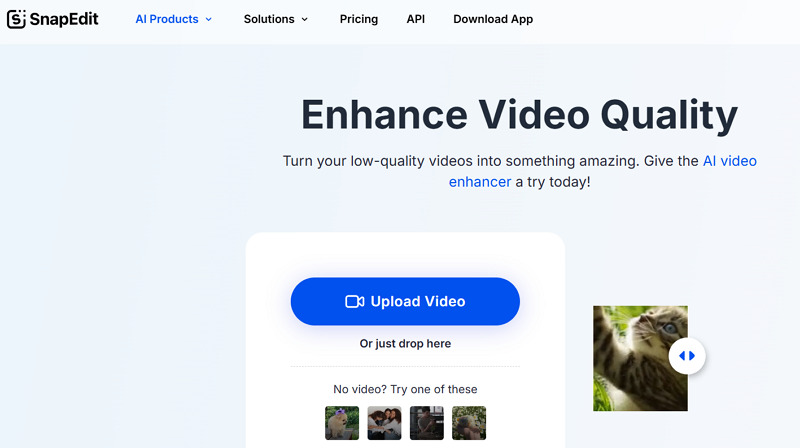
The first step is to access the SnapEdit Video Enhancer on your browser by clicking “AI Products” > “Video Enhance” to proceed.
Step 2. Import Video File
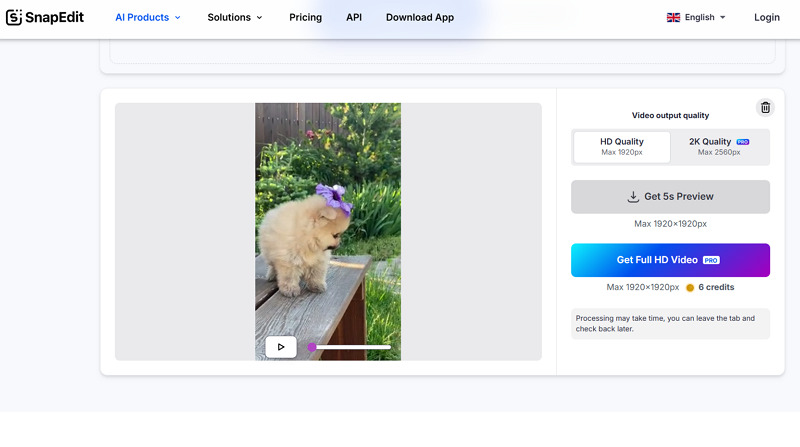
Now, press “Upload Video” or drag and drop the video. Then, you can select “HD Quality” or “2K Quality,” whichever you need.
 Step 3. Generate and Download
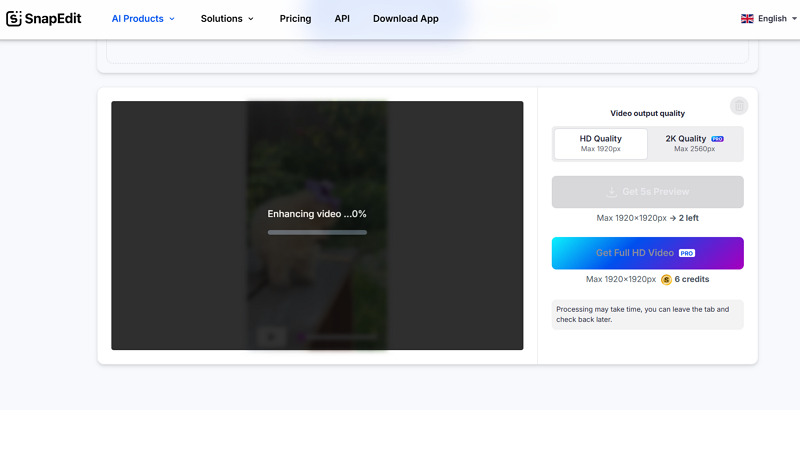
Lastly, hit the “Get 5s Preview” or Get Full HD Video” button. Once the video is enhanced, compare the results with a slider. Then, download the output, and that’s all.
Pricing Review of SnapEdit Video Enhancer
SnapEdit offers flexible pricing plans for different users based on subscription and credits. Here is a breakdown of the available options to better understand it:
Plan | Pricing (Credits) | What’s included |
Free | $0 ($10 credits monthly) | Standard quality export Limited AI features Unlimited export with watermarks |
Standard (Monthly) | $10 (400) | Access to all AI services AI Video Enhancer FHD No watermark Best quality export Batch processing |
Standard (Yearly) | $6 (4800) | |
Pro (Monthly) | $20 (1500) | AI Super Remove AI Magic Enhance AI Video Enhancer Mobile app PRO access Latest AI update |
Pro (Yearly) | $12 (18000) |
Popular SnapEdit Video Enhancer Alternatives
While SnapEdit Video Enhancer is an advanced enhancement solution, you must compare it with other alternatives available in the market. So, let’s consider this comparison table of SnapEdit with Vmake, Airbrush, Topaz Labs, and 123APPS:
Tool | Platform | Custom Options | Speed | Output Quality | Ideal for |
SnapEdit Video Enhancer | Web | No | Moderate | Good | Automatic adjustment of videos and upscaling to 2K. But mainly designed for photo editing & enhancement |
Web, Mobile (Android & iOS) | Yes | Fast | Best | Enhancing videos with world-leading scenario-specific enhancement with AI 4K+ upscaling and multi-feature processing | |
Airbrush Video Enhancer | Web, Mobile (Android & iOS) | No | Fast | Good | Quick video fixes with enhanced clarity, ideal for social media content or personal projects |
Topaz Labs Video Enhancer | Web, Desktop (Win & Mac) | Yes | Moderate | Best | Advanced video enhancement with noise reduction, upscaling, and frame interpolation |
Fotor Video Enhancer | Web | No | Moderate | Good | Basic video enhancements, suited for quick fixes and social media content creation |
SnapEdit Video Enhancer: Advantages & Disadvantages
To have a comprehensive review of SnapEdit Video Enhancer, it is a must to look at both its strengths and limitations. Here are a few:
Pros:
Simple and easy to use
No software installation is required
Suitable for beginners and quick edits
Auto-adjustment of all video aspects
Support batch processing with subscription
Slider preview for a better comparison
Faster processing for enhancing shorter clips
Cons:
Require sign-up to proceed
No mobile or desktop version available
Lack of manual adjustments and control
Unable to reduce the background noise
Full automation leads to unrealistic results
Offer only a 5-second preview for free
Advanced features are only for premium users
Frequently Asked Questions of SnapEdit Video Enhancer
1. Is it safe to use SnapEdit Video Enhancer?
Yes, SnapEdit Video Enhancer is completely safe to use. It ensures user data privacy by incorporating standard data processing practices. However, it is good to avoid uploading personal or confidential videos.
2. Is SnapEdit Video Enhancer free?
No doubt, SnapEdit Video Enhancer offers a free version, but it is limited in functionality. To process a full video and access other advanced features, you need a subscription.
3. Does it offer a money-back guarantee?
No, SnapEdit Video Enhancer does not offer any refunds once the payment is processed. However, it advises users to utilize the free version and consider their decision carefully before paying.
Conclusion: Is SnapEdit Video Enhancer Worth It?
SnapEdit Video Enhancer is a fantastic tool for web users who need quick enhancement without complex manual editing. Whether you are handling personal content, social media posts, or business projects, its AI-driven capabilities can help you. However, it is mainly suitable for photo editing tasks.
But for those seeking a few customization options for advanced control over their video edits, Vmake Video Enhancer is a great choice. With a user-friendly interface and different AI models, it can efficiently give your low-resolution, old, or long videos a professional look.

You May Be Interested

123APPS Watermark Remover Review (2026): Pros, Cons, and Pricing

Seedance 2.0 vs Sora 2: Which AI Video Generator Wins in 2026?

Top 20 Captions to Make Your YouTube Shorts Go Viral

Google Gemini|Copy Paste This Simple Prompts to Create “Hug my younger self ” Photos
