
Pollo AI: Features, Reviews & Best Video Generator Alternative in 2026
 Vmake Labs TeamMay 30, 2026
Pollo AI makes it easy to create AI videos. It can turn text into a video, animate images, create AI avatars, and add effects that make videos go viral. In this article, we will investigate its features, pricing, reviews, and popular use cases. We will also look at Vmake as a great alternative for generating marketing, social media, and promotional videos in 2026.
What is Pollo AI?
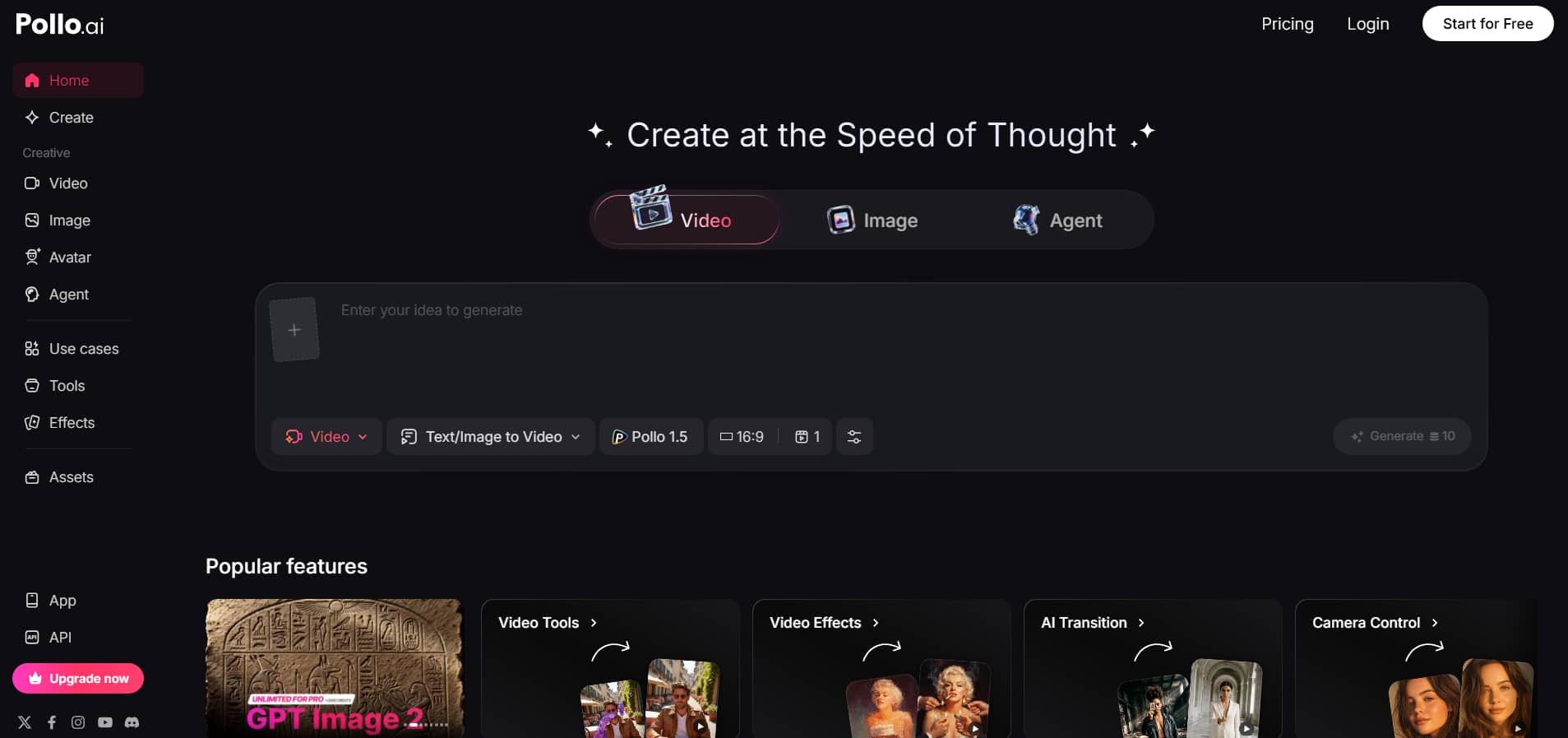
Pollo AI is an all-in-one AI video creation tool that enables users to combine text prompts, photos, and existing videos into engaging visual content. It is gaining popularity by bundling several top AI video models, including Veo 3, Kling AI, Runway, PixVerse AI, and Seedance 2.0, into a single workspace. No traditional editing skills required; users can create cinematic videos, anime animations, AI avatar clips, marketing, advertising, and social media content with just one click.
Key features of Pollo AI video generator
Pollo AI is a set of AI-powered video creation tools on a single platform that enables users to produce cinematic videos, animations, AI avatars, marketing videos, and viral social media clips faster. Here are some of the top qualities that make the platform popular with creators and advertisers in 2026.
-
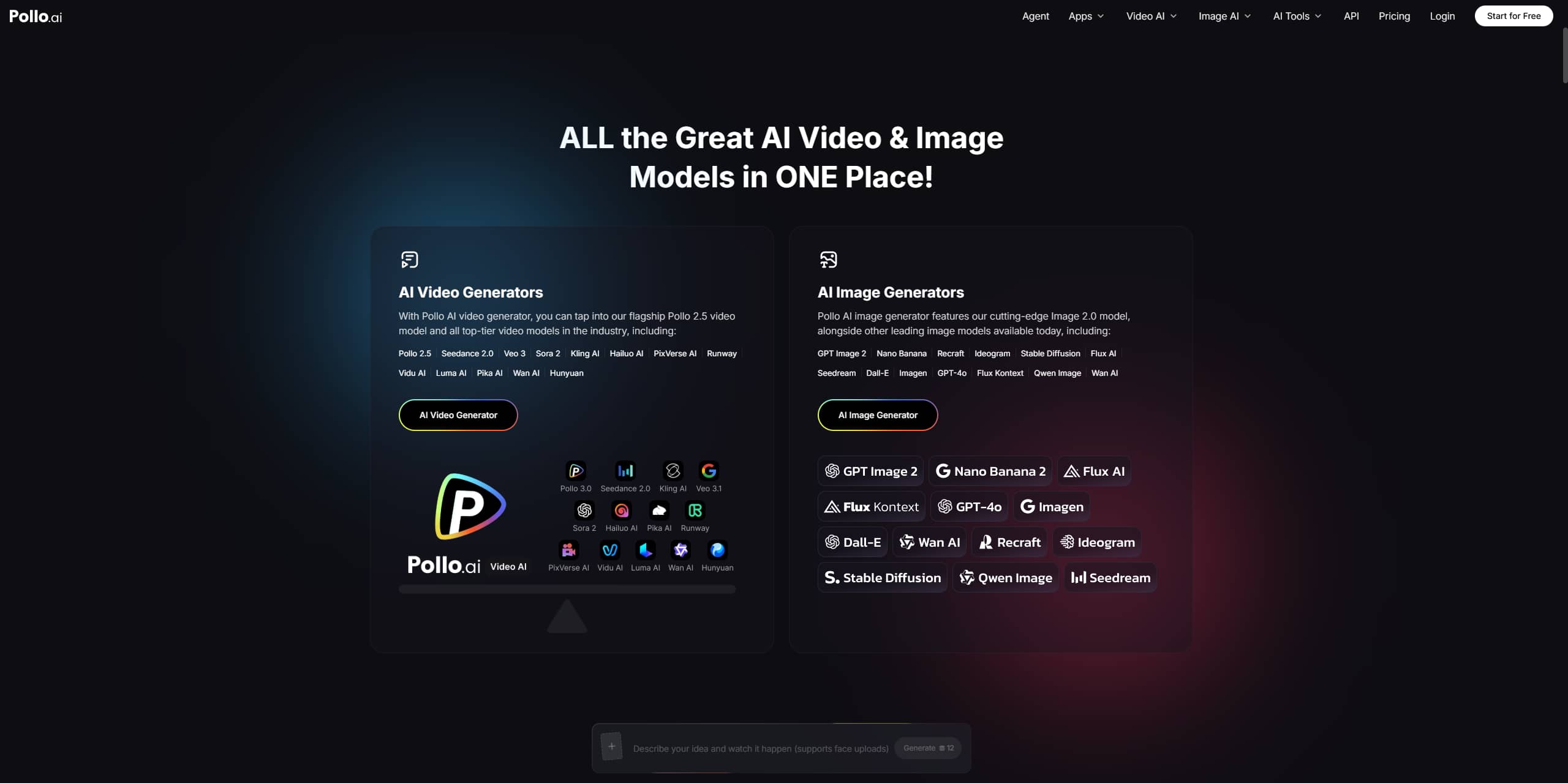
Multi-model AI video generation: Pollo AI is a workspace that integrates many of the best AI video models, including Pollo 2.5, Veo 3.1, Kling AI, Runway, Luma AI, PixVerse AI, Seedance 2.0, Hailuo AI, and more. Users can switch between cinematic, realistic, anime, and stylized video generation tools from a single dashboard.
-
Pollo AI text-to-video generation: With Pollo AI's text-to-video, word prompts turn into fully fledged AI videos, including situations, action, effects, and graphic styles. Users can choose characters, settings, camera angles, or emotions, and the tool automatically generates engaging video content within minutes.
-
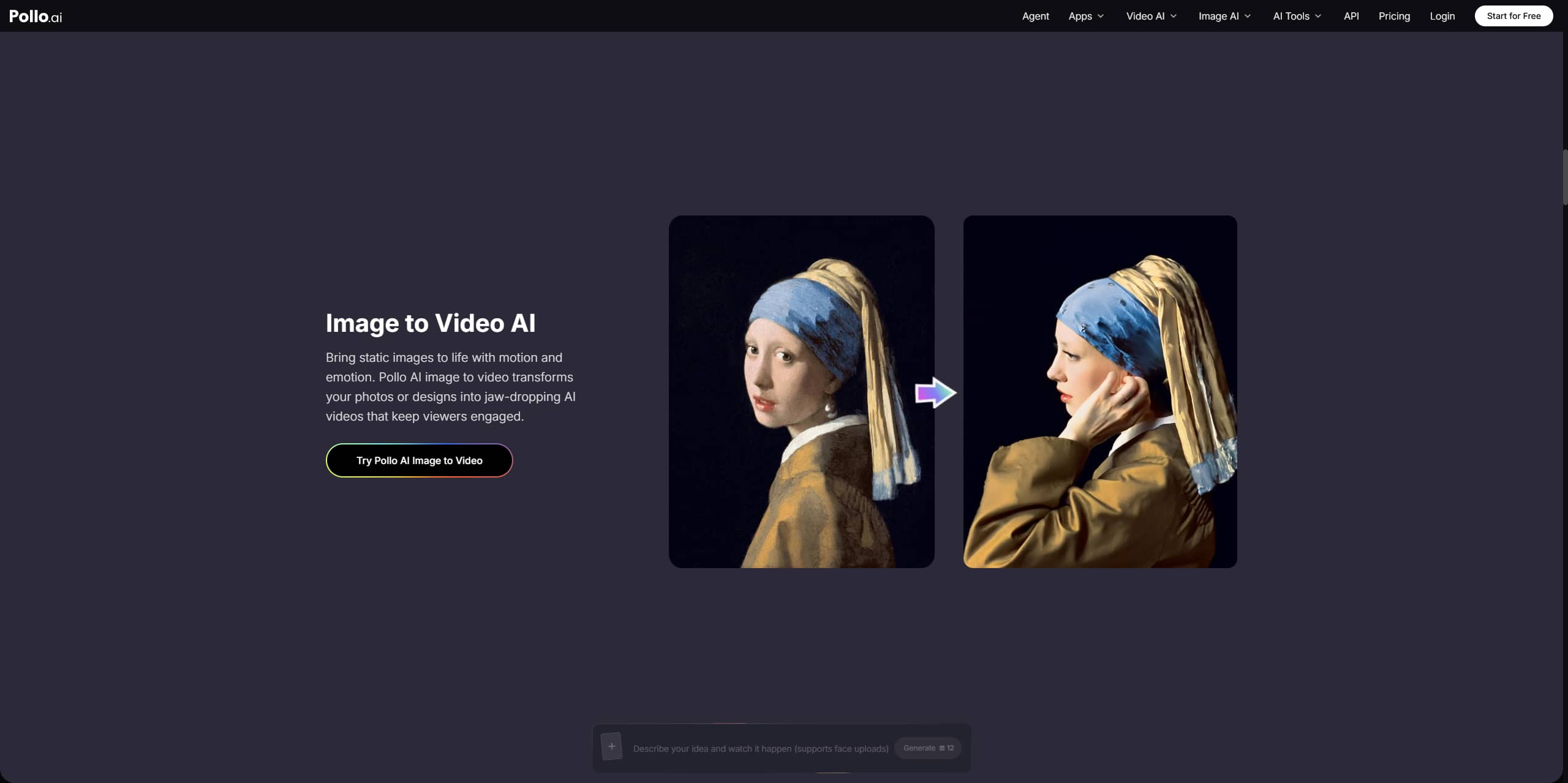
Image-to-video transformation: Pollo AI lets you convert static images, graphics, and artwork into dynamic, AI-generated videos with smooth motion and cinematic transitions. Technology can add animation, emotional expressions, and camera movement to still photographs, as well as visual depth, to make them more interactive and interesting.
-
AI avatar, animation, and editing tools: The platform offers capabilities for current multimedia creation, including AI avatar generation, video-to-video, lip sync, and animation. Make realistic talking avatars with facial expressions and natural movements, or convert existing movies into anime, cinematic, or stylized visuals.
-
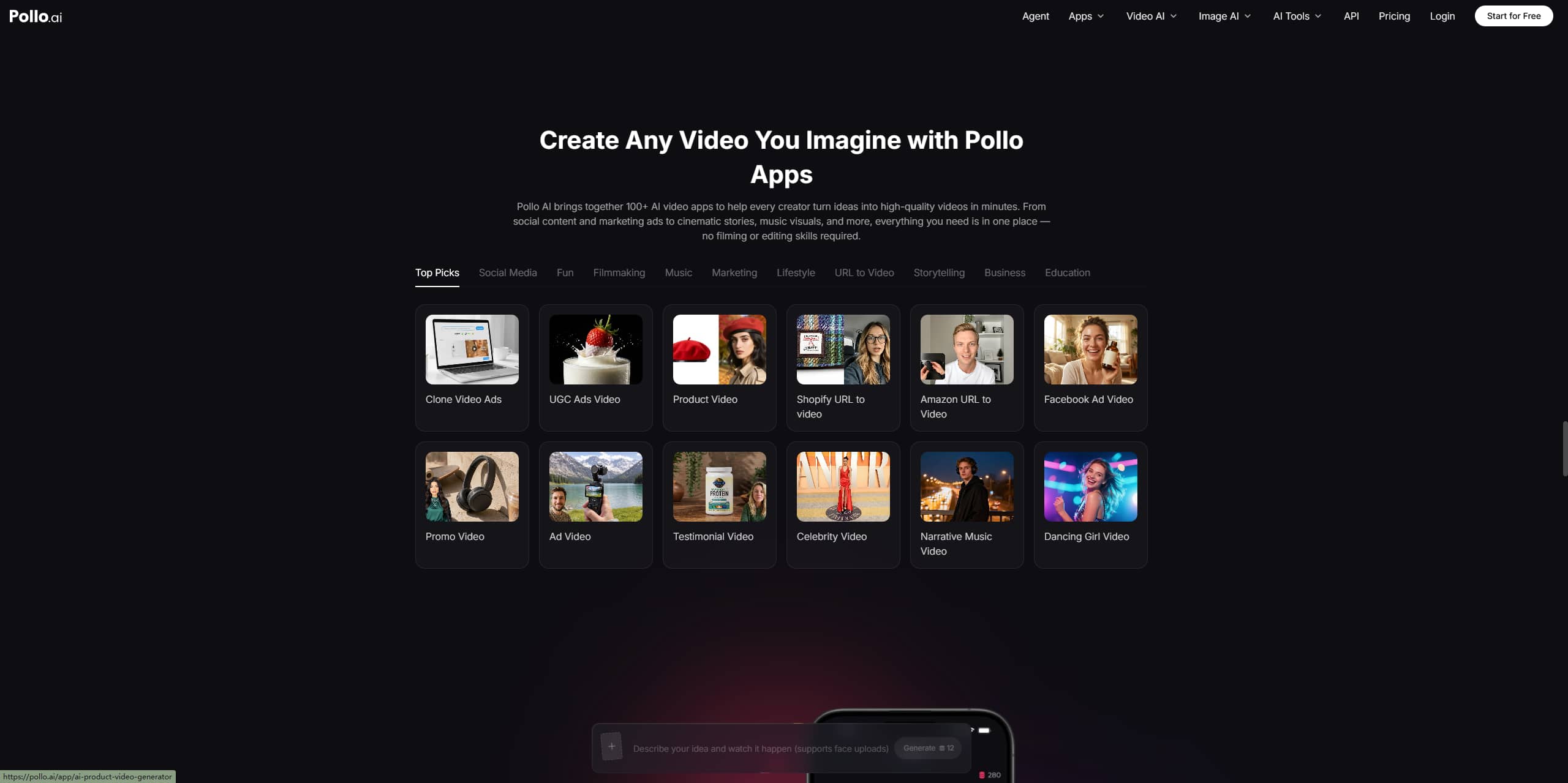
100+ AI apps and creative workflows: Pollo AI offers more than 100 AI-powered apps for making UGC advertisements, product videos, explainer clips, music graphics, storytelling videos, and social media content. The tool also offers ready-made processes for YouTube intros, promotional videos, effects, and marketing campaigns in celebrity style.
How to use the Pollo AI video creation tool
Once you get the hang of it, it's really simple to use Pollo AI. No editing skills needed, just a few clicks and a clear idea.
Step 1: Go to image-to-video
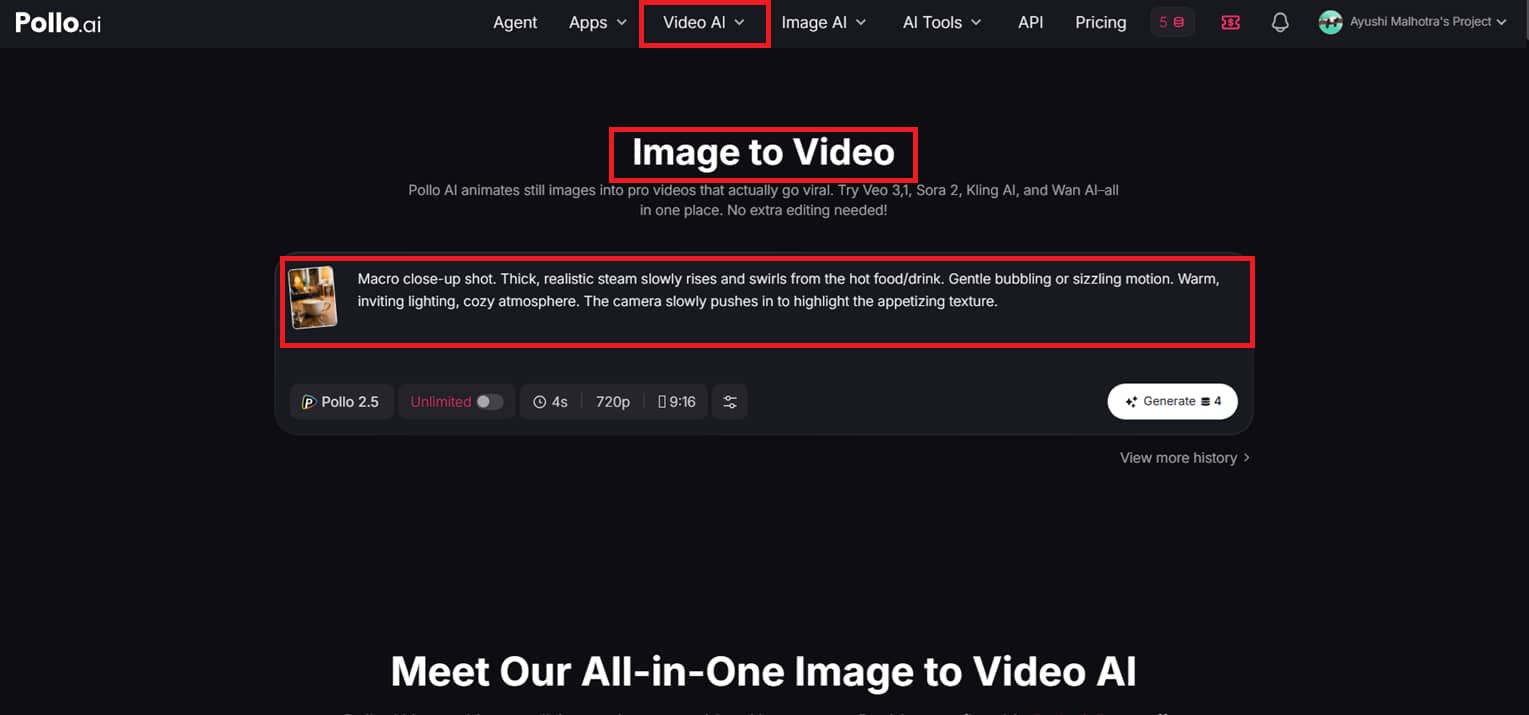
On the Polllo AI homepage, click on ''Video AI'' and select ''Image-to-Video''. A prompt box will pop up where you can upload your image and create a quick prompt describing the movement, style, or setting you desire.
Step 2: Set your preferences and generate
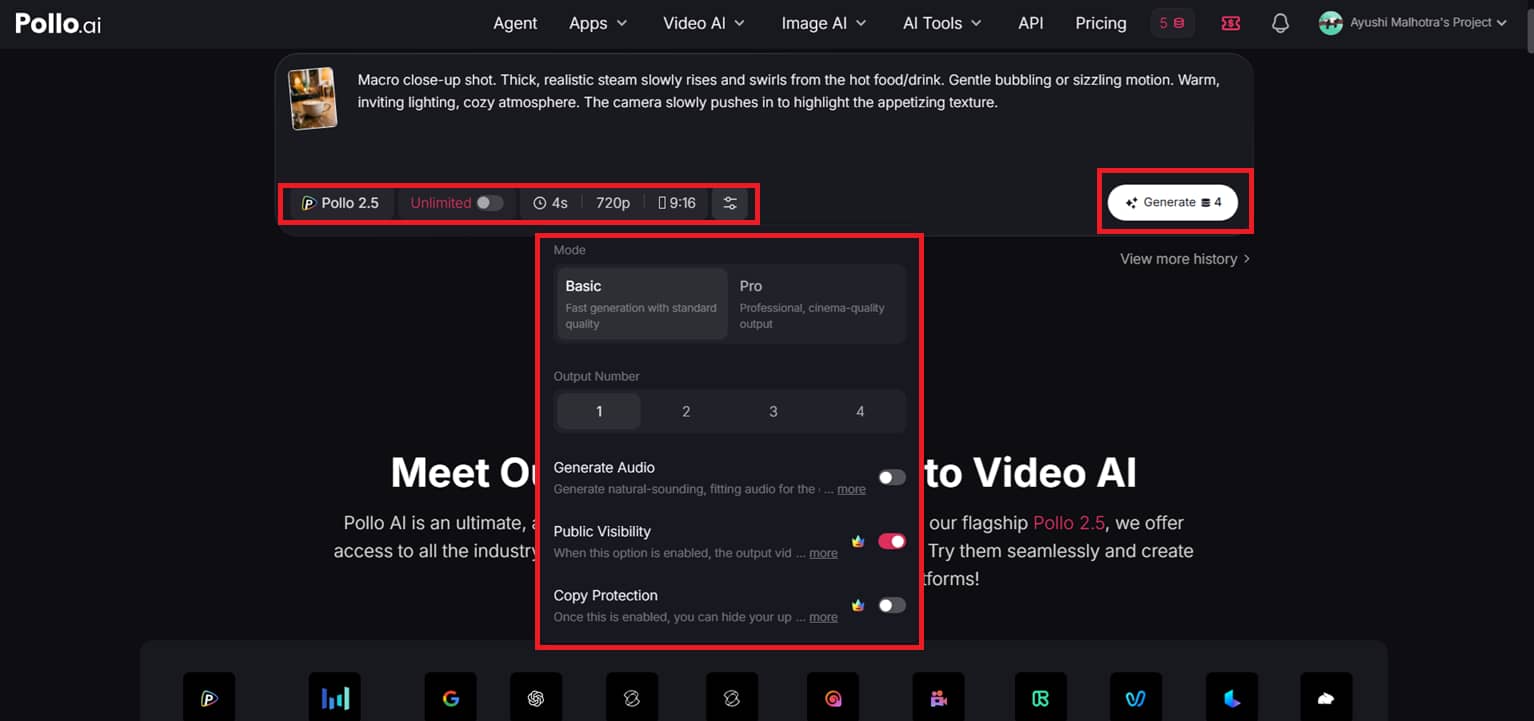
In the same box, you can select the AI model you want to use, adjust video duration, resolution, and aspect ratio, and choose between basic and pro mode. You can also specify how many outputs you want and whether you need audio. When you're happy with it all, just press ''Generate''.
Step 3: Edit or download your video
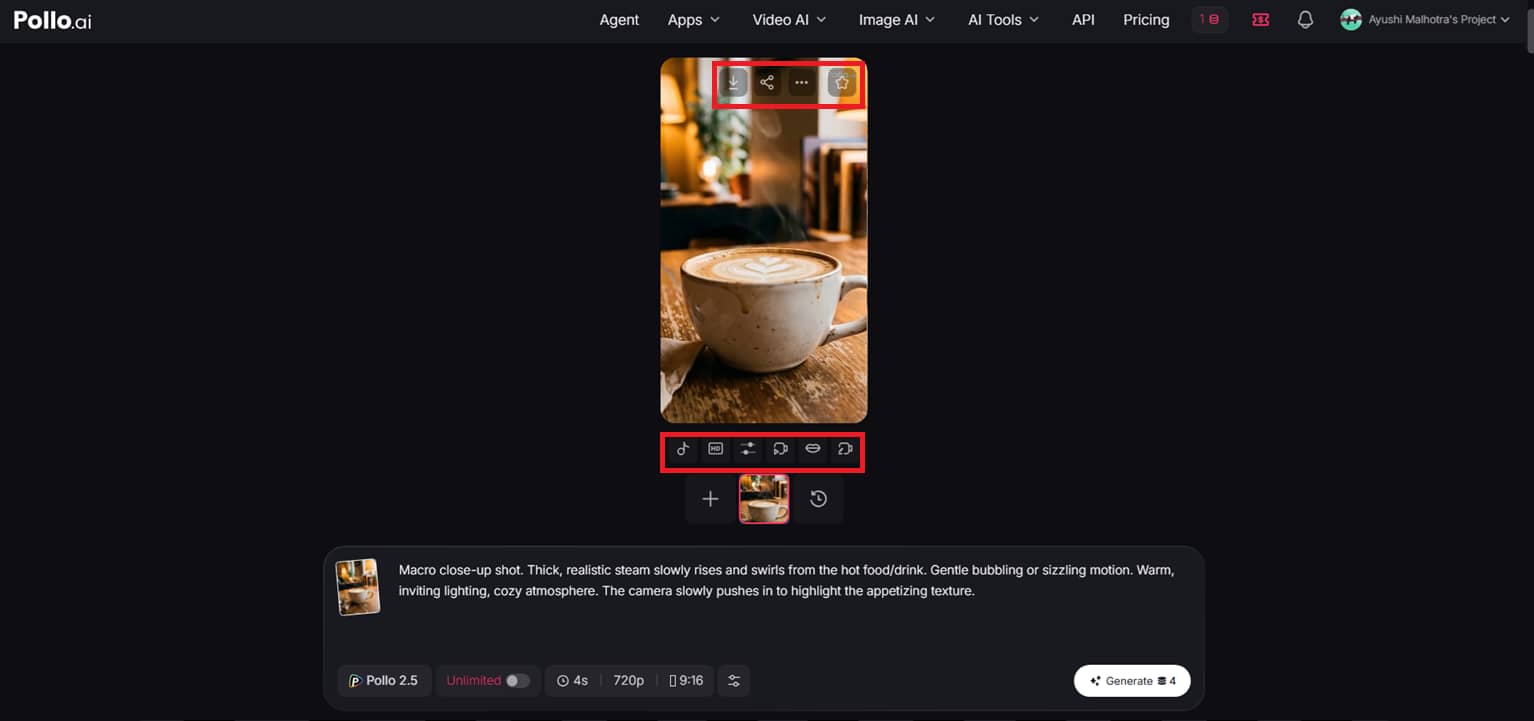
Your video will be ready in a few seconds. You can also add sound effects, upscale quality, extend the movie, add lip sync, or use the advanced editor to make further modifications. If you are happy with the outcome, just download it or share it right from the top corner.
Pollo AI pricing plans:
Pollo AI is based on a simple credit price model, so you can start for free and then scale up depending on how much content you want to make. It's made for anyone, from a newbie who only wants to dabble in AI video tools to a pro who needs to produce large volumes of videos for marketing and client work.
|
Plan |
Price (Billed Annually) |
Monthly Credits |
Key Capabilities & Features |
|---|---|---|---|
|
Free |
$0 |
20 credits |
Standard multi-model access Watermarked outputs Lower queue priority |
|
Lite |
$10mo |
300 credits |
Up to 30 videos/300 images per month 2 parallel tasks Access to premium image/video models (GPT Image 2, Seedance 2.0, Kling 3.0, etc.) Watermarked outputsNormal support |
|
Pro |
$25mo |
800 credits (Scalable up to 3K) |
Up to 80 videos/800 images per month 3 parallel tasks No watermarks Faster generation speed & priority support Advanced controls: more camera movements, private video visibility, and copy protection |
Free Pollo AI plan:
The signup includes a free trial with a limited number of credits. That means you may try out text-to-video, image creation, and basic editing features without paying up front. Confined use and fewer advanced model options make it better for experimenting than regular use for free users, who are sometimes confined to watermarked films.
Paid pricing plans:
-
Lite Plan ($10/mo, annual billing): This package provides access to major AI models and approximately 300 credits per month. If you're a casual producer looking to make a couple of videos, or are trying out other AI technologies without extreme use, it's a great starting spot.
-
Pro Plan ($14.5 /month payable annually): If you are an active producer, marketer, or social media user and you require continuous, high-quality content, this plan, with 800 credits per month, faster creation, and no watermarks, is better for you.
-
Ultra Plan ($109 per month, payable annually): The most powerful plan with 5,000 credits per month, priority speed, and full access to all models. Designed for agencies, professionals, and teams with big video production or client project needs.
Pollo AI review: Benefits and limitations
Pollo AI combines powerful AI video models, creative effects, and beginner-friendly workflows, making it a great tool for creators, marketers, and enterprises. However, like most AI video tools, it has some limitations that users should consider based on their content needs and editing expectations.
|
Benefits |
Limitations |
|---|---|
|
Pollo AI combines multiple prominent AI video models into a single platform, making content creation more versatile and convenient. |
Free users could have watermarks, reduced export quality, and daily video generation restrictions. |
|
It's straightforward to use and helps beginners to make films with simple prompts and reference images, videos, or motions. |
A perfect natural look is not always possible in some intricate actions or multi-character sequences. |
|
Users can generate all kinds of content, such as advertising, anime videos, AI avatars, and social media clips. |
Users searching for advanced manual editing controls, however, may still require separate editing software. |
|
Fast AI generation makes it easier to quickly develop films for TikTok, YouTube Shorts, and marketing campaigns. |
Audio editing and sound tuning options are less extensive than those of professional video editors. |
Pollo AI is great for fast AI video generation, but some customers may still prefer more sophisticated editing workflows, clearer marketing-focused tools, and better content optimization for social media campaigns. For these purposes, Vmake emerged as a powerful substitute for Pollo AI in 2026, especially for creating promotional videos, product marketing materials, and short-form branded content.
Vmake: Best Pollo AI alternative in 2026
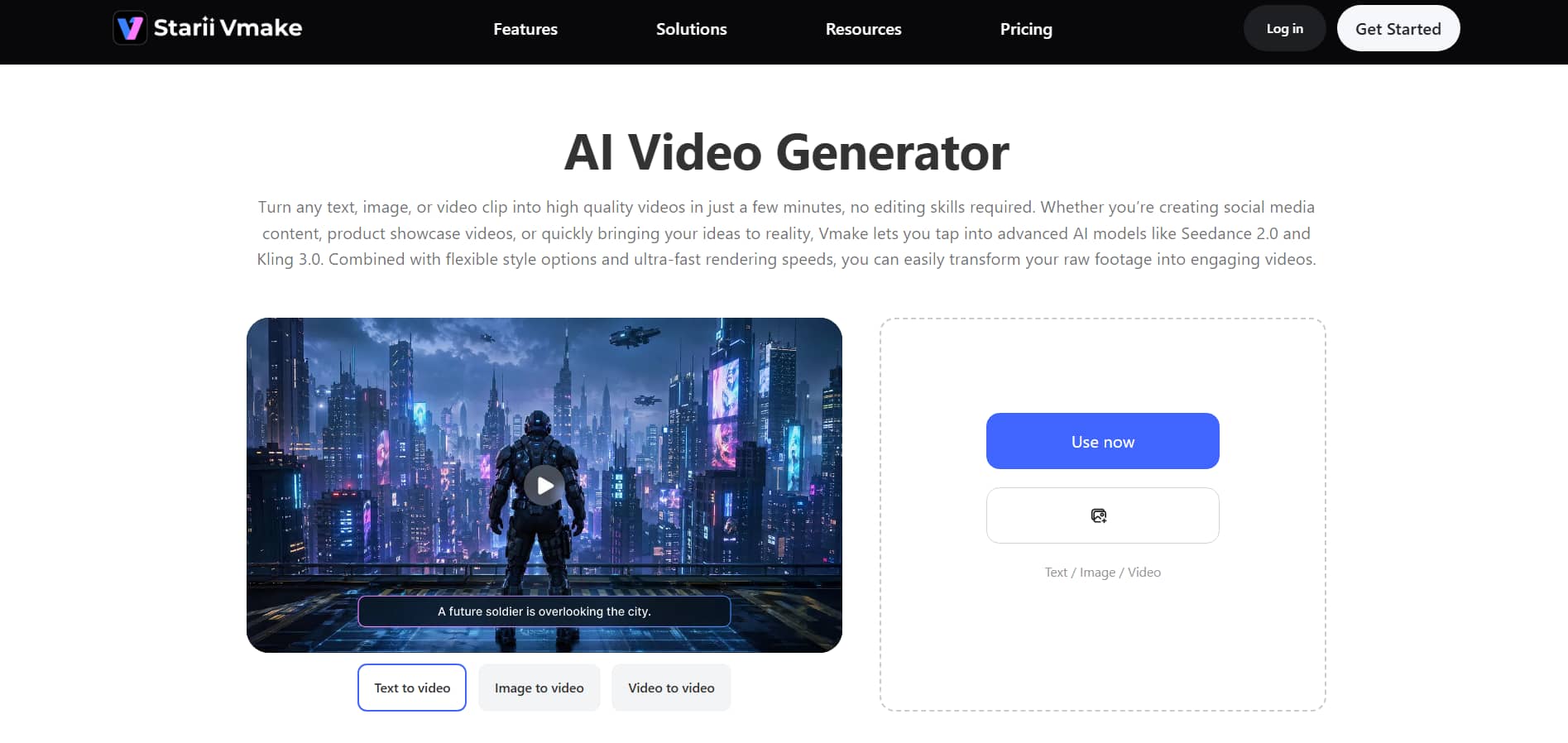
Vmake is a great alternative to Pollo AI in 2026 for a simple, marketing-oriented way to create AI videos. With advanced models like Seedance 2.0, Kling 3.0, Veo 3, Sora 2, and Hailuo 2.3, you can generate high-quality visuals from text prompts, photos, or existing movies. The platform is designed for speed and ease of use, so producers can generate high-quality videos without learning complex editing tools or workflows.
Key features of the Vmake video generator tool
-
Multi-modal AI for video generation: Vmake unites sophisticated AI models, including Seedance 2.0, Kling 3.0, Veo 3, Sora 2, and Hailuo 2.3 on a single platform. You don't have to bounce between multiple tools to get different styles or results.
-
Text, Image, and Video-to-Video Generation: There are 3 simple ways to generate videos: by providing a text prompt, by uploading an image, or by repurposing an existing video.
-
Clean, no-ad experience: Vmake is about a distraction-free workstation where you can focus exclusively on producing. No unnecessary pop-ups or clutter, which makes the experience smoother.
-
Rich visual styles for any content: Vmake provides a variety of visual styles ranging from Japanese and American comic looks to more Eastern-inspired aesthetics. This makes it easy to tailor your video style to the kind of content or platform you're generating for.
-
High-resolution output with precise control: You can create films up to 4K resolution, and you have complete control over how long your video is, from 2 to 15 seconds.
-
AI video enhancer to improve quality: Vmake also offers an AI video enhancer that transforms low-quality videos into clean, high-resolution visuals with a single click. It can sharpen details, decrease blur, and smooth motion, even at 4K and beyond.
How to create videos with Vmake?
Step 1: Open the AI video generator
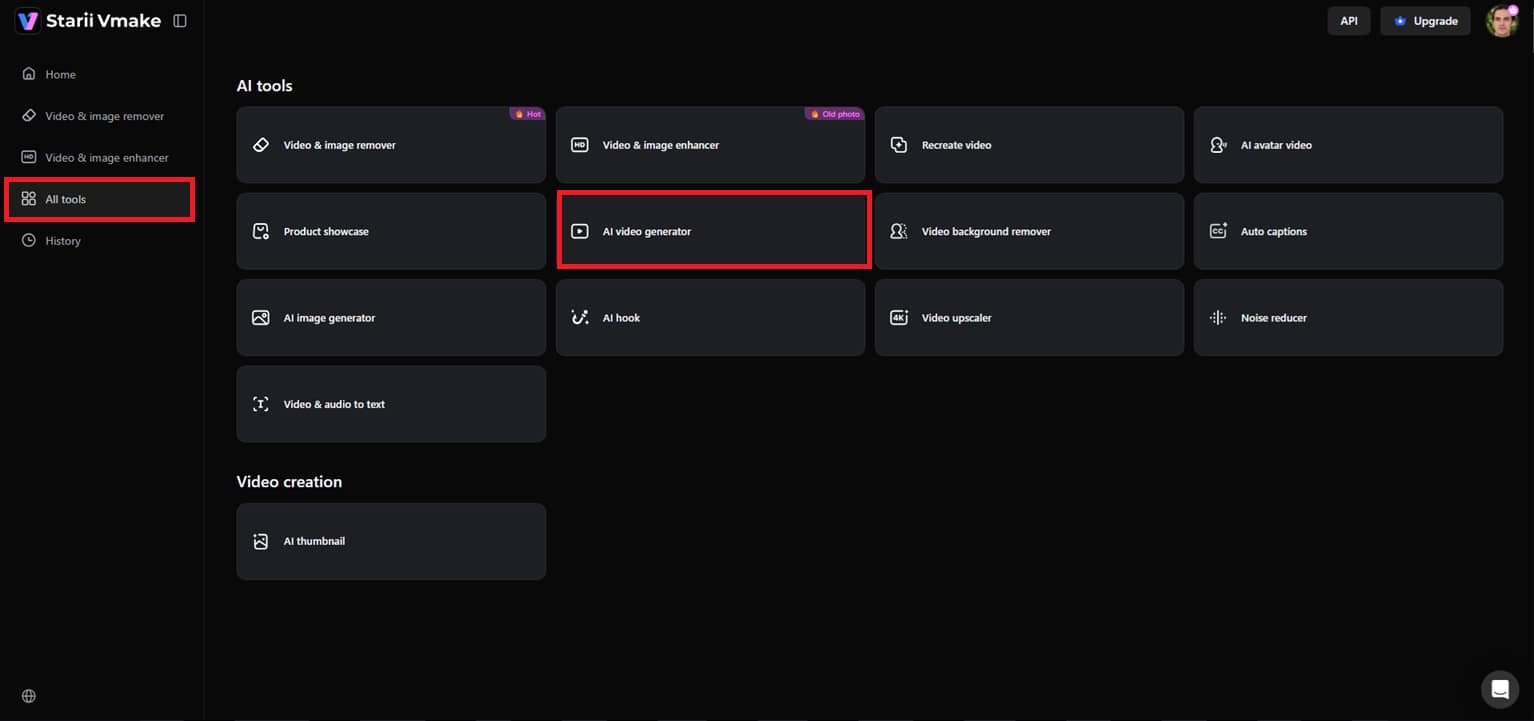
So, let's begin with the left-side menu. Click on "All Tools." Scroll down till you see "AI Video Generator" and click on it. This takes you to the primary workspace where you can start building your video.
Step 2: Set up your video creation
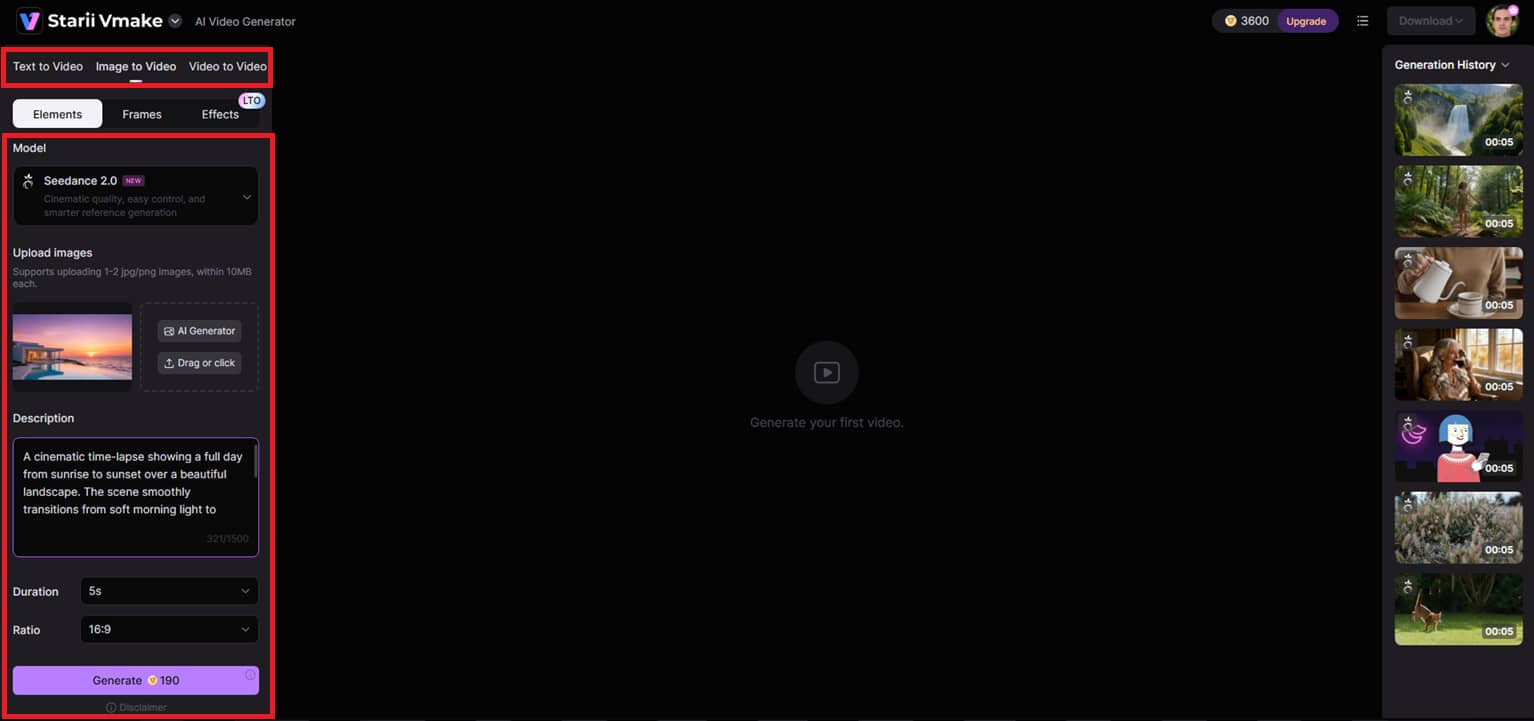
Select your video generation method from the left panel in text to video, image to video, or video to video inside the editor. Then select your favorite AI model, upload reference photos if you want, write a comprehensive prompt, and adjust parameters such as video duration and aspect ratio. When everything looks good, click “Generate.”
Step 3: Preview and download your video
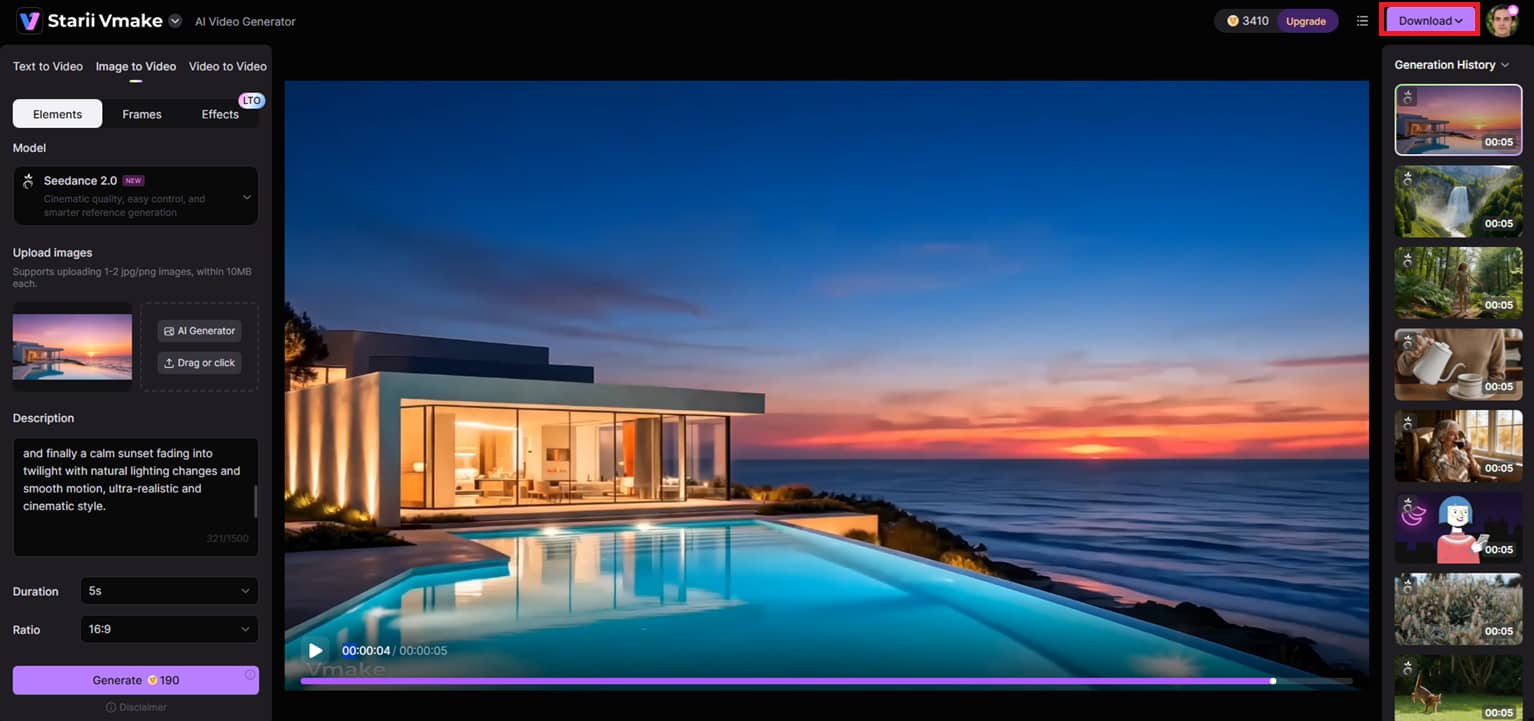
Your AI video is ready in seconds. You can preview it to see the visuals, motion, and the overall output quality. If you like the result, just click "Download" at the top to export your final video.
Pollo AI vs Vmake AI: Which is the best
|
Aspects |
Pollo AI |
Vmake AI |
|---|---|---|
|
AI models & variety |
Creative flexibility with a diverse variety of models like Veo 3, Sora 2, Kling AI, Runway, PixVerse AI, and many more. |
A more concentrated, streamlined setup with top models like Seedance 2.0, Kling 3.0, Veo 3, Sora 2, and Hailuo 2.3. |
|
Video styles & transformations |
Supports the full range of artistic genres, from cinematic, anime, fantasy, and experimental AI effects |
Strong video-to-video style changes such as anime face, comics, doodle, 3D animation, horror comics, idol, and clay style |
|
Ease of use |
A feature-rich platform with various tools and effects, which may be intimidating for beginners. |
Simple, clean workflow designed for quick generation with minimal steps. |
|
Content focus |
Awesome for viral content, AI effects, avatars, and creative narrative experiments. |
Specializes in UGC videos, product advertisements, marketing material, and social media creatives. |
|
Editing & output control |
Offers advanced editing options, AI effects, avatars, lip sync, and multiple creative tools. |
No significant editing options. Focuses on fast creation, consistent output, 4k quality, and fast enhancing tools. |
If you're looking for entertaining, adventurous, and super creative AI video styles, Pollo AI is a great option. But if you are all about UGC ads, marketing videos, and fast stylized video creation with clean outcomes, then Vmake AI is more practical and business-friendly.
Conclusion
In this article, we have discussed the Pollo AI process and why it is increasingly popular for creating AI videos with diverse models, styles, and effects. It's a terrific choice if you like experimenting with creative ideas, making anime-style clips, or creating eye-catching social media content.
Tools such as Vmake AI provide a more targeted strategy for UGC films, product advertising, and rapid marketing content. If you want to be creative, Pollo AI is a good alternative. However, for speed, simplicity, and business-ready videos, Vmake AI would be a better everyday pick in 2026.
FAQs
How does Pollo AI text-to-video generation work?
Pollo AI text-to-video generation takes your textual prompt and automatically turns it into a full video with scenes, action, and visual storytelling. Simply tell it what you want to see, and the AI will produce it in seconds, with no manual editing necessary. If you want a more structured & creative approach with marketing-focused output, try Vmake. It also offers text-to-video production with neater, brand-ready outcomes.
What is the best alternative to Pollo AI?
While the best Pollo AI alternative depends on your needs, Vmake is one of the greatest solutions for those creating advertising, UGC videos, and social media marketing material. It makes things easier and creates more usable, ready-made outputs. Pollo AI is more experimental and style-heavy, while Vmake is geared for speedier production and consistent outcomes, especially for business applications.
Is the Pollo video tool good for YouTube Shorts and TikTok videos?
Yes, Pollo AI is really effective for YouTube Shorts and TikTok, as it offers fast generation, innovative effects, and trending styles that help capture attention quickly. It's great for fun, viral, and experimental material. Vmake is a good alternative for short-form films, especially if you're interested in UGC-style commercials or more refined, brand-oriented social media posts.
Does the Pollo video tool add watermarks to exported videos?
Pollo AI's free plan typically adds watermarks, while higher plans remove them and offer better export quality and more advanced features. This is typical of most AI video services. In a similar vein, Vmake likewise offers a tiered structure in which higher plans deliver clean, watermark-free films more appropriate for professional and commercial use.
Can beginners use Pollo easily?
Yes, Pollo AI is beginner-friendly because it lets users create videos with simple prompts, reference images, and prebuilt tools, without any editing knowledge. It’s built to make video creation fast and accessible. Vmake is likewise very straightforward to use and even more simplified, making it a fantastic choice for beginners who want fast results without exploring too many technical features.
Does Pollo AI support image-to-video animation?
Yes, Pollo AI offers image-to-video animation. Users can animate static photos to create animated films with motion, effects, and creative transitions. It's excellent for material on social media and visual storytelling. Vmake can also generate video from images, but it's more focused on creating polished animations that are ready to go for marketing, and is especially good for product advertising and branded content.

You May Be Interested

5 Top Shoppable Video Generators for TikTokers in 2026
OpenClaw 2026: Ultimate Guide to World-Changing Local AI
Remove Sora 2 Video Watermark Easily with Vmake AI