
X-Design Video Enhancer: Is It Worth Trying in 2026?
 Ken DawsonJanuary 23, 2026
In this fast-paced world of digital content creation, video quality can make or break a project. Whether you are a social media influencer, YouTuber, or a business looking to boost their brand, the importance of high-quality videos is undeniable. That is when X-Design Video Enhancer comes in handy.
This remarkable tool promises to enhance and upscale low-quality videos with minimal effort. What makes it unique is its quick, automated processing. But does it really work?
In this guide, you will learn everything about X-Design Video Enhancer, including its benefits, drawbacks, and comparison with the popular alternatives.
Introduction to X-Design Video Enhancer
X-Design Video Enhancer is a powerful browser-based solution that helps enhance and upscale low-quality footage without technical requirements. You can also use its watermark and background remover to enhance your videos. However, it serves as a pillar of the broad X-Design platform, popular for image editing, design, and content creation. With a user-friendly interface, powerful e-commerce tools, and advanced photo editing features, X-Design is suitable for graphic designers, creators, educators, and casual users.
Additional Features:
Design Agent: This AI agent helps you generate a logo, flyer, poster, menu, mockup, business design, food photos, brand color palette, style guide, and more with just a single text prompt.
Image Tools: It offers a range of AI image tools to help remove or replace backgrounds, erase watermarks, enhance or upscale images, change colors, and extend pictures with ease.
AI Photo Editor: This works best if you want to edit photos in one place. You can resize, retouch, remove objects, enhance quality, and generate backgrounds quickly and accurately.
E-Commerce Tools: Whether you need to create a product background, a fashion model, a virtual try-on for clothes, change a shirt or clothing color, or generate an outfit, X-Design can facilitate this for you.
Video Tools: It helps you generate videos from text or images, remove text or watermarks, and erase backgrounds.
Performance Review of X-Design Video Enhancer
X-Design Video Enhancer is a beginner-friendly online tool that is capable of improving video quality with a few clicks. It uses advanced AI to automatically sharpen video details, correct imperfections, reduce noise & artifacts, and adjust colors in seconds, resulting in high-quality output.
With support for MP4, M4V, and MOV formats, it also lets you upgrade the video resolution to 1080P, 2K, or 4K without signing up. So, you can easily restore old memories and fix blurry clips.
It even allows you to preview the video enhancement process in real time. Whether you’re a YouTube creator or a beginner in video editing, it can help enhance videos for daily vlogs, advertising, and online courses.
X-Design Video Enhancer: Step-by-Step Tutorial
Although you can use X-Design Video Enhancer without hassle, here are the steps to help you get started:
Step 1. Access X-Design Video Enhancer
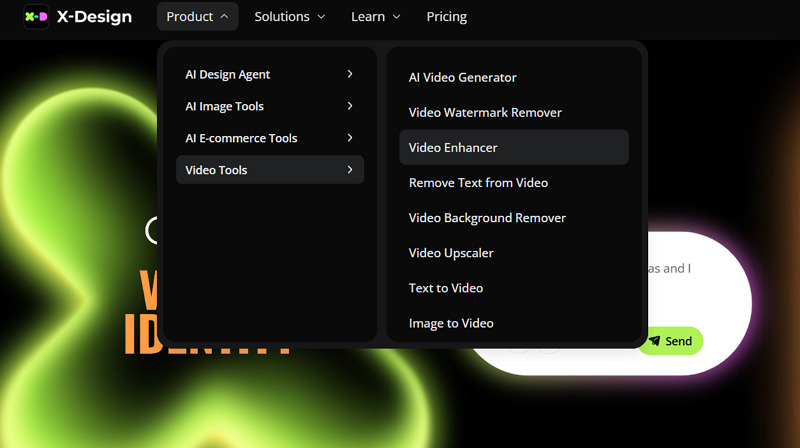
The first step is to open the X-Design official website and click “Product” > “Video Tools,” and choose “Video Enhancer.”
Step 2. Upload Video File
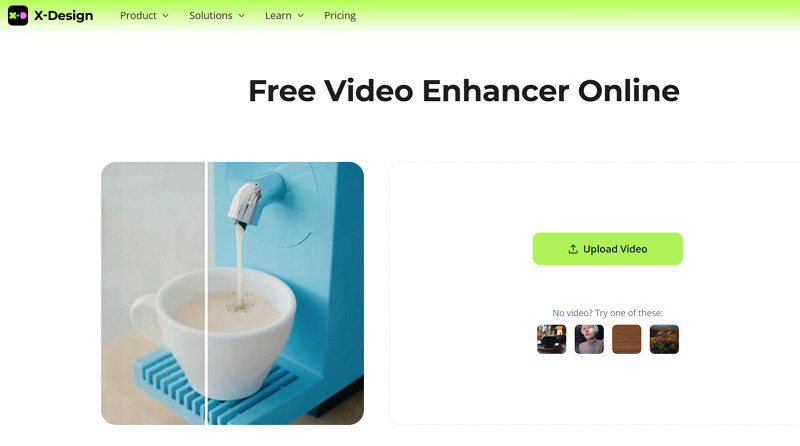
Now, press “Upload Video” to browse and import a video. You can also use the sample videos to practice beforehand.
Step 3. Enhance Video
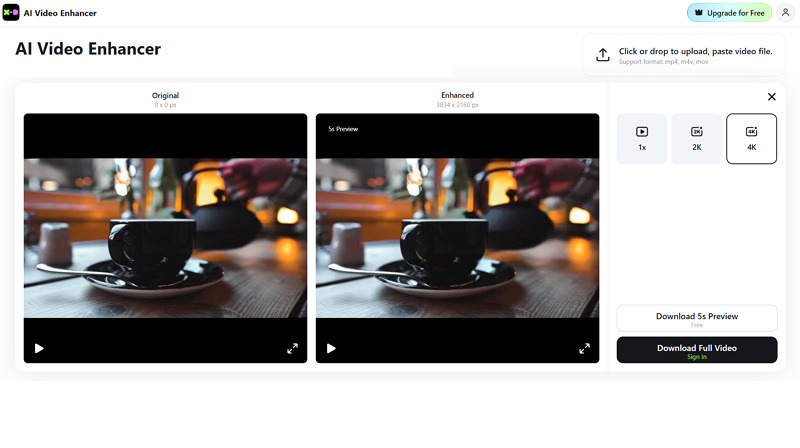
Lastly, you can choose from “1K,” “2K,” or “4K” options and tap “Enhance.” Once done, hit “Download 5s Preview” or “Download Full Video.” That’s all!
Pricing & Plans of X-Design Video Enhancer
X-Design Video Enhancer offers subscription models but works on credits system. Let’s look at the table below to understand the pricing structure better:
Plan | Pricing | What’s included |
Free | $0 | 20 agent credits daily Limited AI image removal Limited image upscaling & enhancement |
Plus (Monthly) | $9.99 | 200 credits/month 100 agent credits monthly Unlimited AI image removal Unlimited image upscaling & enhancement Up to 10 AI video enhancements daily Up to 10 AI video watermark removal daily |
| Plus (Yearly) | $69.99 | |
Pro (Monthly) | $29.99 | 700 credits/month 300 agent credits monthly Unlimited AI image removal Unlimited image upscaling & enhancement Up to 30 AI video enhancements daily Up to 30 AI video watermark removal daily |
| Pro (Yearly) | $249.99 | |
Enterprise | Let’s talk! | AI Background Remover Image Enhancer Image Color Changer Private Models Other AI Tools |
Credits | $6.99 | 20 credits |
| $12.99 | 50 | |
| $19.99 | 100 | |
| $49.99 | 300 | |
| $69.99 | 500 | |
| $89.99 | 1000 | |
| $149.99 | 2000 |
Top X-Design Video Enhancer Alternatives
While X-Design Video Enhancer is a handy AI enhancement solution, you should compare it with popular alternatives such as Vmake, HitPaw, and Aiarty. Here is the comparison table with the key aspects:
Tool | Platform | Ease of Use | Output Quality | Key Feature |
X-Design Video Enhancer | Web | Easy | Good | Offer quick and auto enhancement and upscaling of short video clips |
Web, Mobile (Android & iOS) | Easy | Best | Professional video-specific enhancement, adjustment, and restoration with support for 4K+ upscaling | |
HitPaw Video Enhancer | Web, Desktop (Win & Mac), Mobile (Android & iOS) | Complex | Best | High-quality video enhancer with support for up to 4K/8K upscaling |
Aiarty Video Enhancer | Desktop (Win & Mac) | Complex | Good | General AI video enhancer offering quick 4K upscaling and fine-detail enhancement |
X-Design Video Enhancer: Pros & Cons
To learn more about X-Design Video Enhancer, it’s crucial to consider both its benefits and drawbacks. Let’s have a look:
Pros:
Ideal for both beginners and professionals
One-click video and image enhancement
Help enhance short videos within seconds
AI-powered upscaling to 4K resolution
Offer an extensive range of design tools
Provide a mobile-friendly image editing app
Cons:
Slow processing speed during peak times
Lack of manual adjustments and control
Allow only a five-second preview for free
The output may look distorted or overprocessed
Advanced features are behind a paywall
User Reviews
To better assess the performance of X-Design Video Enhancer, here is the real user feedback to consider:
Trustpilot: 3.8/5 (40 reviews)
I have been using X design for the last 5-6 months & I am a satisfied user. I have extensively used X-Design to enhance the video for my favourite songs. While many improvements are made in X design during these times, there is still scope to make it more user-friendly & further improve the upscaling/enhancement of Video quality to the extent that some YouTube channels do & upload. - Rajesh Sharma
Frequently Asked Questions about X-Design Video Enhancer
1. Is X-Design Video Enhancer safe to use?
X-Design Video Enhancer is completely safe to use from a technical standpoint. Its regular security updates protect your data; however, you should avoid uploading personal or confidential videos.
2. Does it enhance videos from YouTube or TikTok?
Of course. X-Design Video Enhancer can enhance videos from YouTube, TikTok, and other social platforms. However, the videos must already be downloaded.
3. Is there a money-back guarantee?
Yes. If you purchased the Pro Plan and have not used it within 7 days, you’re eligible for a full refund. However, if you purchased credits, you’re eligible to receive a refund for unused credits within 7 days.
Conclusion: Is X-Design Video Enhancer Worth It?
X-Design Video Enhancer is an excellent tool for users looking for a simple yet effective way to improve video quality. It can automatically enhance video sharpness and reduce noise, but lacks advanced AI models and restoration capabilities.
However, if you are looking for such advanced features to enhance videos with professional-quality output, Vmake Video Enhancer is a powerful alternative. It offers a user-friendly interface with 2K, 4K, and 4K+ upscaling, as well as one-click processing. Try it today and enjoy video-specific restoration!

You May Be Interested

Seedance 2.0: What's New & How to Use It

123APPS Watermark Remover Review (2026): Pros, Cons, and Pricing

5 Best Valentine's Day Video Ideas for eCommerce in 2026

How to Create a YouTube Thumbnail? Create YouTube Thumbnails Using AI
