
2026 Pixelbin AI Watermark Remover Review [Tested]
 Ken DawsonDecember 15, 2025
PixelBin AI Watermark Remover has caught attention for being fast, easy, and capable of removing watermarks from images, videos, and PDFs without sacrificing quality.
In this review, let’s take an in-depth look at what PixelBin AI Watermark Remover offers, how well it performs, how easy it is to use, where it stands compared to other tools in the market, and whether it’s the right choice for your needs.

Pixelbin AI Watermark Remover: What Does It Bring to the Table
Pixelbin AI Watermark Remover is an advanced tool that automatically detects and removes watermarks from your files. It uses inpainting technology that analyzes the pixels around the watermark and rebuilds the area so it looks natural, as if the watermark had never been there.
It’s a part of a versatile platform, built for people who need quick, efficient results without a learning curve, such as creators, editors, marketers, small businesses, and even developers who need automated image processing. It also supports batch processing, cloud storage, and optional API integration for advanced use.
Additional Features:
- Batch Processing: It can handle a large volume of images, allowing you to process up to 50 images at once in just a few clicks.
- Image Adjustment: You can also crop the image dimensions and adjust parameters such as hue, saturation, and brightness.
- AI Apps: For seamless photo editing, it offers a range of AI apps, including a headshot generator, an image upscaler, and a background remover.
Pixelbin AI Core Capabilities & Real-World Performance
Pixelbin is a comprehensive, AI-driven watermark removal tool that supports a range of file types. I tested Pixelbin on several watermarked samples to evaluate its capabilities. Here is a breakdown of its standout features and how it performed in my hands-on experience:
Pixelbin Video Watermark Remover
Pixelbin Video Watermark Remover can remove both dynamic and static watermarks, but the results vary. It can detect and remove unwanted text, logos, stamps, and marks, delivering clean, high-quality output.
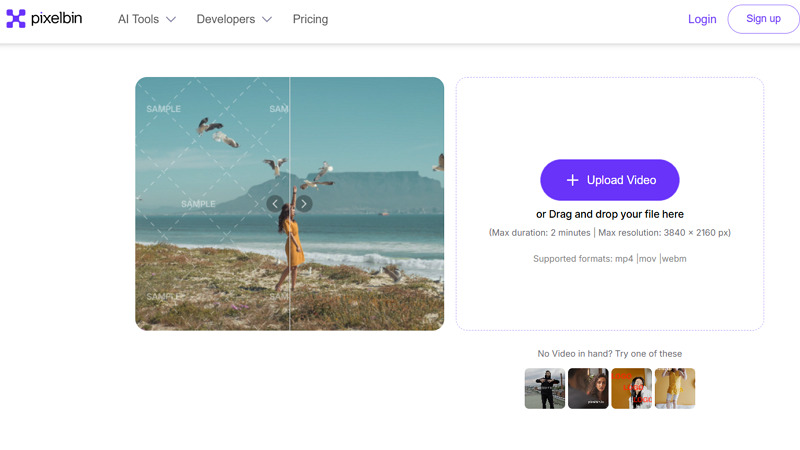
The supported formats include MP4, MOV, and WebM. However, the maximum duration is 2 minutes, and the maximum resolution is 3840 x 2160 px. It also lets you preview the first five seconds of video for free without signing up.
Pixelbin Image Editing Solution
Images were Pixelbin’s strongest area during my testing. It can remove text overlays, semi-transparent logos, signatures, objects, and stickers from your images without leaving odd smudges. You can either use the AI detection for quick fixes or the manual brush for complex tasks.
Pixelbin PDF Watermark Remover
Pixelbin offers a free AI PDF Watermark Remover so your documents with DRAFT or CONFIDENTIAL stamps come out clean in seconds. Pixelbin can remove watermarks from each page individually while preserving the PDF’s layout, formatting, and text. You can either upload a PDF or paste a URL to erase signatures or image-based logos.
Pixelbin Cross-Platform Compatibility
Something I appreciate about PixelBin is how easy it is to access. The tool is web-based and responsive, so it runs on any device, including desktops, phones, and tablets. For people who switch between devices (like I often do), this is convenient. It also offers official Android and iPhone apps.
Pixelbin API Support
Pixelbin’s API is designed for teams or developers who want smooth, automated cleanup. It can seamlessly integrate with your workflows and tools via simple APIs to automatically clean watermarks from photos, videos, or PDFs without human intervention. Not everyone will need this, but it’s a valuable feature for businesses.
Getting Started with Pixelbin AI Watermark Remover
Thanks to its intuitive interface, using Pixelbin AI Watermark Remover is not difficult. However, the image and video process is a bit different. Here is a step-by-step guide based on my experience of removing a watermark from a video.
Guide 1. How to Remove Watermarks from a Video:
Step 1. Import Your Video
The first step is to visit the Pixelbin Video Watermark Remover. Now, click “Upload Video” or drag & drop your video file into the section.
Step 2. Select Any Option
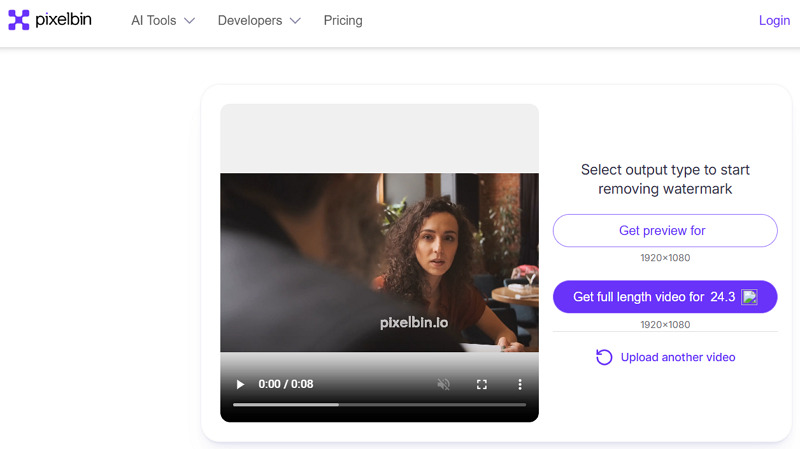
Here, you can either choose the “Get Preview for” or “Get Full Length Video” option based on your requirements.
Step 3. Preview and Download
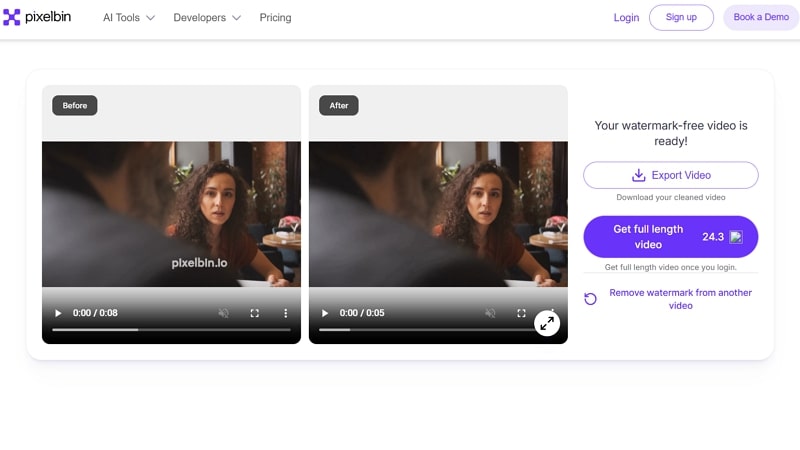
Lastly, when it provides the watermark-free video clip, press the “Export Video” button, and you’re all done.
Guide 2. How to Use the Pixelbin Image Watermark Remover:
Now, let’s comply with the given steps to remove a watermark from single or multiple images within seconds:
Step 1. Upload Your Image
First of all, visit Pixelbin’s Free AI Watermark Remover site and tap “Upload Image” to import the photo or paste its URL. You can import up to 10 images or use the batch edit option for 50 at once.
 Step 2. Select the Watermark
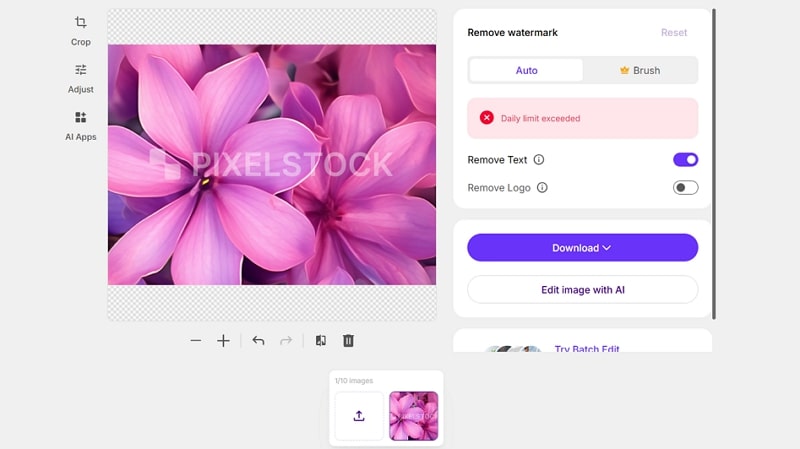
Now, turn on the “Remove Text” or “Remove Logo” switch. Also, you can either use the “Auto” or “Brush” tool to select the watermark.
Step 3. Adjust Parameters
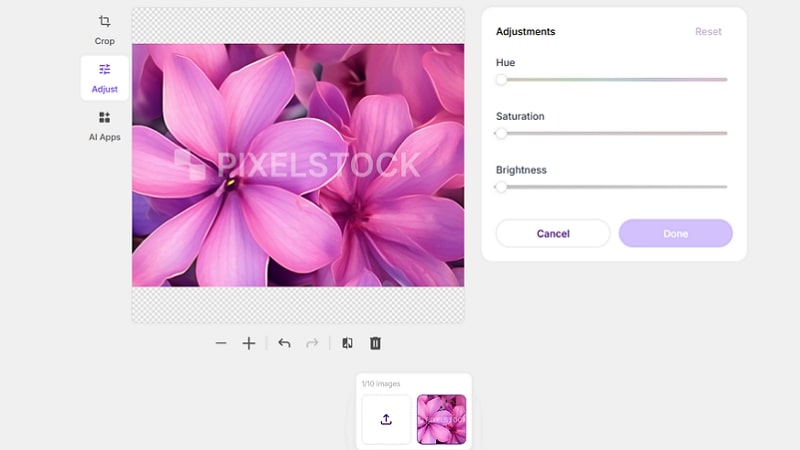
It’s time to try the “Crop” or “Adjust” its hue, saturation, or brightness with the sliders. You can even use the “AI Apps” to enhance your picture.
Step 4. Download Output
Once done with all the processing, press the “Download” tab, and hit “Download SD” or “Download HD.” That’s all!
Pricing Review of Pixelbin
Pixelbin uses a credit-based system. The free plan is enough to try it, but not enough for regular use. Paid plans vary depending on how heavily you need the tool. Here is a table for understanding the pricing plans better:
| Plan | Credits/Price | What’s included |
| Free | 3 credits per month/$0 | Limited access to all AI tools |
| Pay as you go | 50 credits/$9 200 credits/$22 500 credits/$45 1000 credits/$80 |
|
| Lite plan | 150 credits/$9 (Billed Monthly) 1800 credits/$6 per month (Billed Yearly) |
|
| Pro plan | 500 credits/$29 (Billed Monthly) 6000 credits/$21 per month (Billed Annually) |
|
| Enterprise plan | Talk to Sales |
|
Pixelbin AI Watermark Remover Alternatives: The Comparison
Although Pixelbin AI Watermark Remover is powerful, plenty of similar tools are available in the market. For a comprehensive review, here is a comparison table, including Pixelbin, Vmake, Fotor, HitPaw, and AirBrush:
| Tool | Pricing Model | Best for | Output Quality |
| Pixelbin AI Watermark Remover | Free with credits | Supports video, image, and PDF watermark removal, but truly excels at removing watermarks from images | High |
| Vmake Video Watermark Remover | Free, Subscription | Free one-click watermark detection and removal. Specialized in handling dynamic video watermarks | High |
| Fotor Watermark Remover | Free, Subscription | Capable of removing image watermarks; however, it can satisfy occasional video watermark removal needs | Medium |
| AirBrush AI Watermark Remover | Free with credits, Subscription | Supports both video & image watermark removal, but is more focused on images | Medium |
Pros and Cons of Pixelbin AI Watermark Remover
Let’s have a look at some advantages and disadvantages of this watermark remover:
Pros:
- A range of AI tools
- Easy to use and navigate
- Browser-based functionality
- Support photo, video, and PDF
- Support batch processing
Cons:
- Limited free plan
- Full video processing requires credits
- No desktop-based software
- Lesser-known than major competitors
Real User Reviews
To have an idea about customer satisfaction, I’ve looked at Pixelbin ratings on platforms like Trustpilot and G2. Let’s consider a few:
Trustpilot: 1.5/5 (30 Reviews)
Absolute scam! Same as all the other reviews, the watermark remover works perfectly on the free images, then as soon as I’ve paid, it fails to remove watermarks and leaves blurry lines all over the images. The ‘support’ is beyond laughable. DO NOT waste your money. –C Richard
G2: 4.7 (6 Reviews)
I love the UI. It’s a nice minimalist format that still has everything I need, with everything in locations that don’t require too many clicks. The transformations are quick and don’t take too long. I haven’t found anything to dislike about it aside from wishing that the price plans weren’t such a jump. –Kyle M.
FAQs about Pixelbin AI Watermark Remover
1. Is Pixelbin AI Watermark Remover safe?
Yes. From a technical and privacy standpoint, Pixelbin AI Watermark Remover is safe to use. It’s a professional platform used by many businesses due to its security measures, like encryption.
2. Can I use Pixelbin AI Watermark Remover for commercial projects?
Absolutely. Pixelbin is designed for commercial use as part of its content workflow. In fact, it offers an enterprise plan for marketing teams, e-commerce, and other professionals.
3. Does Pixelbin offer a money-back guarantee?
No. Pixelbin doesn’t offer refunds for unused credits or subscriptions. This means you won’t get your money back for the remaining portion of the monthly or annual plan when you cancel.
Final Verdict: Is Pixelbin Worth Using in 2026?
After trying PixelBin on several types of content, I was impressed by how quickly it cleaned watermarks without hassle. The workflow is simple, and it handles images, videos, and PDFs with consistent quality. However, it can struggle with complex watermarks. If you regularly deal with watermarks and want an easy, browser-based interface, PixelBin is a practical and reliable option for 2026.
But so is Vmake Video Watermark Remover, which has a more generous free offering for video specifically. In fact, if you’re primarily concerned with removing watermarks from videos and want to do it with minimal cost, you should give Vmake Video Watermark Remover a try first.

You May Be Interested

Seedance 2.0: What's New & How to Use It

123APPS Watermark Remover Review (2026): Pros, Cons, and Pricing

5 Best Valentine's Day Video Ideas for eCommerce in 2026

How to Create a YouTube Thumbnail? Create YouTube Thumbnails Using AI
