
Picwand Video Enhancer: Transforming Visuals with Artificial Intelligence
 Ken DawsonJanuary 26, 2026
Whether you need to restore old footage, remove grain & noise, increase resolution, or do other related tasks to improve video quality, finding the right video enhancement tool is essential. One name that frequently pops up in this regard is Picwand Video Enhancer.
This cutting-edge tool is designed to transform low-quality videos into high-definition masterpieces. What makes it stand out is its clean interface and AI-powered upscaling capabilities. But how well does it perform, and for whom is it best suited?
In this review, you will learn everything about Picwand Video Enhancer, including its strengths & limitations, and its alternatives.
Introduction to Picwand Video Enhancer: A Beginner’s Guide
Picwand Video Enhancer is a fantastic tool that uses AI technology to automatically enhance, upscale, and interpolate with minimal effort. Besides, it is a part of the broader platform Picwand AI, known for creating, editing, and stylizing images and videos with AI. Its user-friendly interface, unique video effects, and a range of image-editing features make it ideal for casual users, content creators, and graphic designers.
Additional Features:
AI Video Generator: It helps create videos from images or text prompts using advanced AI models, including Sora 2 and Google VEO 3.1, etc. You can also set the output resolution, aspect ratio, duration, background music, etc.
AI Image Tools: You can access a variety of tools to enhance, restore, upscale, and stylize your images, as well as improve their resolution, remove backgrounds, and erase objects with a click.
Photo Editing Tools: Its built-in editor facilitates resizing, cropping, converting, compressing, beautifying, and optimizing photos for any use.
AI Video Effects: It offers a range of video effects to try, such as dance, cheek kiss, family heart, Christmas, hair color changer, and smile effect.
Key Functionalities of Picwand Video Enhancer
Picwand Video Enhancer is a powerful enhancement solution available on all platforms, i.e., online, desktop, and mobile. After using all of its versions, here are my insights:
Picwand AI Video Enhancer (Web)
Picwand AI Video Enhancer is a remarkable cloud-based AI tool that enhances blurry or low-quality visuals with the desired model settings. It can automatically remove noise, sharpen, correct colors, and upscale up to 4K or 8K resolution without losing details. Its deep learning models analyze and fill in missing details, breathing new life into archival footage.
You can even increase your videos’ frame rate to smooth their motion with a single click using the Video Frame Interpolation feature. With support for multiple video formats and a simple workflow, it is suitable for personal and social media platforms.
Picwand Video Enhancer (Desktop)
For those who prefer fast processing and more stable performance, the desktop version is the top solution. Picwand Video Enhancer offers an extensive range of AI modes, including general enhancement, colorize model, low-light enhancement, detail restoration, frame interpolation, video quality repair, video denoise, etc.
What’s more? You can enhance video quality based on your video type, i.e., film, TV series, documentary, AI-generated video, game recording, and many more. It even supports batch processing, various export formats, resolutions, and encoders.
Picwand AI Photo Video Editor (Mobile)
When it comes to the Picwand mobile version, it allows generating, editing, and enhancing videos and photos. Whether you are a beginner or a professional, its AI technology delivers stunning, professional-grade edits in just one tap. Beyond its photo and video magic, it can boost clarity, resolution, and details with ease. It is suitable for social media influencers, educators, travelers, artists, and anime lovers.
Step-by-Step Tutorial to Use Picwand Video Enhancer
Since Picwand Video Enhancer works differently across web, desktop, and mobile, below are the tutorials for each one to facilitate you. Let’s comply with the given steps, depending on the platform you’re using:
Guide 1. How to Enhance Videos Online
Step 1. Access Picwand Video Enhancer
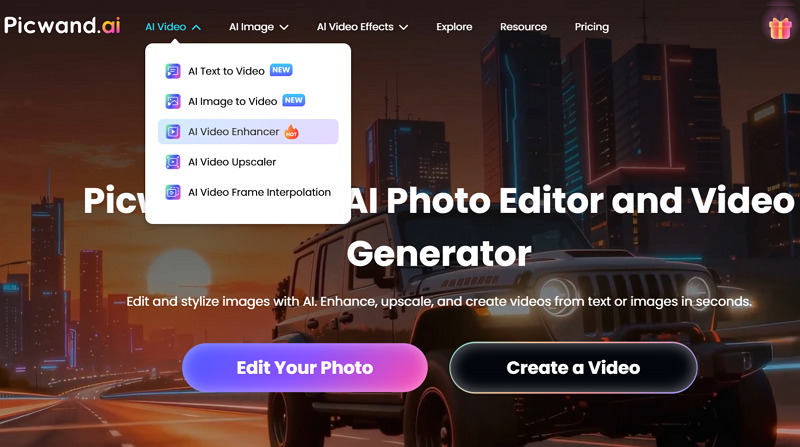
The first step is to open the Picwand AI tool in your browser. Now, expand the “AI Video” menu and tap “AI Video Enhancer.”
Step 2. Upload Video File
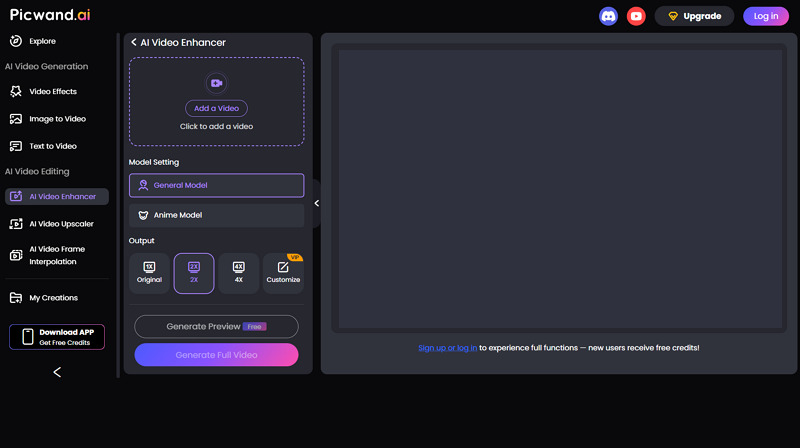
Next, click “Add a Video” to import the video file. Then choose the preferred model (General or Anime) and the output resolution.
Step 3. Enhance and Download
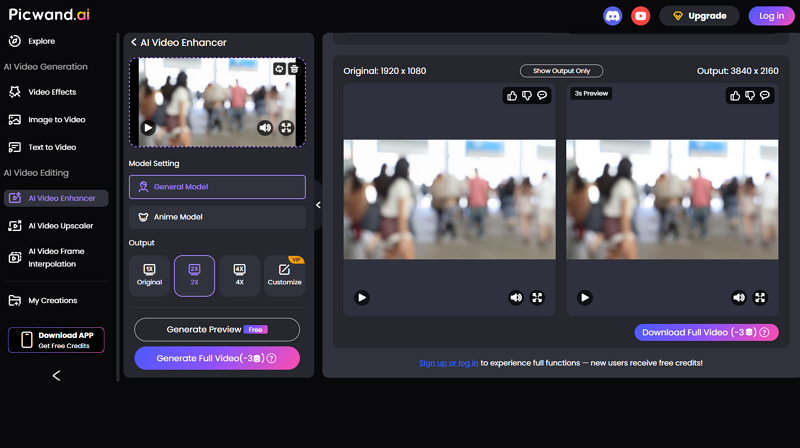
Lastly, press “Generate Preview” or “Generate Full Video.” Once processed, preview the output and if it’s okay, download to your device. That’s all!
Guide 2. Steps to Use Picwand Video Enhancer on Desktop
Step 1. Import Video
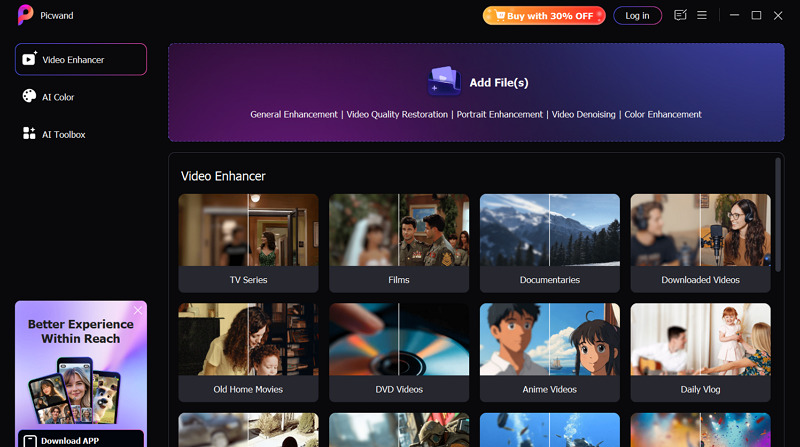
After downloading and installing, launch it on your PC. Now, click “Add File(s)” to browse and download the video.
Step 2. Select the Enhancement Model
Next, you can choose the AI enhancement model from the available options in the side column. Also, select the output resolution from the drop-down menu.
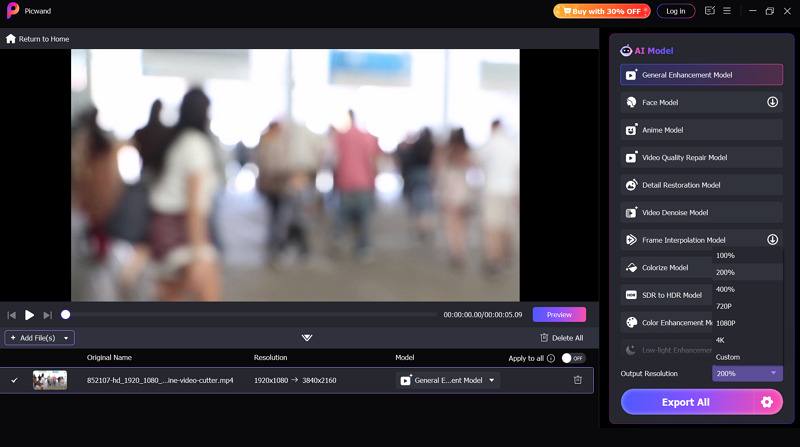
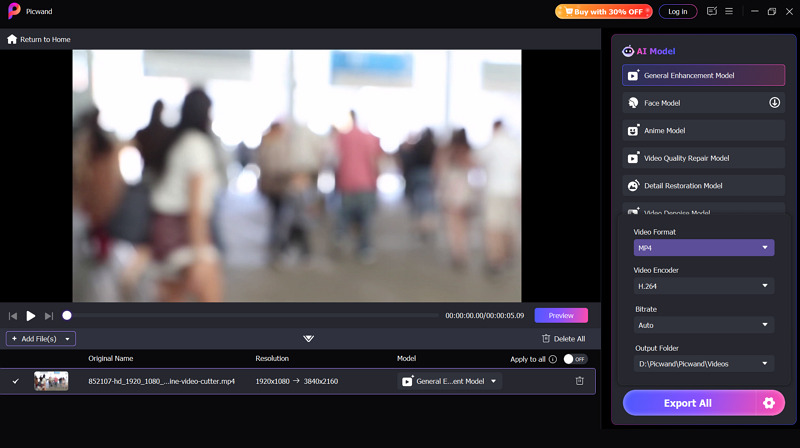
Step 3. Preview and Export
Finally, press the “Preview” button to see the results. If the enhanced video seems fine, tap the settings icon, pick format, encoder, and bitrate. Then, hit “Export.”
 Guide 3. How to Enhance Videos on Mobile
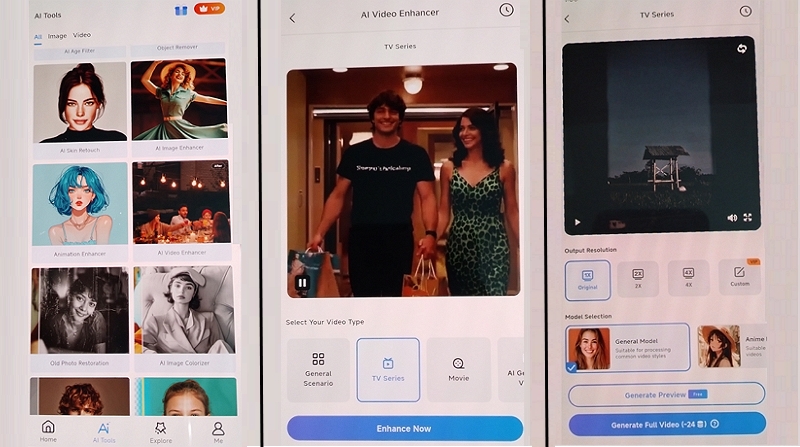
Step 1. Open AI Tools
First of all, install and launch the application. Now, tap “AI Tools” from the drop-down menu and open the “AI Video Enhancer” tool.
Step 2. Enhance Video
It’s time to select the video type and press “Enhance Now.” Next, upload the video file and choose the general or anime model, along with the resolution.
Step 3. Generate and Download
The last step is to click “Generate Preview” or “Generate Full Video.” Once processed, download the output to your phone. All done!
Picwand Video Enhancer: Pricing Plans
Picwand Video Enhancer offers a subscription system, along with additional credits. Also, it works differently for mobile and desktop platforms. Let’s consider the table below to better understand the pricing structure:
Plan | Pricing (Credits) | What’s included |
Online & Desktop | ||
Monthly | $14.9 (100) | Access to all features Export the full processed video Watermark-free preview VIP is valid across all platforms Free upgrades Video resolution up to 8K Batch processing 5GB cloud storage Fast processing |
| Yearly | $84.90 (1500 or 125/mo) | |
| Perpetual | $147.9 (3000) | |
Lifetime Credits | Price | Credits |
| $14.9 | 100 | |
| $34.9 | 300 | |
| $74.9 | 1000 | |
| $124.9 | 2000 | |
| $254.9 | 5000 | |
| $454.9 | 10000 | |
Mobile | ||
Weekly | $5 | 30 |
Monthly | $14.9 | 100 |
Yearly | $84.90 | 1500 or 125/mo |
Perpetual | $147.9 | 3000 |
Picwand Video Enhancer vs Popular Alternatives
To assess the performance of Picwand Video Enhancer, it’s essential to compare it with popular alternatives on the market. So, here is a comparison table of Picwand with Vmake, Aiarty, and Unblur Image:
Tool | Platform | Ease of Use | Custom Options | Key Feature |
Picwand Video Enhancer | Web, Desktop (Win & Mac), Mobile (Android & iOS) | Easy | Yes | Quick, high-quality video enhancement with up to 8K upscaling and frame interpolation |
Web, Mobile (Android & iOS) | Very Easy | Yes | One-click scenario-specific video enhancement and restoration with support for batch processing and upscaling to 4K+ resolution | |
Aiarty Video Enhancer | Desktop (Win & Mac) | Complex | Extensive | Enhance and upscale blurry, noisy, old, and grainy videos to HD/4K resolution, but available only for desktop users |
Unblur Image Video Enhancer | Web | Very Easy | No | Simple AI video quality enhancer with support for up to 2K resolution |
Pros & Cons of Picwand Video Enhancer
To learn more about Picwand Video Enhancer, it is important to know where it performs best and where it falls short. Let’s look at both of them:
Pros:
Cross-platform support
Simple workflow with no installation
Split-screen preview comparison
Various video-based AI presets
Video frame interpolation feature
Auto-adjustment of all video aspects
Cons:
No full-export option for free users
Batch processing is only in the pro version
Lack of video editing functionalities
No preview without signing up
Frequently Asked Questions of Picwand Video Enhancer
1. Is Picwand Video Enhancer safe to use?
Yes, Picwand Video Enhancer claims to implement strict security policies and technical measures to save your personal information from unauthorized access. However, you should be careful when uploading sensitive or confidential videos.
2. Can I use it for commercial projects?
Yes, you can use Picwand Video Enhancer for both personal and business use. However, it is recommended to check the terms of service page on their official website to ensure compliance with the latest regulations.
3. Does it offer a money-back guarantee?
Yes, it has a 30-day money-back guarantee, but only under certain circumstances. It includes duplicate purchases, exchanges for purchasing the wrong product, delayed credits with no response within 48 hours, and more.
Conclusion: Is Picwand Video Enhancer Worth Using in 2026?
This article has provided all the information about Picwand Video Enhancer. It is an excellent AI tool for both beginners and professionals, delivering stunning video enhancement across different platforms with a few clicks.
However, if you’re looking for advanced features such as scene-specific and batch restoration, Vmake Video Enhancer is an excellent alternative. Try it today to enjoy one-click facial enhancement for portraits and detailed processing for gaming visuals!

You May Be Interested

Seedance 2.0: What's New & How to Use It

123APPS Watermark Remover Review (2026): Pros, Cons, and Pricing

5 Best Valentine's Day Video Ideas for eCommerce in 2026

How to Create a YouTube Thumbnail? Create YouTube Thumbnails Using AI
