BeeCut Review: Watermark Remover + Editor
 Ken DawsonMay 3, 2026
It can be hard to find the proper video editor in 2026. There are a vast number of software and tools available for the same in the market, including Beecut. A lot of people want to read a BeeCut review to determine whether it can fix their videos or remove messy watermarks. It says it will be easy for beginners, but will it really be that way in 2026? In this post, we look closely at its tools and features. We will talk about how powerful it is for editing, how well it really removes watermarks, and how much it costs right now. Let's dive in now.
What is BeeCut & does it remove watermarks?
People often say that BeeCut is a quick and easy way to clean up videos, but it's not that straightforward. Most people download it to remove logos, but they are typically startled by what happens afterward. Find out how this tool handles watermarks and whether it really employs AI or just uses clever ways to hide things.
What is BeeCut?
BeeCut is straightforward video-editing software developed by Apowersoft, specifically designed for people who have never edited a video before. It works across Windows, Mac, and mobile platforms, offering a classic drag-and-drop timeline. You get access to essential tools like splitting, merging, and rotating clips without a steep learning curve. It also includes modern touches like speech-to-text for automatic subtitling and various aspect ratios tailored for social media. Because it is owned by a long-standing developer, the software feels stable and secure. Hence, making it a practical choice for beginners who need to produce clean, simple videos quickly and efficiently.

BeeCut watermark remover — does it actually remove watermarks?
If you want to acquire a BeeCut video watermark remover, you need to know what you're getting. A lot of people look for this tool because they want a "magic eraser" that would obliterate logos right away. BeeCut, on the other hand, doesn't really have an AI-powered removal method. BeeCut still uses older manual methods in 2026, even though AI can reconstruct backdrops.
The software doesn't erase pixels; instead, it gives you tools to hide the area you don't want. You can cut off the edges, use a mosaic to obscure the logo, or put a sticker over it. Before you sign up for a $39.95 monthly plan, consider this important aspect. These "workarounds" may help you address things quickly, but they won't provide you with the clean, invisible results that modern AI technologies can.
What BeeCut actually offers for watermark "removal"
BeeCut doesn't really erase pixels to show what's underlying. Instead, it gives you classic editing tips to help you hide or remove trademarks you don't want to appear in. You have to perform hard work manually with these three features because it doesn't have the "magic" of modern automated tools:
-
The crop tool: This is the most usual way to do it. You just have to zoom in on your video till the watermark is no longer in the frame. It removes the logo but also changes the aspect ratio, which could mean you miss critical parts of the footage.
-
The mosaic effect: You can apply a mosaic filter to the watermark without changing your video's size. This makes the logo unreadable by pixelating or blurring the surrounding area. It stays in the same place, but it leaves a big "blurry box" that can be hard for others to see.
-
Overlay stickers or text: This is an easy job to cover up. You can choose a sticker, an emoji, or a text box from the BeeCut library and put it right on top of the watermark. It does a good job of hiding the old logo; however, putting in a random design solely to disguise another one can look unprofessional.
-
No AI inpainting: The biggest drawback is the complete lack of it. Modern tools can analyze the surrounding pixels and "rebuild" the background once a watermark is removed. BeeCut cannot do this. If you remove a logo, you are left with a hole that must be covered, rather than a seamless, clean background.
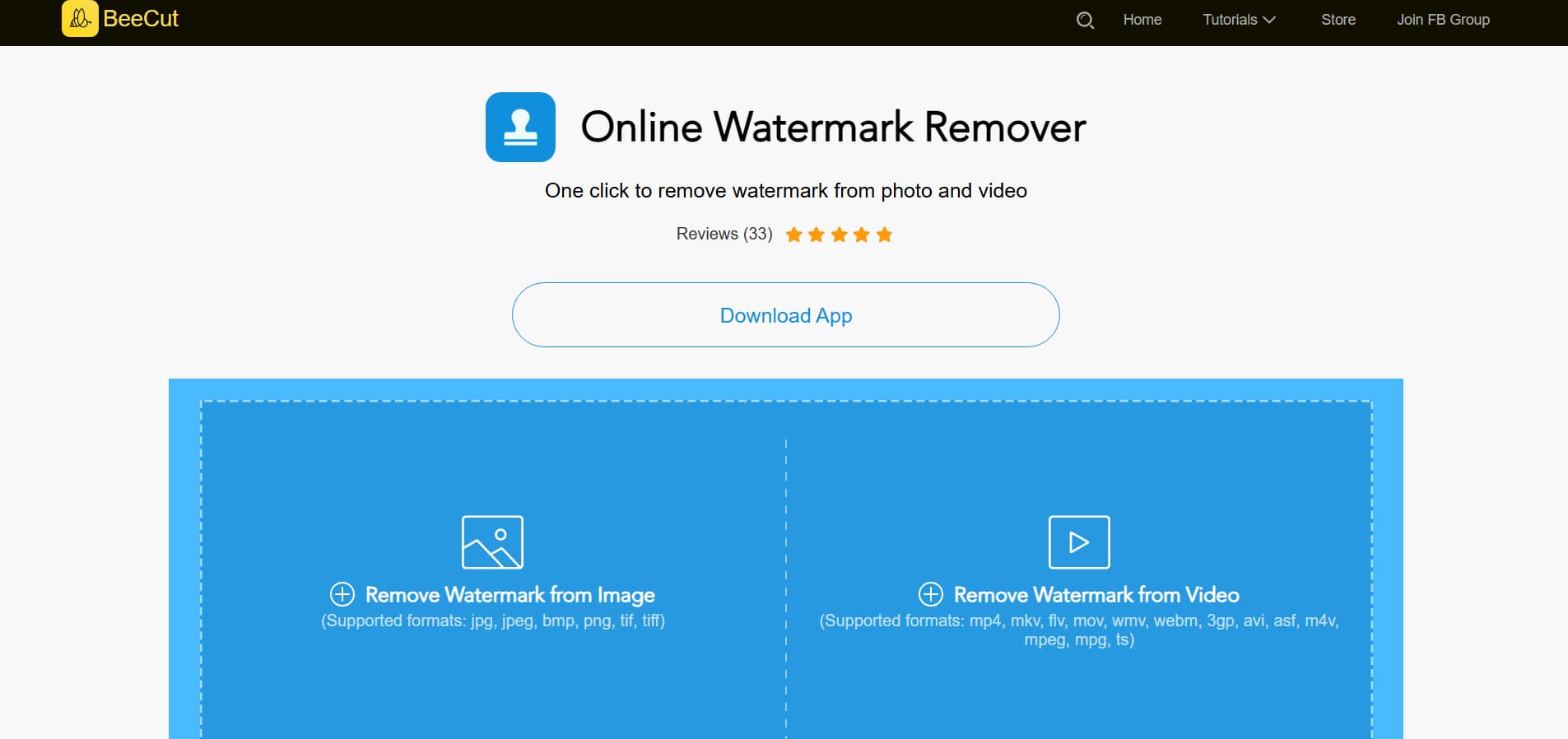
BeeCut online watermark remover — what it is
The BeeCut online watermark remover is a simple way to remove watermarks without installing heavy software. This online tool is independent of the main desktop editor and only does one thing: remove logos. This is for people who need quick, browser-based repairs without dealing with a complicated timeframe. It helps you tidy up your files by letting you "select and delete" them.
It is useful, but it has its limits. It works well on plain backgrounds like a clean sky because the AI is really simplistic. When your video has a lot of movement or a busy background, it sometimes leaves behind a "ghostly" smear or a hazy spot. It doesn't have the polish needed for a really invisible finish when compared to contemporary tools like Vmake. It's a good choice for a quick, free job that takes five seconds, but it's not a professional-grade option.
BeeCut editor features — what actually works well
BeeCut isn't a "magic" watermark eraser, but it is a very good, reliable video editor for regular use. It strikes a good balance between being simple to use and having enough features to make your videos look professional without the hassle of complicated software.
Timeline editing basics
BeeCut's simple, multi-layer timeline is what makes it so great. With only a few clicks, you can simply trim, cut, divide, and combine footage. It also has numerous layers, so you can stack video, music, text, and filters on top of each other to make your material look rich and layered.
Text and subtitles
It doesn't take long to make captions here. You may use hundreds of different typefaces and a text-to-speech engine that makes voiceovers right away. The speech-to-text option is a great time-saver for producing subtitles, and while you might need to edit a few errors, it is normally very accurate.
Effects and visuals
BeeCut offers a range of creative tools, including color correction, overlays, and transitions. You may show two movies at once in picture-in-picture mode, or use video stabilization to make shaky handheld footage look smooth. It's great for giving social media videos that additional shine.
Audio and export
You don't have to look for background music elsewhere because the software comes with its own library. You can export your work in high resolution, even 1080p, when you're done. It even offers direct export settings for TikTok, YouTube, and Instagram, so your video will always be the proper size for those sites.
BeeCut pricing — is it worth $39.95/month?
BeeCut demands a lot of commitment, given the price tag. It offers a free trial so you can see how it works, but if you want to export your films without a large watermark, you'll have to pay right away. This is how the costs will be in 2026:
-
Monthly Plan: $39.95 a month.
-
Annual Plan: About $59.95 a year.
-
One-time purchase of the Lifetime Plan is $99.95.
To be honest, it's getting harder and harder to explain these prices. In today's world, CapCut has a huge collection of trendy effects and high-end AI tools that you can get for a small fee or even for free. DaVinci Resolve gives you Hollywood-level editing tools for free if you want to go pro. It seems strange to pay about $40 a month for a simple editor in today's market. If you don't really like its plain, specific UI, you might want to spend your money on anything else.

BeeCut pros and cons
When choosing an editor, you typically have to weigh the expense of the software against how easy it is to use. BeeCut is easy to use, but it faces strong competition from modern AI-powered programs. This is a direct look at the platform's pros and cons in 2026.
|
PROS |
CONS |
|---|---|
|
The drag-and-drop interface is great for people who are new to editing and don't want to spend hours watching tutorials. |
It doesn't have modern AI inpainting, so it can't "rebuild" backdrops if you remove a logo. |
|
You can start a project on your Windows or Mac computer and finish it on your Android or iOS phone. |
You have to hide watermarks by cropping, blurring, or putting stickers over them. |
|
It comes with pre-set aspect ratios for TikTok, Instagram Reels, and YouTube, so you don't have to spend time formatting. |
At $39.95 a month, it's much more expensive than many free or cheaper AI options. |
|
The software supports more than 17 languages, making it a good choice for artists worldwide. |
A lot of people have reported that the program crashes and lags from time to time, especially when exporting large HD files. |
|
Many applications make you pay every month, but BeeCut lets you buy it once and own it forever. |
You won't find advanced professional color grading, motion tracking, or keyframing in this program. |
Vmake AI: BeeCut alternative for watermark removal and modern editing
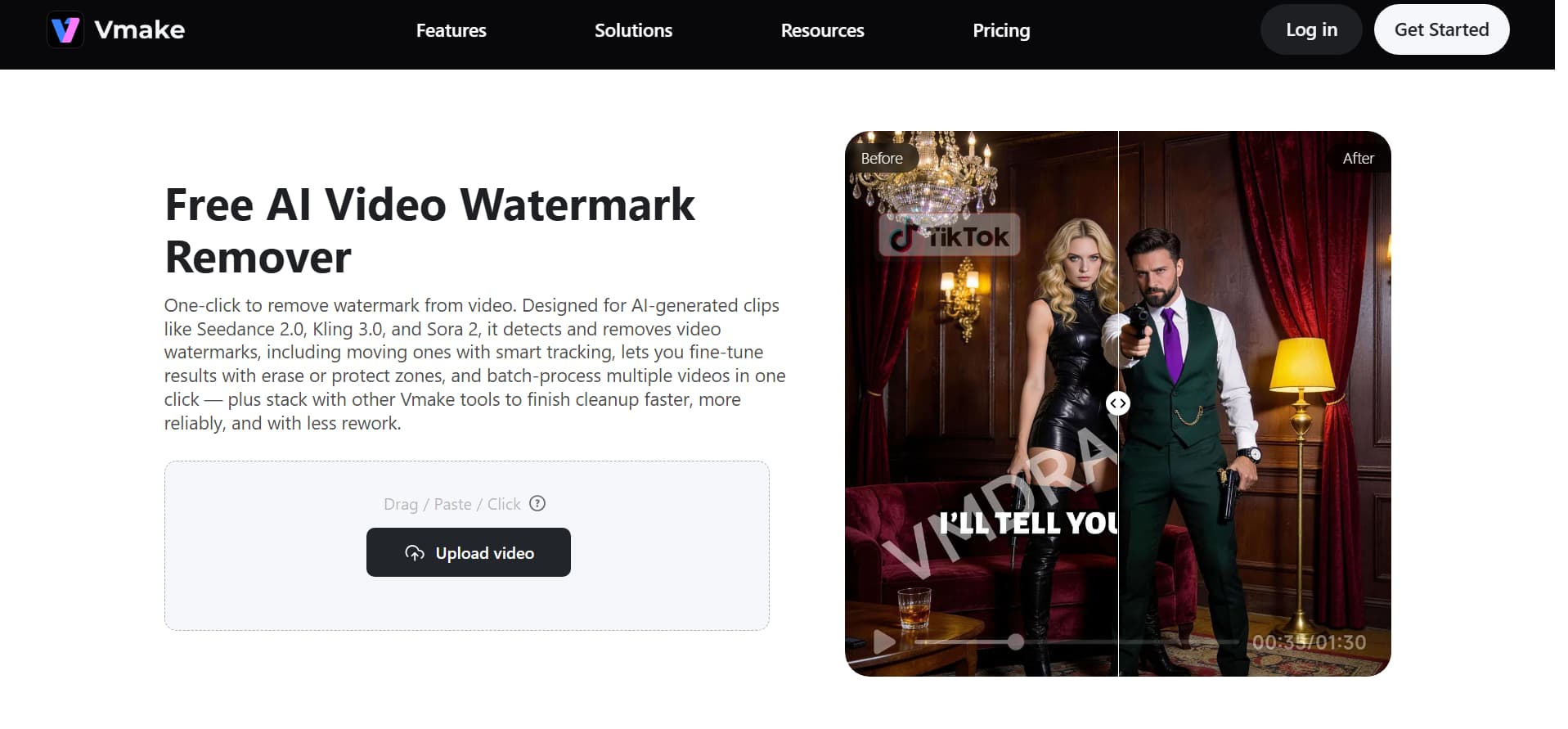
Vmake AI is a huge improvement over regular editors if you want a professional look. Most apps only blur or clip a logo, while Vmake AI video watermark remover employs real AI inpainting. This technology not only covers up the watermark; it actually rebuilds the pixels in the backdrop. This leaves you with a clean, invisible effect that makes it look like the watermark was never there.
One of the best things about it is that it can handle a lot at once. You can upload a huge collection of films and let the AI clean them all up at once instead of cleaning them up one by one. It also has clever motion tracking, so the removal stays smooth even if a watermark moves around the screen. You can check the results for free before you buy them to evaluate their quality. Vmake AI is the better alternative for creators in 2026 who wish to save time and avoid messy "ghostly" smudges.
Try Vmake Video Watermark Remover Now
Step-by-step guide
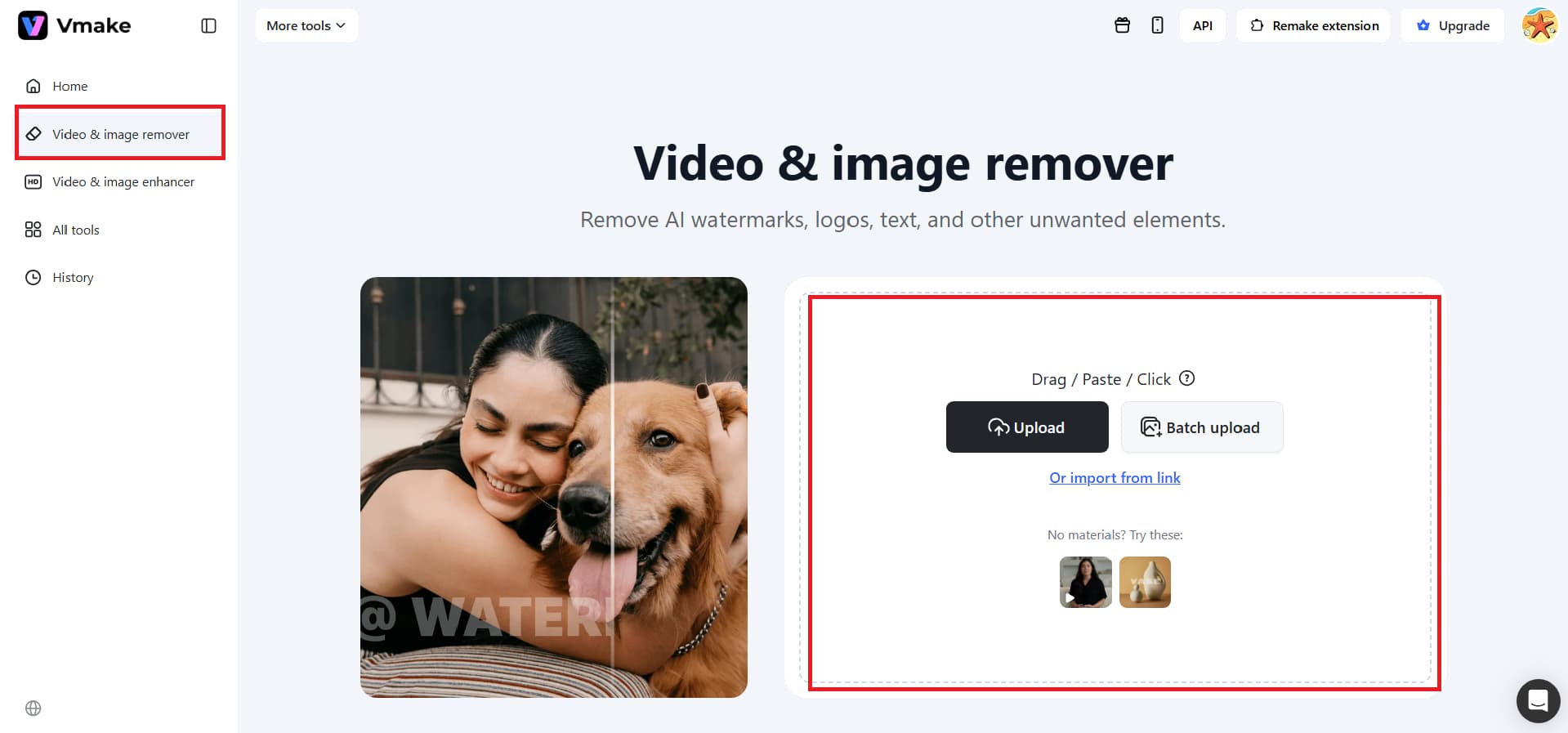
Step 1: Upload your video or paste the link
It's easy to get started: just drag and drop your files into the Vmake AI watermark remover interface. You can upload up to 30 clips at once, so you don't have to work on just one video at a time. Each video looks like a neat little card, which makes it easy to stay organized and see how far you've come.
Step 2: Let the AI do the work
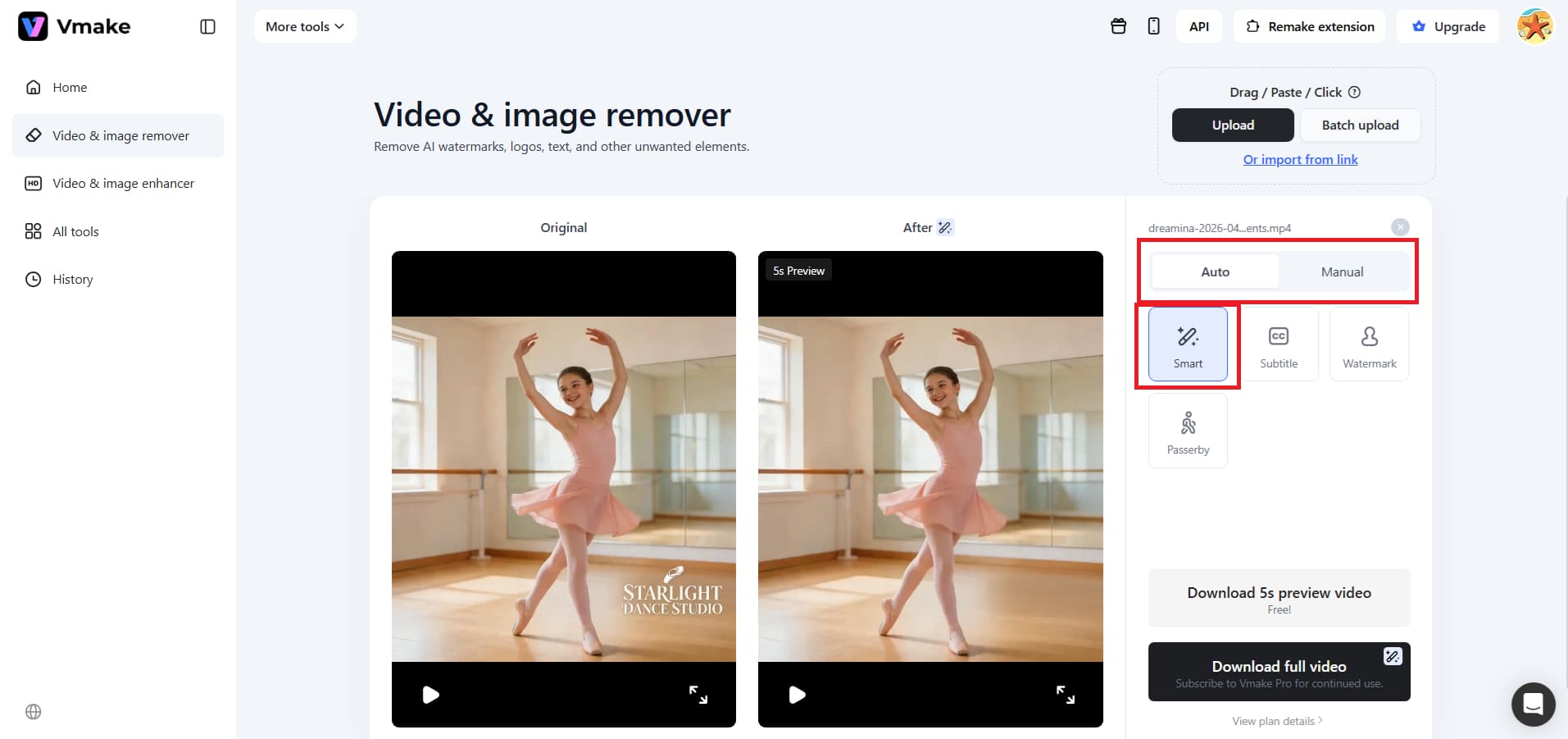
The AI takes control right away after you upload your files. You don't have to highlight the logo or use any selection tools. Vmake automatically finds and removes the watermarks for you. You can see the results right away on each video card, which gives you a clear picture of how clean the film looks without extra branding.
Step 3: Preview and download
You can watch a free preview of the first five seconds of your video before you decide to download it. This allows you to see how well the removal is working in real time. You can then download the whole video in high quality if you're delighted with the results. It's a quick and easy way to generate a professional-looking video in seconds.
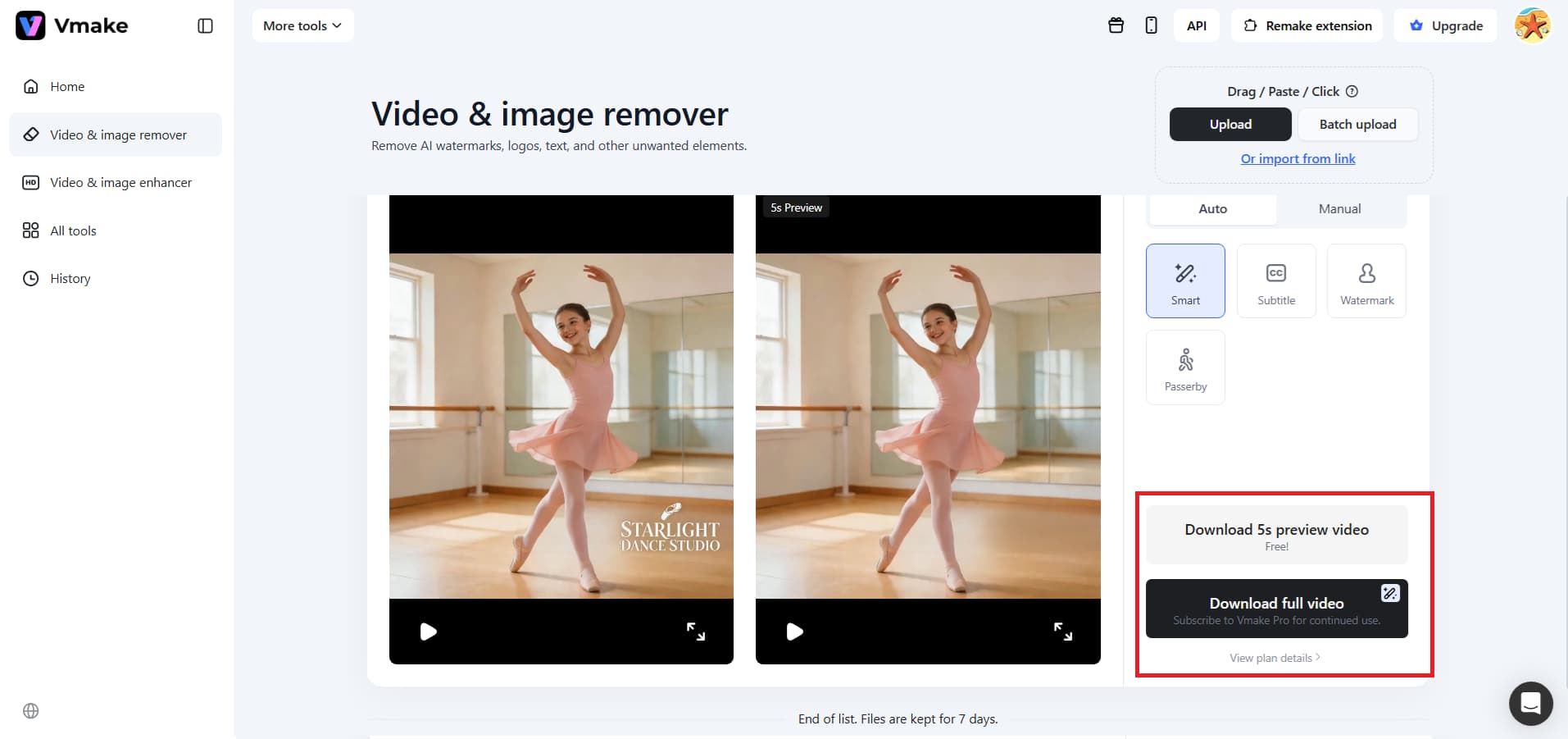
Key features:
-
Advanced AI detection and tracking: Vmake intelligently tracks items in every frame. This lets it remove watermarks, logos, and even people walking through your photo, leaving no mess behind. The background is rebuilt naturally since it knows how to move, which keeps it from being "glitchy."
-
Auto and manual removal modes: The automated mode is great for quick fixes, and the manual mode lets you control things exactly. You can either box select the watermarks or even the subtitles, ensuring you delete only what you need to.
-
Batch processing and multi-format support: You can work on up to 30 videos at once instead of editing them one at a time. It works with all major video formats, so it's a huge time-saver for anyone who requires consistent, high-quality results in seconds when handling large amounts of footage.
Conclusion
Deciding between these tools comes down to your final goal. BeeCut serves as a helpful, all-in-one editor for beginners who need to trim clips or add basic text. However, its removal tools are limited to simple blurs and crops, which can often leave your footage looking a bit messy and unfinished.
For a truly professional result in 2026, Vmake AI is the superior video watermark remover. Its advanced AI inpainting doesn't just hide logos; it invisibly rebuilds the background pixels for a seamless look. With its ability to batch process 30 videos at once, it is a massive time-saver.
Ready to see magic? Try Vmake video watermark remover and get your free preview!
FAQ's
Is BeeCut free?
BeeCut has a free trial, but if you want to export without a large watermark, you'll have to pay for a subscription starting at $39.95 per month or a lifetime license for $99.95. Vmake AI, on the other hand, has a flexible credit structure that lets you see previews for free and offers reduced-cost, high-quality AI processing.
Does BeeCut remove watermarks?
Not in the way you might want; it largely relies on cutting the movie or blurring the logo, which can appear untidy. Use Vmake AI for a very clean finish. It's clever inpainting that literally rebuilds the background, so watermarks disappear without a trace.
Is BeeCut safe to download?
Yes, Apowersoft made it, and as long as you use the official site, it is safe. But if you want to skip downloads completely, Vmake AI offers a very secure, browser-based experience that handles heavy editing and watermark removal without installation.
Does BeeCut work on Mac?
Yes, it works on Windows, Mac, and mobile devices. This versatility is good, but mobile users typically say that Vmake AI makes it much faster and easier to tidy up footage on the move.
What's the best BeeCut alternative?
CapCut is wonderful for free editing, but DaVinci Resolve is best for professionals. But if your main goal is to get rid of logos, Vmake AI is the best choice because it leverages modern AI for batch processing and motion tracking much better than BeeCut can.

You May Be Interested

123APPS Watermark Remover Review (2026): Pros, Cons, and Pricing
[2025] Top 5 FREE Video Downloader without Watermark

Best AI Watermark Remover for Clean, Fast Edits
How to Remove Watermarks from Videos with Vmake's Watermark Remover Tool