
HitPaw Video Enhancer: Is It Worth Trying in 2026?
 Ken DawsonJanuary 27, 2026
Have you recorded footage, only to find it blurry, noisy, or faded? It’s really disturbing to lose your favorite moments to poor video quality, but no worries. Various AI-powered video enhancement solutions like HitPaw Video Enhancer (also known as HitPaw VikPea) are available to effortlessly upgrade your content.
This remarkable tool claims to take your videos to the next level by enhancing colors, reducing noise, and upscaling resolution. But does it really live up to the hype? This post covers everything about HitPaw Video Enhancer, including its features, pricing, performance, and comparison with the popular alternatives.
What Does HitPaw Video Enhancer Bring to the Table?
HitPaw Video Enhancer is a fantastic tool that uses AI technology to significantly improve your video quality with minimal effort. However, it basically serves as a pillar of the comprehensive HitPaw platform, popular for enhancing, editing, and converting multimedia files. With a simple interface and a range of online AI tools, it is suitable for everyone from casual users to content creators and professionals.
Additional Features:
AI Video Generator: It helps you create a video from an image or text prompt, adding unique artistic styles and AI effects.
Video Translator: With ChatGPT’s translation feature, you can translate videos into 95 languages for global reach.
Photo Generator: You can create unique, high-quality AI photos from text or images with AI models and unlimited creative variations.
Face Animator: This tool lets you animate still images using multiple templates, creating lifelike, dynamic animations.
Unblur Images: This fantastic AI photo enhancer helps unblur photos by sharpening details and enlarging them without losing quality.
Watermark Remover: Whether you need to remove watermarks, text, or objects from images or videos, it can do so in seconds.
Background Generator: It facilitates removing and changing the background instantly with preset templates.
Online Audio Tools: HitPaw offers various tools to enhance, convert, compress, and extract audio. You can also remove vocals, adjust speed or volume, cut or join clips, and add music to audio.
Key Features & Hands-On Experience of HitPaw Video Enhancer
HitPaw Video Enhancer is an advanced enhancement solution available for online, desktop, and mobile users. Since each version offers different features, let’s explore the performance of each one based on my hands-on experience:
HitPaw Video Enhancer (Web)
HitPaw AI Video Enhancer is undoubtedly one of the best online video quality enhancers on the market, delivering vibrant, smooth visuals. It offers various models to improve video clarity, reduce noise, restore old footage, and upscale to 4K resolution without sacrificing quality.
You can also export the enhanced videos in professional formats like MP4, MOV, and MKV. Its automated processing makes it ideal for video creators, celebrity fans, film lovers, anime fans, and AIGC users.
HitPaw VikPea (Desktop)
HitPaw VikPea is a professional-grade video enhancer on Windows & Mac that can fix and upscale blurry, pixelated videos up to 8K resolution. It helps remove grain, sharpen details, stabilize shaky footage, enhance colors, restore old memories, and repair damaged or unplayable videos.
With its advanced AI models, you can overcome a range of video quality issues and achieve a professional look. It’s best suited to those seeking advanced features, offline processing, and stable performance. With fast cloud rendering and batch support, it is perfect for enhancing vlogs, YouTube content, and ordinary videos.
VikPea - AI Video Enhancer (Mobile)
VikPea AI Video Enhancer is a remarkable mobile application, primarily designed to sharpen, colorize, upscale, and optimize videos with high-definition clarity. With various models, you can enhance facial features, boost vibrancy, add colors to b&w footage, brighten dark scenes, beautify & smoothen skin, and more. It can even restore old footage and upscale it to 4K resolution with enhanced details.
Getting Started with HitPaw Video Enhancer
Thanks to the user-friendly interface of HitPaw Video Enhancer, you won’t have difficulty navigating. Below are the tutorials to use it on different platforms:
Guide 1. How to Use HitPaw Video Enhancer Online
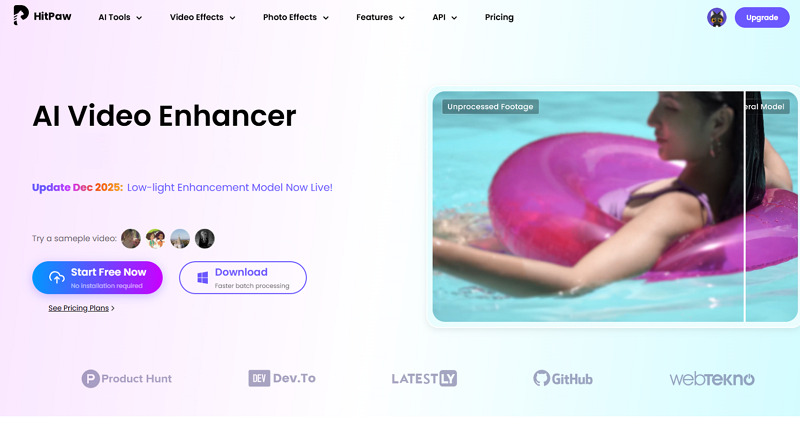
Step 1. Upload Video
The first step is to open the HitPaw Video Enhancer online tool in your browser. Now, click “Start Free Now” to browse and upload a video file.
Step 2. Select the Enhancement Model
Next, choose the required “AI Model” from the drop-down menu as well as its preferred mode. Also, pick the resolution as a percentage or a fixed value.
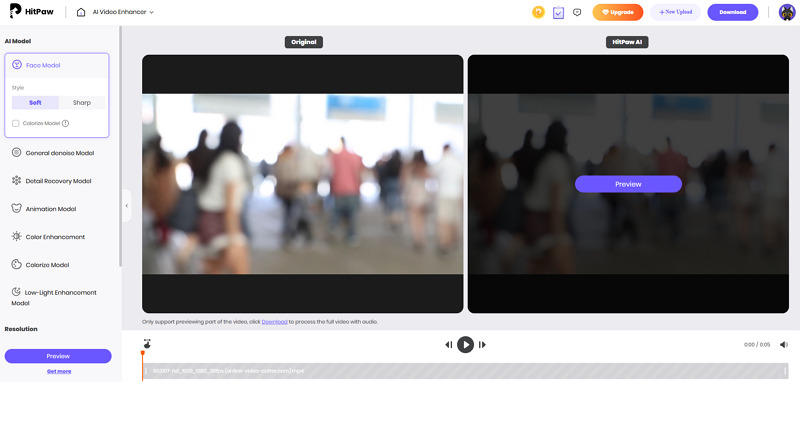
Step 3. Preview and Download
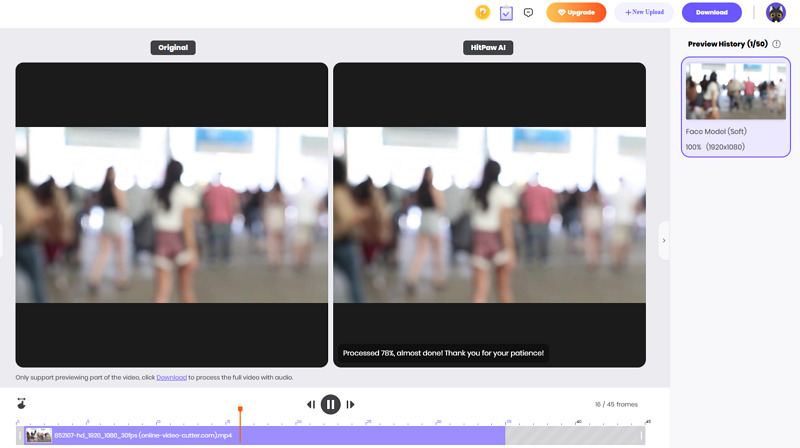
Lastly, press the “Preview” tab to view the enhanced results. If the output looks fine, hit “Download” and that’s all!
Guide 2. Steps to Enhance Videos on Desktop
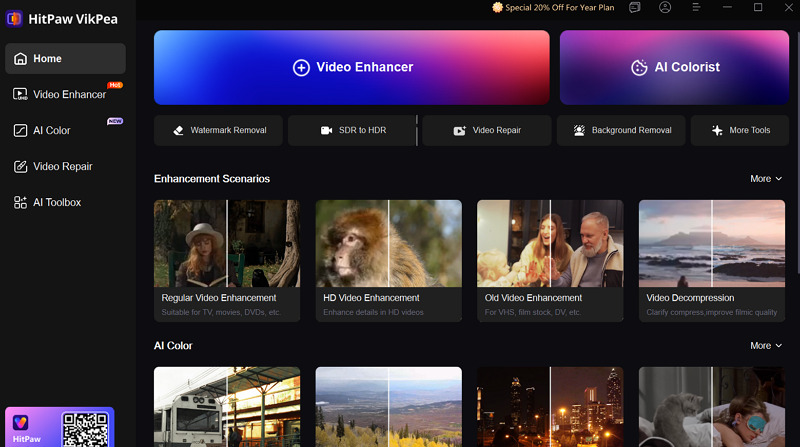
Step 1. Import Video
After downloading and installing this software, open it. Now, click “Video Enhancer” > “Browse Videos” to import the required video.
Step 2. Choose the AI Model
Next, select the desired AI model from any category: General, AI Pilot, Portrait, or Professional. You can also choose the resolution under “Export Settings.”
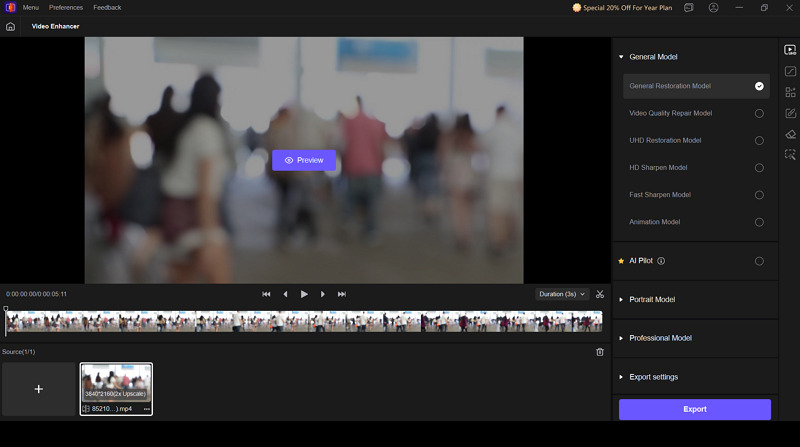
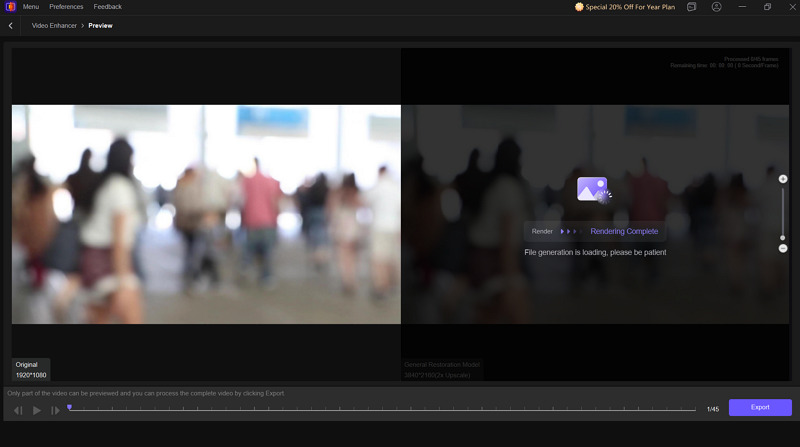
Step 3. Preview and Export
Finally, tap the “Preview” button and let AI render the video. Later, compare the results, and if it’s okay, hit “Export.” You’re all done!
Guide 3. How to Enhance Videos on Mobile
Step 1. Open the AI Enhancer
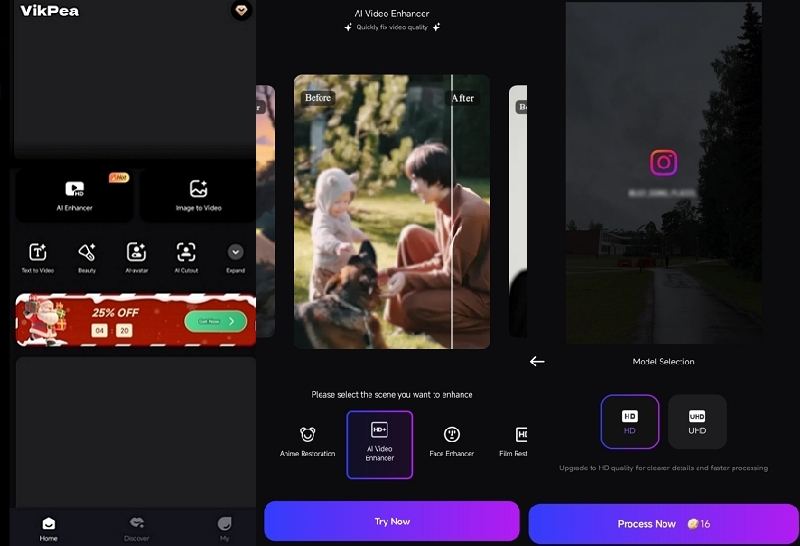
Once you have installed this app, launch it on your phone. Now, tap “AI Enhancer” from the main screen to proceed.
Step 2. Upload Video File
Next, select the scene, like 4K Enlarge, Face Enhancer, or simply “AI Video Enhancer.” Then, click “Try Now” and upload the video file.
Step 3. Export the Enhanced Video
Lastly, you can choose the desired model, i.e., HD or UHD. Once done, export to your device. That’s all!
Pricing Review of HitPaw Video Enhancer
HitPaw Video Enhancer uses a subscription model; however, the plans differ for desktop, online, and mobile users. Here is the pricing table to make you understand it easily:
Plan | Pricing | What’s included |
Online | ||
Free | $0 | AI Video Enhancer (Preview only) Limited upload file size |
Weekly | $14.99 | 500 AI credits/week Up to 1000 seconds |
Monthly | $24.99 | 1200 credits/month Up to 2400 seconds |
Yearly | $135.99 | 5000 AI credits/year Up to 10000 seconds |
Desktop (Individuals) | ||
Monthly (Windows) | $43.19 | Upscale video resolution to 8K Enhance video edge detail definition Remove noise & grain 10+ AI video enhancement models Repair old/corrupted videos Colorize & brighten color Stabilize shaky footage Batch processing |
| Yearly | $99.99 | |
| Perpetual | $350.39 | |
| Monthly (Mac) | $70.39 | |
| Yearly | $110.39 | |
| Perpetual | $350.39 | |
Desktop (Team & Business) | ||
| 5 PC | $459.95 | Free updates & tech support Volume discount 1-1 sales report |
| 10 PCs | $859.95 | |
| 100 PCs | $1099.95 | |
Mobile | ||
Weekly | $7.18 | 600 credits Unlimited 4K, restoration, removal, and cutout |
Monthly | $40.55 | 10800 credits Unlimited 4K, restoration, removal, and cutout |
Best HitPaw Video Enhancer Alternatives
While HitPaw Video Enhancer is a powerful solution, it is important to compare it with other alternatives in the market to assess its performance. Let’s look at the comparison table below:
Tool | Platform | Ease of Use | Speed | Output Quality | Ideal for |
HitPaw Video Enhancer | Web, Desktop (Win & Mac), Mobile (Android & iOS) | Easy | Average | High | Professional-grade video enhancement and upscaling to 4K/8K with specialized AI models |
Web, Mobile (Android & iOS) | Very Easy | Quick | Best | World-leading scenario-specific video enhancement, 4K+ upscaling, and batch processing | |
Topaz Labs Video Enhancer | Web, Desktop (Win & Mac) | A bit Complex | Average | High | Improve video clarity and sharpness frame by frame with AI-powered precision; support for HD/4K resolution |
Unblur Image Video Enhancer | Web | Easy | Slow | Average | Simple enhancement solution for very low-quality videos with support for upscaling to 2K resolution |
HitPaw Video Enhancer: Benefits & Drawbacks
To have a comprehensive review of HitPaw Video Enhancer, you must consider both its benefits and drawbacks. Here are the leading ones:
Pros:
Available across all devices
User-friendly interface
Broad format support
Work with 10 advanced AI-driven models
A range of creative AI tools
Batch processing in the desktop version
Quick preview without any watermark
Split-screen preview for easy comparison
Upscale to 4K while ensuring high output quality
Cons:
No export available in the free version
Lack of video editing features
Time-consuming, especially for high-resolution
Some models don’t deliver good results
Minor artifacts may appear in complex areas
No fine-tune control for accurate adjustments
Real User Reviews
To learn more about the performance of HitPaw Video Enhancer, let’s have a look at some real user reviews:
Capterra: 4.8/5 (19 reviews)
This is a very powerful piece of software. It’s enhanced and upscaled my early film projects and my old family videos. It’s nothing less than magical. I highly recommend this software for anyone working with video. You need this tool as part of your production pipeline. - Dino I.
After a long processing time, the enhanced video quality is satisfying. It offers ease of use and optimizes automatically; you only have to choose from the video enhancement menu. However, I think the data processing speed is slow, maybe due to the computer specs. An over-1-hour video needs 10 hours of processing time, in my case. - Kiyotaka K.
FAQs about HitPaw Video Enhancer
1. Is HitPaw Video Enhancer safe to use?
Yes, HitPaw Video Enhancer is safe. However, you should only install the product from the official website. Plus, it’s recommended not to upload confidential or sensitive data to the online platform.
2. Is there a money-back guarantee?
Of course. HitPaw Video Enhancer offers a 30-day money-back guarantee. If there is no solution after contacting their support team, you will surely be entitled to a refund.
3. Should I use a cracked version of HitPaw Video Enhancer?
Never. Although cracked versions seem tempting, they are illegal and can pose threats like viruses. Besides violating copyright laws, it can also put your data and system at risk. Always use the official version from a legitimate source.
Final Verdict: Is HitPaw Video Enhancer Worth It?
After reading this post, you must have a clear understanding of its capabilities. HitPaw Video Enhancer is an advanced and effective solution that can turn low-quality videos into stunning visuals. However, its long processing time, inconsistent results of some models, and no free export option make it not so perfect solution.
For those seeking ease of use, reliable performance, and professional-quality results, Vmake Video Enhancer is an excellent choice. Let’s try it today

You May Be Interested

Seedance 2.0: What's New & How to Use It

123APPS Watermark Remover Review (2026): Pros, Cons, and Pricing

5 Best Valentine's Day Video Ideas for eCommerce in 2026

How to Create a YouTube Thumbnail? Create YouTube Thumbnails Using AI
