The Ultimate Upsampler AI Video Generator Review & Guide
Read our comprehensive Upsampler AI video generator review. Learn how to use it, its pros and cons, and why Vmake might be a better fit for your budget. Upscale your video content production right now!

AI has completely democratized digital creation. You no longer need expensive gear or complex editing software to instantly generate stunning, high-quality videos. This review dives into the features and pricing of the Upsampler AI video generator, while exploring a powerful alternative to elevate your content workflow.
What is Upsampler AI video generator?
Upsampler AI is an innovative, browser-based video generation platform specifically engineered to eliminate the traditional barriers to entry for digital creators. By utilizing advanced artificial intelligence models, it allows users to create stunning visual content entirely from scratch online.
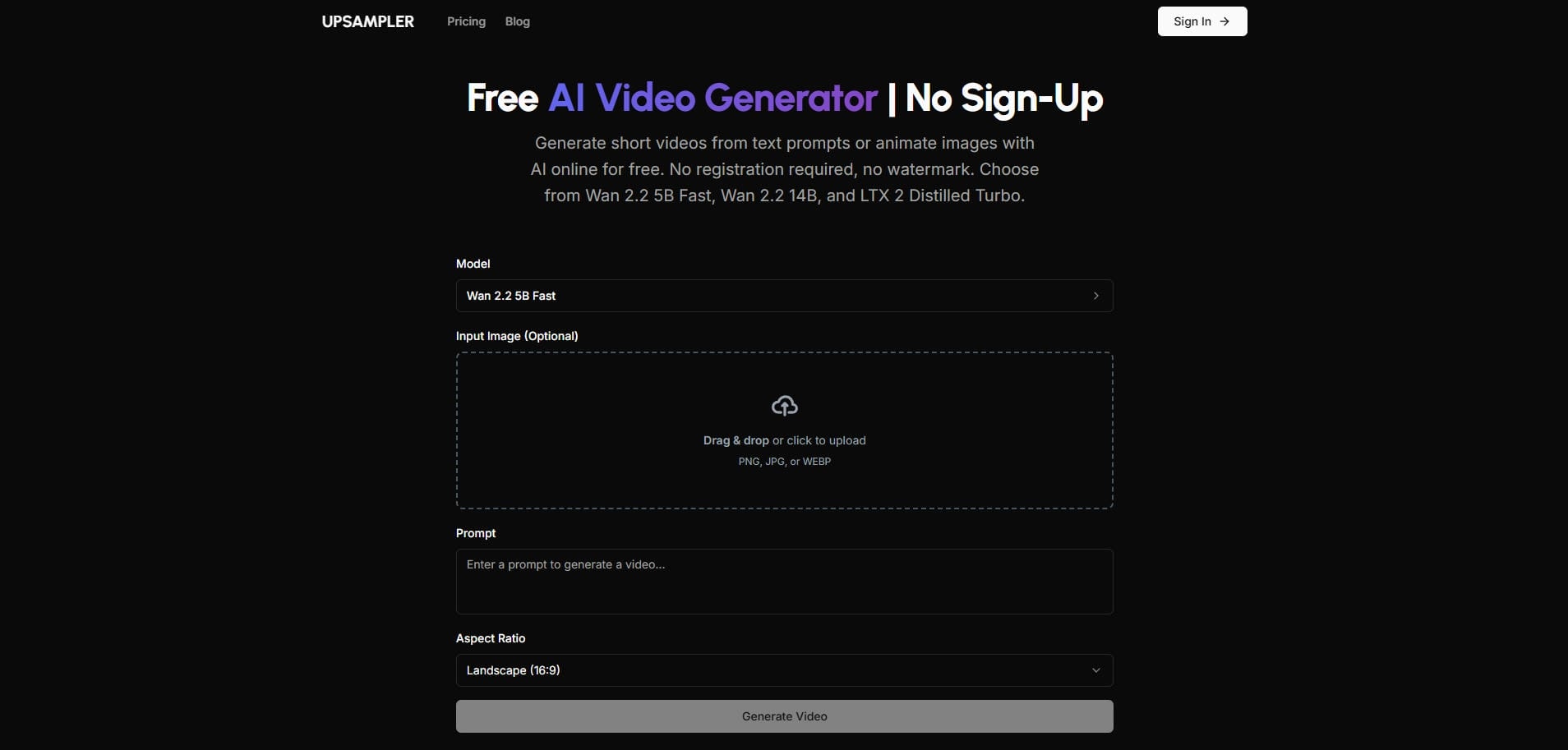
The most defining characteristic of Upsampler is its completely frictionless experience; it offers immediate, full-featured access to text-to-video and image-to-video generation tools without ever requiring users to sign up, register an email, or create a formal account before starting their creative projects.
Noteworthy features of Upsampler free AI video generator
Explore the impressive generative capabilities that make Upsampler an excellent choice for producing original video content directly in your browser.
-
Text-to-video creation: Simply type a detailed text prompt, and the AI will instantly translate your input into fully realized, dynamic video clips, without requiring any expensive physical camera equipment.
-
Image-to-video animation: When you upload a photograph onto the platform, the system adds motion to the frame by moving the subject, which brings still images to life without requiring any user effort.
-
No-signup access: Because you can generate videos immediately without an account, you bypass passwords and registration forms, letting you seamlessly enter prompts and download files right away during every single website visit.
-
Multiple artistic styles: Customize your visual output by choosing from a massive variety of distinct artistic styles, ranging from hyper-realistic cinematic footage to colorful, highly stylized 3D digital character animations.
-
High-speed cloud rendering: Experience incredibly fast processing times as the platform utilizes highly powerful cloud-based servers to render your generated videos, saving your local device from complex computational processing strain.
How to use Upsampler AI video generator in 3 simple steps?
Generating your own professional-looking videos is incredibly simple and fast. Follow these three quick steps to bring your ideas alive.
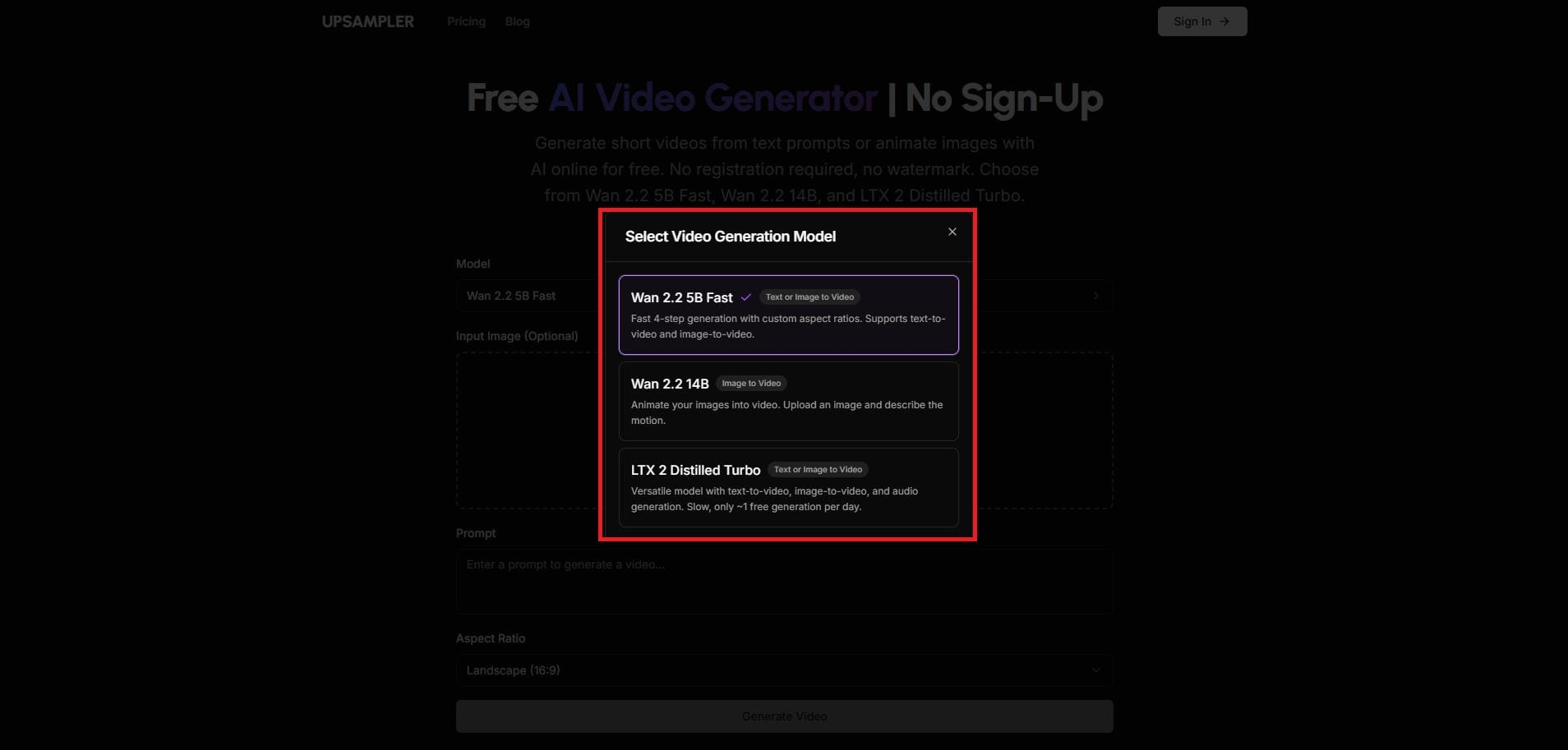
Step 1: Select your AI video generation model
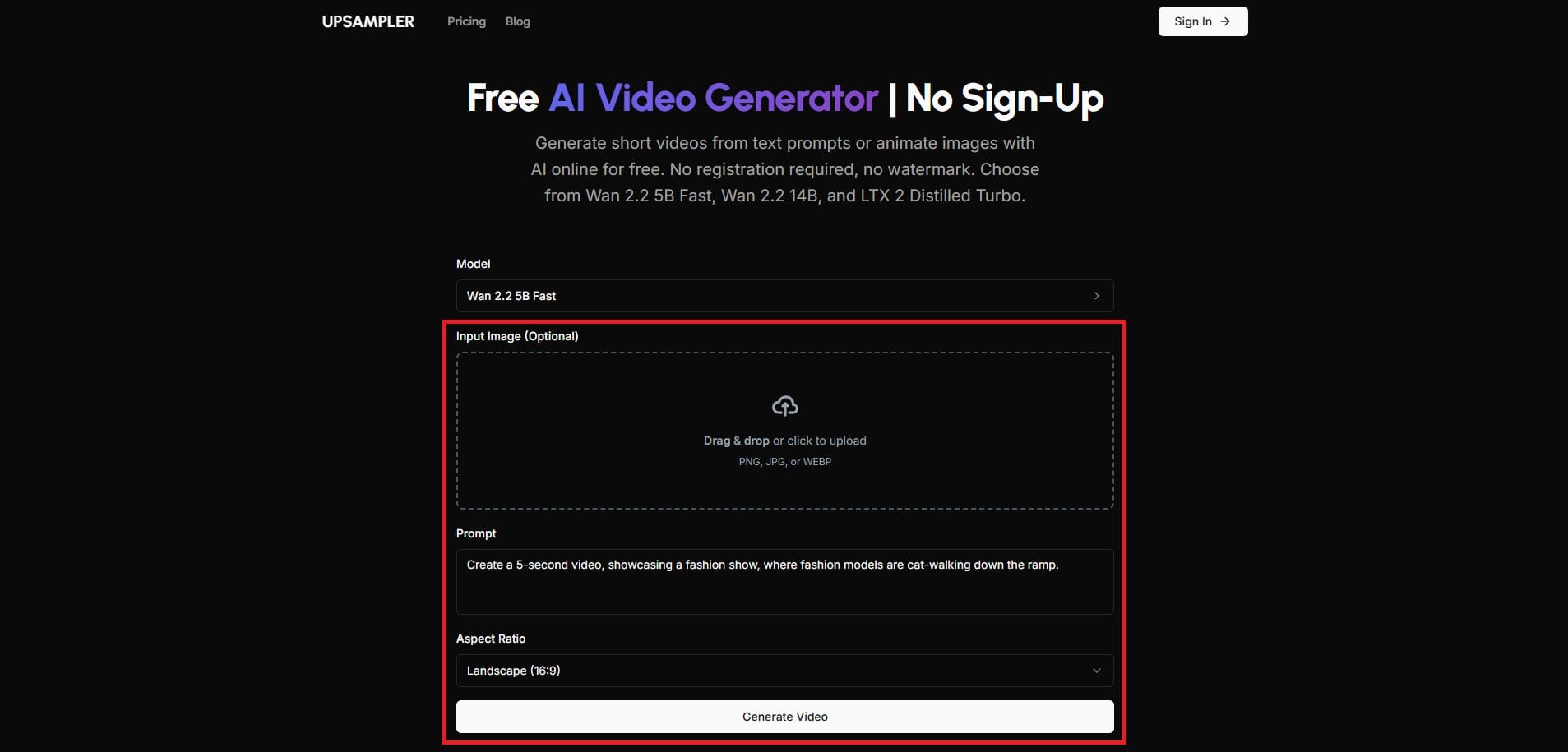
First, you need to access the official website of Upsampler AI video generator. Once you do, you need to select your ideal AI video generation model. The free options include WAN 2.2 5B Fast, WAN 2.2 14B, LTX 2 Distilled Turbo.
Step 2: Enter your video generation prompt
After selecting your AI model, you need to provide your video generation prompt. Keep in mind that your prompt should be detailed, mentioning the duration, style, etc. Additionally, you can also upload a reference image, and select your video's aspect ratio. Once done, click on "Generate Video".
Step 3: Download your AI-generated video
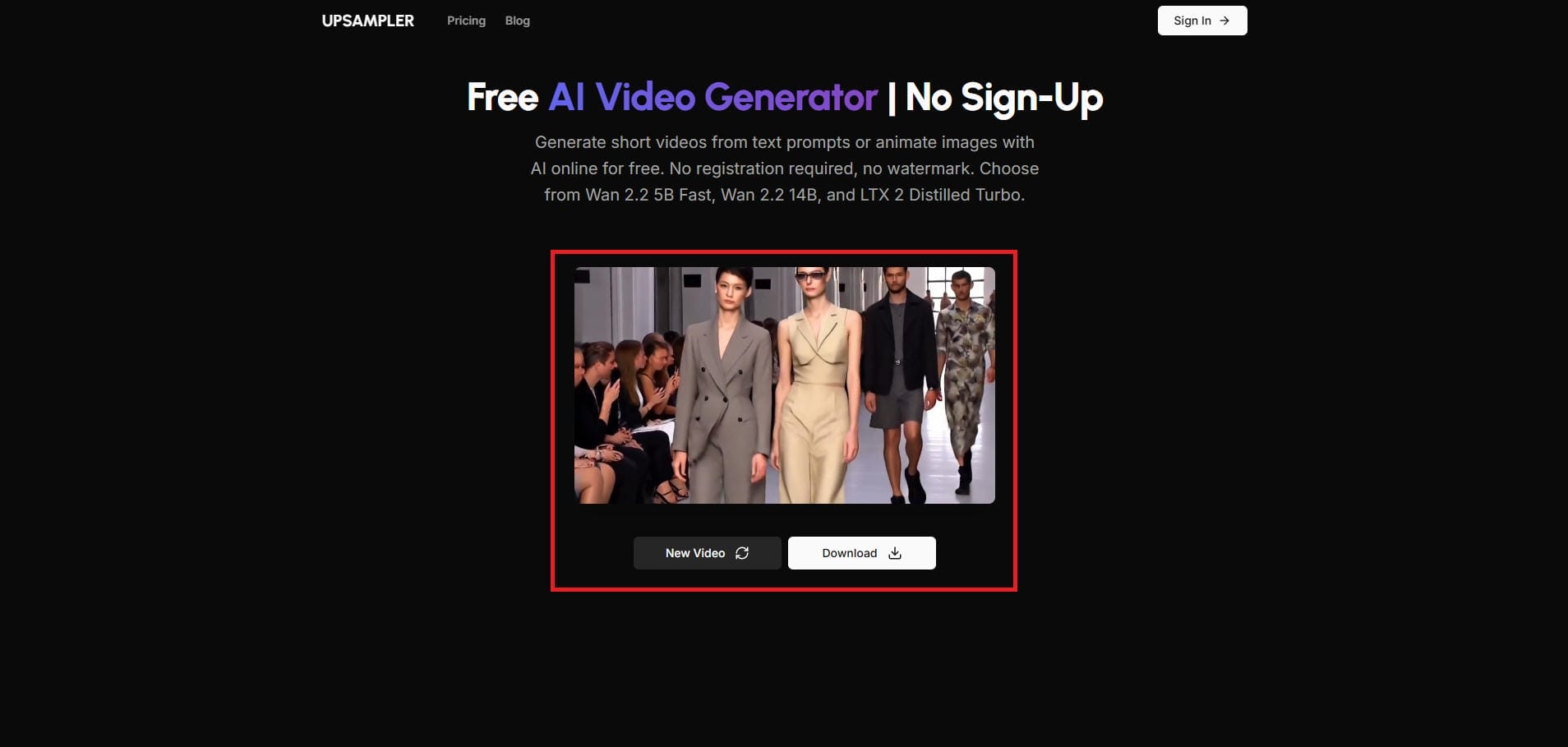
Upsampler's AI video generator will start creating your video and once that is done, you will be able to download it to your local device for further sharing.
Upsampler AI video generator pricing plans
Upsampler provides flexible, credit-based subscription options specifically designed to accommodate every type of creator.
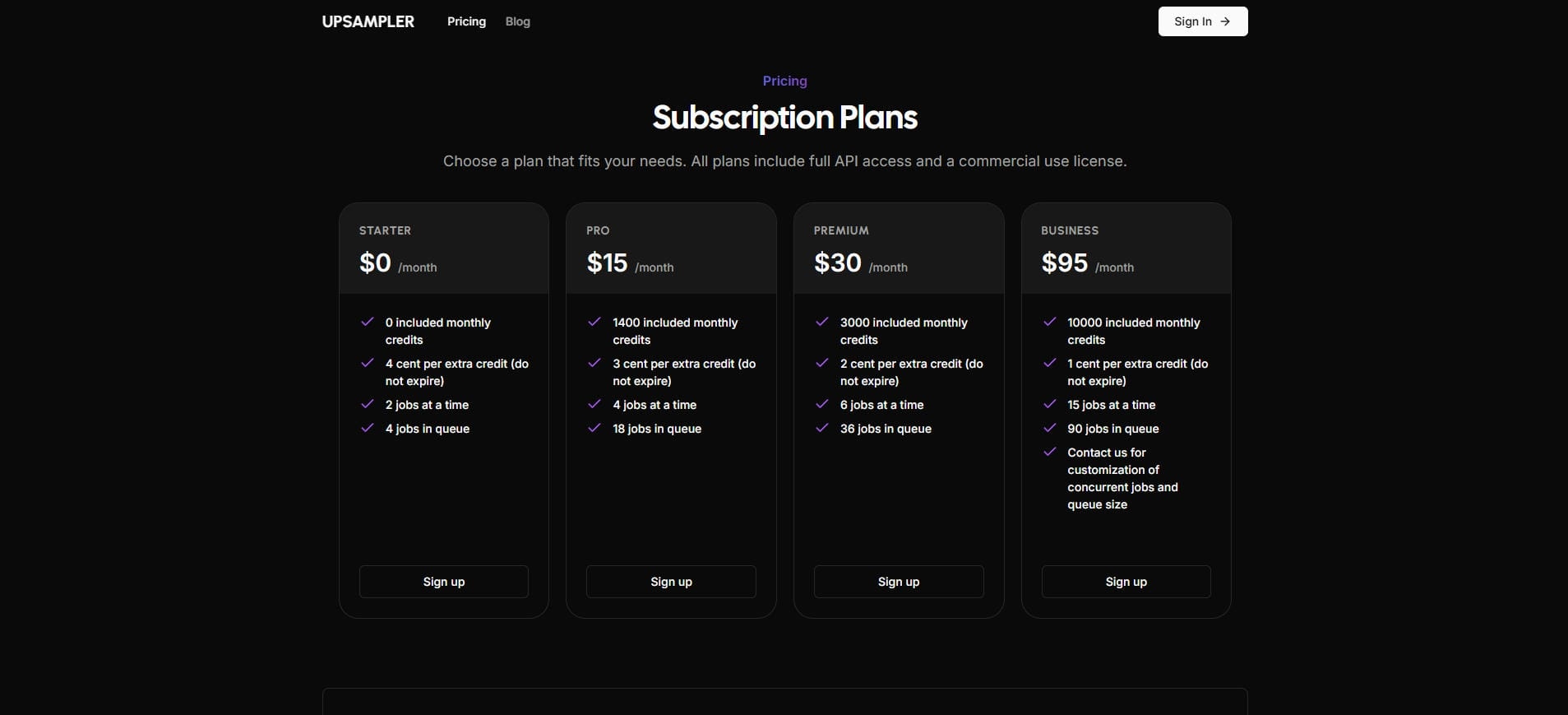
Whether you are casually experimenting with daily free allowances or actively scaling a massive professional commercial production, you can easily review the comprehensive, official pricing table below to find your perfect fit.
|
Plan Name |
Monthly Cost |
Monthly Credits & Limits |
Best Suited For |
|---|---|---|---|
|
Starter |
$0.00 |
Daily free credits (1 parallel job, watermarked) |
Casual users and beginners testing the tool |
|
Pro |
$15.00 |
1,400 credits (2 parallel jobs, no watermark) |
Social media content creators |
|
Premium |
$30.00 |
3,000 credits (3 parallel jobs, no watermark) |
Professional marketers and growing teams |
|
Business |
$95.00 |
10,000 credits (5 parallel jobs, no watermark) |
Enterprise and heavy volume agencies |
Note: Upsampler also offers a one-time payment option of $10.00 for 200 lifetime credits with instant access and no watermarks.
Ideal use cases of Upsampler AI video generator
This powerful generator adapts flawlessly to a massive variety of creative projects. Discover the most effective applications for this technology.
-
Social media content creation: Quickly produce highly engaging, trend-ready short-form video content perfectly optimized for social media platforms like TikTok, YouTube Shorts, and Instagram Reels, keeping your audience entertained and growing.
-
Professional marketing B-roll: Instantly generate eye-catching visual B-roll footage to easily elevate professional corporate presentations, email newsletters, and digital marketing campaigns, adding a layer of polish without hiring a crew.
-
Cinematic storyboarding: Rapidly visualize complex cinematic storyboards and dynamic pre-production concepts for film projects without spending any money on initial test shoots, allowing directors to pitch their vision effortlessly.
-
Live stream backgrounds: Create highly dynamic, continuously animated background visuals that are perfectly tailored for music videos, live streams, podcast recordings, and interactive virtual events to maintain high viewer retention rates.
-
Product advertisement animation: Transform completely static e-commerce product photography into exciting, motion-filled commercial advertisements that immediately capture customer attention online, driving higher conversion rates and boosting digital sales.
Upsampler AI video generator review: is it worth it?
Before integrating this tool into your workflow, carefully consider its unique advantages alongside its distinct limitations and potential performance drawbacks.
Pros and cons
Pros |
Cons |
|---|---|
|
|
See what users are saying
On Reddit
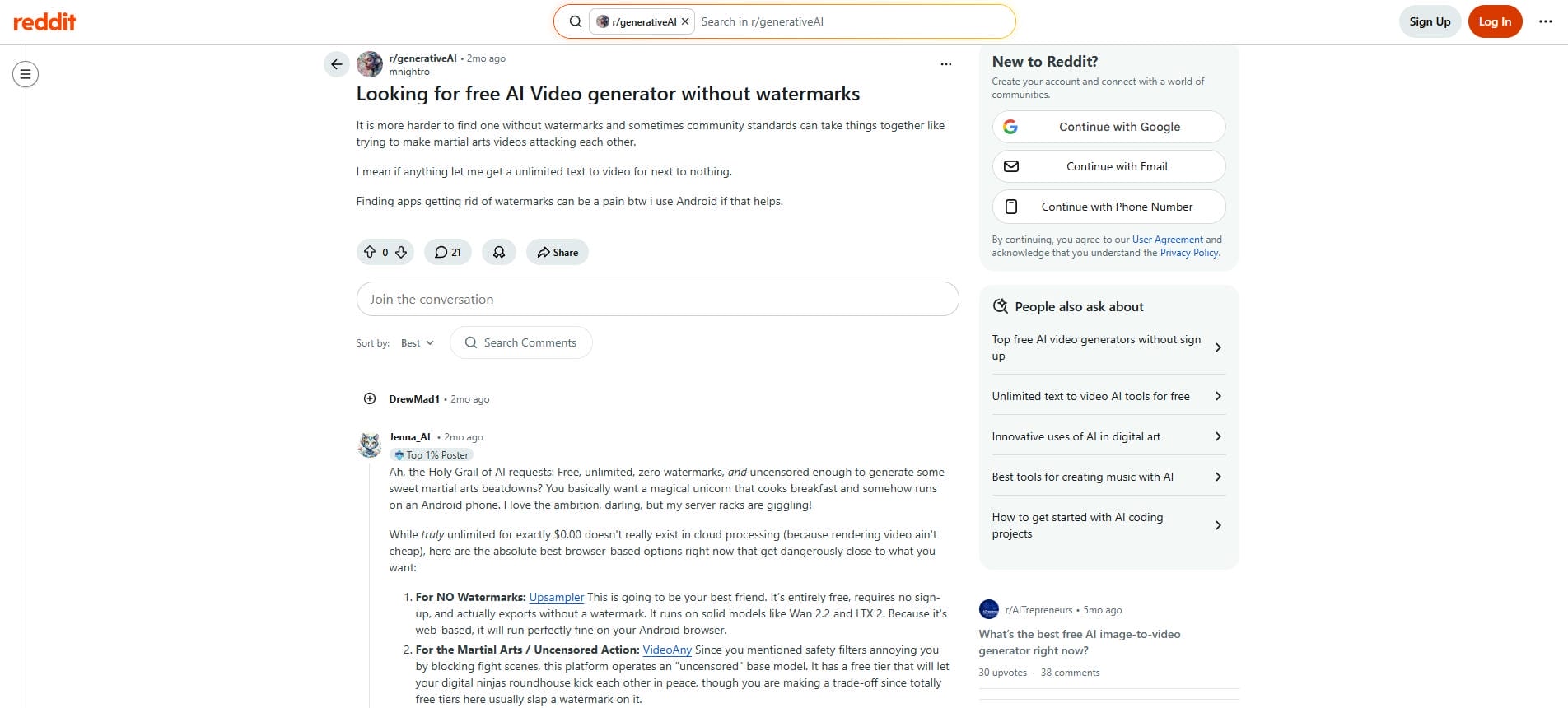
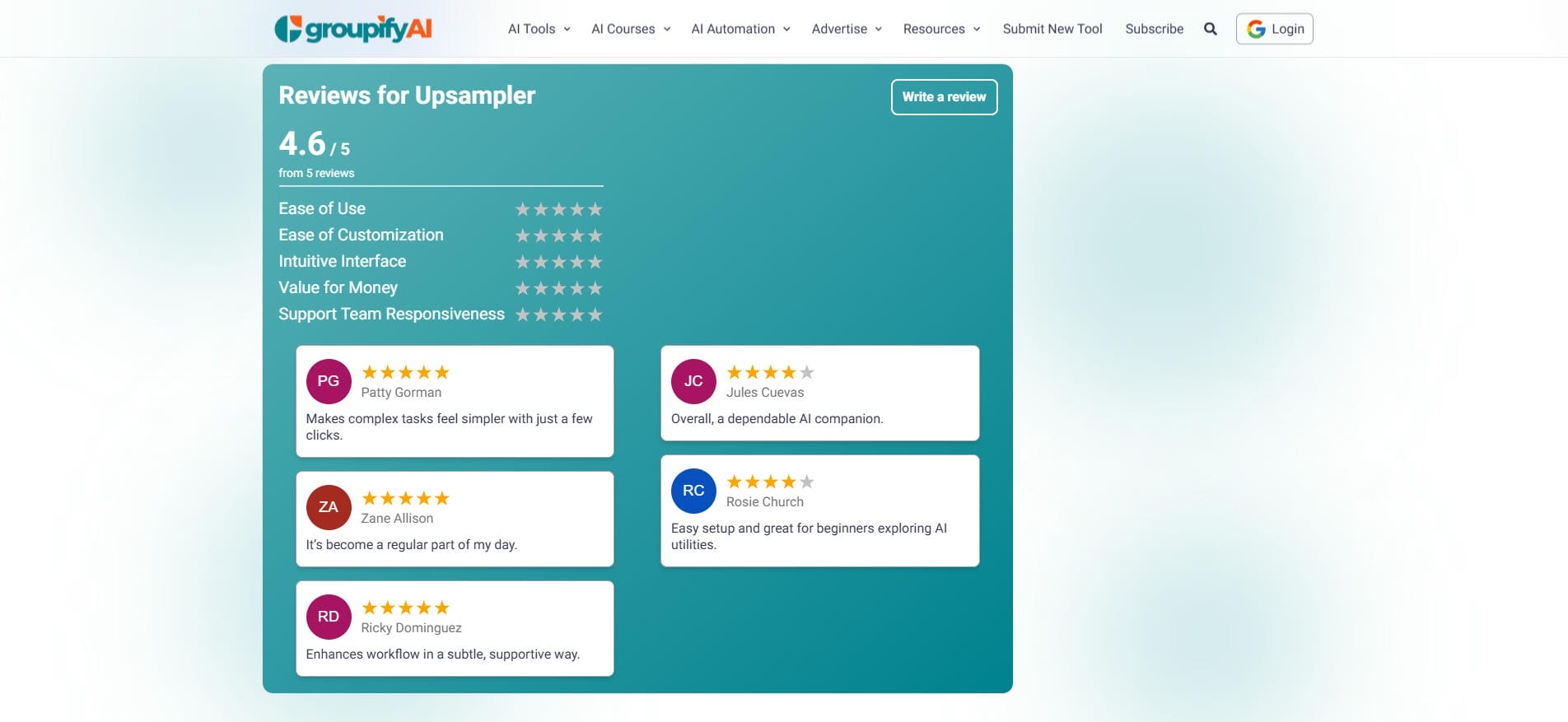
On creative and AI-focused subreddits, early adopters consistently praise Upsampler AI for its completely frictionless, no-signup accessibility. However, redditors frequently point out strict limitations regarding its maximum video duration and occasional visual inconsistencies when testing out highly complex text prompts.
On Groupify.ai
Discussions within the Groupify.ai community echo similar sentiments regarding the platform's incredible ease of use. Creators highly appreciate the fast cloud rendering speeds but consistently note that the tool's short duration limits often necessitate finding robust alternatives for professional productions.
Final verdict
Overall, feedback from Reddit and Groupify.ai clearly indicates that Upsampler is a fantastic, accessible starting point for beginners, though professional creators will quickly outgrow its strict video duration limits today.
A powerful alternative: Vmake AI video generator
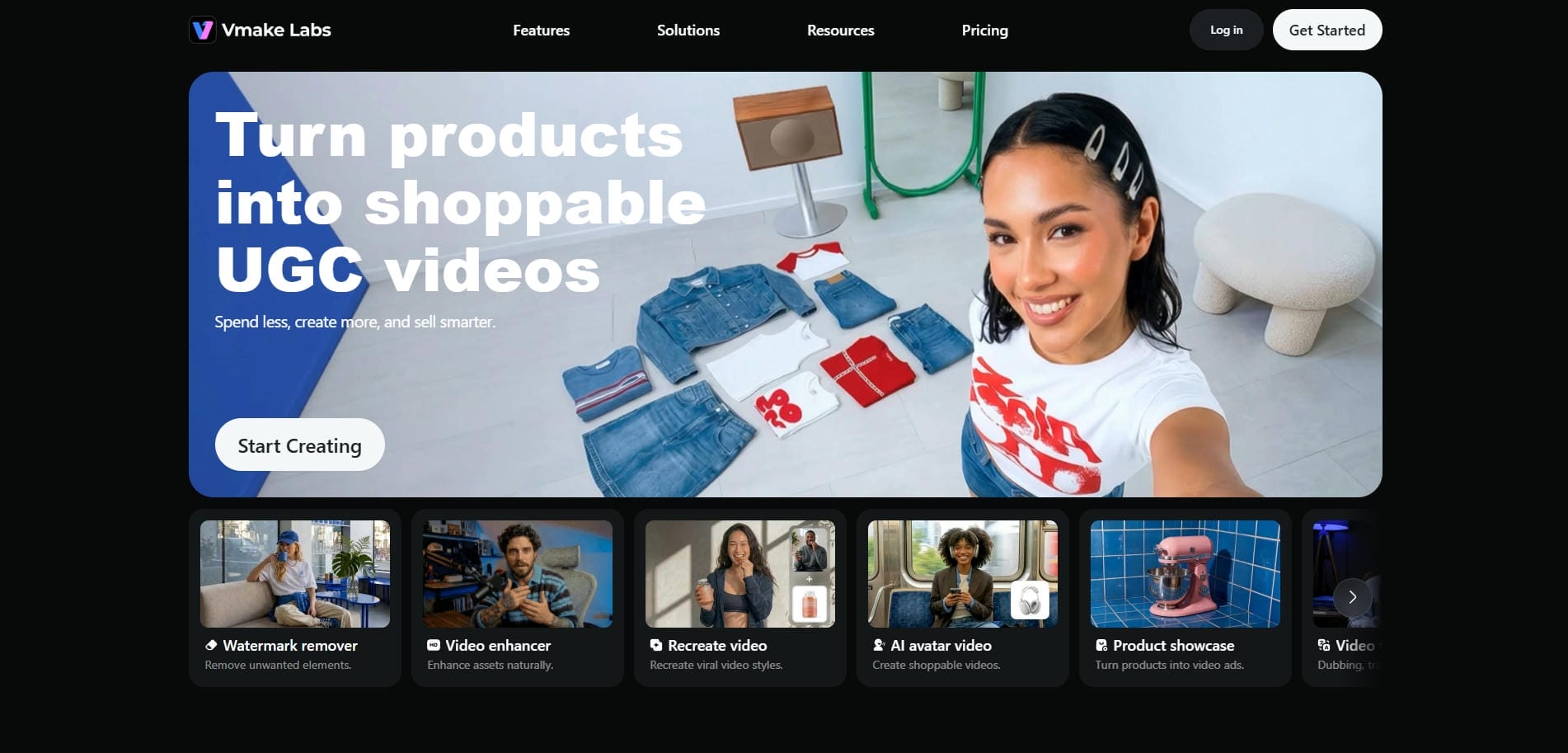
While Upsampler AI provides a fantastic, frictionless entry point into the world of artificial intelligence video creation, its inherent limitations can sometimes hold back more ambitious creators. That's where Vmake AI video generator emerges as a much stronger, professional-grade alternative.
Designed specifically for users who demand greater narrative control, Vmake bridges the gap between casual experimentation and serious cinematic production. If you have outgrown basic, rapid-fire generators and require a comprehensive platform that supports your creativity, Vmake offers the exact AI video generator to elevate your overall output instantly.
Top features of Vmake AI video generator
Vmake provides an incredibly robust suite of generative tools designed for professional creators. Explore its exceptional video creation features below.
-
High-fidelity text-to-video: Utilize advanced generative models that interpret text prompts with reasonable accuracy, producing realistic video clips with attention to detail, including dynamic shadows and realistic environmental background details.
-
Extended duration generation: Vmake AI allows you to seamlessly generate significantly longer video sequences, ensuring your cinematic narratives and detailed storytelling elements remain completely uninterrupted and cohesive throughout the timeline.
-
Multi-image sequence animation: Upload a carefully structured series of distinct images, and the AI will brilliantly weave them together, generating smooth, logical video transitions that tell a complete, visually stunning cinematic story.
-
Advanced motion control: Take complete directional command over your generated content by dictating specific camera movements, camera angles, and distinct subject tracking behaviors directly using your prompt parameters.
-
Consistent character generation: With Vmake AI, you can enjoy reasonable visual consistency across multiple generations, allowing you to keep the generated characters and environments aligned across related video clips.
How to use Vmake AI video generator in 3 easy steps
Creating high-quality, professional-grade videos with Vmake is highly efficient. Follow these precise steps to start producing your cinematic content today.
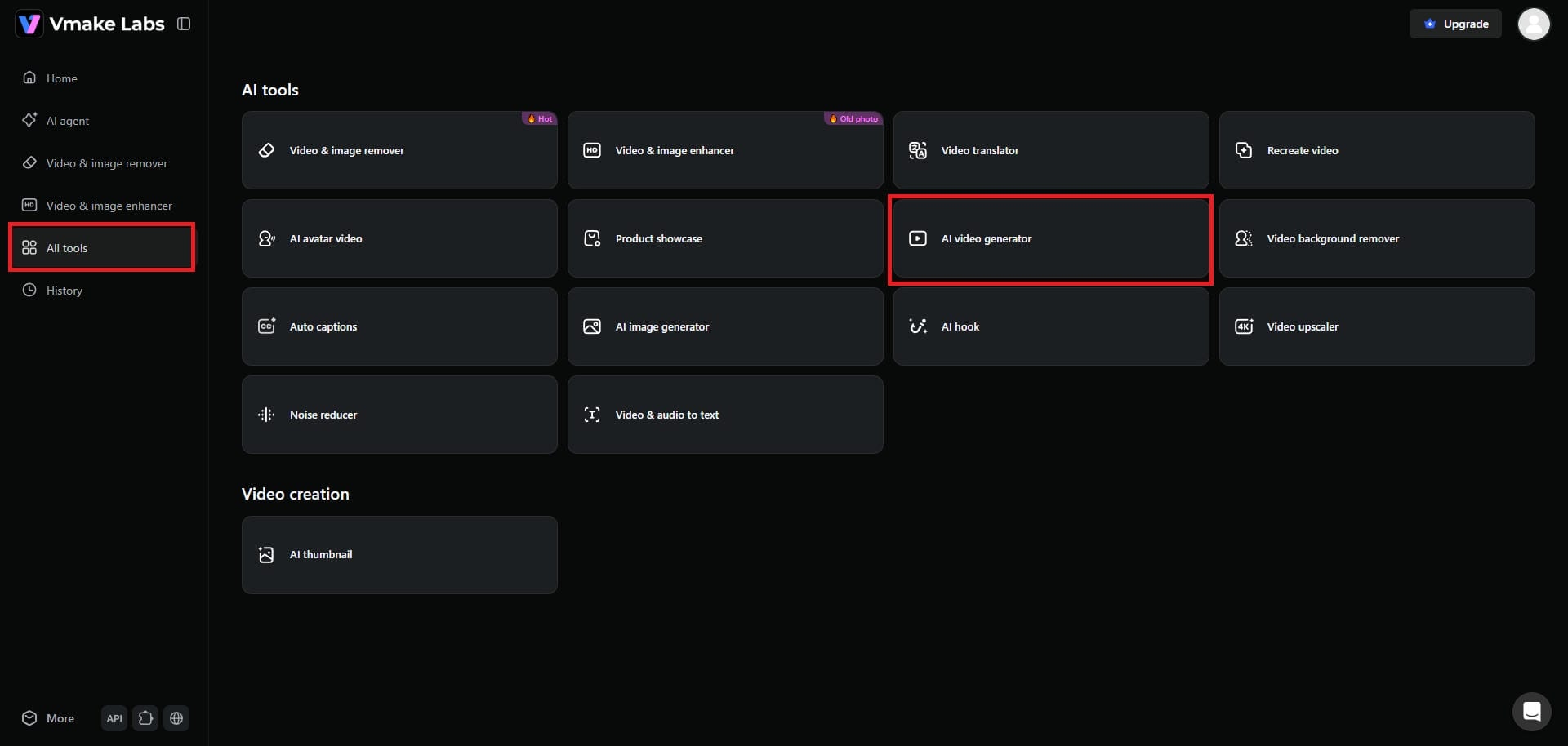
Step 1: Select the "AI video generator" from the tools list
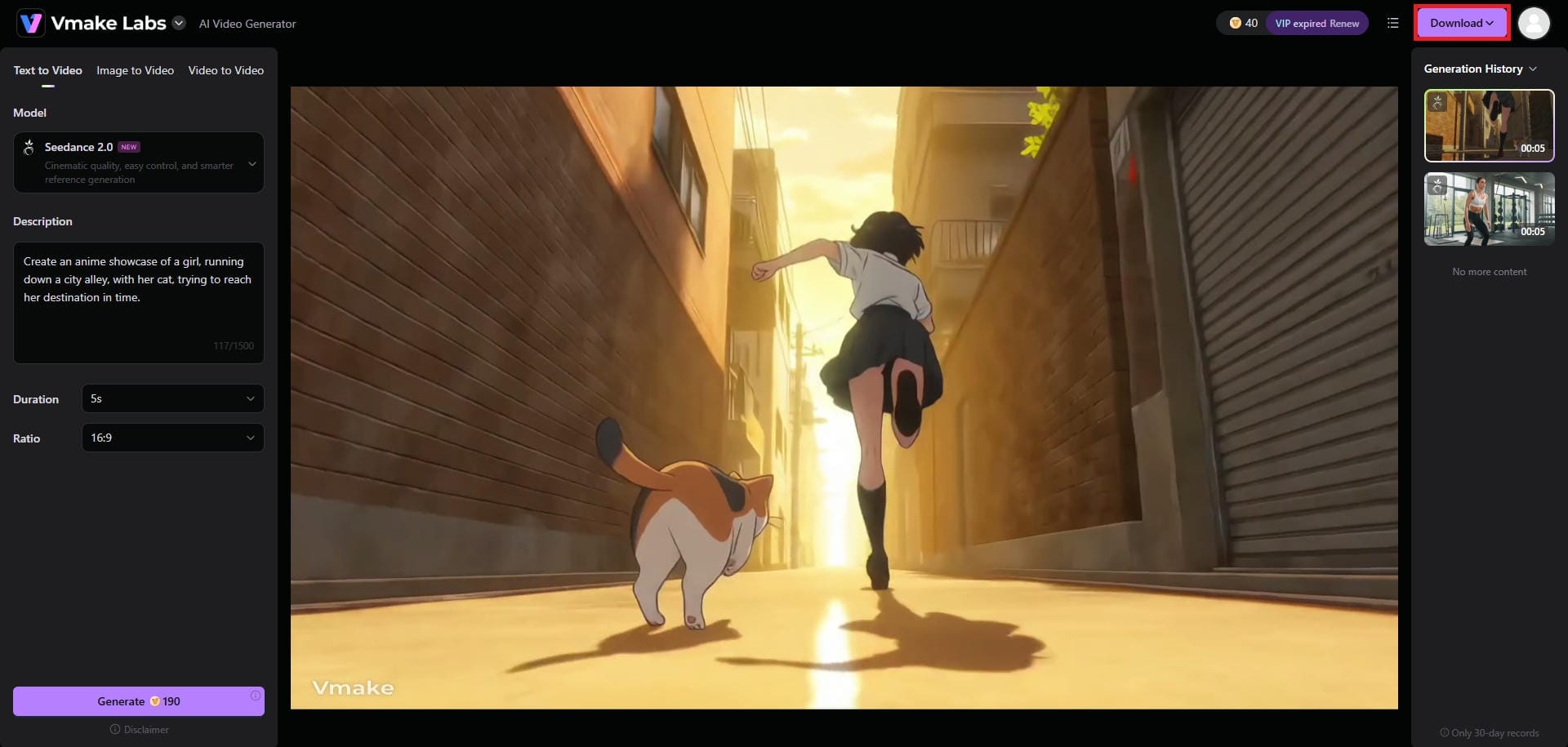
Access your Vmake AI dashboard and select the "All tools" option from the left-hand panel. From there, you need to select the "AI video generator" option.
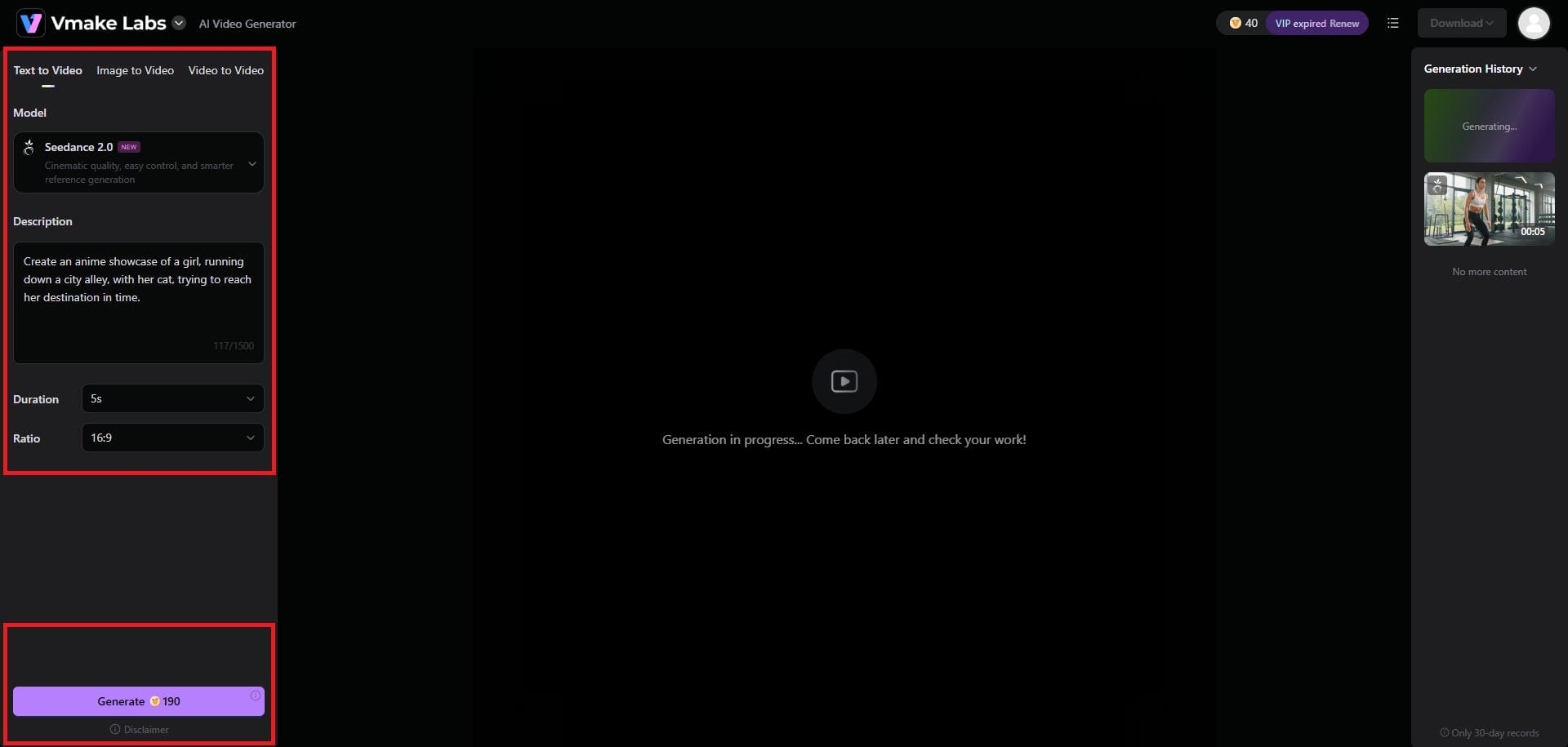
Step 2: Provide your video generation prompt
Vmake AI gives you three ways to generate a video: you can simply write your text, or use an image as input, or use video as your input method. Once you choose your ideal procedure, you also need to select your AI video model (we have chosen Seedance 2.0), video duration and aspect ratio. Once done, click on "Generate".
Step 3: Export your AI-generated video for sharing
Wait for a little while as Vmake AI will start creating your video. Once your video generation process is complete, simply click on "Download" and save the file to your local storage device for sharing.
Upsampler AI vs. Vmake AI: major differences that matter
While both tools generate video from scratch, they cater to distinctly different creative needs. Here are their primary technical differences:
|
Comparison Factor |
Upsampler AI Video Generator |
Vmake AI Video Generator |
|---|---|---|
|
Account Requirement |
No (Instant, frictionless access) |
Yes (Requires account creation) |
|
Video Duration |
Shorter, rapid-fire clips |
Extended, cohesive sequences |
|
Camera Control |
Basic parameter adjustments |
Advanced panning, tracking, and angles |
|
Visual Consistency |
Occasional chaotic or morphing elements |
Highly consistent character and style retention |
|
Target Audience |
Casual users, beginners, quick social posts |
Professional filmmakers, marketers, and studios |
Upsampler is perfect for rapid, no-hassle video creation. Its lack of a signup requirement makes it incredibly frictionless for quick social media clips or rapid prototyping. However, it sacrifices duration and deep control.
Vmake AI, conversely, is a professional-grade generative studio. It offers extended video lengths, precise camera motion controls, and character consistency, making it far superior for serious filmmakers and marketers, despite requiring an account and a higher learning curve.
Signing off
Choosing the correct generative AI video tool completely depends on your specific production requirements and ultimate creative workflow goals today.
If you need to generate a fast video clip instantly without the hassle of making an account, Upsampler AI is an incredibly fun and accessible choice. However, if you are looking to build cohesive narratives, control complex camera movements, and generate longer, professional-quality content, Vmake Video Generator is undeniably the more powerful and reliable investment for your creative future.
FAQs
Is Upsampler AI free to use?
Yes, Upsampler AI allows completely free video generation without any signup required. However, if you need advanced professional features, extended durations, and higher consistency, Vmake generally requires a paid subscription.
What is the maximum resolution Upsampler can generate?
Upsampler typically outputs standard HD videos perfectly suitable for rapid social media sharing. If your project demands stunning cinematic resolution and pristine visual fidelity, consider utilizing the Vmake platform instead, which supports up to 4K exports.
Does Vmake AI offer better pricing than Upsampler?
Upsampler offers an unbeatable free entry point without registration. However, Vmake provides vastly superior professional value through flexible credit systems, justifying its premium pricing by delivering significantly higher quality generation.
Do I need to download software to use these tools?
No, both Upsampler and Vmake function completely within your standard web browser. You can instantly generate premium quality videos online without ever downloading or installing any heavy desktop software locally.
Which tool is better for creating new videos from scratch vs enhancing old ones?
Both platforms are built primarily for generating completely new videos from scratch. For simple rapid concepts, use Upsampler. For highly detailed, cinematic narratives generated entirely from scratch, definitely choose Vmake.

You May Be Interested

AI TikTok Video Generator | Create High-Quality AI Videos

Best AI Video Generator: Top Tools Tested (2026)
Viggle AI Video Generator Review & Top 2026 Alternatives
Trump AI Video Generator: 3 Best Tools to Create AI Videos
How to Remove CapCut Watermark
Nero AI Review 2026 Explained: Is the Tool Worth Using?