Understanding 2k video resolution: The Ultimate Guide for Video Pros
 Vmake Labs TeamMay 28, 2026
While 4K marketing targets creators, it often traps workflows with heavy files and compressed delivery on small screens. Instead, a pragmatic middle ground offers better performance. This blog explores what 2K video resolution actually means and how it can optimize your content strategy.
What Exactly is 2K Video Resolution?
To leverage a format, you must first define it technically. The term "2K" is often confused because its meaning changes by context: in digital cinema, it refers to 2048 x 1080, while in consumer electronics, it typically signifies QHD (2560 x 1440).
QHD is the industry standard for monitors and smartphones because its 16:9 aspect ratio fits modern screens perfectly, eliminating letterboxing. At a standard desk distance, the human eye struggles to distinguish individual pixels at this density. Consequently, pushing beyond 1440p often yields diminishing returns, wasting computing power on microscopic details the audience cannot actually see.
1080p vs. 2K vs. 4K: Finding the Sweet Spot
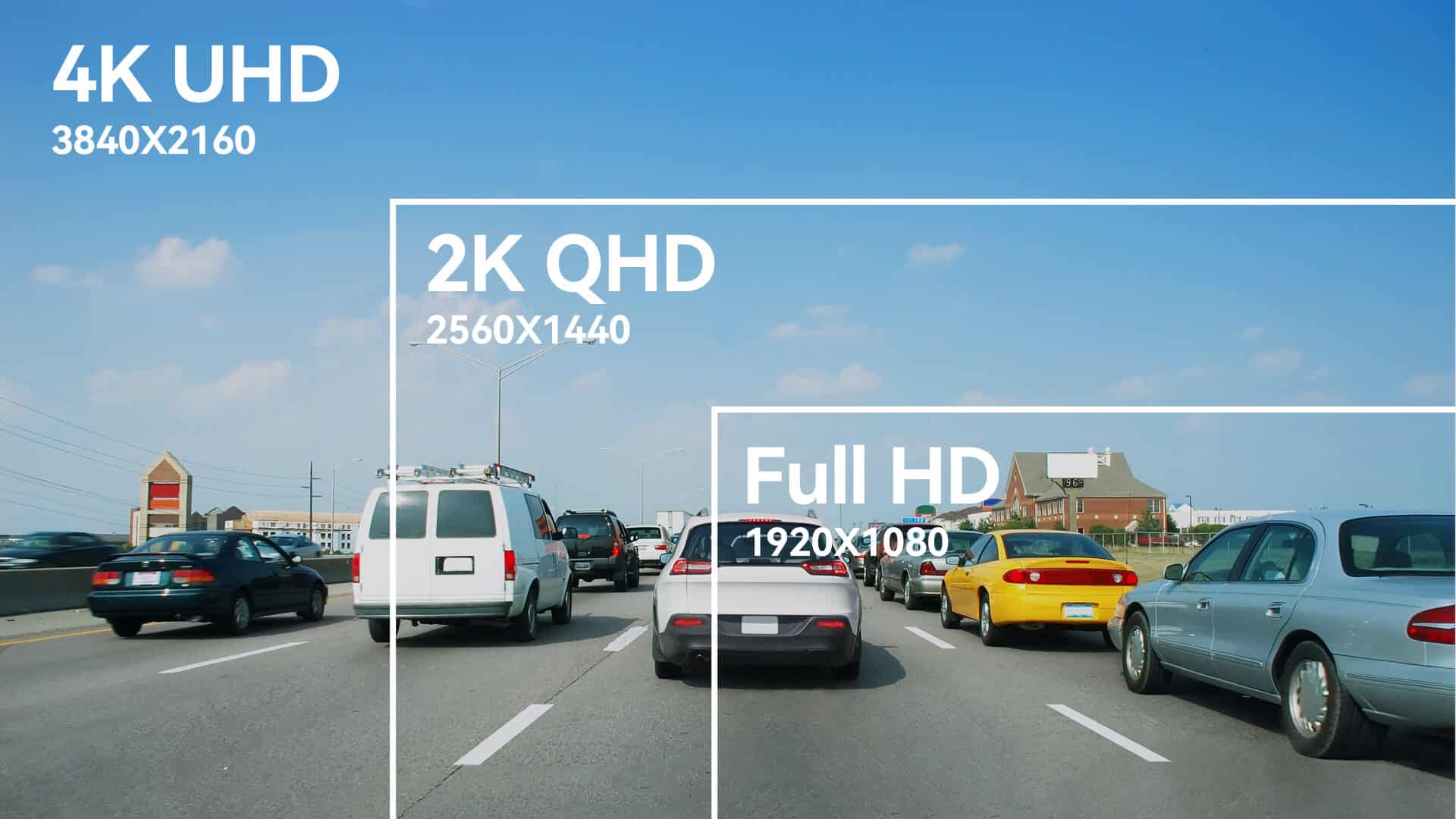
Resolution is a math problem. Pick the wrong format, and your editing machine grinds to a halt. Finding the sweet spot means balancing visual clarity against hardware reality.
|
Comparison Point |
Full HD (1080p) |
2K Format (QHD / DCI 2K) |
4K Ultra HD (UHD / DCI 4K) |
|---|---|---|---|
|
Resolution (W × H) |
1920 × 1080 |
2560 × 1440 (QHD) 2048 × 1080 (DCI) |
3840 × 2160 (UHD) 4096 × 2160 (DCI) |
|
Approximate Pixel Count |
~2.07 million |
~3.69 million (QHD) ~2.21 million (DCI) |
~8.29 million (UHD) ~8.85 million (DCI) |
|
Standard Aspect Ratio |
16:09 |
16:9 (QHD) ~1.90:1 (DCI) |
16:9 (UHD) ~1.90:1 (DCI) |
|
Visual Clarity |
The standard high-definition baseline. |
Noticeable upgrade; QHD offers a significant visual leap over 1080p. |
Elite clarity; delivers roughly four times the detail of 1080p. |
|
Ideal Display Size |
21 in to 27 in (53.34 cm to 68.58 cm) monitors, standard televisions. |
24 in to 32 in (60.96 cm to 81.28 cm) monitors, premium consumer laptops. |
27 in (68.58 cm) and larger monitors, massive home theater TVs, theatrical screens. |
|
System Resource Demands |
Minimal processing power required. |
Medium requirement; achievable for most modern setups. |
Extremely resource-heavy; requires top-tier GPUs and CPUs. |
|
Optimal Use Cases |
General web browsing, everyday streaming. |
PC gaming, professional content creation, balanced workflows. |
High-end film production, massive display viewing, future-proofing. |
|
The Bottom Line |
Reliable, universally compatible, and lightweight. |
The ultimate middle ground for outstanding quality and workflow efficiency. |
Unmatched visual fidelity for those with the hardware to support it. |
-
1080p (Full HD): Everyone acknowledges 1080p as the old reliable standard, but it fails modern desktop monitors. Map a 1080p signal across a massive 32-inch screen, and the image falls apart. Pixels stretch. Text overlays become jagged. Color gradients band together.
-
4K (Ultra HD): This format is a notorious hardware killer. The heavy toll it takes on machinery requires massive storage arrays and quadruples your render times. Editing 4K multi-cam footage crushes standard laptop processors. Editors find themselves forced into tedious proxy workflows, wasting hours transcoding media just to scrub their timelines without stuttering.
-
The 2K Advantage: Positioning 2k resolution videos as the perfect compromise solves both issues. You deliver noticeably sharper detail than 1080p while remaining highly manageable for standard editing rigs. You retain tight color gradients and sharp text graphics without sacrificing a single ounce of operational speed.
The Problem: Overcoming Platform Compression
Exporting a pristine file from your editing suite resolves only half the battle.
|
Feature |
Standard 1080p Upload |
The 1440p (2K) "Workaround" |
|---|---|---|
|
Server Codec |
Uses AVC (H.264), which aggressively crushes color and detail. |
Forces VP9, a superior codec used for premium tiers. |
|
Visual Quality |
Often results in blurry footage and artifacts in dark scenes. |
Handles motion, grain, and shadows with high efficiency. |
|
Performance |
High compression can lead to "muddy" visuals. |
Optimizes data for mobile users, reducing buffering. |
|
The "Secret" |
Standard HD gets basic treatment. |
Upscaling to 1440p triggers a "backdoor" to better server-side rendering. |
How to Upscale Standard Footage to 2K (The Solution)
Client work is rarely ideal. Sometimes you simply do not have native high-res footage to work with. You need to match archival 1080p clips to a new project timeline. Dropping low-resolution assets into a larger sequence forces your editing software to perform basic bilinear scaling. It just stretches the existing pixels, resulting in a muddy image. You cannot fake data that isn't there using basic editing suites.
Professionals rely on a dedicated video enhancer as a workflow solution to elevate standard footage to crisp 2K quality. Rather than blindly pulling pixels apart, intelligent neural network algorithms actively synthesize the missing visual data with up to 98% AI enhancement accuracy.

Key Features
-
General Upscaling: Instantly elevates standard media resolution to 1080p, 2K, or standard 4K for crystal-clear playback.
-
AI 4K+: A revolutionary generative enhancement mode that goes beyond simple upscaling by intelligently reconstructing pixel data to redefine overall video quality.
-
De-AI Mode: Employs an advanced AI algorithm that targets and removes unnatural artifacts, jitters, or warping from generated media.
-
Batch Processing: Supports concurrent processing of up to 30 video files to maximize workflow efficiency.
Step-by-Step Operation Guide
-
Upload the File: Navigate to the enhancement dashboard and drop your low-resolution media assets directly into the primary upload zone.

-
Configure Output Parameters: Select your target dimension (2k) from the resolution menu and apply the appropriate scene-specific enhancement mode based on your visual context.

-
Process and Review: Execute the render. Cloud servers handle the heavy computational load, allowing you to preview the side-by-side transformation before downloading the finalized asset.

Best Export Settings for 2K Production
Export parameters dictate how your final file behaves in the wild.
|
Factor |
Technical Target |
Benefit |
|---|---|---|
|
Bitrate & Codec |
16–24 Mbps VBR; use HEVC (H.265). |
Reduces file size by 30% while maintaining high visual fidelity. |
|
High FPS Load |
Pair 60fps with 1440p (2K). |
Maintains fluid motion without overheating GPUs or causing massive render delays. |
|
Color Space |
Rec. 709 (Standard). |
Ensures color consistency across uncalibrated laptop and smartphone screens. |
|
Skin Tones |
Use color correction upscalers if flat. |
Prevents "plastic" looks and ensures natural, human skin tones in the final render. |
Conclusion
Chasing the highest possible number on a spec sheet is rarely the best strategy. Blindly adopting heavy formats leads to bloated production cycles and massive hardware debt. The core goal of post-production is effective visual communication, not mere pixel hoarding.
By understanding what 2k video resolution actually provides and utilizing the right tools, creators deliver premium, professional-grade media while keeping rendering processes highly efficient. You trigger premium platform compression algorithms, build visual authority, and save hours of rendering time.
FAQs
Is 1440p the same as 2k video resolution?
Functionally, yes. While digital cinema technically defines the format strictly as 2048 x 1080, the consumer electronics market universally utilizes 1440p (2560 x 1440 pixels) as the standard representation.
Is a 2k video resolution monitor noticeably better than a 1080p screen?
Absolutely. A standard high-definition display pushes roughly 2 million total pixels. A QHD display nearly doubles that density, projecting over 3.6 million pixels. This massive increase tightens visual details and provides significantly more desktop real estate.
Do streaming 2k resolution videos consume more internet bandwidth?
Yes. Pushing more visual data across a network inherently requires higher data transfer rates. Viewers typically require a sustained broadband connection of at least 15 Mbps to 20 Mbps to process this feed smoothly.
How much storage drive space is required for raw 2k video resolution files?
Storage footprints rely heavily on the camera's compression codec. On average, a standard H.264 compressed sequence operating at 30fps demands approximately 3 GB to 4.5 GB of drive space per hour.
Can older 1080p footage be upscaled to 2k video resolution?
Yes. Legacy clips no longer need to ruin your modern timeline. Exploring the differences between native versus upscaled content proves that modern AI restoration tools actively synthesize missing pixel geometry, transforming soft media into competitive assets.
How do I fix blurry or artifact-heavy 2k resolution videos?
Basic sharpening sliders cannot fix baked-in compression; they only amplify the digital noise. You cannot fake data that is already lost. Instead, running the compromised clip through Vmake's AI enhancement engine actively reconstructs the missing pixel geometry, rescuing soft footage from the cutting room floor.

You May Be Interested
2026 Fotor Video Enhancer Review: Features and Top Alternatives
How to Change Video Resolution Without Losing Quality
HD vs 4K Guide: Evaluating Video Resolution Standards

What is 4K Resolution: A Complete Beginner's Guide

What is 1440p Resolution? A Complete Guide to QHD Displays
1080p vs 4K: Pros, Cons, and Which One to Choose