
[2026] Detailed Comparison of Native 4K vs Upscaled 4K
 Vmake Labs TeamFebruary 24, 2026
As 4K content becomes more mainstream, it has sparked debate between native and upscaled resolution. But what exactly are the differences between 4K native vs upscaled, and which display delivers better visual value for your needs? This guide provides a detailed comparison of native 4K vs upscaled 4K.
What Is 4K Resolution? (Quick Overview)
Before diving into native vs upscaled 4K, let’s quickly review 4K resolution. 4K resolution offers 4 times the detail of standard 1080p Full HD, resulting in sharper visuals, finer textures, and an immersive visual experience. It consists of approximately 4000 pixels; however, the exact pixel count varies based on the specific 4K format being used:
-
Ultra High Definition (UHD): Found in most home TVs and monitors, this format uses a 3840 x 2160 resolution.
-
Digital Cinema Initiatives (DCI 4K): The professional standard for cinema projection, offering a wider frame at 4096 x 2160 pixels.
What Is Native 4K?
Let’s explore the technical foundations of native 4K and why it remains the gold standard for high-end visual clarity.
Native 4K Explained
Native 4K refers to content that is originally produced or displayed in 4K resolution. It is rendered at 3840 x 2160 pixels (8.3 million total pixels) without relying on post-processing. This means that each pixel corresponds directly to the content’s pixels, ensuring precise control over color, brightness, and display.
Why Native 4K Matters
The primary advantage of native 4K is the crispness and detail it offers. There is no loss of quality due to scaling or interpolation, so the image remains true to its original form. This is particularly important for large displays, where lower resolutions can appear blurry or pixelated. You will see native 4K in UHD Blu-ray movies, on PS5/Xbox Series X and high-end PCs, in cinema films (DCI 4K), and in true 4K streaming tiers (Netflix, Disney+, etc.).
What Is Upscaled 4K?
To understand how modern displays handle lower-resolution content, we need to look at the technology behind upscaled 4K.
Upscaled 4K Explained
Upscaled 4K refers to low-quality content (such as 1080P or 720P) that has been enhanced to fit 4K displays (3840 x 2160) with software or hardware algorithms. While upscaled 4K uses bicubic upscaling (smooths edges but softens details) or AI upscaling to fill in gaps, making the original visuals appear sharper.
Upscaled 4K Use Cases
Upscaled 4K is often used when native 4K content isn’t available or when hardware limitations prevent true 4K playback. It is perfect for watching classic movies, standard TV broadcasts, or 1080p YouTube videos without them looking blurry. It also enables gaming consoles or PCs to run games faster at lower settings while still rendering them at 4K resolution. Essentially, it ensures that even if your video wasn’t filmed with a high-end 4K camera, it still looks good on your modern screens.
Native 4K vs Upscaled 4K: Core Differences
Now, let’s learn about the specific performance gaps between upscaled 4K vs native 4K to see which one fits your setup.
Comparison Table
|
Features |
Native 4K |
Upscaled 4K |
|
Pixels |
Around 4000 original pixels exist natively in the display |
Low resolution, like 1080P or 720P; pixels are displayed by algorithms |
|
Accuracy |
Capable of zooming or cropping into the image or video details losslessly |
Show signs of inaccuracy when zoomed in or cropped |
|
Quality |
Maximum sharpness and texture |
Improved clarity but fewer true details |
|
Impact |
No quality loss |
Possible artifacts like blurred edges, motion blur, etc. |
|
Processing |
Low; direct rendering |
High; requires a heavy processor |
|
Hardware |
High-end displays like true 4K projectors |
Mid/low-end 4K TVs |
|
Best for |
Native 4K movies, games, and content |
Enhancing low-resolution content on 4K displays |
Visual Quality Differences
In the 4K upscaling vs native 4K comparison, the biggest difference is clarity. Native 4K maintains sharp edges even when you are sitting very close to the monitor. In upscaled 4k, you might notice artifacts or softness in complex textures like grass, as the algorithm is estimating those fine details rather than reading them from the source. While upscaling can improve the viewing experience, it can’t match the level of detail native 4K offers.
When Upscaled 4K Looks “Good Enough”
For many users, upscaled 4K looks perfectly acceptable, especially on smaller screens or from a regular viewing distance. Upscaling technologies have improved significantly over the years, so for casual viewers or for devices that can’t handle native 4K, upscaled 4K offers a good middle ground.
Best Online Free 4K Video Upscaler in 2026
If you have older videos that look blurry on your 4K screen, Vmake Video Upscaler is the ultimate solution. Rather than just stretching the footage, this powerful online tool uses deep learning technology to convert low-quality videos to 4K resolution without manual editing. With a single click, it will sharpen edges, restore details, and reduce noise, delivering the high-resolution, vibrant, and professional-looking output. With multi-format support, it even lets you upscale multiple videos at once.
Steps to Make a 4K Upscaled Video:
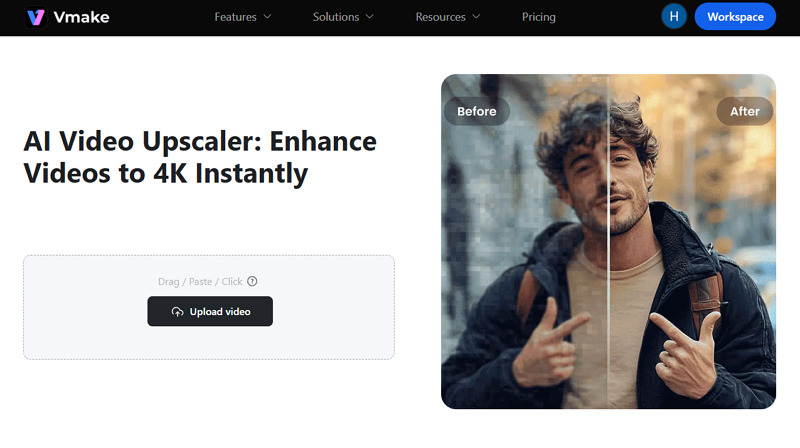
Step 1. Upload Video
The first step is to open the Vmake Video Upscaler in your browser. Now, drag & drop or click to upload the low-quality video file.
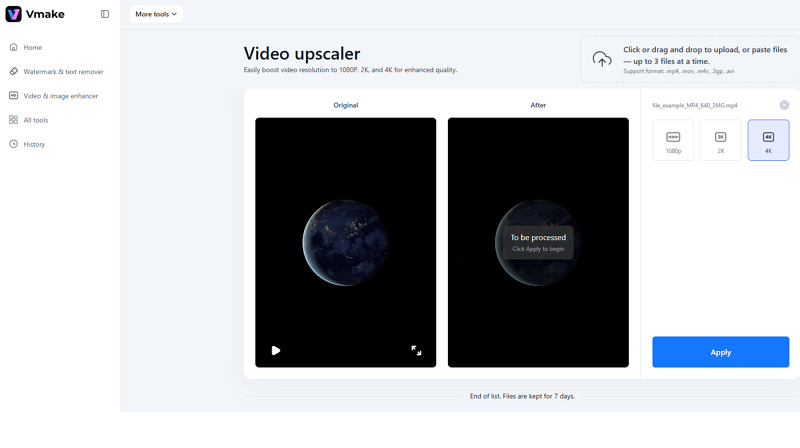
 Step 2. Select Resolution
Once the video is processed, choose the “4K” resolution option from the available options and click “Apply.”
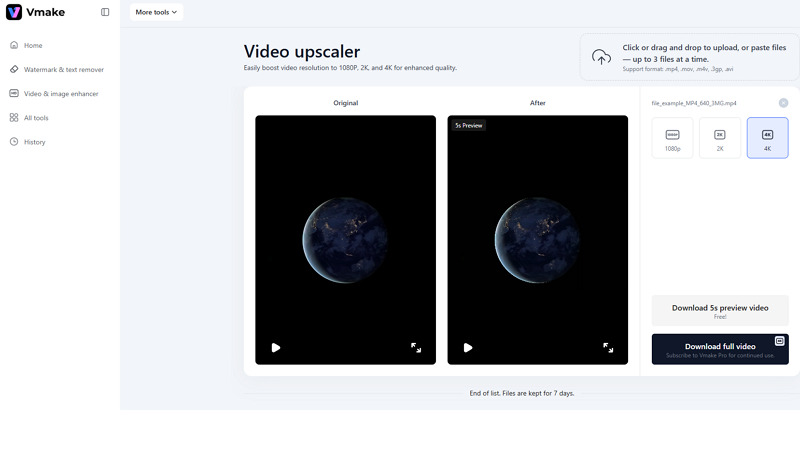
 Step 3. Download Enhanced Video
When the AI finishes its processing, press the “Download 5s preview video” or “Download full video.” That’s all!
Upscaled 4K in Gaming
As gaming continues to evolve, upscaled 4K technology plays a significant role in enhancing visual experiences while maintaining high performance.
Real‑Time Upscaling Techniques (DLSS / FSR)
In the gaming world, upscaling technologies like NVIDIA DLSS (Deep Learning Super Sampling) or AMD FSR (FidelityFX Super Resolution) are widely used to improve game performance. These technologies render the game at a lower resolution and then use AI to upscale the graphics to 4K in real time, offering a smooth gaming experience.
Performance vs Quality Trade‑offs
While real-time upscaling delivers great performance, it can sometimes sacrifice fine details and textures. So, gamers often need to strike the right balance of quality and performance for a smooth, visually pleasing experience.
However, in a 4K upscaling vs 4K native comparison, the former might show minor visual artifacts in fast-moving scenes, but smoother gameplay usually outweighs the slight loss in raw resolution.
Upscaled 4K on TVs & Projectors
Beyond gaming, 4K upscaled technology also makes its way into home entertainment systems, including TVs and projectors. Now, let’s explore how upscaling affects these devices and what buyers need to consider:
True Native vs Pixel Shifting (Projector Tech)
Many 4K projectors and TVs use pixel shifting technology, which simulates 4K resolution by rapidly shifting pixels to mimic native 4K. While it’s a form of hardware-based upscaling that looks much sharper than standard HD, it doesn’t offer the true clarity of native 4K.
What Buyers Should Know
When buying a TV or projector, it’s essential to know whether it supports native 4K or uses pixel shifting to simulate 4K. In an upscale 4K vs native 4K comparison, the native 4K projectors are more expensive. However, they offer superior image quality, especially on larger screens. So, whether you go for a native or an upscaled device depends on your preferences.
FAQs About 4K Resolution
1. What is the difference between 4K native vs 4K upscaling?
Native 4K provides raw, realistic detail using original pixels. Upscaled 4K stretches lower-resolution sources using AI, often resulting in a brighter, processed finish that lacks true clarity when zoomed in.
2. Is upscaled 4K better than native 4K?
Yes. In a 4K upscale vs native comparison, upscaled 4K is considered better for your wallet and your hardware. It allows you to watch older movies or play high-end games without an expensive computer or high internet speeds.
3. Is PS5 native or upscaled?
The PS5 runs most games at a full, native 4K resolution at 30FPS. This is roughly double the pixels of the Pro at the same frame rate, as the Pro relies on upscaling techniques to reach 4K.
Conclusion
Choosing between native 4K and upscaled 4K depends on your viewing devices, content availability, and budget. For those who demand the best professional-quality visuals even when zoomed in, native 4K is the clear winner.
However, if you’re seeking an affordable alternative to make any content look great on modern displays, upscaled 4K is an excellent solution. For upscaling video content, Vmake Video Upscaler is the best choice. Try it today to get that 4K look without needing a 4K camera.

You May Be Interested

123APPS Watermark Remover Review (2026): Pros, Cons, and Pricing

Seedance 2.0 vs Sora 2: Which AI Video Generator Wins in 2026?
Top 20 Captions to Make Your YouTube Shorts Go Viral

Google Gemini|Copy Paste This Simple Prompts to Create “Hug my younger self ” Photos
