What Is Video Translation? Complete Beginner's Guide
Learn what video translation is, how AI video translation works, the difference between subtitles and dubbing, and how to translate videos into multiple languages automatically.

You poured hours into a video. Wrote it, shot it, edited it, the whole thing. And most of the planet can't understand a single word of it. That's the language gap, and it quietly puts a ceiling on how far your work can travel.
Here's the good news, though. Translating video used to be a job for studios and fat budgets. Not anymore. It's fast now, it's cheap, and it's simple enough that you don't need any technical background to pull it off. Let me walk you through how the whole thing works.
What Is Video Translation?
Definition of Video Translation
Video translation means taking the spoken words and on-screen text in a clip and moving them into another language. Usually that happens through subtitles, dubbing, or some blend of the two. The goal is dead simple. Someone who doesn't speak your language can still follow along and get everything out of it.
How Video Translation Differs From Text Translation
Translating a document is mostly about swapping words. Video is trickier. You've got timing to worry about, plus tone, plus the audio itself. A line that's three words in English might be eight in German, and now it has to squeeze into the same gap on screen. So a translation video has to land with the speaker's pace and whatever's happening in the frame, not just read correctly on paper.
Common Types of Video Translation
It mostly comes down to four flavors: subtitles, closed captions, voice dubbing, and full localization. Some projects use just one. Others stack a few together. Which one you pick really depends on your audience and what you're trying to pull off.
Why Video Translation Matters
Reach Global Audiences
Translate a video and suddenly it speaks to people who would have scrolled right past. One upload, dozens of markets. That's reach you simply can't buy with the original language alone.
Improve Accessibility
Subtitles and captions are a lifeline for non-native speakers and for anyone who's deaf or hard of hearing. They also quietly serve a crowd you might forget about: everyone watching on mute in a waiting room, on the train, or next to a sleeping baby.
Increase Video Engagement
Here's the thing. When people understand every word, they stick around. They watch longer, they bail less, and they're far more likely to hit share. Translation isn't just nice to have. It moves your numbers.
Support Global Marketing and Education
Brands localize their campaigns so an ad feels homegrown instead of imported. Teachers open their courses up to students on the other side of the world. If that's the kind of reach you're after, a good AI video translator makes it almost effortless. Try it for free now!
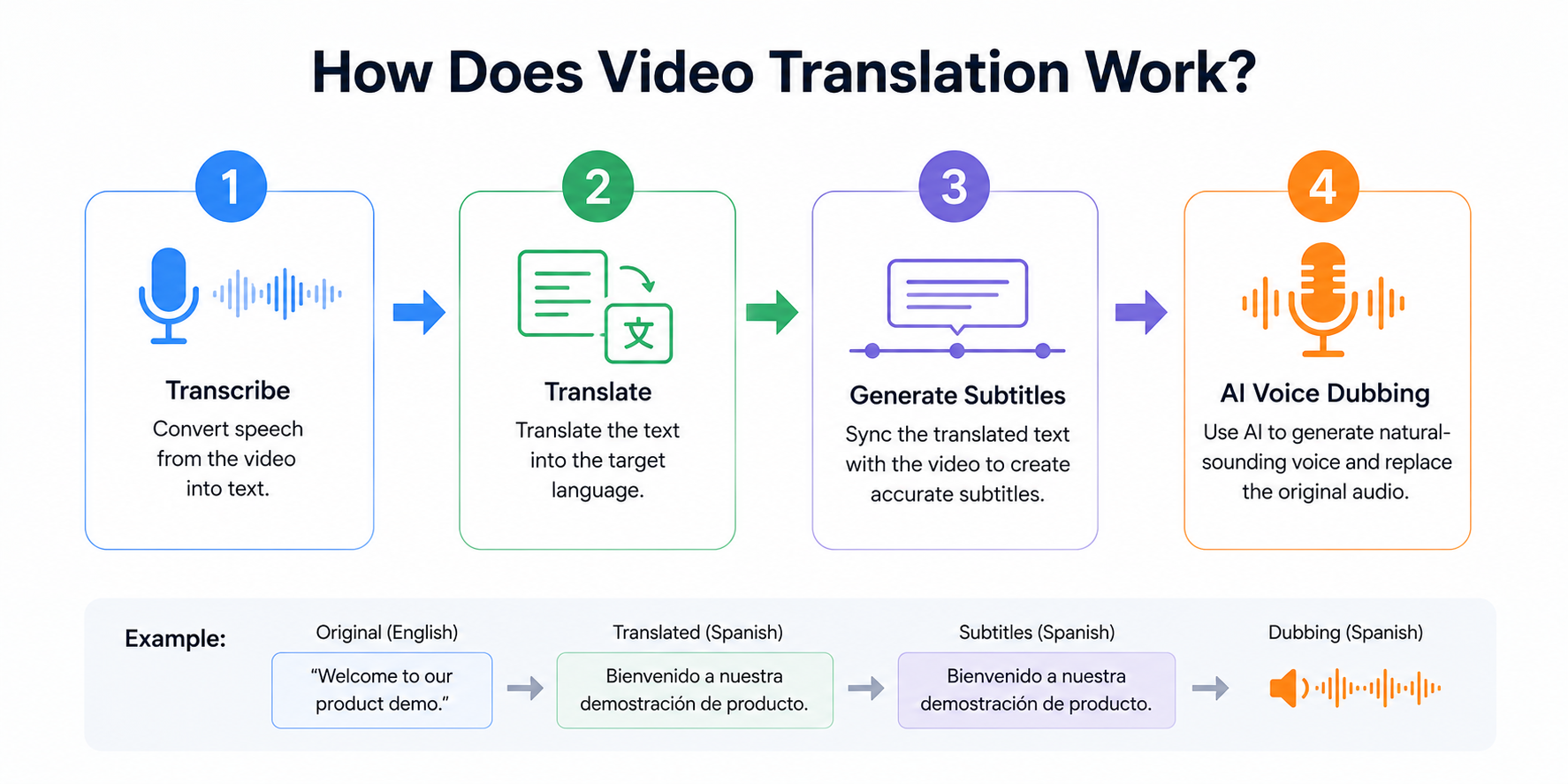
Transcribing Speech Into Text
First, the tool listens to your audio and types out every word that's spoken. Think of that transcript as the foundation. Everything else gets built on top of it, so the cleaner this step is, the better your final result.
Translating the Content
Next, that transcript gets translated into your target language. A good tool holds onto the meaning and the context instead of going word for word, which is how you dodge those clunky, robotic translations everyone's run into at least once.
Generating Subtitles
Then the translated lines get timed to the video, so each one pops up right as it's spoken and clears off when it should. Get the timing wrong and subtitles are maddening. Get it right and you barely notice they're there.
Creating AI Voice Dubbing
Finally, AI can read that translated script aloud in a natural voice and drop it in where the original audio sat. That's automatic video dubbing, and honestly it's come a long way from the flat, monotone voices of a few years back. Try it for free now!
Types of Video Translation
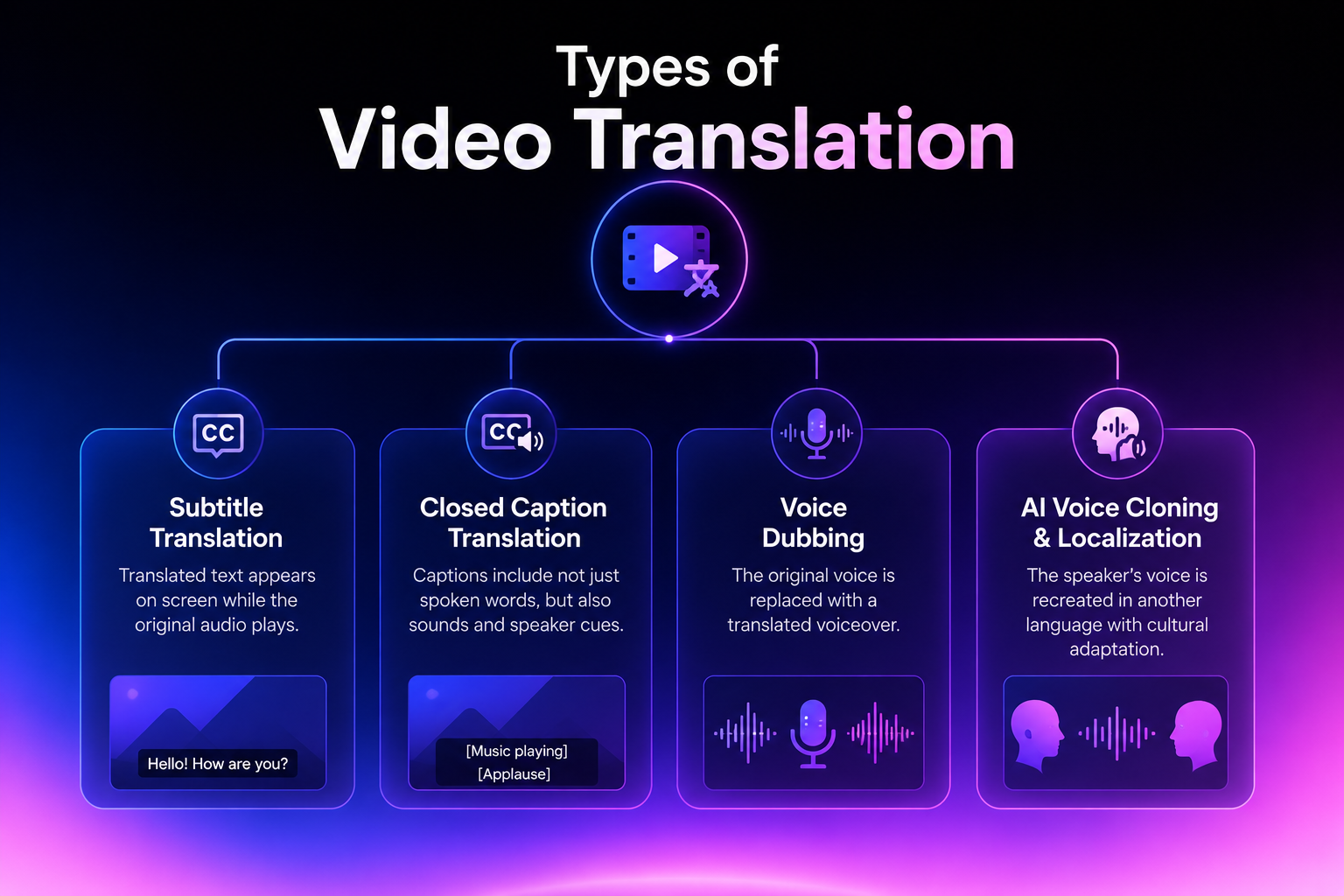 Subtitle Translation
Translated text sits at the bottom of the screen while the original audio keeps playing. Quick, cheap, and perfect for short social clips where people are half-watching anyway.
Closed Caption Translation
Captions go a step past subtitles. They include sound cues too, things like music, laughter, or applause. That extra layer makes your content clearer and a lot more accessible.
Voice Dubbing
With dubbing, the original voice gets swapped out for a translated voiceover. Now viewers can sit back and just listen instead of reading along, which feels far more natural for longer videos.
AI Voice Cloning and Localization
This is the high end. The tool rebuilds the speaker's own voice in a brand new language, then tweaks the cultural details so nothing feels off. Done well, it doesn't feel translated at all. It feels like it was made for that audience from the start.
AI Video Translation vs Human Translation
| Feature | AI Video Translation | Human Translation |
|---|---|---|
| Accuracy | Great for most everyday content | Best for nuanced and emotional content |
| Speed | Minutes | Days to weeks |
| Scalability | Easily handles multiple languages | Limited by manual workflow |
| Cost | Cost-effective | Higher production costs |
| Best For | Tutorials, marketing, social media, e-learning | Films, TV, animation, premium productions |
Accuracy and Quality
Humans still win on the slippery stuff: nuance, humor, a pun that falls apart the second you translate it literally. But a modern AI video translator is sharp where it matters most, especially for clear, structured content like tutorials, demos, and explainers.
Speed and Scalability
This is where AI just leaves humans in the dust. You can translate videos online in minutes, not weeks. Need the same clip in ten languages by Friday? AI shrugs and does it. A human team would still be scheduling the kickoff call.
Cost Comparison
Voice talent, studio time, project managers. It adds up fast, and it adds up per language. AI flattens most of that, and some teams report cutting costs by up to 90%. That's not a rounding error. That's the gap between translating one video and translating fifty.
Which Option Should You Choose?
For volume, speed, and budget, go AI every time. For one flagship piece where every word and beat matters, a human touch can still be worth the spend. Truth is, loads of people use both, and there's nothing wrong with that. Try it for free now!
How to Translate a Video with Vmake
Vmake AI video translation offers an all-in-one solution for efficiently localizing video content with subtitles, dubbing, and lip-syncing.Its support for various languages helps translate videos for a wide range of markets with complete privacy. You can also access several video-processing tools, such as subtitle remover, video cleanup, 4K enhancement, and noise reduction.
Key Features
AI Video Translation: Instantly translate spoken content into English and dozens of other languages with automatically generated subtitles, making video localization fast and effortless.
AI Dubbing: Generate natural-sounding multilingual voiceovers with AI, helping you reach international audiences without recording new audio.
AI Lip Sync: Keep translated speech synchronized with the speaker's mouth movements for more realistic, professional-looking dubbed videos.
Subtitle Controls: Edit, customize, or remove subtitles before exporting, giving you full control over your localized content.
4K Video Export: Export translated videos in up to 4K resolution, ensuring sharp, professional-quality results for YouTube, marketing, online courses, and social media.
User steps
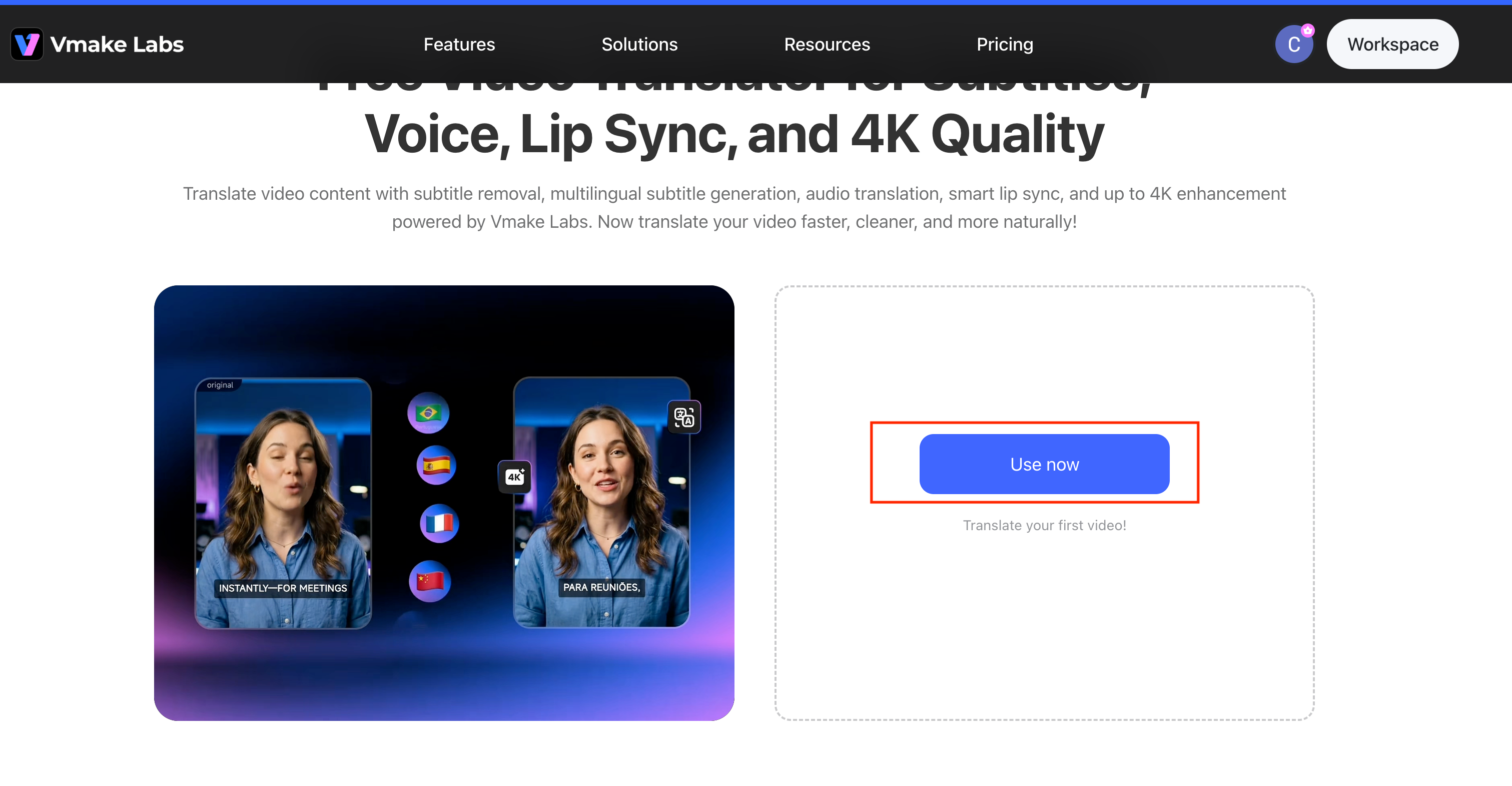
Step 1:Upload your video
Start translating your videos now!
Drag your file into Vmake, or pull it straight off your device. No special setup, no plugins to wrestle with.
Step 2:Choose the Target Language
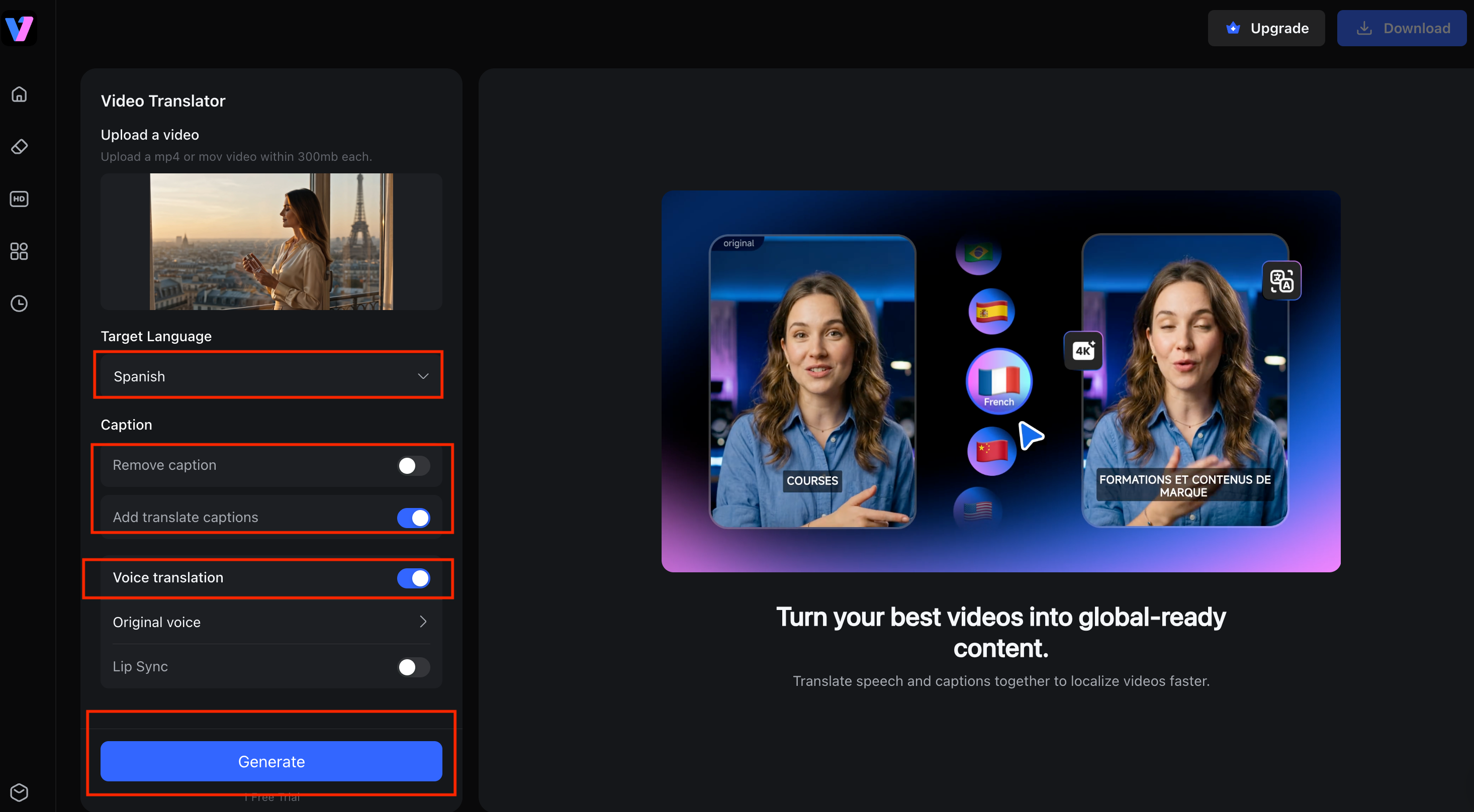
Pick the language you want. Maybe you're translating a video into English for a wider audience, maybe you're rolling one clip out across a handful of regions at once. Your call.
Step 3:Generate Subtitles or Dubbed Audio
Now decide what you actually need. Subtitles only? Full automatic video dubbing? Dubbing with lip sync so the mouth matches the words? You're in charge of the whole workflow, so you only deal with the parts you'll use.
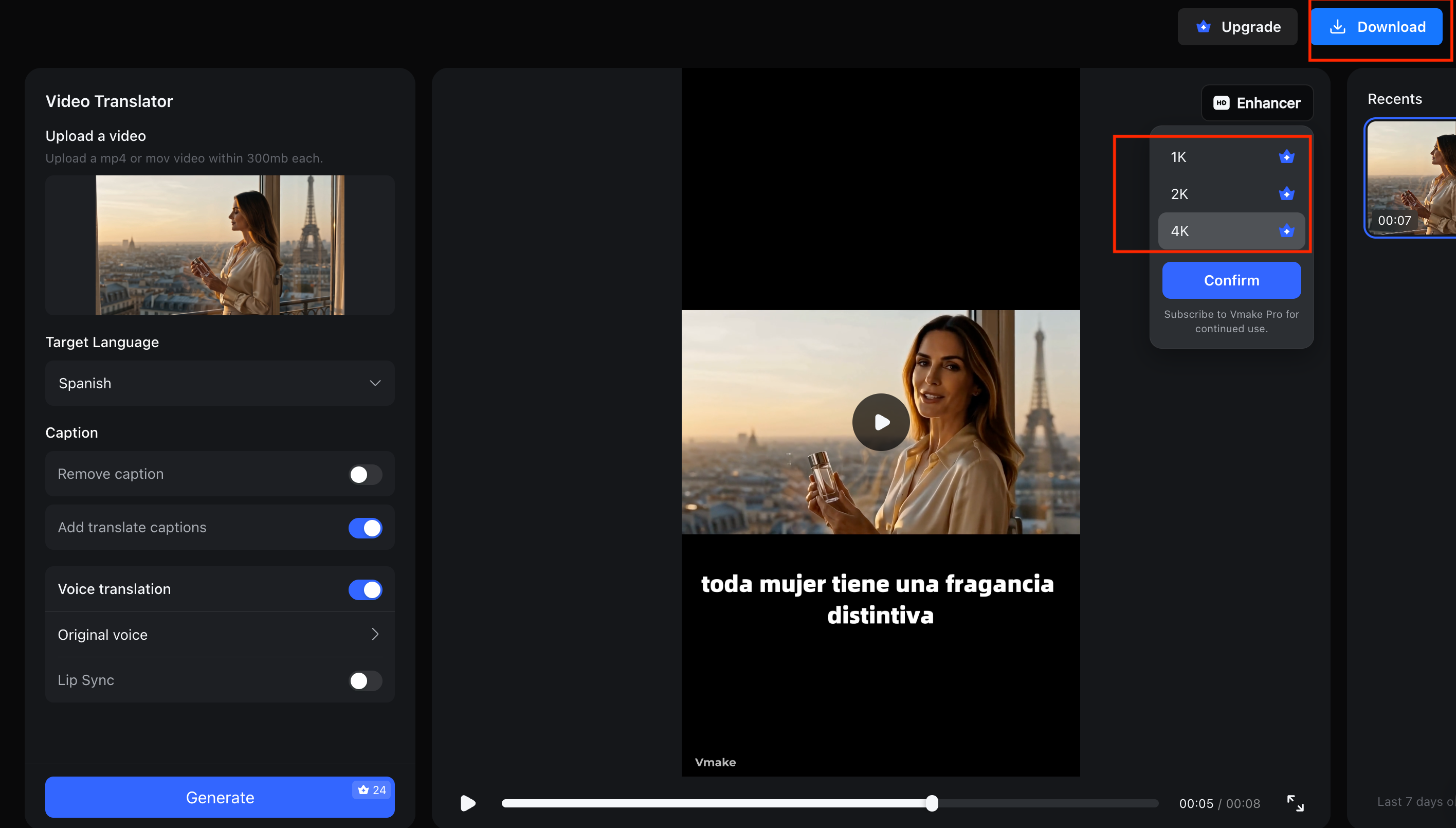
Step 3:Review and Export the Final Video
Give it a once-over, fix anything that reads a little off, then export at up to 4K. And you're done. Creators in 120+ countries already lean on Vmake to make 5 to 10x more videos than they used to.
Best Use Cases for Video Translation
Translating YouTube Videos for Global Audiences
Turn one upload into several language versions and start growing your channel in countries you've never charted before. Same video, brand new viewers.
Localizing TikTok and Instagram Reels
Short clips travel fast and far. A translated reel can trend in a bunch of regions at once instead of just your home one, which is exactly how creators stumble into a global following.
Making Online Courses Accessible Worldwide
Translate your lessons and language stops being the thing that shuts students out. A course you build once can go on to teach people on every continent.
Expanding Marketing Videos Into New Markets
Localize your ads and product demos to meet new customers in their own language. People trust a message that sounds like it was made for them, and that trust is what turns a viewer into a buyer.
FAQ
What is video translation?
It's converting a video's speech and text into another language using subtitles, dubbing, or both, so a wider audience can actually follow it.
How does AI video translation work?
The tool transcribes your audio, translates it, then builds either synced subtitles or a dubbed voice track in the new language.
What is the difference between subtitles and dubbing?
Subtitles are translated text on the screen while the original audio plays. Dubbing replaces that audio with a translated voiceover instead.
Can I translate a video for free?
Yep. Tools like Vmake let you try video translation for free, so you can judge the quality yourself before you spend a cent.
What is the best AI video translation tool?
For most creators and small businesses, Vmake is hard to beat. Simple workflow, solid dubbing, natural lip sync, and 4K export, all in one place.

You May Be Interested
BlipCut AI Video Translator Review 2026: Pricing, Features, Pros, Cons & Alternatives
HeyGen Video Translator Review 2026: Features, Pricing, Pros, Cons & Alternatives

How to Create a YouTube Thumbnail? Create YouTube Thumbnails Using AI

Google Gemini|Copy Paste This Simple Prompts to Create “Hug my younger self ” Photos